
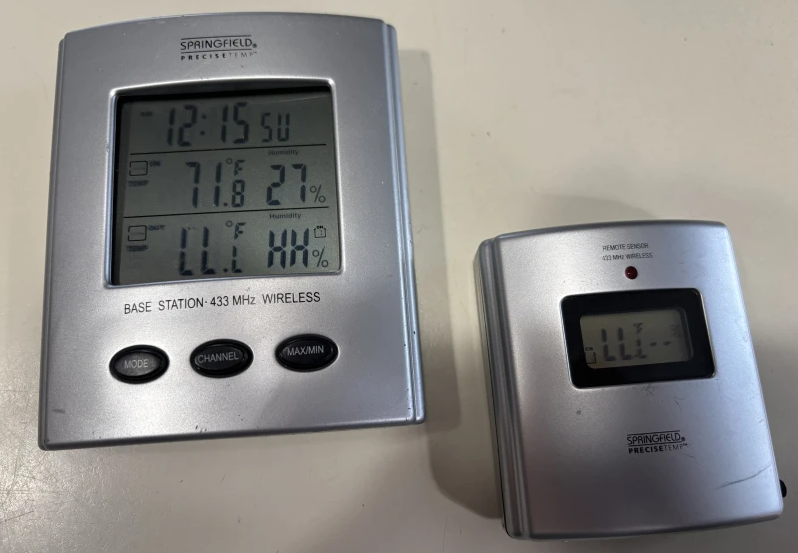

Springfield Precisetemp 91765 Wireless Thermostat
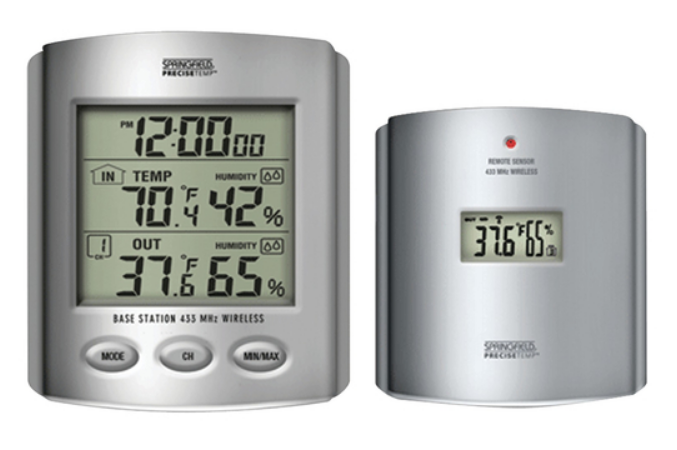
FEATURES AND SPECIFICATIONS
BASE STATION
- Indoor/outdoor RF temperature
- Remote channel auto scroll
- Indoor/outdoor temperature displayed in °F or °C
- Memory function to recall the highest/lowest temperature readings
- Indoor temperature range: 14°F to 158°F (-10°C to 70°C)
- Temperature tolerance: +/- 2°F (+/- 1.1°C)
- Low battery indicator for the base station and the remote
- Table-top or wall mount
- Requires (2) AAA batteries
REMOTE SENSOR
- 433 MHz transmission frequency
- Transmission range up to 100 ft. (range may be shorter based on interference present)
- Temperature range: -4°F to 158°F (-20°C to 70°C)
- Temperature tolerance: +/- 2°F (+/- 1.1°C)
- Requires (2) AAA batteries
Notes:
- Always replace all batteries at the same time; do not mix old and new batteries. Do not mix alkaline, standard (carbon-zinc), or rechargeable (Ni-Cad, Ni-MH, etc.) batteries.
- For maximum performance in normal conditions, we recommend using good-quality alkaline batteries. When temperatures are near or below freezing (32°F / 0°C), alkaline batteries can lose power, resulting in a loss of remote transmission. If you reside in an area that experiences frequent temperatures near or below freezing, we recommend using lithium batteries to minimize the loss of transmission.
NOTE: Please recycle or dispose of batteries per local regulations.
WARNING: Batteries may pose a choking hazard. Do not let children handle batteries.
PRECAUTION: Do not dispose of batteries in a fire. Batteries may explode or leak. Remove the batteries if the thermometer or remote sensor will not be used for a long period of time.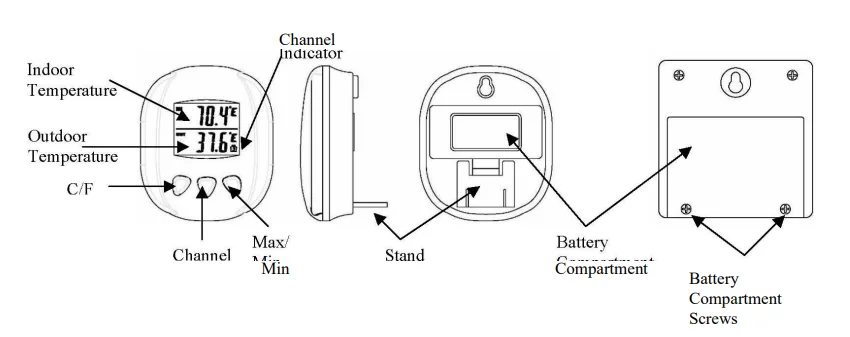
BATTERY INSTALLATION AND SETUP
- Position the remote sensor near the base station.
- Remove 2 screws from the bottom back of the remote sensor module and open the battery compartment.
- Open the battery compartment at the back of the base station and insert (2) AAA batteries according to the polarity markings.
- Replace the base station battery compartment cover.
- Press the C/F button on the front of the base station to display the temperature in °C or °F.
- The RF signal icon (located at the bottom right of the outdoor temperature display) will flash for 5 minutes, indicating that the base station is ready to pick up the RF signal from the remote sensor.
Register the Remote Sensor
- Inside the battery compartment of the remote sensor, slide the channel selector switch to your desired channel.
- Insert (2) AAA batteries according to the polarity markings. Be sure to install the batteries in the remote within the time that the RF signal icon is flashing on the base station.
- After the base station has picked up the outdoor temperature signal, the setup is complete.
- If the rubber gasket for the battery compartment of the remote sensor has been dislodged, position it properly to ensure a watertight seal. Replace the battery compartment cover and reinstall the 2 screws. Do not over-tighten the screws.
Register a Remote Sensor When the RF Signal Icon is not Showing.
To register a remote sensor when the RF signal icon is not showing on the base station LCD:
- Press and hold the CHANNEL button for 3-4 seconds until the RF signal icon is showing.
- Install the batteries in the new remote sensor, or if the batteries have already been installed, press the TX button (located inside the remote battery compartment) for 2 to 3 seconds.
Locating the Base Station and Remote Sensor
- Choose a suitable place for the base station and remote outdoor sensor, within the transmission distance.
- The base station can be wall-mounted using the hanger in the back of the unit, or it can be free-standing. To stand the unit, pull the hinged stand away from the base unit, then push the stand horizontally into the unit.
- Place the base unit near a window, but away from direct sunlight or sources of heat or air conditioning to ensure accurate temperature readings.
- The remote sensor is water-resistant, but not waterproof. Locate the sensor out of direct sunlight, in an area where it will not be exposed to rain, snow, or ice.
- The location you choose is critical for maximizing the transmission range. The remote sensor is designed to transmit up to 100 ft. unimpeded. Transmitting through walls, metal doors, and metal-framed windows may reduce the transmission range. To optimize the transmission distance, the remote should be positioned in a location that minimizes these obstructions. Interference from other sources, such as home security systems, wireless doorbells, and wireless home entertainment equipment, may interrupt the transmission signal temporarily.
Max/Min Memory
- Press the MAX/MIN button once to display the lowest indoor and outdoor temperatures recorded since the last reset. MIN is shown on the display.
- Press MAX/MIN a second time to display the highest indoor and outdoor temperatures recorded since the last reset. MAX is shown on the display.
- To clear and reset the max/min records, when either the MAX or MIN record is shown on the LCD, press and hold MAX/MIN for 2-3 seconds.
RESET
Your multi-zone thermometer can be reset in case of malfunction. The RESET button is located on the back of the base unit. Press the RESET button once, and the unit will return to its original factory settings.
FCC STATEMENT OF COMPLIANCE
Caution: Changes or modifications not expressly approved by the party responsible for compliance could void the user’s authority to operate the equipment. Note: This device complies with part 15 of the FCC Rules. Operation is subject to the following two conditions:
- This device may not cause harmful interference, and
- This device must accept any interference received, including interference that may cause undesired operation.
This equipment has been tested and found to comply with the limits for a Class B digital device, pursuant to part 15 of the FCC rules. These limits are designed to provide reasonable protection against harmful interference in a residential installation. This equipment generates, uses, and can radiate radio frequency energy and, if not installed and used in accordance with the instructions, may cause harmful interference to radio communications.
However, there is no guarantee that interference will not occur in a particular installation. If this equipment does cause harmful interference to radio or television reception, which can be determined by turning the equipment off and on, the user is encouraged to try to correct the interference by one or more of the following measures:
- Reorient or relocate the receiving antenna.
- Increase the separation between the equipment and receiver.
- Connect the equipment into an outlet on a circuit different from that to which the receiver is connected.
- Consult the dealer or an experienced radio/TV technician for help.
ONE (1) YEAR LIMITED WARRANTY
This product is warranted against defects in materials or workmanship (excluding batteries) for one (1) year from the date of original purchase for the original purchaser. It does not cover damages or wear resulting from accident, misuse, abuse, commercial use, or unauthorized adjustment and/or repair. Should this product require service (or replacement at our option) while under warranty, do not return to the retailer. Please pack the item carefully and return it prepaid, along with the store receipt showing the date of purchase and a note explaining the reason for the return to:
Taylor Precision Products, Inc. / Springfield Precision
2220 Entrada Del Sol, Suite A
Las Cruces, New Mexico 88001
1-866-843-3905
www.springfieldprecision.com
There are no express warranties except as listed above. This warranty gives you specific legal rights, and you may have other rights which vary from state to state. For additional product information or warranty information outside the USA, please contact us through www.taylorusa.com or www.springfieldprecision.com. © 2013 Taylor Precision Products, Inc. and its affiliated companies, all rights reserved. Springfield® is a registered trademark of Taylor Precision Products, Inc and its affiliated companies, all rights reserved. Made to our exact specifications in China.
For More Manuals By Springfield Instruments, Visit ManualsLibraryy.
Springfield Precisetemp 91765 Wireless Thermostat-FAQS
What is the Springfield Precisetemp 91765 Wireless Thermostat?
The Springfield Precisetemp 91765 is a wireless temperature monitoring thermostat designed to display accurate indoor and remote temperature readings for home or office use.
How do I set the time on the Springfield Precisetemp thermostat?
Press and hold the ALARM ON/OFF / ZONE button for 3–4 seconds until the time zone indicator flashes. Continue pressing to select the correct time zone. The clock updates automatically once selected.
How do I set or adjust the alarm time?
Press and hold the ALARM SET button for a few seconds until the alarm time starts flashing. Use the adjustment buttons to set the desired alarm time.
How do I reset the Springfield Precisetemp 91765?
Remove the batteries from both the main unit and the wireless sensor. Wait about 1–2 minutes, then reinsert fresh batteries to reset the device.
How do I change between °C and °F?
Locate the °C/°F button or switch on the back of the unit or inside the battery compartment, then toggle to your preferred temperature unit.
Why is my wireless temperature sensor not working?
Common causes include weak batteries, signal interference, or poor sensor placement. Ensure the sensor is within range and placed away from direct sunlight.
Where should I place the wireless sensor for accurate readings?
Place the sensor in a shaded, well-ventilated area, away from heat sources, direct sunlight, and electronics.
What should I do if the display is blank or unresponsive?
Replace the batteries first. Low or dead batteries are the most common cause of display issues.
Can I calibrate the Springfield Precisetemp thermostat?
Most Precisetemp models automatically calibrate, but you can verify accuracy using ice-water or room-comparison methods.