
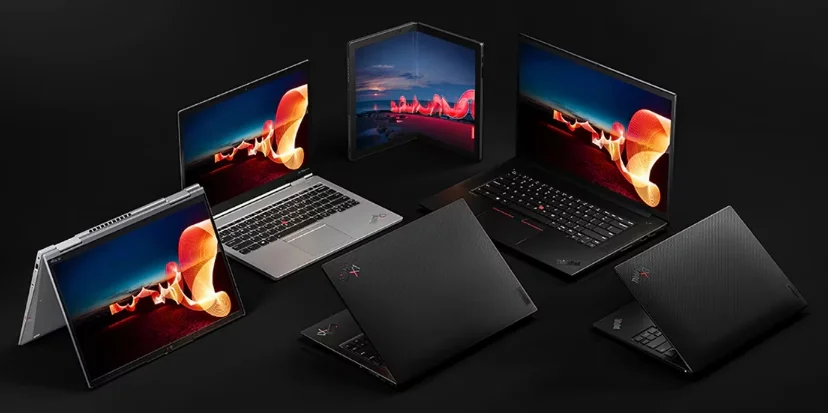

ThinkPad X1 Carbon Gen 10 All You Need to Know
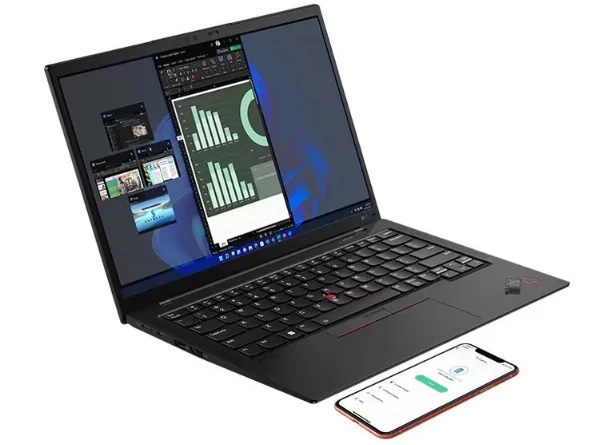
OVERVIEW
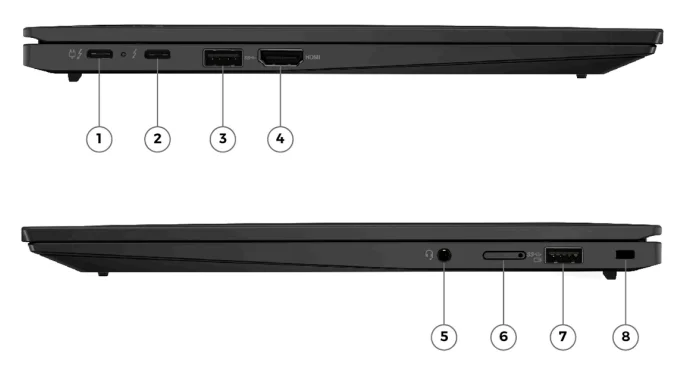
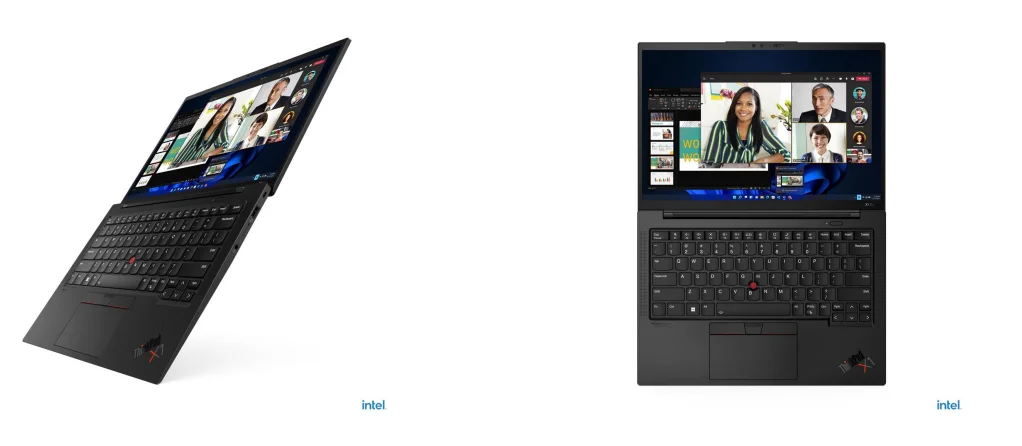
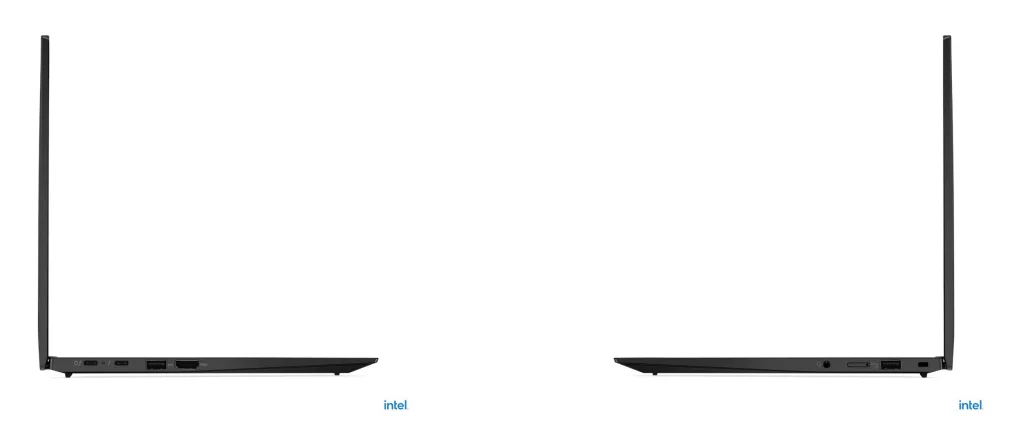
- Thunderbolt 4
- Thunderbolt 4
- USB 3.2 Gen 1
- HDMI
- Headphone/microphone combo jack (3.5mm)
- Nano-SIM card slot *
- USB 3.2 Gen 1 (Always On)
- Kensington Nano Security Slot
Notes:
- Items with * are only available on selected models
PERFORMANCE
Processor
Processor Family
12th Generation Intel® Core™ i5 / i7 Processor
Processor**
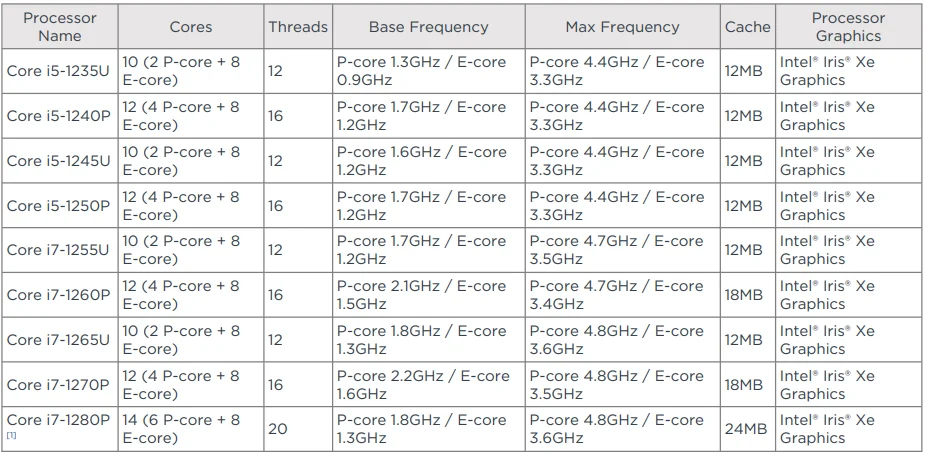
Notes:
- [1] NOT available in EMEA.
Operating System
Operating System**
- Windows® 11 Pro
- Windows® 11 Home
- Windows® 11 Home Single Language
- Windows® 11 DG Windows® 10 Pro 64
- Fedora Linux[1]
- Ubuntu Linux[2]
- Linux[3]
- No preloaded operating system
Notes:
- [1], [2], [3] Some features may not be supported on the system with Linux preload, including but not limited to Intel® RST RAID, MIPI computer vision camera, WWAN, Human Presence Detection, etc.
Graphics
Graphics

Monitor Support
Monitor Support[1]
Supports up to 4 independent displays (native display and 3 external monitors via Thunderbolt™ and HDMI®)
- Thunderbolt™ supports up to 5K@60Hz
- HDMI® supports up to 4K@60Hz
Notes:
- [1] Refresh rates > 60Hz are also supported; however, max resolution will be limited.
Chipset
Chipset
Intel® SoC (System on Chip) platform
Memory
Max Memory
- 8GB soldered memory, not upgradable[1]
- 16GB soldered memory, not upgradable
- 32GB soldered memory, not upgradable
Memory Slots
Memory soldered to the system board, no slots, 8-channel
Memory Type
LPDDR5-5200[2]
Notes:
- [1] 8GB memory is NOT available in EMEA.
- [2] Installed memory is actually LPDDR5-6400, but run as LPDDR5-5200 due to processor limitations.
Storage
Storage Support[1]
One drive, up to 2TB M.2 2280 SSD
Storage Slot
One M.2 2280 PCIe® 4.0 x4 slot
Storage Type**

Notes:
- [1] The storage capacity supported is based on the test results with current Lenovo® storage offerings.
- [2] 512GB and 1TB are NOT available in EMEA.
- [3] PCIe® x4 may be PCIe® 3.0×4 or PCIe® 4.0×4 as substitution.
Removable Storage
Card Reader
No card reader
Multi-Media
Audio Chip
High Definition (HD) Audio, Realtek® ALC3306 codec
Speakers
Stereo speakers, 2W x2 woofers and 0.8W x2 tweeters, Dolby Atmos®
Microphone
Quad-microphone array, 360° far-field, Dolby Voice®
Camera**
- FHD 1080p + IR discrete, with privacy shutter, MIPI, fixed focus, Computer Vision
- FHD 1080p + IR hybrid, with privacy shutter, fixed focus
- FHD 1080p, with privacy shutter, fixed focus
- HD 720p, with privacy shutter, fixed focus[1]
Notes:
- [1] An HD 720p camera is NOT available in EMEA.
Battery
Battery
Integrated Li-Polymer 57Wh battery, supports Rapid Charge (charge up to 80% in 1hr) with 65W AC adapter
Battery Life[1]
Configuration 1 (max battery life)
MobileMark® 2018: up to 15.0 hr with 838 performance score @200nits
MobileMark® 25: up to 13.1 hr with 663 performance score @250nits
JEITA 2.0: up to 24.9 hr @150nits
Local video playback: up to 19.9 hr @150nits
Alternate configuration 2
MobileMark® 2018: up to 14.3 hr with 840 performance score @200nits
MobileMark® 25: up to 11.3 hr with 623 performance score @250nits
JEITA 2.0: up to 24.9 hr @150nits
Local video playback: up to 19.9 hr @150nits
Alternate configuration 3
MobileMark® 2018: up to 14.2 hr with 809 performance score @200nits
MobileMark® 25: up to 11.1 hr with 600 performance score @250nits
JEITA 2.0: up to 21.7 hr @150nits
Local video playback: up to 19.7 hr @150nits
Notes:
- [1] Configuration 1 (max battery life): WUXGA (non-touch), Intel® i5-1235U, 8GB LPDDR5, Win 11, 57Wh battery, best power efficiency power mode
- Alternate configuration 2: WUXGA (non-touch), Intel® i5-1240P, 16GB LPDDR5, Win 11, 57Wh battery, best power efficiency power mode
- Alternate configuration 3: WUXGA (non-touch), Intel® i7-1260P, 16GB LPDDR5, Win 11, 57Wh battery, best power efficiency power mode
All battery life claims are approximate maximum and based on results using MobileMark® 2018, MobileMark® 25, JEITA 2.0, continuous 1080p local video playback (using default Media Player in Fullscreen mode with 150nits brightness and default volume level), or Google Power Load Test (PLT) battery life benchmark tests. Actual battery life will vary depending on many factors such as product configuration, software, wireless functionality, power management settings, and screen brightness.
The maximum capacity of the battery will decrease with time, ambient temperature, and use.
Refer to the Microsoft® link for more information about the Windows® Performance Power Slider.
Power Adapter
Power Adapter**[1][2]
- 45W USB-C® (2-pin) AC adapter, supports PD 3.0, 100-240V, 50-60Hz
- 45W USB-C® (3-pin) AC adapter, supports PD 3.0, 100-240V, 50-60Hz
- 65W USB-C® (2-pin) AC adapter, supports PD 3.0, 100-240V, 50-60Hz
- 65W USB-C® (3-pin) AC adapter, supports PD 3.0, 100-240V, 50-60Hz
- 65W USB-C® slim (2-pin) AC adapter, supports PD 3.0, 100-240V, 50-60Hz
- 65W USB-C® slim (3-pin) AC adapter, supports PD 3.0, 100-240V, 50-60Hz
- No power adapter
Notes:
- [1] AC adapter offerings depend on the country.
- [2] In EMEA, only 65W USB-C® slim AC adapters are available.
DESIGN
Display
Display**[1]
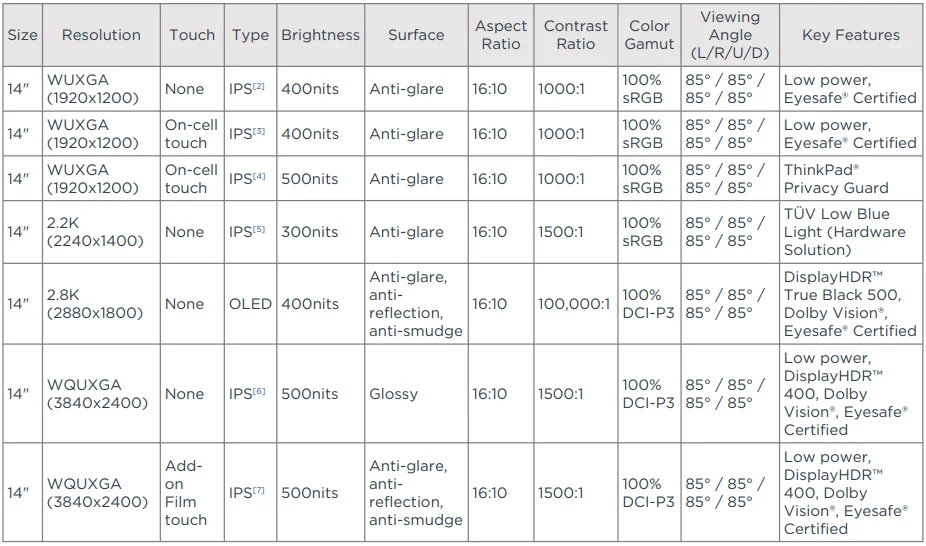
Touchscreen**
- Add-on Film Touch supports 10-point touch
- On-cell multi-touch, supports 10-point touch
- Non-touch
Notes:
- [1] 2.2K display and Add-on Film Touch display are NOT available in EMEA.
- [2], [3], [4], [5], [6], [7] IPS (in-plane switching) technology may refer to IPS, PLS, ADS, AHVA, and AAS.
Input Device
Keyboard
6-row, spill-resistant, air intake design, multimedia Fn keys with Unified Communications controls
Keyboard Backlight
LED backlight
UltraNav™
TrackPoint® pointing device and glass surface multi-touch touchpad, 56 x 110 mm (2.20 x 4.33 inches)
Mechanical
Dimensions (WxDxH)[1]

Weight[2]
Starting at 1.12 kg (2.48 lbs)
Case Color**
- Deep black paint
- Deep black, weave
Case Material
Carbon fiber (top), aluminium (bottom)
Notes:
- [1] The system dimensions may vary depending on configurations.
- [2] The system weight is approximate and based on results in Lenovo® lab, which varies depending on the source of cthe component, the variance of the distribution of each component, and the nd manufacturing process. It may not be the exact weight for each specific model.
CONNECTIVITY
Network
Ethernet
No onboard Ethernet[1]
WLAN + Bluetooth®**[2]
- Intel® Wi-Fi® 6 AX201, 802.11ax 2×2 Wi-Fi® + Bluetooth® 5.1 (Bluetooth® 5.2 hardware ready)[3]
- Intel® Wi-Fi® 6E AX211, 802.11ax 2×2 Wi-Fi® + Bluetooth® 5.1 (Bluetooth® 5.2 hardware ready)[4]
WWAN**
- Wireless WAN upgradable to 4G (with antenna ready)
- Fibocom L860-GL-16, 4G LTE CAT16, MIMO 4×4, M.2 card
- Fibocom FM350-GL, 5G Sub-6 GHz, M.2 Card, with embedded eSIM functionality
- No support
SIM Card
- Gemalto eSIM card (physical)
- No physical SIM card inbox
NFC
- Near Field Communication
- No support
Notes:
- [1] Ethernet support via optional Lenovo® USB-C® to Ethernet Adapter.
- [2] Bluetooth® may operate at a lower version than the hardware design, depending on factors such as the operating system, driver, etc.
- [3] Wi-Fi® 6 full features might be limited by country-level restrictions.
- [4] Wi-Fi® 6E full features might be limited by country-level restrictions.
Wi-Fi® 6E is only enabled on Windows® 11 and operates as Wi-Fi® 6 with Windows® 10.
6GHz Wi-Fi® 6E operation is dependent on the support of the operating system, routers/APs/Gateways that support Wi-
Fi® 6E, and the regional regulatory certifications & spectrum allocation.
Ports[1]
Standard Ports
- 1x USB 3.2 Gen 1
- 1x USB 3.2 Gen 1 (Always On)
- 2x Thunderbolt™ 4 / USB4® 40Gbps (support data transfer, Power Delivery 3.0 and DisplayPort™ 1.4a)
- 1x HDMI® 2.1, up to 4K/60Hz
- 1x Headphone/microphone combo jack (3.5mm)
Optional Ports
1x Nano-SIM card slot (WWAN support models)
Notes:
- [1] The transfer speed of the following ports will vary and, depending on many factors, such as the processing speed of the host device, file attributes, and other factors related to system configuration and your operating environment, will be slower than the theoretical speed.
USB 2.0: 480 Mbit/s;
USB 3.2 Gen 1 (SuperSpeed USB 5Gbps, formerly USB 3.0 / USB 3.1 Gen 1): 5 Gbit/s;
USB 3.2 Gen 2 (SuperSpeed USB 10Gbps, formerly USB 3.1 Gen 2): 10 Gbit/s;
USB4® 20Gbps / USB 3.2 Gen 2×2 (SuperSpeed USB 20Gbps): 20 Gbit/s;
USB4® 40Gbps (USB 40Gbps): 40 Gbit/s;
Thunderbolt™ 3/4: 40 Gbit/s.
Docking
Docking
Various docking solutions supported via Thunderbolt™ / USB-C®.
For more compatible docking solutions, please visit Docking for ThinkPad® X1 Carbon Gen 10
SECURITY & PRIVACY
Security
Security Chip
Discrete TPM 2.0, TCG certified, FIPS 140-2 certified
Physical Locks
Kensington® Nano Security Slot™, 2.5 x 6 mm
Smart Card Reader
No smart card reader
Fingerprint Reader
Touch-style fingerprint reader integrated in the power button, match-on-chip
BIOS Security
- Supervisor password
- Power-on password
- System management password
- NVMe® password
- Certificate-based BIOS authentication
- FIDO (Fast Identity Online) authentication
- Self-healing BIOS
Other Security
- Privacy Guard with Privacy Alert (models with ThinkPad® Privacy Guard display)
- (Optional) IR camera for Windows® Hello (facial recognition)
- Camera privacy shutter
• Glance by Mirametrix® - (Optional) Computer Vision-based User Presence Sensing, including lock on leav,e Tile ready
MANAGEABILITY
System Management
System Management**
- Intel® vPro® Enterprise[1]
- Intel® vPro® Essentials[2]
- Non-vPro®
Notes:
- [1], [2] Intel® vPro® offers a superset of DASH’s defined capabilities.
SERVICE
Warranty
Base Warranty**
- 1-year courier or carry-in service
- 1-year courier or carry-in with 2-year system board service (Korea only)
- 1-year limited onsite service
- 3-year (1-yr battery) courier or carry-in service
- 3-year (1-yr battery) limited onsite service
- No base warranty
ACCESSORIES
Bundled Accessories
Bundled Accessories***[1]
- Lenovo® HDMI® to VGA Monitor Adapter
- Lenovo® USB-C® to Ethernet Adapter (1Gbps)
- None
Notes:
- [1] For more compatible accessory solutions, please visit Accessories for ThinkPad® X1 Carbon Gen 10.
OPERATING REQUIREMENTS
Operating Environment
Temperature[1]
- Operating: 5°C (41°F) to 35°C (95°F)
- Storage and transportation in original shipping package: -20°C (-4°F ) to 60°C (140°F)
- Storage without package: 5°C (41°F) to 43°C (109°F)
Relative Humidity - Operating: 8% to 95% at wet-bulb temperature 23°C (73°F)
- Storage and transportation: 5% to 95% at wet-bulb temperature 27°C (81°F)
Altitude
Maximum altitude (without pressurization): 3048 m (10,000 ft)
Notes:
- [1] When you charge the battery, its temperature must be no lower than 10°C (50°F).
ENVIRONMENTAL
Sustainability
Material
- 95% PCC recycled plastic used in speaker enclosure
- 25-30% PCC recycled plastic used in the 57Wh battery frame
- 95% PCC recycled plastic used in standard 65W adapter
- Low-temperature solder
- 90% recycled and/or sustainable packaging
CERTIFICATIONS
Green Certifications[1]
Green Certifications[2]
- ENERGY STAR® 8.0
- EPEAT™ Gold Registered[3]
- ErP Lot 3
- RoHS compliant
- TCO Certified 9.0
Notes:
- [1] The items listed under the “Green Certifications” section may not only refer to certification but also registration or oself-declarationon.
For ESG & regulatory compliance documents, please visit https://compliance.lenovo.com. - [2] EPEAT™ registration and ENERGY STAR® certification are dependeon the on system OS. Please visit epeat.net and
energystar.gov for more information. - [3] EPEAT™ is registered where applicable. Please visit epeat.net for registration status by country.
Other Certifications
Mil-Spec Test
MIL-STD-810H military test passed
Other Certifications
- (Optional) Intel® Evo™ Platform
- (Optional) Eyesafe® Certified
- (Optional) TÜV Rheinland® Low Blue Light (Hardware Solution)
- TÜV Rheinland® Dynamic Privacy Filter (DPF) Certification (Privacy Guard models)
- Features with ** means that only one offering listed under the feature is configured on selected models.
Feature with *** means that one or more offerings listed under the feature could be configured on selected models. - Lenovo reserves the right to change specifications or other product information without notice. Lenovo is not responsible for photographic or typographical errors. LENOVO PROVIDES THIS PUBLICATION “AS IS,” WITHOUT WARRANTY OF ANY KIND, EITHER EXPRESS OR IMPLIED, INCLUDING THE IMPLIED WARRANTIES OF MERCHANTABILITY OR FITNESS FOR A PARTICULAR PURPOSE. Some jurisdictions do not allow disclaimer of express or implied warranties in certain transactions; therefore, this disclaimer may not apply to you.
- The specifications on this page may not be available in all regions, and may be changed or updated without notice.
For more manuals by Lenovo, visit ManualsLibraryy
ThinkPad X1 Carbon Gen 10 All You Need to Know- FAQs
What makes the ThinkPad X1 Carbon Gen 10 special?
The ThinkPad X1 Carbon Gen 10 stands out for its lightweight carbon-fiber design, powerful 12th Gen Intel® Core™ vPro® processors, and durable build. It delivers strong performance, long battery life, and the premium ThinkPad keyboard experience professionals love.
Does the ThinkPad X1 Carbon Gen 10 have a touch screen?
Yes, select models of the X1 Carbon Gen 10 come with an optional 14-inch touch display, offering intuitive navigation and vibrant visuals.
How long does the X1 Carbon Gen 10 battery last?
Battery life varies by configuration, but typically lasts 8–12 hours on regular web browsing or streaming, thanks to its efficient Intel Evo platform design.
What are the common issues with the X1 Carbon?
Some users report thermal throttling under heavy load and occasional system lag. Ensuring proper ventilation and keeping Windows updated can improve overall performance.
Can I upgrade the RAM on the X1 Carbon Gen 10?
No. The RAM is soldered to the motherboard, meaning it cannot be upgraded later. You’ll need to choose your preferred memory configuration (up to 16GB LPDDR5) at purchase.
Does the ThinkPad X1 Carbon Gen 10 have a backlit keyboard?
Yes. It includes a backlit keyboard, making it easy to work in low-light environments while maintaining the signature ThinkPad typing comfort.
How does the X1 Carbon compare to the Dell XPS 13?
Both are high-end ultrabooks, but the X1 Carbon offers a better keyboard, more ports, and improved webcam quality, while the Dell XPS 13 wins on display design and compactness.
What is the price of the ThinkPad X1 Carbon Gen 10 in Pakistan?
Prices may vary, but on average, the ThinkPad X1 Carbon Gen 10 starts at around Rs. 105,000, depending on the processor and configuration.
Is the ThinkPad X1 Carbon good for students?
Absolutely. Its lightweight build, fast performance, and long battery life make it ideal for students and professionals who need reliability on the go.