
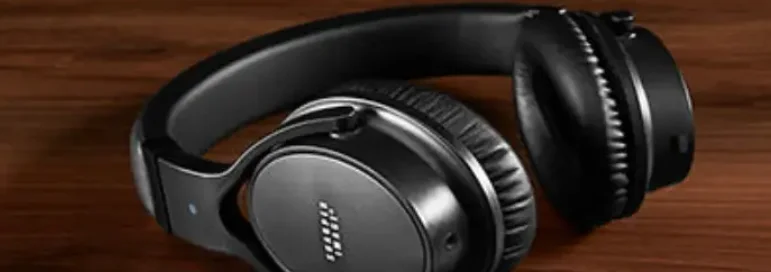
Uliptz WH202A Wireless Bluetooth Headphones User Manual

Package List
- Wireless headphones*l
- Charging Cable* 1
- Headphones Carrying Pouch XL
- Audio cable*l
- User Manual*l
Diagram

- Volume Up/Next Track
- Multi-function button
- Volume Down/Previous Track (t LED indicator
- 3.5mm audio interface
- Microphone
- CD
- Type-C charging interface
- EQButton
Specification

Power On/Off
Power on: Long-press the 11MFB11 button for 2 seconds to flash the blue light.
Power off: Long-press the 11MFB11 button for 4 seconds to flash a red light.
How to Pair
When the headset is powered off, press and hold the Multi-function Button to turn it on, and wait for the indicator light to flash alternately in blue and red to enter the Bluetooth pairing mode. Turn on the Bluetooth of the mobile phone and find “WH202A” to connect.
Media Playback & Volume Functions

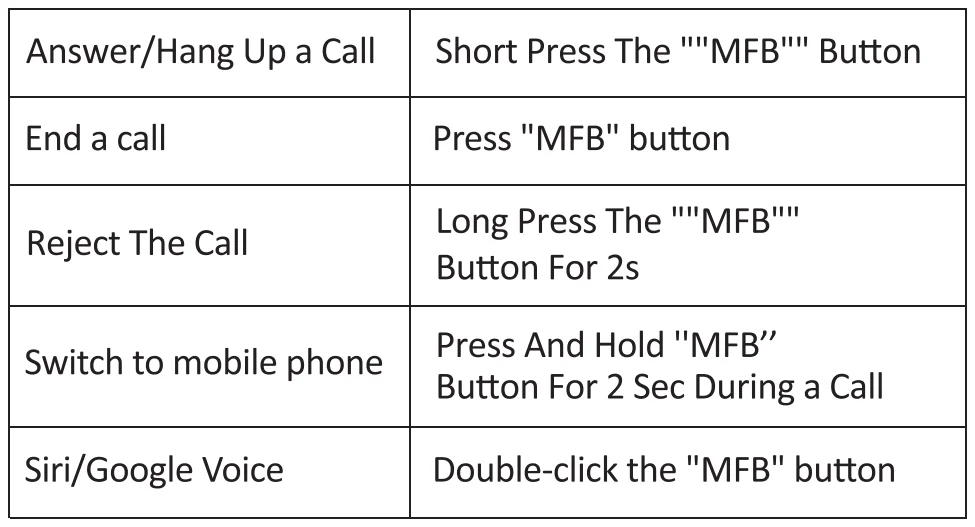
Call Functions
To connect the WH 202A to the second device:
- After you have connected the headphones to the first device, click the MFB button to turn off the headphones temporarily. Turn on the headphones again, and long-press press MFB button to enter pairing mode.
- On your second phone, go to Settings> Bluetooth List, find WH202A, and connect the headphones to your second phone.
- Go to the Bluetooth list of the first phone again, reconnect the WH202A under My Device.
- Then, the headphone will build a connection with two devices; you can change the headphone connection between the two smartphones back and forth.
Clear Paired Device
Long-press the “MFB” button and the Volume”-” button simultaneously for 4s, until the red and blue lights flash 2 times at the same time.
Charge the Headphones
- Charging: The Red LED Light Is On
- Fully Charged: The Blue LED Light Is On(Charging for 2.5 hours).
FOR MORE MANUALS BY BLOGS, VISIT MANUALSLIBRARYY
Uliptz WH202A Wireless Bluetooth Headphones User Manual-FAQs
How long does it take to fully charge the headphones?
It takes about 2.5 hours to fully charge the Uliptz WH202A.
What is the battery life of these headphones?
They offer up to 65 hours of playtime on a single charge.
Can I use them with an Android phone or iPhone?
Yes, they are compatible with both Android and iOS devices.
Can I use them while charging?
Yes, you can continue to use the headphones while they are plugged in.
How do I know when they are fully charged?
The LED indicator will turn green when charging is complete.
Do they block out background noise completely?
They reduce most low-frequency noises like engine hum or office chatter, but loud voices or sudden sounds may still be audible.
Can these headphones be used for watching TV or gaming?
Yes, they support Bluetooth connections with devices like TVs, PCs, and gaming consoles, though latency may vary by device.
Can I wear them while sleeping or exercising?
Yes, they are safe to wear, but make sure the volume is at a comfortable level.
Can I adjust the audio or EQ?
Yes, the EQ button allows you to switch between sound profiles for bass, treble, or balanced audio.
How do I reset my headphones?
Press and hold the reset button (usually recessed) for 10–30 seconds to restore factory settings.