
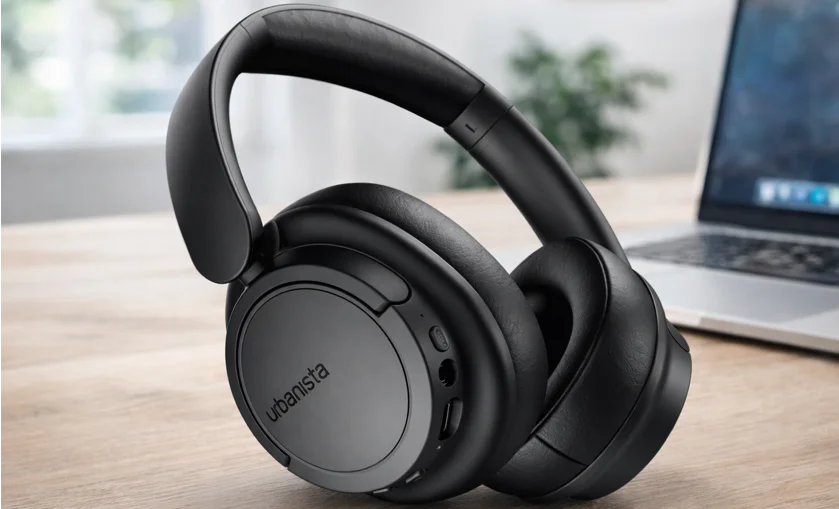

Urbanista Buenos Aires Headphones
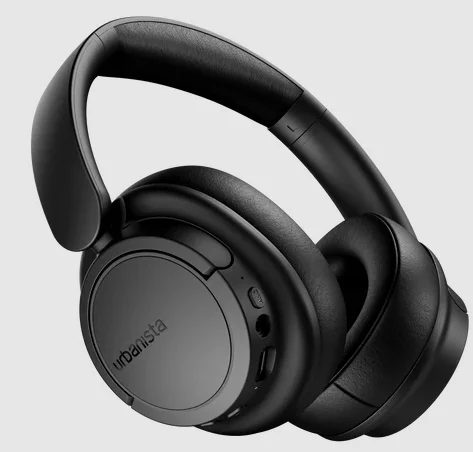
The Urbanista Buenos Aires Headphones are modern wireless over-ear headphones designed to deliver immersive sound, advanced noise cancellation, and long battery life for everyday listening. These headphones feature active noise cancelling up to 37 dB, helping reduce surrounding noise so you can enjoy music, calls, and podcasts without distractions. Equipped with 40 mm dynamic drivers, they provide clear, balanced audio with strong bass and detailed sound across a wide frequency range.
With up to 40 hours of playtime on a single charge, the Buenos Aires headphones are ideal for long listening sessions. They support Bluetooth 5.4 for stable connectivity, along with multipoint pairing, allowing you to connect two devices simultaneously. The headphones also include built-in microphones, voice assistant support, and easy button controls for managing music, calls, and sound settings. With a comfortable over-ear design and powerful features, the Urbanista Buenos Aires headphones are a great choice for work, travel, or daily entertainment.
WELCOME TO URBANISTA
Thank you for choosing Urbanista Buenos Aires. This guide will help you get the most out of your new headphones.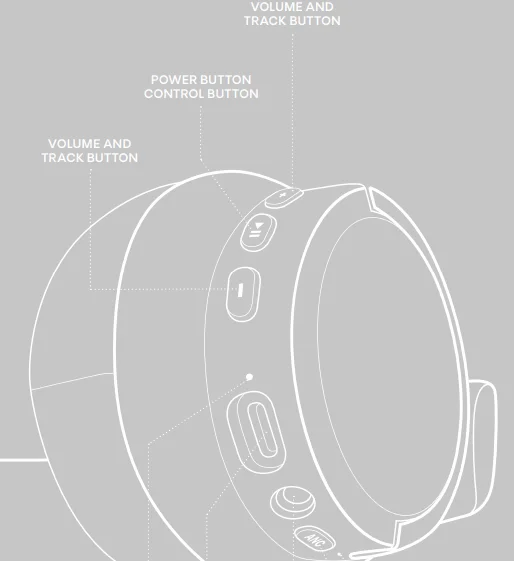
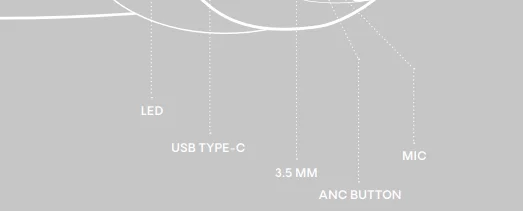
POWER ON AND OFF
Long-press the control button for 2 seconds to turn the headphones on and 5 seconds to turn them off. The headphones automatically power off after 5 minutes of no connection or 5 minutes of inactivity.
FIRST PAIRING AND RECONNECTION
Turn on the headphones to initiate first-time pairing. The LED will start flashing to indicate pairing mode. Open the Bluetooth settings on your device and select “Urbanista Buenos Aires” to connect. The LED will stop flashing when the headphones are successfully connected. Each time the headphones are powered on, they will automatically try to reconnect to the last connected device(s).
BLUETOOTH MULTIPOINT CONNECTION
Urbanista Buenos Aires supports Bluetooth multipoint, allowing it to connect to two Bluetooth devices at the same time. This lets you switch seamlessly between two connected devices, such as a phone and a computer, without disconnecting either.
Pair and connect to a second device
Activate Bluetooth multipoint by long-pressing the ANC button for 2 seconds. The LED will start flashing to indicate that multipoint is active. The headphones can pair with and store up to six devices and will reconnect to the last used devices when powered on. Bluetooth multipoint does not allow audio from two devices to play at the same time. Pause playback on the first device before switching to the second.
BUTTON CONTROLS
Use buttons to control music and calls:
- Turn headphones on: Long-press (2 sec) Play button
- Turn headphones off: Long-press (5 sec) Play button
- Play / Pause: Single-press Play button
- Next track: Long-press (2 sec) Volume Up
- Previous track: Long-press (2 sec) Volume Down
- Volume up: Single-press Volume Up
- Volume down: Single-press Volume Down
- Answer / End call: Single-press Play button
- Reject call: Long-press (2 sec) Play button
- Activate voice assistant: Double-press Play button
- Toggle sound setting: Single-press ANC button
CHARGING AND BATTERY
The headphones will play a “low battery” alert when the battery level reaches 10%. When the battery is empty, the headphones will automatically power off. Use a qualified USB Type-C cable and adapter to charge your headphones. While charging, the LED indicates the battery status as follows:
- 0–29%: LED solid red for 3 seconds
- 30–100%: LED solid blue for 3 seconds
RESET
If you experience connection issues or the headphones become unstable or unresponsive, turn the headphones off and on again to attempt pairing or reconnecting with your device.
If the issue persists, proceed with a full factory reset:
- Remove “Urbanista Buenos Aires” from the Bluetooth settings on your device(s).
- Press and hold the Play button for 10 seconds until the LED becomes solid. The headphones will restart and enter pairing mode.
- Follow the instructions in “First Time Pairing and Reconnecting” to reconnect your headphones.
NEED SUPPORT?
For further assistance and FAQs, please visit www.urbanista.com/support.
For More Manuals By Urbanista, Visit ManualsLibraryy.
Urbanista Buenos Aires Headphones -FAQs
What are the key features of the Urbanista Buenos Aires headphones?
Urbanista Buenos Aires headphones are wireless over-ear headphones designed for immersive audio and comfortable everyday listening. They include active noise cancellation (ANC), 40 mm dynamic drivers, Bluetooth connectivity, and built-in microphones for calls. The headphones also support voice assistants and multipoint connectivity, so you can connect them to more than one device. Their design focuses on delivering balanced sound while reducing external noise for a better music or podcast experience.
Do Urbanista Buenos Aires headphones have noise cancellation?
Yes, Urbanista Buenos Aires headphones feature active noise cancellation technology that helps reduce background noise when listening to music or taking calls. The ANC system can reduce surrounding noise by up to about 37 dB, which helps create a quieter and more immersive listening environment. This feature is especially helpful in noisy environments such as public transport, offices, or busy streets.
How long does the battery last on Urbanista Buenos Aires headphones?
Urbanista Buenos Aires headphones offer up to about 40 hours of wireless playback on a full charge. This long battery life allows users to listen to music, podcasts, or videos for several days without needing to recharge frequently. Long battery performance is particularly useful for travel, work, or extended listening sessions where frequent charging may not be convenient.
How long does it take to charge Urbanista Buenos Aires headphones?
The headphones typically take around two hours to fully charge using a USB-C cable. Once fully charged, the battery can deliver extended playback time and standby performance. The charging indicator light on the headphones helps users monitor battery levels and charging progress, ensuring the device is ready when needed.
What sound quality can you expect from Urbanista Buenos Aires headphones?
Urbanista Buenos Aires headphones use 40 mm dynamic drivers and support a frequency response range of about 20 Hz to 20 kHz. This allows them to reproduce clear vocals, balanced mids, and deep bass suitable for different audio types such as music, movies, and podcasts. Their sound profile is designed to deliver a balanced listening experience rather than extremely bass-heavy or specialized audiophile tuning.
Can Urbanista Buenos Aires headphones connect to multiple devices?
Yes, the headphones support Bluetooth multipoint connectivity, which allows them to connect to two devices simultaneously. This feature makes it easy to switch between devices like a smartphone and a laptop without manually disconnecting and reconnecting. For example, users can listen to music on a laptop and instantly answer a phone call from their smartphone.
What Bluetooth version do Urbanista Buenos Aires headphones use?
Urbanista Buenos Aires headphones support Bluetooth 5.4 connectivity, which provides stable wireless connections and efficient power usage. The headphones typically have a wireless range of up to about 10 meters, allowing users to move around freely without losing connection to their device. This makes them suitable for use with smartphones, tablets, laptops, and other Bluetooth-enabled devices.
Are Urbanista Buenos Aires headphones compatible with iPhone and Android devices?
Yes, Urbanista Buenos Aires headphones are compatible with both Android and iOS devices because they connect through standard Bluetooth technology. Once paired with a smartphone, tablet, or computer, the headphones can automatically reconnect when powered on. This wide compatibility makes them a convenient wireless audio option for users across different platforms.
What is the warranty for Urbanista Buenos Aires headphones?
Urbanista typically provides a limited one-year warranty for the Buenos Aires headphones. The warranty covers manufacturing defects and hardware issues under normal use. To claim warranty service, users generally need to keep their proof of purchase and contact the retailer or Urbanista support for assistance and repair or replacement options.