
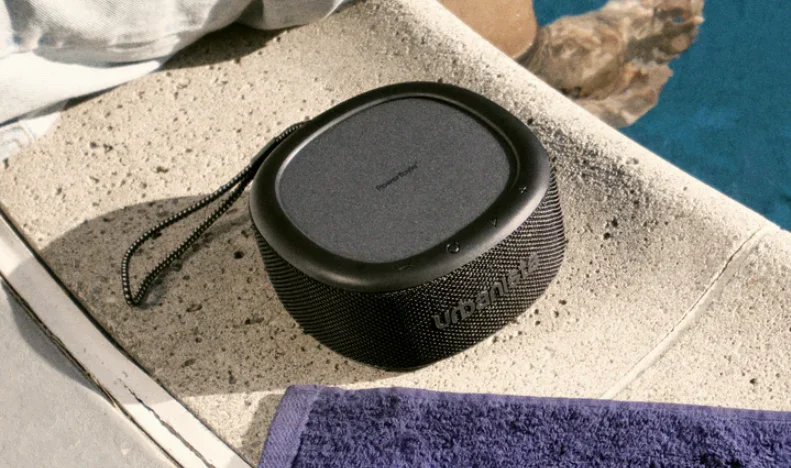

Urbanista Malibu Solar-powered Speaker
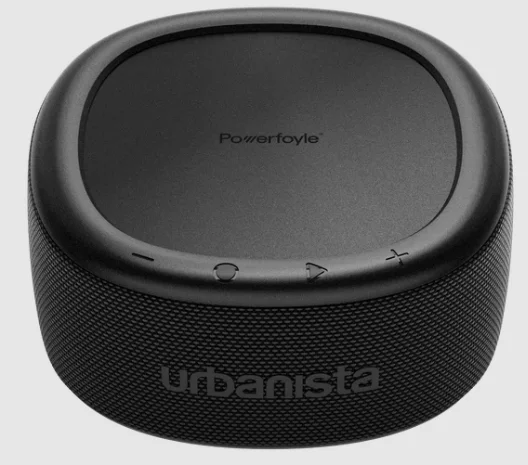
The Urbanista Malibu Solar-Powered Speaker is an innovative portable speaker designed for outdoor enthusiasts who want powerful sound without worrying about battery life. Featuring integrated solar charging technology, it continuously recharges using sunlight, making it ideal for camping, beach trips, and long outdoor adventures.
The speaker delivers clear, balanced audio with strong bass while maintaining a durable, water-resistant design that can handle different weather conditions. With Bluetooth connectivity, easy controls, and a sleek, modern look, the Urbanista Malibu combines sustainability, convenience, and high-quality sound in one eco-friendly device.
WELCOME TO URBANISTA
Thank you for choosing Urbanista Malibu. This guide will help you get the most out of your new speaker.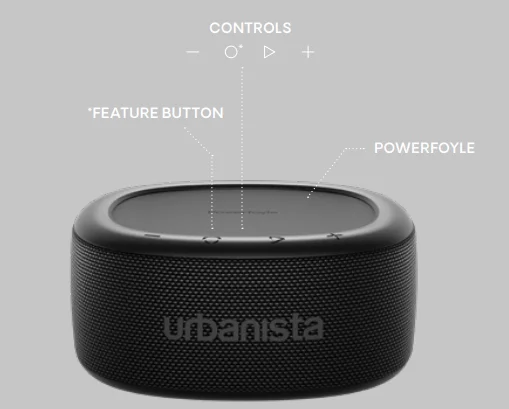
FIRST CONNECTION AND RECONNECTION
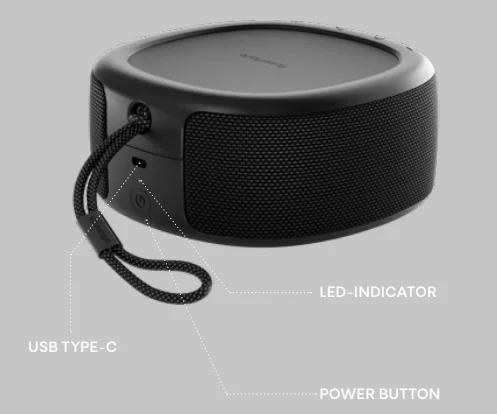
- Power on the speaker by pressing the Power button.
- Enable Bluetooth on your device and select “Urbanista Malibu” from the list.
- The LED will turn solid upon a successful connection.
Next time you power on the speaker, it will attempt to reconnect to the last connected device. In case of failure, it will automatically enter pairing mode. Double-press the Power button to disconnect from an already connected device and enter pairing mode.
BUTTON CONTROLS
- Play/Pause: Single press

- Volume Up: Single press

- Volume Down: Single press

- Next track: Long press
- Previous track: Long press
- Enable/Disable power saving mode: Long press

- Stereo pair: Double press
- Turn on: Single press (1s)

- Turn off: Long press (3s)
- Check battery status: Single press
- Enter pairing mode: Double-press
- Reset device settings: Long press (10s)


POWERFOYLE™ LIGHT CHARGING
Urbanista Malibu utilizes Powerfoyle™ light charging technology to continuously charge its battery when exposed to indoor and outdoor light. It is recommended to store the speaker in a sunlit area, such as a windowsill, when the speaker is not in use. Remember, stronger light yields more effective charging.
POWER SAVING MODE
Activating Power Saving Mode will extend the speaker’s playtime, with the duration dependent on factors such as content, volume, and environmental conditions.
BATTERY
A “low battery” alert activates when the battery falls below 20%. In such cases, it’s advisable to use a standard USB Type-C cable for charging. While charging, the LED indicates battery status as follows:
- 0–30%: Amber LED pulses
- 30–100%: White LED pulses
- 100%: Solid white LED
To check the battery level, simply single-press the Power button. The LED turns amber if the battery level is below 30% and solid white if it exceeds 30%.
AUTOMATIC POWER-OFF
The speaker will automatically power off after 5 minutes of disconnection or 30 minutes of inactivity while connected. In Power Saving Mode, it will power off after 15 minutes.
STEREO PAIRING
For enhanced sound, follow these steps to connect two Malibu speakers:
- Connect Speaker A to a Bluetooth device.
- Power on Speaker B, but do not connect it to any device.
- Double-press the Feature button on both speakers.
- Both speakers’ LEDs will flash rapidly, and once connected, turn solid.
- To stop stereo pairing, double-press the Feature button on either speaker.
USING THE APP
Enhance your experience with the Urbanista Audio app, available on both the App Store and Google Play. The app allows you to monitor light charging performance, personalize sound settings, and customize your speaker.
IP67 WATER AND DUST RESISTANT
IP67 means the device is dust- and waterproof for up to 30 minutes in 1 meter of water depth. Important safety precaution: To avoid the risk of electric shock, please do not use your speaker near water when charging with a cable.
FACTORY RESET
To reset to factory settings, press the Power button for 10 seconds while powered off. The LED will begin flashing, and after restarting, the speaker will automatically enter pairing mode. Remember to remove “Urbanista Malibu” from your Bluetooth settings before re-pairing.
NEED SUPPORT?
For further assistance and FAQs, please visit www.support.urbanista.com.
For More Manuals By Urbanista, Visit ManualsLibraryy.
Urbanista Malibu Solar-powered Speaker -FAQs
How does the Urbanista Malibu solar-powered speaker work?
The Urbanista Malibu uses Powerfoyle™ solar cell technology that converts both indoor and outdoor light into energy to recharge its battery. This means the speaker can continue charging while you’re using it or when it’s placed near a light source. Even ambient indoor lighting contributes to the charging process, reducing the need for traditional charging. However, it still includes a USB-C port for wired charging if you want to quickly top up the battery.
How long does the Urbanista Malibu speaker battery last?
The speaker offers a battery reserve of around 20 hours on a full charge, and solar charging can extend playback time depending on lighting conditions. Under strong sunlight, playtime can increase significantly, potentially reaching around 30 to 45 hours with consistent exposure to light. The actual runtime varies based on volume levels, environment, and how much light the speaker receives while in use.
Is the Urbanista Malibu speaker waterproof?
Yes, the Urbanista Malibu has an IP67 rating, which means it is both dustproof and waterproof. It can withstand submersion in water up to one meter deep for about 30 minutes, making it suitable for outdoor activities like beach trips, poolside listening, and camping. This level of protection also helps guard the speaker against sand, dust, and dirt in outdoor environments.
Does the Urbanista Malibu support Bluetooth connectivity?
The speaker uses Bluetooth 5.2 technology for wireless connectivity, allowing it to connect easily to smartphones, tablets, and other compatible devices. Bluetooth 5.2 provides stable connections and efficient power usage, helping maintain consistent audio streaming during playback. The speaker supports standard Bluetooth audio profiles, enabling seamless music streaming, podcasts, and other audio content from your device.
Can you pair two Urbanista Malibu speakers together?
Yes, the Urbanista Malibu supports stereo pairing, allowing you to connect two speakers together for a wider and more immersive sound experience. When paired, each speaker can function as a separate channel, creating a left-right stereo effect. This feature is useful for outdoor gatherings, parties, or larger listening spaces where a single speaker might not provide enough audio coverage.
Does the Urbanista Malibu speaker have an app for customization?
Yes, the speaker works with the Urbanista mobile app, which is available for both iOS and Android devices. Through the app, users can monitor solar charging performance, adjust sound settings, and personalize certain speaker features. The app also allows you to track how much energy has been generated through light charging, giving insight into the speaker’s solar efficiency over time.
What is the sound output of the Urbanista Malibu speaker?
The Urbanista Malibu features dual 10-watt amplifiers, providing a total output of 20 watts. This setup delivers balanced sound with decent volume for a portable outdoor speaker. The speaker also supports a frequency response range of about 20 Hz to 20 kHz, which covers most of the audible spectrum and ensures clear playback for music, podcasts, and other audio content.
Can the Urbanista Malibu still be charged without sunlight?
Yes, while the Malibu is designed to recharge through light using solar technology, it also supports conventional charging through a USB-C cable. This means you can charge it quickly using a power adapter, power bank, or laptop when sunlight or indoor lighting is limited. The combination of solar charging and USB-C backup ensures the speaker remains practical in various environments.
What materials are used in the Urbanista Malibu speaker?
Urbanista designed the Malibu with sustainability in mind. The speaker is made using recycled plastics and fabrics, and the packaging also follows environmentally conscious practices. This eco-friendly design aligns with Urbanista’s focus on reducing environmental impact while still delivering durable and portable audio products suitable for outdoor use.
Is the Urbanista Malibu good for outdoor activities?
Yes, the Urbanista Malibu is specifically designed for outdoor use. Its IP67 waterproof and dustproof rating protects it in harsh environments, while solar charging keeps it powered throughout the day when exposed to light. The portable design, durable materials, and long battery life make it suitable for activities like hiking, beach trips, cycling, and poolside gatherings where traditional speakers might struggle.