
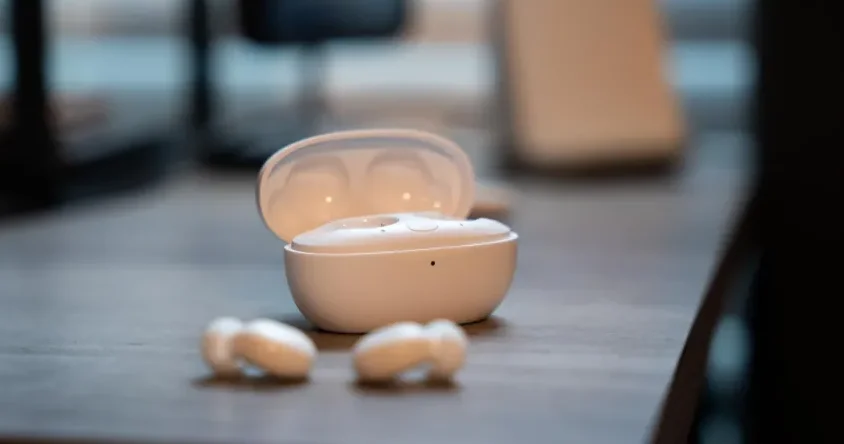

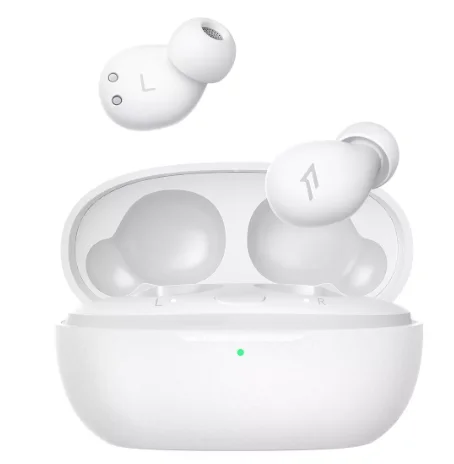
1MORE SleepBuds Z30 Earbuds
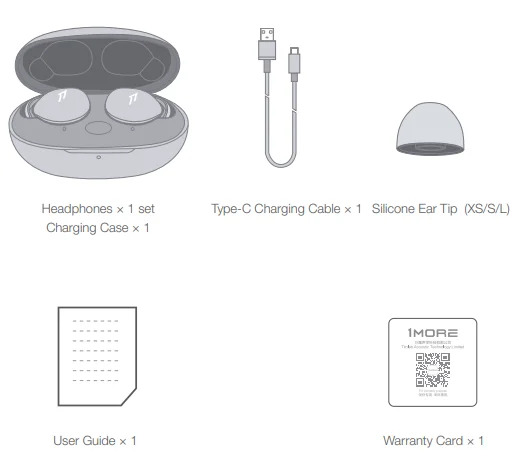
In The Box
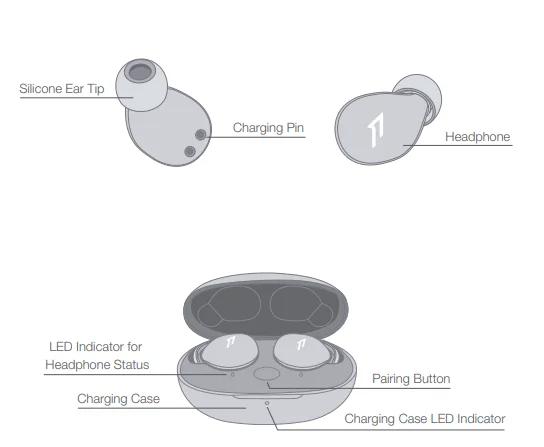
Product Overview
Fit
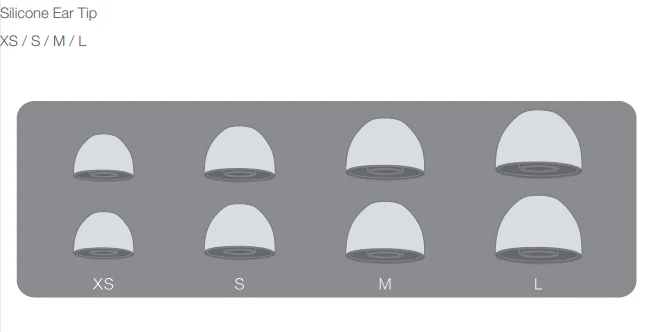
Replace
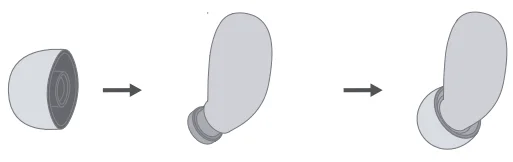
Placement
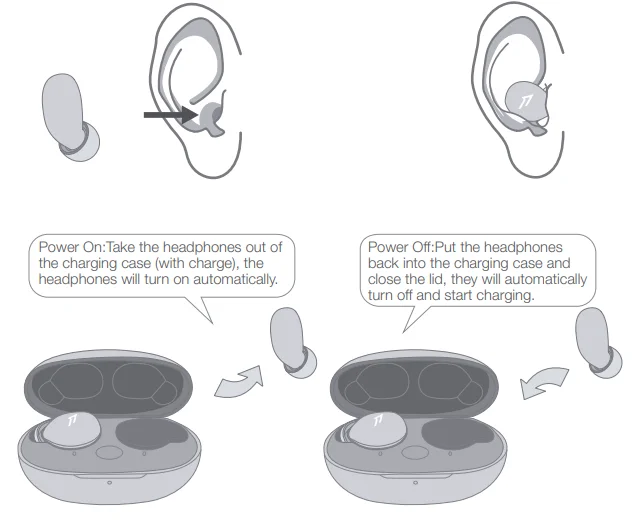
The above functions are available for either headphones in individual or Stereo mode.
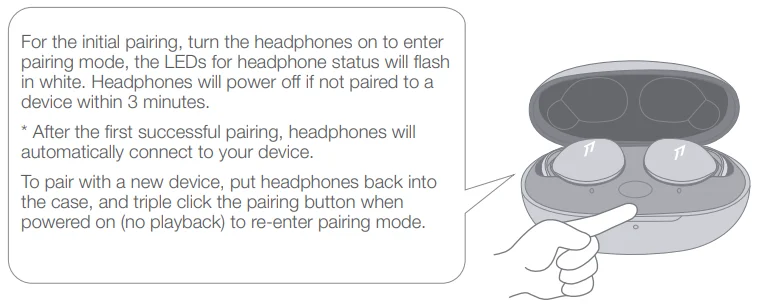
Headphones Pairing
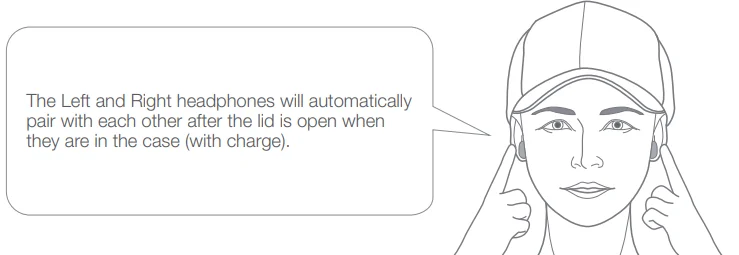
Bluetooth Pairing To The Device
The above functions are available for either headphones in individual or Stereo mode.
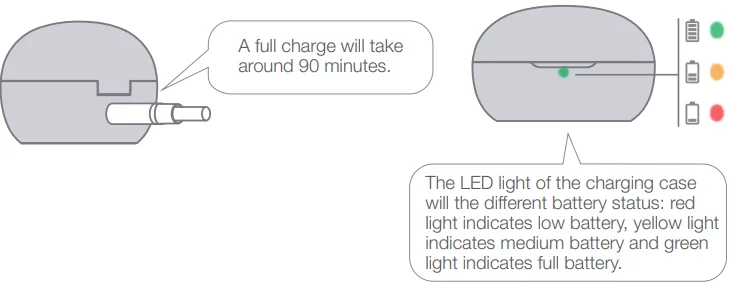
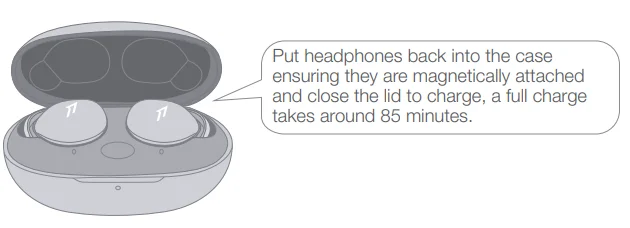
Charging
- To charge the case with a Type-C cable.

- To charge the headphones with the case.

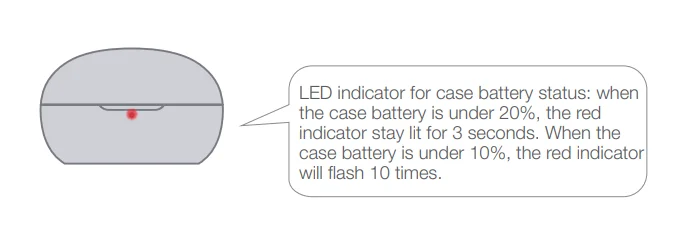
Battery Notification
Controls
The phone call function is not available on the headphones, and the playback controls can be implemented on the connected device. Please download the 1MORE MUSIC APP for soothing sounds.
Switch Listening Modes via APP
Enter the 1MORE Z30 home page in the 1MORE MUSIC APP after pairing to your cellphone, then you can switch listening modes between “Music” and “Soothing”.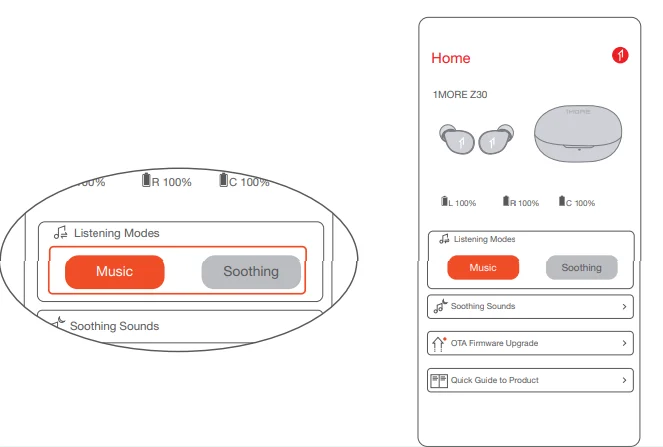
Soothing Sounds
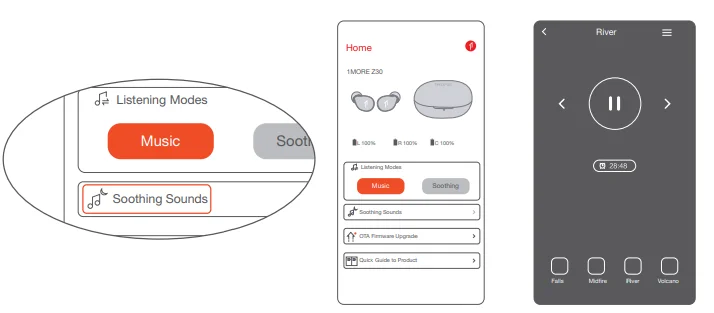
- Click the “Soothing Sounds” to enter the playlist.

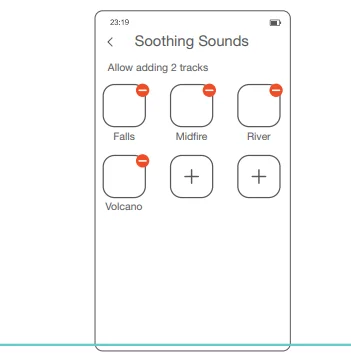
- Click “+” to select the sound to be downloaded to your headphones for listening.

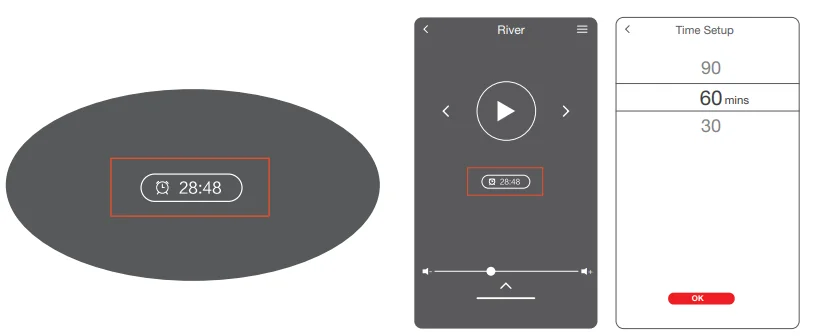
- Click the timer icon on the song page to set the playtime.

- Playback and volume for the soothing sounds can only be adjusted via the APP.
Extra Functions
- If the headphones cannot pair normally when powered on. Put both headphones back into the case, triple-click the pairing button, and search for “1MORE Z30” in Bluetooth in your devices to connect.
- To unpair the device: Put both headphones into the case, press and hold the pairing button on the case for 8 seconds to disconnect the headphones and the device.
- OTA Firmware Update: It can be synchronously upgraded via the 1MORE MUSIC APP while the Left and Right earbuds are connected with at least 50% battery.
Functions of the 1MORE MUSIC APP may vary with different devices or operating systems. For more details, please contact our customer service.
1MORE (1) Year Limited Warranty
1MORE Inc. (“1MORE”) warrants to the original retail purchaser that this product is to be free from defective materials and workmanship for a period of one year from the date of purchase if it is properly used and maintained. If this product proves defective in either material or workmanship, 1MORE, at its option, will (a) repair the product with new or refurbished parts, or (b) replace the product with an equivalent new or refurbished product, at no charge for parts or labor.
If the product model is no longer available and cannot be repaired effectively or replaced with an identical model, 1MORE, at its sole option, may replace the unit with a current model of equal or greater value. In some cases, modification to the mounting surface may be required where a new model is substituted. 1MORE assumes no responsibility or liability for such modification.
TO OBTAIN A REPAIR OR REPLACEMENT UNDER THE TERMS OF THIS WARRANTY, PLEASE RETURN TO THE ORIGINAL DEALER FIRST, AND THE ORIGINAL DEALER SHALL REPAIR THE PRODUCT WITH NEW OR REFURBISHED PARTS OR REPLACE THE PRODUCT WITH AN EQUIVALENT NEW OR REFURBISHED PRODUCT. You will be required to submit proof of purchase details, including but not limited to a receipt or sales invoice. Return shipping for exchanges/repairs is the sole responsibility of the original retail purchaser.
Limitations:
- This limited warranty does not cover the failure of the product resulting from improper installation, misuse, abuse, accident, neglect, mishandling, or wear from ordinary use or environmental deterioration.
- This limited warranty does not cover cosmetic damage, including paint damage, or consequential damage to other components or premises which may result from any reason from the failure of the product.
- This limited warranty is null and void for products not used in accordance with 1MORE’s instructions.
- This limited warranty is null and void for products with altered or missing serial numbers and for products not purchased from an AUTHORIZED dealer.
- This limited warranty terminates if you sell or otherwise transfer this product to another party.
We Appreciate Your Business
We know you will enjoy the new 1MORE headphones as much as we do. At 1MORE, we value your satisfaction. If you would like more details on this product or any of our other products, please visit us online by scanning the QR code. Go to www.1more.com and sign up for VIP, and 1MORE will treat you like one.
Tips
- Please read this instruction manual carefully and retain it for future reference.
- Please fully charge the battery before first use.
- If the headphones have been unused for more than 3 months, we recommend that you charge them. This will improve battery capacity.
- Only use charging cables and adapters that are FCC (Federal Communications Commission) approved.
- In dry environments, static electricity may numb your ear. This is not related to the quality of the product.
Safety Information
- Never disassemble the headphones. There are no user-serviceable parts inside.
- Do not expose the headphones to temperatures below 32 °F (0°C) or temperatures above 113 °F (45 °C).
- Do not use the headphones in a thunderstorm. This could prevent the headphones from working properly, and also increase your chance of being electrically shocked.
- Do not use oil or any volatile liquid to clean this product.
- Do not use the headphones in traffic. Do not use the headphones at any time, as it would be dangerous to be unaware of the noises around you.
- Adult supervision is required for children aged 6 and under.
- If you don’t feel comfortable after wearing the headphones, please refer to an aurist for advice on whether in-ear headphones are suitable for you.
- The headphones contain a lithium-ion battery; do not attempt to open, crush, or expose a charging case to fire or excessive temperature. Do not use it if the battery is swollen.
 Please note that excessively high volumes and long listening times may cause hearing damage.
- The symbol indicates DC voltage
 Please note that excessively high volumes and long listening times may cause hearing damage.
FAQ
1. How to make sure the headphones have been fully charged?
Put the headphones into the charging case. If the headphone status LEDs are glowing, this means they have been fully charged.
2. Why won’t the headphones turn on?
Check if your headphones have enough battery life. If not, please charge them for at least 30 minutes.
3. Why won’t the headphones connect to my cellphone, or take a long time to connect?
Put both buds back into the charging case, then press and hold the pairing button for 3 seconds, click the device name in your settings, and they should now pair correctly to the phone.
4. Why won’t the headphones make phone calls?
The headphones are without microphones or phone call functions.
5. Why is the Bluetooth connection not stable and/or experiencing some interruptions?
- Try shortening the distance between your headphones and the device. Avoid solid barriers between you and the device.
- Please keep away from strong interference sources, such as Wi-Fi and GPRS.
- Please make sure the Bluetooth antenna of your device is not blocked.
6. Why can’t the volume be adjusted by the cellphone buttons when playing soothing sounds in 1MORE MUSIC APP?
The soothing sounds are stored in the flash of the headphone, which can be adjusted only via the APP.
7. The headphones will be disconnected from the cellphone when out of wireless range. They cannot restore the connection after returning to the wireless range. How to solve it?
Click the device name in the cellphone pairing list to connect again.
8. I feel uncomfortable when wearing the headphones. How can I solve this?
This is mainly because the sizes of ear tips and your canals are not snug, we suggest trying smaller ear tips.
For more detailed product FAQs, please visit the product support section under www.1more.com.
FCC
The SAR limit of USA (FCC) is 1.6 W/kg averaged over one gram of tissue. Device type EH608 (FCC ID: 2ASDI-EH608) has also been tested against this SAR limit. This device complies with part 15 of the FCC rules. Operation is subject to the following two conditions:
- This device may not cause harmful interference, and
- This device must accept any interference received, including interference that may cause undesired operation.
NOTE: The manufacturer is not responsible for any radio or TV interference caused by unauthorized modifications or changes to this equipment. Such modifications or changes could void the user’s authority to operate the equipment.
NOTE: This equipment has been tested and found to comply with the limits for a Class B digital device, pursuant to part 15 of the FCC Rules. These limits are designed to provide reasonable protection against harmful interference in a residential installation. This equipment generates uses and can radiate radio frequency energy and, if not installed and used in accordance with the instructions, may cause harmful interference to radio communications.
However, there is no guarantee that interference will not occur in a particular installation. If this equipment does cause harmful interference to radio or television reception, which can be determined by turning the equipment off and on, the user is encouraged to try to correct the interference by one or more of the following measures:
- Reorient or relocate the receiving antenna.
- Increase the separation between the equipment and receiver.
- Connect the equipment into an outlet on a circuit different from that to which the receiver is
connected. - Consult the dealer or an experienced radio/TV technician for help.
IC regulatory conformance
This device complies with CAN ICES-003 (B)/NMB-003(B). This device complies with Industry Canada licence-exempt RSS standard(s). Operation is Subject to the following two conditions:
- This device may not cause interference, and
- This device must accept any interference, including interference that may cause undesired operation of the device.
For More Manuals By 1MORE, Visit ManualsLibraryy.
1MORE SleepBuds Z30 Earbuds-FAQs
What are the 1MORE SleepBuds Z30 earbuds designed for?
The 1MORE SleepBuds Z30 earbuds are specifically designed for sleep and relaxation rather than everyday music or calls. They are ultra-lightweight and slim, making them comfortable to wear while lying down, especially for side sleepers. Their primary purpose is to provide soothing sounds, reduce ambient noise, and help users fall asleep more easily without discomfort caused by traditional earbuds.
Are the 1MORE SleepBuds Z30 comfortable for side sleepers?
Yes, these earbuds are built with side sleepers in mind. Each earbud weighs around 2.7 grams and has a very slim 7.5mm profile, which reduces pressure when your head rests on a pillow. Their ergonomic design ensures they stay in place and remain comfortable throughout the night, even if you move around frequently while sleeping.
Do the 1MORE SleepBuds Z30 have active noise cancellation?
The 1MORE SleepBuds Z30 do not feature active noise cancellation but instead rely on passive noise isolation. They can reduce ambient noise by up to about 24 decibels, helping block out distractions like background chatter or light environmental sounds. This makes them effective for creating a quieter sleeping environment without using advanced ANC technology.
How long does the battery last on the 1MORE SleepBuds Z30?
The earbuds offer around 6 to 8 hours of playback on a single charge, which is generally enough for a full night’s sleep. With the charging case, total battery life can extend up to approximately 24 to 32 hours. This allows multiple nights of use before needing to recharge the case, depending on usage mode and volume levels.
Do the 1MORE SleepBuds Z30 support Bluetooth streaming?
Yes, the 1MORE SleepBuds Z30 support Bluetooth 5.3 connectivity, allowing you to stream music, podcasts, or sleep sounds directly from your device. They also include a local playback mode with built-in soothing sounds, which can help save battery and provide uninterrupted playback without relying on a constant Bluetooth connection.
Can you take calls or use a microphone with the SleepBuds Z30?
No, the 1MORE SleepBuds Z30 do not include a microphone or call functionality. They are intentionally designed without these features to minimize distractions and improve comfort during sleep. This makes them less suitable for everyday communication but ideal for a focused, uninterrupted sleep experience.
Do the 1MORE SleepBuds Z30 have touch controls?
The earbuds do not include touch controls, which is a deliberate design choice. Removing touch-sensitive surfaces prevents accidental inputs when your head rests on a pillow. Instead, playback and settings are typically managed through the companion app, ensuring a more sleep-friendly and disturbance-free experience.
What kind of sound quality do the 1MORE SleepBuds Z30 offer?
The 1MORE SleepBuds Z30 use balanced armature drivers to deliver clear and detailed sound. While they are not tuned for heavy bass or high-energy music, they provide a calm and balanced audio profile that works well for relaxing sounds, ambient noise, podcasts, and light music, making them suitable for bedtime listening.
Are the 1MORE SleepBuds Z30 waterproof or sweat-resistant?
The 1MORE SleepBuds Z30 are not water-resistant or waterproof, as they are designed primarily for indoor, sleep-focused use. They should be kept away from moisture, sweat, or rain to avoid damage. Unlike sports earbuds, they are optimized for comfort and quiet environments rather than durability in active conditions.
Are the 1MORE SleepBuds Z30 worth buying?
The 1MORE SleepBuds Z30 are a good choice for users who struggle with sleep and want a comfortable, purpose-built solution. They excel in comfort, lightweight design, and noise isolation for nighttime use. However, they lack features like microphones and strong noise cancellation, so they are best suited as dedicated sleep earbuds rather than all-purpose wireless earbuds.