
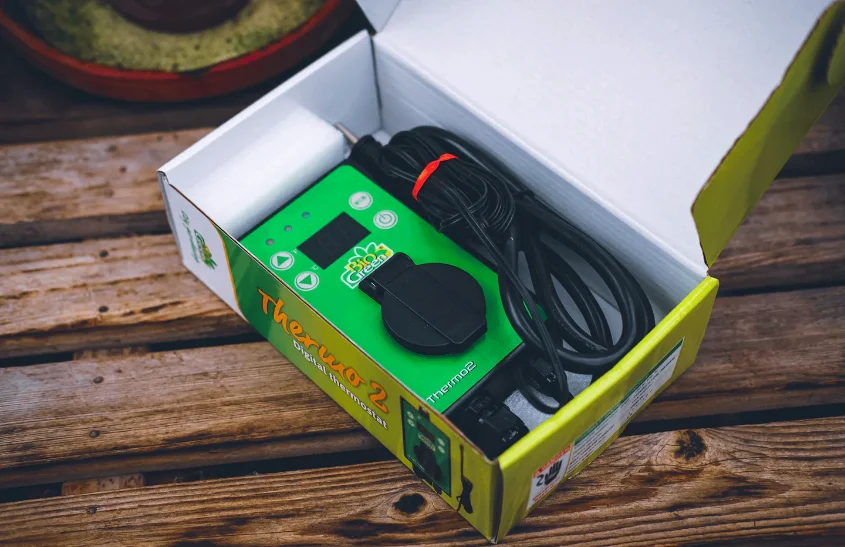

BIOGREEN THERMO 2 Digital Thermostat
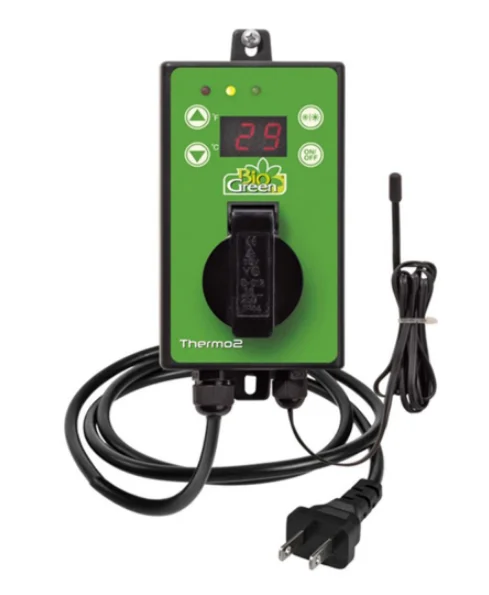
Scope of supply
- Digital-Thermostat Thermo 2 Incl. suspension device
Technical data
- Type of unit: Thermo 2
- Power supply: 230 V / 50-60 Hz
- Max. breaking capacity: 3000 W
- Max. switching current: 16 A
- Control range: 0 – 40 °C
- Distinction rate: ± 1 °C
- Measuring temperature range: -50 to 99 °C
- Switching accuracy: ± 1 °C
- Input: < 1,5 W
- Protection class: II
- Protective system: IP X4
- Sensor length: approx. 1.0 m
IMPORTANT:
Read carefully and follow these instructions as well as the general advice on safety and risks before installation. Keep this leaflet in a safe place for future reference. If you have any doubt about the safety of the unit, seek the advice of an expert. If the unit is used in a greenhouse, make sure that the electrical connections are carried out by qualified personnel.
General
After unpacking and before switching on, make sure that the unit and all its accessories are perfectly in order. If there has been any damage in transit, consult your dealer or the manufacturer immediately. Keep the packaging materials (polythene bag, polystyrene, nails, etc.) out of reach of children because they represent a potential source of danger. This also applies to small parts supplied, which can be swallowed.
This electronic thermostat can be used for a wide variety of temperature control applications, for example, for heating and cooling greenhouses and winter gardens, or for monitoring water temperatures in aquariums, the air temperature in terrariums, or the soil temperature in seed beds. It is simple to operate and can be connected to any type of heating cable, heating mat, or other heating or cooling devices, provided that the maximum heating power of 3000 W is not exceeded. This thermostat is only licensed for connection to 230 V / 50-60 Hz a.c. voltage. The unit must be protected from high degrees of contamination and moisture. If it is used for any application other than that described above, it may be damaged, and risks such as short-circuiting, fire, electric shock, etc. may ensue. The safety and installation instructions must be strictly adhered to.
Advice on safety and risks
- Only a 230 V ~ / 50-60 Hz mains socket in the public supply network may be used as a power source. Never try to operate the unit at a different voltage.
- Consult an expert if you have any doubts about the operation, safety or connection of the unit.
- This unit may only be used indoors.
- When opening the cover or removing parts, the unit must be disconnected from the mains supply.
- Never switch the mains plug on or off with wet hands.
- Never pull on the mains cable itself; always pull the plug out of the socket by the gripping surfaces. Do not use the unit in an easily flammable atmosphere (e.g. in the vicinity of fuel gas or spray bottles). Risk of explosion and fire!
- Never install the unit close to water cocks, washbasins or other water sources.
- Do not insert any objects in the openings of the unit. Risk of injury, electric shock or damage to the unit!
- When assembling, make sure that the connecting cable is not squeezed or damaged by sharp edges. If such damage gives rise to open points on the unit, it must under no circumstances be connected to the mains supply. Danger!
- Always pull the plug out of the socket before cleaning the unit. Only clean with a dry cloth.
- Remove the plug from the socket whenever the unit is switched off.
- If it is to be assumed that harmless operation is no longer possible, the unit must be switched off and protected against unintentional operation, which is the case when:
- The unit or mains cable shows visible damage
- The unit no longer operates
- after being stored for a long time under unfavourable conditions
- after heavy transport loads
- Units that operate on mains voltage should not get into the hands of children.
- The unit is not suitable for use in cattle breeding areas.
- These instructions for use form part of the unit and should be kept in a safe place. If the unit is passed on to third parties, these instructions for use should also be provided.
- In industrial installations, the accident prevention regulations of the Industrial Professional Association for Electrical Installations and Equipment must be complied with.
- Never pour liquids over the unit as this presents the risk of a fire or fatal electric shock. If this should happen, however, pull the plug out of the socket and consult a specialist.
- If you are uncertain about the correct connection, or if you have any questions which are not clarified in the course of the instruction, contact the manufacturer or a specialist.
- This unit is not intended for use by persons (including children) with limited physical, sensory or mental capacity. This also applies to persons who do not have sufficient experience in or knowledge of handling the product, unless they are being supervised or instructed in the use of the unit by a person responsible for their safety.
Installation
Make sure that the mains voltage corresponds to the voltage indicated in Chapter 2 (technical data). The place of installation must be chosen so that the unit can under no circumstances get wet (e.g.
dripping condensation, open roof hatches, etc.) or fall into water. The thermostat may be operated in a horizontal or vertical position.
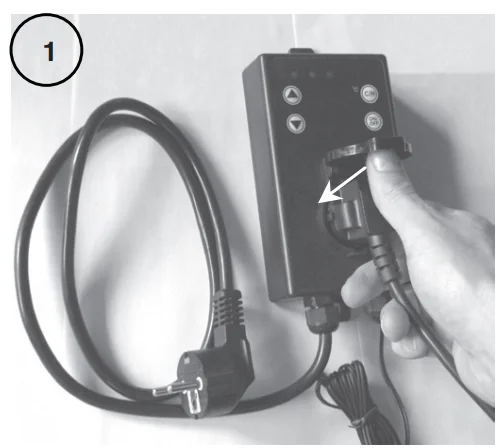
- Connect the heating or cooling unit to the thermostat. To do so, insert the plug of the corresponding heating or cooling unit in the socket on the thermostat.

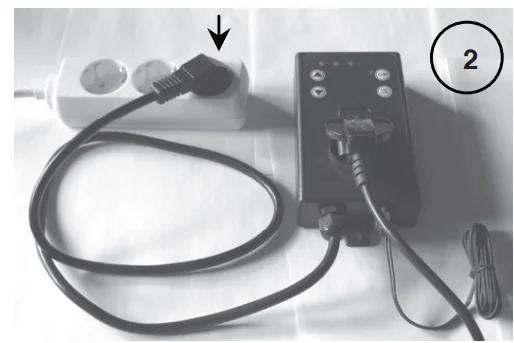
- Now connect the connecting cable of the thermostat to a 230V mains socket.
- Position the end of the sensor cable at the most suitable point for temperature control.
Room temperature control
The sensor should be installed at half room height and should be freely suspended. The room temperature can only be optimally controlled when the sensor is not influenced by draughts, solar radiation or other heat or cold sources.
Cultivation of plants and seeds
Position the sensor in the soil close to the roots. The sensor must be surrounded by soil. In large plant pots, the sensor should be located in the middle of the pot.
Water temperature control
For water temperature control (e.g. in an aquarium), the sensor should be positioned in the central layers of water. Here, too, the sensor must be surrounded by water.
Operation
When installing, check that the unit or mains cable is not damaged. Also, make sure that the sensor cable has not become sharply kinked, as this may impair operation.
Switching on/off
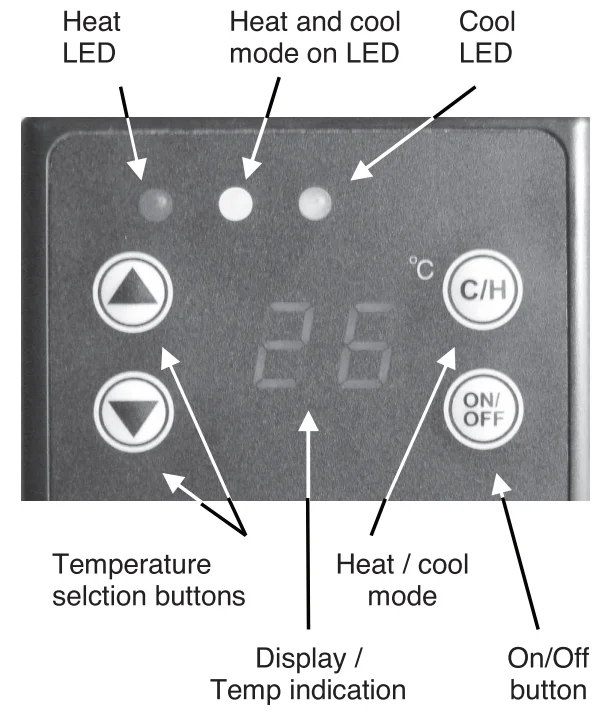
As soon as the unit has been connected to the supply voltage, it can be switched on by means of the “ON/OFF” button. To do this, the button must be pressed for 3 seconds. Immediately after switching on the unit determines the ambient temperature of the sensor and indicates it on the display. To switch off, again press the “ON/OFF” button for 3 seconds.
Heat/Cool mode
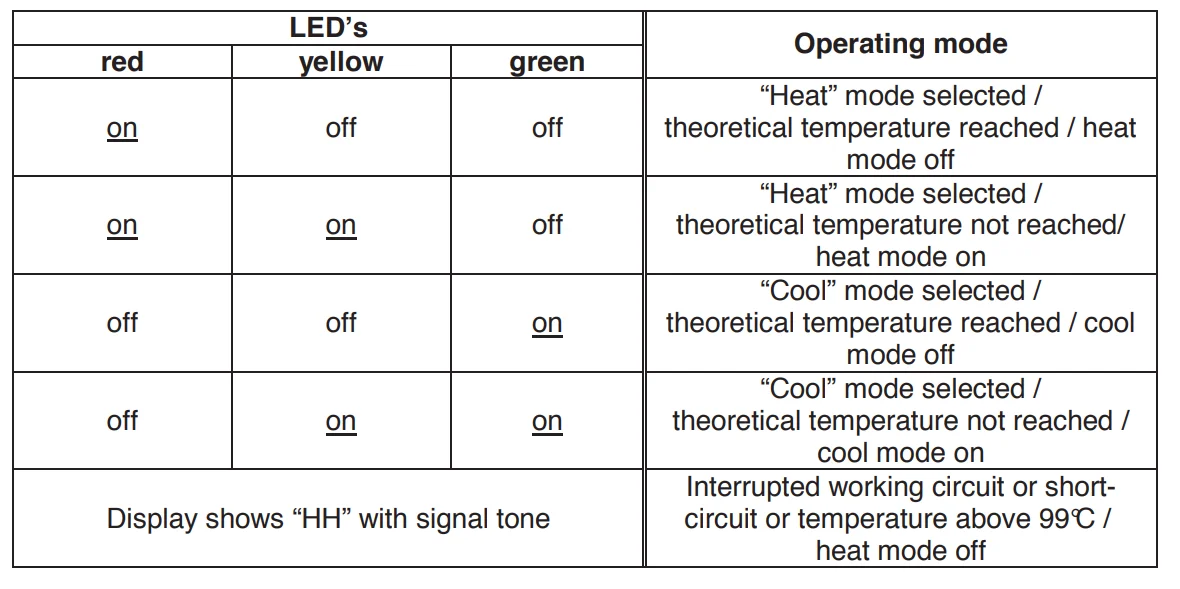
It is possible to alternate between the heat and cool modes by pressing the “C/H” button. Keep the “C/H” button pressed for 3 seconds to change mode. On the display, “H” appears for 4 seconds for heating and “C” for cooling. At the same time, you can detect the mode that has been set by means of the LEDs. The red LED stands for heating and the green LED for cooling.
Setting the required temperature
Press the button briefly to switch to the setting mode. The already set temperature now flashes in the display. Using the buttons, you can change the temperature in 1 °C steps. (Setting range: -50°C to +99 °C). After you have set a new temperature, it is saved automatically, and the menu closes after 3 seconds. Now the display again shows the current ambient temperature.
Operating modes
It is indicated by the yellow LED whether the heat or cool mode is active.
Cleaning
- Switch off the thermostat before cleaning and remove the plug.
- Do not use any grinding, etching or cleaning agents.
- Clean the casing with a damp cloth (not wet), vacuum cleaner or feather duster.
- Never immerse the unit in water. Danger!
- If the unit is not used for a long time, it is necessary to protect it from excessive dust and dirt.
Disposal and repair
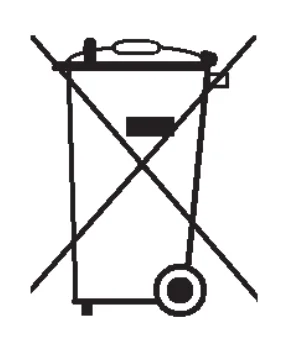
- Take units to be disposed of at a suitable waste reception depot only.
- Repairs to the unit may only be carried out by authorised specialists. Please therefore consult the manufacturer or dealer.
- N.B. If the unit is not correctly repaired, the warranty will not be valid.
- Incorrectly carried out repairs may represent a danger to the user and other people.
Servicing and maintenance under warranty
We give you a 2-year unlimited manufacturerʼs warranty (from date of purchase) on all Bio Green products. Excluded from the warranty is damage due to violence, improper use and failure to follow instructions for use, cleaning and maintenance work. The manufacturer accepts no liability for damage due to frost, insufficient heating power related to the room dimensions, or due to inadequate heat insulation.
Important note
The unit may only be opened, and repair work may only be carried out by licensed specialists in accordance with the applicable repair regulations. Only original parts may be fitted. A guarantee of perfect operation and reliability can only be given if the unit is installed and handled expertly. This also applies to the provisions of the Technical Equipment Act and the applicable accident prevention regulations. In case of warranty, please complete the warranty and info card attached for this purpose.
If you have any further questions, refer to our Bio Green Service: Tel.: +49 (0) 6444 / 9312-0 or Email: [email protected]
For manuals by BioGreen, visit ManualsLibraryy
BIOGREEN THERMO 2 Digital Thermostat-FAQs
How do you set up the BIOGREEN THERMO 2 thermostat?
To set up the thermostat, connect it to your heating device and place the temperature probe correctly. Turn on the unit, choose your desired temperature using the control buttons, and confirm the setting. The thermostat will automatically regulate heating based on the selected temperature, ensuring a stable environment.
Where should the thermostat probe be placed for accurate readings?
The probe should be positioned at plant level or near the area you want to monitor. Avoid placing it too close to the heater or direct sunlight, as this can cause inaccurate readings. Proper placement ensures the thermostat responds to the actual surrounding temperature effectively.
What temperature settings are ideal for greenhouse use?
Ideal temperatures depend on plant types, but generally, maintain moderate daytime warmth and slightly cooler nighttime conditions. Avoid extreme heat buildup, as it can damage plants. The thermostat helps maintain consistent temperature levels, which is essential for healthy plant growth and preventing stress.
How do you adjust temperature settings on the thermostat?
Use the control buttons on the device to increase or decrease the desired temperature. Once set, the thermostat automatically turns the heater on or off to maintain that level. Make small adjustments and monitor results to achieve the most stable and efficient temperature control.
How can you check if the thermostat is working correctly?
Compare the thermostat reading with a separate thermometer placed nearby. If the readings match closely and the heating system turns on and off at the set temperature, it is functioning properly. Inconsistent readings or no response may indicate a setup or calibration issue.
Does using a thermostat help save energy?
Yes, using a thermostat improves energy efficiency by maintaining only the required temperature. It prevents overheating and reduces unnecessary energy use. By automatically controlling the heater, it helps lower energy costs while keeping the environment stable and comfortable.
How do you reset the BIOGREEN THERMO 2 thermostat?
To reset the thermostat, turn it off and disconnect it from the power source for a few minutes. Reconnect and power it back on. This simple reset can fix minor glitches and restore normal operation without affecting basic settings significantly.
What is the best location to install the thermostat unit?
Install the thermostat on an interior surface away from direct sunlight, vents, or doors. A central and stable location provides more accurate readings and better control. Avoid areas with temperature fluctuations, as they can cause the thermostat to cycle heating incorrectly.
What are common mistakes when using a thermostat in a greenhouse?
Common mistakes include poor probe placement, lack of ventilation, and setting extreme temperatures. Placing the sensor too close to heat sources or ignoring airflow can lead to inaccurate control. Proper positioning and balanced temperature settings help maintain an optimal growing environment.
Can the BIOGREEN THERMO 2 thermostat be calibrated?
Yes, calibration can be done if the displayed temperature differs from the actual room temperature. Refer to the manual to adjust the calibration settings. This ensures accurate readings and better control of your heating system, especially in sensitive environments like greenhouses.