


COSORI CRC-R501-KUS 5.0-Quart Rice Cooker
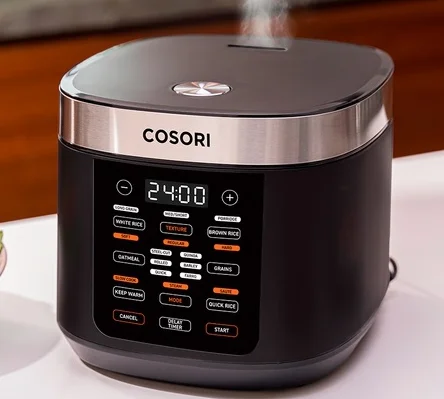
GETTING TO KNOW YOUR RICE COOKER
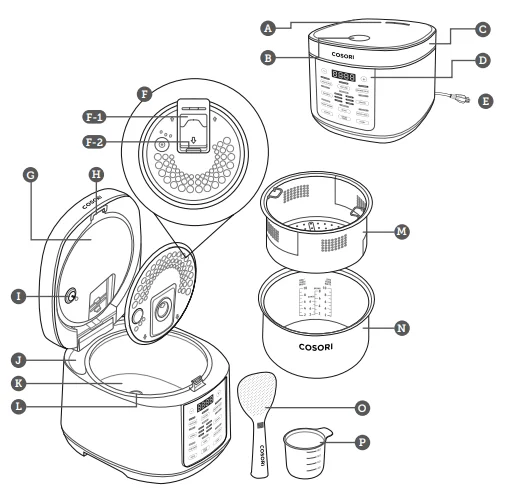
Rice Cooker Diagram
- Steam Vent
- Open Button
- Lid
- Control Panel
- Power Cord
- Inner Lid
- Steam Cap
- Steam Cap Release Button
- Radiator Plate
- Inner Lid Release Button
- Top Temperature Sensor
- Condensation Collectors
- Heating Plate
- Bottom Temperature Sensor
- 3.0-Quart Steam Basket
- Nonstick Inner Pot
- Standing Rice Paddle
- Measuring Cup

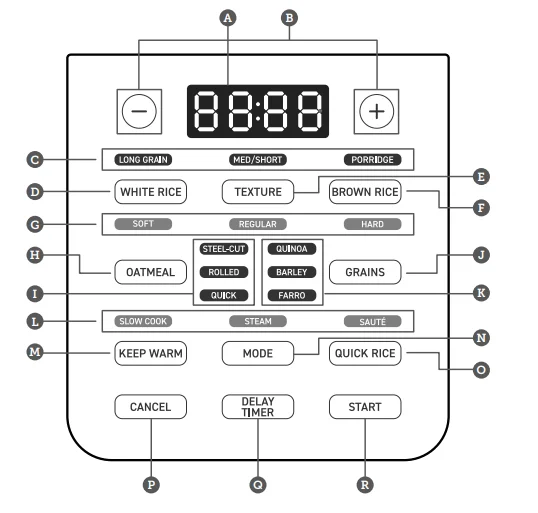
Control Panel
- Display
- Increase/Decrease Time
- Rice Type
- White Rice Button
- Rice Texture Button
- Brown Rice Button
- Rice Texture
- Oatmeal Button
- Oatmeal Type
- Grains Button
- Grain Type
- Cooking Modes
- Keep Warm Button
- Cooking Mode Button
- Quick Rice Button
- Cancel Button
- Delay Timer Button
- Start Button

BEFORE FIRST USE
Setting Up
- Remove all packaging around and inside the rice cooker.
- Place on a stable, level, heat-resistant surface. Keep away from areas that can be damaged by steam (such as walls or cupboards).
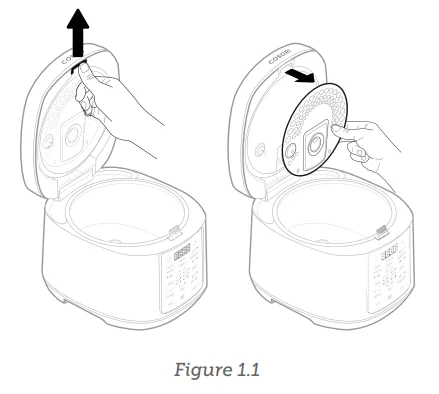
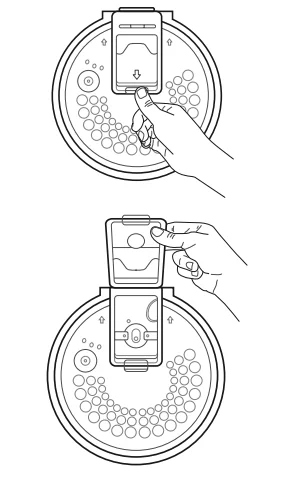
- Remove the inner lid (see page 17). [Figure 1.1]
- Wash the inner lid, steam cap, inner pot, steam basket, rice paddle, and measuring cup with hot, soapy water and a non-abrasive sponge.
- Dry the parts and reinstall the inner lid. Place the inner pot in the rice cooker.

Test Run
A test run will help you become familiar with your rice cooker, make sure it’s working correctly, and clean it of possible residues.
- Make sure there is no food or packaging in the rice cooker and plug it in.
- Add water to the inner pot up to the “STEAM” water level marking. Close the lid.
- Tap MODE twice to select “STEAM”.
- Tap START to start the Steam function.
- The rice cooker will beep several times when finished.
- Open the lid, carefully remove the inner pot, and discard the remaining water.
- Let the rice cooker cool for 15 minutes. Wipe the inner lid and outside of the rice cooker with a dry cloth.
COOKING WITH YOUR RICE COOKER
Cooking Functions
Note:
- Cook time is an estimate. Actual cook time may vary depending on factors such as the amount of grain and water, room temperature, water temperature, and voltage.
- The inner pot does not have water level markings for 1 cup. If you are cooking 1 cup, use the “Grain: Water Ratio” column to determine the correct amount of water.
Cooking Functions Quick Reference Charts
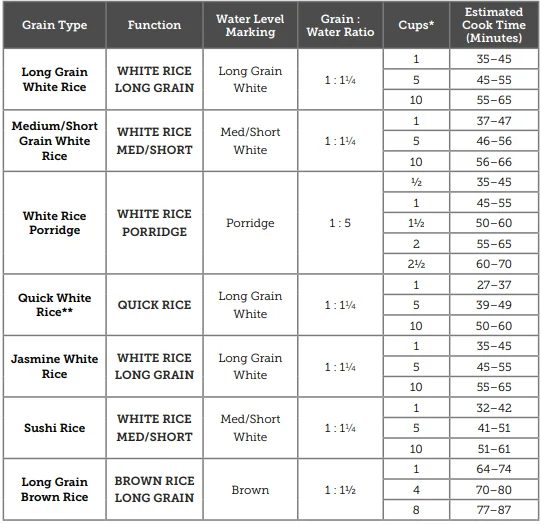
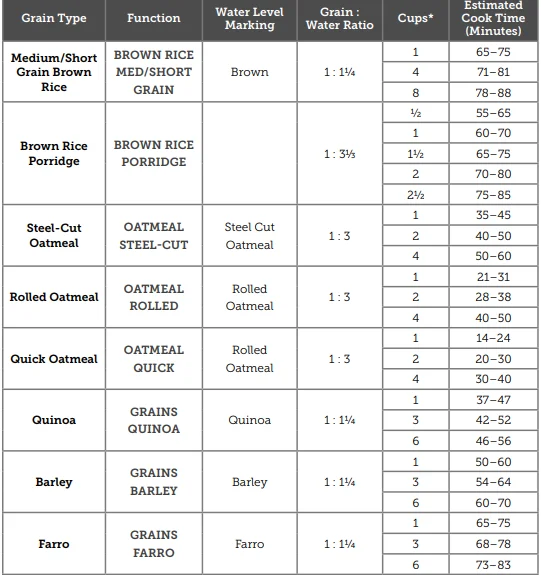
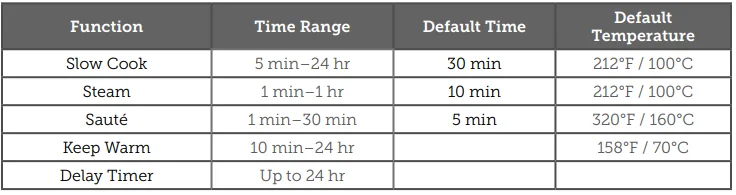
- 1 rice measuring cup is approximately 6.1 oz / 180 mL.
- The Quick Rice function cooks white rice faster but may result in slightly harder rice.

White Rice / Brown Rice
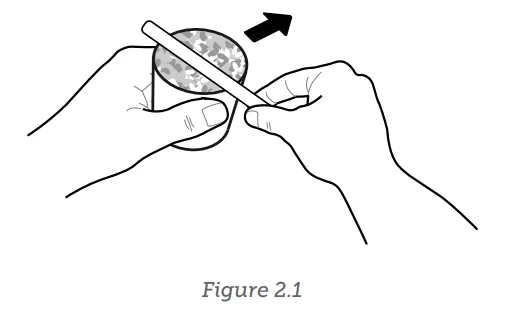
- Use the measuring cup to measure uncooked rice. Overfill the cup, then level it off to get an accurate measurement. [Figure 2.1]

- Place rice in a separate container or fine mesh sieve. Wash rice until the water appears clear.
- Transfer washed rice to the inner pot and add the appropriate amount of water. You can reference the water level markings printed on the inside of the inner pot.
- Place the inner pot in the rice cooker. Close the lid.
- Make sure that the inner lid and steam cap are properly installed.
- Plug in the rice cooker. Tap WHITE RICE or BROWN RICE. “LONG GRAIN” is automatically selected. Continue tapping to select “MED/SHORT GRAIN” or “PORRIDGE”. The estimated cook time will show on the display.
- If you’re cooking porridge, you can adjust the cook time from 40 min to 2 hr.
- “REGULAR” rice texture is automatically selected. Optionally, tap TEXTURE to select “SOFT” or “HARD”.
- Optionally, tap DELAY TIMER and use + and – to delay cooking for up to 24 hours. Cooking will automatically start after counting down.
- Tap START to start the cooking function.
- The rice cooker will beep several times when finished and automatically switch to the Keep Warm function. The display will show how much time has passed since cooking finished. Tap CANCEL twice to stop the Keep Warm function.
- Keep Warm can last up to 24 hours, but we recommend that you avoid leaving cooked rice in the rice cooker for more than 5 hours.
Quick Rice
- Use the measuring cup to measure uncooked rice. Overfill the cup, then level it off to get an accurate measurement.
- Place rice in a separate container or fine mesh sieve. Wash rice until the water appears clear.
- Transfer washed rice to the inner pot and add the appropriate amount of water. You can reference the water level markings printed on the inside of the inner pot.
- Place the inner pot in the rice cooker. Close the lid.
- Make sure that the inner lid and steam cap are properly installed.
- Plug in the rice cooker. Tap QUICK RICE. The estimated cook time will show on the display.
- The Quick Rice function cooks rice faster, but the texture may be slightly harder.
- Tap START to start the cooking function.
- The rice cooker will beep several times when finished and automatically switch to the Keep Warm function. The display will show how much time has passed since cooking finished. Tap CANCEL twice to stop the Keep Warm function.
- Keep Warm can last up to 24 hours, but we recommend that you avoid leaving cooked rice in the rice cooker for more than 5 hours.
Oatmeal
- Use the measuring cup to measure uncooked oats. Overfill the cup, then level it off to get an accurate measurement.
- Place oats in the inner pot and add the appropriate amount of water. You can reference the water level markings printed on the inside of the inner pot.
- Place the inner pot in the rice cooker. Close the lid.
- Make sure that the inner lid and steam cap are properly installed.
- Plug in the rice cooker. Tap OATMEAL. “STEEL-CUT” is automatically selected. Continue tapping to select “ROLLED” or “QUICK”. The estimated cook time will show on the display.
- Optionally, tap DELAY TIMER and use + and – to delay cooking for up to 24 hours. Cooking will automatically start after counting down.
- Tap START to start the cooking function.
- The rice cooker will beep several times when finished and automatically switch to the Keep Warm function. The display will show how much time has passed since cooking finished. Tap CANCEL twice to stop the Keep Warm function.
- Keep Warm can last up to 24 hours, but we recommend that you avoid leaving cooked oatmeal in the rice cooker for more than 3 hours.
Grains
- Use the measuring cup to measure uncooked grains, such as quinoa. Overfill the cup, then level it off to get an accurate measurement.
- Place grains in the inner pot and add the appropriate amount of water. You can reference the water level markings printed on the inside of the inner pot.
- Place the inner pot in the rice cooker. Close the lid.
a. Make sure that the inner lid and steam cap are properly installed. - Plug in the rice cooker. Tap GRAINS. “QUINOA” is automatically selected. Continue tapping to select “BARLEY” or “FARRO”. The estimated cook time will show on the display.
- Optionally, tap DELAY TIMER and use + and – to delay cooking for up to 24 hours. Cooking will automatically start after counting down.
- Tap START to start the cooking function.
- The rice cooker will beep several times when finished and automatically switch to the Keep Warm function. The display will show how much time has passed since cooking finished. Tap CANCEL twice to stop the Keep Warm function.
- Keep Warm can last up to 24 hours, but we recommend that you avoid leaving cooked grain in the rice cooker for more than 3 hours.
Slow Cook
- Place food in the inner pot.
- Do not fill past the 10-cup long grain white rice water level marking.
- Place the inner pot in the rice cooker. Close the lid.
- Make sure that the inner lid and steam cap are properly installed.
- Plug in the rice cooker. Tap MODE to select ‘SLOW COOK’.
- Tap + and – to adjust the cook time.
- Optionally, tap DELAY TIMER and use + and – to delay cooking for up to 24 hours. Cooking will automatically start after counting down.
- Tap START to start the cooking function.
- The rice cooker will beep several times when finished and automatically switch to the Keep Warm function. The display will show how much time has passed since cooking finished. Tap CANCEL twice to stop the Keep Warm function.
- Keep Warm can last up to 24 hours, but we recommend that you avoid leaving cooked food in the rice cooker for more than 3 hours.
CARE & MAINTENANCE
Note:
- Always clean the inner pot and accessories after every use.
- The inner pot has a nonstick coating for easy cleaning.
- Do not use abrasive cleaners, metal scouring pads, or metal utensils on any part of the rice cooker, including the inner pot and other accessories. These will scratch or damage their surfaces.
- This rice cooker does not contain any user-serviceable parts. For any repairs, contact Customer Support (see page 21).
- Before cleaning, turn off and unplug the rice cooker and allow it to cool completely.
- Wipe the outside and inside of the rice cooker with a moist cloth.
- Press the Inner Lid Release Button, then pull the inner lid to remove it. If necessary, press the Steam Cap Release Button to empty and clean the steam cap.

- Wash the inner lid, steam cap, inner pot, steam basket, rice paddle, and measuring cup with hot, soapy water and a non-abrasive sponge. Soak if necessary.
- Accessories are also dishwasher-safe on the top rack.
- If necessary, you can remove the steam cap for easy cleaning and drying.
- Dry the parts and reinstall the inner lid. Place the inner pot in the rice cooker.
- Let all surfaces dry completely before plugging in or turning on the rice cooker.
Storage
- Clean and dry the rice cooker and all accessories.
- Place the inner pot in the rice cooker. Close the lid.
- Store the rice cooker in an upright position. Do not store anything on top.
Emptying the Steam Cap
- Press the Steam Cap Release Button located on the inner lid.
- Empty the water that is collected in the steam cap.
- Clean the steam cap with hot, soapy water and a non-abrasive sponge.
- If necessary, you can remove the steam cap for easy cleaning and drying.
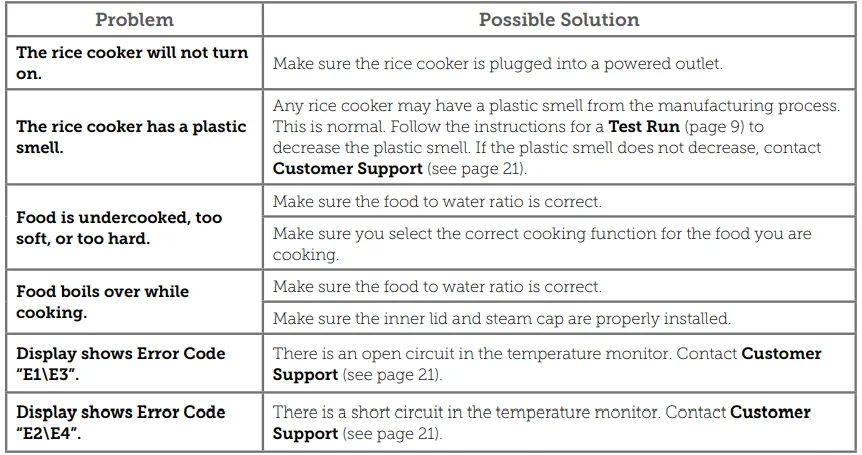
TROUBLESHOOTING
FEDERAL COMMUNICATIONS COMMISSION INTERFERENCE STATEMENT – PART 15
This device complies with Part 15 of the FCC Rules. Operation is subject to the following two conditions:
- This device may not cause harmful interference, and
- This device must accept any interference received, including interference that may cause undesired operation.
NOTE: This equipment has been tested and found to comply with the limits for a Class B digital device, pursuant to Part 15 of the FCC Rules. These limits are designed to provide reasonable protection against harmful interference in a residential installation. This equipment generates, uses, and can radiate radio frequency energy and, if not installed and used in accordance with the instructions, may cause harmful interference to radio communications.
However, there is no guarantee that interference will not occur in a particular installation. If this equipment does cause harmful interference to radio or television reception, which can be determined by turning the equipment off and on, the user is encouraged to try to correct the interference by one or more of the following measures:
- Reorient or relocate the receiving antenna.
- Increase the separation between the equipment and receiver.
- Connect the equipment into an outlet on a circuit different from that to which the receiver is connected.
- Consult the dealer or an experienced radio/TV technician for help.
FCC Caution: Any changes or modifications not expressly approved by the party responsible for compliance could void the user’s authority to operate this equipment.
FCC SUPPLIER’S DECLARATION OF CONFORMITY (SDOC)
Arovast Corporation hereby declares that this equipment is in compliance with FCC requirements. The declaration of conformity may be consulted in the support section of our website, accessible from www.cosori.com.
WARRANTY INFORMATION
TERMS & POLICY
Arovast Corporation (“Arovast”) warrants this product to the original purchaser to be free from defects in material and workmanship, under normal use and conditions, for a period of 2 years from the date of original purchase. Arovast agrees, at our option during the warranty period, to repair any defect in material or workmanship or furnish an equal product in exchange without charge, subject to verification of the defect or malfunction and proof of the date of purchase. There is no other express warranty. This warranty does not apply:
- If the product has been modified from its original condition;
- If the product has not been used in accordance with directions and instructions in the user manual;
- To damages or defects caused by accident, abuse, misuse, or improper or inadequate maintenance;
- To damages or defects caused by service or repair of the product performed by an unauthorised service provider or by anyone other than Arovast;
- To damages or defects occurring during commercial use, rental use, or any use for which the product is not intended;
- To damages or defects exceeding the cost of the product.
Arovast will not be liable for indirect, incidental, or consequential damages in connection with the use of the product covered by this warranty. This warranty extends only to the original consumer purchaser of the product and is not transferable to any subsequent owner of the product, regardless of whether the product is transferred during the specified term of the warranty.
This warranty does not extend to products purchased from unauthorised sellers. Arovast’s warranty extends only to products purchased from authorised sellers that are subject to Arovast’s quality controls and have agreed to follow its quality controls. All implied warranties are limited to the period of this limited warranty. This warranty gives you specific legal rights, and you may also have other rights which vary from state to state. Some states do not allow the exclusion or limitation of incidental or consequential damages, so the above limitation or exclusion may not apply to you.
If you discover that your product is defective within the specified warranty period, please contact Customer Support via [email protected]. DO NOT dispose of your product before contacting us. Once our Customer Support Team has approved your request, please return the product with a copy of the invoice and order ID. Every Cosori product automatically includes a 2-year warranty. To make the customer support process quick and easy, register your product online at www.cosori.com/warranty. This warranty is made by:
Arovast Corporation
1202 N. Miller St., Suite A
Anaheim, CA 92806
USA
For More Manuals By COSORI, Visit ManualsLibraryy
COSORI CRC-R501-KUS 5.0-Quart Rice Cooker-FAQS
What safety features does COSORI provide?
COSORI appliances include overheat protection, auto-pause when the lid/basket is removed, and preheat functions for more consistent cooking.
Can I steam vegetables in the COSORI rice cooker?
Yes. Select the Steam mode and cook vegetables like broccoli or cauliflower for 8–10 minutes, depending on your preferred texture.
Can I boil eggs in the rice cooker?
Yes. Place eggs in the inner pot, cover with water, select Slow Cook, set for 10 minutes, and start the cycle.
What is the 5-5-5 rule for cooking rice on a stovetop?
Bring the rice to a boil for 10 minutes, simmer for 5 minutes, and let it rest off heat for 5 minutes. (This is a cooking trick, not specific to COSORI.)
What is the 24-hour rule for cooked rice?
Refrigerate cooked rice within 1 hour and consume it within 24 hours to reduce the risk of bacterial growth (Bacillus cereus).
Do I need to add salt when cooking rice?
Salt is optional. Traditional rice cooking requires only rice + water. Butter or oil may be added if desired.
What common issues occur with rice cookers?
Typical problems include rice not fully cooking, switching to Keep Warm too early, long cook times, or uneven results.
Can rice be overcooked in a rice cooker?
Yes. Some rice types, especially parboiled varieties, may become mushy if overcooked.
How long does rice take to cook in the COSORI 5.0-Quart cooker?
White rice typically takes 25–35 minutes, depending on the rice type and selected program.
Can I steam broccoli in the COSORI cooker?
Yes, broccoli can be steamed using the Steam mode for about 8 minutes.