

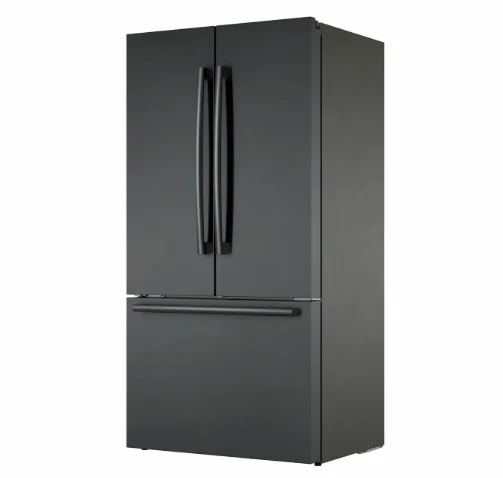
Bosch 800 Series B36CT80SNB French Door Bottom Mount Refrigerator
Familiarizing yourself with your appliance
Appliance
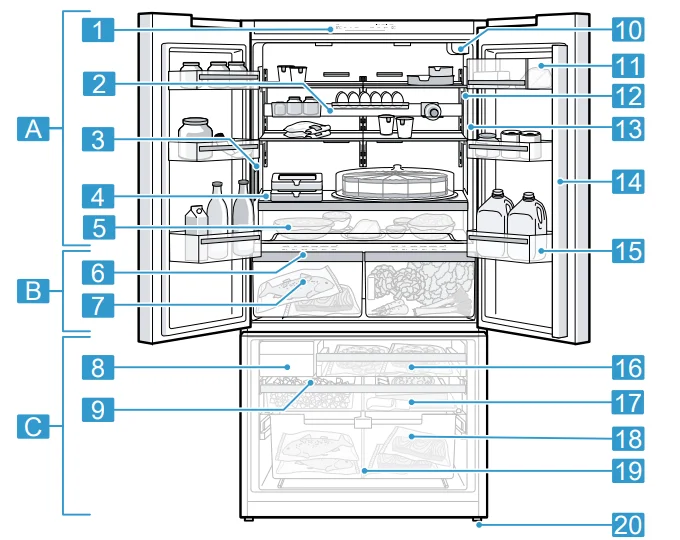
Here you can find an overview of the parts of your appliance. Your appliance may differ from the diagrams with regard to cosmetic features and dimensions.
- Refrigerator compartment → Page 18
- Cool-fresh compartment → Page 19
- Freezer compartment → Page 19
- Control panel → Page 10
- Equipment bar → Page 12
- Water dispenser → Page 21
- Fixed shelf → Page 13
- Pull-out container → Page 13
- Control panel (cool-fresh compartment) → Page 12
- Cool-fresh container → Page 13
- Ice cube maker → Page 21
- Ice storage container → Page 13
- Water filter → Page 20
- Butter and cheese compartment → Page 13
- Interior lighting
- Rating label → Page 31
- Mullion rail with condensation protection → Page 7
- Door tray for large bottles → Page 13
- Frozen food pull-out container → Page 13
- Flat frozen food container → Page 13
- Suspended frozen food container → Page 13
- Container divider → Page 13
- Screw foot

Control panel
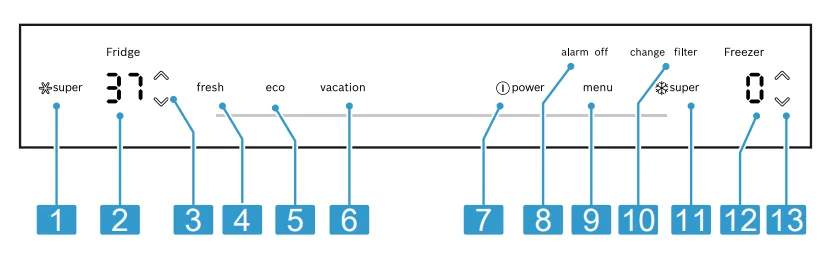
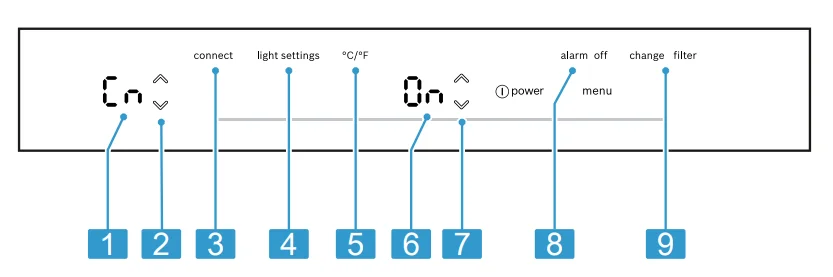
You can use the control panel to configure all functions of your appliance and to obtain information about the operating status.
- switches Super cooling on or off.
- Displays the set temperature for the refrigerator compartment in °F or °C.
- / sets the temperature of the refrigerator compartment.
- switches freshness mode on or off.
- switches energy-saving mode on or off.
- switches vacation mode on or off.
- switches the appliance on or off.
- switches off the alarm.
- opens and closes the menu.
- lights up when the filter needs to be replaced.
- switches Super freezing on or off.
- Displays the set temperature for the freezer compartment in °F or °C.
- / sets the temperature of the freezer compartment.

Control panel (submenu)
You can configure further settings in the submenu.
- Displays the selected submenu.
- / is used to navigate through the submenu.
- Opens the menu for setting Home Connect.
- Opens the menu for setting the lighting.
- Opens the menu for changing the temperature unit.
- Displays the settings of the submenu.
- / changes the submenu setting.
- Opens the menu for setting the door alarm.
- Opens the menu for setting the filter.

Control panel (cool-fresh compartment)
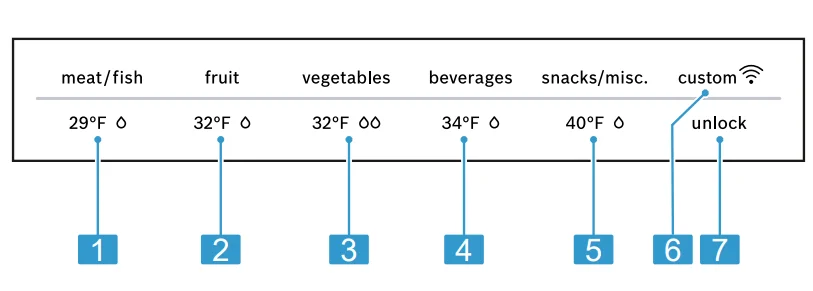
Using the control panel for the cool-fresh compartment, you can set the temperature and humidity in the cool-fresh compartment.
- sets the cool-fresh compartment storage setting for meat and fish.
- sets the cool-fresh compartment storage setting for fruit.
- sets the cool-fresh compartment storage setting for vegetables.
- sets the cool-fresh compartment storage setting for beverages.
- sets the cool-fresh compartment storage setting for snacks.
- lights up if user-defined settings have been set via the Home Connect app. You can find more information in the Home Connect app.
- switches the button lock for the control panel (cool-fresh compartment) off.

Features
The features of your appliance depend on the model.
6.1 Shelf
NOTICE: If fitted at an angle, the hooks on the shelf can scratch the rear panel of the refrigerator compartment.
- Ensure that the shelf is horizontal and that the hooks are properly fitted in place.
- To vary the shelf as desired, you can remove the shelf and re-insert it elsewhere. → “Removing the shelf”, Page 23
Note: To avoid impeding the circulation of air, do not cover the inner ventilation openings.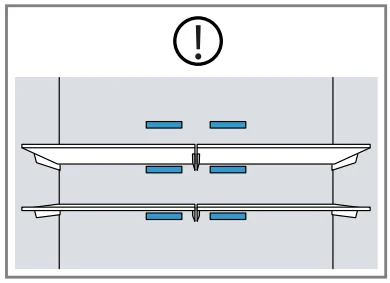
6.2 Equipment bar
The fittings on the equipment bar provide additional storage space in the refrigerator compartment:
- Store a bottle securely on the bottle shelf.
- Store preserving jars in the container.
- Store an egg carton on the shelf.
You can position the fittings anywhere along the equipment bar.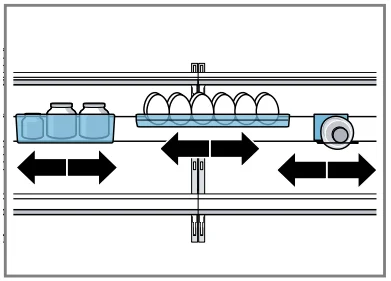
NOTICE: If fitted at an angle, the hooks on the equipment bar can scratch the rear panel of the refrigerator compartment.
- Ensure that the equipment bar is horizontal and that the hooks are properly fitted in place.
- You can remove the equipment bar and re-insert it at a different location. → “Removing the equipment bar”, Page 23
Tip: Position the equipment bar in the centre of the refrigerator compartment.
6.3 Fixed shelf
Always put the fixed shelf in the specified position.
6.4 Pull-out container
Store large plates or containers with processed food that has been covered in the pull-out container.
6.5 Cool-fresh container
Use the lower temperatures in the cool-fresh container to store highly perishable food, e.g., fish, meat, and sausages.
6.6 Container divider
WARNING
- Children may climb into the appliance and suffocate.
- Never remove the container divider from the suspended frozen food container.
NOTICE:
- The container divider for the suspended frozen food container will be damaged if removed.
- Never remove the container divider from the suspended frozen food container.
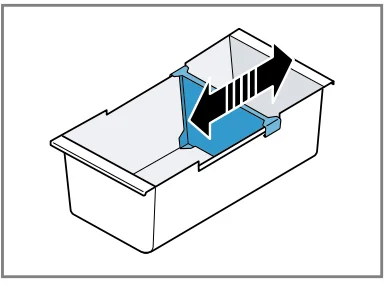
- To vary the division of the suspended frozen food container, you can move the container divider.

6.7 Flat frozen food container
Store flat frozen items, the ice storage container, and the ice scoop in the flat frozen food container.
6.8 Frozen food pull-out container
In order to achieve an improved overview and to remove frozen food more quickly, remove the frozen food pull-out container.
6.9 Suspended frozen food container
Store large frozen items in the suspended frozen food container.
6.10 Butter and cheese compartment
Store butter and hard cheese in the butter and cheese compartment.
6.11 Door tray
To adjust the door tray as desired, you can remove the door tray and re-insert it elsewhere. → “Removing the door tray”, Page 23
6.12 Ice storage container
If ice cube production is switched on, the ice cubes are automatically stored in the ice storage container.
NOTICE:
- The ice maker may become blocked or damaged by food or objects stored in the ice storage container.
- Never store food or objects in the ice storage container.
Note: To prevent the ice storage container from being overfilled, do not manually distribute the ice cubes throughout the ice storage container.
Tip: To ensure that no ice cubes fall into the freezer compartment from the ice storage container, do not slam the freezer compartment drawer shut.
6.13 Accessories
Only use original accessories. These are designed especially for your appliance. The accessories for your appliance depend on the model.
Ethylene absorber
For important safety instructions and information about installation and use, see the enclosed installation instructions for the ethylene absorber. The ethylene absorber slows down the ripening of ethylene-sensitive fruit and vegetables to keep them fresher for longer.
Installing the ethylene absorber
- Install the ethylene absorber in accordance with the installation instructions for the ethylene absorber.
Using the refill set
- Install the components of the refill set in accordance with the installation instructions for the ethylene absorber.
- Replace the bags and timer at least every 6 months following activation.
Note: Refill sets can be purchased from customer service or our website.
Ice scoop
You can use the ice scoop to remove a portion of the ice cubes.
7 Basic Operations
7.1 Switching on the appliance
- Connect the appliance to the electricity supply. → Page 8. Note: If the appliance has been previously switched off using the control panel, press.
- The appliance begins to cool.
- A warning signal sounds, the temperature display (freezer compartment) flashes and lights up because the freezer compartment is still too warm.
- Switch off the warning tone.
- Goes out as soon as the set temperature has been reached.
- Set the desired temperature. → Page 14
7.2 Operating tips
- Once you have switched on the appliance, the set temperature is only reached after several hours. Do not put any food in the appliance until the set temperature has been reached.
- The front and side panels of the housing heat up occasionally. This prevents condensation from forming.
- When you close the door, a vacuum may be created. The door is then difficult to open again. Wait a moment until the vacuum is offset.
- The temperature in the appliance varies due to the following conditions:
- How often the appliance is opened
- Load capacity
- Temperature of newly stored food
- Ambient temperature
- Direct sunlight
7.3 Switching off the appliance
- Press.
7.4 Setting the temperature unit
You can choose between the temperature units °F and °C.
- Press.
- Press.
- Press / until the submenu setting display shows “F” or “C”.
- Press.
7.5 Setting the temperature
Setting the refrigerator compartment temperature
- Press / repeatedly until the temperature display (refrigerator compartment) shows the desired temperature setting.
- The recommended temperature in the refrigerator compartment is 37 °F (3 °C).
Setting the freezer compartment temperature
- Press / repeatedly until the temperature display (freezer compartment) shows the desired temperature setting.
- The recommended temperature in the freezer compartment is 0 °F (−18 °C).
7.6 Cool-fresh compartment storage setting
You can set the temperature and humidity of the cool-fresh compartment using predefined storage settings. Tip: Further settings are available in the Home Connect app.
Setting the cool-fresh compartment storage setting
- Press any touch field on the control panel (cool-fresh compartment).
- Press and hold until the light bar lights up fully.
- Press the storage setting that you desire.
Tips for Storing Food in the Refrigerator Compartment
- Only store food when fresh and undamaged.
- Store food covered or in air-tight packaging.
- To avoid impeding air circulation and prevent food from freezing, do not place food in front of the inner ventilation openings or in direct contact with the back wall.
- Allow hot food and drinks to cool down first before placing them in the appliance.
- Observe the best-before date or expiration date specified by the manufacturer.
Tips for Freezing Fresh Food
- Freeze fresh and undamaged food only.
- Freeze food in portions.
- Cooked food is more suitable for freezing than food that can be eaten raw.
- Vegetables: Wash, chop, and blanch before freezing.
- Fruit: Wash, pit, peel if needed, and possibly add sugar or an ascorbic acid solution.
- Suitable foods for freezing: Baked items, fish and seafood, meat, game, poultry, eggs without shells, cheese, butter, curd cheese, prepared meals, and leftovers.
- Unsuitable foods for freezing: Lettuce, radishes, eggs in shells, grapes, raw apples and pears, yogurt, sour cream, crème fraîche, and mayonnaise.
Packing Frozen Food
- Place the food in suitable packaging.
- Squeeze out the air.
- Seal the food airtight to prevent flavor loss or drying out.
- Label the packaging with the contents and date of freezing.
Defrosting Methods for Frozen Food
CAUTION: During thawing, bacteria may multiply and spoil the food.
- Do not refreeze partly or completely thawed food.
- Refreeze food only after cooking.
- Once thawed, food should no longer be stored for the maximum storage period.
Defrosting tips:
- Defrost animal-based foods (fish, meat, cheese, curd cheese) in the refrigerator compartment.
- Defrost bread at room temperature.
- Prepare food for immediate consumption using the microwave, oven, or cooktop.
14 Water system
Your appliance is equipped with water-carrying components. The water system only works if a water filter or a bypass cap is installed. Switch off ice cube production before disconnecting the appliance from the drinking water connection. → Page 22
14.1 Water filter
The water filter filters particles and the taste of chlorine out of the water. The water filter reduces further contamination, e.g., from chloramines, lead, and pharmaceutical products. Note: The water filter does not filter bacteria or microbes out of the water.
Change the water filter:
- Every 6 months.
- If it lights up.
- If the water output has visibly reduced.
Tips
- A new water filter can be purchased from our customer service, your dealer, or our website.
- If you do not want to use a water filter in your appliance, or an external water filter system is installed, you can permanently replace the water filter with a bypass cap. The bypass cap filters only large particles out of the water and can be cleaned as required.
- A bypass cap can be purchased from customer service or our website.
Filter change notification
- Every 6 months, the filter change notification will come on. Lights up. Note: Increased water consumption switches the filter change notification on sooner.
Switching off the filter change notification
- Replace the water filter.
- The bypass cap does not need to be replaced.
- Press and hold for 3 seconds.
- Goes out.
- The filter change status is reset.
Filter change status
If you replace the filter before the filter change notification, reset the filter change status.
Resetting the filter change status
- Press.
- Press.
- The submenu setting display shows “1”.
- Press.
- The submenu setting display shows “0”.
- Press.
Changing the water filter or replacing it with a bypass cap
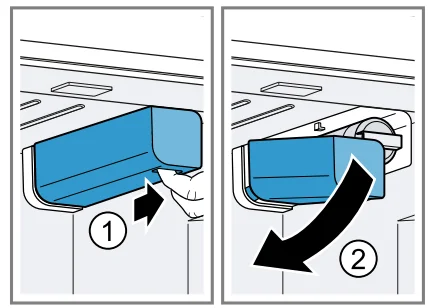
- Reach into the recess below the filter cover, pull it forward slightly, and then down to the left.

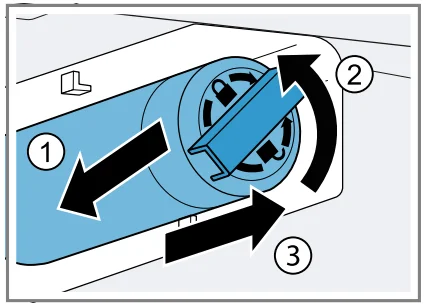
- Pull the water filter down to the left, turn it counterclockwise by 90°, and remove it.
- Remove the water filter with care, as it is under pressure. Note: When removing it, a small amount of water may drip out of the water filter. Remove the drips of water with a dry cloth. Tip: You can dispose of the old water filter with your household garbage.

- Insert the new water filter or the bypass cap all the way into the filter opening, turn it 90° clockwise all the way, and fold it up to the right.
- Move the filter cover up to the right and slide it back all the way.
- Discard the ice cubes produced during the first 24 hours, and dispense water for 5 minutes and discard.
14.2 Water dispenser
Dispense cold water via the water dispenser.
Putting the water dispenser into operation
Note: Once the appliance has been connected or a new water filter has been installed, there will be air in the water system. Requirement: The appliance is connected to the drinking water connection.
- Keep dispensing water until it contains no more air bubbles. Remove any splashes of water with a dry cloth.
- For hygiene reasons, dispense water for 5 minutes and discard.
Dispensing water
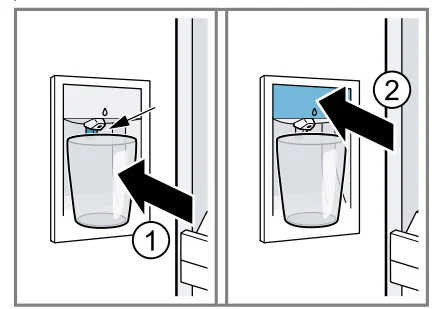
- Press and hold the glass against the dispensing button, or hold the glass under the water dispenser and press.

Notes
- After a while of continuous dispensing, the water stops being dispensed. Wait a few seconds before dispensing water again.
- After water has been dispensed several times consecutively, water stops being dispensed. Wait a few minutes before dispensing water again.
14.3 Ice maker
Use the ice maker to produce ice cubes.
WARNING
- Rotating parts may cause injury.
- Never reach into or underneath the ice maker.
Note: The ice cube maker automatically detects that the ice storage container is full and stops producing ice cubes. It may take up to 48 hours until the ice storage container is full.
Tips
- You can accelerate ice cube production by setting a colder freezer compartment temperature or by switching on Super freezing. This slightly increases the energy consumption.
- If the ice cubes taste stale, dispose of the remaining ice cubes and the cubes produced over the next 24 hours. If the ice cubes still taste stale, change the water filter.
Putting the ice maker into operation
Notes
- Ice cube production starts as soon as the appliance is switched on and the freezer compartment has reached the set temperature.
- As soon as the freezer compartment reaches the set temperature, the first batch of ice cubes will be ready in approximately 4 hours.
- Requirement: The appliance is connected to the drinking water connection.
- For hygiene reasons, discard the ice cubes produced within the first 24 hours.
Switching on ice cube production
- Lift the ice maker cover upwards and press the ice maker button.
- The ice maker button lights up.

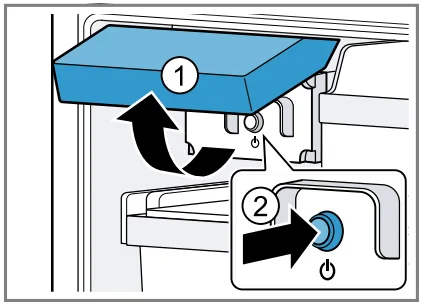
Note: If you press and hold the ice maker button for 3 seconds, the filter change status is reset.
Switching off ice cube production
- Lift the ice maker cover upwards and press the ice maker button 2.

- The ice maker button goes out.
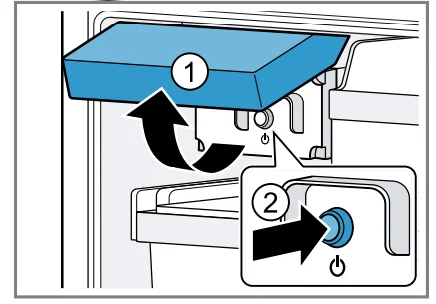
Note: If you press and hold the ice maker button for 3 seconds, the filter change status is reset.
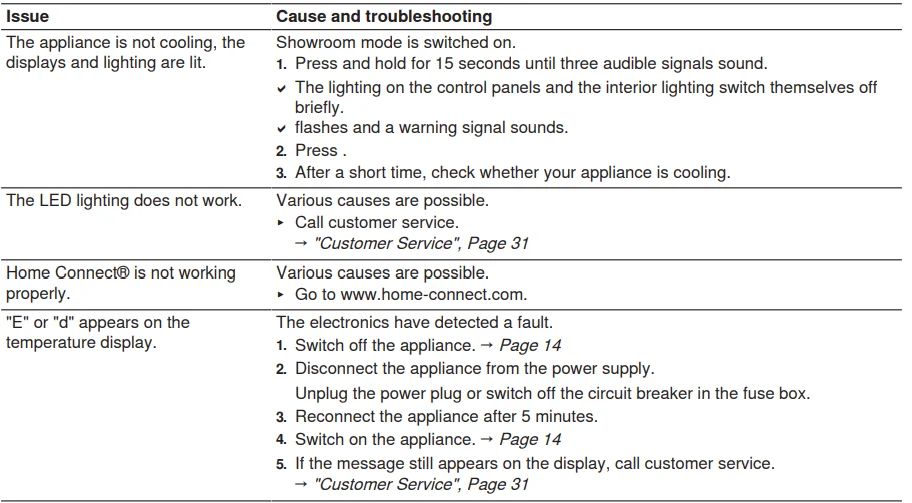
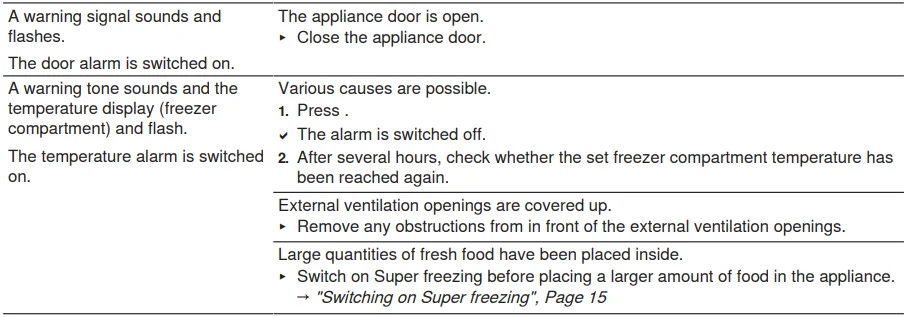
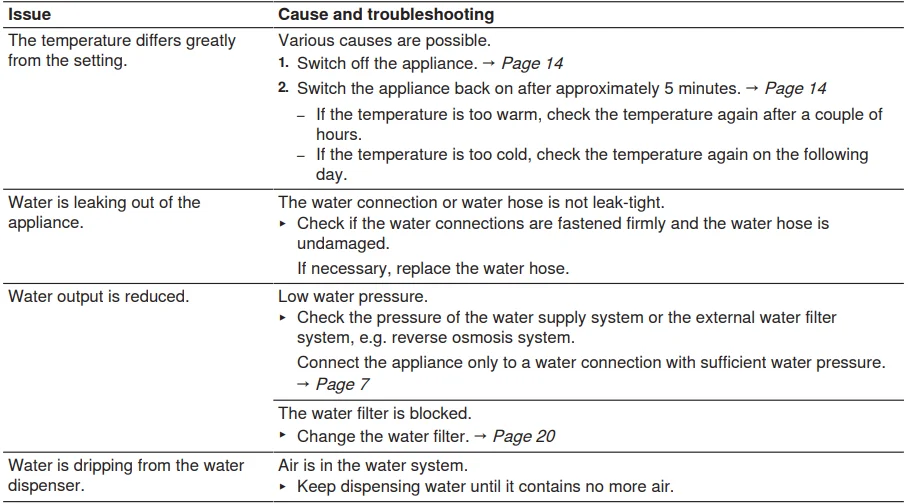
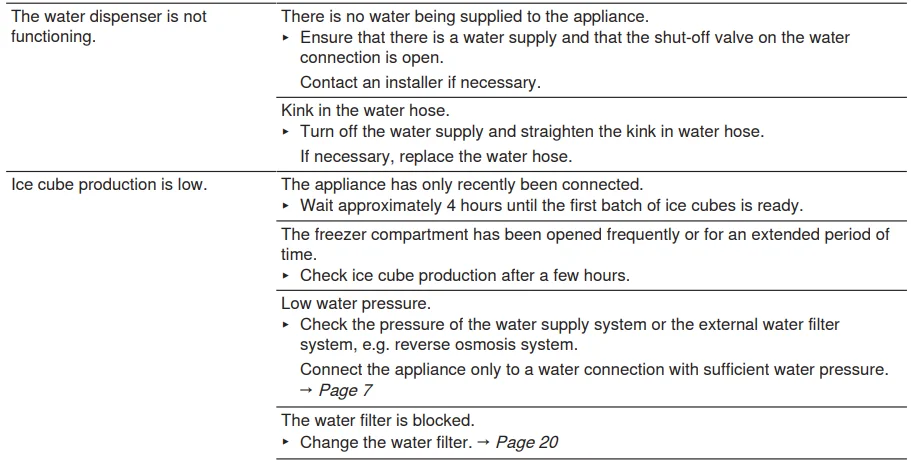
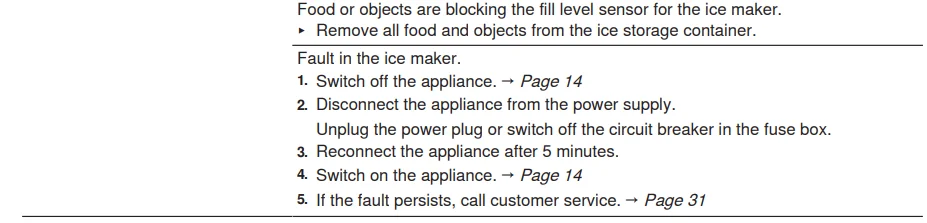
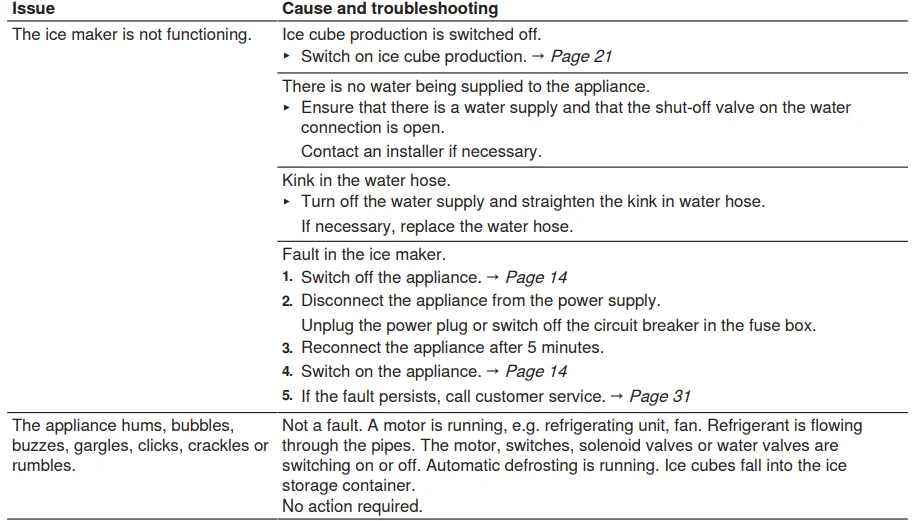
Troubleshooting
You can eliminate minor issues on your appliance yourself. Please read the information on eliminating issues before contacting Customer Service. This may avoid unnecessary repair costs.
WARNING
- Improper repairs are dangerous.
- Repairs to the appliance should only be performed by authorized service providers.
- Only original spare parts may be used to repair the appliance.
- If the power cord or the appliance power cable of this appliance becomes damaged, it must be replaced with a special power cord or special appliance power cable, which is available from the manufacturer or the manufacturer’s Customer Service.


Customer Service
With any warranty repair, we will make sure your appliance is repaired by an authorized service provider using genuine replacement parts. We use only genuine replacement parts for all repairs. Detailed information on the warranty period and terms of warranty can be found in the Statement of Limited Product Warranty, from your retailer, or on our website. If you contact Customer Service, you will need the model number (E-Nr.) and the production number (FD) of your appliance.
USA:
1-800-944-2904, www.bosch-home.com/us/owner-support/get-support, www.bosch-home.com/us/shop.
CA:
1-800-944-2904
www.bosch-home.ca/en/service/get-support, www.bosch-home.ca/en/service/cleaners-and-accessories.
For assistance with connecting to Home Connect, you can also view instructions here: www.home-connect.com/us/en/help-support/set-up.
For More Manuals By Bosch, Visit ManualsLibraryy
Bosch 800 Series B36CT80SNB French Door Bottom Mount Refrigerator-FAQS
How do I adjust the temperature on my Bosch refrigerator?
Press the refrigerator temperature button repeatedly until the desired temperature is shown. The last set temperature is saved automatically.
What is the recommended temperature for a Bosch fridge and freezer?
The fridge should be set between 35–38°F (1.7–3.3°C) and the freezer at 0°F (-18°C) for optimal freshness and food safety.
Why is my Bosch refrigerator not cooling properly?
Common reasons include blocked air vents, dirty condenser coils, a malfunctioning evaporator fan, or an issue with the compressor. Ensure proper airflow and check the temperature settings.
How do I reset my Bosch 800 Series refrigerator?
Unplug the refrigerator for a few minutes and then plug it back in. For control panel or display resets, refer to the manual for the specific reset procedure.
How often should I clean the condenser coils?
Clean the coils at least once or twice a year, or more often if there’s noticeable dust or pet hair. Unplug the fridge before cleaning.
How do I make the water from the dispenser colder?
Lower the temperature in the Fresh Food compartment. The water in the dispenser tubing may take a few ounces to chill initially.
Why is my Bosch fridge running constantly?
It’s normal for the fridge to cycle frequently to maintain temperature. However, if it runs continuously, check for blocked vents, door seal issues, or dirty condenser coils.
Where is the temperature sensor located?
The sensor is typically inside the fresh food compartment, near the evaporator coil or behind the control panel. It regulates the cooling based on temperature readings.