
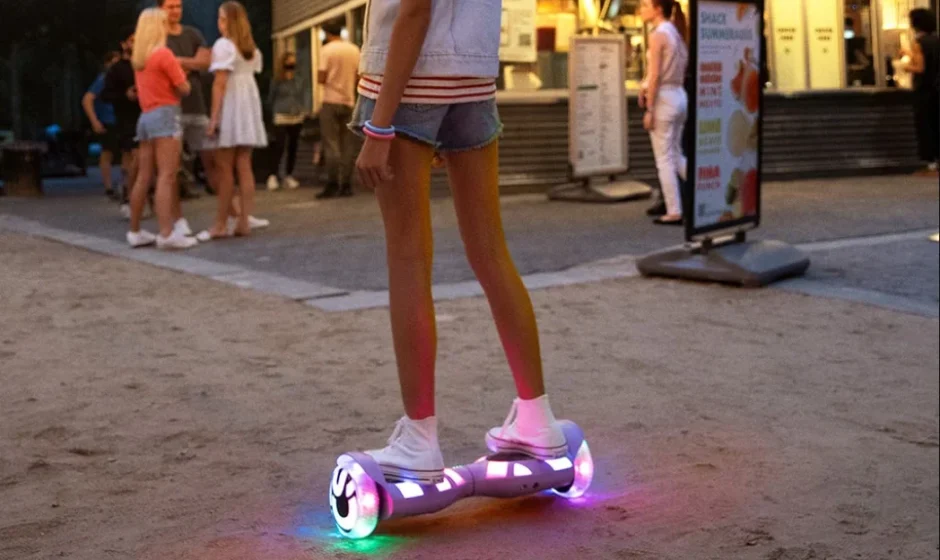

Jetson Litho X All-Terrain Hoverboard
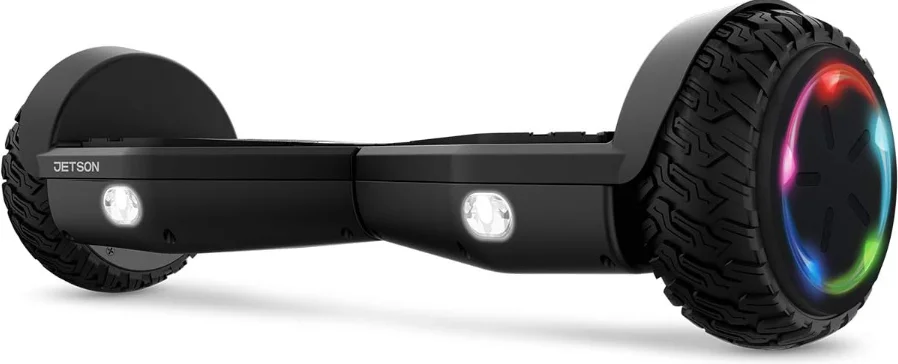
Safety Warnings
- Before use, please read the user manual and safety warnings carefully, and make sure you understand and accept all the safety instructions. The user will be responsible for any loss or damage caused by improper use.
- Before each cycle of operation, the operator shall perform the preoperation checks specified by the manufacturer: That all guards and pads originally supplied by the manufacturer are in proper place and in serviceable condition; That the braking system is functioning properly; That any axle guards, chain guards, or other covers or guards supplied by the manufacturer are in place and in serviceable condition; That tires are in good condition, inflated properly, and have sufficient tread remaining; The area that the product is to be operated should be safe and suitable for safe operation.
- Components shall be maintained and repaired in accordance with the manufacturer’s specifications and using only the manufacturer’s authorized replacement parts, with installation performed by dealers or other skilled persons.
- Warning against recharging non-rechargeable batteries.
- Don’t allow hands, feet, hair, body parts, clothing, or similar articles to come in contact with moving parts, wheels, or drive train, while the motor is running.
- This product should not be used by children or persons with reduced physical, sensory,y or mental capabilities, or lack of experience and knowledge, unless they have been given supervision or instruction (IEC 60335-1/A2:2006).
- Unsupervised children should not play with the product (IEC 60335-1/A2:2006).
- Adult supervision is required.
- The rider should not exceed 220 lb.
- Units shall not be operated to perform racing, stunt riding, or other maneuvers, which may cause loss of control, or may cause uncontrolled operator/passenger actions or reactions.
- Never use near motor vehicles.
- Avoid sharp bumps, drainage grates, and sudden surface changes. Scooter may suddenly stop.
- Avoid streets and surfaces with water, sand, gravel, dirt, leaves, and other debris. Wet weather impairs traction, braking, and visibility.
- Avoid riding around flammable gases, steam, liquids, or dust that could cause fire.
- Operators shall adhere to all of the manufacturer’s recommendations and instructions, as well as comply with all laws and ordinances:
Units without headlights shall be operated only with adequate daylight conditions of visibility, and; Owners shall be encouraged to highlight (for conspicuity) using lighting, reflectors, and, for low-riding units, signal flags on flexible poles. - Persons with the following conditions shall be cautioned not to operate: Those with heart conditions; Pregnant women; Persons with head, back, or neck ailments, or prior surgeries to those areas of the body; and persons with any mental or physical conditions that may make them susceptible to injury or impair their physical dexterity or mental capabilities to recognize, understand, and perform all of the safety instructions and to be able to assume the hazards inherent in unit use.
- Do not ride at night.
- Do not ride after drinking or taking prescription medication.
- Do not carry items when riding.
- Never operate the product barefoot.
- Always wear shoes and keep your shoelaces tied.
- Make sure your feet are always placed securely on the deck.
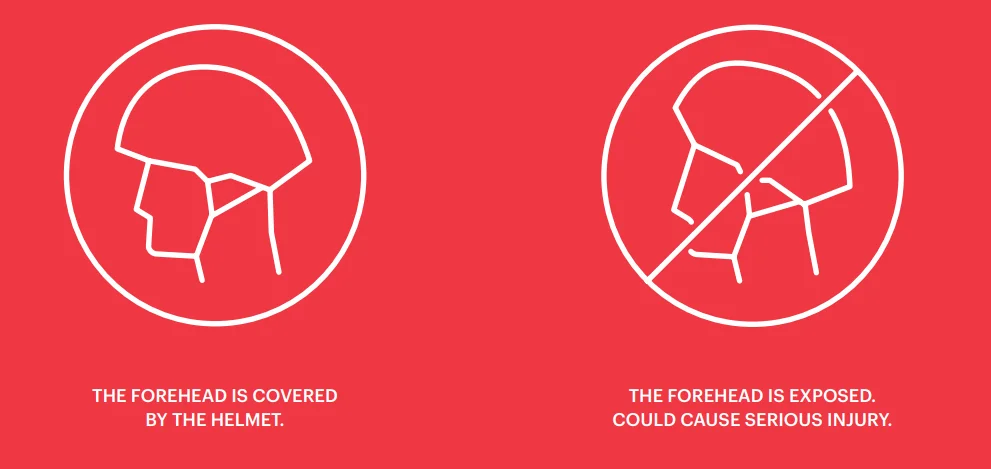
- Operators shall use appropriate protective clothing, including but not limited to a helmet with appropriate certification, and any other equipment recommended by the manufacturer. Always wear protective equipment such as a helmet, knee pads, and elbow pads.
- Always give way to pedestrians.
- Be alert to things in front of and far away from you.
- Do not allow distractions when riding, such as answering the phone or engaging in any other activities.
- The product cannot be ridden by more than one person.
- When you ride the product along with other riders, always keep a safe distance to avoid a collision.
- When turning, be sure to maintain your balance.
- Riding with improperly adjusted brakes is dangerous and can result in serious injury or death.
- The brake may become hot while operating. Do not touch the brake with your bare skin.
- Applying the brakes too hard or too suddenly can lock up a wheel, which could cause you to lose control and fall. Sudden or excessive application of the brake may result in injury or death.
- If the brake loosens, please adjust it with the hexagon wrench, or please contact Jetson Customer Care.
- Replace worn or broken parts immediately.
- Check whether all safety labels are in place and understood before riding.
- The owner shall allow the use and operation of the unit after a demonstration that such operators can understand and operate all components of the unit before use.
- Do not ride without proper training. Do not ride at high speeds, on uneven terrain, or on slopes. Do not perform stunts or turn abruptly.
- Recommended for indoor use.
- Prolonged exposure to UV rays, rain, and the elements may damage the enclosure material. Storee indoors when not in use.
California Proposition 65
 Warning:
This product can expose you to a chemical, such as Cadmium,m that is known to the state of California to cause cancer or birth defects or other reproductive harm. For more information, go to www.p65warnings.ca.gov/product
MODIFICATIONS
Do not attempt to disassemble, modify, repair, or replace the unit or any components of the unit without instruction from Jetson Customer Care. This will void any warranty and can lead to malfunctions, which may cause injury.
ADDITIONAL OPERATION CAUTIONS
Do not lift the product off the ground while it is on and the wheels are in motion. This can result in freely spinning wheels, which may cause injury to yourself or others nearby. Do not jump on or off the product, and do not jump while using it. Always keep your feet firmly planted on the footrest while in operation. Always check the battery charge before using.
NOTICE OF COMPLIANCE
This device complies with Part 15 of the FCC Rules. Operation is subject to the following two conditions:
- This device may not cause harmful interference, and
- This device must accept any interference received, including interference that may cause undesired operation. Warning:
Changes or modifications to this unit not expressly approved by the party responsible for compliance could void the user’s authority to operate the equipment.
NOTE: This equipment has been tested and found to comply with the limits for a Class B digital device, pursuant to Part 15 of the FCC Rules. These limits are designed to provide reasonable protection against harmful interference in a residential installation. This equipment generates, uses,s and can radiate radio frequency energy and, if not installed and used in accordance with the instructions, may cause harmful interference to radio communications. However, there is no guarantee that interference will not occur in a particular installation. If this equipment does cause harmful interference to radio or television reception, which can be determined by turning the equipment off and on, the user is encouraged to try to correct the interference by one or more of the following measures:
- Reorient or relocate the receiving antenna.
- Increase the separation between the equipment and receiver.
- Connect the equipment into an outlet on a circuit different from that to which the receiver is connected.
- Consult the dealer or an experienced radio/ TV technician for help.
Shielded cables must be used with this unit to ensure compliance with the Class B FCC limits.
Litho X Overview
- LED LIGHTS
- POWER BUTTON
- CHARGING PORT
- CHARGER
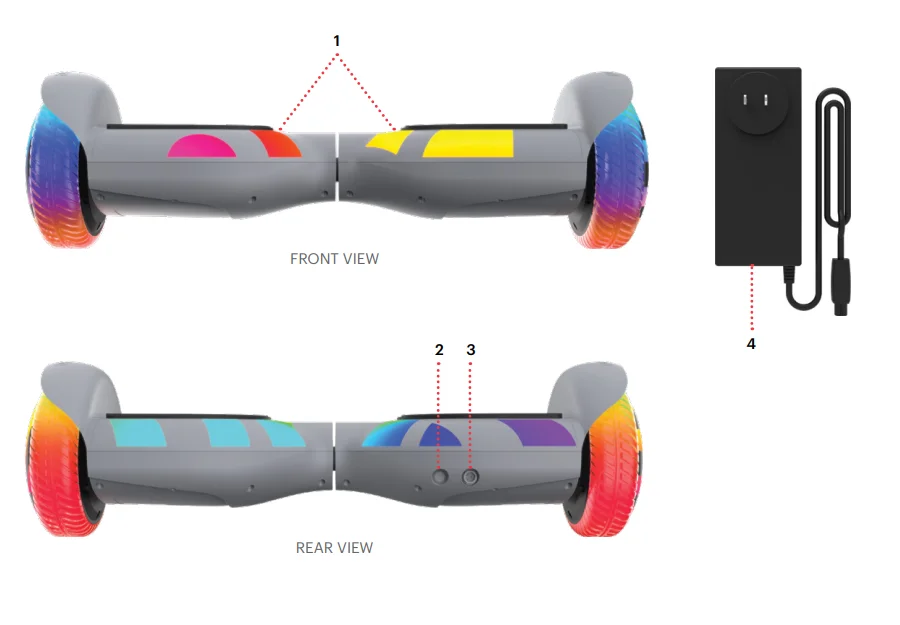
*ADULTS MUST ASSIST CHILDREN IN THE INITIAL ADJUSTMENT PROCEDURES OF THE PRODUCT.
PLEASE NOTE: IMAGES MAY NOT REFLECT THE EXACT APPEARANCE OF THE ACTUAL PRODUCT.
Specs & Features
- MAX SPEED: UP TO 10 MPH
- MAX RANGE: UP TO 10 MILES
- BATTERY: 36V, 2.0AH LITHIUM-ION
- MOTOR: 400W
- CLIMBING ANGLE: UP TO 15°
- PRODUCT WEIGHT: 13.6 LB
- TIRE SIZE: 6.3”
- PRODUCT DIMENSIONS: L24.2” × W7” × H7.4”
- CHARGER: UL LISTED, 100-240V
- CHARGE TIME: UP TO 5 HOURS
- WEIGHT LIMIT: 220 LB
- RECOMMENDED AGE: 12+
Get Started
Charging the Battery
- ONLY USE THE INCLUDED CHARGER
- PLUG THE CHARGER INTO THE WALL BEFORE THE CHARGING PORT
- DON’T TURN ON THE LITHO X WHILE IT’S CHARGING
- CHARGE THE BATTERY UNTIL IT IS FULLY CHARGED – UP TO 5 HOURS

Indicator Lights
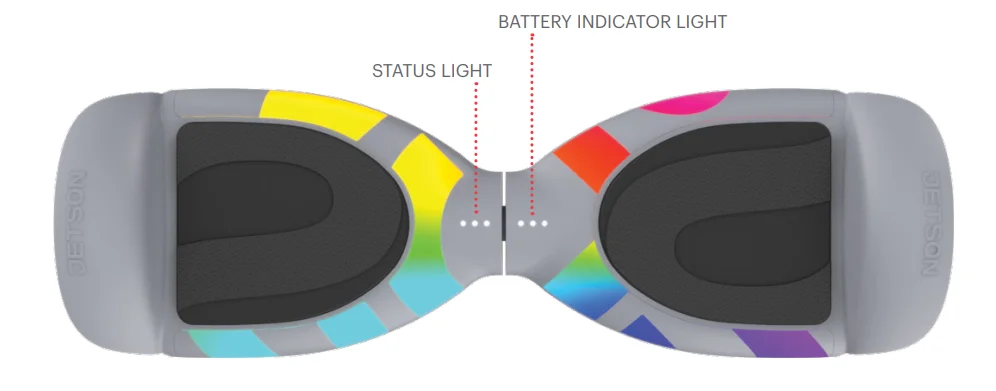
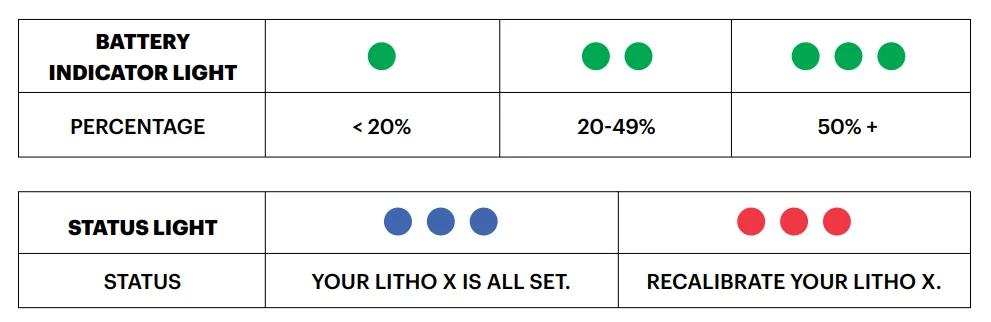
WARNING: THE LITHO X WILL AUTOMATICALLY TURN OFF ONCE THE BATTERY POWER GOES BELOW 10% AS A SAFETY PRECAUTION.
How to Recalibrate
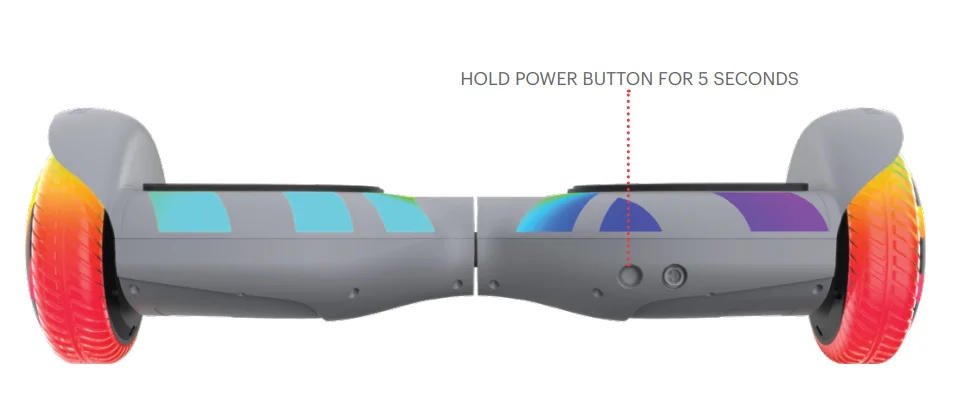
FOLLOW THESE 3 SIMPLE STEPS:
- PLACE TURNED OFF LITHO X ON A FLAT SURFACE. HOLD THE POWER BUTTON FOR 5 SECONDS UNTIL THE TUNE IS COMPLETE. THE LITHO X IS NOW ON.
- LET GOOF THEF POWER BUTTON AND THEN PRESS IT AGAIN TO TURN LITHO X OFF.
- TURN LITHO X BACK ON; RECALIBRATION IS NOW COMPLETE.
* KEEP THE HOVERBOARD LEVEL AND STILL THROUGHOUT THE RECALIBRATION PROCESS.
Make Moves
Riding the Hoverboard
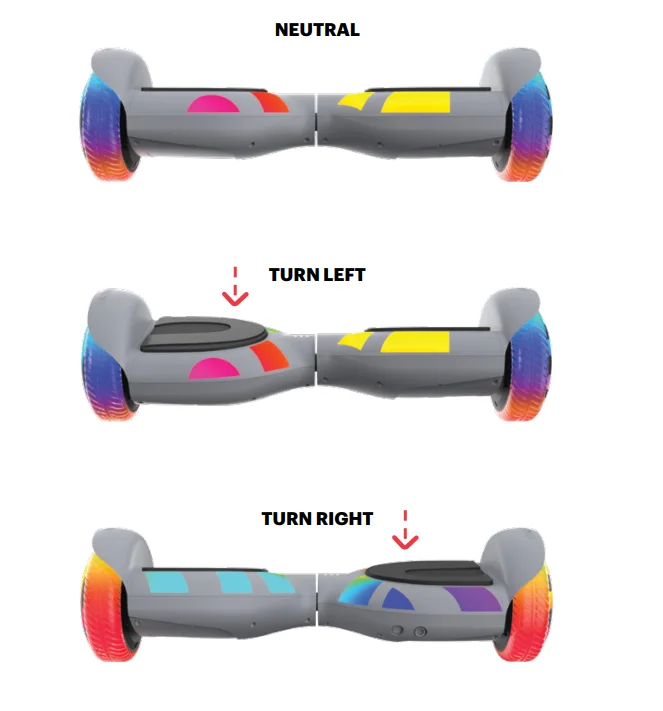
Turning the Lights On
- THE DEFAULT LIGHTING MODE WILL DISPLAY WHEN THE LITHO X IS POWERED ON.
- SHORT PRESS ONCE TO CYCLE THROUGH 5 LIGHT PATTERNS.
- LONG-press 2 SECONDS TO POWER ON/OFF LITHO X.
Helmet Safety
Care & Maintenance
RIDING RANGE
THE MAXIMUM RANGE IS 10 MILES. HOWEVER, MANY FACTORS WILL AFFECT HOW FAR YOU CAN GO PER CHARGE:
- DRIVING SURFACE: A SMOOTH, FLAT SURFACE WILL INCREASE DRIVING DISTANCE.
- WEIGHT: MORE WEIGHT MEANS LESS DISTANCE.
- TEMPERATURE: RIDE, STORE, AND CHARGE THE LITHO X ABOVE 50°F.
- MAINTENANCE: TIMELY BATTERY CHARGING WILL INCREASE DRIVING DISTANCE.
- DRIVING STYLE: FREQUENT STARTING AND STOPPING WILL REDUCE DRIVING DISTANCE.
CLEANING THE LITHO X
TO CLEAN THE LITHO X, CAREFULLY WIPE WITH A DAMP CLOTH, THEN DRY WITH A DRY CLOTH. DO NOT USE WATER TO CLEAN THE LITHO X, AS THE ELECTRICAL AND ELECTRONIC SYSTEMS MAY GET WET, RESULTING IN PERSONAL INJURY OR MALFUNCTION OF THE LITHO X. IF THE ELECTRIC PARTS OR BATTERY GET WET, DO NOT POWER ON THE LITHO X. PLEASE CONTACT JETSON CUSTOMER CARE FOR ASSISTANCE.
BATTERY
- KEEP AWAY FROM FIRE AND EXCESSIVE HEAT.
- AVOID INTENSE PHYSICAL IMPACT AND / OR SEVERE VIBRATION.
- PROTECT FROM WATER OR MOISTURE.
- DO NOT DISASSEMBLE THE LITHO X OR ITS BATTERY.
- CONTACT JETSON CUSTOMER CARE IF THERE ARE ANY ISSUES WITH THE BATTERY.
STORAGE
- FULLY CHARGE THE BATTERY BEFORE STORING. THE BATTERY SHOULD BE FULLY CHARGED ONCE A MONTH AFTER THIS.
- COVER THE LITHO X TO PROTECT AGAINST DUST.
- STORE THE LITHO X INDOORS, IN A DRY PLACE.
Questions? Let us know.
Hours of Operation: 7 Days a Week, 10 am-6 pm
For more manuals by Jetson, visit ManualsLibraryy
Jetson Litho X All-Terrain Hoverboard- FAQs
How do I set up my Jetson Litho X hoverboard for the first time?
Unbox the hoverboard, fully charge it, place it on a flat surface, and press the power button. Allow the board to self-balance before stepping on.
How do I turn on the Jetson Litho X hoverboard?
Press and hold the power button until the indicator lights turn on and the board levels itself.
How do I know if my Jetson hoverboard is charging?
When plugged in, the charger light shows red while charging and turns green once charging is complete.
How long does it take to fully charge a Jetson Litho X hoverboard?
A full charge usually takes 2–4 hours, depending on battery level and power conditions.
How do I know when my Jetson hoverboard is fully charged?
The charger light changes from red to green, indicating the battery is fully charged and ready to use.
Can I leave my hoverboard charging overnight?
No. It is not recommended to leave the hoverboard unattended or charging overnight, as this may damage the battery or create safety risks.
What happens if I overcharge my hoverboard?
Overcharging can reduce battery lifespan, cause overheating, and may damage internal components over time.
Do all Jetson hoverboards use the same charger?
No. Each Jetson model requires a specific charger, and using the wrong one can damage the battery.
Can I use a phone charger or another charger for my hoverboard?
No. Always use the original charger designed for your Jetson Litho X. Never use a charger just because the plug fits.
Why is my charger light green but the hoverboard is not charging?
This may indicate a faulty charger, damaged charging port, loose wiring, blown fuse, or battery issue.