
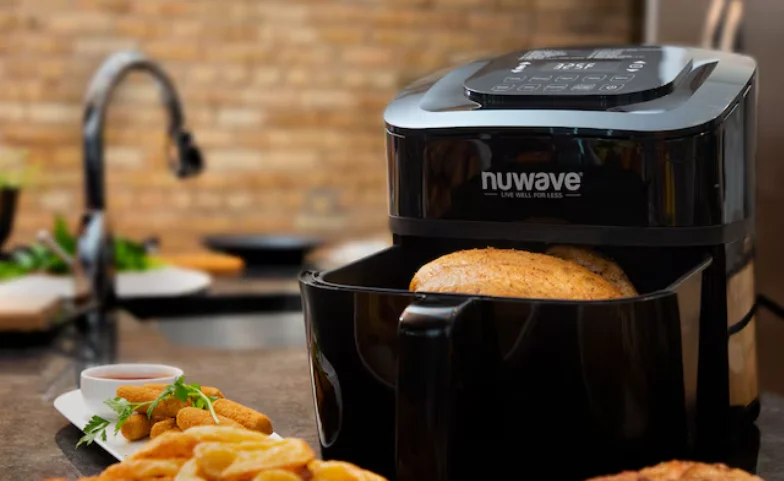

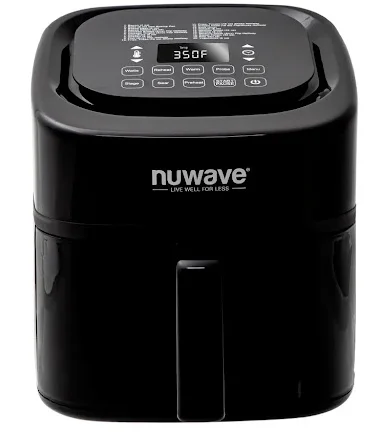
Nuwave 37402 Brio Plus 8 Qt Air Fryer
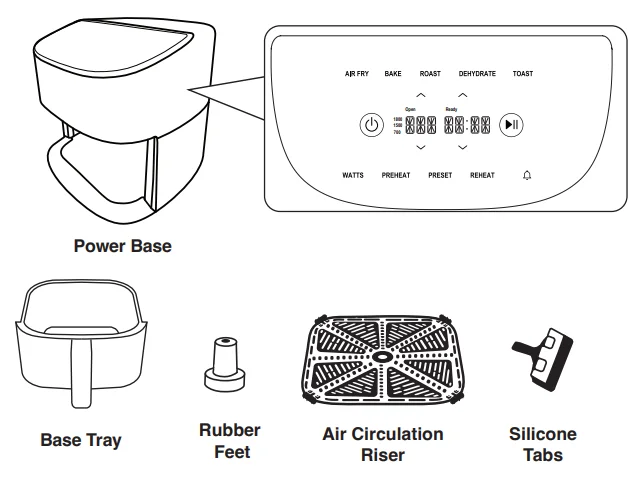
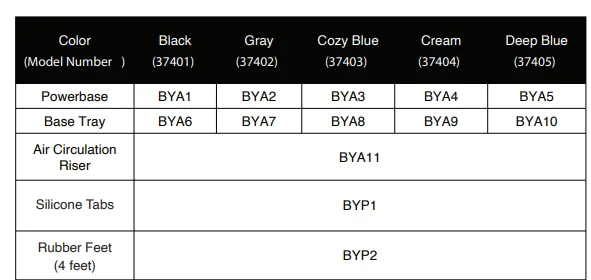
PARTS & ACCESSORIES
ASSEMBLY GUIDE
Assembling the Brio
Removing the Base Tray & Air Circulation Riser
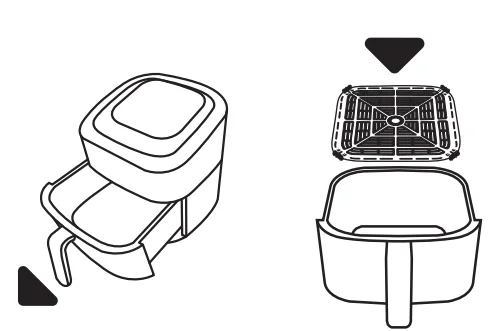
- Using the handle, pull the Base Tray straight out from the Power Base and remove the Air Circulation Riser by poking a hole in the center of the paper and lifting.
- Remove any paper or plastic inside the Power Base or Base Tray.
- Remove the paper wrapped around the Air Circulation Riser, then slide it back into the Base Tray, ensuring it fits snugly inside.

After Use:
- NEVER use the Brio without the Base Tray or Air Circulation Riser.
- NEVER touch the inside of the Base Tray or Air Circulation Riser immediately after cooking.
- NEVER use utensils to remove the Air Circulation Riser; they may scratch the coating.
- When removing food from the Base Tray, use a silicone utensil or partially tip the Base Tray and carefully shake the food onto the serving dish.
OPERATING INSTRUCTIONS
NOTE: For best results, use the recommended amount of ingredients as listed in the Quick Start Guide. May need to cook in batches for optimal results.
 On/Off
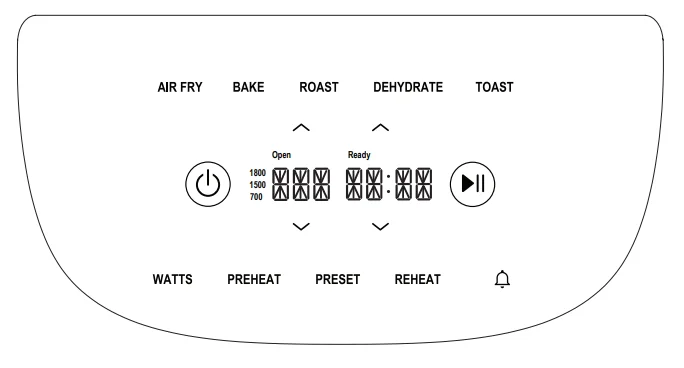
Turns the Brio on or off and cancels all functions. The default is 350°F for 15 minutes.
 Start/Pause
Press to start, pause, or resume cooking. When cooking, the time (:) will flash, and when paused, the time (:) will not flash.
Note:
- When the Brio is turned on, press
 and cooking will begin at the default temperature and time.
 - Cooking can be paused anytime during preheat and cooking.
- Opening the Base Tray will pause cooking; “Open” will be in the display.
 Up and Down Arrows
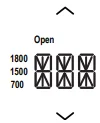 Press to adjust cooking temperature, time, or select a preset*. To change temperature, press the up or down arrow on the left to increase or decrease temperature in 5-degree increments between 50°F and 400°F. Hold the arrows down to adjust in larger increments.
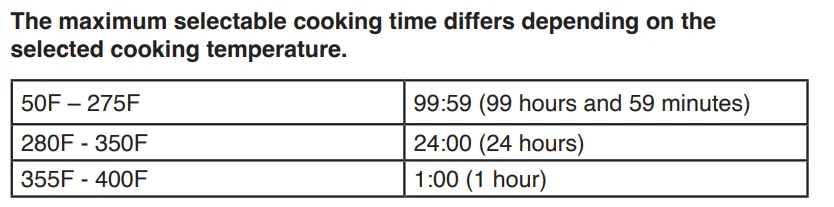
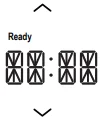 To change the time, press the up or down arrow on the right to increase or decrease time in 1-minute increments up to 99 hours and 59 minutes. Hold the arrows down to adjust in larger increments. Please refer to the preset for instructions.
How to change the default cooking temperature or time:
- Turn the Brio on.
- Set your desired temperature and/or time.
- Press and hold the
 .
. - The Brio will beep twice, indicating the default has been changed.
Note:
- The new default settings will remain when the Brio is turned off or unplugged.
- Preheat: Heats the Brio to the set temperature before the timer starts. Must press preheat before starting to cook.
- Turn the Brio on and press PREHEAT.
- Adjust settings to the desired cooking temperature and time.
- Press to begin the cooking cycle.
- PREHEAT and set the temperature to flash, indicating the Brio is preheating.
- When preheated, the Brio will beep twice. “Ready” will display to indicate the set temperature has been reached. A 10-second countdown will begin to place the food into the Brio.
- Open the Base Tray; this will pause the cooking. “Open” will display along with 2 beeps.
- Close the Base Tray; cooking will begin. When finished, the Brio will beep 3 times and display “END”.
Note: If the food is not placed in the Brio, the unit will beep 1 time, then begin the cooking cycle.
Auto Preheat
The Brio can be set to automatically preheat before cooking.
- Press and hold PREHEAT.
- The Brio will beep twice, indicating the auto preheat has been turned on.
- Repeat to disable automatic preheat.
Note: Auto Preheat will remain enabled even when the Brio is turned off or unplugged.
 Notification
The  notification will inform you when it is time to shake the basket or flip your food halfway through cooking. The notification will flash when selected or if it is included in a preset. It must be selected before the cooking cycle begins.
Adding a notification to your own recipe or user preset:
- Before beginning your cooking cycle, select the
 notification.
 - The
 notification will flash, indicating it has been selected, and will notify you when it is time to shake, flip, or turn your food, along with 3 triple beeps.
 - The flashing
 notification will display for approximately 8 seconds.
 - When the cooking cycle is finished, the Brio will beep 3 times and display “END”.
Note:
- If no action is taken when the
 notification happens, the flashing
  will display for approximately 8 seconds.
 - A preset that has the notification cannot be deleted.
- Once the cooking cycle has started, notification cannot be added or deleted.
- When added to a preset or a user preset, will only display the word “FLIP”.
Preset
There are 100 named preprogrammed presets that are set to automatically preheat. These are listed in the Quick Start Guide and Recipe Book. There are 50 user presets.
Using the 100 presets:
- Press PRESET once; “1” and the preset name will scroll on the display.
- Use the Up/Down arrows on the left to select the preset number for the recipe you want to make.
- Once selection is made, press the Up/Down arrows on the right once to display the temperature and time and adjust if desired.
- Press
 to begin the cooking cycle.
 - When finished, the Brio will display “END” and beep 3 times.
Making your own presets 101–150:
- Press PRESET twice; 101 will appear in the display.
- Use the Up/Down arrows on the left to select a custom preset (101–150).
- Once selection is made, press the Up/Down arrows on the right one time to display the temperature and time and adjust to your desired settings.
- Preheat and notification can also be added to the preset.
- Press and hold PRESET to save your custom settings. The Brio will beep twice and show the preset number and SAVE on the display.
- Press
 to begin cooking.
Making preset from adjusted 100 presets. User presets are 101–150.
- Press PRESET once; “1” and the preset name will scroll on the display.
- Use the Up/Down arrows on the left to select the preset number for the recipe you want to adjust.
- Once selection is made, press the Up/Down arrows on the right once to display the temperature and time and adjust to your desired settings.
- Press PRESET twice; “101” will appear on the display.
- Use the Up/Down arrows on the left to select the user preset you wish to save the adjusted recipe under (101–150).
- When the preset number is selected, press and hold PRESET. The Brio will beep twice, and SAVE will appear on the display.
- Press to begin cooking.
Note:
- Presets can be saved before, during, and after cooking.
- Wattage can be adjusted for any preset.
- User presets can be overridden.
- Custom presets cannot be named.
- Presets will always cook at the locked wattage.
Watts
For your convenience, the Brio has 3 different wattages to suit your needs (1800W, 1500W, 700W). This allows the Brio to be used in places like dorms, RVs, or older homes that do not support 1800W.
- Change the wattage by pressing WATTS to your selection.
To lock in the wattage:
- Select the wattage to be locked in.
- Press and hold WATTS until 2 beeps are heard, indicating the selected wattage has been locked in.
- Repeat to unlock.
Note: Locked wattage will reset when the Brio is unplugged.
Cooking Functions
The cooking functions below are frequently used cooking features. All functions have a default temperature and time. Each has a set temperature range that cannot go below or above that set range.
- Make your selection.
- Adjust the temperature and time if desired.
- Add preheat and notification to flip or shake, if desired.
- Press Start, and the cooking cycle will begin.
- When the cooking cycle has finished, the Brio will beep 3 times and display “END”.
- REHEAT: The default is 350°F for 10 minutes. Range: 300°F–400°F.
- AIR FRY: The default is 350°F for 15 minutes. Range: 250°F–400°F.
- BAKE: The default is 325°F for 25 minutes. Range: 250°F–400°F.
- ROAST: The default is 350°F for 30 minutes. Range: 250°F–400°F.
- DEHYDRATE: The default is 100°F for 2 hours. Range: 90°F–200°F.
- TOAST: The default is 400°F for 5 minutes. Range: 350°F–400°F.
- Mute: To mute the Brio, press and hold BAKE until you hear 2 beeps. Repeat to unmute.
- Lock: To lock the settings, press AIR FRY + BAKE simultaneously. The lock will appear in the display. When locked, all buttons are disabled except the power button and AIR FRY + BAKE. Repeat to unlock the Brio.

CLEANING & MAINTENANCE
Cleaning
Clean the Brio after every use or in between batches. The Base Tray and Air Circulation Riser have a non-stick coating. Do not use metal utensils or harsh abrasives when cleaning, as these can damage the coating.
- Unplug the appliance and make sure it cools completely.
- Use a damp cloth to wipe the outside of the appliance.
- Clean the Base Tray and inside components with a non-abrasive sponge, hot water, and mild detergent.
- To clean the display panel, spray window cleaner on a clean cloth, then wipe the display panel.
Note: Remove the Base Tray and place it on a heat-resistant surface to help cool the appliance faster. If using the dishwasher for the Base Tray and Air Circulation Riser, use the top rack only.
Tip: If there is residual food on the Base Tray and Air Circulation Riser, add some hot water and let them soak separately for about 10 minutes. Then use a soft cleaning brush to remove any lingering food.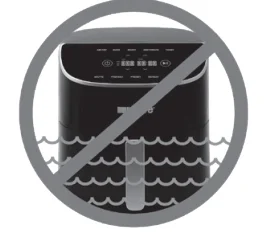
Storage
- Unplug the Brio and let it cool down completely.
- Make sure that all parts are clean and dry.
IMPORTANT: Do not immerse the Brio in water or attempt to clean the appliance in the dishwasher.
Cleaning Silicone Tabs
The Circulation Riser comes with 4 silicone tabs.
- Let the Circulation Riser cool completely.
- Grasp the Circulation Riser by the central handle and pull it straight up to remove it from the Base Tray.
- Carefully pull the silicone tabs up to slide them off the metal tabs, then pull each of them out.
Replacing the Silicone Tabs
- Insert the locking mechanism into the tab hole.
- Slide the silicone tab over the metal tab.
- Pull the locking mechanism until securely locked in place.
Note: Wash the Air Circulation Riser and silicone tabs with warm, soapy water and a sponge. The Circulation Riser can be washed in a dishwasher, top rack only. DO NOT wash the silicone tabs in the dishwasher.
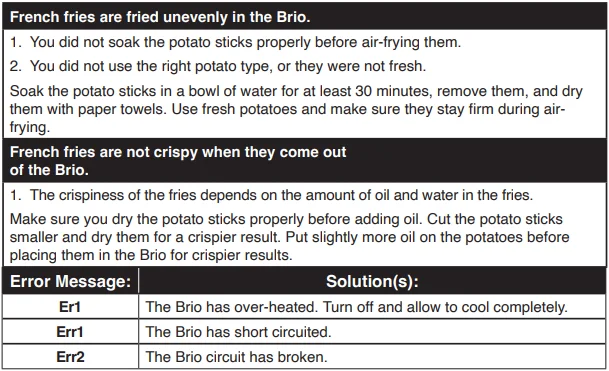
TROUBLESHOOTING GUIDE
LIMITED WARRANTY
THE MANUFACTURER WARRANTS
Nuwave, LLC warrants the Brio Plus 8Q will be free from manufacturer defects for 1 year from the date of purchase, under normal household use, and when operated in accordance with the Manufacturer’s written instructions. The Limited Warranty covers the Original Purchaser only. The Manufacturer will provide the necessary parts and labor to repair the product at the Nuwave LLC Service Department. After the expiration of the warranty, the cost of the parts and labor will be the responsibility of the owner.
THE WARRANTY DOES NOT COVER
The Limited Warranty is voided if repairs are made by an unauthorized dealer or if the serial number data plate is removed or defaced. Normal deterioration of finish due to use or exposure is not covered by this Warranty. This Limited Warranty does not cover failure, damages, or inadequate performance due to accident, acts of God (such as lightning), fluctuations in electric power, alterations, abuse, misuse, misapplications, corrosive-type atmospheres, improper installation, failure to operate in accordance with the Manufacturer’s written instructions, abnormal use, commercial or rental uses, or resold units. Nuwave LLC reserves the right to void the Limited Warranty, where allowable by law, for products purchased from an unauthorized dealer.
TO OBTAIN SERVICE
The owner shall have the obligation and responsibility to pay for all services and parts not covered by the warranty; prepay the freight to and from the Service Department for any part or system returned under this warranty; and carefully package the product using adequate padding material to prevent damage in transit.
The original container is ideal for this purpose. Include in the package the owner’s name, address, daytime telephone number, a detailed description of the problem, and RGA (Return Goods Authorization) number. To obtain the RGA number, email us at [email protected]. Provide the product model and serial number, and proof of date of purchase (a copy of the receipt) when making claims under this warranty.
MANUFACTURER’S OBLIGATION
The Manufacturer’s obligation under this Limited Warranty is limited, to the extent allowable by law, to repairing or replacing any part covered by this Limited Warranty which, upon examination, is found to be defective under normal use. The Limited Warranty applies only within the continental United States and only to the original purchaser of the Manufacturer’s authorized channels of distribution.
THE LIMITED WARRANTY MAY NOT BE ALTERED, VARIED, OR EXTENDED EXCEPT BY A WRITTEN INSTRUMENT EXECUTED BY THE MANUFACTURER. THE REMEDY OF REPAIR OR REPLACEMENT AS PROVIDED UNDER THIS LIMITED WARRANTY IS EXCLUSIVE. IN NO EVENT SHALL THE MANUFACTURER BE LIABLE FOR ANY CONSEQUENTIAL OR INCIDENTAL DAMAGES TO ANY PERSON, WHETHER OR NOT OCCASIONED BY NEGLIGENCE OF THE MANUFACTURER, INCLUDING WITHOUT LIMITATION, DAMAGES FOR LOSS OF USE, COSTS OF SUBSTITUTION, PROPERTY DAMAGE, OR OTHER MONEY LOSS.
Some states do not allow the exclusion or limitation of incidental or consequential damages, so the above limitation exclusions may not apply. This Limited Warranty gives specific legal rights, and there may also be other rights that vary from state to state.
EXCEPT AS OTHERWISE EXPRESSLY PROVIDED ABOVE, THE MANUFACTURER MAKES NO WARRANTIES EXPRESSED OR IMPLIED ARISING BY LAW OR OTHERWISE, INCLUDING WITHOUT LIMITATION, THE IMPLIED WARRANTIES OF MERCHANTABILITY AND FITNESS FOR A PARTICULAR PURPOSE TO ANY OTHER PERSON. READ YOUR OWNER’S MANUAL. IF YOU STILL HAVE ANY QUESTIONS ABOUT THE OPERATION OR WARRANTY OF THE PRODUCT, PLEASE CONTACT Nuwave LLC.
DISPUTE RESOLUTION PROCEDURE
For disputes relating to use of the website or use or purchase of a Nuwave product or service (collectively “Disputes”), you agree to first contact Nuwave LLC at [email protected]. If we cannot resolve your dispute informally, any disputes shall be submitted to final and binding arbitration. You may start the arbitration process by submitting in writing a demand to the American Arbitration Association (“AAA”) and sending a copy to Nuwave.
Nuwave will pay all filing costs. A single arbitrator of the AAA will conduct the arbitration in a location convenient to you or by phone. The arbitrator’s award will be binding and may be entered as a judgment in a court of competent jurisdiction. The arbitration will be conducted in accordance with the provisions of AAA’s Commercial Arbitration Rules and Mediation Procedures in effect at the time of submission of your demand for arbitration.
See https://www.adr.org/sites/default/files/CommercialRules_Web.pdf. Except as may be required by law as determined by an arbitrator, no party or arbitrator may disclose the existence, content, or results of any arbitration hereunder without prior written consent of both parties.
- WAIVER OF RIGHT TO SUE. By agreeing to arbitration, you understand that, to the maximum extent permitted by law, you are agreeing to waive your right to file suit in any court, to a court hearing, a judge trial, or a jury trial.
- CLASS ACTION WAIVER. To the maximum extent permitted by law, you expressly agree to refrain from bringing or joining any claims in any representative or class-wide capacity, including but not limited to bringing or joining any claims in any class action or class-wide arbitration.
- OPT OUT PROCEDURE. To request to opt out of arbitration, you must contact Nuwave LLC at [email protected], Nuwave LLC, 560 Bunker Ct., Vernon Hills, IL 60061, U.S.A. You will have thirty (30) days from the date of product delivery to opt out of arbitration with respect to any dispute arising out of or relating to the use or purchase of any Nuwave product. If more than 30 days have passed, you are not eligible to opt out of arbitration and will have waived your right to sue or participate in a class action with respect to the dispute arising out of your purchase or use of a Nuwave product. For any dispute arising out of your use of Nuwave’s website, you have thirty (30) days from the date you provided information to the website to opt out of arbitration. If more than 30 days have passed, you are not eligible to opt out of arbitration, and you will have waived your right to sue and participate in a class action with respect to the dispute arising out of your use of Nuwave’s website.
- SOME MATTERS ARE NOT SUBJECT TO ARBITRATION. Notwithstanding the foregoing, the following shall not be subject to arbitration and may be adjudicated only in the state and federal courts of Illinois: (i) any dispute, controversy, or claim relating to or contesting the validity of our intellectual property rights and proprietary rights, including without limitation, patents, trademarks, service marks, copyrights, or trade secrets; (ii) an action by a party for temporary, preliminary, or permanent injunctive relief, whether prohibitive or mandatory, or other provisional relief; or (iii) interactions with governmental and regulatory authorities. You expressly agree to refrain from bringing or joining any claims in any representative or class-wide capacity, including but not limited to bringing or joining any claims in any class action or any class-wide arbitration.
For More Manuals By Nuwave, Visit ManualsLibraryy.
Nuwave 37402 Brio Plus 8 Qt Air Fryer-FAQs
Is the NuWave 37402 Brio Plus air fryer good?
Yes, the NuWave Brio Plus is well-reviewed for its fast cooking, even heat circulation, and consistent crispy results. Many users find it reliable for daily cooking.
Is NuWave a good brand for air fryers?
NuWave is a trusted American brand known for innovative kitchen appliances. Its air fryers are popular for safety features, durability, and ease of use.
What is the capacity of the NuWave Brio Plus 37402?
This model has a large 8-quart capacity, making it ideal for families, meal prep, or cooking larger portions at once.
Is the NuWave Brio air fryer safe to use?
Yes. The Brio Plus includes built-in safety features such as auto shut-off when the basket is removed, preventing accidents during cooking.
How many watts does the NuWave Brio Plus use?
The NuWave Brio Plus typically operates around 1800 watts, providing powerful and efficient cooking.
Is the NuWave Brio Plus non-toxic?
Yes. NuWave uses non-toxic ceramic coatings free from PFOA, PTFE, lead, and other harmful chemicals.
Can I put aluminum foil in a NuWave air fryer?
Yes, aluminum foil can be used safely if it doesn’t block airflow and is properly secured inside the basket.
What foods should not be cooked in an air fryer?
Avoid uncooked rice, wet batter, popcorn, large whole chickens, chocolate, and very liquid-based foods, as they don’t cook properly.
Does the NuWave Brio Plus use a lot of oil?
No. It uses little to no oil, helping reduce fat while still delivering crispy and flavorful food.