
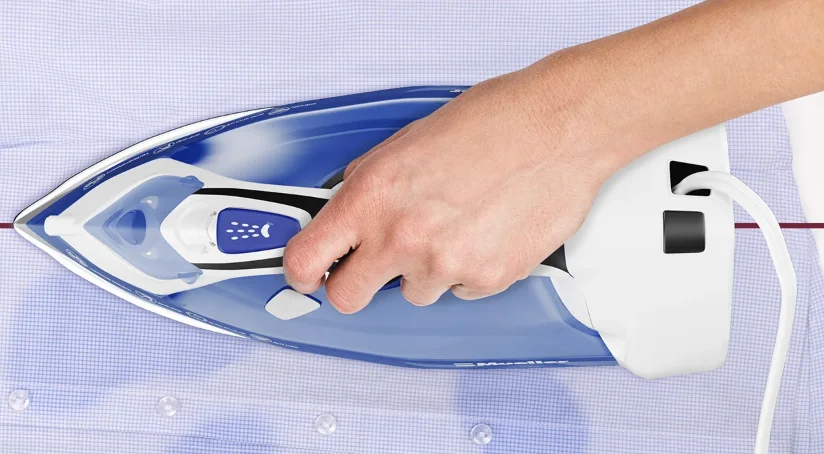

MuellerLiving MLR010002N Professional Grade Steam Iron
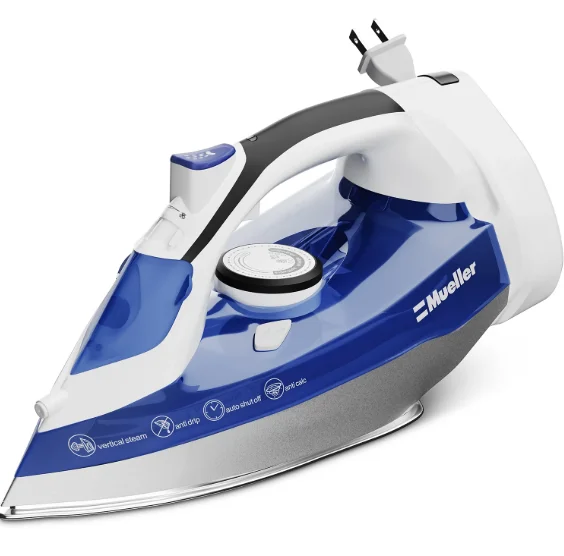
IMPORTANT SAFETY INSTRUCTIONS
When using electrical appliances, basic safety precautions should always be followed to reduce the risk of fire, electric shock, and/or injury to persons, including the following:
READ ALL INSTRUCTIONS BEFORE USING:
- Make sure that the voltage indicated on the rating plate of the appliance corresponds to your outlet voltage.
- Do not use the appliance for anything other than its intended use.
- To protect against a risk of electric shock, do not submerge the Steam Iron in water or any other liquids.
- The Steam Iron should always be turned to Minimum (Min) before plugging or unplugging from the outlet. Always grasp the power plug to remove it from the wall outlet. Do not pull on the Power Cord itself.
- Do not allow the cord to touch hot surfaces. Let the steam iron cool completely before putting it away. Loop the cord loosely around the Steam Iron when storing.
- Always disconnect the steam iron from the electrical outlet when filling with water, emptying, or when not in use.
- Do not operate the Steam Iron with a damaged cord; do not operate the Steam Iron if it has been dropped or damaged. To avoid the risk of electric shock, do not disassemble the Steam Iron. Instead, take it to a qualified service place for examination and repair. Incorrect reassembly can cause a risk of electric shock when the Steam Iron is used.
- This appliance is not intended for use by persons (including children) with reduced physical, sensory, or mental capabilities, or a lack of experience and knowledge, unless they have been given supervision or instruction concerning the use of the appliance by a person responsible for their safety.
- Close supervision is necessary for any appliance being used near children.
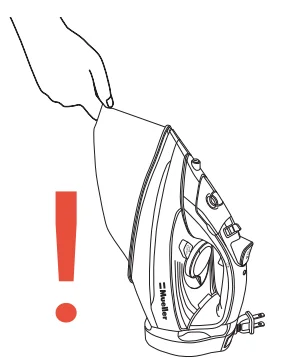
- Burns can occur from touching hot metal parts, hot water, or steam. Use caution when you turn our Steam Iron upside down – there may be hot water in the reservoir.
- To avoid a circuit overload, do not operate another high-wattage appliance on the same circuit.
- If an extension cord is necessary, a 10 A cord should be used. Cords rated for less amperage may overheat. Care should be taken to arrange the cord so that it cannot be pulled or tripped over.
More specifically:
- Do not leave the hot Steam Iron touching fabrics or very flammable surfaces.
- Do not leave the steam iron unattended while connected to the power outlet, and/or if the soleplate is hot. Do not leave the Steam Iron unattended when on an ironing board.
- Never touch the appliance with wet hands.
- Do not leave the appliance exposed to rain, sun, etc.
- Do not fill the reservoir with water while the Iron is plugged into the outlet.
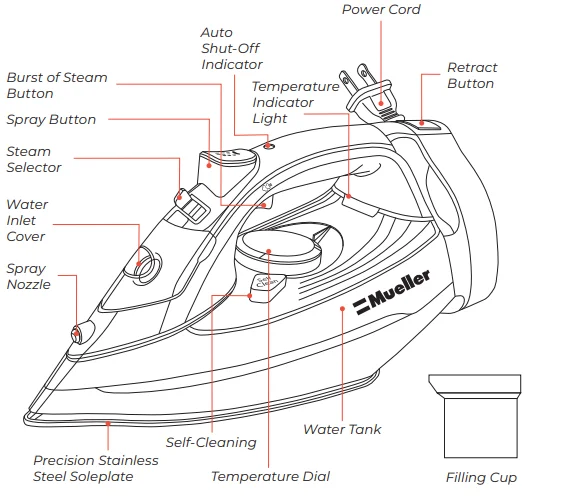
PARTS OVERVIEW
BEFORE USE
- Please read the instructions and the “Important Safety Instructions” carefully
- It is normal for a small amount of smoke to be produced the first time the Steam Iron is used. This will quickly disappear.
- To avoid damage to clothes from dust or dirt that may collect in the Steam Iron: before the first use or after the Steam Iron has been stored for some time, first iron an old cloth, testing both the “Spray” and the “Burst Of Steam” features.

ANTI-CALC SYSTEM
 A special resin filter inside the Water Tank softens the water and prevents scale build-up in the plate. The resin filter is permanent; it does not need replacing.
PLEASE NOTE!
- Mueller irons are designed to use REGULAR TAP WATER (up to 12 grains of hardness). If your water is harder than this, we recommend mixing tap water with distilled water (1:1 ratio), which reduces the hardness, or just use inexpensive bottled water.
- Do not use chemical additives, scented substances, or decalcifiers.
ANTI-DRIP SYSTEM
 With the Anti-Drip system, you can perfectly iron even the most delicate fabrics. Always iron delicate fabrics at low temperatures. The plate may cool down to the point where no more steam comes out, leaving drops of boiling water that can leave marks or stains on the fabric. In these cases, the Anti-Drip system automatically activates to prevent vaporization, so that you can iron the most delicate fabrics without risk of spoiling or staining them.
AUTOMATIC SHUT-OFF
 A special resin filter inside the Water Tank softens the water and prevents scale build-up in the plate. The resin filter is permanent; it does not need replacing. The Auto Shut-Off indicator will automatically show a flickering green light if the Steam Iron is tipped over or placed horizontally for more than 30 sec or vertically for 8 min. In this case, the Steam Iron will produce a warning sound and will automatically switch off. As soon as you move the Steam Iron, the Auto Shut-Off will turn off, and the Steam Iron will start working again.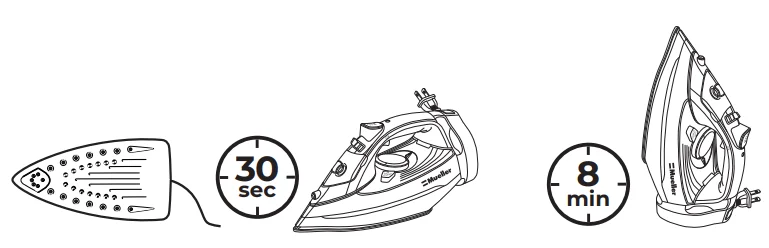
PREPARATIONS
Sort the laundry to be ironed according to the international symbols on the garment label, or if this is missing, according to the type of fabric.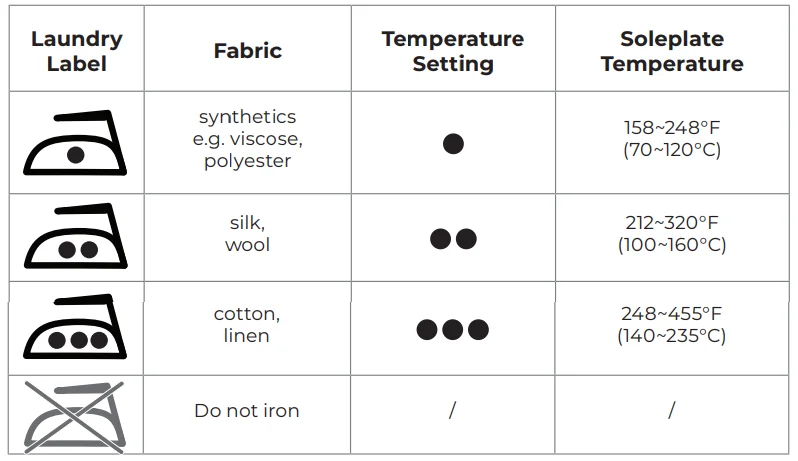
To save time, start ironing garments requiring a low temperature. This reduces the waiting times (the Steam Iron takes less time to heat up than to cool down) and eliminates the risk of scorching the fabric.
STEAM IRONING
Filling With Water
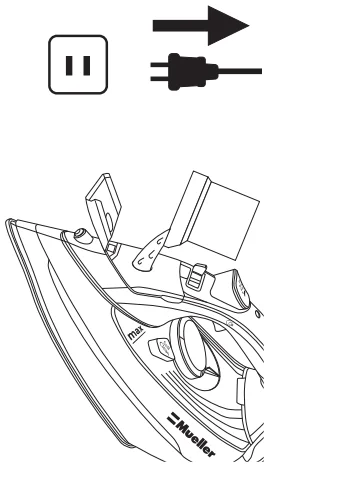
- Check that the plug is disconnected from the socket.
- Move the Steam Selector to
 .
. - Open the Water Inlet Cover.
- Hold the Steam Iron at an angle (~60°) and flip open the Water Inlet Cover. Fill the Water Tank with water (containing no additives) to the “MAX” water level mark using the provided Filling Cup, and close the cover.

NOTE:
- If you need to add water during ironing, UNPLUG the Power Cord from the outlet and repeat the above steps.
- Ensure the Steam Iron is fully reheated after filling.
Selecting the Temperature
- Place the Steam Iron on an even and stable surface on its heel rest.
- Insert the Power Cord into an electric power socket.
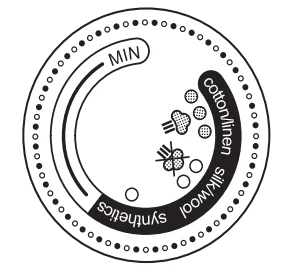
- Adjust the Temperature Dial according to the international symbol on the garment label (see chart at left). The Temperature Indicator Light indicates that the Steam Iron is heating up. Wait until the Temperature Indicator Light goes off before ironing.

WARNING!
During ironing, the Temperature Indicator Light comes on at intervals, indicating that the selected temperature is maintained. If you lower the thermostat temperature after ironing at a high temperature, do not start ironing until the Temperature Indicator Light turns on again.
Selecting the Steam
- The amount of steam is regulated by the Steam Selector.
- Move the Steam Selector to a position between minimum and maximum depending on the quantity of steam required and the temperature selected.

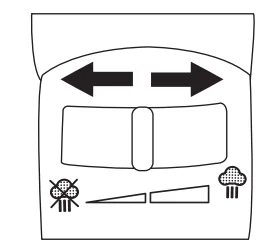
WARNING!
The Steam Iron gives off steam continuously only if you hold the Steam Iron horizontally. You can stop the continuous steam by placing the Steam Iron in a vertical position or by moving the Steam Selector to. As indicated on the Temperature Dial, you can only use steam at the highest temperatures. If the selected temperature is too low, water may drip onto the plate.
Choose “Burst of Steam” Instead of Continuous Steam When Ironing Vertically
- Press the “Burst of Steam” button once to generate a powerful burst of steam that can penetrate the fabrics and smooth the most difficult creases. Wait for a few seconds before pressing again.
- IRONING VERTICALLY: Use the “Burst Of Steam” button to iron curtains, hanging garments, etc.

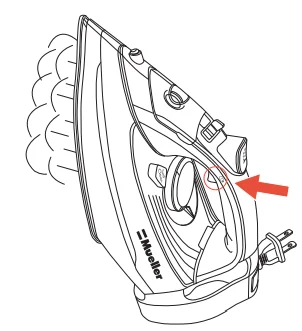
WARNING! The “Burst Of Steam” function can only be used at high temperatures. Stop the steaming when the plate temperature control light comes on, then start ironing again only after the light has gone off.
WARNING! To avoid scald injury, do not touch the heating Soleplate or hot steam when using the Iron.
DRY IRONING
To iron without steam, follow the instructions in “Steam Ironing” (See Page 6), leaving the “Burst of Steam” button in position .
.
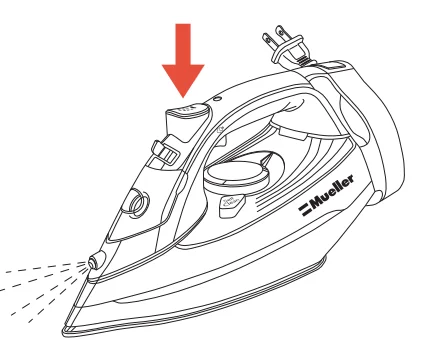
Spray Function
- Make sure that there is water in the Water Tank.
- Press the “Spray” button down slowly for a jet or press quickly and firmly for a mist.

CLEANING
- Before cleaning the Steam Iron, make sure that the appliance plug is not connected to the electric outlet.
- Any deposits or starch residue left on the plate can be removed using a damp cloth or an unabrasive liquid detergent.
- Avoid scratching the plate with steel wool or metal objects.
- Clean the plastic parts with a damp cloth, then wipe them over with a dry cloth.
Self-Cleaning Button
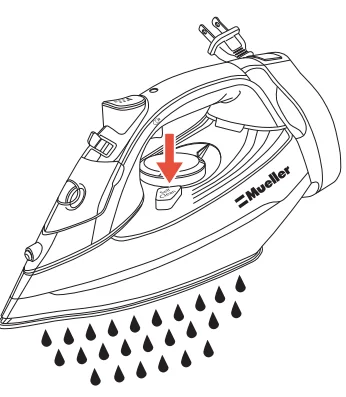
The “Self-Cleaning” feature cleans inside the Soleplate, removing scale and impurities. We recommend using it every 10–15 days.
- Fill the Water Tank to the maximum level and set the Steam Control switch to OFF.
- Set the Temperature Dial to the maximum and wait for the Temperature Indicator Light to turn off.
- Pull the plug out of the socket and hold the Steam Iron horizontally over the sink.
- Hold the “Self-Cleaning” button until all the boiling water, steam, impurities, and scale come out of the Soleplate.

STORAGE
- Make sure the Steam Iron is disconnected from the outlet.
- Let the Steam Iron cool down completely.
- Empty the Water Tank by turning the Steam Iron upside down over the sink, and gently shaking it.
- Roll up the Power Cord using the “Retract” button.
- Store the Steam Iron in a vertical position in a cool and dry place.
ADVICE FOR GOOD IRONING
- We recommend using the lowest temperatures with fabrics that have fine finishes (sequins, embroidery, flush, etc.).
- If the fabric is mixed (e.g., 40% cotton, 60% synthetics), set the Temperature Dial to the temperature of the fiber requiring the lower temperature.
- If you don’t know the composition of the fabric, test the temperature on a hidden corner of the garment. Start with a low temperature and increase it gradually until it reaches the ideal temperature.
- Never iron areas with traces of perspiration or other marks: the heat of the plate will make the stain “stick” to the fabric, making it irremovable.
- To avoid leaving a burn mark on silk, woolen, or synthetic garments, iron them inside out.
- Velvet garments can be handled by ironing in one direction (following the fiber).
- Do not press down on the Steam Iron.
- It is easier to iron fabrics if they are not completely dry. For example, silk should always be ironed while damp.
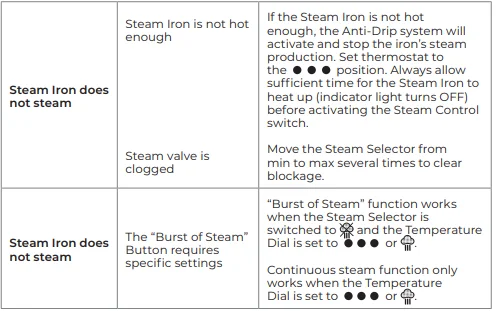
IRON TROUBLESHOOTING
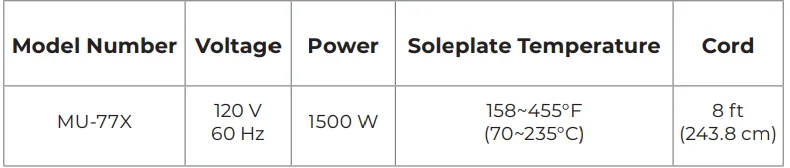
SPECIFICATIONS
1-YEAR LIMITED WARRANTY
This product is warranted to be free from defects in material and workmanship under normal use and service for one year from the date of the original purchase with the receipt. The manufacturer’s obligation shall be limited to repairing or replacing any part of the product that is defective. Such warranty shall not apply to damages resulting from accidents, abuse, or misuse. If there is any problem with the Mueller Professional Steam Iron, please contact Customer Service. MUELLERDIRECT.COM, [email protected].
For More Manuals By MuellerLiving, Visit ManualsLibraryy.
MuellerLiving MLR010002N Professional Grade Steam Iron-FAQs
How do you use a professional steam iron properly?
Fill the water tank with distilled water, plug in the iron, and set the temperature according to the fabric type. Allow the iron to preheat, then activate the steam function while gliding smoothly over the fabric.
How long does the steam iron take to heat up?
Most professional steam irons heat up within 1–2 minutes, depending on the selected temperature setting.
Can the MuellerLiving steam iron be used without water?
Yes, it can be used as a dry iron. Simply empty the water tank, allow the iron to cool, and set the steam control to OFF or the MIN setting.
How do I know when my steam iron is ready to use?
Most irons have an indicator light that turns off or changes color once the selected temperature is reached.
Can a steam iron overheat if left on?
Yes. Overheating can occur if the thermostat fails or the iron is left unattended for long periods. Always unplug after use.
What are the most common problems with steam irons?
Common issues include no steam output, water leakage, overheating, uneven heating, and clogged steam vents.
What temperature does a steam iron reach?
Steam irons typically operate between 250°F and 360°F, depending on the fabric selection.
Why is my iron turning on but not heating?
Common reasons include a faulty power connection, damaged cord, incorrect temperature setting, or a malfunctioning thermostat.