

EPH Controls CP4 RF Programmable Room Thermostat
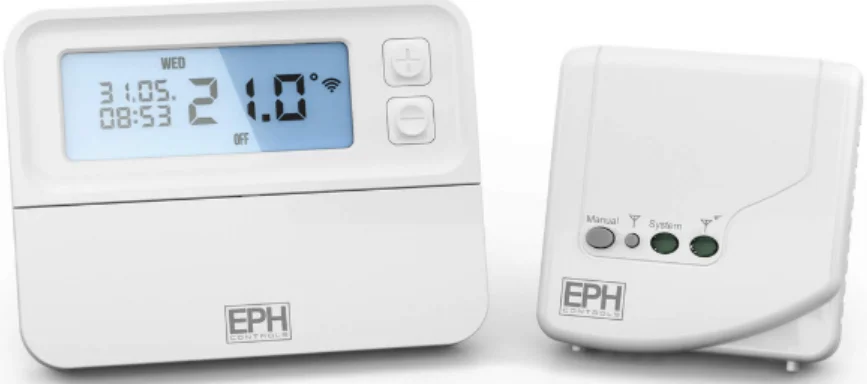
RFRP-OT Room Thermostat Installation
Factory Default Settings
- Temperature indicator: °C
- Switching differential: 04°C
- In-built frost protection: 5°C- Not adjustable
- Clock: 24 hours
- Keypad lock: Off
- Operating mode: 5/2 days
Frost Protection
Frost protection is built into this thermostat. It is pre fixedat 5°C and is not adjustable. It will only be activated when the thermostat is in the OFF mode, and the room temperature falls below 5°C.
Specifications
- Power supply: 2 x AA Alkaline Batteries
- Power consumption: 2 mW
- Battery replacement: Once a year
- Temp. control range: 5 … 35°C
- Ambient temperature: 0 … 45°C
- Dimensions: 130 x 99 x 25mm
- Temperature sensor: NTC 100K Ohm @ 25°C
- Temperature indication: °C
- Switching differential: 0.4°C
- Frost protection: Only operational in Off mode
- Pollution degree: Pollution degree 2
How your programmable thermostat works
When the thermostat is in the AUTO mode, it will operate according to the times and temperatures that have been programmed. The user can select from 6 different programs per day, each with a time and a
temperature. There is no OFF time, only a higher and a lower temperature. If the user wants the thermostat to be OFF at a certain time, set the temperature for this time to be low. The thermostat will turn ON if the room temperature is lower than the setpoint for the current period.
Example: If P1 is set to be 21°C at 6 am, and if P2 is set to be 10°C at 8 am, the thermostat will look for the temperature to be 21°C between 6 am and 8 am.
Mounting & Installation
Caution!
- Installation and connection should only be carried out by a qualified person.
- Only qualified electricians or authorised service staff are permitted to open the thermostat.
- If the thermostat is used in a way not specified by the manufacturer, its safety may be impaired.
- Prior to setting the thermostat, it is necessary to complete all required settings described in the section.
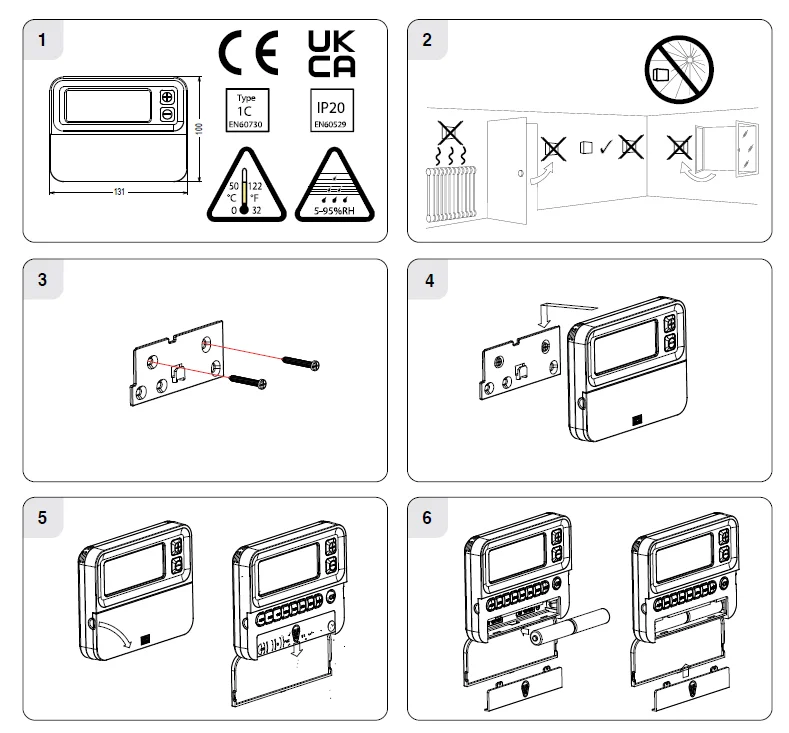
This thermostat can be mounted in the following ways:
- Directly mounted on the wall
- Free-standing – Stand Included
- The mounting height should be 1.5 metres above the floor level.
- The thermostat should be wall-mounted in the room where the heating is to be controlled. The place of installation should be chosen so that the sensor can measure the room temperature as accurately as possible. Choose the mounting location to prevent direct exposure to sunlight or other heating/cooling sources when mounted.
- Fix the mounting plate directly to the wall with the screws provided.
- Attach the thermostat to the mounting plate.
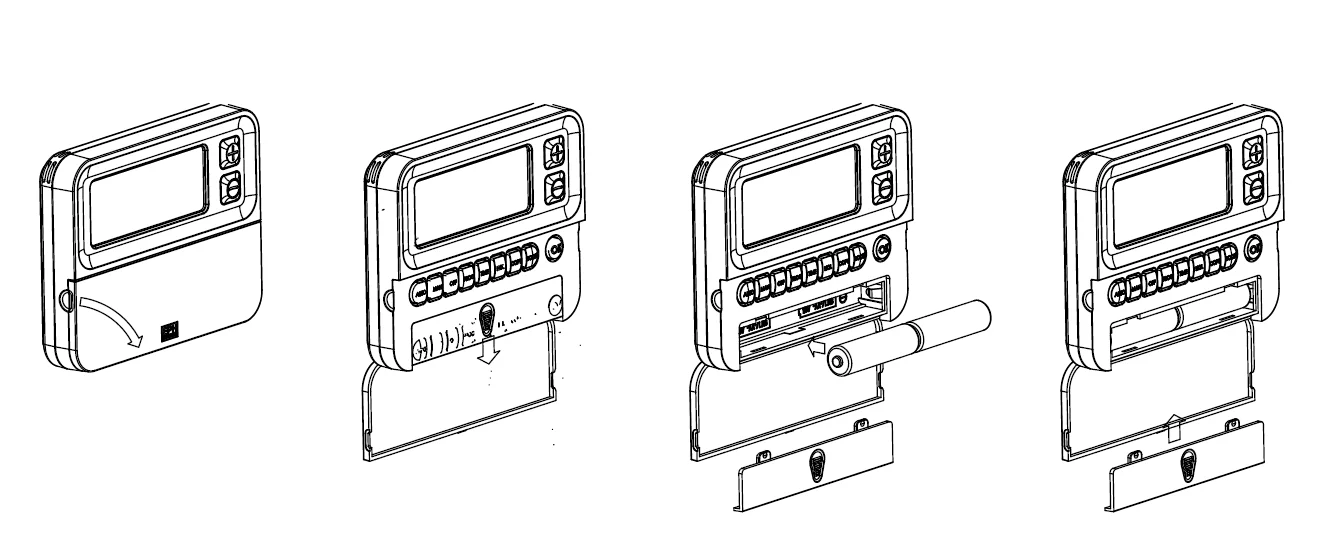
- Lower the flap at the front of the thermostat. There is a battery compartment located below the buttons. Apply downward pressure to remove the cover.
- Insert the 2 x AA batteries, and the thermostat will turn on. Close the battery compartment.
RF1A Wireless Receiver Installation Instructions
Specifications & Wiring
- Power supply: 200 – 240Vac 50-60Hz
- Contact rating: 250 Vac 10(3)A
- Ambient temperature: 0 … 45°C
- Automatic action: Type 1. C.Q
- Appliance classes: Class II appliance
- Pollution degree: Pollution degree2
- IP Rating: IP20
- Rated Impulse Voltage: Resistance to voltage surge 2500V as per EN 60730
Internal wiring diagram for RF1A-OT
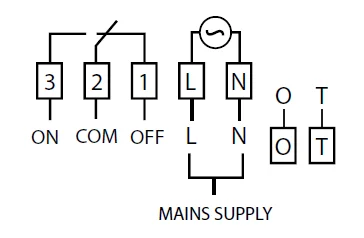
* If mains voltage output is required, terminals L & 2 must be electrically linked.
Important: Do not connect Mains Voltage to OpenTherm® terminals.
Mounting & Installation
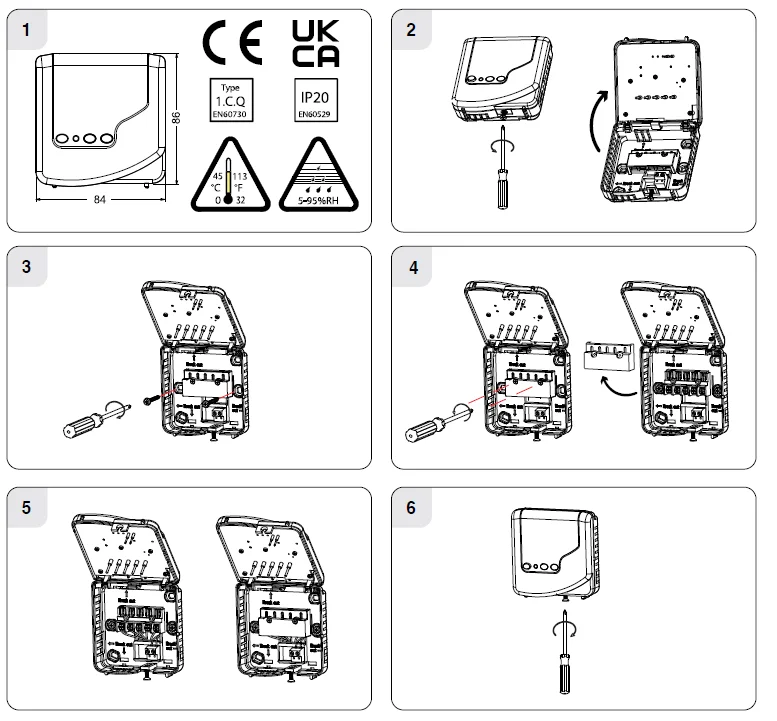
- The RF1A-OT receiver should be wall-mounted in an area within 20 metres of the wireless thermostat. The receiver must be mounted more than 1 metre away from metal objects, as this will affect communication with the thermostat. The receiver should be installed at least 1 metre from any electronic devices such as radio, TV, microwave or wireless network adaptor.
- Slacken the fastening screw on the bottom of the receiver with a Philips screwdriver. The receiver is hinged and can be opened 180 degrees.
- Screw the receiver to the wall with the screws provided.
- Remove the protective cover on the terminal block.
- Insert wires into the terminal block in accordance with the wiring diagram.
- Close the cover and tighten the fastening screw.
RFRP-OT Room Thermostat Operating Instructions
LCD Symbol Description
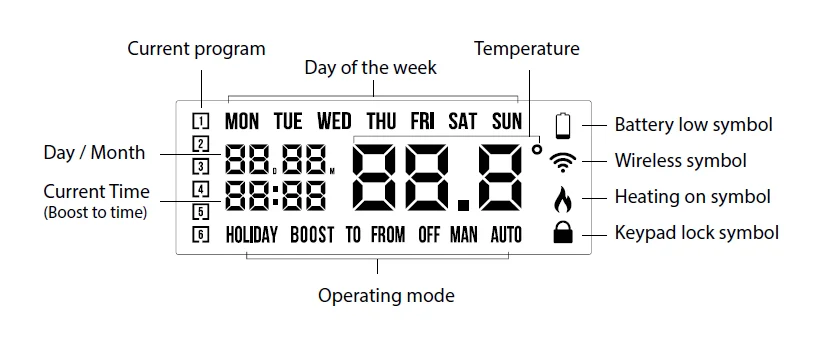
Button Description
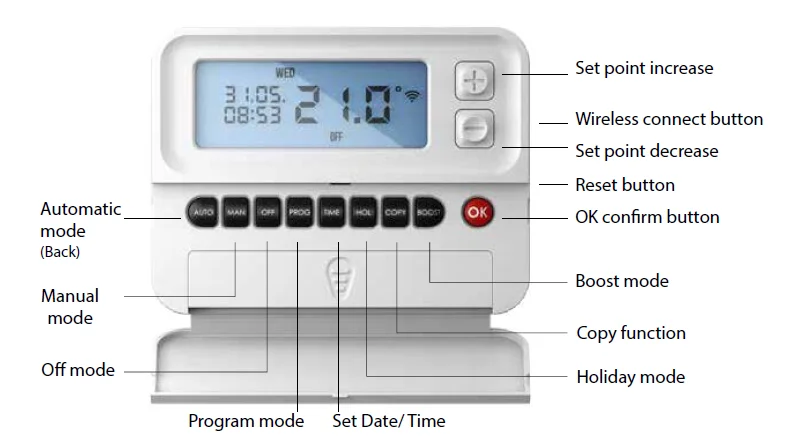
 Automatic mode
 Set Date / Time
 Set point increase
 Manual mode
 Holiday mode
 Set point decrease
 Off mode
 Copy function
 Confirm button
 Program mode
 Boost mode
 Reset button
 Automatic mode
 Set Date / Time
 Manual mode
 Holiday mode
 Off mode
 Copy function
 Confirm button
 Boost mode
 Reset button
Resetting the thermostat
- Press thebutton on the side of the thermostat.
- ‘rst no’ will appear on the screen.
- Press thebutton.
- ‘rst yes’ will appear on the screen.
- Press thebutton to reset the thermostat.
Keypad lock and unlock OFF
OFF
- To lock the keypad, press and hold theand
 buttons for 10 seconds.
 will appear on the screen. The keypad is now locked.
 - To unlock the keypad, press and hold theandbuttons for 10 seconds.will disappear from the screen. The keypad is now unlocked.
 will appear on the screen. The keypad is now locked.
Setting the date, time, and programming mode
- Press thebutton once, and the year will begin flashing.
- Press theorbuttons to adjust the year. Press OK.
- Press the orbuttons to adjust the month. Press OK.
- Press theorbuttons to adjust the day. Press OK.
- Press theorbuttons to adjust the hour. Press OK.
- Pressthe orbuttons to adjust the minutes. Press OK.
- Press theorbuttons to adjust from 5/2d to 7d or 24h mode.
- Press theorbuttons to turn DST (Daylight Saving Time) on or off.
- Press the
 button or wait 5 seconds, and the thermostat will return to normal operation.
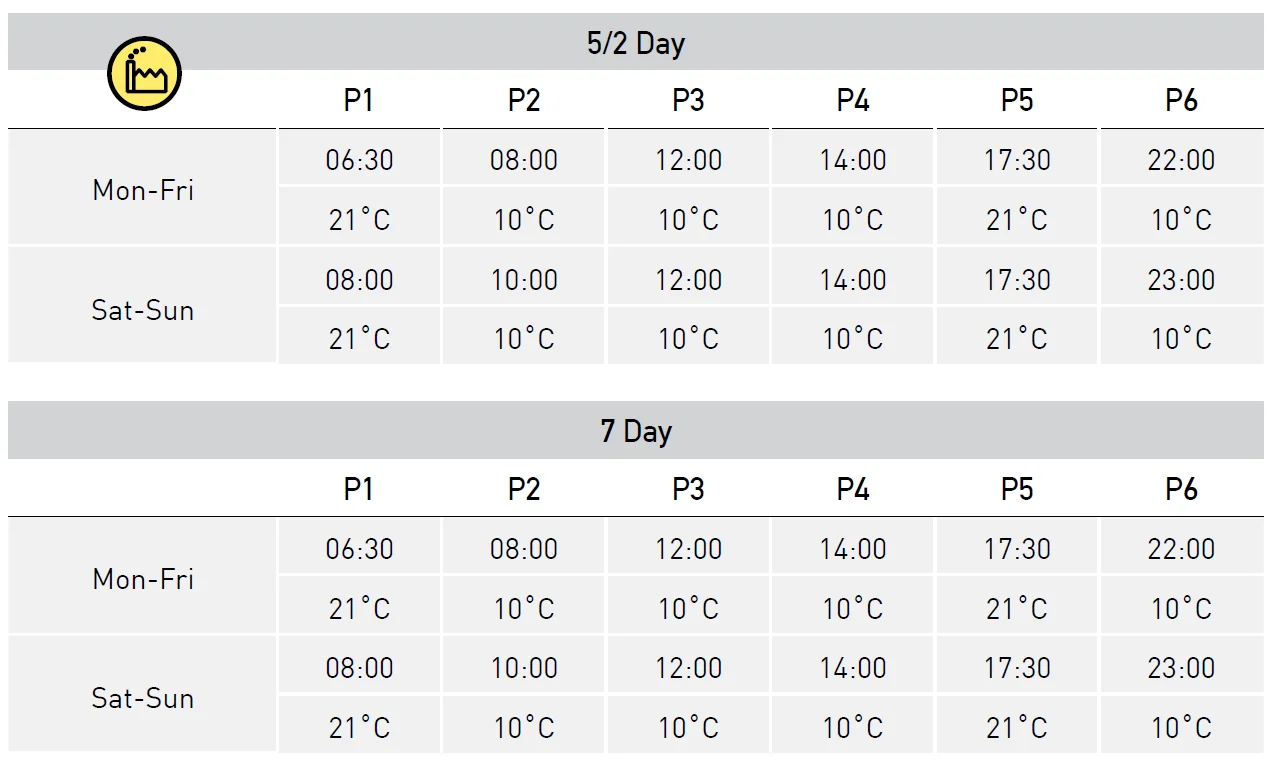
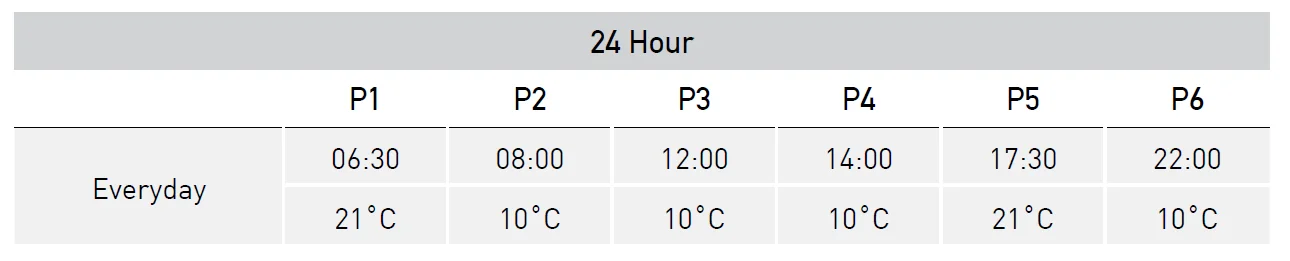
Factory Program Setting5/2d
Programming Modes
The RFRP-OT Room Thermostat has the following programming modes available:
- 5/2 Day mode Programming Monday to Friday as one block and Saturday and Sunday as a 2nd block. Each block can have 6 different times and temperatures.
- 7 Day mode Programming all 7 days individually with different times and temperatures.
- 24 Hour mode Programming all 7 days as one block with the same time and temperatures.
If 7 D mode is selected, you can program each day of the week with 6 individual times and temperatures. If 24H mode is selected, you can only program each day of the week with the same 6 times and temperatures.
Adjust the program setting in 5/2 Day mode
Press the ROG button once.
Programming for Monday to Friday is now selected.
- Press theorbuttons to adjust the P1 time. Press OK.
- Press theorbuttons to adjust the P1 temp. Press OK.
- Repeat this process to adjust P2 to P6 times and temperatures. Press OK.
Programming for Saturday to Sunday is now selected.
- Press theorbuttons to adjust the P1 time. Press OK.
- Press theorbuttons to adjust the P1 temp. Press OK.
- Repeat this process to adjust P2 to P6 times and temperatures.
- Press thebutton to return to automatic mode.
- While in PROG Mode, pressing the PROG button will jump from P1-P2 etc
- without changing the temperature.
- While in PROG Mod,
 pressing the TIME button will jump to the next day (block of days).
Copy Function
Copy function may only be used if the thermostat is in the 7d mode.
- Set the times and temperatures for the day that you wish to copy from in programming mode.
- When still on the day, press thebutton.
- The day of the week that you have selected will be shown with ‘COPY’ below it.
- The next day will begin to flash on the top of the screen.
- Press thebutton to copy the times and temperatures to that day.
- Press thebutton to skip a day.
- You can copy to multiple days using thebutton.
- Press the OK button when copying has been completed.
Temporary Override
- When in AUTO mode, press theorbuttons to adjust the temperature setpoint. ‘OvEr’ will appear on the screen.
- Press OK or after 5 seconds, the thermostat will operate at this temperature until the next switching time.
- To cancel the temporary override, press the
 button and then press thebutton to return to the automatic mode.
Permanent Override
- Press the
 button to enter the manual mode (Permanent Override), ‘MAN’ will appear on the screen.
 - Press theorbuttons to adjust the temperature setpoint.
- Press OK or after 5 seconds, the thermostat will operate in this permanent override.
- To cancel the permanent override, press thebutton and then press thebutton to return to the automatic mode.
Boost Function
- The thermostat can be boosted to a specific temperature for 1, 2, or 3 hours while the thermostat is operating in all modes except for holiday mode.
- Press the BOOST button 1, 2, or 3 times; the time that the boost will be activated will flash on the screen.
- If you do not press any other button, the boost will activate to the temperature displayed on the screen after 5 seconds.
- If you press the OK button, the temperature will now flash. You can edit the temperature if you press theorbuttons.
- Press the OK button or wait for 5 seconds for the boost to activate.
- ‘BOOST TO’ will now be displayed on the screen, with the time that it is activated displayed above this text.
- Press the BOOST button again to deactivate the boost.
Holiday Function
This will switch your heating system of between the start and end times you select.
- Press the
 button, ‘HOLIDAY FROM’ will appear on the screen.
 - Press theorbuttons to adjust the year. Press OK.
- Press theorbuttons to adjust the month. Press OK.
- Press theorbuttons to adjust the day. Press OK.
- Press theorbuttons to adjust the hour. Press OK.
‘HOLIDAY TO’ will appear on screen.
- Press theorbuttons to adjust the day. Press OK.
- Press theorbuttons to adjust the month. Press OK.
- Press theorbuttons to adjust the year. Press OK.
- Press theorbuttons to adjust the hour. Press OK.
- The thermostat will now return to the mode it was in before the Holiday settings were entered. To cancel Holiday mode, press thebutton.
There are two settings for selection. The factory default setting is AUTO.
- OFF The backlight is permanently OFF.
- AUTO On pressing any button, the backlight stays on for 5 seconds.
- To adjust the backlight setting, lower the cover on the front of the unit.
- Press the OK button for 5 seconds.
- Press either theorbuttons to select the OFF or AUTO mode.
- Press the OK button.
Battery low warning
When the batteries are almost empty, the symbol will appear on the screen. The batteries must now be replaced or the unit will shut down.
Replacing the batteries
- Lower the flap at the front of the thermostat.
- There is a battery compartment located below the buttons.
- Apply downward pressure to remove the cover.
- Insert the 2 x AA batteries, and the thermostat will turn on.
- Close the battery compartment.

Installer menu
To access the installer menu, you must hold Prog and OK for 5 seconds. When in the installer menu, press ,
, and OK to navigate and select. Use AUTO , MAN or OFF to go back a step.
- P0 1: Mode (Normal / Optimum Start / TPI)
- P0 2: Hi Lo (limiting the thermostat)
- P0 3: Hysteresis (differential)
- P0 4: Calibration
- P0 5: Frost Protection
- P0 6: Exit
Installer menu OpenTherm® Instructions
- P0 6: Setting DHW temperature
- P0 7: OpenTherm® Information
- P0 8: DHOP
- P0 9: Set OpenTherm® Parameters Exit
Nor (Normal Mode)
When the thermostat is in Normal mode, the thermostat will try to reach the target temperature after the program changes.
Example: Program 1 on the thermostat is 21°C for 06:30 am, and the room temperature is 18°C. The thermostat will start the heating at 06:30 am, and the room temperature will start to increase then. PO 1 Operating Mode (Normal / Optimum Start / TPI)
OS (Optimum Start Mode) Boiler Plus
When the thermostat is in Optimum Start mode, the thermostat will try to reach the target temperature by the start time of the next switching time. This is done by setting the Ti (time interval) on the thermostat in this menu to 10, 15, 20, 25 or 30. This will allow the thermostat 10, 15, 20, 25, or 30 minutes to increase the room temperature by 1°C. Ti can be set when OS is selected in the installer menu. 20°C
To achieve the target temperature when the program starts, the thermostat will read:
- The Room Temperature (RT)
- The Setpoint Temperature (ST)
- The Target Temperature Difference (TTD) is the difference between the setpoint temperature and the room temperature.
The time (in minutes) that it will take to overcome (TTD) is called Optimum Start Time (OST), and its maximum value is 3 hours = 180 mins. This is subtracted from the start time. As the temperature increases, the thermostat will recalculate the OST if the temperature is increasing too quickly.
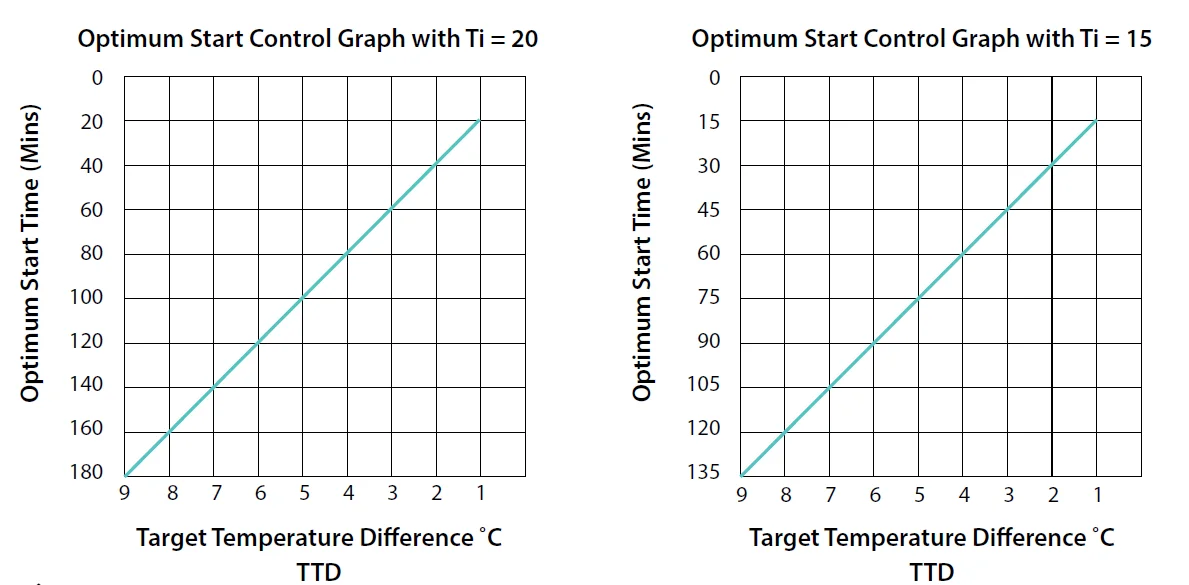
Example when Ti = 20
Program 1 on the thermostat is 21°C for 06:30 am, and the room temperature is 18°C. The thermostat will start the heating at 05:30 am to reach 21°C for 06:30 am Ti=20.
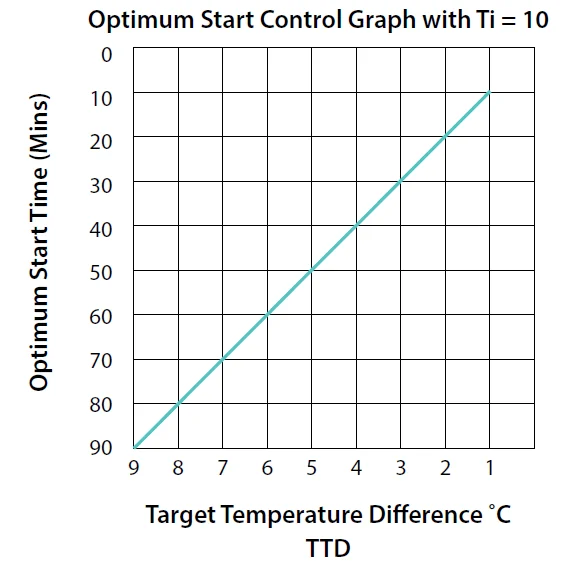
Example when Ti = 10
Program 1 on the thermostat is 21°C for 06:30 am, and the room temperature is 18°C. The thermostat will start the heating at 06:00 am to reach 21°C for 06:30 amTi=10.
PO 1 Operating Mode (Normal / Optimum Start / TPI)
TPI (Time Proportional & Integral Mode)
When the thermostat is in TPI mode, and the temperature is rising in the zone and falls into the Proportional Bandwidth section, TPI will start to affect the thermostat’s operation. The thermostat will turn on and off as it gains heat so that it doesn’t overshoot the setpoint by too much. It will also turn on if the temperature is falling so it doesn’t undershoot the setpoint which will leave the user with a more comfortable level of heat.
2 settings will affect the thermostat’s operation:
- CYC – No. of Heating Cycles per
Hour: 6 Cycles
This value determines how often the thermostat cycles heating on and off to reach the setpoint temperature. You can select 2/3/6 or 12. - Pb – Proportional Bandwidth: 2°C
This value refers to the temperature below the setpoint at which the thermostat will start to operate in TPI Control. You can set this temperature from 1.5°C to 3.0°C in 0.1°C increments.
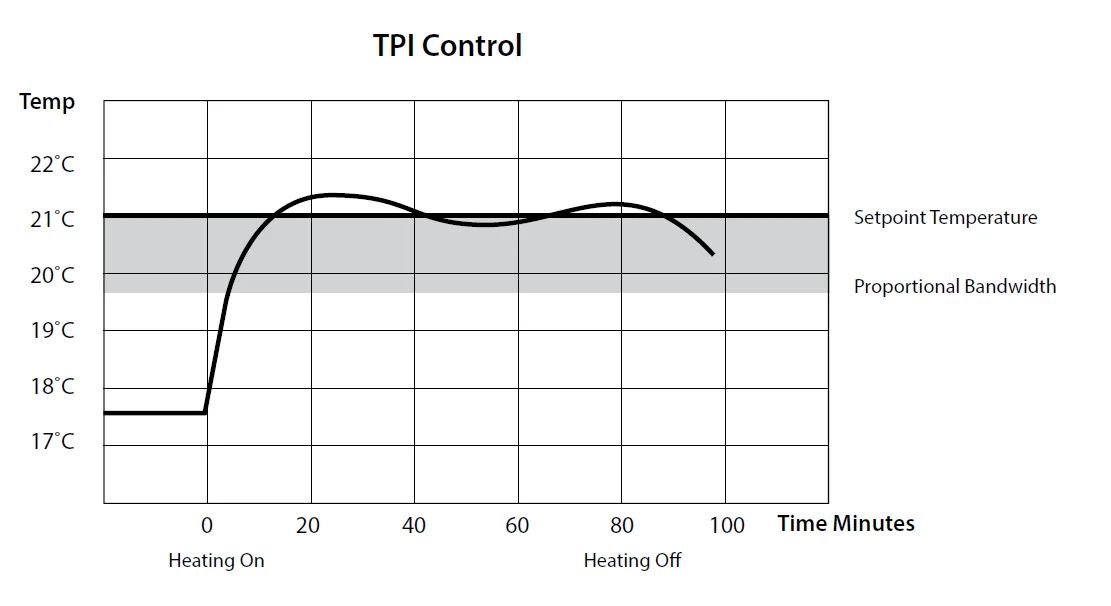
Example: Program 1 on the thermostat is 21°C for 06:30 am, and the room temperature is 18°C. The thermostat will start the heating at 06:30 am, and the room temperature will start to increase then, but will switch itself off before it reaches the desired temperature, and allow the room temperature to increase naturally – this cycle may begin again if the thermostat isn’t reaching the desired temperature.
PO 2 Setting high & low limits Hi 35°C and Lo 5°C
This menu allows the installer to change the min. and max. temperature range that the thermostat can be set at.
PO 3 Hysteresis HOn and HOFF
- This menu allows the installer to change the switching differential of the thermostat when the temperature is rising and falling.
- HOn is the fall in temperature – Default – 0.4°C. This will allow a fall of 0.4°C from the setpoint before the thermostat turns on again.
- HOFF is the temperature rise – Default – 0.0°C. This will allow the temperature to rise 0°C above its setpoint.
PO 4 Calibrate the thermostat
This menu allows the installer to recalibrate the thermostat. The current temperature will be displayed on the screen and can be adjusted by pressing theorbuttons.
PO 5 Frost Protection 5°C
This menu allows the installer to activate or deactivate frost protection. When frost protection is activated, the thermostat will switch on the boiler when the temperature drops below 5°C.
PO 6 Exit
This menu allows the installer to return to the main interface. It is also possible to exit the installer menu by pressing AUTO , MAN or OFF whilst in the installer menu.
PO 6 Setting DHW temperature
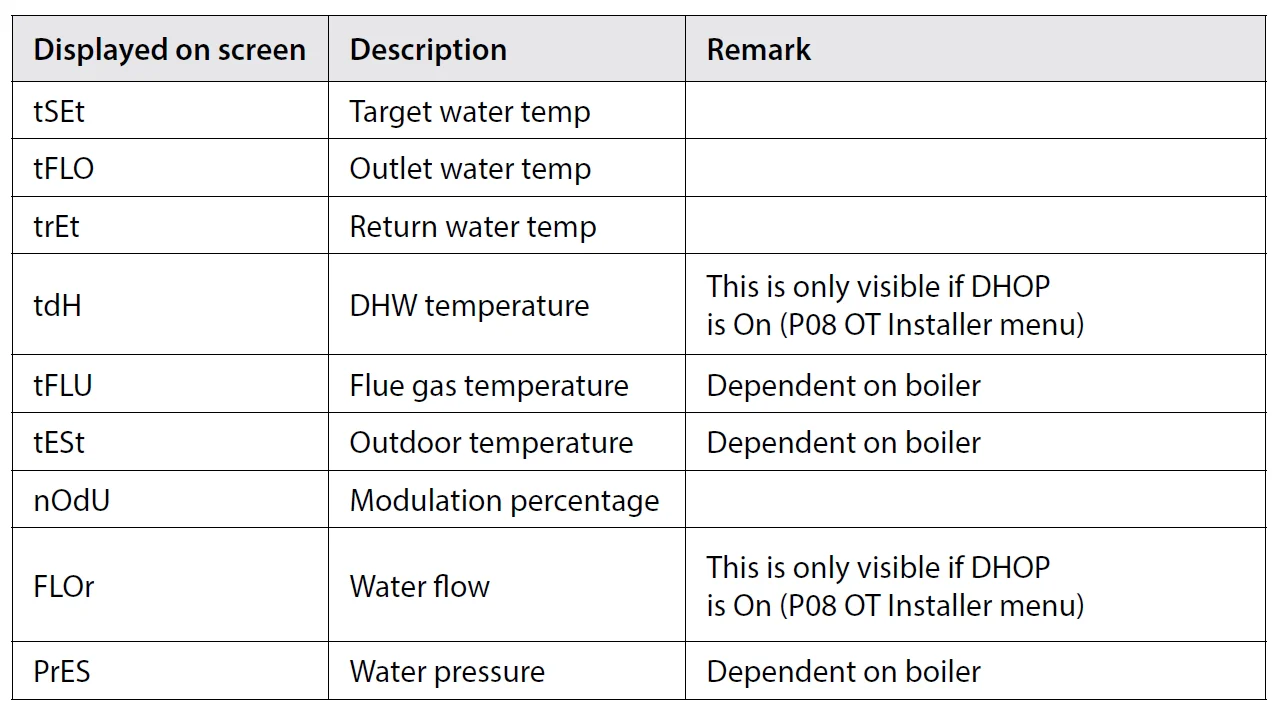
This menu allows the installer to change the DHW temperature of the boiler. The temperature can be set in 0.5°C increments by pressing the or buttons. Press the OK button to select the desired temperature. This menu is only available when the thermostat is connected to OpenTherm® and DHOP is ON (P08 OT installer menu).
PO 7 OpenTherm® Information
This menu allows the installer to view information received from the OpenTherm® boiler. It may take a few seconds to load information relating to each parameter. The information that can be shown from the boiler is outlined in the table below.
PO 8 DHOP
This menu allows the installer to activate or deactivate DHW target temperature control from the thermostat. This menu is only available when the thermostat is connected to OpenTherm.
PO 9 Set OpenTherm® Parameters
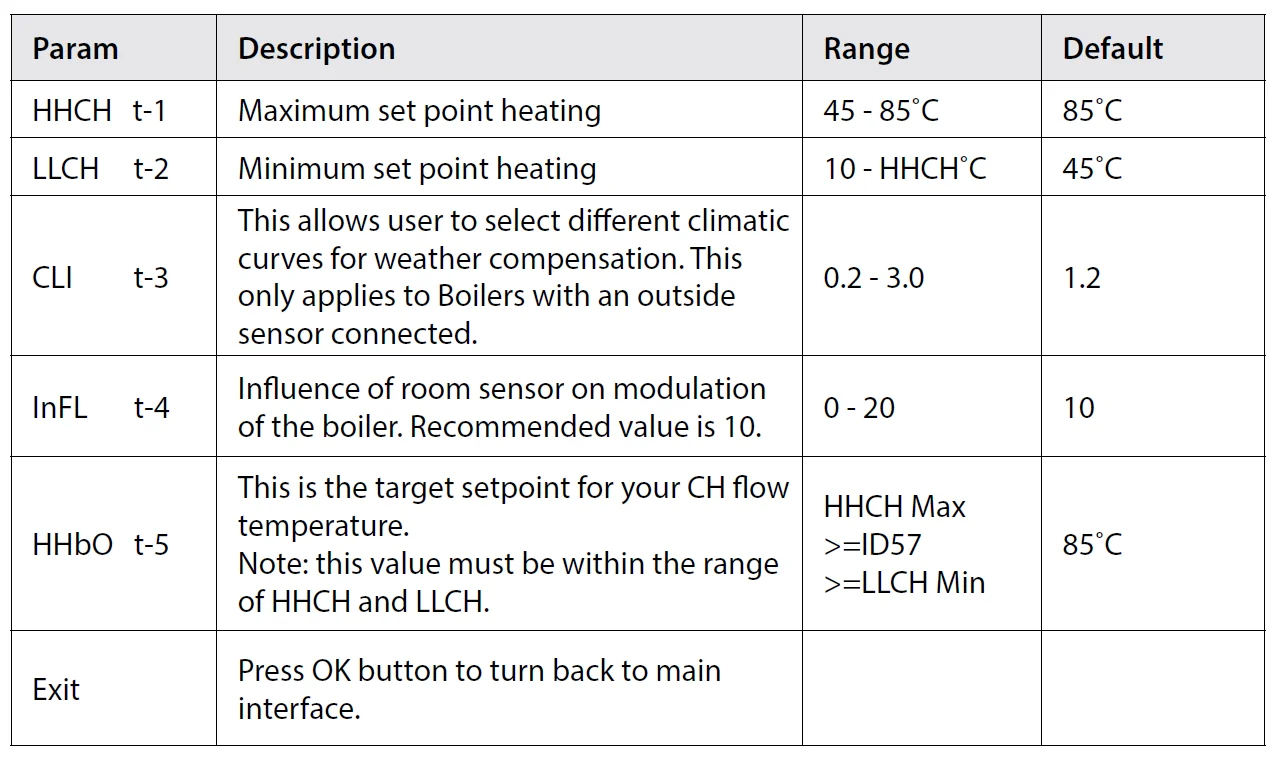
This menu allows the installer to configure the OpenTherm® parameters. To access the menu, please enter the password “08” with theorbuttons. Press OK to confirm. The parameters that can be set are outlined in the table below.
PO 9 Set OpenTherm® parameters
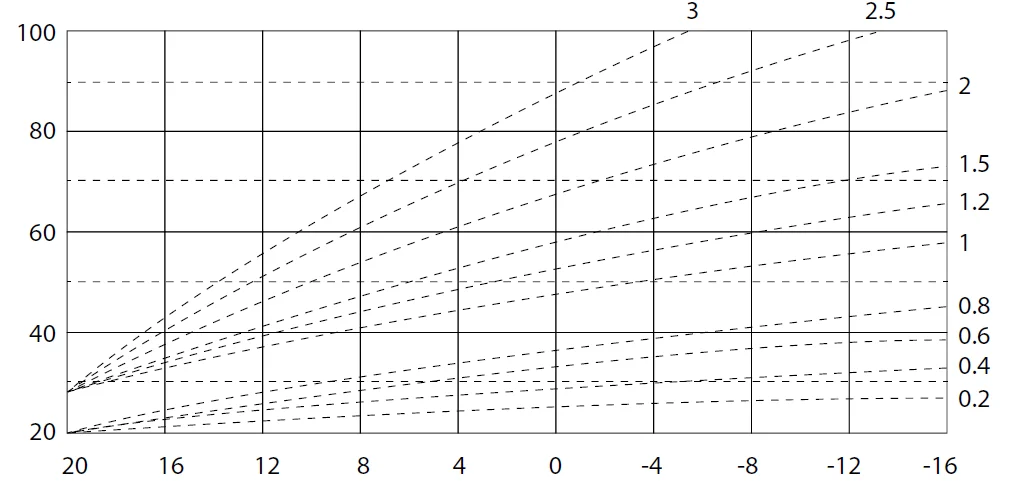
Climatic Curve
Exit
This menu allows the installer to return to the main interface. It is also possible to exit the installer menu by pressing AUTO, MAN or OFF whilst in the installer menu.
Controlling an OpenTherm® Boiler with multiple CombiPack4-OT
It is possible to have 6 CombiPack4-OT controlling 1 OpenTherm® boiler. To do this, one of the RF1A-OT receivers must be configured as a Hub Receiver. This Hub Receiver will receive data from all of the RFRP-OT thermostats and relay this information to the boiler via OpenTherm®.
Note: The Hub Receiver should have a wired OpenTherm® connection to the boiler.
Identifying if a receiver is a Hub Receiver
- Press the
 button.
 - The Hub receiver will flash Green and Red.
- The Normal receiver will just flash Red.
- To exit to the main interface, press the
 button.
 button.
 button.
Pairing the RF1A-OT receivers together
- Press thebutton on the Hub receiver. Red and Green lights will begin to flash.
- Press thebutton on the next receiver to be paired. The Red light will flash 3 times and then stop.
- Repeat this process to pair more, up to a maximum of 6 receivers.
Once all units have been paired, allow time for the receivers to begin to communicate and receive OpenTherm® information from the boiler. This may take approximately 2 – 5 minutes. You will see the red light flash on the Hub receiver and see a corresponding flash on the other receivers paired to the Hub Receiver when they are sharing information. You may need to pair the receivers to the thermostats again. If so, please refer to page 51. You can tell if your thermostat is receiving OpenTherm® information from the boiler by entering the installer menu of the thermostat (Hold Prog and OK buttons for 10 Sec) and go to P07 – Info. If the installer menu is only showing P01 – P05, the thermostat and/or receiver have not been successfully paired.
For more manuals by EPH Controls, visit ManualsLibraryy
EPH Controls CP4 RF Programmable Room Thermostat-FAQs
How do I program the EPH Controls CP4 RF thermostat?
Start by setting the correct time and date. Press the Set/Program button to enter scheduling mode. Adjust your preferred heating periods (P1–P4), including wake, leave, return, and sleep times. Set the desired temperature for each period and press OK to confirm.
What do P1, P2, P3, and P4 mean on the CP4 thermostat?
These represent programmable heating periods throughout the day. Typically, P1 is morning start time, P2 is when you leave home, P3 is your return time, and P4 is nighttime or sleep mode.
How do I manually set the temperature?
Press the MAN button to activate Manual Mode. Use the arrow buttons to increase or decrease the temperature. Press OK to confirm. The thermostat will maintain this temperature until changed.
How do I reset the EPH CP4 thermostat?
Press the reset button. When “RST YES” appears on the screen, press OK to confirm. The thermostat will return to factory settings, and you’ll need to re-enter time and schedule settings.
What is the ideal room temperature for a home?
Most experts recommend 18–20°C for living areas. Bedrooms are usually more comfortable at 16–19°C for better sleep quality.
Why is my EPH thermostat not communicating with the boiler?
Common causes include low batteries, signal interference, pairing issues, or incorrect wiring. Replace batteries first, ensure the receiver is properly paired, and check for wireless interference.
What are common problems with EPH thermostats?
Typical issues include battery failure, signal dropouts, incorrect programming, and receiver connection faults. Regular battery checks and proper installation help prevent most problems.
Should I leave the heating on overnight?
It’s generally more energy-efficient to lower the temperature at night rather than leaving heating on continuously. Bedrooms are best kept slightly cooler for comfort and savings.
Can I control the EPH CP4 thermostat from my phone?
The CP4 RF model itself does not require WiFi. However, EPH offers smart systems like Ember, which allow app-based heating control from your smartphone.
Should the thermostat be set to Auto or Heat mode?
Use Auto mode for scheduled heating based on your programmed times. Choose Manual (Heat) mode when you want a constant temperature without following the schedule.