
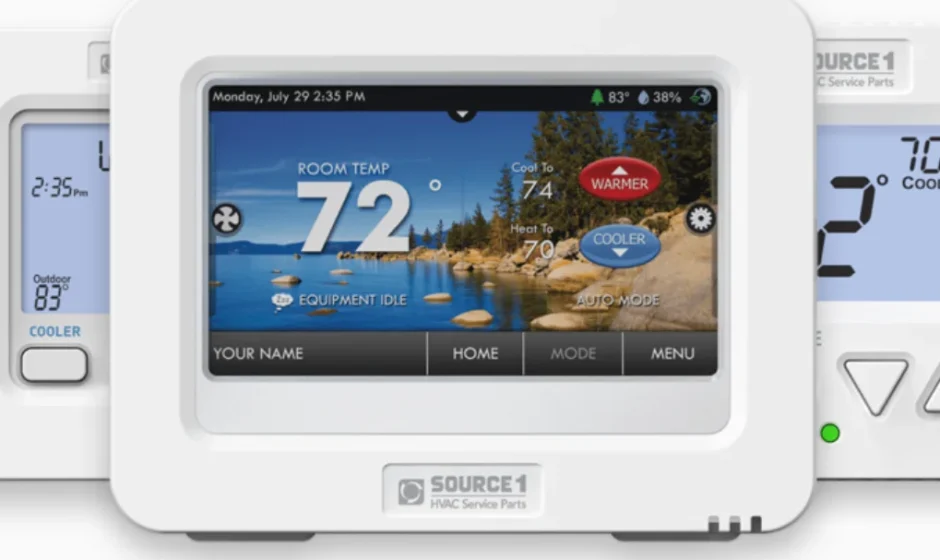

Source1 S1-THEU21P7S
- Turn off the power to the Heating/Air Conditioning system at the main fuse panel. Most residential systems have a separate breaker for disconnecting power to the furnace.
- Remove the cover of the old thermostat and loosen the screws holding the thermostat base or subbase to the wall to lift it away.
- Disconnect the wires from the old thermostat. Tape the ends of the wires as you disconnect them, and mark them with the letter of the terminal for easy reconnection to the new thermostat.
TERMINAL CONNECTIONS
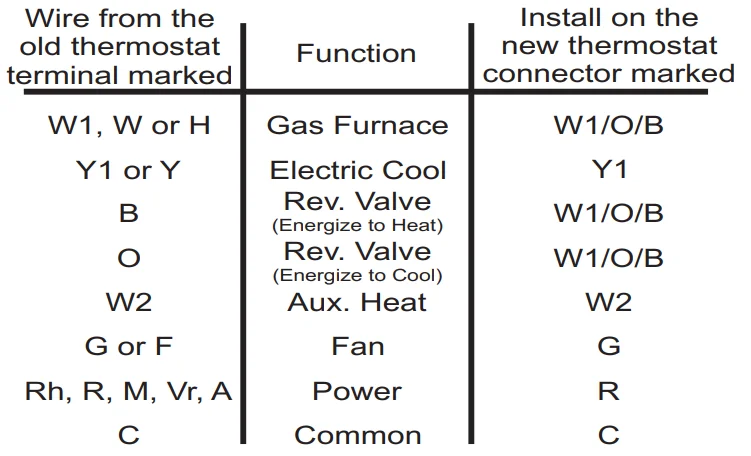
SAMPLE WIRING DIAGRAMS
A COMMON WIRE MUST BE CONNECTED IN ALL APPLICATIONS.
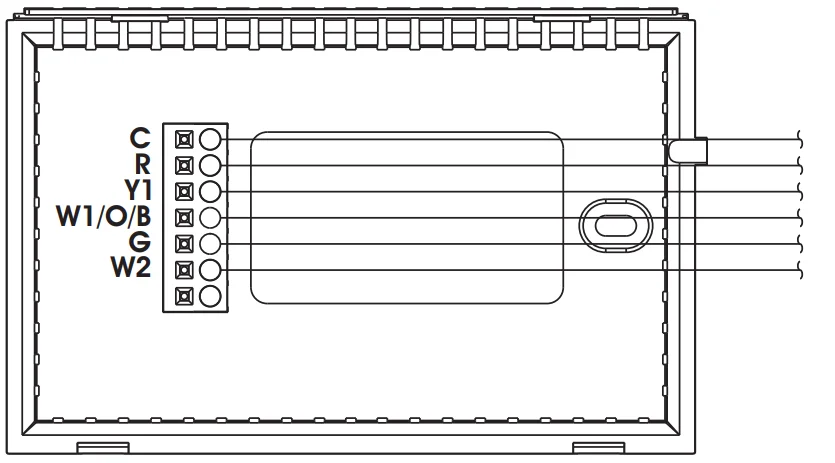
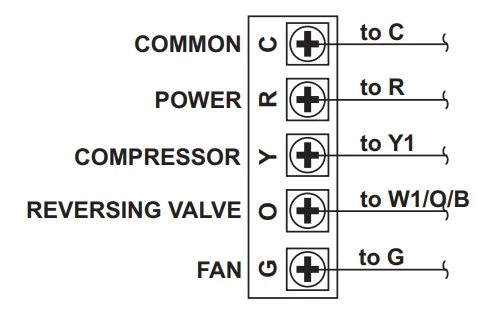
- 5 Wire, 1 Stage Heat Pump O reversing valve.
Residential Heat Pumps, split systems & package units, with no auxiliary heat.
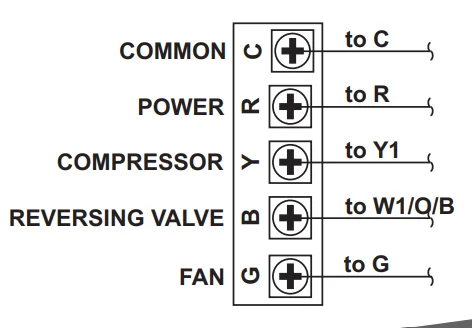
- 5 Wire, 1 Stage Heat Pump B reversing valve.
Residential Heat Pumps, split systems & package units, with no auxiliary heat.
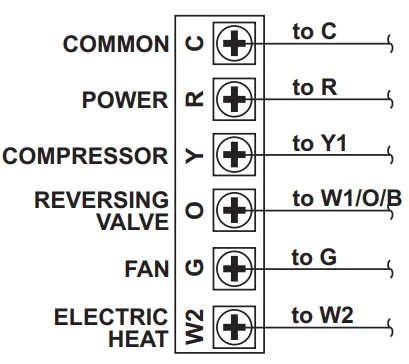
- 6 Wire, 1 Stage Cool & 2 Stage Heat-Heat Pump O reversing valve.
Residential Heat Pumps, split systems & package units, with auxiliary heat.
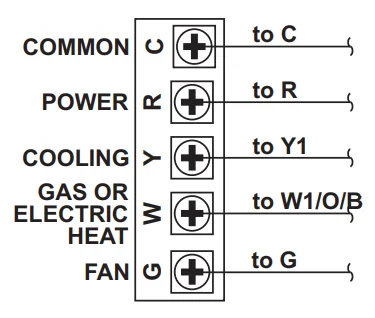
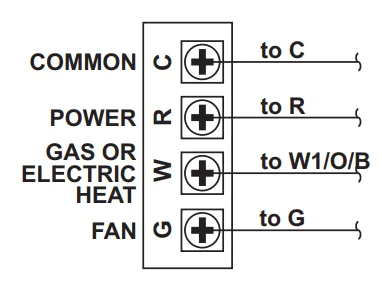
- 5 Wire, 1 Stage Cool & Heat-Gas or Electric
Residential Gas or Electric Heat, Electric Cool, split systems & package units
- 4 Wire, 1 Stage Heat Gas or Electric
Residential Gas or Electric Heat units with a separately controlled fan.
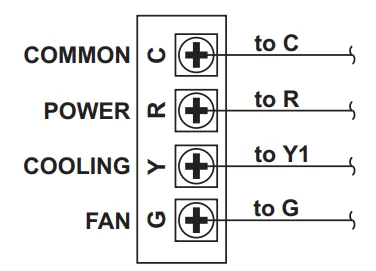
- 4 Wire, 1 Stage Cool
Residential Electric Cool units.
JUMPER SETTINGS
HEAT PUMP w/ O REVERSING VALVE
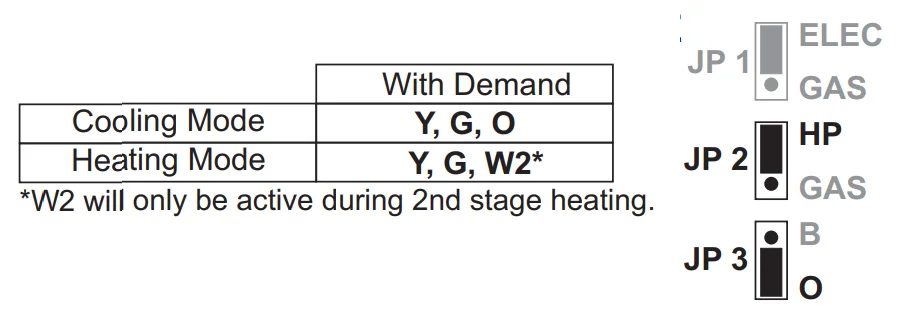
*W2 will only be active during 2nd stage heating.
HEAT PUMP w/ B REVERSING VALVE
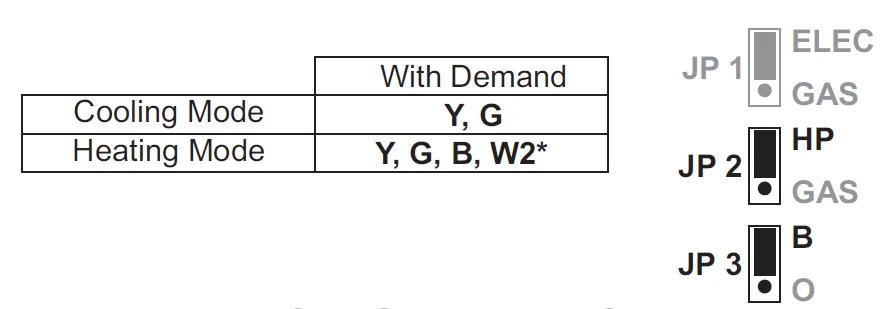
*W2 will only be active during 2nd stage heating.
GAS FURNACE w/ ELECTRIC COOL
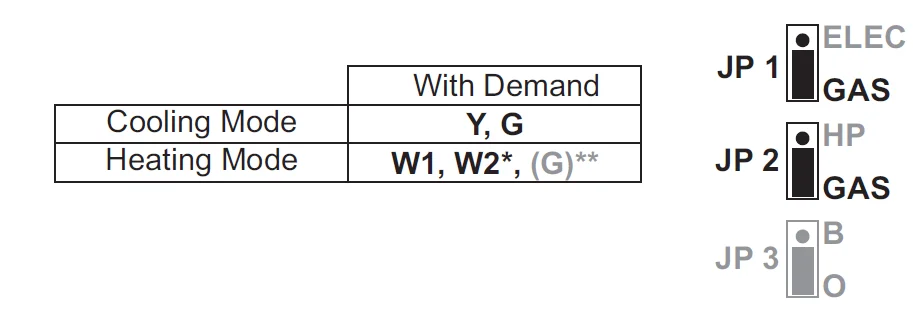
*W2 will only be active during 2nd stage heating.
**In this application 24v will not be present at the ‘G’ terminal as the fan will be controlled by the Gas Furnace.
ELECTRIC STRIP HEAT w/ ELECTRIC COOL
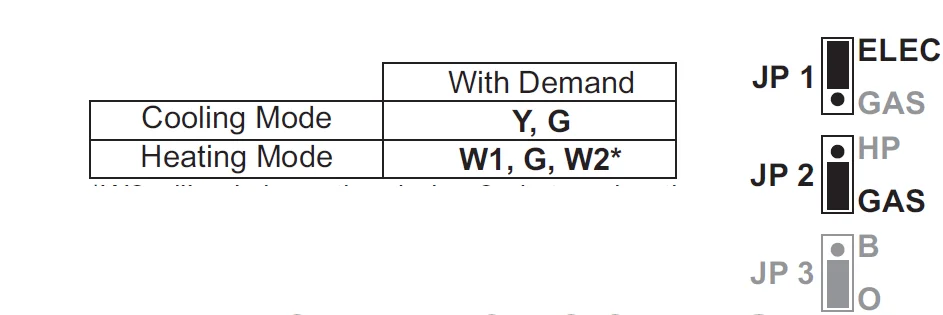
*W2 will only be active during 2nd stage heating.
TEST OPERATION
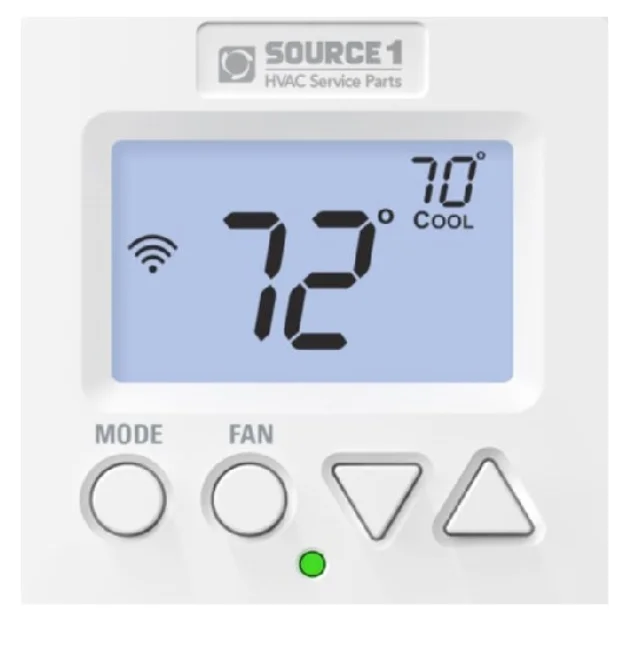
- On the thermostat, use the MODE button to place the thermostat into the HEAT mode. Press the COOLER or WARMER button until the set temperature is 10 degrees above room temperature. The HVAC unit should energize in the heating mode, and the Heat icon should blink.
Note: You may need to wait up to five minutes for the heating to energize due to the compressor lockout feature.
If your HVAC unit is equipped with 2nd stage strip heat, press the WARMER button once. 2nd stage heating (W2) should energize. - On the thermostat, use the MODE button to place the thermostat into the COOL mode. Press the COOLER or WARMER button until the set temperature is 10 degrees below room temp. The HVAC unit should energize in the cooling mode, and the Cool icon should blink.
Note: You may need to wait up to five minutes for the cooling to energize due to the compressor lockout feature. - On the thermostat, use the MODE button to place the thermostat into the OFF mode. Press the FAN button to display the Fan On icon. The fan should turn on and run continuously.
TROUBLE SHOOTING
- SYMPTOM: The Cooling does not attempt to turn on.
CAUSE: The cooling setpoint is set too high or the thermostat is not in the Cool mode.
REMEDY: Consult the Normal Operation section in the Owner’s Manual to:- Lower the cooling setpoint
- Place the thermostat into the Cool mode
- SYMPTOM: The Heating does not attempt to turn on.
CAUSE: The heating setpoint is set too low or the thermostat is not in the Heat mode.
REMEDY: Consult the Normal Operation section in this manual to:- Raise the heating setpoint
- Place the thermostat into the Heat mode
For more manuals by Source1 Thermostate, visit ManualsLibraryy
Source1 S1-THEU21P7S-FAQs
How do I set the Source1 S1-THEU21P7S thermostat?
Use the COOLER and WARMER buttons to adjust your desired temperature. Select Heat or Cool using the mode switch. Keep the fan set to Auto so it runs only when heating or cooling is needed.
How do I reset the Source1 thermostat?
Turn off the HVAC system at the circuit breaker for about 20–30 seconds, then turn it back on. Allow a few minutes for the thermostat to reboot and reconnect.
What is the 3-minute rule for AC systems?
After turning off your AC or heat pump, wait at least 3 minutes before turning it back on. This protects the compressor from damage due to rapid cycling.
What is the normal lifespan of a heat pump?
Most heat pumps last 10–15 years, depending on maintenance, usage, and environmental conditions.
What temperature should I set my heat pump to?
For comfort and efficiency, set heating between 68–72°F (20–22°C) in winter and cooling around 74–78°F (23–26°C) in summer.
What does “Stage 1” or “Stage 2” mean on the thermostat?
Stage 1 indicates normal operation. Stage 2 activates when extra heating or cooling is needed for faster temperature adjustment.
Do I need a C-wire for this thermostat?
A C-wire (common wire) provides continuous power. Some systems require it, especially for heat pumps. Check your wiring before installation.
What are S1 and S2 terminals on a thermostat?
S1 and S2 typically serve as communication terminals, sending low-voltage signals between indoor and outdoor HVAC units.
How do I know if my heat pump is working correctly?
Your home should gradually reach the set temperature. The system should run smoothly without constant cycling, unusual noises, or ice buildup.