
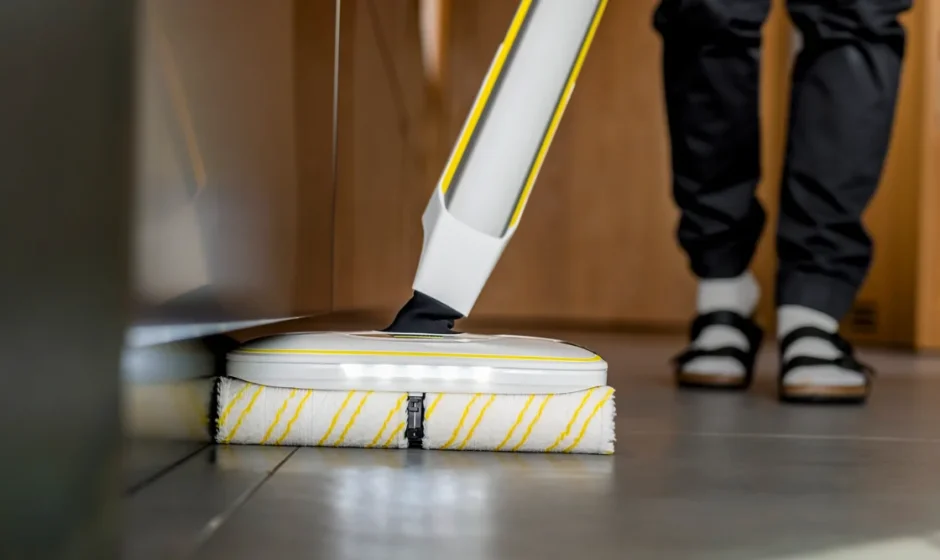

Karcher FC 8 Smart Signature Line

Intended use
Use the floor cleaner exclusively for cleaning hard floors in your private household and only on waterproof hard floors. No water-sensitive floor coverings, such asuntreated cork floors, since the moisture can penetrate and damage the floor. The device is suitable for cleaning PVC, linoleum, tiles, stone, oiled and waxed parquet, laminate, and all water-resistant floor coverings.
Accessories and spare parts
Only use original accessories and original spare parts. They ensure that the appliance will run fault-free and safely. Information on accessories and spare parts can be found at www.kaercher.com.
Scope of delivery
The scope of delivery for the appliance is shown on the packaging. Check the contents for completeness when unpacking. If any accessories are missing or in the event of any shipping damage, please notify your dealer.
Warranty
The warranty conditions issued by our relevant sales company apply in all countries. We shall remedy possible malfunctions on your appliance within the warranty period, free of cost, provided that a material or manufacturing flaw is the cause. In a warranty case, please contact your dealer (with the purchase receipt) or the next authorised customer service site. (See overleaf for the address). Further warranty information (if available) can be found in the service area of your local Kärcher website under “Downloads”.
Safety instructions
Read this safety chapter and these original instructions before using the device for the first time. Act in accordance with them. Keep the original instructions for future reference or for future owners.
- In addition to the notes in the operating instructions, you also need to take into consideration the general safety regulations and accident prevention guidelines applicable by law.
- Warnings and information notices attached to the device provide important information for hazard-free operation.
Hazard levels
DANGER
- Indication of an imminent threat of danger that will lead to severe injuries or even death.
WARNING
- Indication of a potentially dangerous situation that may lead to severe injuries or even death.
CAUTION
- Indication of a potentially dangerous situation that may lead to minor injuries.
ATTENTION
- Indication of a potentially dangerous situation that may lead to damage to property.
Electrical components
DANGER
- Do not immerse the device in water.
- Never insert conductive objects, e.g. screwdrivers or similar, into the charging socket on the appliance.
- Never touch contacts or lines.
- Do not damage the mains connection cable by running it over, crushing it, or pulling it across sharp edges.
- Only connect the device to alternating current. The voltage indicated on the type plate must match the voltage of the power source.
- Only operate the device via a fault current protection switch (maximum 30 mA).
WARNING
- Immediately replace a damaged charger, together with the charging cable, with an original part.
- Switch off the device immediately and remove the mains plug before performing any care and service work.
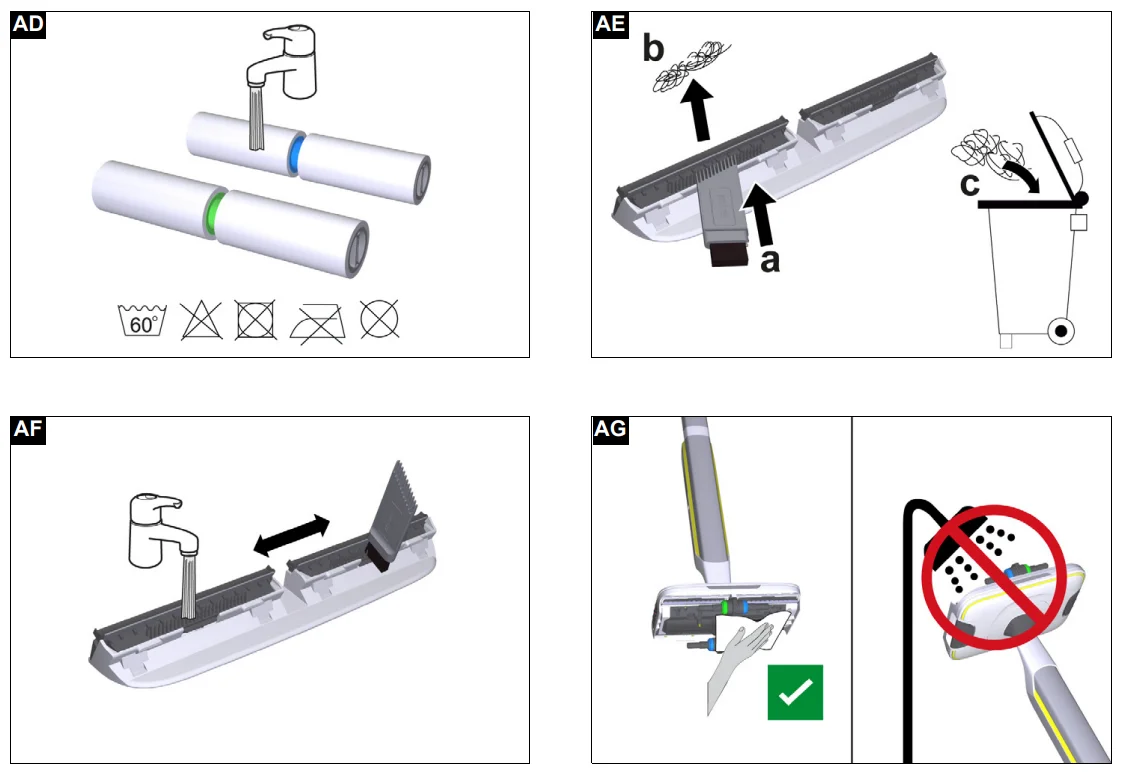
- The device contains electrical components. Do not clean the device or the top or bottom of the floor head under running water or under a shower spray; water may enter.
- Only connect the device to an electrical connection that has been set up by a qualified electrician as per IEC 60364-1.
CAUTION
- Have repair work carried out by the authorised customer service only.
- Check the device and the accessories each time before operation, in particular the mains connection and extension cable, to make sure it is safe and working correctly. Pull out the mains plug in case of any damage and do not use the device.
Safe handling
ATTENTION
- Device damage. Never fill the water reservoir with solvents, liquids containing solvents, or undiluted acids (e.g., detergents, petrol, paint thinners, and acetone).
- Only switch on the device when the fresh water tank and waste water tank are installed.
- Do not pick up sharp or larger objects with the device, such as e.g., glass shards, gravel, or toy parts.
- Do not fill the fresh water container with vinegar, decalcification agents, essential oils, or similar substances. Avoid taking up these substances with the device.
- Use the device only on hard floors with a watertight coating, such as e.g., varnished parquet, enamelled tiles, or linoleum.
- Do not use the device for cleaning carpets or carpeted floors.
- Do not guide the device over the floor grilles of convection heating systems. The device cannot vacuum up the escaping water when it is guided over a floor grille.
- In case of longer breaks in operation and after use, switch off the device at the main switch/device switch and pull out the charged mains plug.
- Do not operate the device at temperatures below 0 °C.
- Protect the device from rain. Do not store the device outdoors.
Description of the device
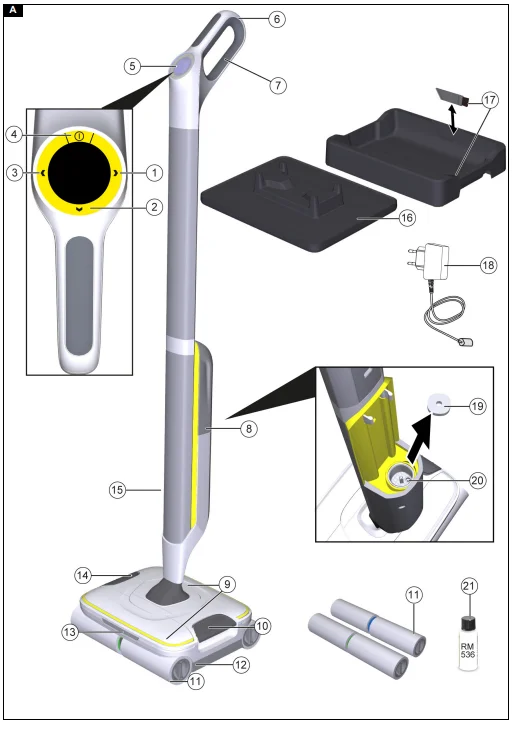
For the illustrations, refer to the graphics page. Illustration A
- Right selection button
- Confirm button
- Left selection button
- ON / OFF button
- LCD display
- Wall anti-slip handle
- Handle
- Fresh water tank
- Removable hair filter
- Unlocking button for waste water tank and the parking station
- Cleaning rollers (4 x)
- Waste water tank
- LED lights
- Unlocking button for hair filters
- Charging socket
- Parking station
- Cleaning station with a cleaning brush
- Charger with charging cable
- Fresh water filter
- Sensor in the freshwater tank holder
- Detergent RM 536 (30 ml)
Initial start-up
Connecting the hard floor cleaner with Bluetooth and the app
To be able to use all available functions, we recommend connecting the device to the Kärcher Home & Garden app. To do this, the KÄRCHER Home & Garden app must be® downloaded to a mobile device with Bluetooth wireless technology. The Kärcher Home & Garden app can be downloaded here: Illustration B
- Google Play™ and Android™ are trademarks or registered trademarks of Google Inc.
- Apple® and App Store® are trademarks or registered trademarks of Apple Inc.
The Kärcher Home & Garden App offers the following main functions, among others:
- Cleaning modes recommended by KÄRCHER for different floors that can be transferred to the device
- Ability to set up your own cleaning modes
- Step-by-step instructions for initial startup, commissioning, use and device cleaning
- Tips & tricks
- FAQ with detailed troubleshooting guide
- Notification of system updates and their execution
- Connection to the KÄRCHER Service Centre
- Usage statistics
- Device settings, e.g. Boost time
- Reminder to change rollers
- Connection to the Kärcher online shop, e.g. for purchasing additional accessories
Connecting the device to the Kärcher Home & Garden app:
- Load the Kärcher Home & Garden app from the Apple App Store or from the Google Play Store.
- Launch the Kärcher Home & Garden App.
- Start the Kärcher Home & Garden app with a customer account or as a guest.
- Add the device and follow the step-by-step instructions.
Installation
Installing the handlebars
- Hold the basic device firmly.
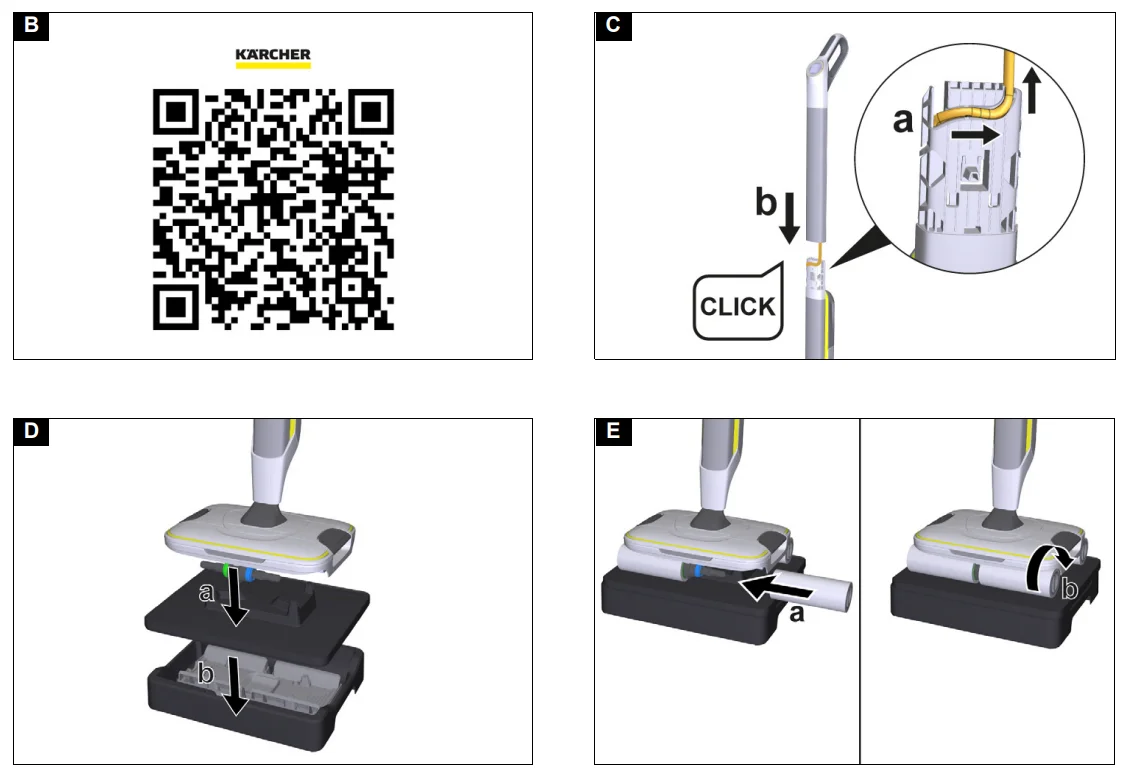
- Insert the cable into the guide of the plastic connector and fix it in place.
- Insert the handle bar into the basic unit as far as it will go, until it audibly clicks into place. The handlebar must sit firmly in the device.
Illustration C - Place the device on the parking station and let it click into place.
- Place the device with the parking station on the cleaning station.
Illustration D - Rotate the cleaning rollers onto the roller holder until they stop. Pay attention to the colour coding on the inner side of the roller and on the roller holder on the device (e.g. blue to blue).
Illustration E
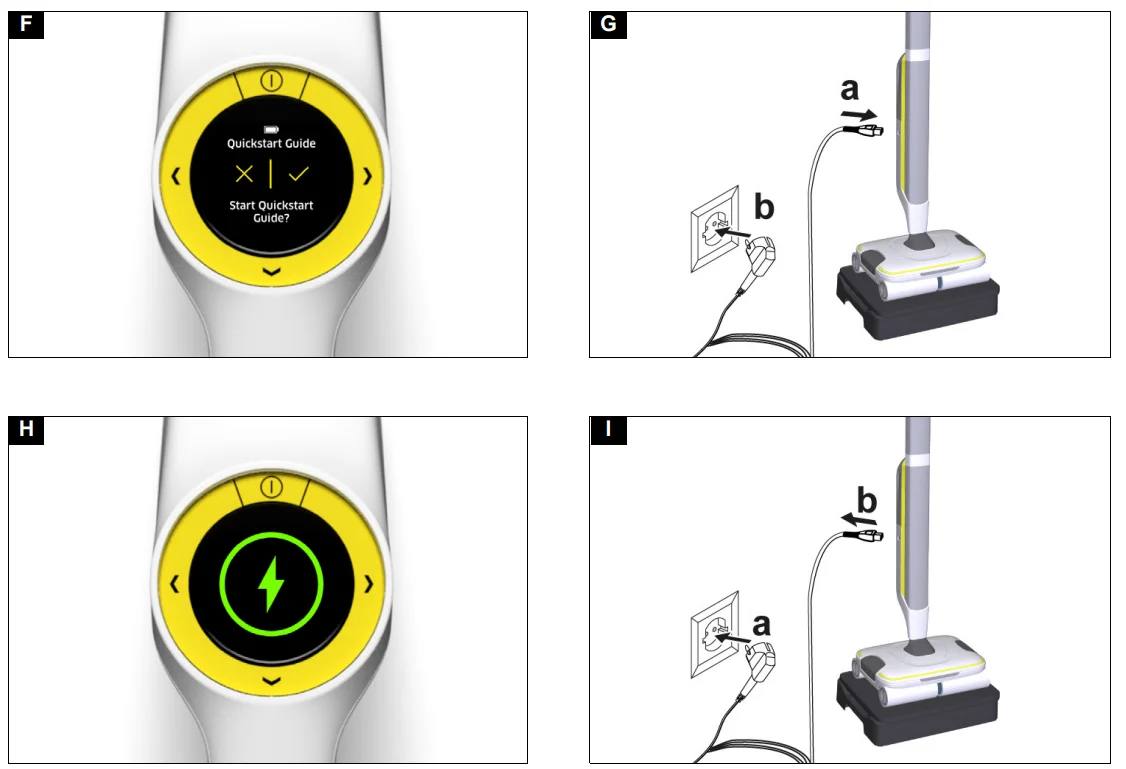
Note: If desired, a quick start guide can be called up directly on the device. To do this, the device must be switched on. - Press the ON / OFF button.
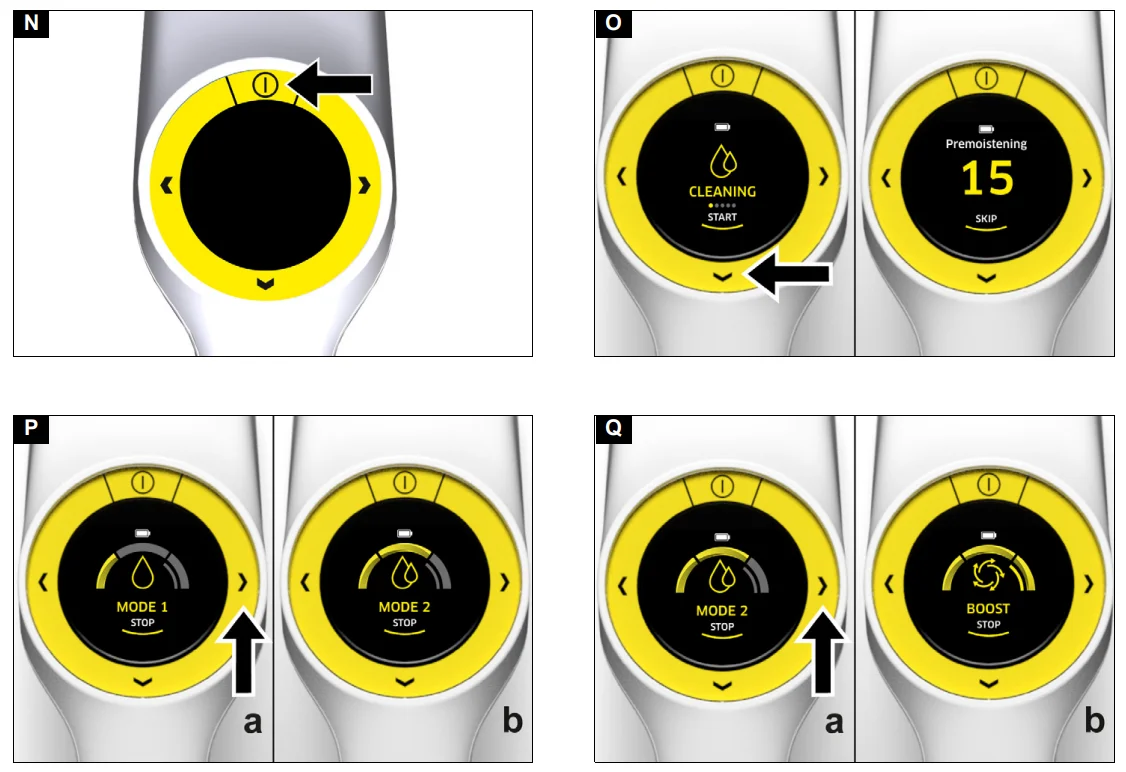
Illustration N
The device switches on.
The LCD asks whether the quick start guide should be called up.
Illustration F
Initial startup
Charging process
- Plug the charging cable of the charger into the charging socket on the device.
Illustration G - Plug the mains plug of the charger into the socket. The LCD shows the current charging state of the battery.
Illustration H
The battery is fully charged after 4 hours. - Unplug the mains plug from the charger from the socket after charging.
Illustration I - Pull the charging cable out of the device.
Fitting the wastewater tank
- Operate the unlocking button for the parking station with your foot and lift the device.
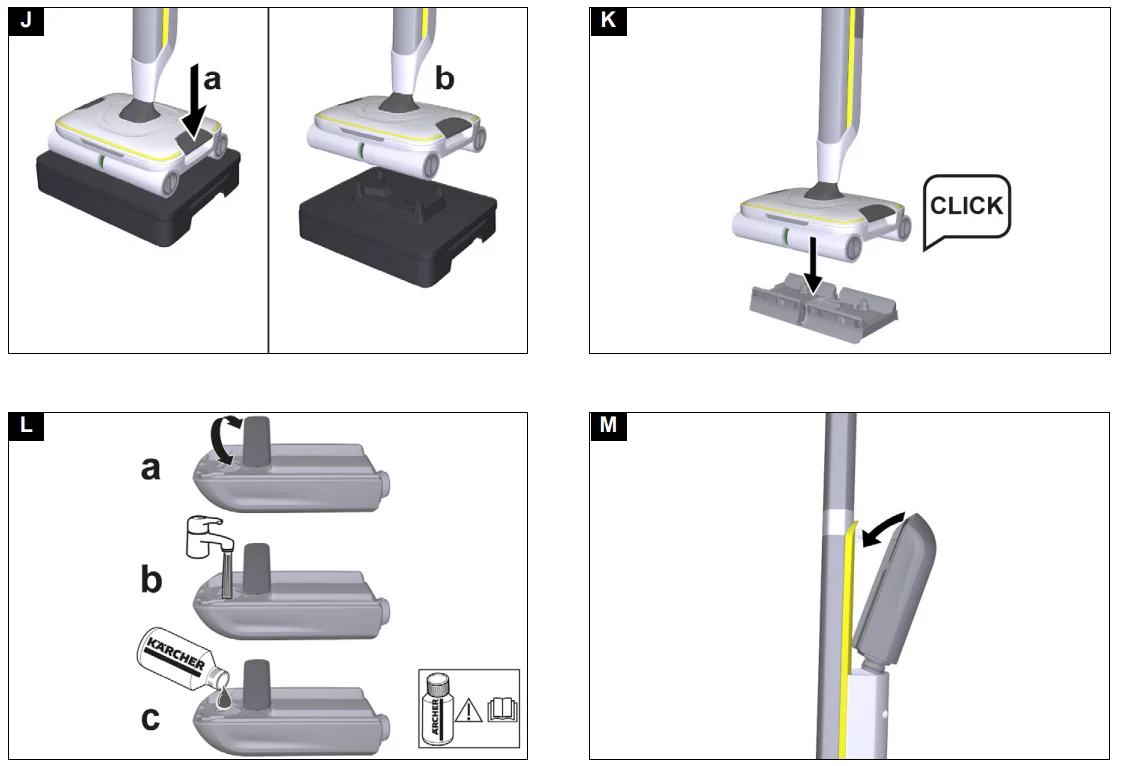
Illustration J - Place the device in the middle of the wastewater tank so that it is positioned between the rollers, and then it audibly clicks into place. The position of the tank is not important here, as it can be used in both
longitudinal directions in the device.
Illustration K
The wastewater tank must sit firmly in the device.
Filling the fresh water tank
- Grasp the fresh water tank by the recessed grips at the side and remove it from the device.
- Open the tank cap and turn it to the side.
Illustration L - Fill the fresh water tank with cold or lukewarm tap water up to the MAX marking.
- If necessary, add KÄRCHER detergent or care agent to the freshwater tank.
ATTENTION
Overdosing or underdosing of the detergent or care agent
Can result in poor cleaning results. Follow the dosage recommendations for the detergent or care agent. - Close the tank cap.
- Insert the fresh water tank into the device.
Illustration M
The fresh water tank must sit firmly in the device.
Operation
General information on the operation
ATTENTION
Moisture
- Material damage to sensitive floors
- Check the surface to be cleaned for water sensitivity at an inconspicuous location before using the device.
- Do not clean water-sensitive floor coverings, such as e.g. untreated cork floors, since the moisture can penetrate and damage the floor.
ATTENTION
Material damage
- Damage to the device from pointed, large and/or bulky objects.
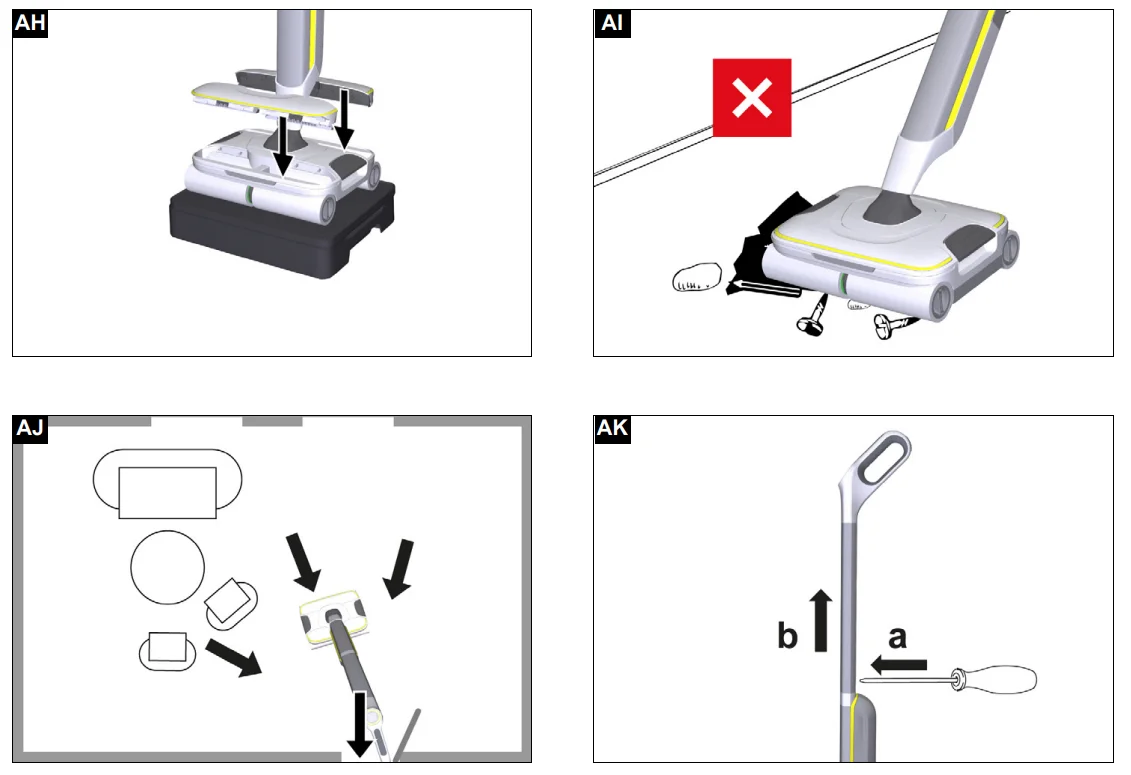
- The device must not be stored and used on hard, coarse dirt and objects, as the parts can get stuck under the wastewater tank and cause scratches on the floor and tank.
- Before starting work and storing the device, remove objects such as shards, pebbles, screws or toy parts from the floor.
Illustration AI
Note
- To avoid striped patterns, test the device on an inconspicuous area before using on sensitive surfaces, e.g. wood or fine stone.
- Do not allow it to remain in one area, but keep it in motion
- Observe the instructions for the floor covering manufacturer.
Note- Work backwards towards the door so that no footprints are generated on the freshly washed floor.
Illustration AJ
- Work backwards towards the door so that no footprints are generated on the freshly washed floor.
- Floor cleaning is performed using a to-and-fro movement at the same speed as when vacuuming.
- Activate the boost function for heavy soiling. To do this, select the “Cleaning” tab in the main menu and press the right selection button repeatedly until the Boost function is selected. The Boost function is activated for 15 seconds by default and can be customized via the app. The device is then automatically in Cleaning mode 2. The Boost function can also be activated directly by permanently pressing the right selection button in Cleaning mode
- When the boost function is activated, the roller speed and the amount of water are increased. Let the device slide slowly across the floor without exerting pressure on the device.
Illustration Q
- When the boost function is activated, the roller speed and the amount of water are increased. Let the device slide slowly across the floor without exerting pressure on the device.
- The colour of the rollers shows which application they are especially suitable for.
- Yellow universal rollers: versatile use
- Rollers with black stripes: Cleaning of insensitive hard floors (e.g. stone, ceramics); not suitable for sensitive natural stone floors (e.g. marble, terracotta)
Note
For optimal cleaning results, wash the rollers in the washing machine at 60°C before using them for the first time.
Care and service
Floor head cleaning by means of a rinsing process
ATTENTION
Dirt or detergent residues
The wastewater tank and the hair filters must be cleaned regularly to ensure that dirt does not accumulate in the tank and hair filters. Dirt particles can clog the hair filters and slots if the device is not cleaned after use. The accumulation of dirt and bacteria can also result in the development of unpleasant odours in the device. On completion of work, place the device in the cleaning station and start the rinsing process. Clean the floor head in the cleaning station only by using the automatic rinsing process and not by pouring water into the station separately. Make sure that the wastewater tank is attached. Do not clean the device or the top or bottom of the floor head under running water or under a shower spray; water may enter.
Note: As long as the warning “Tank full” is shown on the LCD, and the wastewater tank has not been emptied, the rinsing process cannot be started.
Note: The LED lighting on the floor head remains switched off during the rinsing process.
To be guided through the device cleaning process, you can navigate to the “Device cleaning” tab in the main menu and confirm the display of the instructions. The same steps are explained below. If the instructions are not displayed, the rinsing process starts immediately.
- Empty and reinsert the wastewater tank (see Emptying the wastewater tank).
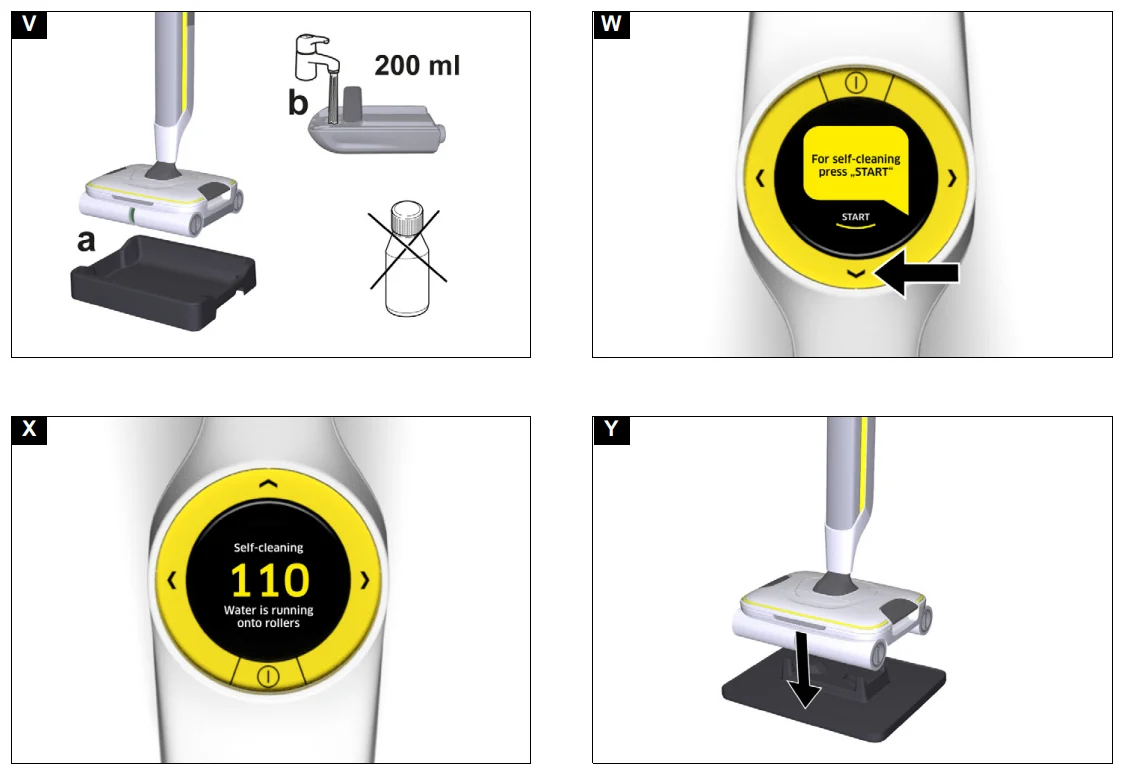
- Place the device with the empty wastewater tank in the cleaning station.
- Fill the fresh water tank with at least 200 ml of fresh water without a detergent or care agent (see Filling the fresh water tank.
Illustration V
Note: It is not necessary to add detergent for the rinsing process. - Select the “Device cleaning” tab in the main menu and start the rinsing process using the Confirm button.
Illustration W
A signal tone sounds.
The rinsing process begins and takes about 2 minutes. The time runs down on the display until self-cleaning is complete.
Illustration X
Note: At the start of the rinsing process, the water runs from the fresh water tank onto the rollers for approx 80 seconds. During this time, the device is silent. Only at the end of the rinsing process do the rollers start to turn for approx 30 seconds. - An acoustic signal sounds when the rinsing process has finished.
- Press the unlocking button for the wastewater tank and place the device on the parking station. The wastewater tank remains in the cleaning station.
Note: If you try to start cleaning with a full wastewater tank, the warning “Tank full” appears on the LCD, and cleaning cannot be started. - Push the unlocking button for the hair filters inwards.
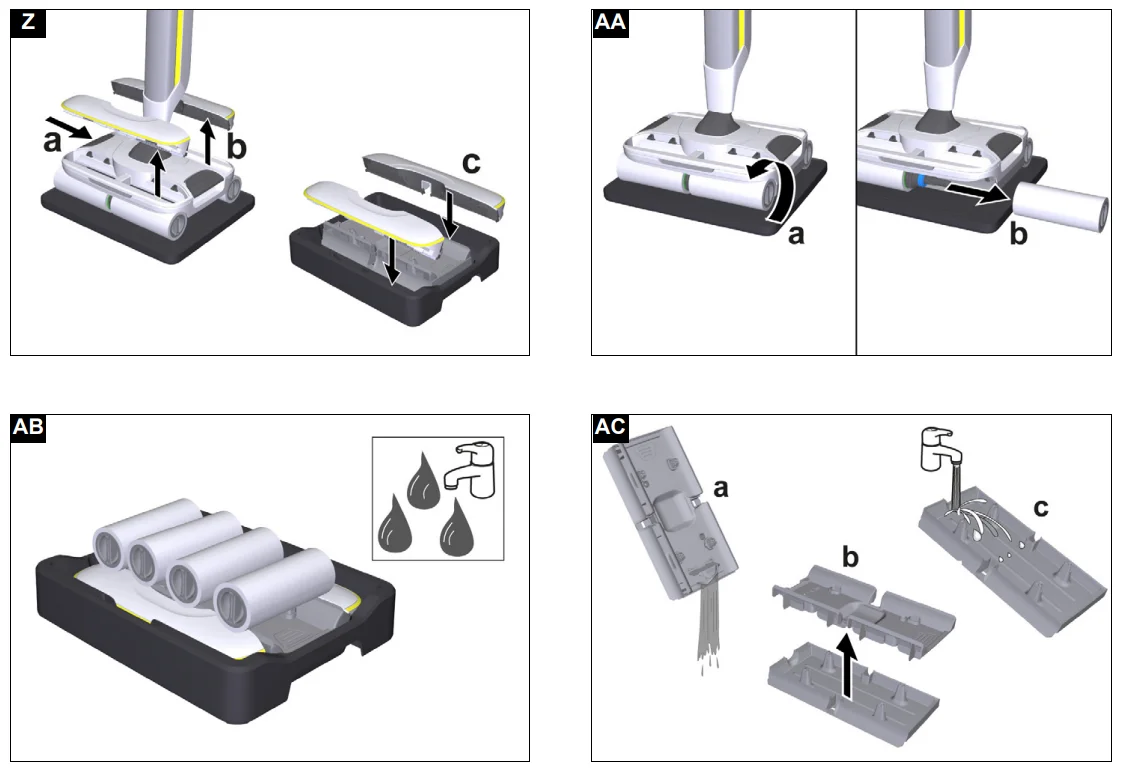
Illustration Z
The hair filters are released. - Place the hair filters in the cleaning station.
- Remove the rollers and place them in the cleaning station.
Illustration AA - Transport the cleaning station with a waste water tank, hair filters and rollers to the toilet, sink or trash can as required.
Illustration AB - Clean the wastewater tank (see Cleaning the wastewater tank).
- Clean the rollers (see Cleaning the rollers).
- Clean the hair filters (see Cleaning the hair filters).
- Clean the underside of the floor head and the roller drive with a moist cloth.
Illustration AG
Note: Do not clean the device or the top or bottom of the floor head under running water or under a shower spray; water may enter. - Empty and dry the cleaning station.
- If there is still water in the freshwater tank, remove the freshwater tank and empty it.
Cleaning the rollers
ATTENTION
Detergent residue in the rollers
Foaming
- Wash the rollers under running water or clean them in a
- washing the machine each time after using the device.
ATTENTION
- Damage due to cleaning the rollers with fabric softener or using a clothes dryer
- Damage to the microfibres
- Do not use fabric softener when cleaning in a washing machine.
- Do not dry the rollers in a clothes dryer.
ATTENTION
Material damage due to loose rollers
This may damage the washing machine. Place the rollers in a laundry net and load the washing machine with extra laundry.
- Press the ON / OFF button.
The device switches off. - Place the device on the parking station.
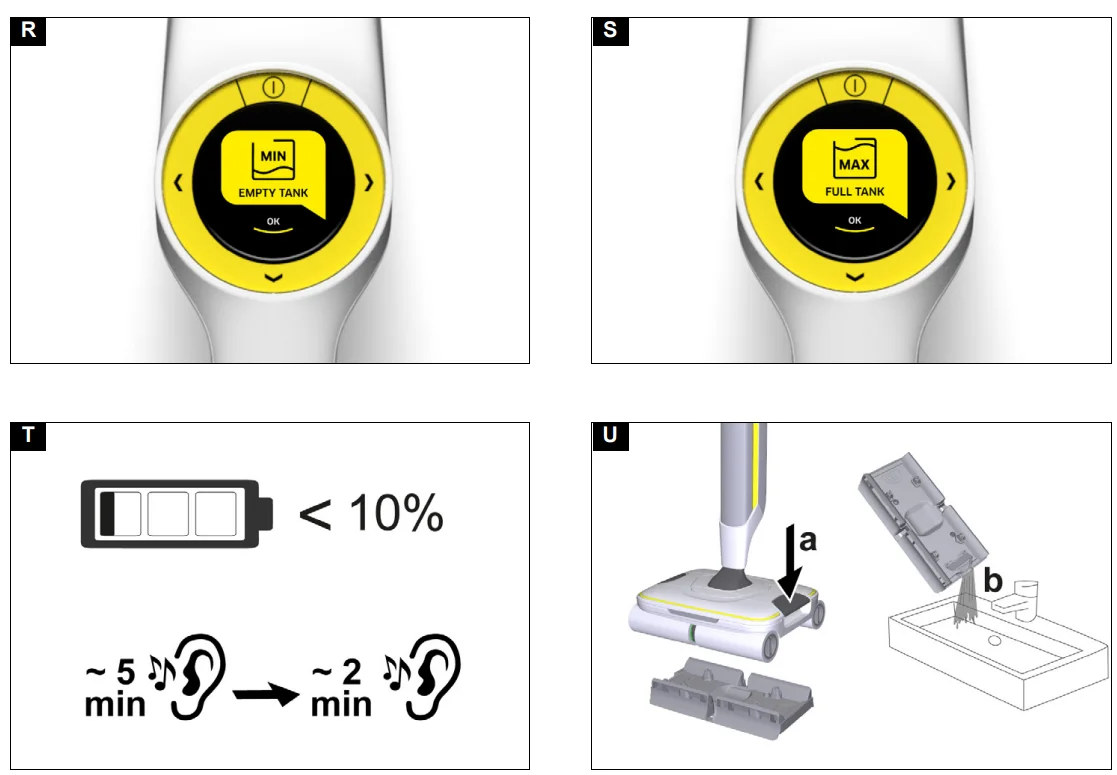
Illustration Y - Unscrew the cleaning rollers on the recessed grip.
Illustration AA - Clean the cleaning rollers under running water or wash them in a washing machine at max. 60 °C.
Illustration AD - Rotate the cleaning rollers onto the roller holder until they stop. Pay attention to the colour coding on the inner side of the roller and on the roller holder on the device (e.g. blue to blue).
Illustration E - Let the rollers on the device and on the parking station dry.
Cleaning the hair filters
ATTENTION
Risk of damage
- Stuck dirt can permanently damage the device.
- Clean both hair filters regularly with the cleaning brush.
ATTENTION
- Damage due to cleaning the hair filters in a dishwasher
- The washing process can distort the scraper edge and it will no longer press on the rollers correctly. This worsens the cleaning result.
- Do not clean the hair filters in a dishwasher but rather under running water.
- Press the ON / OFF button.
The device switches off. - Place the device on the parking station.
Illustration Y - Push the unlocking button for the hair filters inwards.
Illustration Z
The hair filters are released and can be removed. - Clean both hair filters under running water.
- Remove stuck dirt, e.gin the filter comb, with the cleaning brush.
Illustration AE
Illustration AF
Disassembly
Removal of the handle
ATTENTION: Frequent removal of the handle
- The handle components can be damaged by repeated removal.
- Do not remove the handle from the basic device after assembly.
- The handle may only be removed from the basic device when the device is sent out for service purposes.
ATTENTION: Incorrect removal of the handle
Device damage
Take care to ensure that the connection cable between the basic unit and the handle is not damaged.
- Insert the screwdriver at a 90° angle into the small opening on the back of the handle, and remove the handle.
Illustration AK
Troubleshooting guide
Malfunctions often have simple causes that you can remedy yourself using the following overview. When in doubt, or in the case of malfunctions not mentioned here, please contact your authorized Customer Service.
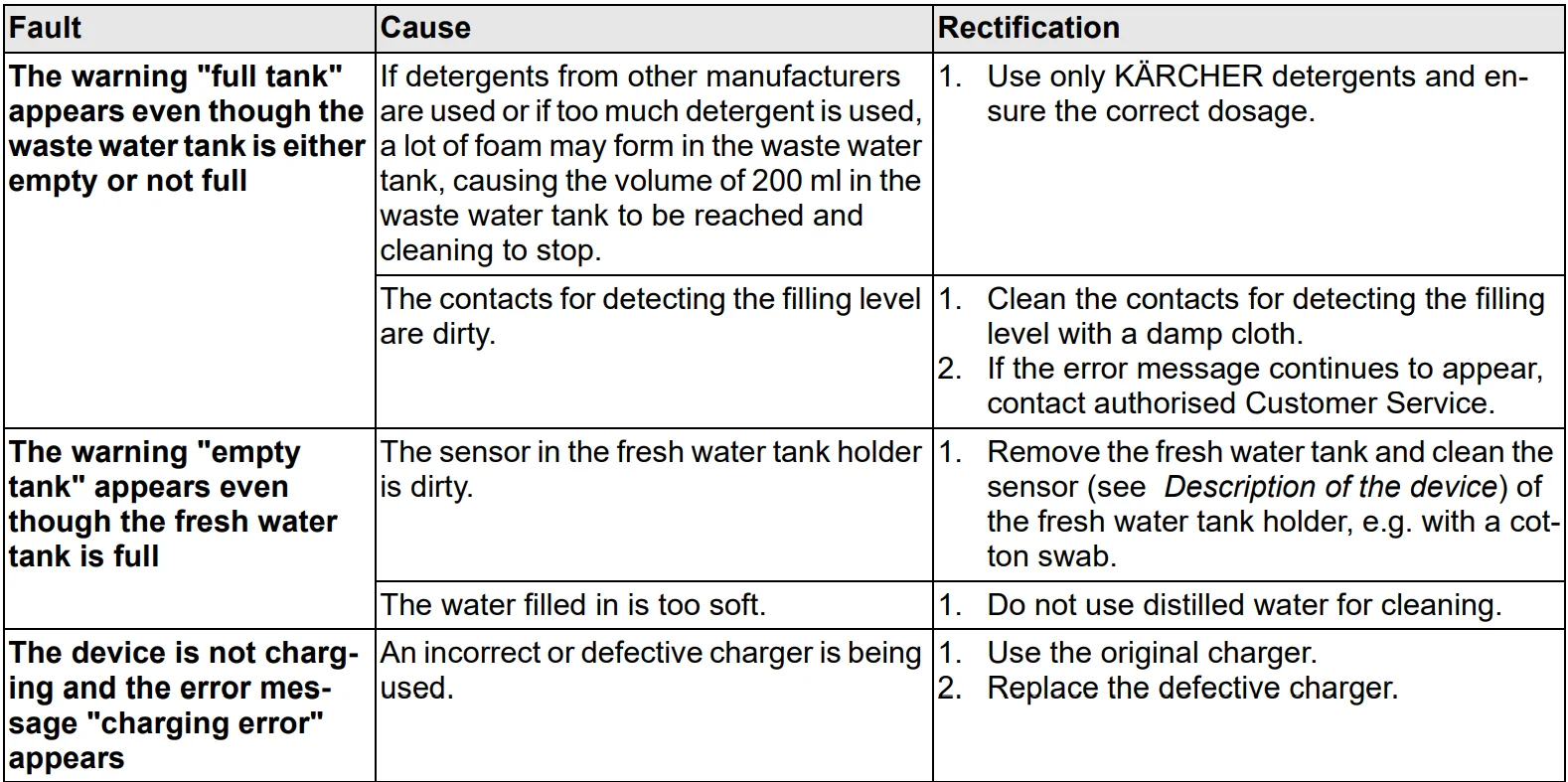
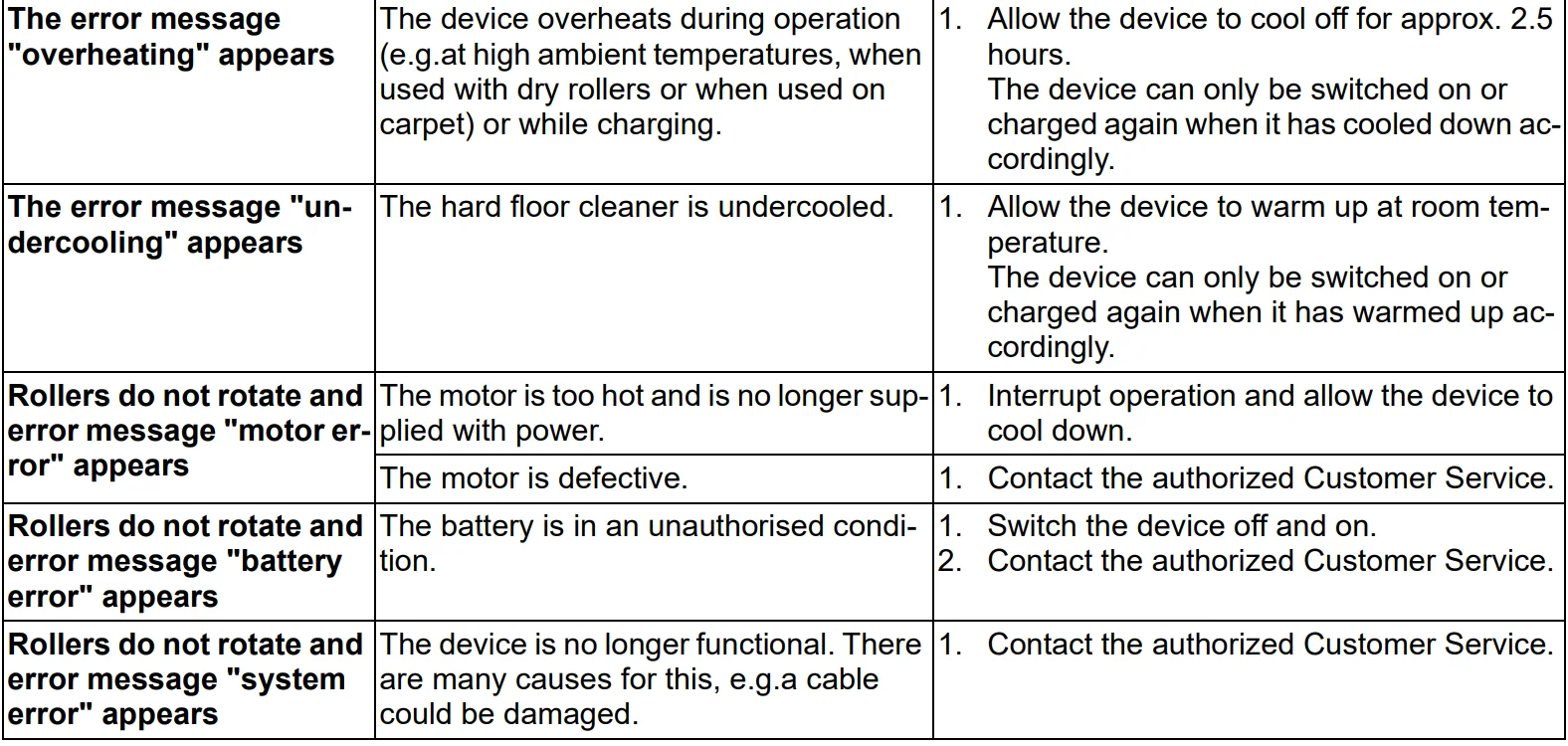
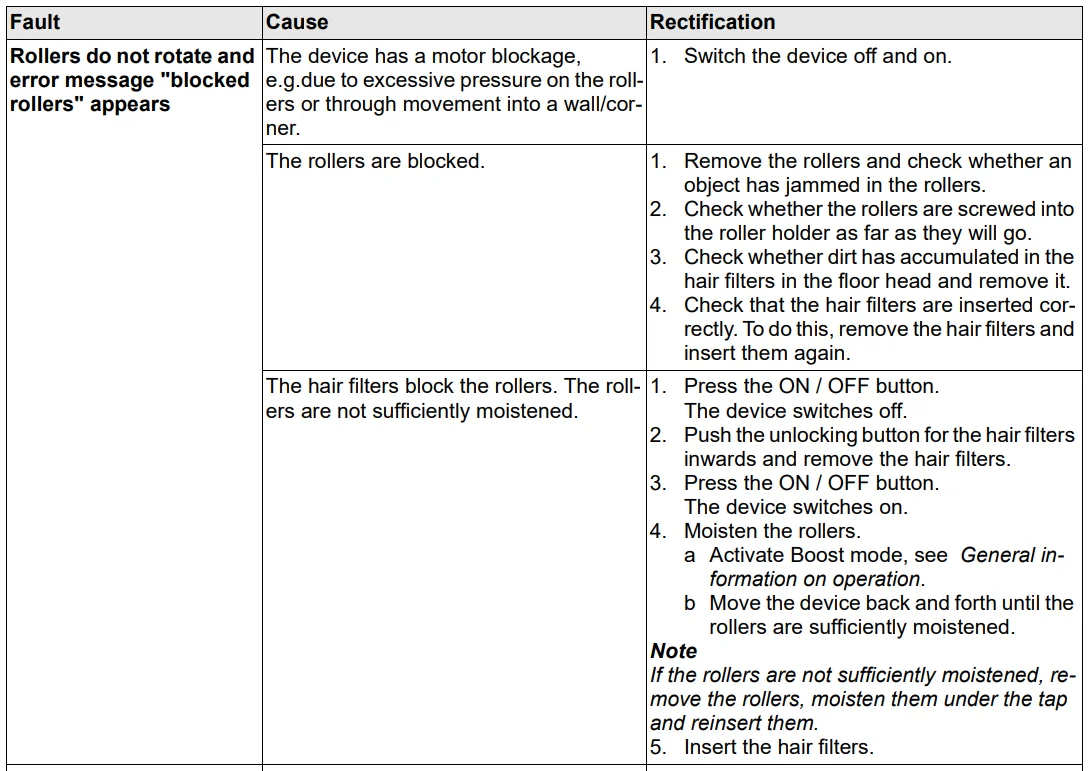
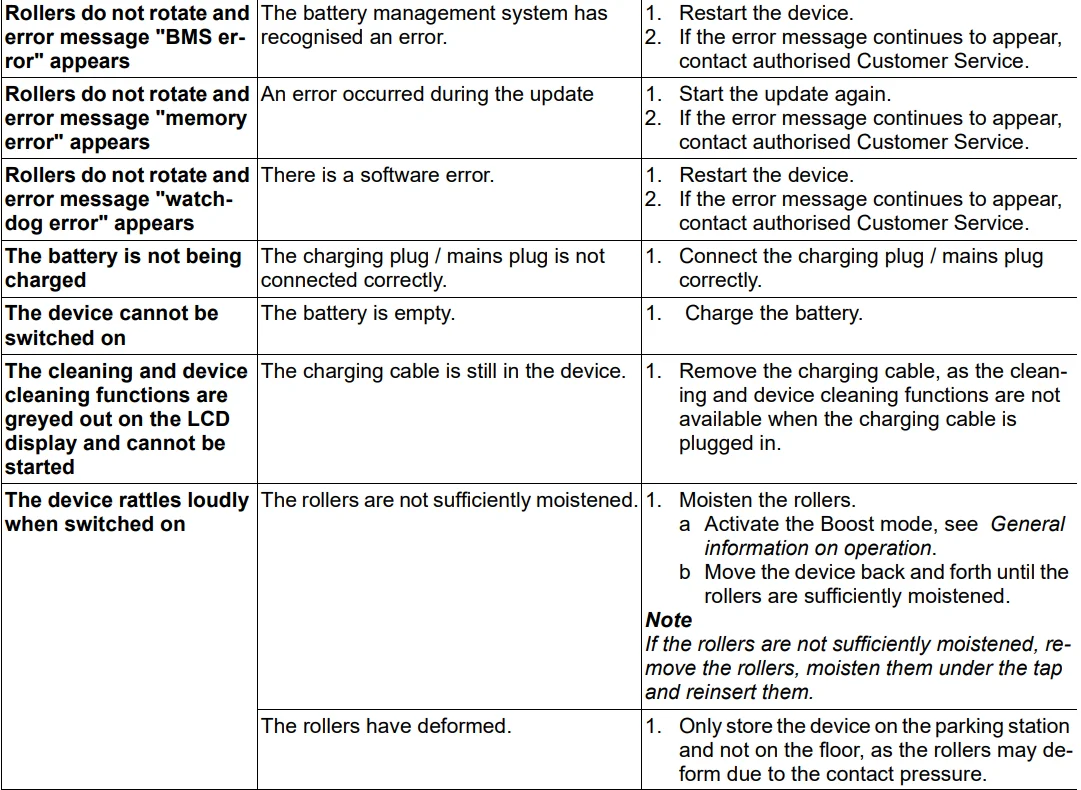
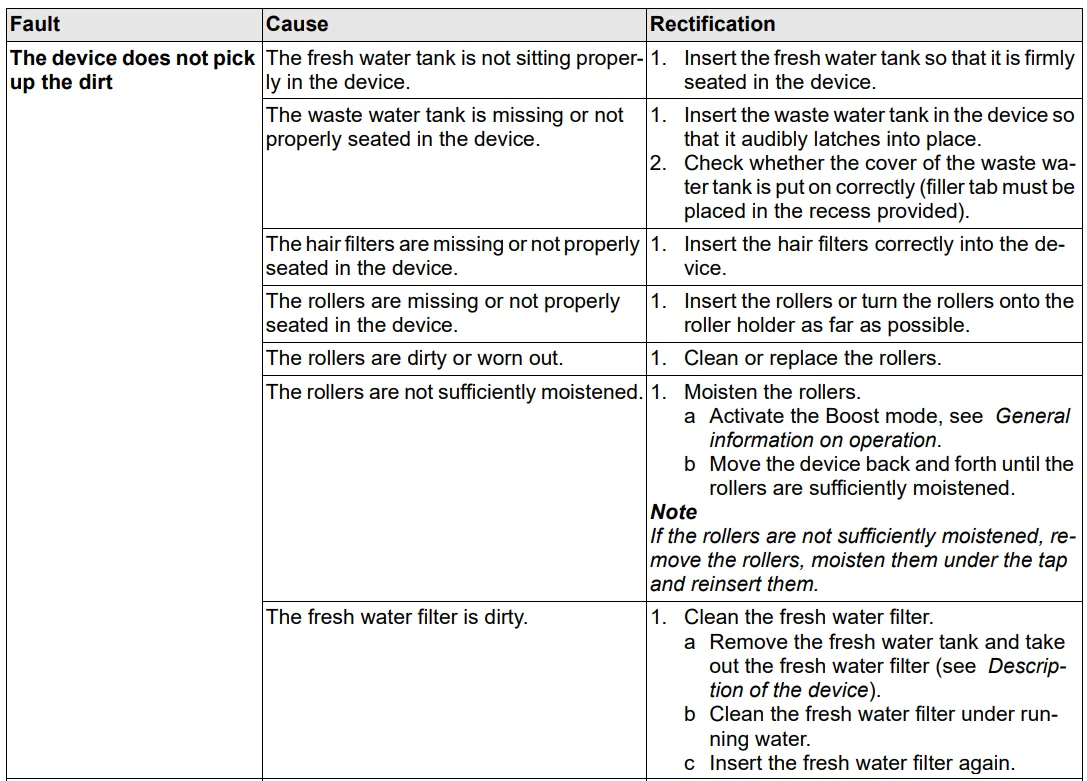
Note: The device is disabled for 3 seconds when a fault occurs. The device cannot be switched on again until the fault has been corrected.
EU Declaration of Conformity
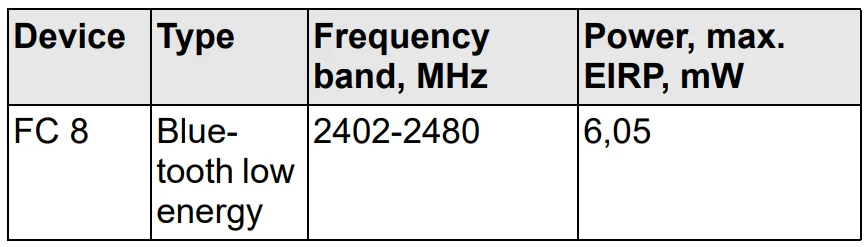
Alfred Kärcher GmbH & Co. KG hereby declares that the radio device type Floor Cleaner complies with the 2014/53/EU directive. The full text of the EU Declaration of Conformity can be found at www.karcher.com/fc8.
Technical data
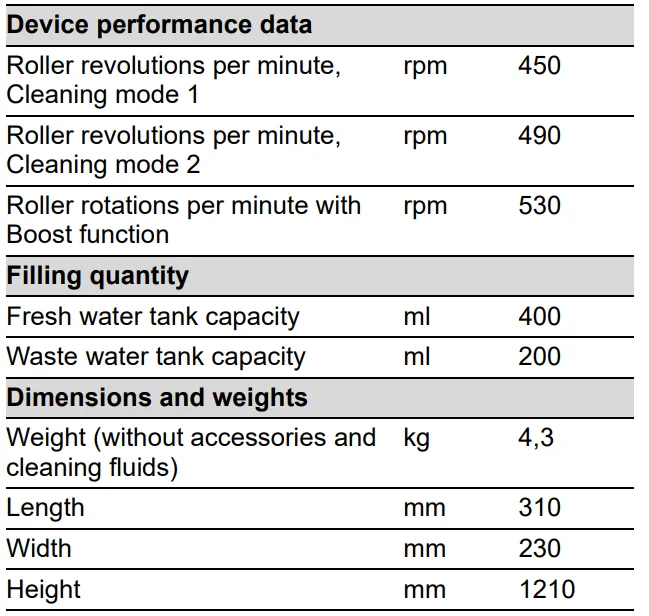
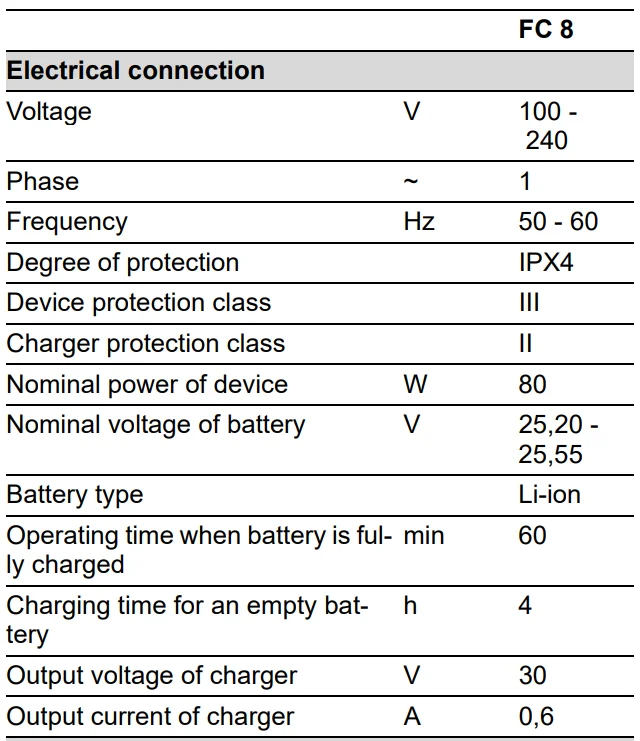
Subject to technical modifications.
For more manuals by Karcher, visit ManualsLibraryy
Karcher FC 8 Smart Signature Line-FAQs
Which country is Karcher from?
Kärcher is a German brand headquartered in Winnenden, Germany. It operates in over 190 countries worldwide.
Can the Karcher FC 8 clean all hard floor types?
Yes, it is designed for most sealed hard floors including tile, laminate, vinyl, sealed wood, and stone. It leaves minimal moisture, so floors dry quickly.
Is the Karcher FC 8 noisy during operation?
The FC 8 operates at a moderate noise level and glides smoothly across floors. It is quieter than many traditional vacuum cleaners.
Is the Karcher FC 8 worth buying?
If you want simultaneous vacuuming and mopping with smart features and adjustable cleaning modes, the FC 8 offers excellent performance and convenience for modern homes.
What is Karcher best known for?
Karcher is globally recognized for its high-quality pressure washers and innovative cleaning equipment for both home and professional use.
Can I use any detergent with the FC 8?
It is recommended to use Kärcher-approved floor cleaning solutions to ensure optimal performance and prevent internal damage.
How long do Karcher products typically last?
With proper maintenance and correct usage, Kärcher cleaning machines generally last between 5–10 years.
Can I use hot water in the Karcher FC 8?
No, only clean, cold or lukewarm water should be used unless otherwise specified in the manual. Hot water may damage internal components.
What are common issues with Karcher floor cleaners?
Some users report streaking if rollers are dirty, reduced suction if the filter needs cleaning, or uneven water distribution if the tank is not installed correctly.
Is Karcher a reliable brand for home use?
Yes, Kärcher has a strong global reputation for durability, innovation, and reliable cleaning performance.