
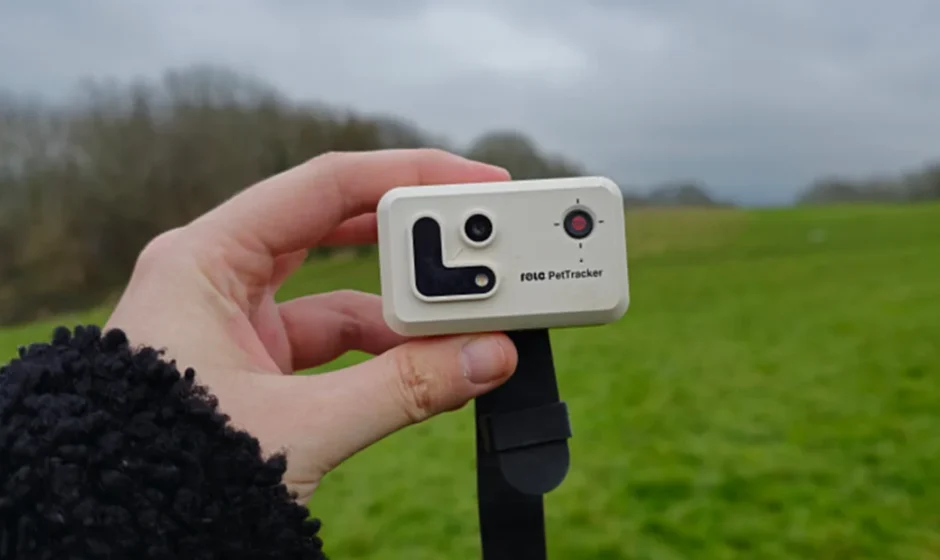

Enabot ROLA PetTracker
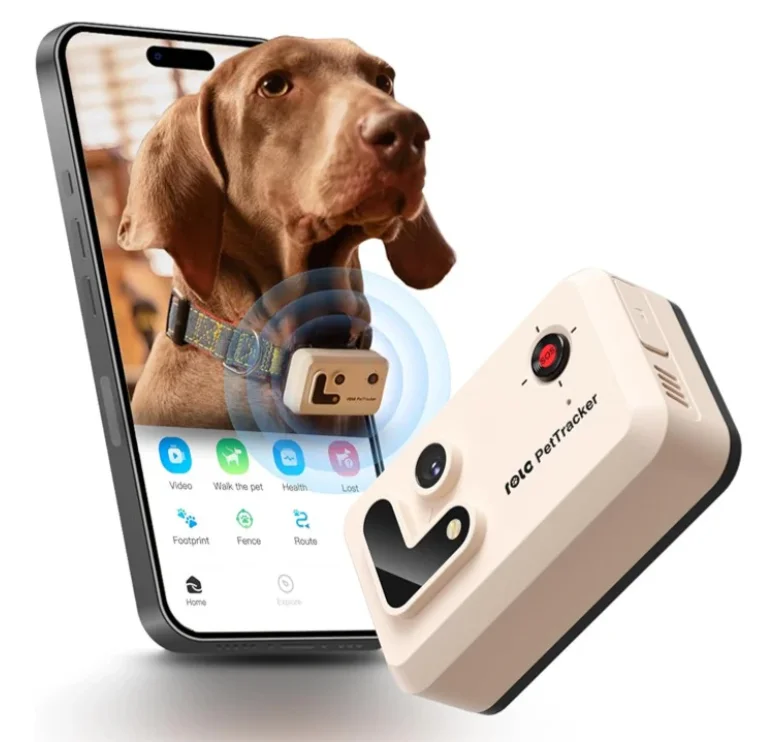
Safety Information
Before using this product, please read the following safety instructions carefully and take regular safety precautions.
- Only authorized technicians can disassemble the product. Users should not try this themselves.
- Remove the protective film from the product before use to ensure normal operation.
- To avoid damage from falling. Do not place the product in places whereit may fall, such as tables, coffee tables, 1V cabinets, etc.
- Do not use the product in an environment with open flames, fragile items, orflammable items.
- Do not drop or kick the product.
- Do not charge continuously for more than 48 hours, as it may reduce battery performance or shorten its lifespan.
- Only use the product in an environment with the temperature between -10°c and 35°c.
- The product contains a lithium battery. Please do not place it near heat sources or flames. Do not subject the product to severe impact or heavy pressure. If the product experiences severe swelling. Please stop using it.
- Avoid bending wires excessively. Avoid placing heavy or sharp objects on the product.
- Prevent pets from biting the product’s wires to avoid pet safety hazards.
- Any operation inconsistent with the instructions may cause damage to the product.
- The waterproof rating of this product is for everyday use, capable of handling splashes, playful water activities, and rain exposure. Please do not immerse or soak the main unit in water, as it may cause damage to the product.
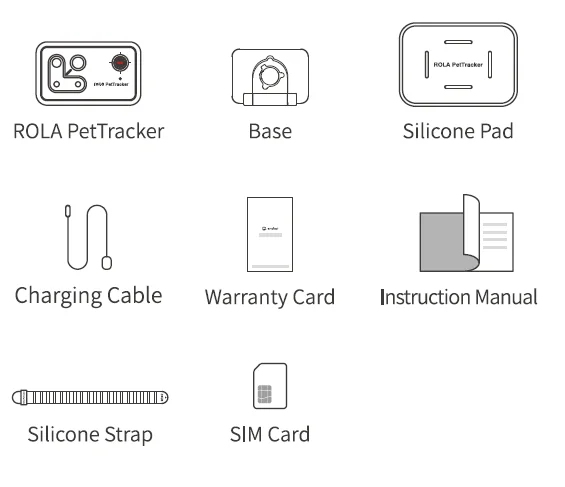
Packaging
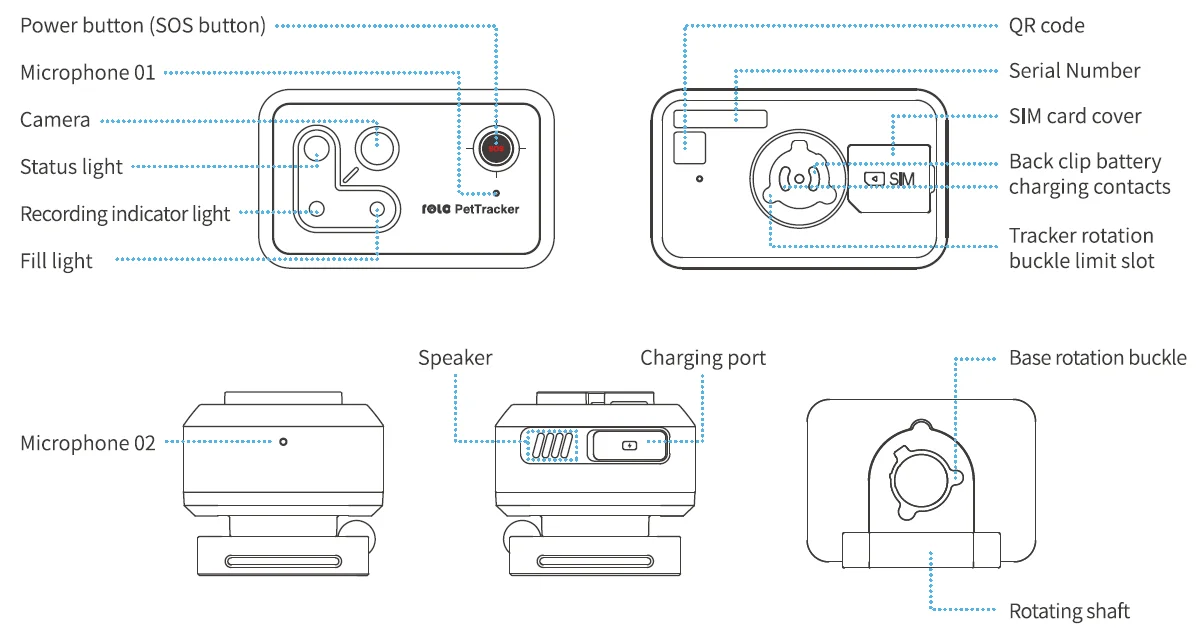
Production Description
Usage Instructions
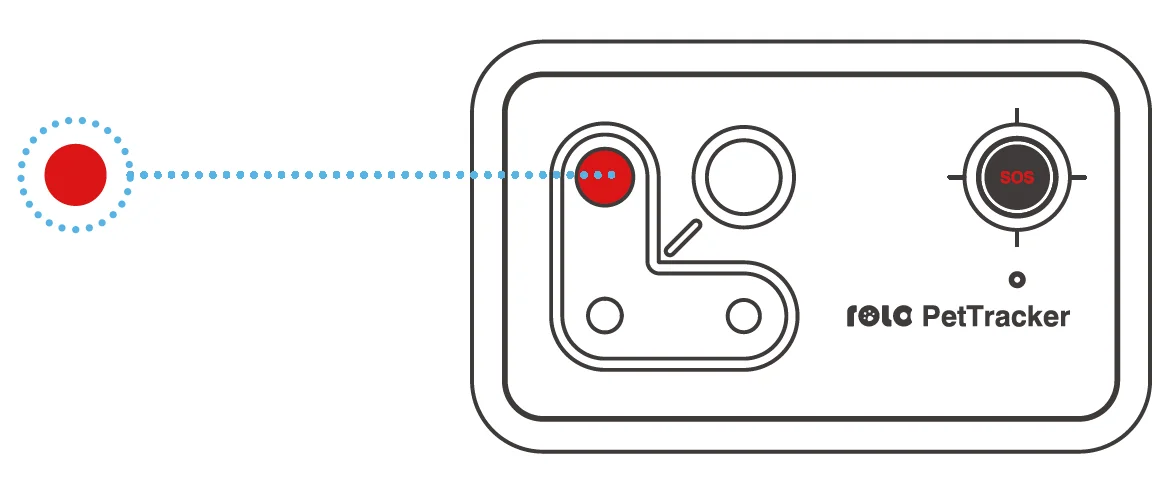
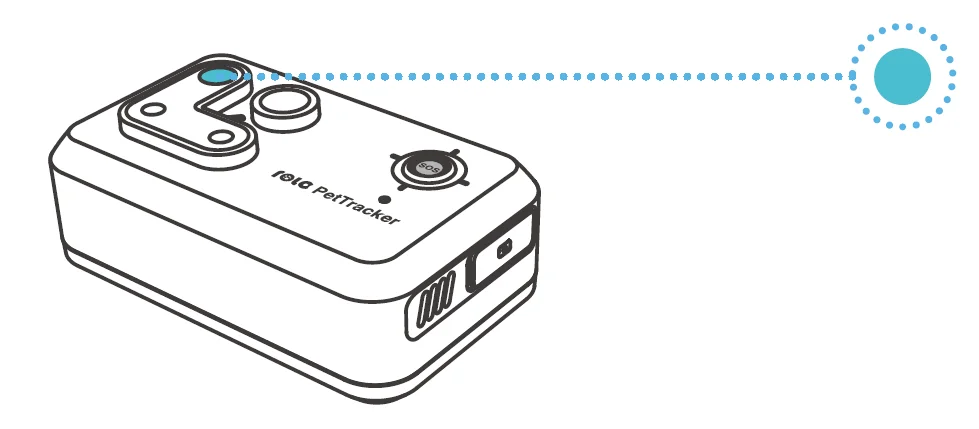
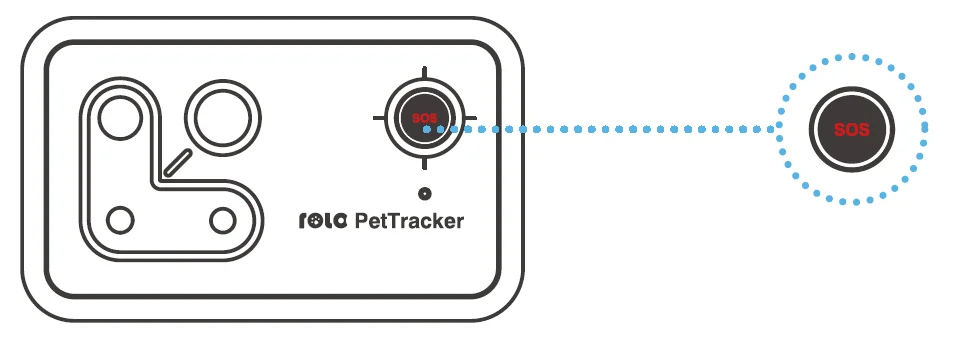
- Device Power On/Off: Press and hold the power button (SOS button) for three seconds. The indicator light will flash red twice, and you will hear a prompt sound.

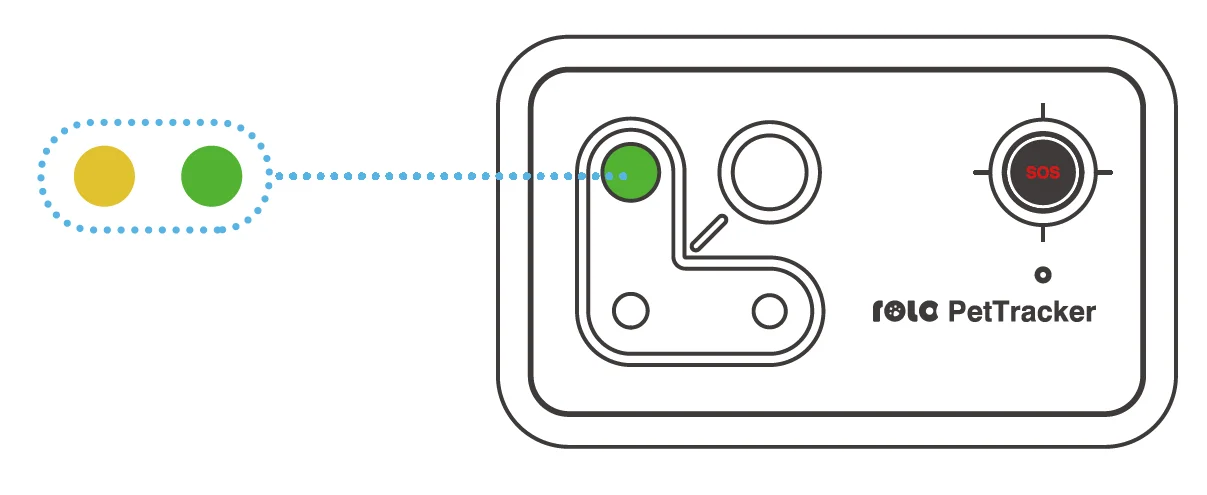
- After powering on, the flashing yellow indicator light signifies no network connection. Once successfully connected to the network, the signal light turns green for one second, accompanied bya prompt sound.

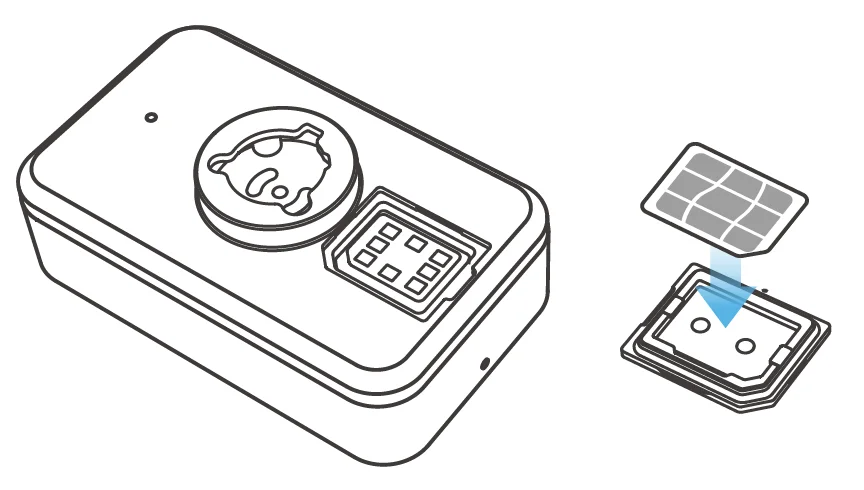
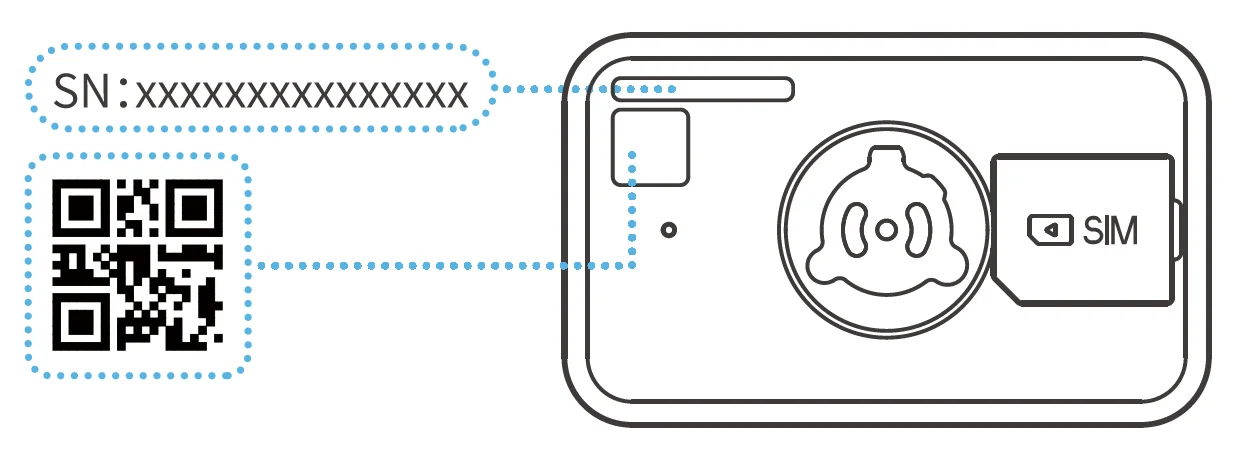
- 4G Connection: Open the SIM card coveratthe bottom of the device, insert the SIM card, then close the cover to connect to the network directly. The SIM card data is limited; please recharge it immediately after binding.

- Binding the App: After downloading the ROLA App, follow the app’s instructions to scan the device’s QR code or enter the device ID. A prompt sound will confirm successful binding. If not bound within ten minutes, the device will automatically shut down.

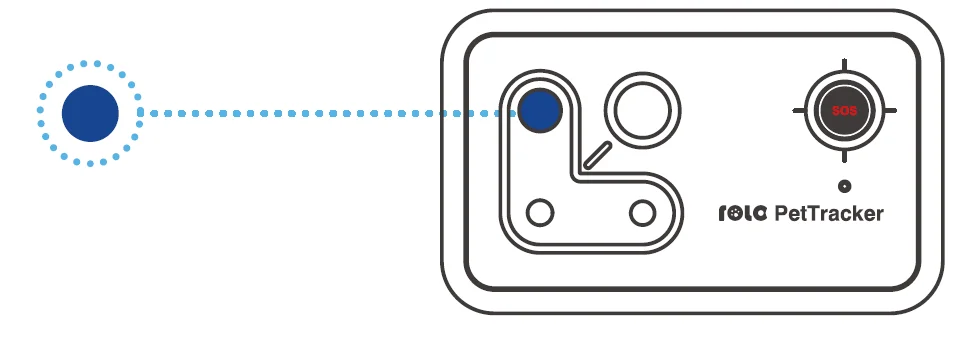
- Device Charging: Use a Type-C charging cable for charging. When powered on: The indicatorlightflashes indigo while charging. And when fully charged, the indicator light stays indigo. When powered off. The indicator light stays red while charging, and when fully charged, it stays indigo.

Note: When the device is off, there is a 5-second delay for the indicator light. - When the device is powered on, a single click of the 505 button shows a deep blue power status Indicator light.

- After the device is bound, double-clicking the SOS button will dial an emergency call.

Instructions for Fastening the Device
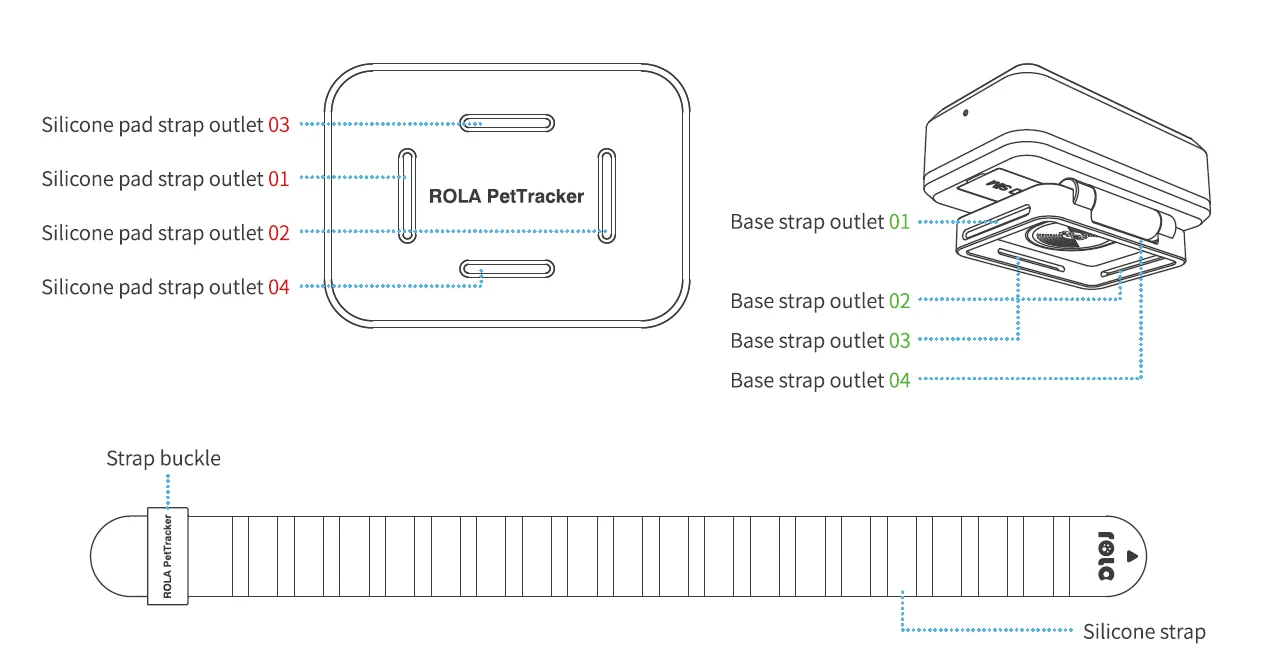
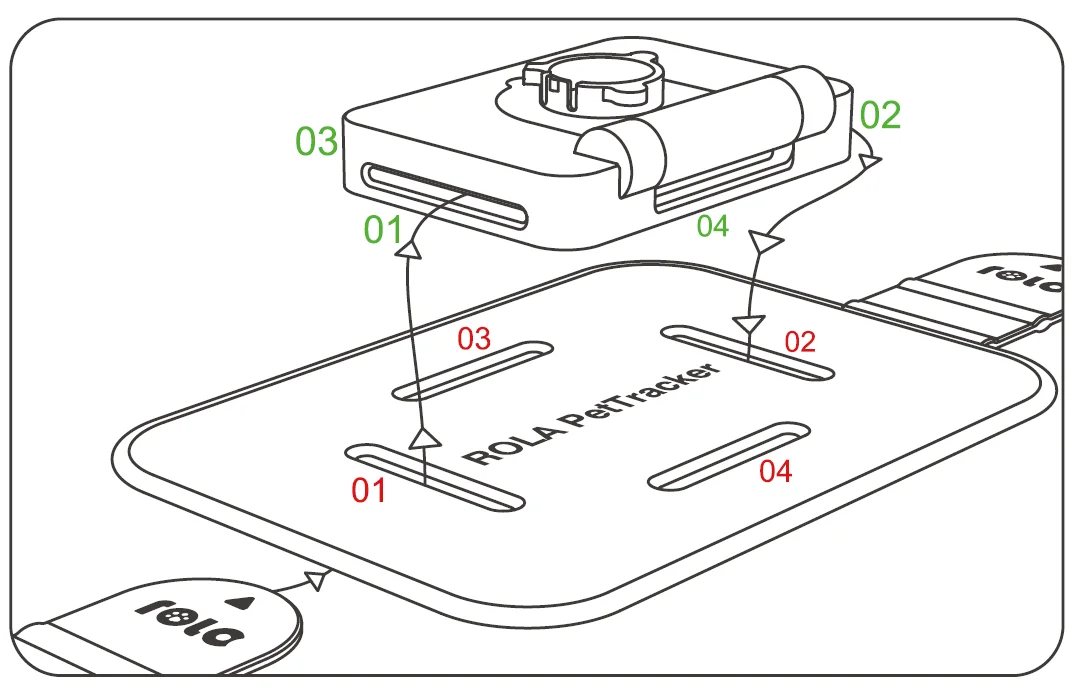
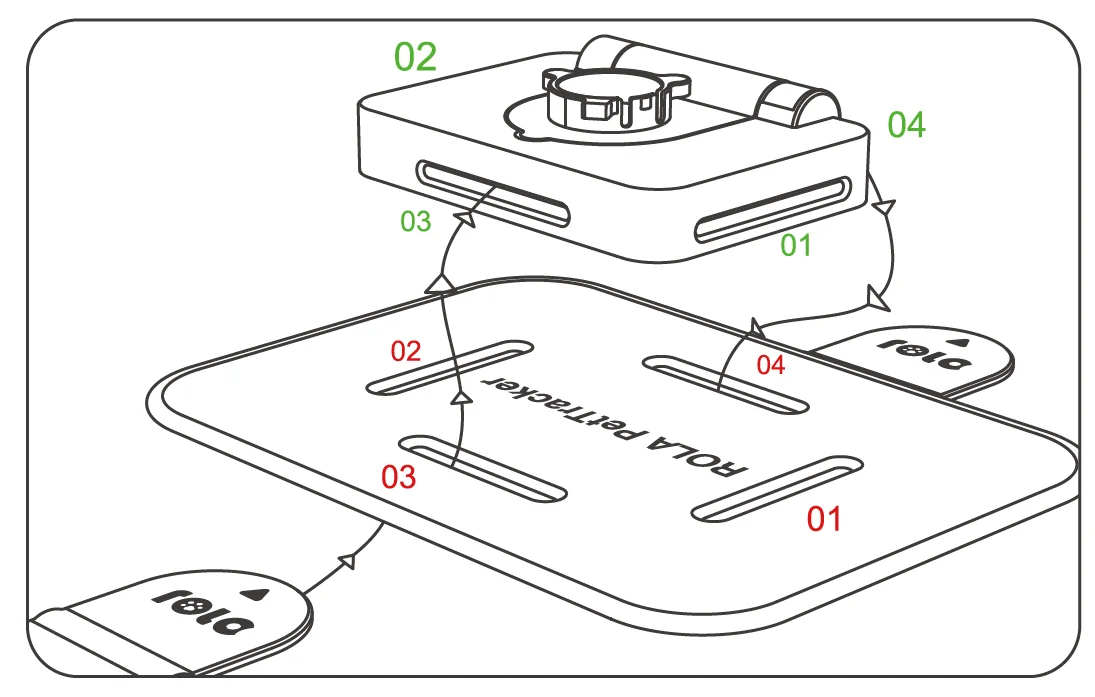
- Thread the silicone strap from red outlet 01 to green outlet 01. It will come out of green outlet 02, enter into the top of red outlet 02, and come out of the bottom. Then secure the end of the ROLA logo strap to the collar.

This suits a pet harness, with the tracker fixed on the back of the pet. - Thread the silicone strap from red outlet 03 to green outlet 03. It will come out of green outlet 04, enter into the top of red outlet 04, and come out of the bottom. Then secure the end of the ROLA logo strap to the collar.

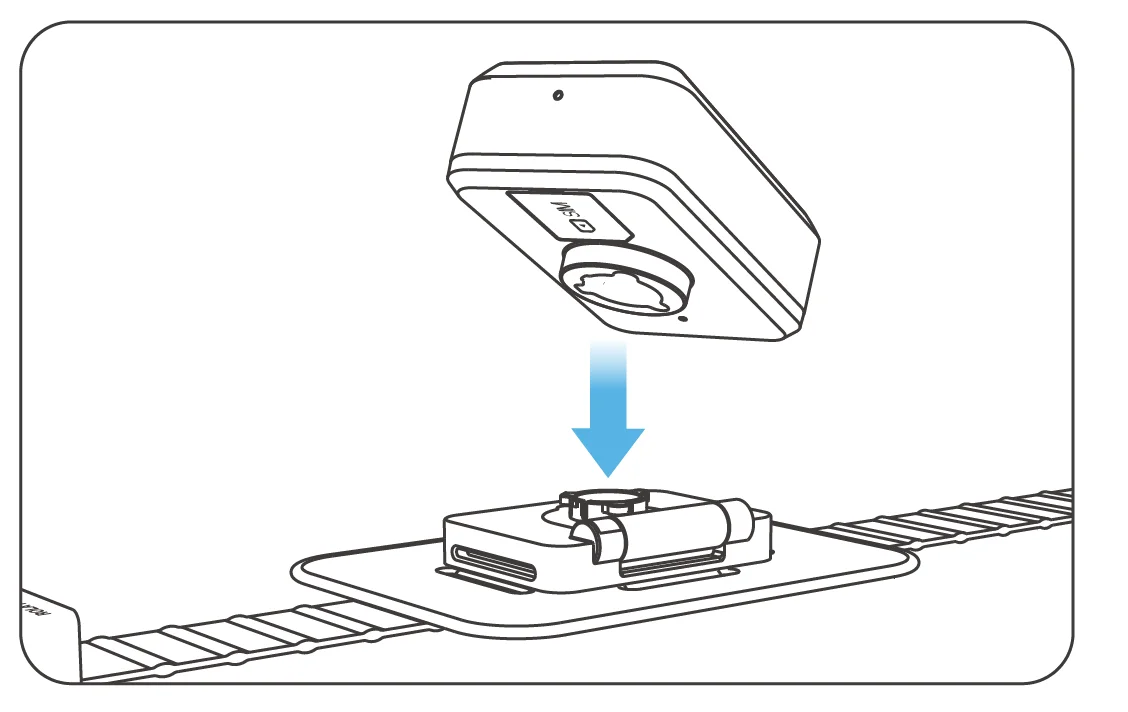
This suits a circular pet collar, with the tracker fixed on the neck of the pet. - Align the base rotation buckle with the tracker rotation buckle. Insert and rotate to fix the base and the tracker until securely fastened.

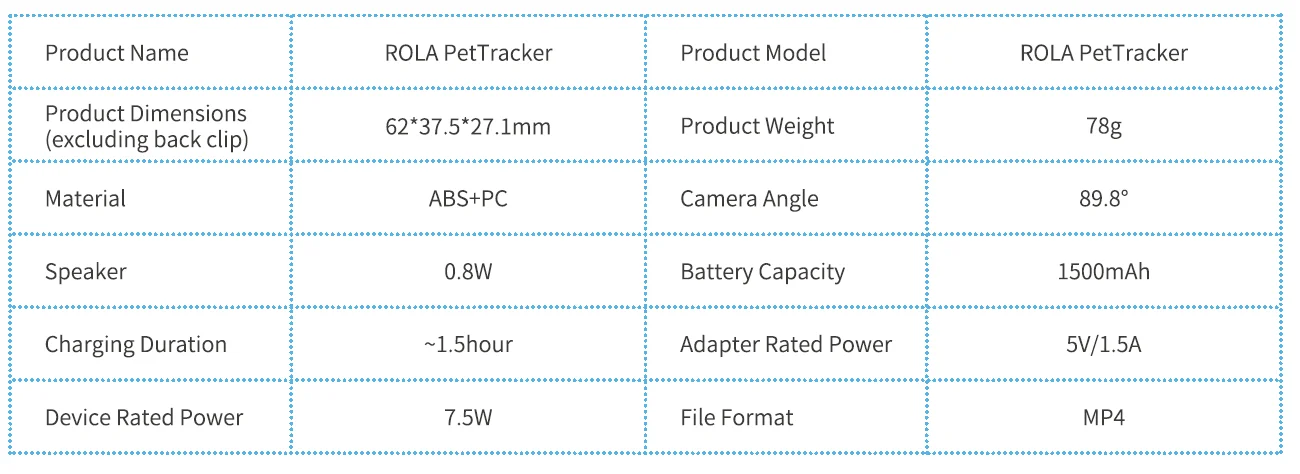
Specifications and Parameters
Legal Statement
- Before using the product, please read this document and keep it stored for reference.
- The illustrations and descriptions in this document are for reference only, and the physical product shall take precedence. For specifications and configurations, please refer to the relevant specification documents or consult the seller.
- The nominal storage capacity and technical performance indicators are only general, and actual data may vary due to factors such as environment and setting.
- If using other products or software, compatibility and legality are the user’s responsibility.
- Nothing in this document constitutes a modification to the warranty policy for Enabot products.
- This product is not designed for use in organ transplantation or other life support systems, where failure could result in personal injury or death.
- Without authorization from Enabot, no one may copy, transcribe, abridge, compile, store, transmit, or translate this document.
IC Warning
This device complies with Industry Canada’s licence-exempt RSS standard(s). Operation is subject to the following two conditions:
- This device may not cause interference, and
- This device must accept any interference, including interference that may cause undesired operation of the device.
RF Exposure Statement:
The device complies with RF exposure guidelines, and users can obtain Canadian information on RF exposure and compliance. The device can be used in portable exposure conditions without restriction.
FCC Warning
This device complies with part 15 of the FCC Rules. Operation is subject to the following two conditions:
- This device may not cause harmful interference, and
- This device must accept any interference received, including interference that may cause undesired operation.
Any Changes or modifications not expressly approved by the party responsible for compliance could void the user’s authority to operate the equipment.
Note: This equipment has been tested and found to comply with the limits for a Class B digital device, pursuant to part 15 of the FCC Rules. These limits are designed to provide reasonable protection against harmful interference in a residential installation. This equipment generates uses and can radiate radio frequency energy and, if not installed and used in accordance with the instructions, may cause harmful interference to radio communications. However, there is no guarantee that interference will not occur in a particular installation. If this equipment does cause harmful interference to radio or television reception, which can be determined by turning the equipment off and on, the user is encouraged to try to correct the interference by one or more of the following measures:
- Reorient or relocate the receiving antenna.
- Increase the separation between the equipment and receiver.
- Connect the equipment into an outlet on a circuit different from that to which the receiver is connected.
- Consult the dealer or an experienced radio/TV technician for help.
This equipment complies with FCC radiation exposure limits set forth for an uncontrolled environment. This equipment can be used in portable exposure conditions without restriction.
NB Warning
RF warning statement:
The device has been evaluated to meet the general RF exposure requirement. The device can be used in portable exposure conditions without restriction. This product complies with the radio interference requirements of the European Community.
- Product name: ROLA PetTracker
- Product model: ROLA PetTracker
- Manufacturer: Fuzhi Technology (Shenzhen) Co., Ltd.
- Frequency Range: WiFi 2.4G: 2412~2472MHz; GSM900: 880-915MHz DCS1800: 1710-1785MHz: WCDMA Band I: 1920-1980 MHz; WCDMA Band VIII: 880-915MHz; FDD Bandl: 1920~1980MHz; FDD Band3: 1710~1785MHz; FDD Bands: 880~915MHz; FDD Band20: 832~862MHz; FDD Band38: 2570~2620MHz; TDD Band40: 2300-2400 MHz Max. Transmit Power: WiFi 2.4G: 16.78dBm Max; WCDMA Band I: 24.10dBm Max; WCDMA Band VIII: 24.42dBm Max; FDD Band1: 23.43dBm Max; FDD Band3: 23.73dBm Max; FDD Bands: 23.20dBm Max; FDD Band20: 23.84dBm Max; FDD Band38: 23.62dBm Max; FDD Band40: 23.62dBm Max;
SIMPLIFIED EU DECLARATION OF CONFORMITY
The simplified EU declaration of conformity referred to in Article 10(9) shall be provided as follows: Hereby, WeHome Technology Company Limited declares that radio equipment type ROLA PetTracker is in compliance with Directive 2014/53/EU, and this product is allowed to be used in all EU member states. This product can be used across EU member states. Risk of explosion if the battery is replaced with an incorrect type. Dispose of used batteries according to the instructions. The product shall only be connected to a USB interface of version USB Type-C. The operating temperature of the EUT can’t exceed 35°C and shouldn’t be lower than -10°C.
SAR Warning
This radio is designed for and classified as “General population/uncontrolled Use”; the guidelines are based on standards that were developed by independent scientific organizations through periodic and thorough evaluation of scientific studies. The standards include a substantial safety margin designed to assure the safety of all persons regardless of age or health. The exposure standard for wireless radio employs a unit of measurement known as the Specific Absorption Rate, or SAR, the SAR limit set at 1.6W/kg. Body-worn operation; this device was tested for typical body-worn operations with the back of the handset kept 0mm for body-worn. To maintain compliance with RF exposure requirements, use accessories that maintain an Omm for body-worn. The use of belt clips, holsters, and similar accessories should not contain metallic components in their assembly. The use of accessories that do not satisfy these requirements may not comply with RF exposure requirements and should be avoided. The highest reported SAR value for wear on the body is 0.799 W/kg. The maximum simultaneous SAR value is 1.075 W/kg.
For more manuals by Enabot, visit ManualsLibraryy
Enabot ROLA PetTracker-FAQs
What is the Enabot ROLA PetTracker?
The Enabot ROLA PetTracker is a smart moving pet camera robot designed for monitoring and interacting with pets remotely. It features a high-resolution camera, two-way audio, AI tracking, and app control. Unlike fixed pet cameras, ROLA can move around your home, follow your pet, and capture videos automatically. It works as both a security device and an interactive companion.
How do I set up the Enabot ROLA for the first time?
To set up your ROLA, fully charge the device and download the Enabot app on your smartphone. Turn on the robot and follow the in-app instructions to add a new device. Make sure you connect to a 2.4GHz Wi-Fi network. Once paired, you can control movement, camera settings, and tracking features directly from the app.
How do I connect ROLA to Wi-Fi?
Put the robot into pairing mode by powering it on and following the voice prompt. Open the Enabot app and tap “Add Device.” Select your 2.4GHz Wi-Fi network and enter the password. Keep the robot close to the router during setup. After successful connection, you’ll hear a confirmation tone and the robot will appear online in the app.
Does the Enabot ROLA require Wi-Fi to work?
Yes, Wi-Fi is required for full functionality. The robot connects to your home Wi-Fi network, allowing you to view live video, control movement, and receive alerts remotely. Your phone can use mobile data or another Wi-Fi network to access the robot from anywhere, as long as both devices are connected to the internet.
How do I reset the Enabot ROLA to factory settings?
To restore factory settings, locate the reset button at the bottom of the robot. Press and hold it for more than five seconds until you hear a confirmation sound. Once reset, the device will disconnect from Wi-Fi and return to setup mode. You will need to reconnect it through the Enabot app.
How do I charge the Enabot ROLA?
Place the robot onto its charging dock and ensure the charging pins align properly. The indicator light will show charging status. Allow it to charge fully before first use for best battery performance. If it is not charging, check the power adapter, cable connections, and wall outlet to ensure proper power supply.
Can I control and talk through the ROLA robot?
Yes, the ROLA supports two-way audio communication. Through the Enabot app, you can speak to your pets and hear sounds from your home in real time. You can also manually control the robot’s movement, activate AI tracking, schedule patrols, and record video clips directly from your smartphone.
Does Enabot ROLA work over long distances or internationally?
Yes, the ROLA works remotely from anywhere in the world. As long as the robot is connected to Wi-Fi and your smartphone has internet access, you can monitor and control it. If using it overseas, ensure you download the correct regional version of the app compatible with your device.
Why is my ROLA not connecting to Wi-Fi?
Connection issues usually occur due to incorrect passwords, weak signals, or incompatible 5GHz networks. Make sure you are using a 2.4GHz Wi-Fi connection. Restart your router and the robot, then try pairing again. Keeping the robot close to the router during setup can also improve connection success.
Does Enabot ROLA require a subscription?
Basic features like live viewing, remote control, and two-way talk typically work without a subscription. However, cloud storage or advanced AI recording features may require an optional paid plan. Check the Enabot app for current subscription details and available storage options.