


Urbanista Valencia Noise Cancelling Headphones
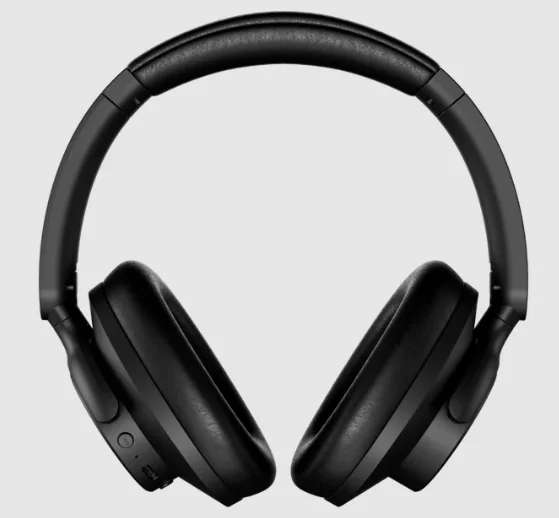
The Urbanista Valencia Noise Cancelling Headphones are stylish over-ear wireless headphones designed to deliver immersive sound, long battery life, and effective noise cancellation for everyday listening. Featuring active noise cancelling up to 25 dB, these headphones help reduce background noise such as traffic and crowds so you can focus on your music, calls, or podcasts. They are equipped with 40 mm dynamic drivers that produce powerful, clear audio with balanced bass and detailed sound.
With up to 50 hours of wireless playtime, the Valencia headphones are built for long listening sessions without frequent charging. Bluetooth 5.3 provides stable connectivity, while multipoint pairing allows you to connect to two devices at the same time. The lightweight foldable design with soft cushioned ear cups ensures comfort and easy portability, making them ideal for commuting, travel, or daily use.
Quick charging also gives about 1 hour of playback from just 10 minutes of charging, so you can get back to listening quickly. Overall, the Urbanista Valencia headphones combine modern design, strong battery life, and effective noise cancellation for a comfortable and enjoyable wireless audio experience.
WELCOME TO URBANISTA
Thank you for choosing Urbanista Valencia. This guide will help you get the most out of your new headphones.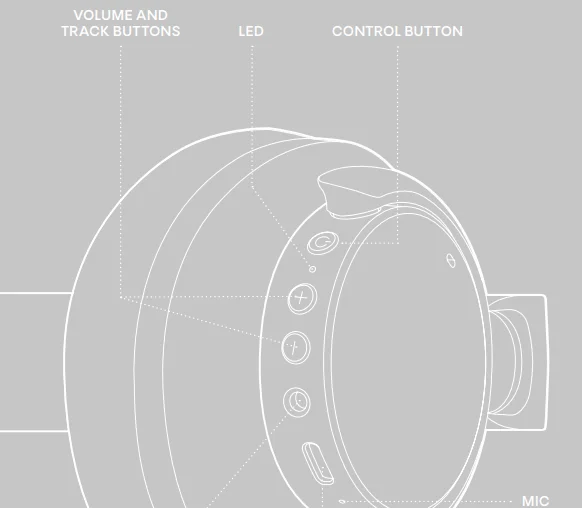
POWER ON AND OFF
Long-press the control button for 2 seconds to turn on and off your headphones. The headphones will automatically power off after 5 minutes of disconnection or 30 minutes of inactivity.
FIRST PAIRING AND RECONNECTION
Turn on the headphones to initiate first-time pairing. The LED will first indicate the battery level, then start flashing to indicate pairing mode. Go to the Bluetooth settings on your device and select ”Urbanista Valencia” to connect. The LED will stop flashing as the headphones successfully connect. The headphones will automatically try to reconnect to the last connected device(s) every time they are powered on.
BLUETOOTH MULTIPOINT CONNECTION
Urbanista Valencia can be connected to two Bluetooth devices simultaneously through Bluetooth multipoint. This allows you to seamlessly switch between 2 connected devices, such as your phone and a computer, without disconnecting from one.
Pair and connect to a second device
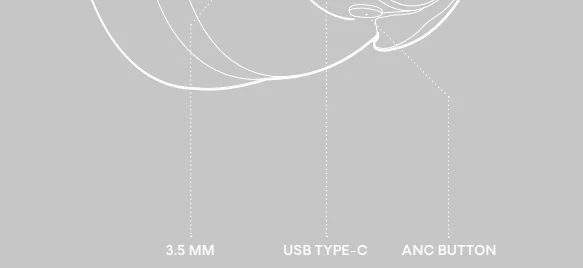
Activate Bluetooth by long-pressing the ANC button for 2 seconds. The LED will start flashing to indicate that Bluetooth multipoint is activated. The headphones can pair with and store up to 6 devices and will connect to the last two devices every time they’re powered on. Bluetooth multipoint does not allow audio from 2 devices to be played simultaneously. Pause the music on your first device before switching to your second device.
BUTTON CONTROLS
Use buttons to control music and calls:
- Turn headphones ON/OFF: Long-press (2 sec)
 – button
 - Play/Pause: Single-press – button
- Next track: Long-press (2 sec)
 – button
 - Previous track: Long-press (2 sec) – button
- Volume up: Single-press – button
- Volume down: Single-press – button
- Answer/Hang-up call: Single -press button
- Reject a call: Long-press (2 sec) – button
- Activate voice assistant: Double-press the button
- Toggle sound setting: Single-press
 – button
 – button
 – button
 – button
 – button
CHARGING AND BATTERY
The headphones will play a ”low battery” alert to notify you when the headphone battery level reaches 10%. When the batteries are empty, the headphones will automatically power off. Use a qualified USB Type-C cable and adapter to charge your headphones. While charging, the LED indicates the battery status as follows:
- 0-99%: LED flashes red
- 100%: LED solid blue
RESET
If you experience connection issues and the headphones become unstable or unresponsive, turn the headphones off and on again to attempt pairing or reconnecting with your device.
If the issue persists, proceed with a full factory reset:
- Remove ”Urbanista Valencia” from the Bluetooth settings on your device(s).
- Press and hold the button for 10 seconds until the LED becomes solid. The earphones will restart and enter pairing mode.
- Follow the instructions in ”First Time Pairing and Reconnecting” to reconnect your headphones.
NEED SUPPORT?
For further assistance and FAQs, please visit www.urbanista.com/support.
For More Manuals By Urbanista, Visit ManualsLibraryy.
Urbanista Valencia Noise Cancelling Headphones-FAQs
What are the key features of the Urbanista Valencia noise-cancelling headphones?
Urbanista Valencia headphones are over-ear wireless headphones designed for comfortable everyday listening with active noise cancellation (ANC). They feature 40 mm dynamic drivers that deliver clear, balanced sound for music, podcasts, and calls. The headphones include Bluetooth multipoint connectivity, allowing connection to two devices simultaneously, and a foldable design for easier portability. Their lightweight build and soft ear cushions are designed to provide comfort during long listening sessions at home, work, or while commuting.
Do Urbanista Valencia headphones have active noise cancellation?
Yes, Urbanista Valencia headphones include active noise cancellation technology designed to reduce background noise such as traffic, engines, and crowded environments. The ANC system can reduce noise by up to about 25 dB, helping users focus on music, calls, or podcasts without distractions. This feature makes the headphones particularly useful for commuting, traveling, or working in busy environments where outside noise may interfere with listening.
How long does the battery last on Urbanista Valencia headphones?
Urbanista Valencia headphones offer up to about 50 hours of wireless playback on a full charge, which is considered strong battery performance for wireless headphones. This long battery life allows users to listen for several days without needing to recharge frequently. The headphones also support quick charging, where around 10 minutes of charging can provide about one hour of playback, making them convenient for quick top-ups.
How long does it take to charge Urbanista Valencia headphones?
The Urbanista Valencia headphones take approximately 2.5 hours to fully charge using a USB-C charging connection. Once charged, the battery can deliver extended listening time and standby performance. Fast charging support also helps users get additional playback time quickly if the battery runs low, which can be helpful when traveling or commuting.
Are Urbanista Valencia headphones comfortable for long listening sessions?
Urbanista Valencia headphones are designed with comfort in mind, featuring smooth leather-like ear cushions and a lightweight frame weighing around 246 grams. The balanced clamping force helps the headphones stay securely on the head without causing pressure. Their over-ear design also helps reduce outside noise naturally, making them suitable for extended listening during work, travel, or entertainment.
What sound quality can you expect from Urbanista Valencia headphones?
Urbanista Valencia headphones use 40 mm dynamic drivers with a PET diaphragm to produce clear and detailed audio across a wide frequency range of about 20 Hz to 20 kHz. This allows the headphones to deliver balanced sound with clear vocals, controlled bass, and good overall clarity for different types of audio such as music, podcasts, and movies. The design focuses on everyday listening rather than specialized audiophile tuning.
Do Urbanista Valencia headphones support Bluetooth multipoint connection?
Yes, Urbanista Valencia headphones support Bluetooth multipoint connectivity, which allows them to stay connected to two devices at the same time. This feature is useful for users who frequently switch between devices, such as a smartphone and a laptop. For example, you can watch videos on a computer and quickly answer a phone call without disconnecting and reconnecting the headphones manually.
Are Urbanista Valencia headphones good for phone calls and meetings?
Urbanista Valencia headphones include multiple built-in microphones and environmental noise cancellation (ENC) technology that helps improve voice clarity during calls. The microphones reduce background noise and help isolate your voice so the person on the other end can hear you more clearly. This makes the headphones suitable for online meetings, voice calls, and everyday communication.
Are Urbanista Valencia headphones portable and travel-friendly?
Yes, Urbanista Valencia headphones have a foldable design that makes them easier to store and carry when traveling. The ear cups can fold inward to reduce their size, allowing them to fit more easily into backpacks or travel bags. This portability makes them a practical option for commuters, students, or anyone who wants wireless headphones that are easy to carry.
Are Urbanista Valencia headphones compatible with smartphones and laptops?
Urbanista Valencia headphones use Bluetooth 5.3 wireless technology, allowing them to connect to most modern devices, including smartphones, tablets, and laptops. The wireless range is typically around 10 meters, which provides stable audio playback without needing to keep the device close by. This wide compatibility makes them suitable for both Android and iPhone users, as well as computers and other Bluetooth-enabled devices.