
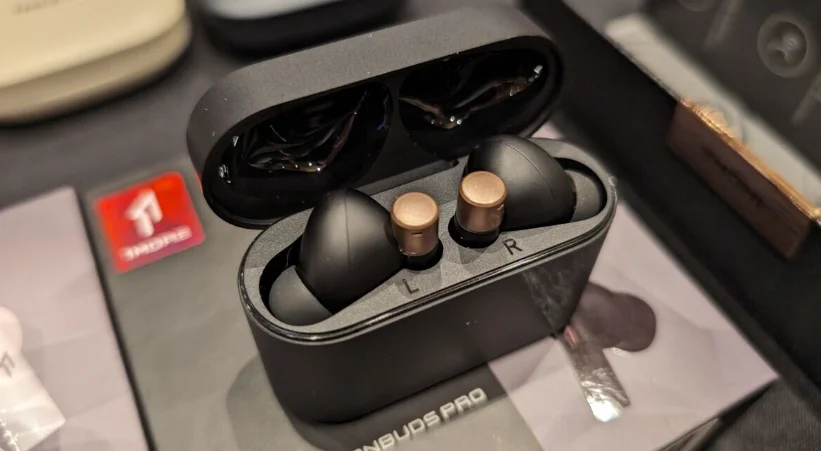

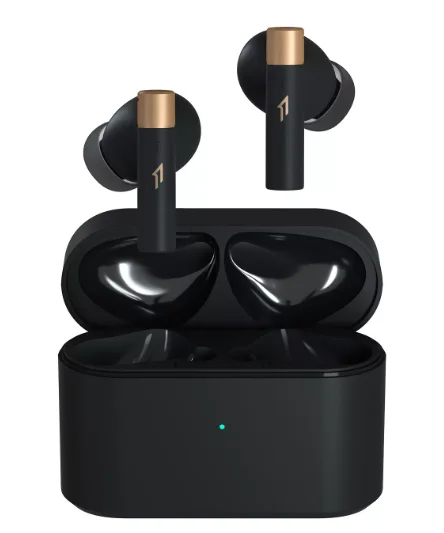
1MORE PistonBuds PRO Q30 Earbuds
1MORE MUSIC APP
For users outside mainland China, please download the 1MORE MUSIC APP for product upgrades and additional features. APP UI in the user guide may vary, and for reference only, please refer to the UI on the device.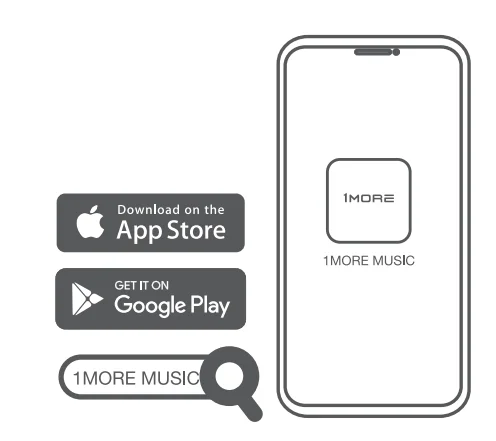
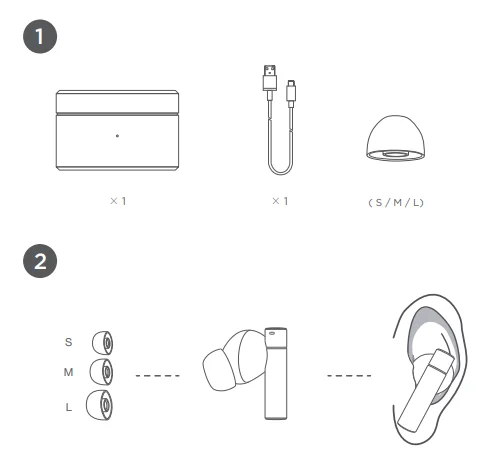
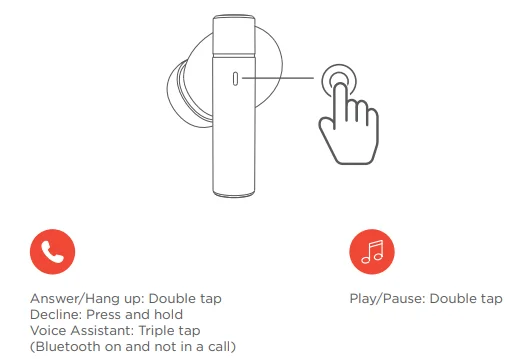
- To change a song or control volume, please set up on 1MORE MUSIC APP or operate on a paired mobile phone or device.
- The above functions are available for either earbud in individual or stereo mode. Custom setup is available on the APP.
- The above functions may vary with different devices.
The default setting of the headphones is “ANC Off”. Long-press the touch control area of the earbuds to switch between “ANC-Off”, “ANC-Strong”, and “Pass-through”. “ANC-Mild”, “WNR (Wind Noise Resistance), “and “ANC-Adaptive” options are available via the 1MORE MUSIC APP. Once the Listening mode has been set up in the APP, they will be memorized by the headphones, allowing you to switch modes based on your settings.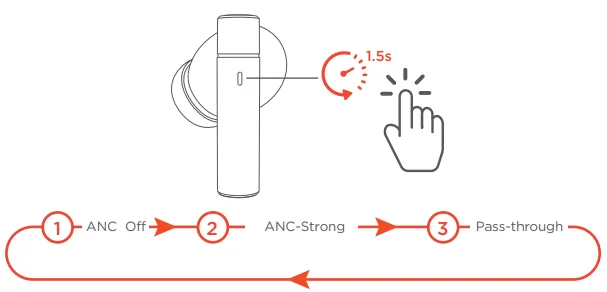
Spatial Audio
1MORE Spatial Audio breaks through the limitations of devices, systems, and audio formats, creating a more immersive and realistic listening experience.
Low-Latency Gaming Mode
Turn on the gaming mode to sync up audio and video, reducing the latency to as low as 80ms. Available via APP.
Extra Functions
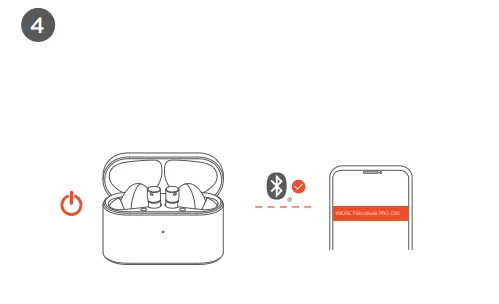
- If only one earbud can be connected to the device, please put the two earbuds back into the case and triple-tap the pairing button, then click “IMORE PistonBuds PRO Q30” in the device pairing list to connect to your device.
- Clear The Pairing Records: Put both Left and Right earbuds into the case, press and hold the pairing button for 8 seconds, and the pairing records will be cleared.
- OTA Firmware Update: It can be synchronously upgraded via the 1MORE MUSIC APP while the Left and Right earbuds are connected with at least 50% battery.
- Functions of the 1MORE MUSIC APP may vary with different devices or operating systems. For more details, please contact our customer service.
1MORE (1) Year Limited Warranty
1MORE warrants to the original retail purchaser that this product is to be free from defective materials and workmanship for a period of one year from the date of purchase if it is properly used and maintained. If this product proves defective in either material or workmanship, 1MORE, at its option, will (a) repair the product with new or refurbished parts, or (b) replace the product with an equivalent new or refurbished product, at no charge for parts or labor. If the product model is no longer available and cannot be repaired effectively or replaced with an identical model, 1MORE, at its sole option, may replace the unit with a current model of equal or greater value.
In some cases, modification to the mounting surface may be required where a new model is substituted. 1MORE assumes no responsibility or liability for such modification. TO OBTAIN A REPAIR OR REPLACEMENT UNDER THE TERMS OF THIS WARRANTY, PLEASE RETURN TO THE ORIGINAL DEALER FIRST, AND THE ORIGINAL DEALER SHALL REPAIR THE PRODUCT WITH NEW OR REFURBISHED PARTS OR REPLACE THE PRODUCT WITH AN EQUIVALENT NEW OR REFURBISHED PRODUCT. You will be required to submit proof of purchase details, including but not limited to a receipt or sales invoice. Return shipping for exchanges/repairs is the sole responsibility of the original retail purchaser.
Limitations:
- This limited warranty does not cover the failure of the product resulting from improper installation, misuse, abuse, accident, neglect, mishandling, or wear from ordinary use or environmental deterioration.
- This limited warranty does not cover cosmetic damage, including paint damage, or consequential damage to other components or premises which may result from any reason from the failure of the product.
- This limited warranty is null and void for products not used in accordance with 1MORE’s instructions.
- This limited warranty is null and void for products with altered or missing serial numbers and for products not purchased from an AUTHORIZED dealer.
- This limited warranty terminates if you sell or otherwise transfer this product to another party.
We Appreciate Your Business
We know you will enjoy the new 1MORE headphones as much as we do. At 1MORE, we value your satisfaction. If you would like more details on this product or any of our other products, please visit us online by scanning the QR code. Go to www.1more.com and sign up for VIP, and 1MORE will treat you like one.
WEEE
 All products bearing this symbol are waste electrical and electronic equipment (WEEE, as in directive 2012/19/EU), which should not be mixed with unsorted household waste. Instead, you should protect human health and the environment by handing over your waste equipment to a designated collection point for the recycling of waste electrical and electronic equipment, appointed by the government or local authorities. Correct disposal and recycling will help prevent potential negative consequences to the environment and human health. Please contact the installer or local authorities for more information about the location, as well as the terms and conditions of such collection points. Your 1MORE retailer will advise you of the correct way of disposal in your country.
Tips
- Please read this instruction manual carefully and retain it for future reference.
- Please fully charge the battery before first use.
- If the headphones have been unused for more than 3 months, we recommend that you charge them. This will improve battery capacity.
- Only use chargers that are FCC (Federal Communications Commission) approved.
- In dry environments, static electricity may numb your ear. This is not related to the quality of the product.
Safety Information
- Never disassemble the headphones. There are no user-serviceable parts inside.
- Do not expose the headphones to temperatures below 32 °F (0°C) or to temperatures above 113 °F (45 °C).
- Do not use the headphones in a thunderstorm. This could prevent the headphones from working properly, and also increase your chance of being electrically shocked.
- Do not use oil or any volatile liquid to clean this product.
- Do not listen at high volumes for extended periods of time.
 Do not use the headphones in traffic. Do not use the headphones at any time, as it would be dangerous to be unaware of the noises around you.
- Adult supervision is required for children aged 6 and under.
 Do not use the headphones in traffic. Do not use the headphones at any time, as it would be dangerous to be unaware of the noises around you.
FCC
This device complies with FCC radiation exposure limits set forth for an uncontrolled environment. This device complies with Part 15 of the FCC Rules. Operation is subject to the following two conditions:
- This device may not cause harmful interference, and
- This device must accept any interference received, including interference that may cause undesired operation.
Caution!
Any changes or modifications not expressly approved by the party responsible for compliance could void the user’s authority to operate the equipment. The SAR limit of the USA (FCC) is 1.6 W/kg averaged over one gram of tissue. Device type EC305 (FCC ID: 2ASDI-EC305) has also been tested against this SAR limit.
NOTE: This equipment has been tested and found to comply with the limits for a Class B digital device, pursuant to part 15 of the FCC Rules. These limits are designed to provide reasonable protection against harmful interference in a residential installation. This equipment generates uses and can radiate radio frequency energy and, if not installed and used in accordance with the instructions, may cause harmful interference to radio communications.
However, there is no guarantee that interference will not occur in a particular installation. If this equipment does cause harmful interference to radio or television reception, which can be determined by turning the equipment off and on, the user is encouraged to try to correct the interference by one or more of the following measures:
- Reorient or relocate the receiving antenna.
- Increase the separation between the equipment and receiver.
- Connect the equipment into an outlet on a circuit different from that to which the receiver is connected.
- Consult the dealer or an experienced radio/TV technician for help.
IC
This device complies with Industry Canada license-exempt RSS standard(s). Operation is subject to the following two conditions:
- This device may not cause interference, and
- This device must accept any interference, including interference that may cause undesired operation of the device.
FAQ
1. Why can’t the headphones be turned on?
Check if your headphones have enough battery life. If not, please charge them for at least 30 minutes.
2. Why do the headphones play music after successfully connecting to my Android device?
After pairing successfully, in the Bluetooth menu of your device, tap the icon on the right of your device name and make sure the “Media Audio” option is on.
3. Why is there no sound from the headphones while making phone calls after successfully connecting to my Android device?
After pairing successfully, in the Bluetooth menu of your device, tap the icon on the right of your device name and make sure the “Phone Audio” option is on.
4. Why is the Bluetooth connection not stable and causing some interruptions?
- Try shortening the distance between your headphones and device. Avoid solid barriers in between.
- Please keep away from strong interference sources, such as Wi-Fi and GPRS.
- Please make sure the Bluetooth antenna of your device is not blocked.
- Why do some control functions not match those in the manual while using third-party music/video player Apps?
- Your operating system and the third-party music/video player apps may have different settings for the control functions. We recommend that you use the music/video player apps that your device originally provided.
For more detailed product FAQs, please visit the product support section under www.1more.com.
For More Manuals By 1MORE, Visit ManualsLibraryy.
1MORE PistonBuds PRO Q30 Earbuds-FAQs
Are 1MORE PistonBuds PRO Q30 earbuds waterproof?
The 1MORE PistonBuds PRO Q30 earbuds are not fully waterproof but come with an IPX5 water and sweat resistance rating. This means they can handle splashes, sweat, and light rain without issues, making them suitable for workouts and outdoor use. However, they should not be submerged in water or exposed to heavy rain, as that could damage the internal components and affect performance over time.
How do you pair the 1MORE PistonBuds PRO Q30 earbuds?
To pair the 1MORE PistonBuds PRO Q30 earbuds, take them out of the charging case, and they will automatically enter pairing mode. Then, enable Bluetooth on your device and select “1MORE PistonBuds PRO Q30” from the available list. Once connected, the earbuds will automatically reconnect to the last paired device when removed from the case, making future use quick and seamless without repeating the pairing process.
How do you use 1MORE earbuds for the first time?
Using 1MORE earbuds for the first time is simple and user-friendly. After charging the earbuds fully, remove them from the case to power them on and enter pairing mode. Connect them to your smartphone via Bluetooth and adjust the fit in your ears for comfort. You can then use touch controls to manage music playback, calls, and voice assistants, depending on the model’s supported features and settings.
Do 1MORE PistonBuds PRO Q30 have noise cancellation?
Yes, the 1MORE PistonBuds PRO Q30 earbuds feature active noise cancellation (ANC), which helps reduce background noise for a more immersive listening experience. This is especially useful in noisy environments like public transport or busy streets. The earbuds may also include a transparency mode, allowing you to hear surrounding sounds when needed without removing them, providing both convenience and safety.
What is the sound quality of the 1MORE PistonBuds PRO Q30 like?
The 1MORE PistonBuds PRO Q30 earbuds deliver balanced and clear sound with a focus on detailed audio performance. They are designed to provide a rich listening experience with decent bass, clear mids, and crisp highs. This makes them suitable for various music genres, podcasts, and calls, offering consistent audio quality whether you are relaxing, commuting, or working out.
How long does the battery last on the 1MORE PistonBuds PRO Q30?
The battery life of the 1MORE PistonBuds PRO Q30 earbuds typically offers several hours of playback on a single charge, with additional charges available through the carrying case. With ANC turned off, you can expect longer usage time, while enabling ANC may slightly reduce battery performance. Overall, the case ensures extended listening throughout the day without frequent recharging.
Are 1MORE earbuds good for workouts and sports?
Yes, 1MORE earbuds like the PistonBuds PRO Q30 are suitable for workouts and sports due to their secure fit and IPX5 water resistance. They are designed to stay in place during movement and resist sweat, making them a reliable option for gym sessions, running, or outdoor activities. However, they are not designed for swimming or water sports that involve full immersion.
What is the difference between 1MORE PistonBuds and Piston Fit earphones?
The main difference is that the 1MORE PistonBuds are wireless earbuds with Bluetooth connectivity and modern features like ANC, while the Piston Fit earphones are wired in-ear headphones. Piston Fit models focus on simplicity and affordability, offering good sound through a wired connection, whereas PistonBuds provide convenience, portability, and advanced features for everyday wireless use.