
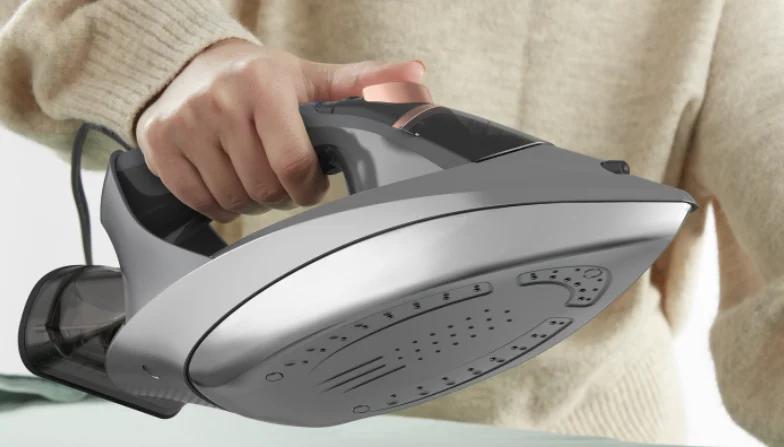

Conair GI500 GlideLite Professional Iron
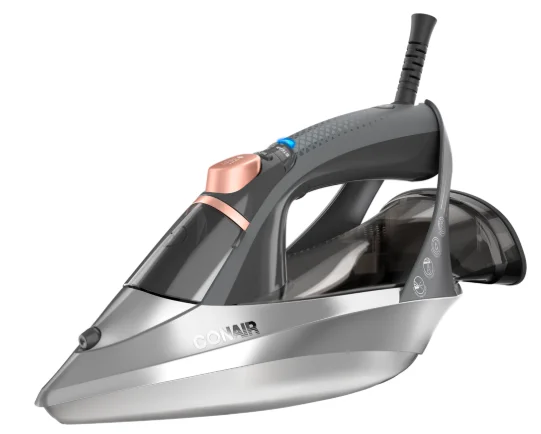
GET TO KNOW YOUR GLIDELITE PROFESSIONAL
SERIES 1700 WATT IRON (MODEL GI500)
IMPORTANT SAFETY INSTRUCTIONS
When using your iron, especially when children are present, basic precautions should always be taken, including the following:
READ ALL INSTRUCTIONS BEFORE USING
DANGER – Any appliance is electrically live even when the switch is off. To reduce the risk of death by electric shock:
- Always unplug the appliance immediately after use and before cleaning.
- Do not place or store the appliance where it can fall or be pulled into a tub or sink.
- Do not place in or drop into water or other liquids.
- Do not reach for an appliance that has fallen into water. Unplug immediately.
- Use only in a dry area.
WARNING – To reduce the risk of burns, electrocution, fire, or injury to persons:
- Children should be supervised to ensure that they do not play with the appliance.
- This appliance is not intended for use by persons (including children) with reduced physical, sensory, or mental capabilities, or the lack of experience and knowledge, unless they have been given supervision or instruction concerning use of the appliance by a person responsible for their safety.
- The iron must not be left unattended while it is connected to an electrical outlet.
- Use this appliance only for its intended use as described in this manual. Do not use attachments not recommended by Conair.
- The iron must be used and rested on a stable surface.
- If the supply cord is damaged, it must be replaced by the manufacturer, its service agent, or similarly qualified persons to avoid a hazard.
- Do not allow the cord to touch heated surfaces. Do not pull or twist the cord. Let the appliance cool completely before emptying or putting it away. Wrap the cord loosely around the iron when storing.
- This appliance has a polarized plug (one blade is wider than the other). As a safety feature, this plug will fit in a polarized outlet only one way. If the plug does not fit fully in the outlet, reverse the plug. If it still does not fit, contact a qualified electrician. Do not attempt to defeat this safety feature.
- Never drop or insert any object into any opening.
- Do not use outdoors or operate where aerosol (spray) products are being used or where oxygen is being administered.
- We recommend you do not use an extension cord to operate this appliance. If an extension cord is necessary, a 15-ampere-rated cord should be used. Cords rated for less amperage may overheat. Care should be taken to arrange the cord so that it cannot be pulled or tripped over.
- Surfaces of this appliance are hot when in use. Do not let heated surfaces touch eyes or skin.
- Do not place the soleplate directly on any surface or on the appliance power cord while the iron is hot or plugged in.
- The plug must be removed from the electrical outlet before the water reservoir is filled with water.
- Do not operate the steam function without properly filling the water tank with water.
- The iron should always be turned off before plugging in or unplugging from an outlet. Never yank the cord to disconnect from the outlet; instead, grasp the plug and pull to disconnect.
- Burns could occur from touching hot metal parts, hot water, or steam. Use caution when turning a steam iron upside down to empty water, as there may be hot water in the reservoir.
- If you need to clean the iron, unplug it and allow it to cool. Use a slightly damp cloth and wipe down the outside of the iron. DO NOT use cleaning agents or place the iron in water or cleaning fluids.
- Do not hold your hand in front of the steam.
- To reduce the likelihood of circuit overload, do not operate another high-wattage appliance on the same circuit.
- Never steam or iron clothes that are being worn.
- When emitting steam, this appliance may cause burns if it is used too close to the skin or eyes or if it is used incorrectly. To reduce the risk of contact with hot water emitted from the steam vents, test the appliance before use by holding it away from the body.
- When placing the iron on its base, ensure that the surface on which the base is placed is stable.
- The iron is not to be used if it has been dropped, if there are visible signs of damage, or if it is leaking.
- Always disconnect the iron from the electrical outlet before filling the reservoir with water, emptying the water from the reservoir, and when the iron is not in use.
- Close supervision is required for any appliance used by or near children. Do not leave the iron unattended while it is connected or on an ironing board.
FOR HOUSEHOLD USE ONLY
- DO NOT let children use the appliance.
- DO NOT let untrained persons use the appliance without supervision.
- NEVER immerse the iron, cable, or plug in any liquids.
- DO NOT leave the hot iron touching fabrics or inflammable surfaces.
- DO NOT leave the appliance unnecessarily plugged in. Disconnect the plug from the outlet when the appliance is not being used.
- NEVER touch the appliance with wet hands.
- DO NOT use the power cord or the appliance to pull the plug out of the outlet.
- DO NOT leave the appliance exposed to the weather (rain, sun, etc.).
- DO NOT leave the iron without supervision when it is connected to the power supply.
- DO NOT fill the reservoir with water before removing the plug from the outlet.
PLEASE NOTE!
Do not use chemical additives, scented substances, or decalcifiers in the reservoir. Failure to comply with the above-mentioned regulations will lead to the loss of warranty.
OPERATING INSTRUCTIONS
PREPARING FOR FIRST USE
- Before first use, remove all labels from the soleplate and housing. Plug the iron in. Turn the iron on, allow it to heat up, then turn the iron off. Unplug the iron.
- When using the iron for the first time, you may notice a slight emission of smoke and hear some sounds made by the expanding plastics. This is quite normal and will stop after a short time. We also recommend passing the iron over an ordinary cloth before using it for the first time.
- This GlideLite Iron features advanced One-Temp technology. No settings are needed. The iron is safe and effective on all fabric types.
FILLING THE RESERVOIR
- The reservoir can be filled with ordinary tap water, but distilled or demineralized water is preferred.
- a. Open the water reservoir door.
b. Using a clean measuring cup, slowly fill the reservoir until the water reaches the max fill indicator. DO NOT OVERFILL. - c. Close the water reservoir door.
- d. Wipe off any water that may have spilled on the outside of the iron with a soft, clean cloth.
- a. Open the water reservoir door.
- Set the iron on a stable, flat surface. We recommend using a quality ironing board as the pressing surface. Be sure to give yourself enough room to maneuver the iron when pressing.
- Plug in the iron. Make sure that no other high-wattage appliances are plugged into the same circuit.
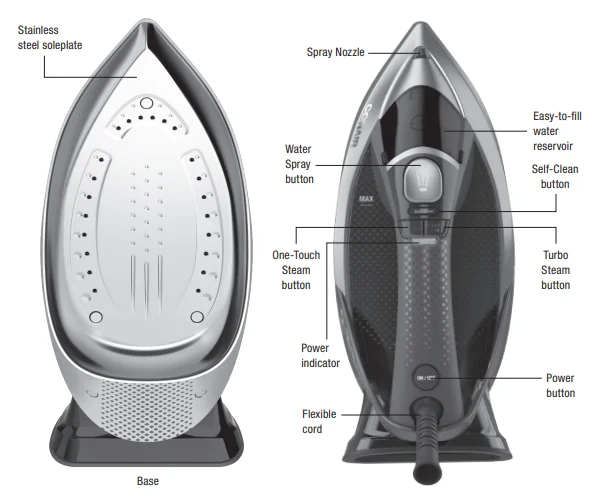
- Press the Power button. A blue light will blink for 30 seconds while heating. The iron is ready to use when the blue light turns solid.
- There are no temperature or fabric type settings to select. One-Temp technology safely removes wrinkles with one setting, thanks to powerful steam.
- If steam is desired, press the One-Touch Steam button. For stubborn wrinkles, press the Turbo Steam button to get a turbocharged amount of steam. The iron will only release steam when it’s in the horizontal position.
- After use, turn the iron off, unplug it, and let it cool for 10 minutes before putting it away.
3-WAY AUTO OFF
As a safety feature, your iron will turn off automatically if left in the upright position and not moved for 8 minutes. It will also turn off automatically if left in the horizontal or left or right side positions and not moved for 30 seconds. In these instances, the blue light will flash. Only when the iron is held horizontally can steam be released. When the unit is held vertically, the steam function will shut off automatically, and the white steam light will flash.
Please Note: DO NOT use chemical additives, scented substances, or decalcifiers in the water reservoir. Failure to comply with this regulation will lead to the loss of warranty.
ANTI-DRIP SYSTEM
With the Anti-Drip System, you can perfectly iron even the most delicate fabrics. It prevents water from dripping out of the soleplate when the temperature is too low.
DRY IRONING
To iron without steam, do not press the One-Touch Steam button.
SPRAY FUNCTION
Make sure that there is water in the reservoir. (See Filling the Reservoir.) Press the Water Spray button slowly for a dense spray or quickly for a vaporized spray.
WARNING: For delicate fabrics, we recommend moistening the fabric beforehand using the spray function or putting a damp cloth between the iron and the fabric. To avoid staining, do not use the spray on silk or synthetic fabrics.
CLEANING
Please Note: Before cleaning the iron in any way, make sure that the appliance plug is not connected to the outlet.
- Any deposits or starch residue left on the soleplate can be removed using a damp cloth or a nonabrasive liquid detergent after the iron has cooled.
- Avoid scratching the soleplate with steel wool or metallic objects.
- The plastic parts can be cleaned with a damp cloth, then wiped with a dry cloth.
SELF CLEANING
The self-cleaning feature cleans inside the soleplate, removing impurities. We recommend using this function every 10–15 days.
SELF-CLEANING DIRECTIONS
- Fill the reservoir up to the maximum level indicated and hold the iron horizontally over the sink.
- Plug in the iron and press the Power button. A blue light will blink for 30 seconds and then turn solid. Make sure the Steam button is off and remains off.
- Hold the Self-Clean button for 3 seconds to enter the self-clean mode.
- The blue light will flash for approximately 2 minutes while in self-cleaning mode.
- When the blue light is constant, cleaning has finished, and the unit has entered normal mode.
- Turn the iron off and unplug it from the outlet. When the soleplate has cooled, you may clean it with a damp cloth.
HOW TO STORE
- Disconnect the plug of the iron from the outlet.
- Let the iron cool down completely.
- Empty the water reservoir by turning the iron upside down over a sink and gently shaking it.
- Always put the iron away in a vertical position.
LIMITED ONE-YEAR WARRANTY (U.S. AND CANADA ONLY)
Conair will repair or replace (at our option) your unit free of charge for 12 months from the date of purchase if the appliance is defective in workmanship or materials. To obtain service under this warranty, return the defective product to the service center listed on the back, together with your purchase receipt. California residents need only provide proof of purchase and should call 1-800-3-CONAIR for shipping instructions. In the absence of a purchase receipt, the warranty period shall be 12 months from the date of manufacture.
ANY IMPLIED WARRANTIES, INCLUDING BUT NOT LIMITED TO THE IMPLIED WARRANTY OF MERCHANTABILITY AND FITNESS FOR A PARTICULAR PURPOSE, SHALL BE LIMITED IN DURATION TO THE 12-MONTH DURATION OF THIS WRITTEN, LIMITED WARRANTY. Some states do not allow limitations on how long an implied warranty lasts, so the above limitations may not apply to you.
IN NO EVENT SHALL CONAIR BE LIABLE FOR ANY SPECIAL, INCIDENTAL, OR CONSEQUENTIAL DAMAGES FOR BREACH OF THIS OR ANY OTHER WARRANTY, EXPRESS OR IMPLIED, WHATSOEVER. Some states do not allow the exclusion or limitation of special, incidental, or consequential damages, so the above limitation may not apply to you. This warranty gives you specific legal rights, and you may also have other rights, which vary from state to state.
- Service Center
- Conair LLC
- Service Department
- 7475 N. Glen Harbor Blvd.
- Glendale, AZ 85307
For information on any Conair® product, call 1-800-3-CONAIR or visit us on the web at www.conair.com. Please register this product at register.conair.com.
For More Manuals By Conair, Visit ManualsLibraryy.
Conair GI500 GlideLite Professional Iron-FAQs
What is a Glidelite Professional and what does it do?
A Glidelite Professional is typically a high-performance appliance designed for efficient cooking, heating, or household tasks, depending on the product category. It focuses on speed, precision, and ease of use, making it suitable for both everyday users and those seeking professional-level results at home.
What makes the Glidelite Professional different from standard models?
The Glidelite Professional stands out due to its enhanced performance features, durable build quality, and advanced controls. Compared to standard models, it often delivers faster results, more consistent output, and improved reliability, making it a preferred choice for users who want efficiency and long-term value.
Is the Glidelite Professional suitable for beginners?
Yes, the Glidelite Professional is designed with user-friendly controls that make it accessible for beginners while still offering advanced functionality. Clear settings, intuitive operation, and safety features ensure that even first-time users can operate it confidently without needing extensive technical knowledge or experience.
What key features should I expect from a Glidelite Professional?
You can expect features such as adjustable settings, precision control, durable materials, and efficient performance. Many models also include safety mechanisms, ergonomic design, and easy maintenance options, ensuring a balance between convenience and professional-grade functionality for everyday or intensive use.
How do I maintain and clean my Glidelite Professional?
Maintaining your Glidelite Professional involves regular cleaning after use, checking for wear, and following manufacturer guidelines. Most models are designed for easy maintenance, with removable or wipe-clean parts. Proper care helps preserve performance, ensures hygiene, and extends the lifespan of the appliance.
Is the Glidelite Professional energy efficient?
Yes, the Glidelite Professional is generally built with energy efficiency in mind. It is designed to deliver optimal performance while minimizing energy consumption, making it a cost-effective option over time. Efficient operation also helps reduce waste and supports more sustainable everyday usage.
Can the Glidelite Professional be used for multiple tasks?
The Glidelite Professional is often versatile, allowing users to perform a range of tasks depending on the model. Its adaptable settings and performance capabilities make it suitable for different applications, reducing the need for multiple devices and helping streamline your workflow or kitchen setup.
What safety features are included in the Glidelite Professional?
Most Glidelite Professional models include built-in safety features such as automatic shut-off, heat protection, and stable construction. These features are designed to prevent accidents, protect users, and ensure safe operation, especially during extended or high-performance use in busy environments.
How long does a Glidelite Professional typically last?
With proper care and regular maintenance, a Glidelite Professional can last for many years. Its durable construction and high-quality components are designed for longevity, making it a reliable investment for users who want consistent performance without frequent replacements or repairs.
Is the Glidelite Professional worth the investment?
The Glidelite Professional is considered a worthwhile investment for users seeking performance, durability, and convenience. Its professional-grade features, efficiency, and reliability provide long-term value, especially for those who frequently use such appliances and want dependable results every time.