
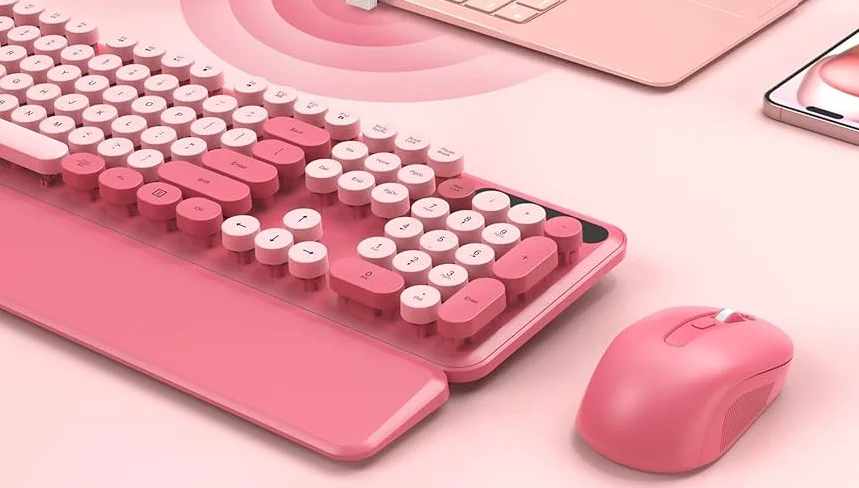

Sablute CK23 Keyboard & Mouse Combo
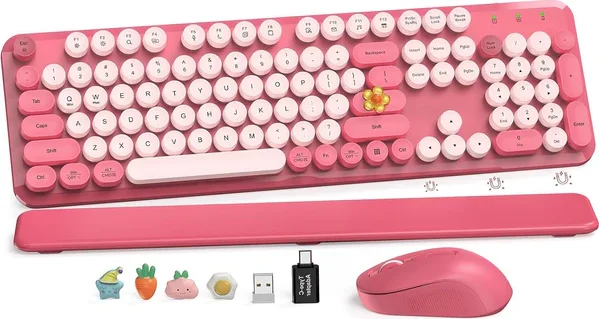
Where is USB? — Where is the USB receiver?
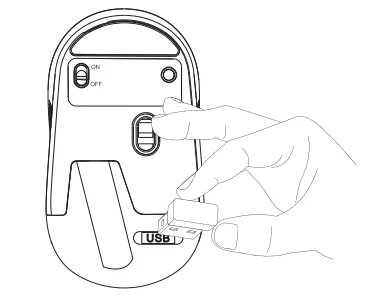
Remove the USB receiver from the back of the mouse. The keyboard and mouse share a single USB receiver. The adapter is inside the battery compartment.
How to set up?
- Please put batteries into the keyboard and mouse (Batteries NOT included).
- Insert the USB receiver into your computer.
- Turn on the keyboard and mouse.
Note: The keyboard and mouse will automatically connect to your computer. No drivers are required.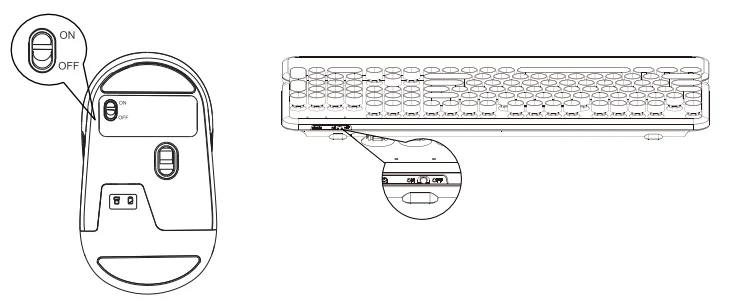
What to do if the keyboard loses connection with the USB?
Pairing method: Long-press the “ESC” + “=” keys for three seconds until the red light stays on. Then, immediately plug in the receiver.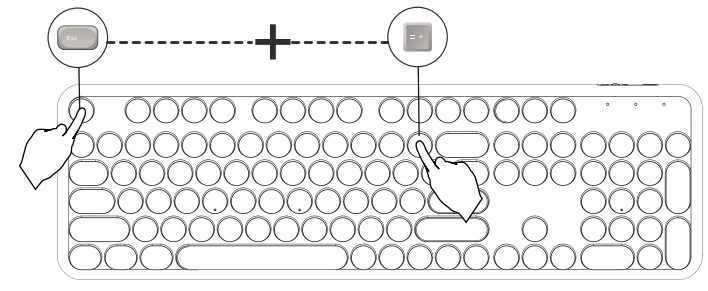
What to do if the mouse loses connection with the USB?
Press and hold the left, middle, and right buttons of the mouse for 3-5 seconds, then plug the USB into the computer.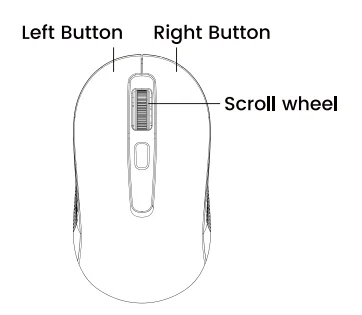
The Functions of a Mouse
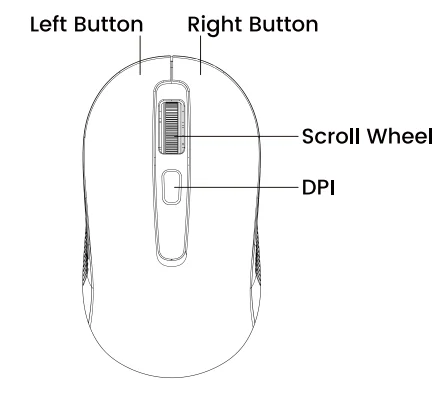
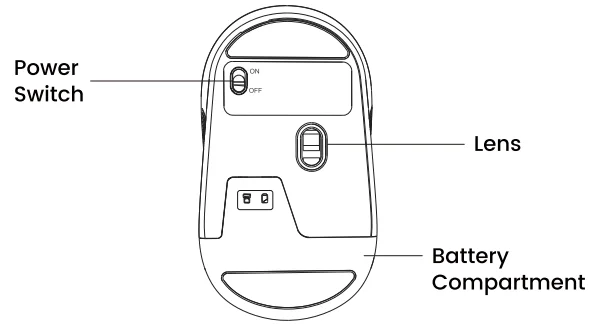
Shortcut keys
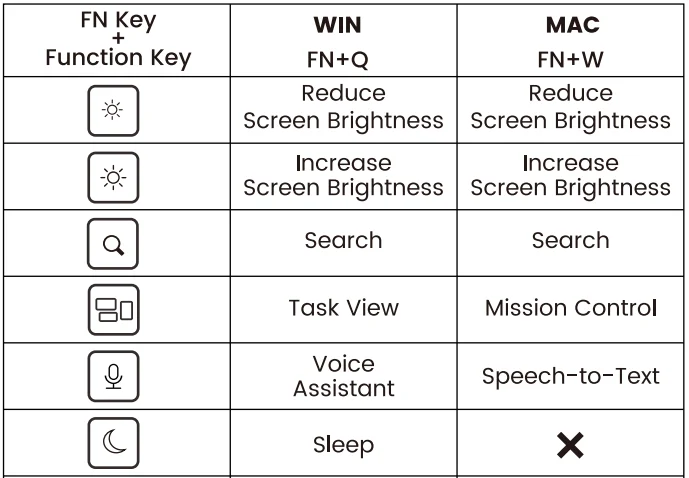
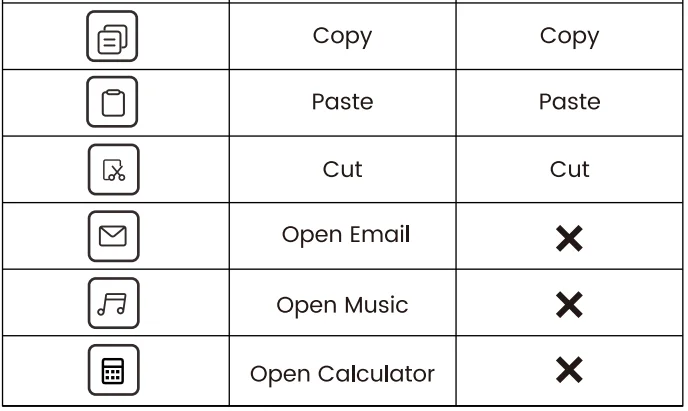
Indicator light function
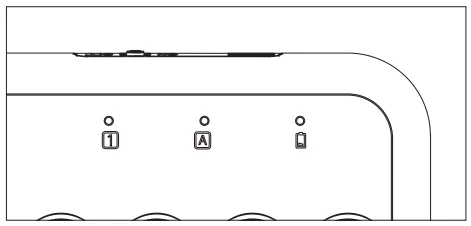
 NUM LOCK: The indicator lights up green when Num Lock is on.
 Caps LOCK: The indicator lights up green when Caps Lock is on.
 Low-battery protection: The red light turns on when the battery is low.
 NUM LOCK: The indicator lights up green when Num Lock is on.
 Caps LOCK: The indicator lights up green when Caps Lock is on.
 Low-battery protection: The red light turns on when the battery is low.
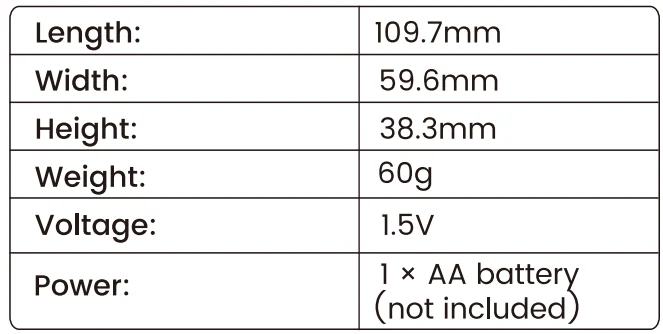
Product specifications and parameters
Keyboard:
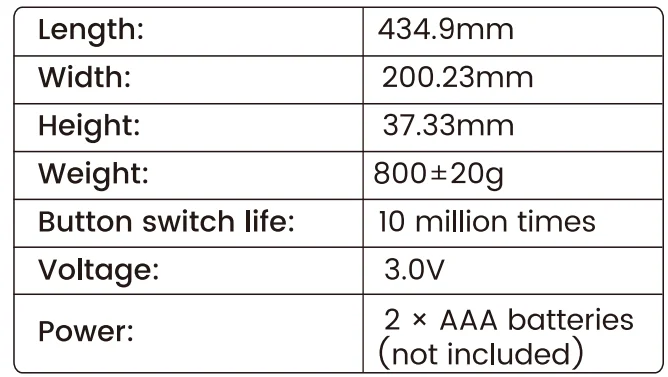
Mouse:
FAQ
Q1: Why won’t my keyboard or mouse connect to my computer?
A1: Make sure the USB receiver is plugged firmly into your computer’s USB port. Insert new batteries into both the keyboard and mouse, and turn them on. If you’re still having trouble, try re-pairing the devices. Refer to page 3 of this manual for step-by-step instructions.
Q2: Some keys on the keyboard aren’t working or feel stuck. How can I fix this?
A2: Gently clean around the keys with a soft brush. If a key is still stuck or unresponsive, you can gently lift off the round keycap, wipe underneath with a dry cloth or cotton swab, and snap the keycap back into place.
Q3: The mouse is lagging or not responding smoothly. What should I do?
A3: This could be due to low batteries or interference from other wireless devices. Try replacing the batteries and using the mouse on a flat, non-reflective surface. Also, keep the receiver away from other electronics to improve the connection.
Q4: Do the keyboard and mouse need to be charged?
A4: No. Both the keyboard and mouse use replaceable batteries (not rechargeable). The keyboard requires 2 AAA batteries, and the mouse requires 1 AA battery (batteries not included).
Q5: How do I attach or remove the wrist rest?
Customer service
Buy on SABLUTE and enjoy:
 30-Day Money-Back Guarantee
- 90-Day Free Replacement
- Hassle-Free Warranty (No need to return)
- Lifetime Customer Support
 30-Day Money-Back Guarantee
Contact us
For FAQs and more information, please visit our website. sablute.com/pages/contact, [email protected].
FCC Statement
This equipment has been tested and complies with the limits for Class B digital devices under Part 15 of the FCC rules. These rules are designed to provide reasonable protection against harmful interference in a residential environment. The device emits radio frequency energy during use, and improper setup may cause interference with wireless communications. If interference is detected (you can test by turning the device off and on), please try the following:
- Make sure the USB receiver is firmly plugged into your computer.
- Place the keyboard, mouse, and USB receiver closer together, with no large objects blocking the signal.
- Try connecting the USB receiver to a different USB port on your computer.
- If the problem continues, consult a technician or your dealer for further assistance.
Changes or modifications not approved by the responsible party may void the user’s authority to operate this equipment. Operation is subject to the following two conditions:
- The device may not cause harmful interference.
- The device must accept any interference received, including interference that may cause undesired operation.
For More Manuals By Sablute, Visit ManualsLibraryy.
Sablute CK23 Keyboard & Mouse Combo-FAQs
What is the Sablute CK23 Keyboard & Mouse Combo?
The Sablute CK23 is a wireless keyboard and mouse combo designed with a retro typewriter-style aesthetic. It includes a full-size keyboard with round keycaps and a matching mouse, offering a stylish yet functional setup for everyday computing, office work, and casual use.
Is the Sablute CK23 keyboard wireless or Bluetooth?
The Sablute CK23 is not a Bluetooth device. It uses a 2.4GHz wireless connection via a USB receiver, which must be plugged into your computer. Without the receiver, the keyboard and mouse cannot connect or function properly.
Does the Sablute CK23 come with a wrist rest?
Yes, the Sablute CK23 includes a detachable or built-in wrist rest, depending on the variant. This feature improves typing comfort by supporting your hands during long sessions, helping reduce strain and making it more suitable for office work or extended use.
What devices are compatible with the Sablute CK23 combo?
The Sablute CK23 is compatible with Windows and Mac computers, including desktops and laptops. However, it is not suitable for tablets or phones since it relies on a USB receiver instead of Bluetooth connectivity for pairing and operation.
Is the Sablute CK23 good for gaming?
The Sablute CK23 is primarily designed for productivity and casual use rather than gaming. Its membrane keys and wireless connection make it suitable for typing and everyday tasks, but it may not offer the responsiveness or features required for competitive gaming.
How is the typing experience on the Sablute CK23?
The typing experience is smooth and quiet, thanks to its membrane key design and soft keystrokes. The round keycaps add a tactile feel, while reduced noise makes it ideal for shared spaces like offices, libraries, or home environments.
What makes the Sablute CK23 design unique?
The Sablute CK23 stands out with its retro typewriter-style design and colorful aesthetic options. It features round keycaps and visually appealing layouts, making it popular among users who want a stylish desk setup alongside functional performance.
Does the Sablute CK23 require batteries or charging?
The Sablute CK23 typically runs on replaceable batteries rather than being rechargeable. This design ensures long-lasting usage without frequent charging, although users need to replace batteries periodically depending on usage and power-saving features like sleep mode.
How far is the wireless range of the Sablute CK23?
The combo offers a reliable wireless range of up to approximately 33 feet (10 meters). This allows flexible use across desks or small rooms without noticeable lag, making it suitable for home offices, classrooms, or general workspace setups.
Is the Sablute CK23 worth buying?
The Sablute CK23 is worth considering if you value aesthetics, quiet typing, and basic productivity features. It delivers a balance of style and functionality at an affordable price point, though it may not suit users looking for advanced features like RGB lighting or Bluetooth connectivity.