
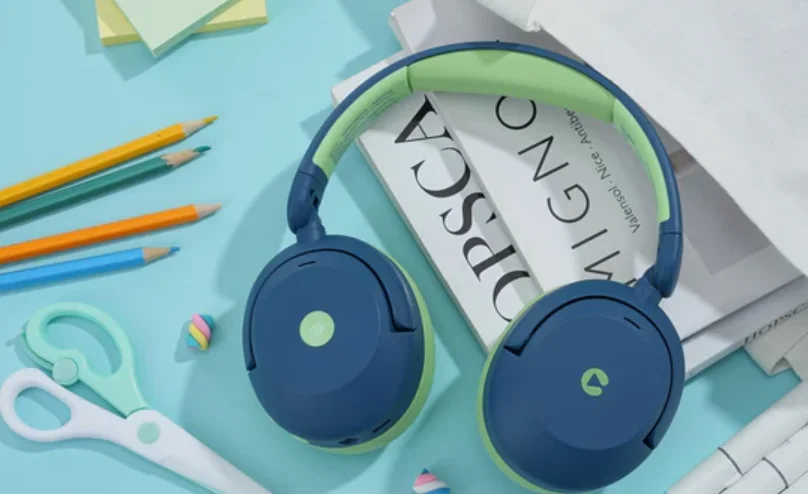

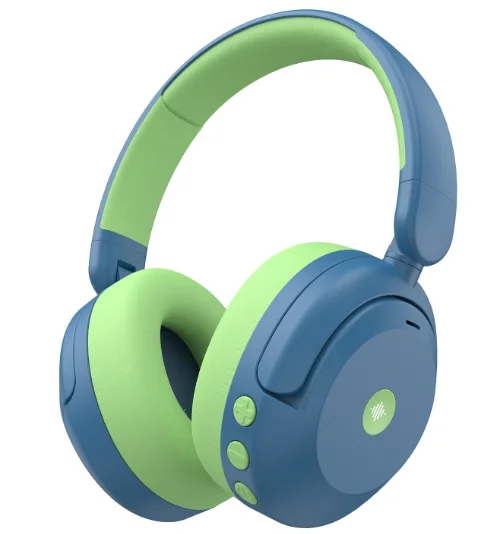
iClever BTH20 Noise Cancelling Headphones
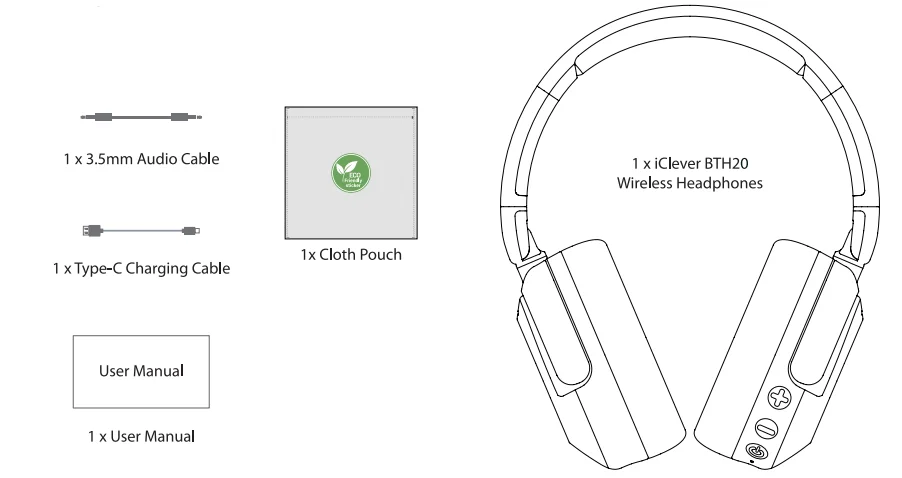
Package Contents
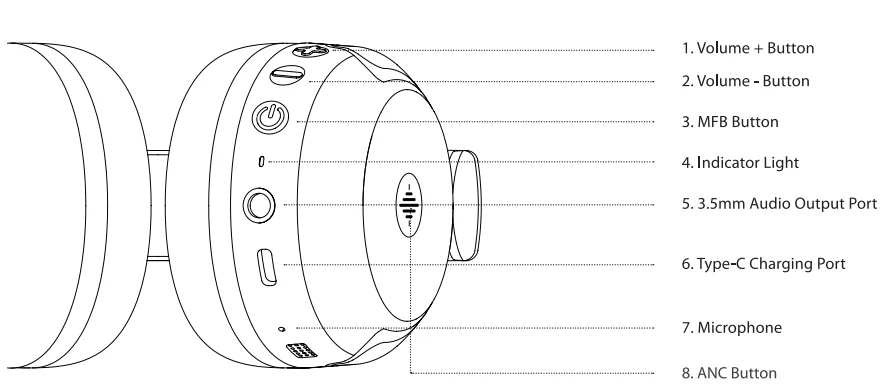
Product Diagram
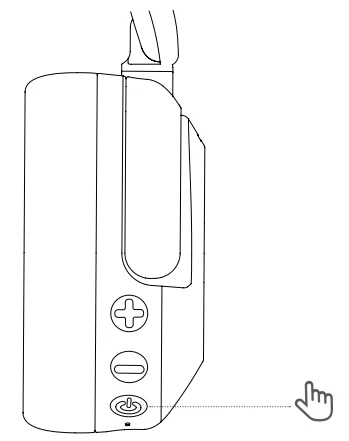
Power On/Off
- Power On: In the power-off state, press and hold the MFB button for 3 seconds to power on the headphones. The headphones will play the voice prompt “Power On,” and the indicator light will flash red and blue alternatively, indicating that the headphones have entered pairing mode.
- Power Off: In the power-on state, press and hold the MFB button for 4 seconds to power off the headphones. The headphones will play the voice prompt “Power Off,” and all lights will turn off, indicating that the headphones are powered off.

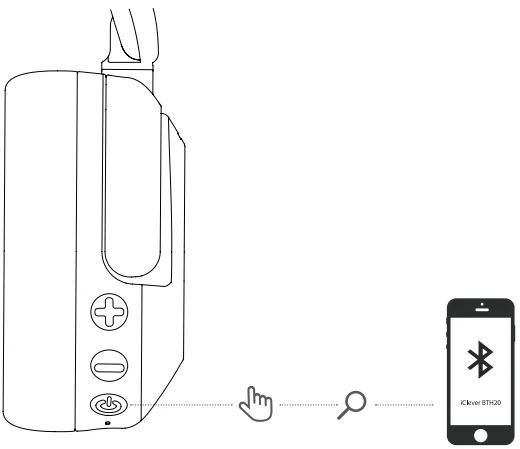
Bluetooth Pairing
- When first turning on the device, its indicator light turns blue for 2 seconds, then the Bluetooth enters the pairing state, and the red and blue lights flash alternately.
- Open the Bluetooth on your phone and select “iClever BTH20” in the device list for Bluetooth pairing.
Note:
- After the second power-on, the phone will automatically reconnect to the last paired Bluetooth device. If the last paired Bluetooth device is out of range, the headphones will enter pairing mode.
- If the device exceeds the effective Bluetooth range of the headphones, it will automatically disconnect.
- If the headphones fail to connect via Bluetooth for more than 5 minutes, they will shut down automatically, unless the noise reduction mode is turned on.

Wired Connection
Insert the provided 3.5mm audio cable, with one end into the 3.5mm audio interface of the headphones and the other end into a device that supports a 3.5mm interface, such as a tablet, computer, laptop, or smartphone.
Noise Reduction
The headphone is in “Noise Cancelling High” mode by default when it is turned on. Short-press the “ANC” button for the first time to turn off the noise reduction mode. Short-press the “ANC” button for the second time to enter the “Noise Cancelling Low” mode. Short-press the “ANC” button for the third time to return to the “Noise Cancelling High” mode.
Note: The noise-cancelling function is not supported when using a wired connection.
Button Functions
- Volume Up: Press the “+” button
- Volume Down: Press the “-” button
- Next Track: Press and hold the volume + button for 2s
- Previous Track: Press and hold the volume button for 2s
- Play/Pause: Press the MFB button
- Answer/End Call: Press the MFB button
- Reject Call: Press and hold the MFB button for 2s
- Clear Pairing List: When the headphones are powered on (connected) or in the pairing state, press and hold the Volume + Button & Volume – Button for 4 seconds. The headphones will automatically clear the pairing list and enter pairing mode, with the indicator light flashing red and blue alternately.
Voice Prompt
- Power on: Power on
- Power off: Power off
- Pairing: Pairing
- Successful Bluetooth Connection: Connection Successful
- Bluetooth Disconnection: Disconnected
- Low Battery Reminder: Battery Low
- Low Noise Cancellation: Noise Cancelling Low
- High Noise Cancellation: Noise Cancelling High
- Turn off the Noise Cancellation: Noise Cancelling Off
- Maximum Volume: Maximum Volume
- Minimum Volume: Minimum Volume
Product Specifications
- Frequency Range: 2.402G-2.48G Hz
- Maximum Transmission Power: 8 dBm
- Battery Type: Li-ion Battery
- Battery Parameters: 3.7 Vdc 500mAh
- Charging Parameters: DC 5V 1A
How to Charge the Headphones
Connect one end of the Type-C charging cable to a 5V power adapter (the product does not include an adapter), and the other end to the earphones. The earphones will automatically shut down, and the red light will stay on when charging, and the light will go out when fully charged.
Warnings
- Stop using the product if it is damaged.
- Replace the USB interface of the charging cable if it becomes hot.
- Keep the product away from high temperatures and open flames.
Statements of Compliance
- Product Model: BTH20
- Date Code: 20240101
- Name and Address of manufacturer: Thousandshores Deutschland GmbH, Sorbenstraße 22, 20537 Hamburg, DE
- Name and Address of Authorised Representative: APEX CE SPECIALISTS LIMITED, 89 Princess Street, Manchester, M14HT, UK
The statement of compliance is prepared by or on behalf of the manufacturer of the product. In the opinion of the manufacturer, they have complied with either—(i) the applicable security requirements in Schedule 1 of SI 2023 No. 1007: Provision 5.1-1 of ETSI EN 303 645 & provision 5.1-2 of ETSI EN 303 645; Provision 5.2-1 of ETSI EN 303 645; Provision 5.3-13 of ETSI EN 303 645.
- The defined support period for the product: 20250101
- Signature, name, and function of the signatory: [not provided]
- The place and date of issue: [not provided]
The power delivered by the charger must be between min 0.05 Watts required by the radio equipment, and max 2 Watts in order to achieve the maximum charging speed.
FCC Statement
Changes or modifications not expressly approved by the party responsible for compliance could void the user’s authority to operate the equipment. This equipment has been tested and found to comply with the limits for a Class B digital device, pursuant to Part 15 of the FCC Rules. These limits are designed to provide reasonable protection against harmful interference in a residential installation.
This equipment generates, uses, and can radiate radio frequency energy and, if not installed and used in accordance with the instructions, may cause harmful interference to radio communications. However, there is no guarantee that interference will not occur in a particular installation. If this equipment does cause harmful interference to radio or television reception, which can be determined by turning the equipment off and on, the user is encouraged to try to correct the interference by one or more of the following measures:
- Reorient or relocate the receiving antenna.
- Increase the separation between the equipment and receiver.
- Connect the equipment into an outlet on a circuit different from that to which the receiver is connected.
- Consult the dealer or an experienced radio/TV technician for help.
This device complies with part 15 of the FCC rules. Operation is subject to the following two conditions:
- This device may not cause harmful interference.
- This device must accept any interference received, including interference that may cause undesired operation.
The device has been evaluated to meet the general RF exposure requirements. The device can be used in portable exposure conditions without restriction.
IC Caution
This device contains licence-exempt transmitter(s)/receiver(s) that comply with Innovation, Science and Economic Development Canada’s licence-exempt RSS(s). Operation is subject to the following two conditions:
- This device may not cause interference, and
- This device must accept any interference, including interference that may cause undesired operation of the device.
DOC
The device has been evaluated to meet general RF exposure requirement. The device can be used in portable exposure condition without restriction. Hereby, Thousandshores Deutschland GmbH declares that the radio equipment type Wireless Headphones BTH20 is in compliance with Directive 2014/53/EU. The full text of the EU declaration conformity is available at the following internet address: http//files.iClever.com/BTH20-eu-doc.pdf.
For More Manuals By iClever, Visit ManualsLibraryy.
iClever BTH20 Noise Cancelling Headphones-FAQs
What makes the iClever BTH20 headphones suitable for kids?
The iClever BTH20 is designed specifically for children with safety and comfort in mind. It includes an 80dBA volume limit to protect hearing, soft ear cushions, and durable BPA-free materials. The adjustable headband ensures a proper fit for growing kids during daily use.
How effective is the noise-cancelling feature on the iClever BTH20?
These headphones offer active noise cancellation with up to 40dB reduction, helping block out background sounds like traffic or airplane noise. While not as strong as premium adult models, it is effective enough for study, travel, and improving focus in noisy environments.
How long does the battery last on the iClever BTH20?
The battery life is impressive, offering up to 60 hours of playback with noise cancellation turned off and around 35 hours with it enabled. A quick 10-minute charge can provide about 5 hours of listening time, making it convenient for busy routines.
Can the iClever BTH20 be used without Bluetooth?
Yes, the headphones support both wireless and wired usage. You can connect them using the included 3.5mm audio cable when Bluetooth is unavailable, or the battery runs out, ensuring uninterrupted listening across various devices like tablets, laptops, and smartphones.
Are these headphones comfortable for long listening sessions?
The iClever BTH20 features a pressure-reducing design, soft protein leather ear cushions, and a lightweight build. The earcups rotate and the headband adjusts easily, allowing children to wear them comfortably for extended periods such as studying, watching videos, or traveling.
What noise cancellation modes are available?
The headphones offer two noise cancellation modes: a low mode for gentle noise reduction and a high mode for stronger isolation. This flexibility helps kids adapt to different environments, whether they need mild background reduction or a more immersive listening experience.
Are the iClever BTH20 headphones durable for everyday use?
Yes, they are built with reinforced materials that are more resistant to wear and impact than standard designs. The flexible structure and sturdy construction make them suitable for active children, helping them withstand drops, bends, and frequent handling.
Do these headphones support fast charging?
The iClever BTH20 supports fast charging through a USB-C port. A short 10-minute charge can deliver several hours of playback, which is useful when you need a quick power boost before travel or school sessions.
What devices are compatible with the iClever BTH20?
These headphones use Bluetooth 5.4, ensuring stable connections with smartphones, tablets, laptops, and other Bluetooth-enabled devices. The wired option also makes them compatible with devices that have a 3.5mm headphone jack, offering wide usability across platforms.
Are the iClever BTH20 headphones good for travel and school use?
Yes, they are ideal for both travel and school. The noise cancellation helps reduce distractions, while the long battery life supports extended use. Their foldable, lightweight design and durable build make them easy to carry and reliable for everyday activities.