
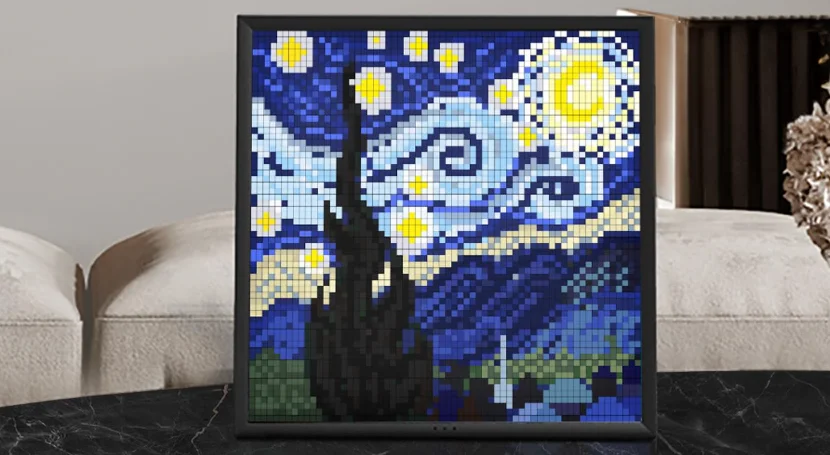

Divoom Pixoo 64 LED Display Frame
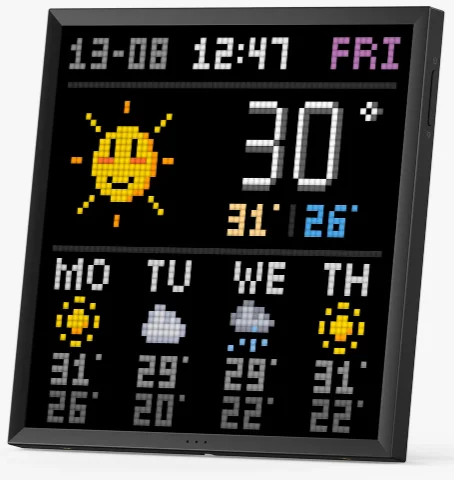
Nice to meet you!
This is Pixoo 64, a new multi-functional, informative smart display for your home. With a 64×64 pixel art LED display and wireless Internet connectivity, Pixoo 64 unlocks the world of pixel art, and you can decorate your house with this unique gadget.
What’s included?
- Pixoo 64
- Mounting screws
- User manual
- USB-C Charging cable

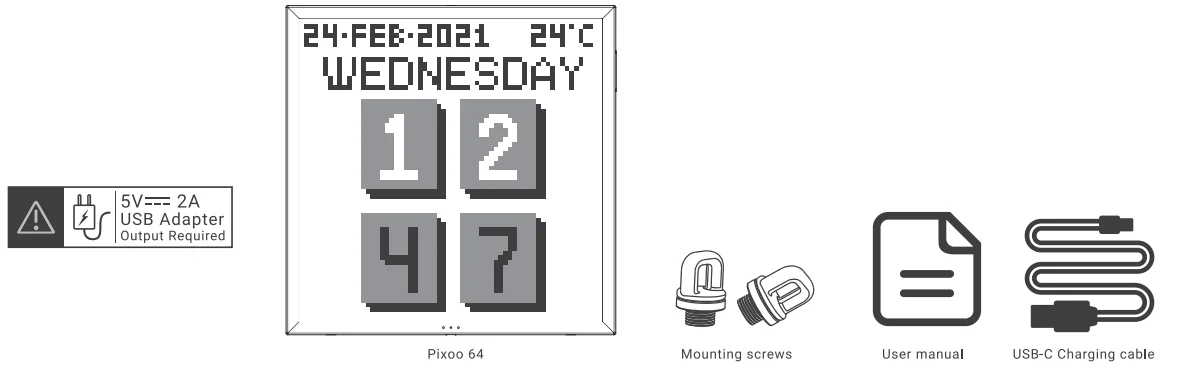
Thank you for purchasing a Divoom product! Please read this manual carefully. Visit www.divoom.com to learn more about our other products. Due to the nature of the technology products, the information in this manual is subject to change without prior notice. If you have any questions, please feel free to contact the Divoom customer representative.
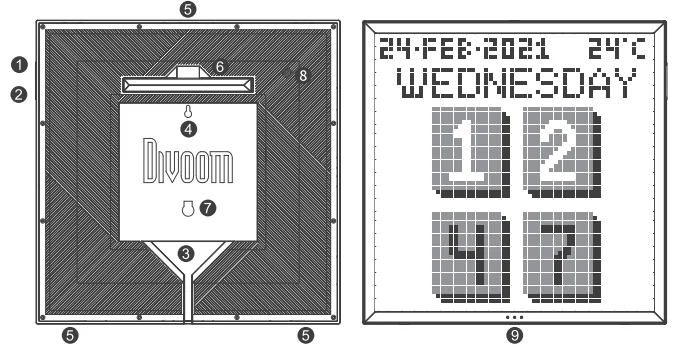
Product details
- PRESS: Power ON/OFF
- HOLD (8 seconds): Reset network settings
- PRESS: Change channels
- HOLD (3 seconds): Switch recent clock interfaces / Music visualizer effects / Custom channels
- USB-C POWER PORT
- WALL MOUNT HOLES
- MOUNTING SCREW HOLES
- MOUNTING STAND/TRAY
- MOUNTING STAND HOLE
- BUZZER HOLE
- MICROPHONE HOLE

How to set up the network connection?
The Divoom application is available in both iOS and Android app stores. You can search ‘Divoom’ or scan this QR code.
- Please download and install the Divoom app from the App Store or Google Play.
- Connect to a 2.4G wireless Internet network (keep your phone/device close to the network router).
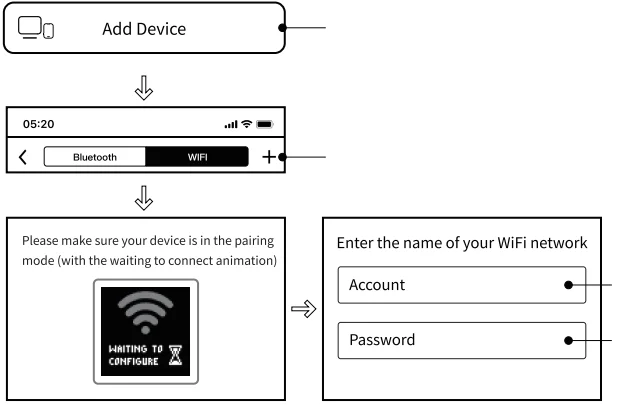
- Open the app, press Me > My device, and select Internet to pair the device.
- Connect the device with power, and it should show a ‘waiting for config’ logo.
- In the app, press ‘Start to pair’, and enter the password for the connected network.
- In the app, it will show ‘pairing’ for 10 to 20 seconds.
- Once the device is connected to the network, the app will show successfully connected. If there is an update message, please proceed with the update. Do not unplug the device during its update.

Reset network?
- Connect the device to the power cable. Once the device is ON, please hold the ON/OFF button for 8 seconds.
- The device should be ready for the Internet configuration.
How to power it?
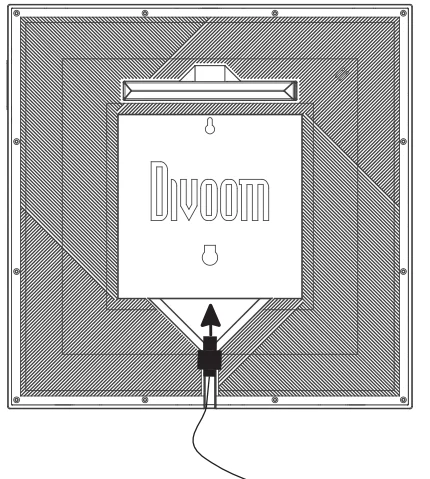
- Insert the USB-C cable into the USB port on the rear panel.
- The device will power ON instantly.
- If the device is currently OFF, you can press its power button to turn it ON.
- Please use the stock USB-C cable. The maximum supported length is 2M.
- Please use a USB charger with a 5V = 2A output.
- If the device is flickering or randomly powers OFF, please try a different USB cable and/or charger.

General Troubleshoot:
- The device is connected to power, but the screen and the ON/OFF button are unresponsive.
- a) Please make sure it’s connected with a 5V = 2A charger. b) Try a different USB-C cable.
- Network pairing timeout
- a) Make sure the phone is connected to a 2.4G Internet network (5G network not supported).
- b) Make sure the Internet network is working properly, and both devices are near the router.
- c) Try the pairing process on a different phone. Or reset and re-do the network pairing process.
- d) Download the latest Divoom app.
- Device shows number and full panel coloring
- a) Make sure the lighting key is unstuck. b) Reconnect the power cable.
Product specification
- Dimension (mm): 262x20x261.4
- Weight: 978.4g
- LED: 1921 RGB x 4096
- Color Temp: 1600-6500K
- Color: Full RGB
- Brightness: 80@4000K
- Output: 10W
- Microphone: MEMS
- Charge: via USB cable, 5V = 2A
Warranty information:
- If you believe your product is defective within the warranty period, please bring the product back to where the product was initially purchased. Alternatively, or with any other questions or concerns, please call customer support at +0755 86290767, or contact us via email at [email protected].
- If, within 12 (24 if required by local law) months of purchase, this device or any part thereof is proven to be defective by reason of faulty workmanship or defects in materials, we will, at our option, repair or replace the same free of charge for labor or materials on condition similar to the product’s current condition.
- The sales invoice or receipt with the date and source of purchase must be presented together with the defective unit. We cannot validate the product warranty information without an invoice.
- The warranty does not cover product failures that have been caused by the use of accessories or other peripheral devices that are not Divoom-branded original accessories intended for use with the product.
- The warranty does not cover product failures caused by modification, repair, or disassembly by any person who is not authorized by the manufacturer.
- The warranty is non-transferable. Any defective unit or part shall become the property of the manufacturer.
- Warranty does not cover any damage caused by misuse, drop, hit, or negligence.
- Customer is responsible for the return shipping charges.
Please read the following instructions carefully:
- Please follow our product installation and operation instructions.
- Always place the product on a smooth and stable surface.
- Do not push any objects into product vents or slots. Do not apply any great force on the product.
- Please keep the product in a room-temperature environment. Do not place the product near any heat sources (such as radiators, heat registers, stoves, fireplaces, or direct sunlight). Do not place the product near any open flame source.
- Do not attempt to service the product by yourself. Always refer to the instructions by qualified service personnel.
- To avoid the risk of electrical hazard, do not expose this product to a wet surface.
Declaration of conformity:

- This device meets the essential requirements of the following Directive 2014/53/EU of the European Parliament and the Council of 16 April 2014.
- This product is in compliance with Directive 2011/65/EU of the European Parliament and of the Council of 1 July 2011 on the restriction of the use of certain hazardous substances in electrical and electronic equipment.
- The waste container symbol with the X through it on the device indicates that the device must be disposed of separately from normal domestic waste at an appropriate waste disposal facility at the end of its useful service life.
FCC STATEMENT:
This device complies with Part 15 of the FCC Rules. Operation is subject to the following two conditions:
- This device may not cause harmful interference, and
- This device must accept any interference received, including interference that may cause undesired operation.
Warning: Changes or modifications not expressly approved by the party responsible for compliance could void the user’s authority to operate the equipment.
NOTE: This equipment has been tested and found to comply with the limits for a Class B digital device, pursuant to Part 15 of the FCC Rules. These limits are designed to provide reasonable protection against harmful interference in a residential installation. This equipment generates, uses, and can radiate radio frequency energy and, if not installed and used in accordance with the instructions, may cause harmful interference to radio communications.
However, there is no guarantee that interference will not occur in a particular installation. If this equipment does cause harmful interference to radio or television reception, which can be determined by turning the equipment off and on, the user is encouraged to try to correct the interference by one or more of the following measures:
- Reorient or relocate the receiving antenna.
- Increase the separation between the equipment and receiver.
- Connect the equipment to an outlet on a circuit different from that to which the receiver is connected.
- Consult the dealer or an experienced radio/TV technician for help.
Warranty information:
This product is covered by a limited warranty from Divoom. For complete warranty details, visit the website www.Divoom.com.
For More Manuals By Divoom, Visit ManualsLibraryy.
Divoom Pixoo 64 LED Display Frame-FAQs
What is the Divoom Pixoo 64 LED Display Frame, and what does it do?
The Divoom Pixoo 64 is a WiFi-enabled pixel art display featuring a 64×64 LED panel that shows animations, images, and real-time data. It works as both decorative lighting and a smart display for clocks, social stats, or custom pixel artwork.
How do you create and display content on the Pixoo 64?
Content is managed through the Divoom mobile app, where users can design pixel art, upload GIFs, or download creations from a large community gallery. The app allows customization of animations, scrolling text, and images, making it easy to personalize the display.
Does the Pixoo 64 support real-time information display?
Yes, the Pixoo 64 can show real-time data such as weather, stock prices, social media metrics, and gaming stats. It connects via WiFi to fetch live updates, making it useful for both decorative and informational purposes in homes or gaming setups.
Is the Divoom Pixoo 64 easy to set up?
Setup is straightforward and typically involves connecting the device to power and pairing it with the Divoom app over WiFi. Once connected, users can immediately start customizing displays and accessing various features without needing technical expertise.
What size and display quality does the Pixoo 64 offer?
The Pixoo 64 features a 10.3-inch display with a 64×64 LED grid, offering 4096 pixels in total. While it focuses on pixel-style visuals rather than high-resolution images, it delivers vibrant colors and a retro aesthetic ideal for animations and digital art.
Can the Pixoo 64 be used as a clock or desk display?
Yes, it includes multiple clock modes and can function as a desk or wall display. Users can customize clock faces, combine them with animations, or switch between information widgets, making it a versatile addition to workspaces or gaming environments.
Does the Pixoo 64 require constant power?
The Pixoo 64 runs on a direct power connection through a USB cable and does not have a built-in battery. This means it needs to remain plugged in during use, making it best suited for stationary setups like desks, shelves, or mounted walls.
What are the main uses of the Pixoo 64 LED display?
It is commonly used for room decoration, gaming setups, digital art displays, and social media tracking. Many users also use it to display messages, alerts, or themed animations, adding a dynamic and customizable visual element to any space.
Is the Pixoo 64 suitable for beginners in pixel art?
Yes, the companion app includes simple drawing tools and templates, making it beginner-friendly. Users can start with ready-made designs and gradually create their own pixel art, even without prior experience in digital design or animation.
What are the limitations of the Divoom Pixoo 64?
While versatile, it depends heavily on the mobile app for functionality and customization. The 64×64 resolution limits detail compared to standard displays, and larger animations or files may require optimization to fit within system constraints for smooth playback.