
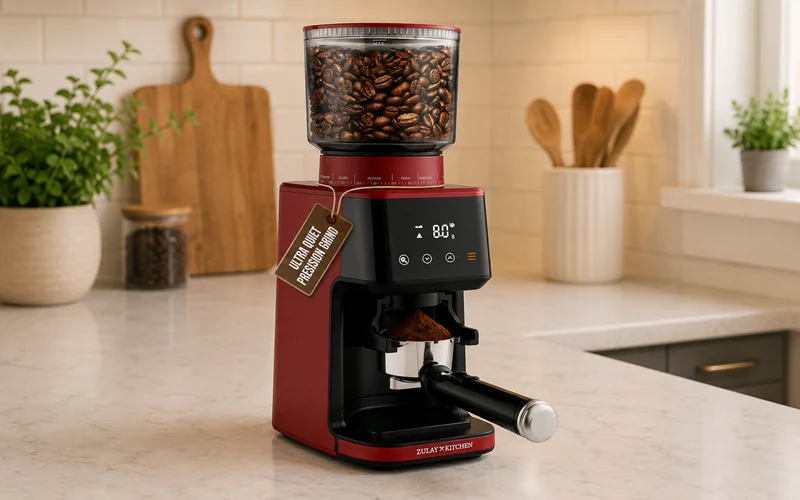

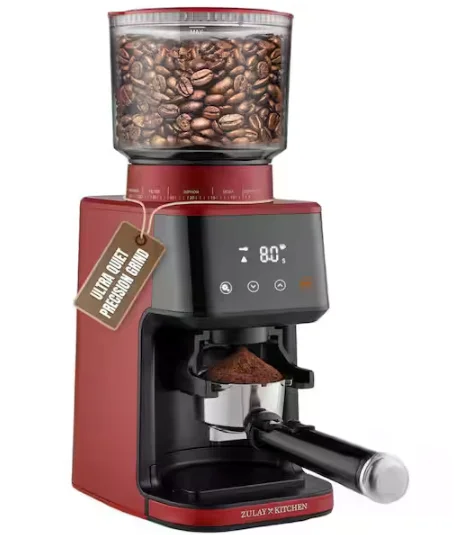
Zulay Kitchen Espresso Coffee Grinder
SAFETY INFORMATION
When using electrical appliances, basic safety precautions should always be followed:
- Carefully read all instructions before operating the appliance for the first time and save them for future reference.
- When the machine is not in use, before handling or cleaning its parts, always remember to unplug it. To unplug, firmly grasp the plug and pull it out from the electrical outlet. Avoid pulling on the cord itself.
- To protect against fire, electric shock, and injury to persons, do not immerse the cord, plugs, or the machine in water.
- To minimize the risk of severe injury or damage to the appliance, ensure that hands and other objects are kept away from the coffee bean hopper during the grinding process.
- If the grinder has a damaged cord or plug, or if it malfunctions, or if it is dropped or damaged in any way, do not continue operating it. For assistance, please contact our customer service team.
- The use of attachments that are not recommended or sold by the manufacturer can potentially result in fire, electric shock, or injuries.
- This product is intended for indoor use only.
- Avoid allowing the cord to hang over the edge of the counter or come into contact with hot surfaces.
- Do not allow foreign objects to enter the coffee bean hopper.
- Ensure that the lid is securely in place when operating the burr grinder.
- Avoid placing the appliance on or near a hot gas or electric burner, or inside a heated oven.
- This product is intended for household use only. Any commercial use, improper use, or failure to follow the instructions will void the manufacturer’s warranty.
- This appliance is only intended for use with roasted coffee beans. Do not use the appliance for any other purpose or with ingredients such as hard seeds, spices, nuts, etc.
- This appliance is not intended for use by persons (including children) with reduced physical, sensory, or mental capabilities, or the lack of experience and knowledge, unless they have been given supervision or instruction concerning use of the appliance by a person responsible for their safety.
- The appliance is not intended for use by children.
- Always disconnect the appliance from the power supply if it will be left unattended or before assembling, disassembling, or cleaning.
- When disposing of electronic equipment, it is advisable to use certified electronics recyclers or authorized recycling facilities. These facilities are equipped to handle electronic waste properly, ensuring that hazardous materials are managed appropriately.
- Be careful when handling burrs, as they are sharp. Never touch them with your fingers!
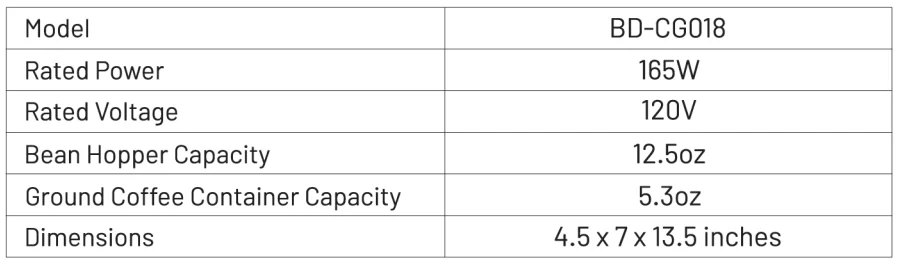
TECHNICAL SPECIFICATIONS
PARTS OF THE GRINDER
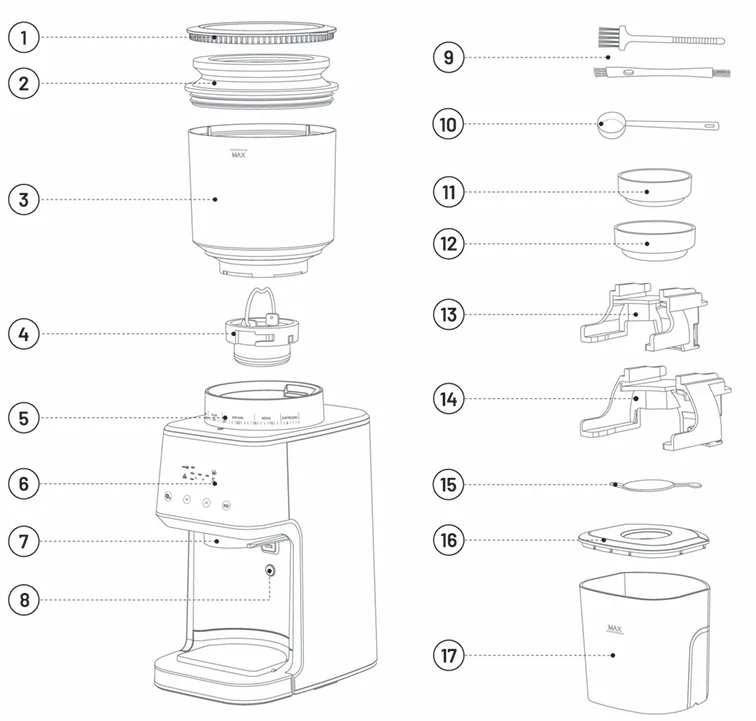
- Bean Hopper Lid
- Coffee Grounds Residual Cleaner
- Bean Hopper
- Stainless Steel Conical Burrs
- Grind Size Control
- Control Panel
- Ground Coffee Chute
- Portafilter Activation Switch
- Cleaning Brushes
- Scoop
- Coffee Dosing Ring Compatible with 53 mm Portafilter
- Coffee Dosing Ring Compatible with 58 mm Portafilter
- Portafilter Cradle 53 mm
- Portafilter Cradle 58 mm
- Silicone Cover
- Ground Coffee Container Lid
- Ground Coffee Container
HOW TO ASSEMBLE AND DISASSEMBLE THE BEAN HOPPER
How to Assemble the Bean Hopper:

- Make sure the coffee grinder is unplugged.
- Please ensure that the top part of the conical burr is clean. If it’s not, use the brush provided to clean it.
- Align the unlock icon
 on the Bean Hopper with the arrow
  on the base.
 - Hold the Grind Size Control with one hand and turn the Bean Hopper clockwise with the other hand until the lock icon
 is aligned with the arrow .
 on the Bean Hopper with the arrow
  on the base.
 is aligned with the arrow
 NOTE:
If the Bean Hopper has not been locked into position, the “E1” message will be displayed on the control panel, disabling the operation of the grinder for safety.
How to Disassemble the Bean Hopper:
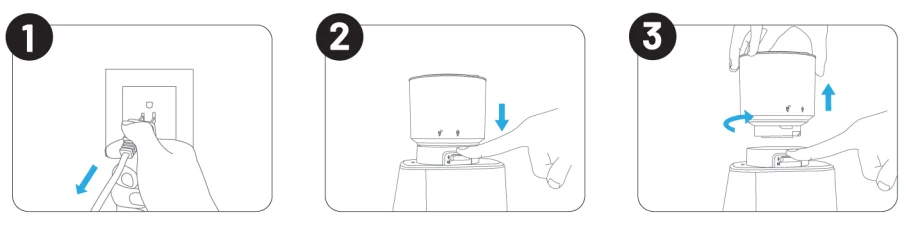
- Make sure the coffee grinder is unplugged.
- To release the Bean Hopper, press the Bean Hopper release lever located on the back of the Grind Size Control.
- The Bean Hopper will turn counterclockwise, and you can now lift it.
HOW TO ATTACH PORTAFILTER CRADLE & PORTAFILTER
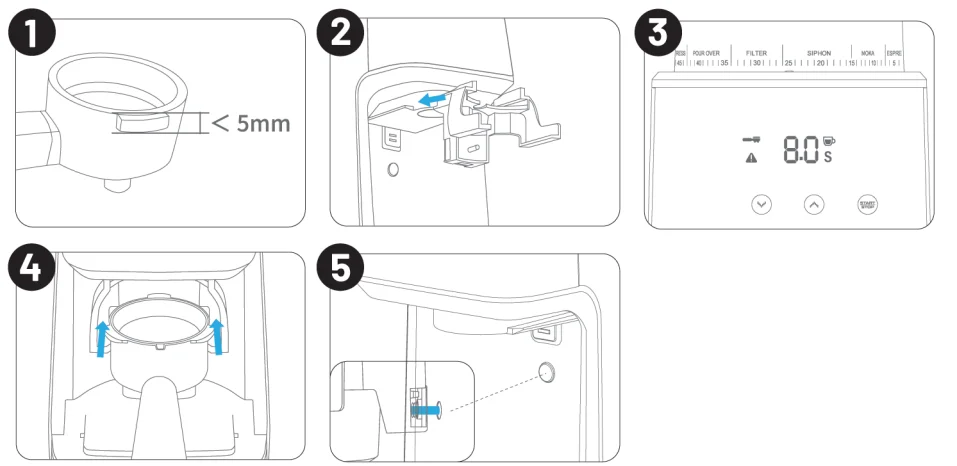
- Ensure that the Portafilter you are using has ribs that are not thicker than 5 mm.
- Attach the Portafilter Cradle as shown in the above image until you hear the click.
- Once the cradle is properly installed, the espresso mode will activate, causing the espresso icon to illuminate and three buttons to light up. At this point, you can adjust the grinding time by pressing the arrow buttons. The minimum time is 5 seconds, and the maximum is 15 seconds.
- To properly attach the portafilter, align it with the corresponding slot on the lower end of the Portafilter Cradle, and slide it horizontally into position.
- After setting the grinding time, simply push the Portafilter forward, ensuring that it makes contact with the Portafilter Activation Switch. Once the designated time has elapsed, the grinding will stop automatically. If you wish to stop grinding before the designated time, push on the Portafilter again.
HOW TO USE THE COFFEE GRINDER
Before using the Coffee Grinder for the first time and before plugging it in, wash accessories such as the Bean Hopper, Cradles, Ground Coffee Container, and Ground Coffee Container Lid in warm, soapy water, and air-dry them fully. Additionally, wipe the exterior of the base with a soft, slightly damp cloth, and ensure it is fully dry before plugging it in.
Important: Do not immerse the base in water!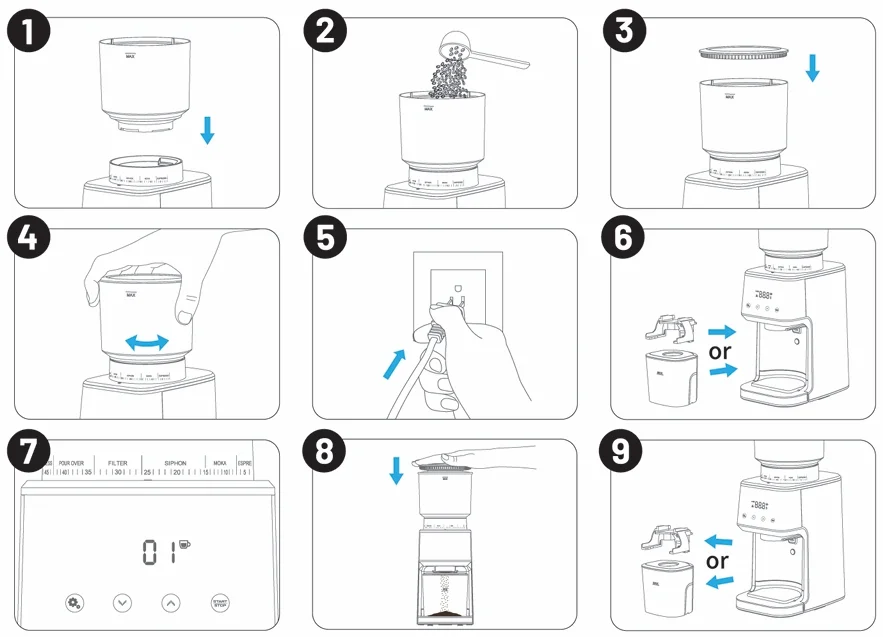
- Assemble the Bean Hopper by following the instructions provided on page 4.
- Fill the Bean Hopper with coffee beans.
- Close the lid.
- Select grind size. The coffee grinder offers 51 grind size options. To adjust the grind size, simply rotate the Bean Hopper from fine to coarse based on your desired coffee type. For recommended grind size settings, please refer to page 7 of the user manual.
- Plug the coffee grinder into a power outlet. After powering on the system, the buzzer will emit a single beep, and the screen will display “888”.
- Place the Ground Coffee Container or attach the Cradle to your grinder.
- If you have placed the Ground Coffee Container, the screen will display “01 cup” with four buttons lighting up. To switch from adjusting the number of cups to the time, simply double-click the “Settings” button. The screen will show 10 seconds for the grinding time, and you can now increase or decrease it by pressing the arrow buttons. Press the “Start/Stop” button to begin the grinding process. If you have placed the Cradle, the screen will display 8 seconds with 3 lights on for grinding beans for the espresso. Adjust the grinding time by pressing the arrow buttons, and then place the Portafilter. To start grinding, simply push the Portafilter forward, and the Portafilter Activation Switch will engage. Once the designated time has elapsed, the grinding will stop automatically. If you wish to stop grinding before the designated time, simply push on the Portafilter again.
- After grinding, utilize the Coffee Grounds Residual Cleaner to remove any remaining coffee residue from the product. Simply replace the Bean Hopper Lid with the Coffee Grounds Residual Cleaner. Push down to effectively remove any remaining ground coffee from the chute.
- Remove the Ground Coffee Container or Portafilter.
Using the Dosing Ring
Place the included Dosing Ring on your Portafilter when grinding directly into it, and hold the Portafilter under the chute. Press the Start/Stop button to start grinding.
CONTROL PANEL OPERATION INSTRUCTIONS
The Coffee Grinder has 4 buttons:
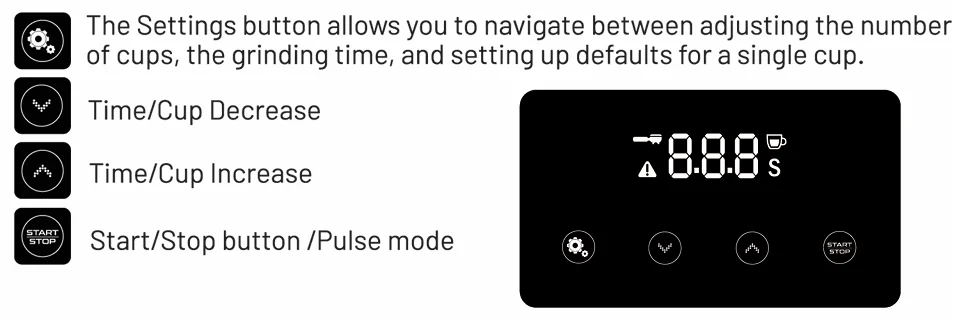
Select the method you prefer to control the grinding process. It can be either the number of cups or seconds, and even fractions of seconds for very precise grinding. Additionally, you have the option to set the default for a single cup and save it.
SETTING UP THE NUMBER OF CUPS
To set the desired number of cups for grinding, ensure that the Ground Coffee Container is in place and all four lights are illuminated. By default, the screen will display “01 cup” with a grinding time of 4 seconds per cup. To increase the number of cups, simply press the button. Each press will add one cup, starting from 1 and going up to 12. Conversely, to decrease the number of cups, press the
 button.
CHANGING DEFAULT SETTINGS FOR A SINGLE CUP
The current default setting is 4 seconds per cup. To set up the time and save it as the default for 1 cup, place the Ground Coffee Container, ensure the screen displays 0.1 cup, press and hold the Settings button for 3 seconds to enter the single-cup working time selection, use the arrow buttons to choose between 3 and 5 seconds of grinding per cup, and briefly press the Settings button to save the settings. The settings will be saved even if you unplug the device.
SETTING UP GRINDING TIME
To switch from selecting the number of cups to adjusting the grinding time, simply double-click the  button. The default time is set to 10 seconds, and you can choose a time between 1 second and 60 seconds.
When selecting a time between 1 and 15 seconds, each short press of the button will increase the time by 0.1 seconds. For example, it will go from 1.1 seconds to 1.2 seconds, and so on, up to 14.9 seconds. If you need to increase the time more rapidly, you can long-press the button. On the other hand, when the time reaches 1 second, both short presses and long presses of the button will have the same effect.
Once you have set the desired time or number of cups, you can start grinding the beans by pressing the “Start/Stop” button. If you would like to stop the grinding process before completion, simply press the “Start/Stop” button.
GRINDING INTO THE PORTAFILTER
- Insert the 53 mm or 58 mm Portafilter Cradle following the instructions on page 5. The default Portafilter grinding setting is 8 seconds. Press the arrow button to choose the grinding time, ranging from 5 to 15 seconds. A long press will increase the speed.
- After setting the grinding time, simply push the Portafilter forward, ensuring that it makes contact with the Portafilter Activation Switch. Once the designated time has elapsed, the grinding will stop automatically. If you wish to stop grinding before the designated time, push on the Portafilter again.
PULSE MODE
By pressing and holding the “Start/Stop” button, the machine will enter the pulse working mode, and the screen will display the working time as 8.1, 8.2, 8.3, and so on. Release the “Start/Stop” button to stop grinding. The maximum grinding time allowed in this mode is 20 seconds.
Note: The pulse mode will only work when the Portafilter Cradle is attached.
SOUND ON/OFF
To turn the sound on or off, simply press the two arrow buttons simultaneously.
ENERGY SAVING FEATURE
The grinder will automatically turn off if it remains unused for 3 minutes. To reactivate the machine while in POWER SAVING/SLEEP MODE, simply press the “Start/Stop” button.
MAKING BETTER QUALITY COFFEE
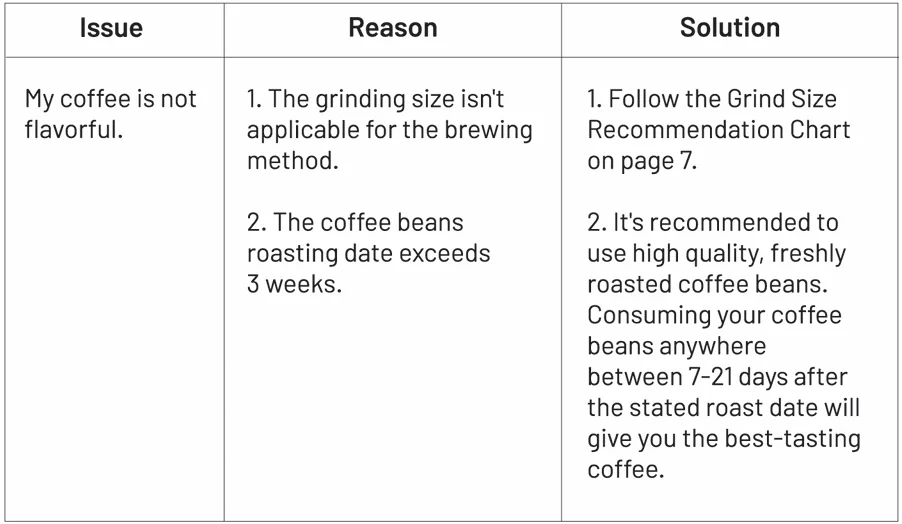
- Freshness is key: To achieve a mellow and delicious cup of coffee, it is crucial to use fresh coffee beans. Adjust the coffee flavor and concentration according to your personal preferences by changing the type, amount, and grinding fineness of the coffee beans.
- Opt for fresh coffee beans: Look for coffee beans marked with the baking date to ensure maximum freshness. Store the beans in a dark, cool, and dry environment. If possible, consider vacuum packaging to preserve their flavor and aroma.
- Buy in small quantities: To minimize storage time, purchase coffee beans in small quantities. It is recommended to store them for no more than one week at a time to maintain their freshness.
- Grind just before brewing: Coffee beans lose their aromatic flavor quickly once ground into coffee powder. For the best brewing results, grind the beans immediately before brewing your coffee.
- Avoid prolonged storage in the Bean Hopper: It is not advisable to store coffee beans in the Bean Hopper for an extended period. Instead, use the grinder to grind the remaining coffee beans and clean the machine before storing it.
- Regular cleaning: Keep your Coffee Bean Grinder in optimal condition by cleaning the Bean Hopper and Ground Coffee Container regularly. This helps maintain the quality of the grounds and prevents any residue buildup that may affect the flavor of your coffee. By following these tips, you can ensure a consistently enjoyable coffee experience with your Coffee Bean Grinder. Experiment with different beans, brewing methods, and grind sizes to discover your ideal taste. Enjoy your freshly brewed cup of coffee!
TROUBLESHOOTING
If your problem is not listed, then you can call us at (727) 386-9117 Mon-Fri 9:00 AM – 5:00 PM (EST), or you can message us at Zulay Kitchen Contact Us www.zulaykitchen.com/contact-us.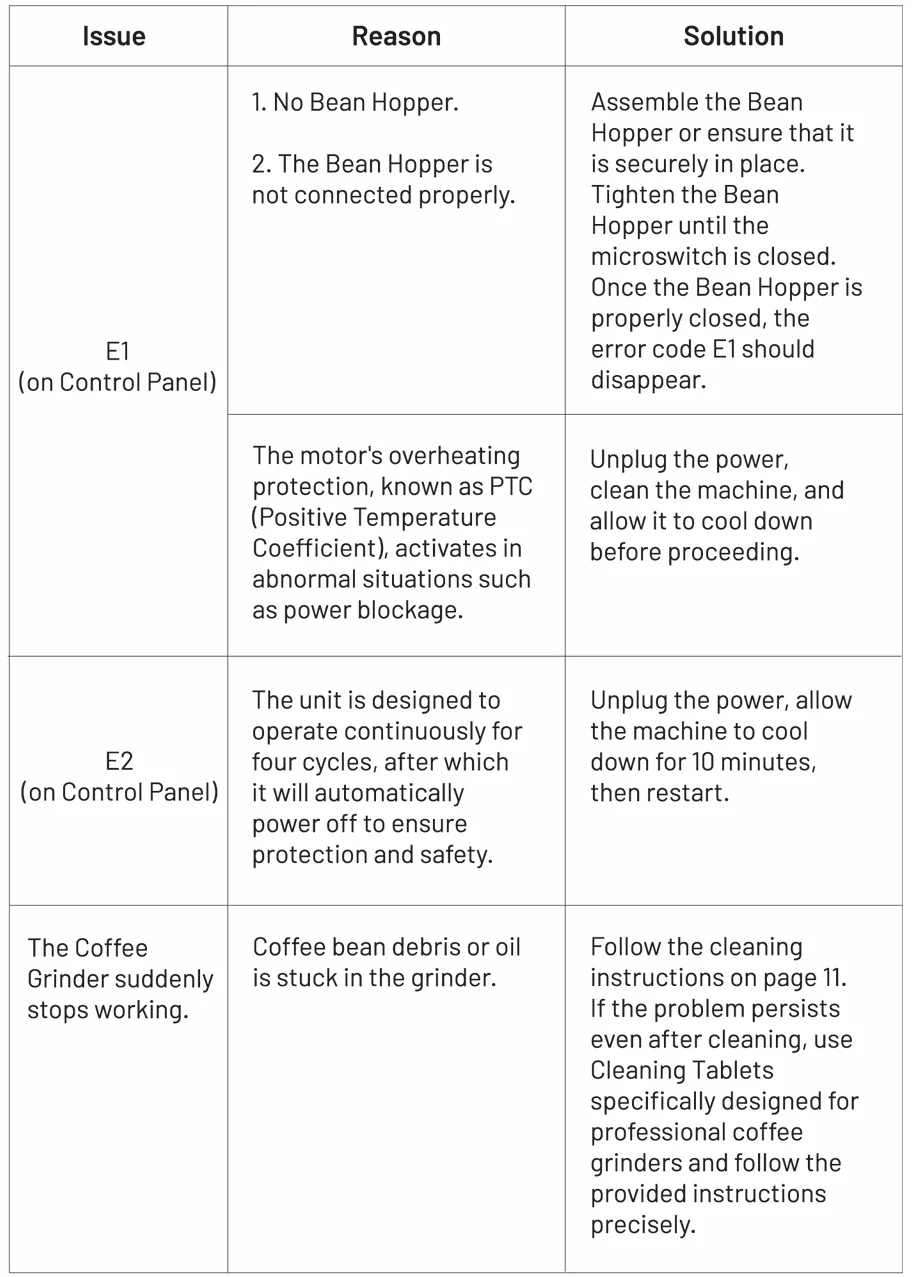
For More Manuals By Zulay Kitchen, Visit ManualsLibraryy.
Zulay Kitchen Espresso Coffee Grinder-FAQs
What is the Zulay Kitchen Espresso Coffee Grinder used for?
The Zulay Kitchen Espresso Coffee Grinder is designed to grind whole coffee beans into consistent grounds for espresso and other brewing methods. Its conical burr system helps improve flavor extraction by producing more uniform grind sizes compared to standard blade grinders.
Does the Zulay Kitchen Espresso Grinder work well for espresso?
Yes, the grinder is designed specifically for espresso preparation and includes fine grind adjustments suitable for espresso machines. Many users appreciate its ability to create consistent grounds, although some report occasional clumping when grinding extremely fine espresso settings.
How many grind settings does the Zulay Espresso Grinder have?
The grinder features 51 adjustable grind settings, allowing users to customize grind size for espresso, drip coffee, pour-over, French press, and cold brew. This flexibility makes it suitable for coffee drinkers who enjoy experimenting with multiple brewing methods at home.
Is the Zulay Kitchen Espresso Grinder a burr grinder?
Yes, it uses a conical burr grinding system instead of blades. Burr grinders are preferred because they produce more consistent particle sizes, which helps improve coffee extraction, flavor balance, and crema quality when making espresso or other specialty coffee beverages.
Is the Zulay Espresso Grinder easy to clean?
The grinder is relatively easy to maintain thanks to removable components and included cleaning accessories. Regular cleaning is important to prevent coffee oil buildup and clogged grounds, which can affect grind consistency and long-term performance if left unmanaged.
Does the Zulay Kitchen Espresso Grinder create a static mess?
The grinder includes anti-static technology designed to reduce coffee grounds from sticking inside the chamber or spilling during use. Many users report cleaner grinding compared to cheaper grinders, although some minor clumping and residue may still occur occasionally with fine espresso settings.
Is the Zulay Espresso Grinder noisy during operation?
Some users describe the grinder as moderately loud during use, especially when grinding espresso-fine settings. However, many still consider the noise level acceptable for a home coffee grinder, particularly given its affordability and overall grinding performance compared to entry-level alternatives.
Can the Zulay Kitchen Espresso Grinder grind for other brewing methods?
Yes, the grinder supports multiple brewing styles beyond espresso, including drip coffee, French press, AeroPress, and pour-over. Its wide range of grind settings makes it versatile for users who switch between different coffee brewing methods regularly.
Is the Zulay Kitchen Espresso Grinder a good value for money?
Many coffee enthusiasts consider the grinder a strong value option because it offers burr grinding, multiple grind settings, anti-static features, and espresso compatibility at a relatively affordable price compared to premium espresso grinders on the market.
What are the main drawbacks of the Zulay Espresso Grinder?
Some users report minor grind inconsistencies, occasional clumping, and moderate operating noise. Others mention that regular cleaning is necessary to maintain peak performance. Despite these drawbacks, most reviews remain positive regarding its overall reliability and espresso grinding capability.