
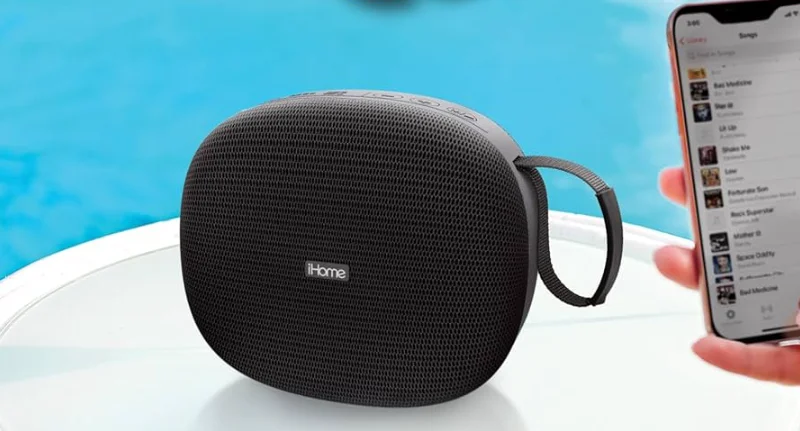

iHome iBT330 Splash Resistant Bluetooth Speaker
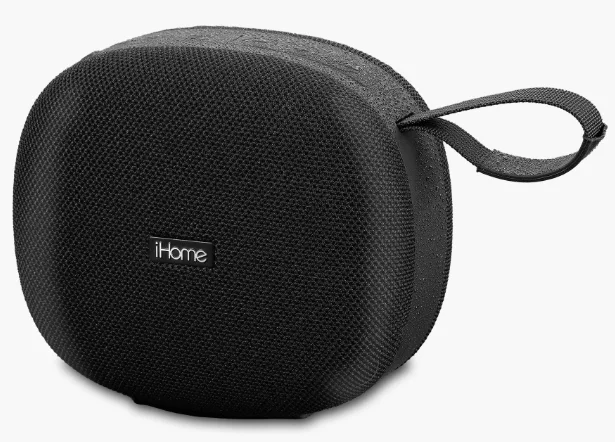
Splash Resistant PORTABLE SPEAKER
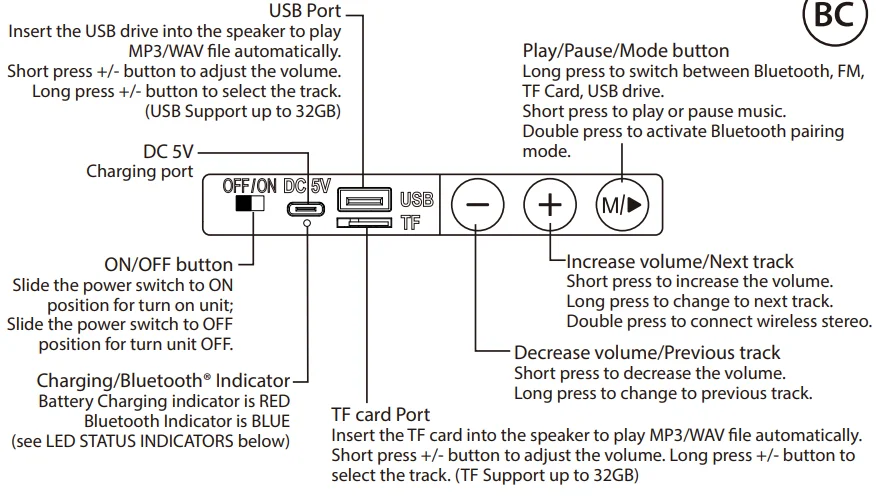
CHARGING THE SPEAKER

LED STATUS INDICATORS
BATTERY CHARGING AND BLUETOOTH STATUS
LED indicator located under the USB-C port
- Battery Indicator: A red light will glow steadily while the unit is charging and will turn off once fully charged. When the battery is low, it will automatically power off after announcing ‘Low Battery’ 3 times.
- Bluetooth Indicator: In Bluetooth mode, a blue light will flash while in pairing mode and glow steadily once connected.
FM RADIO OPERATION
In FM mode, short-press the M button to search for the FM stations automatically. If you need to stop searching, just short-press again. The searched FM stations will be saved automatically. Short press the + or – button to increase or decrease the volume. Long-press the + or – button to select the next or previous preset station.
Note: Please use the charging cable as an FM antenna by connecting to the USB-C port to improve FM reception.
BLUETOOTH OPERATION
- The first time you power on the iBT330, it will enter Bluetooth pairing mode. Select “iHome iBT330” on your device to pair. To manually pair Bluetooth: Double-press the M button to manually search for BT pairing.
- Short-press
 to play/pause Bluetooth music.
 - Long-press the + button for the next track; long-press the – button for the previous track.
 to play/pause Bluetooth music.
WIRELESS STEREO (REQUIRES 2 SPEAKERS)
- Pair one iBT330 unit to your device via Bluetooth.
- Power on the second iBT330 unit.
- Double-press the + button on either speaker to connect the wireless stereo.
- When both units are linked, they will announce “Left Channel” and “Right Channel” respectively.
- Both units will link automatically next time when both units are powered on.
- If you want to remove Wireless Stereo: Double-press the + button again on any one unit.
BLUETOOTH FACTORY RESET OPERATION
- Long-press and hold the + and – buttons for 3 seconds to reset.
For questions, warranty, and additional safety information, please visit: https://support.ihome.com/.
INTERNAL RECHARGEABLE LITHIUM-ION BATTERY
This device uses an internal non-replaceable rechargeable lithium-ion battery that should last the lifetime of the device. If you suspect your battery may be dead, try charging it for an extended period of time and try resetting the unit. Never leave a charging unit unattended. Always charge lithium devices on a non-flammable surface — wooden tables, bedding, and carpeted floors are not recommended charging surfaces.
WARNING/DISPOSAL OF UNIT
Do NOT attempt to change the battery. Doing so will void the warranty and could cause injury and damage to your device. To dispose of the unit, follow the instructions below:
- Never dispose of used batteries/electronics with ordinary solid wastes, since they may contain toxic substances.
- Always dispose of used batteries/electronics in accordance with the prevailing community regulations.
- Many electronics retailers now recycle batteries and other electronic components at no charge. To find a drop-off location near you, visit www.call2recycle.com.
GENERAL BATTERY PRECAUTIONS
- Never use or charge a battery if it appears to be leaking, discolored, deformed, or in any way abnormal.
- Never disassemble the unit or attempt to remove the battery, as that could cause leakage of alkaline solution or other electrolytic substances.
- Avoid charging a rechargeable battery when the temperature is not within 5°C – 35°C (41° – 95° Fahrenheit).
- Never expose a battery to any liquid.
- Never expose a battery to excessive heat, such as direct sunlight or fire. Never use a battery pack in an unventilated vehicle where excessive internal temperatures may be encountered.
- Always keep batteries out of the reach of infants and small children.
IMPORTANT SAFETY INSTRUCTIONS
Please heed all warnings, read and follow all instructions, and keep these instructions handy for future reference.
- Do not submerge this product in water.
- WARNING: To reduce the risk of fire or electric shock, do not expose this product to rain or moisture.
- Unplug the unit and clean only with a damp cloth. Stronger cleaning agents, such as Benzene, thinner, or similar materials, can damage the surface of the unit.
- Do not block any ventilation openings. Install in accordance with the manufacturer’s instructions.
- Heat – This product should be situated away from heat sources such as radiators, heat registers, stoves, or other appliances (including amplifiers) that produce heat.
- Only use attachments/accessories specified by the manufacturer.
- Unplug this product during lightning storms or when unused for long periods of time.
- Damage Requiring Service – This product should be serviced by qualified service personnel when:
- The plug has been damaged.
- Objects have fallen into or liquid has been spilled into the enclosure.
- The unit has been exposed to rain.
- The unit has been dropped or the enclosure damaged.
- The unit exhibits a marked change in performance or does not operate normally.
- No naked flame sources, such as lighted candles, should be placed on this product.
- Attention should be drawn to the environmental aspects of battery disposal.
- This product is suitable for use in tropical and/or moderate climates.
WARNING:
- Do not dispose of batteries in the household trash or fire.
- The mains plug of the power adaptor is used as the disconnect device; it shall remain readily operable.
- If the unit is to be unused for an extended period of time, such as a month or longer, charge the unit fully before storage.
- Always use a UL/ETL certified charging adapter (not included) and the supplied USB charging cable.
FCC Information
This equipment complies with FCC RF radiation exposure limits set forth for an uncontrolled environment. This device complies with Part 15 of the FCC Rules. Operation is subject to the following two conditions:
- This device may not cause harmful interference, and
- This device must accept any interference received, including interference that may cause undesired operation.
Warning: Changes or modifications to this unit not expressly approved by the party responsible for compliance could void the user’s authority to operate the equipment.
NOTE: This equipment has been tested and found to comply with the limits for a Class B digital device, pursuant to Part 15 of the FCC Rules. These limits are designed to provide reasonable protection against harmful interference in a residential installation. This equipment generates, uses, and can radiate radio frequency energy and, if not installed and used in accordance with the instructions, may cause harmful interference to radio communications.
However, there is no guarantee that interference will not occur in a particular installation. If this equipment does cause harmful interference to radio or television reception, which can be determined by turning the equipment off and on, the user is encouraged to try to correct the interference by one or more of the following measures:
- Reorient or relocate the receiving antenna.
- Increase the separation between the equipment and receiver.
- Connect the equipment into an outlet on a circuit different from that to which the receiver is connected.
- Consult the dealer or an experienced radio/TV technician for help.
ISED Information
This equipment complies with IC RSS-102 radiation exposure limits set forth for an uncontrolled environment. This device contains licence-exempt transmitter(s)/receiver(s) that comply with Innovation, Science and Economic Development Canada’s licence-exempt RSS(s). Operation is subject to the following two conditions:
- This device may not cause interference.
- This device must accept any interference, including interference that may cause undesired operation of the device. The device complies with ISED RF exposure requirements; users can obtain Canadian information on RF exposure and compliance.
For More Manuals By iHome, Visit ManualsLibraryy.
iHome iBT330 Splash Resistant Bluetooth Speaker-FAQs
What are the main features of the iHome iBT330 Splash Resistant Bluetooth Speaker?
The iHome iBT330 is a portable Bluetooth speaker designed for indoor and outdoor use. It features splash-resistant construction, built-in FM radio, support for USB drives and microSD cards, and a rechargeable battery. Its carry loop and wireless design make it convenient for travel and everyday listening.
Is the iHome iBT330 waterproof?
The iHome iBT330 is splash-resistant rather than fully waterproof. It can handle light rain, water splashes, and moisture around pools or patios. However, it should not be submerged in water or exposed to heavy rainfall for extended periods.
How long does the battery last on the iHome iBT330?
The iHome iBT330 offers up to 30 hours of battery life under moderate listening conditions. Actual playback time may vary depending on volume level, source type, and usage patterns, but it is designed to provide extended portable use between charges.
Can the iHome iBT330 play music without Bluetooth?
Yes, the iHome iBT330 can play music from sources other than Bluetooth. It includes FM radio functionality and supports MP3 playback from USB flash drives and microSD cards, making it useful even when your phone is unavailable.
What is the Bluetooth range of the iHome iBT330?
The iHome iBT330 provides a wireless Bluetooth range of up to 100 feet in open spaces. Walls, interference, and connected devices may reduce this distance, but the speaker generally maintains a stable connection for typical home and outdoor use.
How do I pair the iHome iBT330 with my phone?
Turn on the speaker and enable Bluetooth on your smartphone or tablet. Select “iHome iBT330” from the available devices list. Once paired, the speaker should reconnect automatically whenever both devices are powered on and within range.
Can two iHome iBT330 speakers be connected?
Yes, the iHome iBT330 supports stereo pairing, allowing two compatible speakers to connect wirelessly. This setup creates left and right audio channels for a fuller sound experience, which is useful for parties or larger outdoor gatherings.
How do I reset the iHome iBT330 speaker?
To reset the speaker, press and hold the volume up and volume down buttons simultaneously for a few seconds. This clears the stored Bluetooth pairings and can help resolve connection issues or other performance problems.
Is the iHome iBT330 a good speaker for outdoor use?
Yes, the iHome iBT330 is well-suited for outdoor use thanks to its splash-resistant housing, long battery life, and portable design. It works well for picnics, camping, backyard gatherings, and other casual listening situations.
What comes in the box with the iHome iBT330?
The package typically includes the iHome iBT330 speaker, a USB-C charging cable, and a user manual. Everything needed for charging and initial setup is included, so you can start using the speaker right away.