
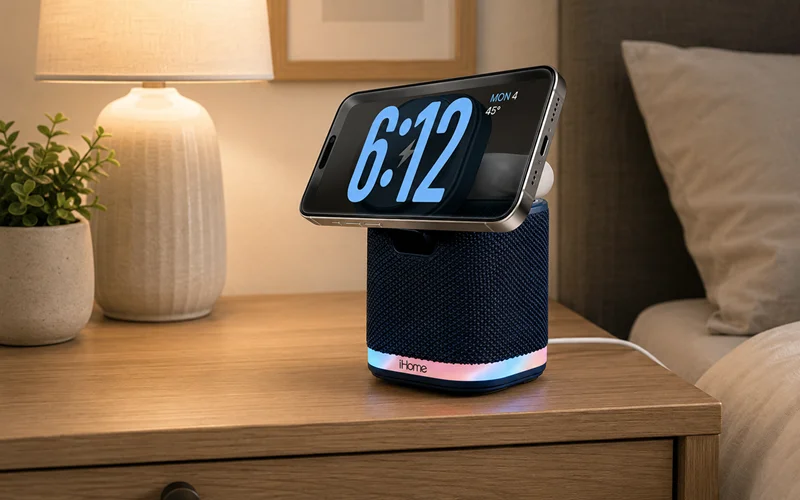

iHome iPBT50L Bluetooth Speaker
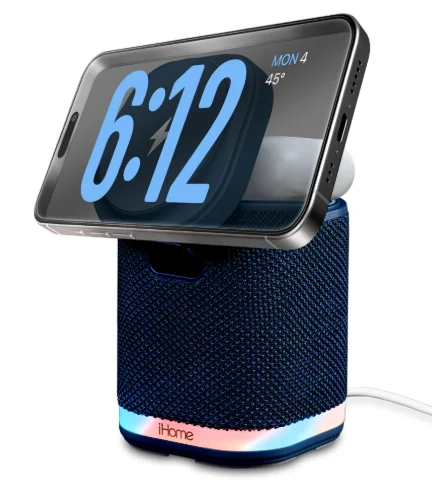
POWER TOWER Dual Charging Speaker
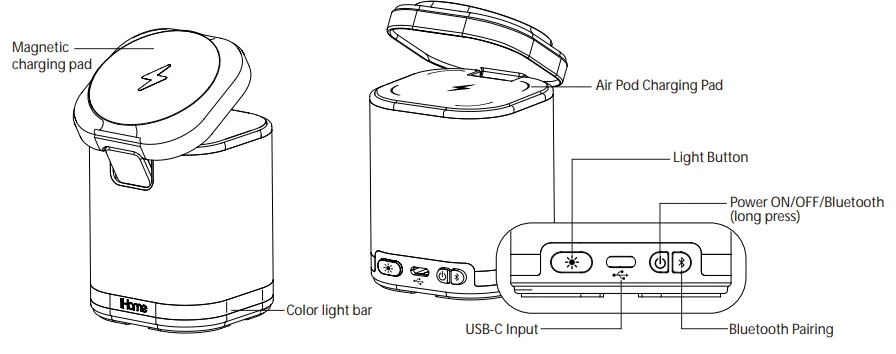
Charge your iPhone or mobile devices:
- Insert the USB-C cable into the USB-C port of the unit. Connect the other end to the 20W USB-C adaptor.
- When the iPBT50 is powered OFF, audible voice prompts for wireless charging are inactive, and only the color light bar will flash three times. It will flash green to indicate charging has begun and red if charging is stopped or the device is removed from the pad.


Note: When the iPBT50 is powered ON, audible voice prompts announce “charging” or “earbuds charging” when a device is placed on the related charging pad. And if charging stops or the device is removed from the pad, the iPBT50 will announce “charging interrupted” or “earbud charging interrupted.”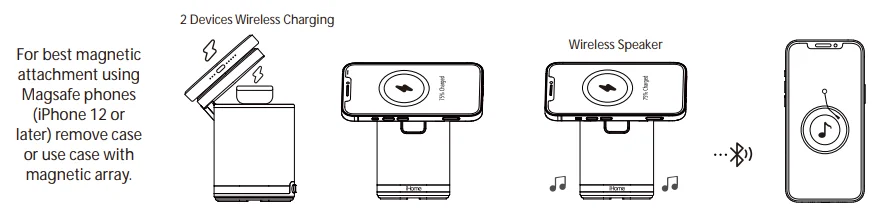
Power Button and Bluetooth connection operation
- Turn on your Bluetooth device and make it discoverable by turning on Bluetooth mode.
- Press and hold the Power Button on the iPBT50. The first time the unit is powered on, it will automatically enter Bluetooth pairing mode.
- Select ‘iHome iPBT50’ on your device to connect BT, short-press the Bluetooth button to play or pause BT music.
- To manually pair with a new BT device, press and hold the BT button for 3 seconds.
- To reset the Bluetooth pairing table, press and hold the BT pairing button for 10 seconds.
Light Button

Long-press the light button to cycle through the 4 light modes:
- Slow fade (default) (2) Fast Change (3) Single color (4) Off
- Short press changes brightness: Low/Med/Hi.
- Remembers the last used lighting mode.
- Note: Long-press the light button to activate lights while the unit/BT is powered off.
For questions and additional information, please visit: support.ihomeaudio.com/support/.
IMPORTANT SAFETY INSTRUCTIONS
Please heed all warnings, read and follow all instructions, and keep these instructions handy for future reference.
- Do not use this product near water.
- Unplug the unit and clean only with a damp cloth. Stronger cleaning agents, such as Benzene, thinner, or similar materials, can damage the surface of the unit.
- Do not block any ventilation openings. Install in accordance with the manufacturer’s instructions.
- Heat – This product should be situated away from heat sources such as radiators, heat registers, stoves, or other appliances (including amplifiers) that produce heat.
- Only use attachments/accessories specified/supplied by the manufacturer.
- Unplug this product during lightning storms or when unused for long periods of time.
- Damage Requiring Service
- This product should be serviced by qualified service personnel when:
- Plug has been damaged.
- Objects have fallen into or liquid has been spilled into the enclosure.
- The unit has been exposed to rain.
- The unit has been dropped or the enclosure damaged.
- The unit exhibits a marked change in performance or does not operate normally.
- No naked flame sources, such as lighted candles, should be placed on this product.
- Attention should be drawn to the environmental aspects of battery disposal. Many electronics retailers now recycle batteries and other electronic components at no charge. To find a drop-off location near you, visit www.call2recycle.com.
- This product is suitable for use in tropical and/or moderate climates.
WARNING:
- To reduce the risk of fire or electric shock, do not expose this product to rain or moisture.
- The mains plug of the power adaptor is used as the disconnect device; it shall remain readily operable.
FCC Information
This equipment complies with FCC RF radiation exposure limits set forth for an uncontrolled environment. This device complies with Part 15 of the FCC Rules. Operation is subject to the following two conditions:
- This device may not cause harmful interference, and
- This device must accept any interference received, including interference that may cause undesired operation.
Warning: Changes or modifications to this unit not expressly approved by the party responsible for compliance could void the user’s authority to operate the equipment.
NOTE: This equipment has been tested and found to comply with the limits for a Class B digital device, pursuant to Part 15 of the FCC Rules. These limits are designed to provide reasonable protection against harmful interference in a residential installation. This equipment generates, uses, and can radiate radio frequency energy and, if not installed and used in accordance with the instructions, may cause harmful interference to radio communications.
However, there is no guarantee that interference will not occur in a particular installation. If this equipment does cause harmful interference to radio or television reception, which can be determined by turning the equipment off and on, the user is encouraged to try to correct the interference by one or more of the following measures:
- Reorient or relocate the receiving antenna.
- Increase the separation between the equipment and receiver.
- Connect the equipment into an outlet on a circuit different from that to which the receiver is connected.
- Consult the dealer or an experienced radio/TV technician for help.
This equipment should be installed and operated with a minimum distance of 20cm (8 inches) between the radiator and your body.
ISED Information
This equipment complies with IC RSS-102 radiation exposure limits set forth for an uncontrolled environment. This device contains licence-exempt transmitter(s)/receiver(s) that comply with Innovation, Science and Economic Development Canada’s licence-exempt RSS(s). Operation is subject to the following two conditions:
- This device may not cause interference.
- This device must accept any interference, including interference that may cause undesired operation of the device. The device complies with ISED RF exposure requirements; users can obtain Canadian information on RF exposure and compliance. This equipment should be installed and operated with a minimum distance of 20 cm between the radiator and your body. Any changes or modifications not expressly approved by the party responsible for compliance could void the user’s authority to operate the equipment.
For More Manuals By iHome, Visit ManualsLibraryy.
iHome iPBT50L Bluetooth Speaker-FAQs
What are the main features of the iHome iPBT50L Bluetooth Speaker?
The iHome iPBT50L combines a Bluetooth speaker, a 15W magnetic wireless charger, a 5W charging pad for earbuds, and a color-changing LED night light. This compact all-in-one design makes it a convenient solution for bedside tables, desks, and small spaces.
Does the iHome iPBT50L support MagSafe charging?
Yes, the iPBT50L includes a MagSafe-compatible magnetic charging pad that securely aligns compatible iPhones for efficient wireless charging. It also supports other Qi-enabled devices, although magnetic attachment works best with MagSafe-compatible phones and cases.
Can the iHome iPBT50L charge more than one device at once?
Yes, the speaker can charge two devices simultaneously. The main charging pad supports smartphones, while the secondary 5W pad is designed for AirPods or other wireless earbuds, helping reduce clutter by combining charging and audio functions.
How is the sound quality of the iHome iPBT50L?
The iPBT50L delivers clear and balanced audio for music, podcasts, and videos. While it is not designed as a high-powered speaker, it offers solid performance for bedrooms, offices, and personal listening environments.
Does the iHome iPBT50L have a built-in night light?
Yes, the unit features a color-changing LED light with multiple modes. You can use it as ambient lighting or a soft night light, adding both style and functionality to your room.
Is the iHome iPBT50L compatible with Apple Standby Mode?
Yes, the magnetic charger supports landscape phone placement, making it suitable for Apple StandBy Mode on compatible iPhones. This allows you to view widgets, photos, and clock information while your device charges.
What is the Bluetooth range of the iHome iPBT50L?
The speaker offers a wireless range of up to approximately 100 feet in open spaces. Real-world performance may vary depending on walls, nearby electronics, and the connected device, but it generally provides a stable connection.
Does the iHome iPBT50L include a power adapter?
Yes, the speaker operates using a USB-C power adapter, which is typically included with the product. This ensures enough power for wireless charging, Bluetooth playback, and the LED light to function at the same time.
Can the iHome iPBT50L charge through phone cases?
In most cases, yes. Standard cases that are not too thick usually work without issues. Cases with metal plates, card holders, or excessive thickness may interfere with magnetic alignment and wireless charging.
Is the iHome iPBT50L worth buying?
The iHome iPBT50L is a practical choice for users who want a compact Bluetooth speaker with wireless charging and ambient lighting. It is especially useful for bedside setups where convenience, charging, and audio are all needed in one device.