
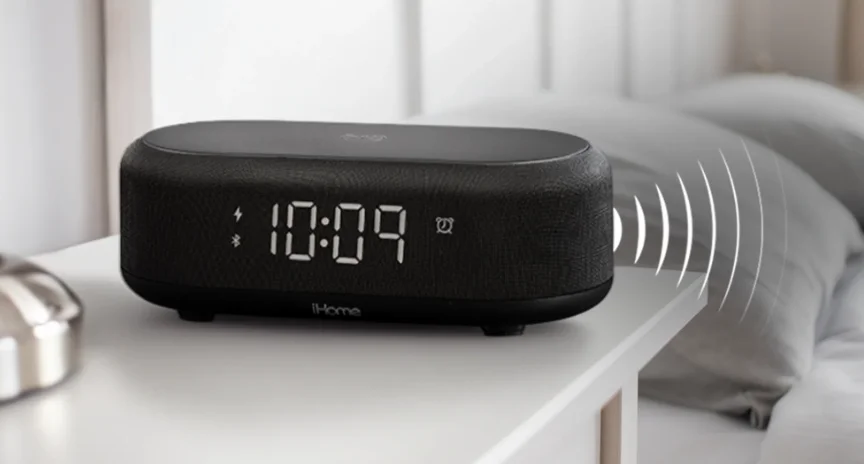

iHome iBTW112 Bluetooth Alarm Clock
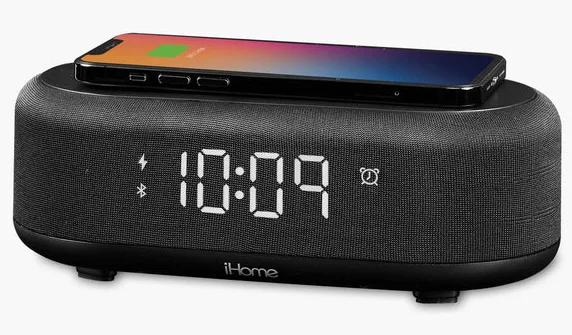
What’s Included

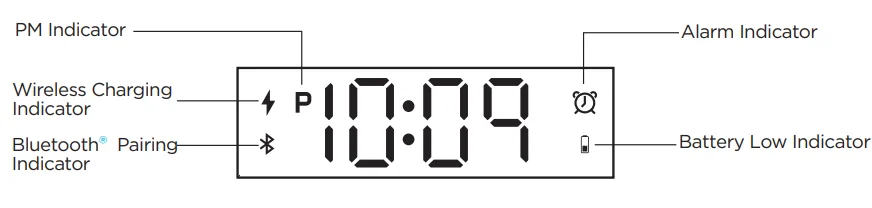
The Display
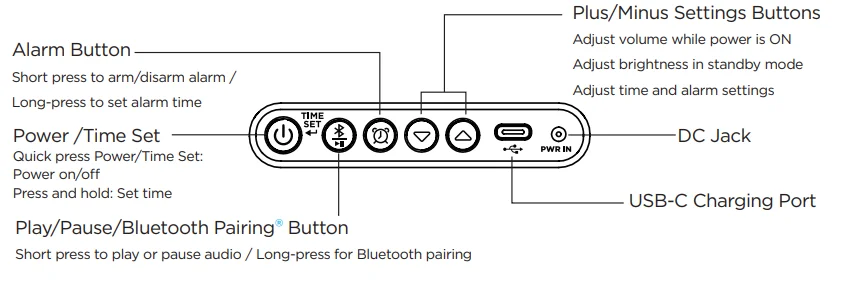
Back of Unit
Connecting the unit
Connect the included AC adapter to the DC jack located on the back of the unit and connect the other end to a working wall outlet.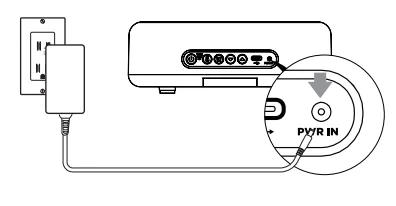
Manual Bluetooth® Pairing
Turn on your Bluetooth device and make it ‘discoverable’ by turning on Bluetooth mode.
- Press the Power Button on the iBTW112.
- Press and hold the Bluetooth Pairing Button on the back of the iBTW112 until the Bluetooth pairing icon flashes to indicate the unit is in pairing mode.
- Select “iHome iBTW112” on your device’s Bluetooth menu to connect.
- If pairing is successful, the Bluetooth indicator
 appears solid on the clock display, indicating the iBTW112 is ready to play music.
 - To reset Bluetooth settings, press and hold the Bluetooth Pairing Button for 10 seconds.
iHome.
 appears solid on the clock display, indicating the iBTW112 is ready to play music.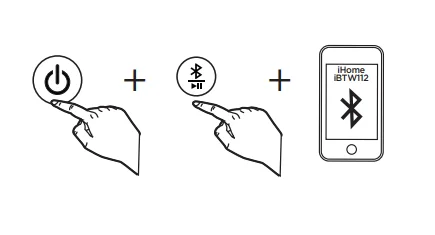
Using Wireless Charging
This unit will wirelessly charge phones. Place the display device face up on the charging pad. Check the lightning icon on the iBTW112 display for charging status:
- Slow blinking
 icon: Device is charging properly.
 - Solid icon: Device is charged.
- Rapid blinking icon: Device is not charging properly. Reposition the device.
Note: The lightning icon may continue to blink slowly when iOS devices are fully charged.
CAUTION: Remove the metal protective case from the phone before charging. When charging a phone, do not place magnetic-striped or other metal objects on the charger. Doing so could damage the object or this unit.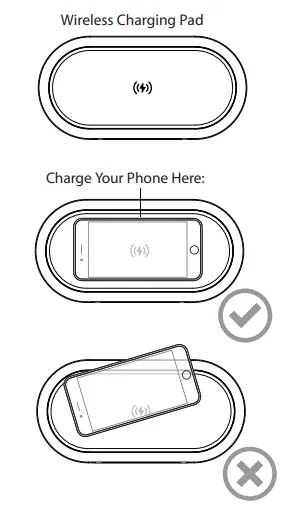
Setting your clock time
Press and hold the Power/Time Set Button until the display flashes. (By default, Bluetooth time Sync is set to ON, and ON is flashing on the display.
- Press or tap the button to toggle Bluetooth time Sync ON or OFF, tap the Power/Time Set button to confirm.
Manual time set is only enabled when Bluetooth time sync is OFF: - Press or Buttons to set Hour, tap Power/Time Set button to confirm.
- Press or Buttons to set Minute, tap Power/Time Set button to confirm and complete clock time setting.
Setting and Using the Alarm
This unit features a single alarm that can be set to different times and alarm sources. Each is set in the same way.
Note: Each step must be completed while the display is flashing, or the setting will time out without any changes saved.
- Press and hold the Alarm Button for 2 seconds until the display flashes. A beep sounds.
- Press
 the button to adjust the alarm hour. Press the Alarm button to confirm.
 - Press the button to adjust the alarm minute. Press the Alarm button to confirm.
- Press the button to adjust the alarm volume. Press the Alarm Button to confirm the alarm volume setting.
- Press the button to select the desired wake-to-alarm source. Press the alarm button to confirm the wake-to-alarm source.
- Press the button to select the desired wake-to-alarm sources:
- Alarm Tone 1
- Alarm Tone 2
- Alarm Tone 3
- Alarm Tone 4
- Bluetooth®
- Press the Alarm Set Button to confirm and complete alarm setting. (Once the alarm is enabled, press the alarm button again to disable the alarm.)
- When the alarm is sounding, press any button to mute the alarm.
To Adjust Dimmer Settings:
In Power off mode, LED display brightness can be adjusted using the  buttons. Press the
  button to increase display brightness, press the
  button to reduce display brightness.
Charging Devices Via USB-C Port
- Connect the standard-size end of a USB-C cable (not included) to the USB-C port on the back of the unit and connect the other end to the charging port on your device.
- Monitor the charging on your device. Some devices use a proprietary charging method and will not charge using the USB-C port. If this happens, you must charge your device using the charger that came with it.
NOTE: The unit must be plugged into a working outlet to charge devices.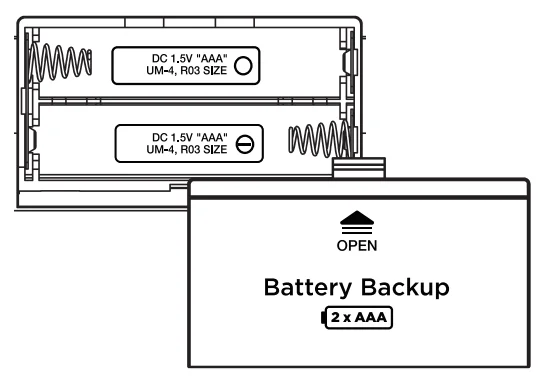
Replacing and Installing Clock Backup Battery
The unit uses two AAA back-up batteries (not included) to provide continuous alarm operation and clock settings in the event of a temporary power failure. When the battery icon on the clock display is flashing, it is time to replace the backup battery. The battery compartment is located at the bottom of the unit.
- Press in and push down on the battery door to open and remove the battery door.
- Install 2 new “AAA” batteries, matching the (+/-) markings in the battery compartment.
- Replace the door.
IMPORTANT SAFETY INSTRUCTIONS
Please heed all warnings, read and follow all instructions, and keep these instructions handy for future reference.
- Do not use this product near water.
- Do not block any ventilation openings. Install in accordance with the manufacturer’s instructions.
- Heat – This product should be situated away from heat sources such as radiators, heat registers, stoves, or other appliances (including amplifiers) that produce heat.
- Only use attachments/accessories specified by the manufacturer.
- Unplug this product during lightning storms or when unused for long periods of time.
- Damage Requiring Service – This product should be serviced by qualified service personnel when:
- The plug has been damaged.
- Objects have fallen into or liquid has been spilled into the enclosure.
- The unit has been exposed to rain.
- The unit has been dropped or the enclosure damaged.
- The unit exhibits a marked change in performance or does not operate normally.
- No naked flame sources, such as lighted candles, should be placed on this product.
- Attention should be drawn to the environmental aspects of battery disposal.
- This product is suitable for use in tropical and/or moderate climates.
- WARNING: To reduce the risk of fire or electric shock, do not expose this product to rain or moisture.
- Do not dispose of batteries in household trash or fire.
- The mains plug of the power adaptor is used as the disconnect device; it shall remain readily operable.
- Unplug the unit and clean only with a damp cloth. Stronger cleaning agents, such as Benzene, thinner, or similar materials, can damage the surface of the unit.
- CAUTION: Risk of explosion if the battery is replaced with an incorrect type.
FCC Information
This equipment complies with FCC RF radiation exposure limits set forth for an uncontrolled environment. This device complies with Part 15 of the FCC Rules; operation is subject to the following two conditions:
- This device may not cause harmful interference, and
- This device must accept any interference received, including interference that may cause undesired operation.
Warning: Changes or modifications to this unit not expressly approved by the party responsible for compliance could void the user’s authority to operate the equipment.
NOTE: This equipment has been tested and found to comply with the limits for a Class B digital device, pursuant to Part 15 of the FCC Rules. These limits are designed to provide reasonable protection against harmful interference in a residential installation. This equipment generates, uses, and can radiate radio frequency energy and, if not installed and used in accordance with the instructions, may cause harmful interference to radio communications.
This equipment should be installed and operated with a minimum distance of 20 cm/8 in between the radiator and your body. However, there is no guarantee that interference will not occur in a particular installation. If this equipment does cause harmful interference to radio or television reception, which can be determined by turning the equipment off and on, the user is encouraged to try to correct the interference by one or more of the following measures:
- Reorient or relocate the receiving antenna.
- Increase the separation between the equipment and receiver.
- Connect the equipment into an outlet on a circuit different from that to which the receiver is connected.
- Consult the dealer or an experienced radio/TV technician for help.
ISED Information
The device complies with ISED RF exposure requirements; users can obtain Canadian information on RF exposure and compliance. This equipment complies with IC RSS-102 radiation exposure limits set forth for an uncontrolled environment. This equipment should be installed and operated with a minimum distance of 20 cm between the radiator and your body. This device contains licence-exempt transmitter(s)/receiver(s) that comply with Innovation, Science and Economic Development Canada’s licence-exempt RSS(s). Operation is subject to the following two conditions:
- This device may not cause interference.
- This device must accept any interference, including interference that may cause undesired operation of the device.
Any changes or modifications not expressly approved by the party responsible for compliance could void the user’s authority to operate the equipment.
Questions? Visit www.ihome.com.
For More Manuals By iHome, Visit ManualsLibraryy.
iHome iBTW112 Bluetooth Alarm Clock -FAQs
What is the iHome iBTW112 Bluetooth Alarm Clock?
The iHome iBTW112 is a compact bedside alarm clock that combines Bluetooth audio streaming, wireless phone charging, USB-C charging, and alarm functionality. It is designed for bedrooms, dorms, and office spaces where users want charging convenience and wireless audio in one device.
Does the iHome iBTW112 support wireless charging?
Yes, the iBTW112 includes a built-in Qi wireless charging pad compatible with many iPhone and Android devices. It also features a USB-C charging port, allowing users to charge multiple devices simultaneously while keeping their bedside area organized and clutter-free.
Can the iHome iBTW112 play music through Bluetooth?
Yes, the clock features Bluetooth connectivity that allows users to stream music, podcasts, audiobooks, and other audio wirelessly from smartphones or tablets. The integrated speaker delivers convenient bedside listening without requiring separate Bluetooth speakers or additional audio equipment.
Does the iHome iBTW112 have adjustable display brightness?
Yes, the alarm clock includes adjustable dimmer controls for the digital display. Users can reduce brightness levels at night for better sleep comfort or increase visibility during daytime use, making it suitable for different lighting preferences and room environments.
What alarm features are available on the iHome iBTW112?
The iBTW112 allows users to wake up using Bluetooth audio or traditional alarm tones. It also supports automatic clock synchronization through Bluetooth pairing with a smartphone, helping maintain accurate time settings without manual adjustments after setup.
Is the iHome iBTW112 easy to set up and use?
Most users find the setup process straightforward because Bluetooth pairing and charging functions work quickly after connecting power. The included instruction manual helps guide users through alarm settings, dimmer controls, Bluetooth pairing, and wireless charging configuration for everyday operation.
Does the iHome iBTW112 include battery backup support?
Yes, the clock supports battery backup functionality using two AAA batteries, which help preserve time and alarm settings during temporary power outages. However, the backup batteries are usually not included and must be purchased separately by the user.
What are the common complaints about the iHome iBTW112?
Some users report inconsistent wireless charging alignment and limited alarm customization options. Others mention the speaker quality lacks strong bass performance, while a few reviewers dislike the rear button placement because it can be difficult to access immediately after waking up.
Is the iHome iBTW112 speaker quality good enough for daily use?
The built-in speaker is generally considered adequate for casual listening, podcasts, and alarm audio. While it may not satisfy users seeking deep bass or premium sound quality, many buyers appreciate its convenience and acceptable clarity for bedside entertainment purposes.
Is the iHome iBTW112 Bluetooth Alarm Clock worth buying?
The iBTW112 is a practical option for users wanting wireless charging, Bluetooth streaming, and alarm features in one compact bedside device. Although some limitations exist with charging alignment and sound quality, many users still value its convenience, compact design, and multifunctional setup.