
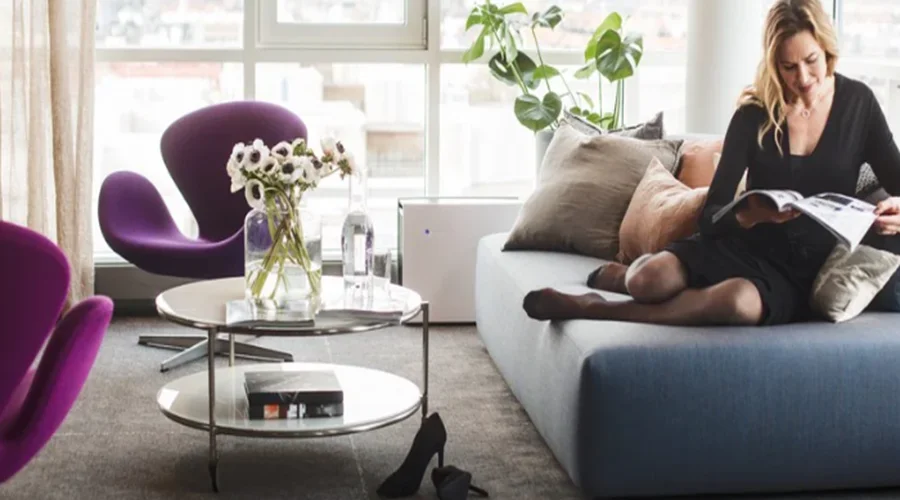

Blueair Pro M Air Purifier
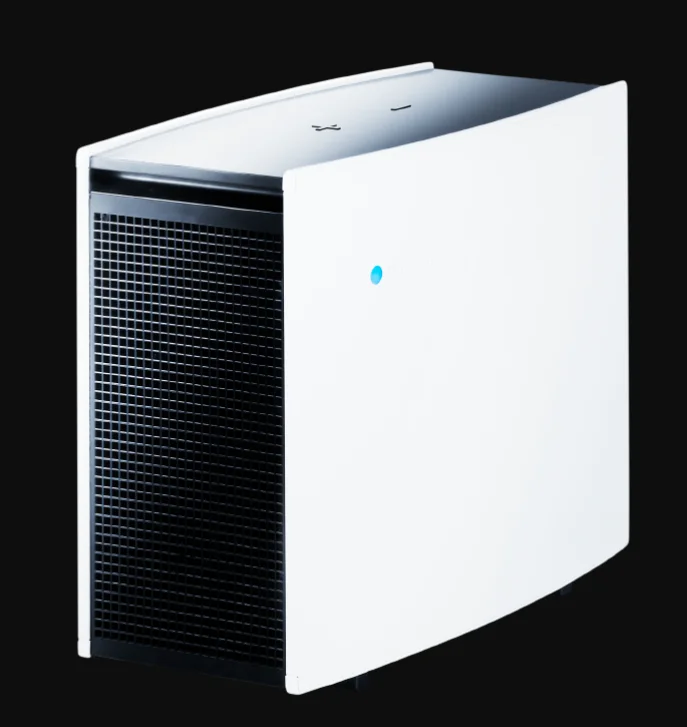
Thank you for buying a Blueair Pro Air Purifier. With patented HEPASilentTM technology and state-of-the-art filters, it is our most powerful and technically advanced air purifier yet. Still, it’s remarkably easy to set up. Just plug in, turn on and let it breeze.
Keep the Filters Fresh
Changing filters according to the replacement schedule keeps your Blueair Pro in tip-top form.
Warranty
For warranty information, visit www.blueair.com/warranty
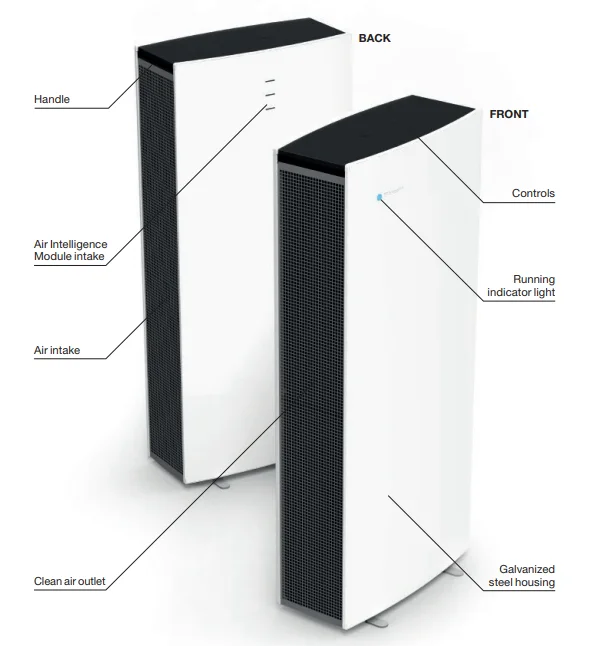
Getting the Most from your Blueair System
The Blueair system is easy to use. Make sure your unit is the right size for your room, and change the filters according to the recommended filter replacement schedule. Remember that, just as air conditioners and heaters have limits to the volume of air they can cool or heat, every air purification system has limits to the volume of air it can clean. Follow these guidelines. Close Your Windows. You wouldn’t throw open your windows on a hot summer day and expect your air conditioner to work efficiently, because you can feel the hot air coming in and the cool air going out. Even though you can’t see the contaminated air coming in and the clean air going out, the same logic applies to your air purifier.
Close Your Doors
Just as you might seal off part of your house on a cold winter night to keep your heater working more efficiently, seal off the room in which your system is working for best results.
Run Your System 24 hours per Day
For best results, run your Blueair unit 24 hours a day, 7 days a week. Round-the-clock operation ensures that a continuous supply of clean, filtered air constantly circulates throughout the room. Blueair systems are designed for phenomenally low power usage. In fact, it costs about the same to power a Blueair air purifier as it does to power a single light bulb, depending on the unit and the operating speed.
- To reduce the risk of electric shock, this equipment has a grounding-type plug that has a third (grounding) pin.
Getting Started
General Safety Instructions
The Blueair Pro Series air purifier is an electrical appliance. Please read the safety instructions before use and take the necessary precautions to reduce the risk of fire, electric shock or injury. This appliance is not intended for use by persons (including children) with reduced physical, sensory or mental capabilities, or lack of experience and knowledge, unless they have been given supervision or instruction concerning use of the appliance by a person responsible for their safety. Children should be supervised to ensure that they do not play with the appliance. If the supply cord is damaged, it must be replaced.
Placement
Place the unit in a location that allows air to circulate freely in, out and around the unit. The minimum acceptable distance from another object is 4˝ or 10 cm.
Do not place the unit:
- Directly on or against soft furnishings, such as bedding or curtains.
- Near sources of heat, such as radiators, fireplaces or ovens.
- Near wet areas, such as bathrooms or laundry rooms, where it may come into contact with water.
- Outdoors.
Settings
Plug the power cable firmly and completely into the recessed power cord socket located at the bottom of the unit and plug the other end into a grounded wall outlet or power strip. Set the unit to maximum speed, which is recommended for fast initial cleaning, daytime use, or very polluted air. After a few minutes, adjust the unit to the desired speed. Minimum speed is generally recommended for night use.
Display Function without the Air Intelligence Module
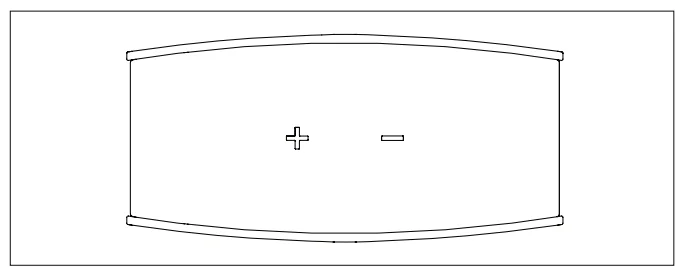
- The display is on standby.

- Turn on your Blueair air purifier by touching the PLUS button on the unit. A blue bar will appear between the buttons.

- Adjust the speed from 1 to 3 using the PLUS and MINUS buttons. Turn the air purifier off by pressing the MINUS button when the unit is in first speed.

- When filter replacement is required, a red replacement filter light will appear.
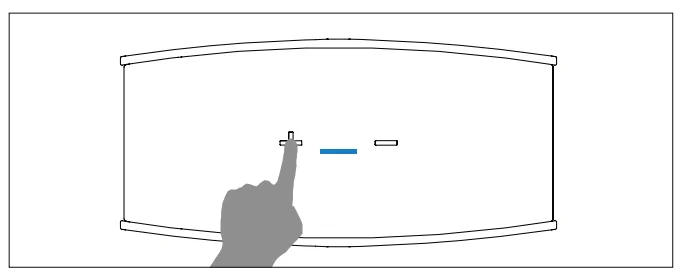
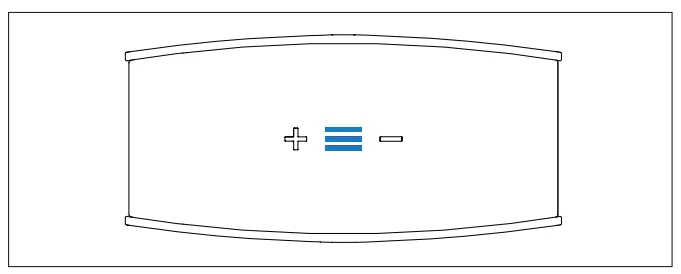
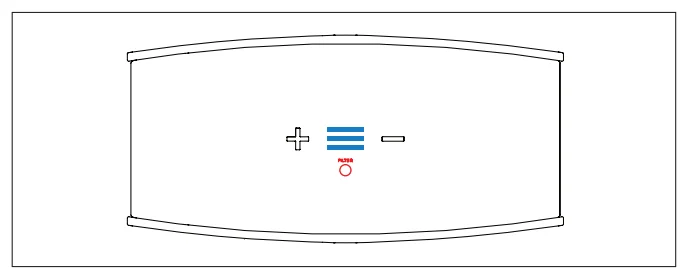
While the unit is running, the display will slowly disappear after 30 seconds. To activate the display again, simply touch one of the buttons.
Display Function with the Air Intelligence Module

- Air Intelligence Module required. For installation and maintenance of the Air Intelligence Module, please see page 16, ”Air Intelligence Module”. Turn on your Blueair air purifier by touching the PLUS button on the unit. A blue bar will appear between the buttons. Above the bar, two bar columns show the levels of air- suspended particles (PM2.5) and gaseous contaminants (GAS). One bar (green) represents a low particle or gas level. Three bars (green, yellow and red) represent a high level of particles or gas, indicating the need to increase the operating speed, or to set the unit in automatic mode. Turn the air purifier off by pressing the MINUS button when the unit is in first speed.

- For automatic mode, touch the PLUS button when the unit is running on speed 3. The word AUTO will appear, and the two air quality sensors will adjust the speed according to the contaminant levels. To return to manual operation, touch the MINUS button.

- When filter replacement is required, a red replacement filter light will appear.
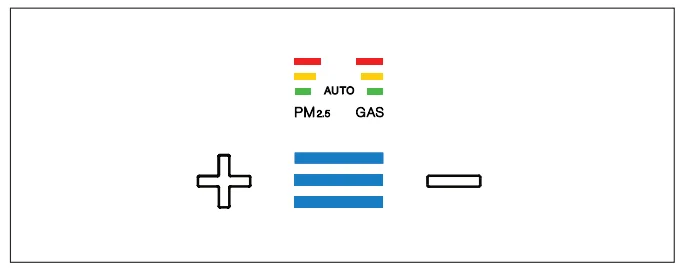
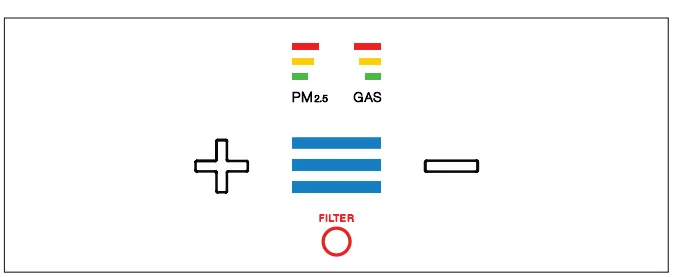
Please note: The Air Intelligence Module will show high levels of both particles and gas during the first five minutes of operation while the air quality sensors calibrate.
Care and Maintenance
Blueair air purifiers feature high-quality design, materials, and workmanship. To keep your unit in top condition, we recommend routine cleaning. The appliance must be disconnected from the supply mains before cleaning or maintenance.
- Vacuum the air intake grille from the inside when you remove the filter to replace it.
- Wipe the exterior of the unit with a soft, clean, damp cloth.
- Never clean with gasoline, chemical solvents, or corrosive materials, as these agents may damage the surface.
- Do not allow foreign objects to enter the intake or exhaust openings. This may cause an electric shock or damage the unit.
How it Works
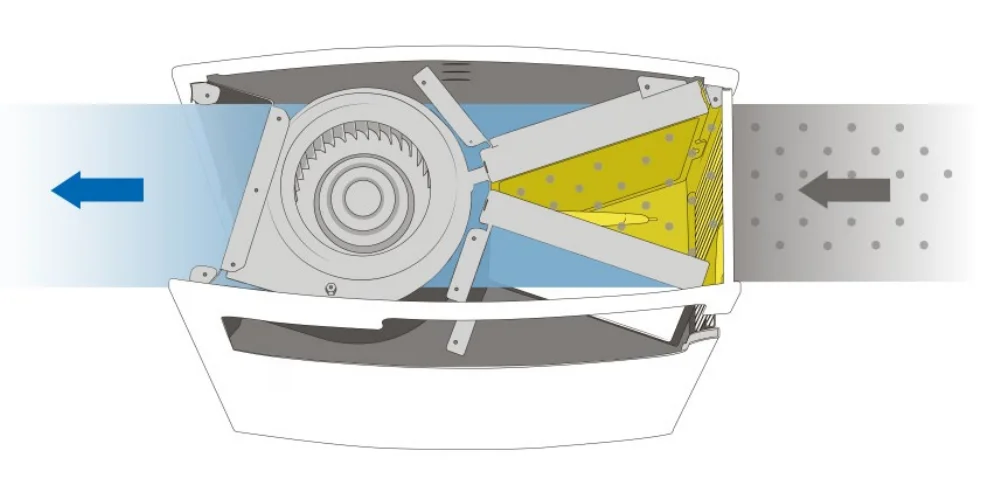
Air passes through an ion chamber where airborne particles are charged with negative ions. Charged particles are drawn to the HEPASilentTM filter surface. Purified air, which is virtually contaminant-free, is recirculated into the room.
Changing the Filter
Before you start changing the filter, turn off the unit and remove the plug from the wall socket.
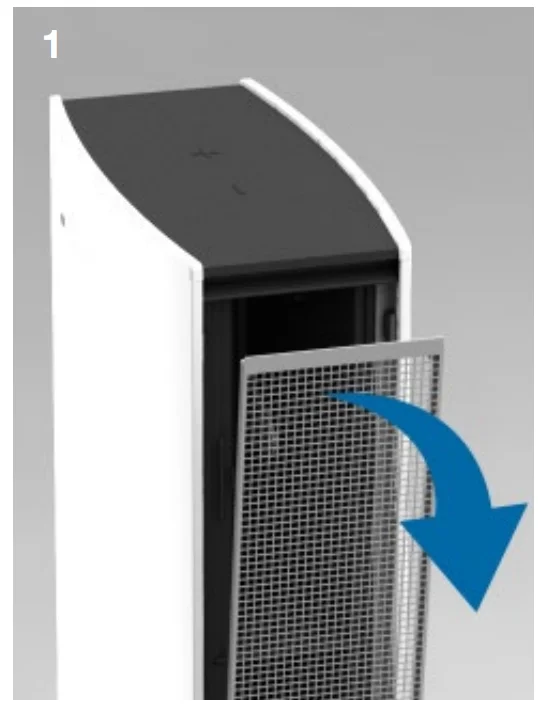
- Turn the unit off and open the intake door by pulling at the top edge. The intake door is on the right-hand side when facing the front of the unit.

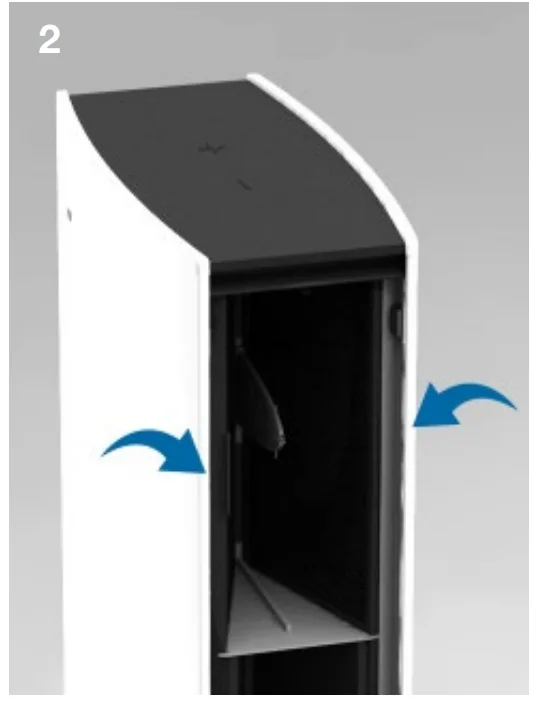
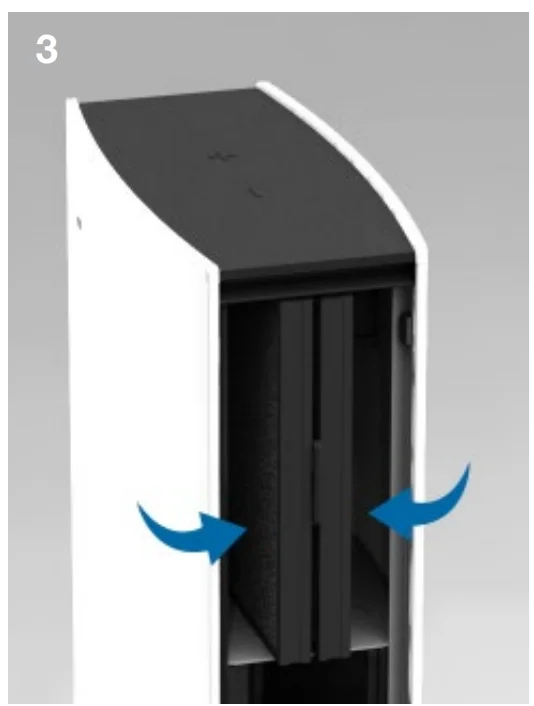
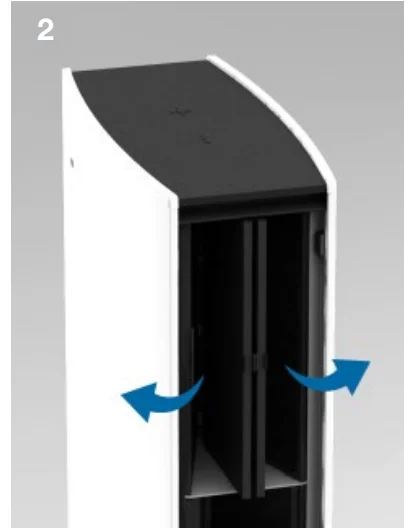
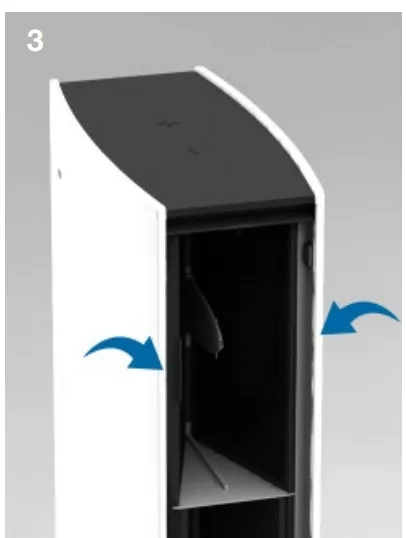
- The filter is fitted into the unit in a V shape. Two tabs protrude on the sides.

- Using the tabs, push the two filter sides together.

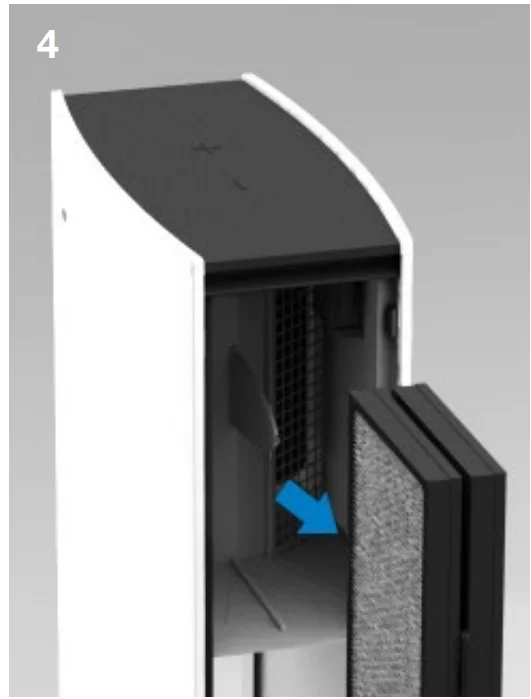
- Gently pull the dirty filter straight out of the unit.

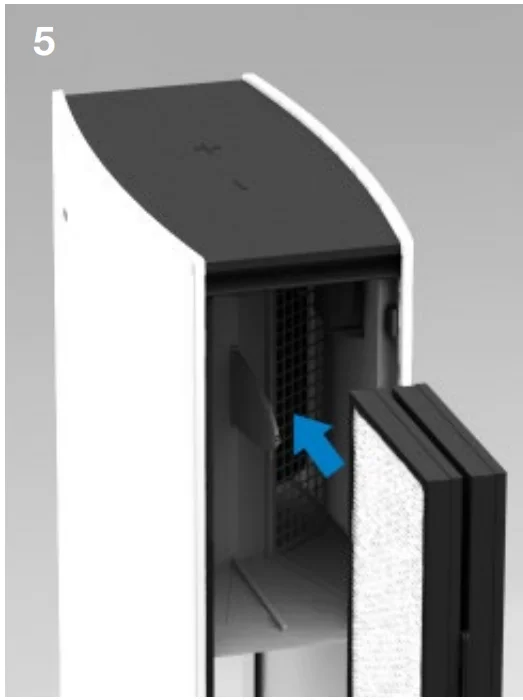
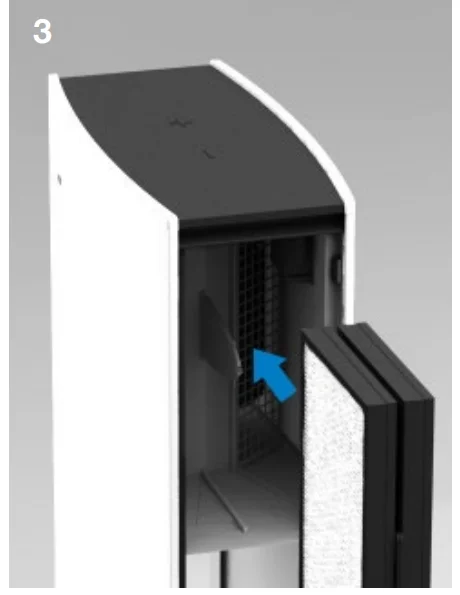
- Keeping the filter sides together, line up the new filter into the unit using the guiding bars in the top and bottom of the filter housing.

- Gently push the new filter in.

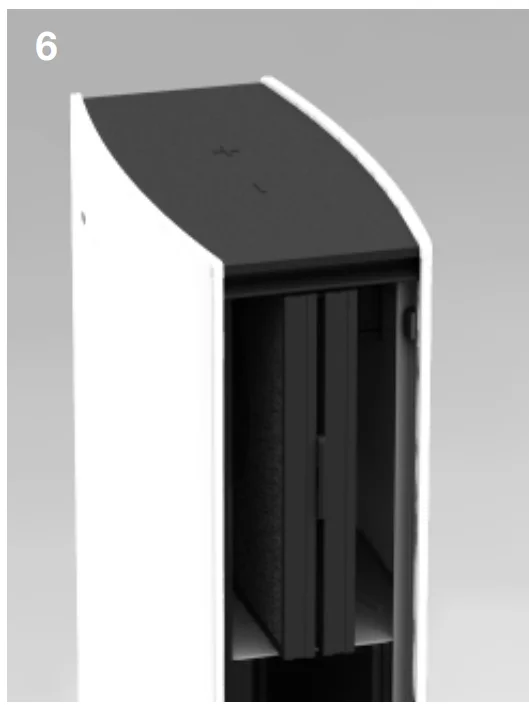
- Push the two filter sides out using the tabs.

- Re-attach the intake door. Turn on the unit.

- For Blueair Pro L and XL, repeat steps 2–7 for all filter packs.

- For Blueair Pro L and XL, repeat steps 2–7 for all filter packs.
- Plug in the power cord, turn on and touch and hold the red filter replacement light for three seconds. It will flash and disappear.
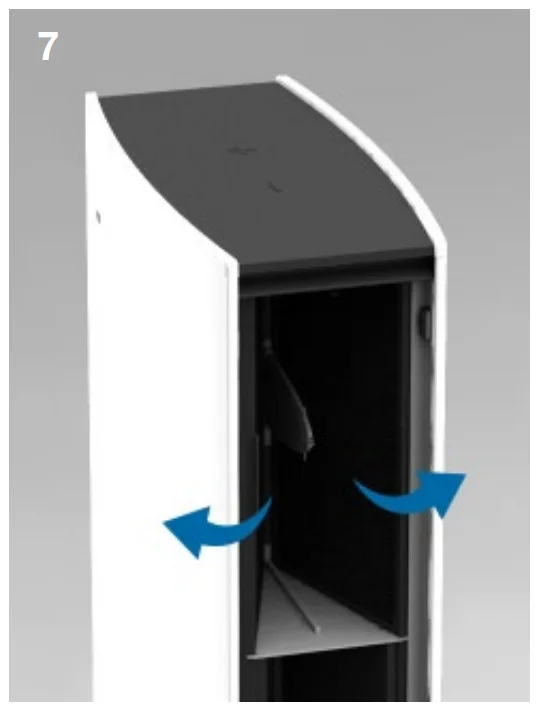
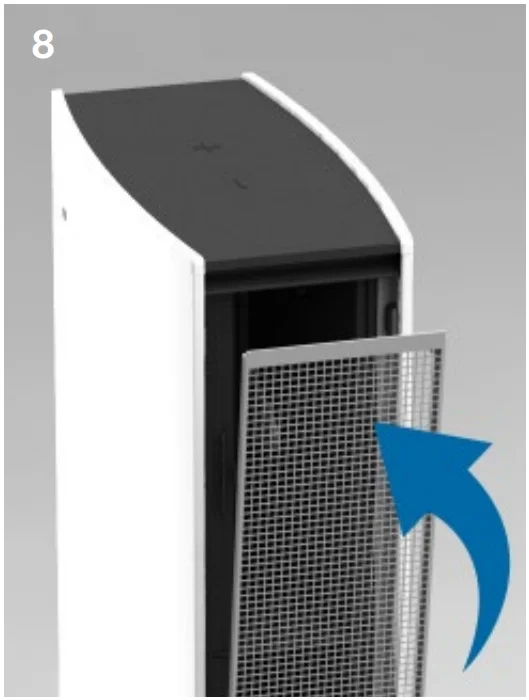

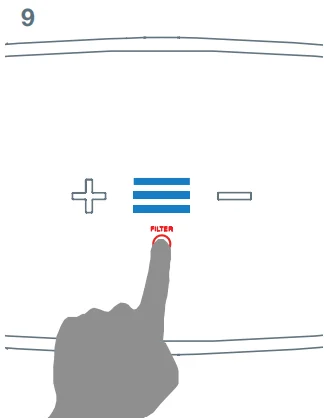
Adding the Carbon+ Filter
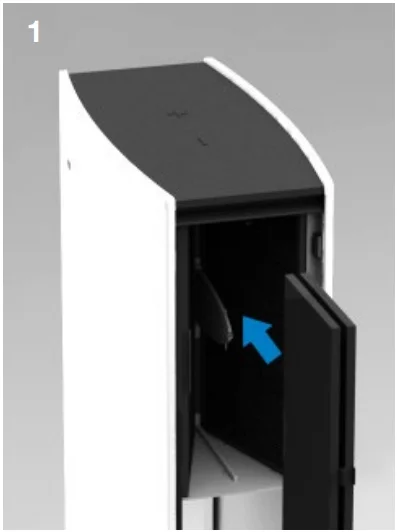
- Keeping the filter sides closed, gently slide the Carbon+ Filter into the unit.

- Push the sides out towards the main filter.

- Snap the Carbon+ Filter to the main filter frame tab.
While the unit is running, the display will slowly disappear after 30 seconds. To activate the display again, simply touch one of the buttons.
Filters
Patented HEPASilentTM technology makes the Blueair Pro Series incredibly quiet. The unit comes with a HEPASilentTM filter already installed. Particle Filter. Includes a particle filter that removes dust, pollen, bacteria, pet dander, mold spores, and other airborne particles. The particle filter is made of polypropylene, which mechanically filters out airborne particles. To maximize filter effectiveness, particles are negatively charged by the Blueair unit before reaching the filter. SmokeStop™ Filter. Includes a combined particle and active carbon filter to remove gaseous pollutants such as cigarette and cigar smoke or other VOCs (volatile organic compounds, including household paints and other chemicals). Adding activated carbon to a filter may affect airflow and CADR. You may also notice a slight odor from the carbon when the filter is first used; this will quickly dissipate.
Carbon+ Filter. An extra active carbon filter stage that can be mounted in the Blueair Pro Series in addition to the main HEPASilentTM particle filter or SmokeStop™ filter. It provides extra protection against gaseous contaminants such as formaldehyde, sulphur dioxide, and volatile organic compounds. For optimal performance, Blueair recommends that you replace filters every six (6) months of use. We offer a convenient Filter Subscription Program in some countries. Contact your local dealer or Blueair to find out whether the program is available to you.
Air Intelligence Module
By adding the Blueair Air Intelligence Module, the Blueair Pro Series can continuously monitor and report the surrounding air quality through state-of-the-art particle and gas sensors. The unit can also run in automatic mode, where the speed is set based on the level of pollution detected by the sensors. If you wish to upgrade your Blueair Pro unit with an Air Intelligence Module, please visit www.blueair.com to find your closest dealer.
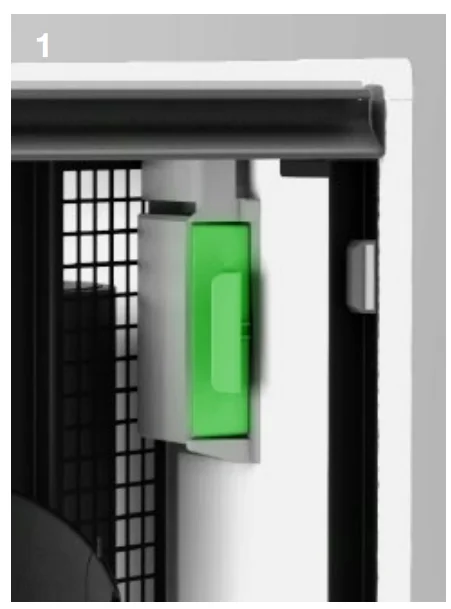
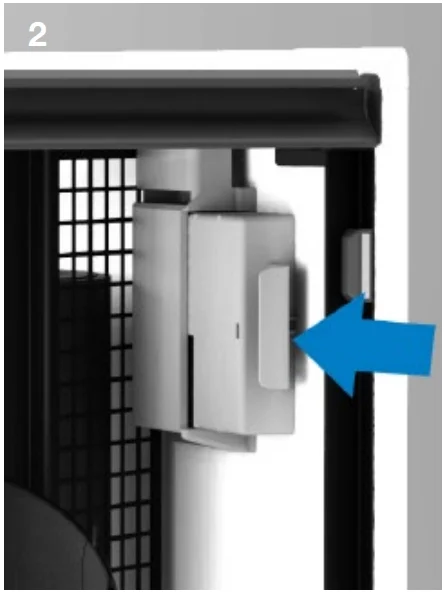
- Pull out the dummy cover sitting in the module holder.

- Insert the Air Intelligence Module into the module holder.

- Insert the filter pack and re-attach the intake door.

Air Intelligence Module Maintenance
- Remove the module from the unit.
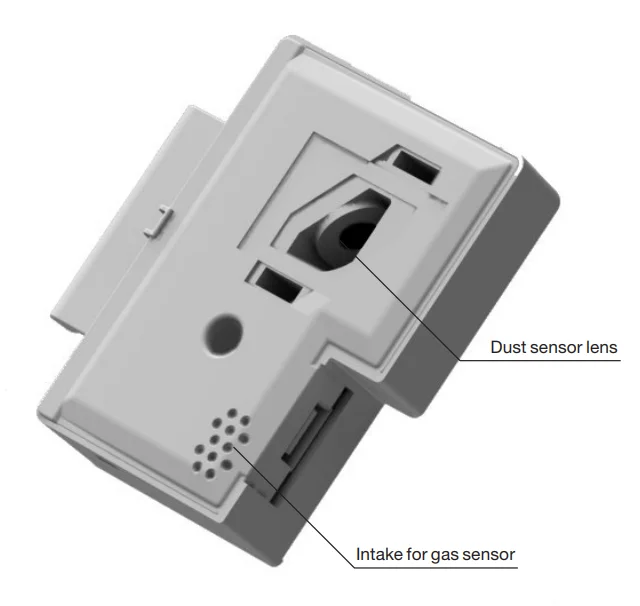
- Use a vacuum cleaner to clean the intake in front of the gas sensor gently.
- Use a damp cotton swab to clean the dust sensor lens. After cleaning the dirt off the lens, use a dry cotton swab to wipe the lens. Do not use alcohol to clean the lens.
- Re-insert the module.
Remove the top filter pack, see Changing the Filter steps 1–4.
Blueair Pro Professional Performance Superior Style
Blueair was founded on the belief that everyone should be able to enjoy clean air indoors, at home, or in the workplace. We have become a global authority on how to remove indoor air impurities down to the tiniest particle, thanks to our deep commitment to research and innovation. Our healthier air solutions work quietly and use very little energy to clean more air faster, removing allergens, asthma triggers, viruses, bacteria, and other airborne pollutants. We develop the world’s best air cleaners because we passionately believe that clean
air is a basic human right. Blueair – Innovated with love in Sweden.
For more manuals by Blueair, visit ManualsLibraryy
Blueair Pro M Air Purifier-FAQs
Is the Blueair Pro M Air Purifier a good choice for indoor air cleaning?
Yes, the Blueair Pro M Air Purifier is known for strong filtration performance, quiet operation, and energy efficiency. It helps improve indoor air quality by reducing airborne particles such as dust, pollen, smoke, and allergens.
Does the Blueair Pro M help remove dust and allergens?
The purifier is designed to capture fine airborne particles, including dust, pet dander, pollen, and smoke. Its advanced filtration system helps keep indoor air cleaner and fresher for daily use.
Can the Blueair Pro M Air Purifier help people with breathing issues?
Cleaner indoor air may help reduce irritation caused by airborne pollutants. Many users with allergies or respiratory sensitivity use air purifiers to improve comfort, but it is not a medical treatment or cure.
Is it safe to leave the Blueair Pro M running all day?
Yes, the unit is made for continuous operation. Many users keep it running throughout the day and night to maintain consistent air quality indoors.
Can I sleep with the Blueair Pro M Air Purifier on?
Yes, the purifier operates quietly, making it suitable for bedrooms. Running it during sleep can help maintain cleaner air overnight.
Does the Blueair Pro M produce ozone?
Blueair air purifiers are designed to meet safety standards for ozone emissions. The unit is generally considered safe for regular home and office use.
Why is Blueair different from traditional HEPA purifiers?
Blueair uses advanced filtration technology that combines mechanical and electrostatic filtration. This design allows efficient particle removal with lower noise levels and reduced energy consumption.
How often should the filter be replaced?
Filter replacement depends on usage and air quality conditions. In most cases, replacing the filter every 6 to 12 months helps maintain optimal performance.
Is the Blueair Pro M suitable for bedrooms and offices?
Yes, its compact design and quiet performance make it ideal for bedrooms, offices, meeting rooms, and other medium-sized indoor spaces.
Can an air purifier help during flu season?
Air purifiers can help reduce airborne particles and improve indoor air quality. While they may support a cleaner environment, they do not guarantee protection from illnesses.