
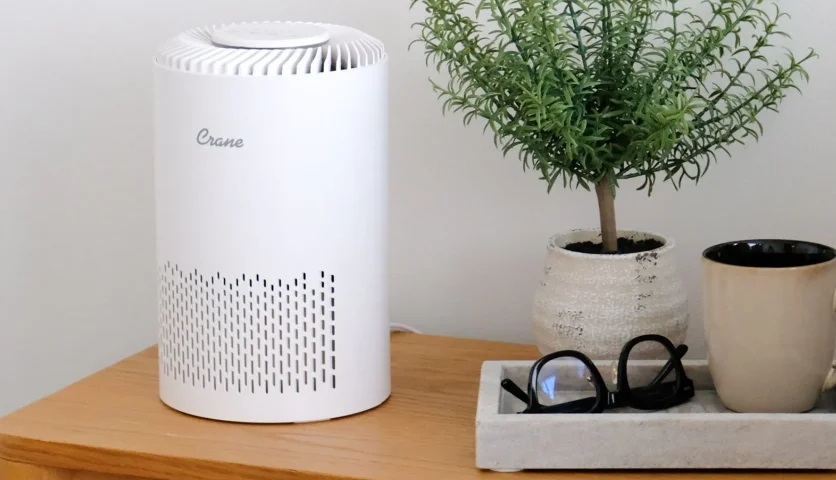

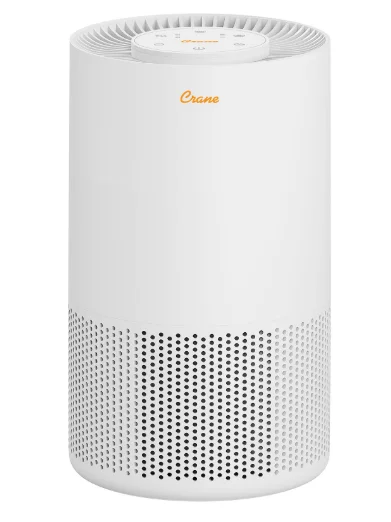
Crane EE-5077 True HEPA Air Purifier
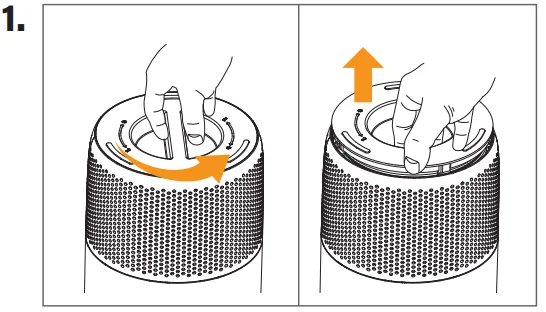
- Twist the cap off the bottom of the unit and take off the filter cover.

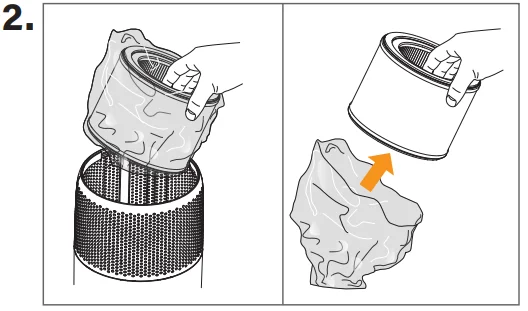
- Take the filter out and remove the plastic bag.

- Replace the filter in the base of the unit, recover, and rescrew. Place the unit on a flat, solid surface and plug the unit in.

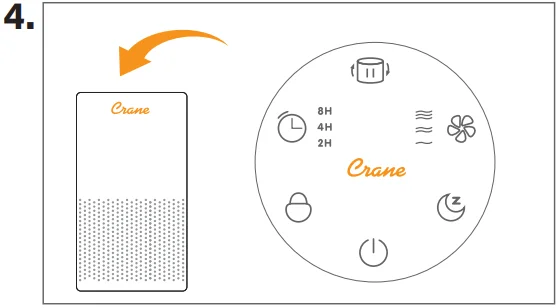
- Use the controls located on top of the unit to turn the air purifier on, set the timer function, speed setting, and sleep mode.

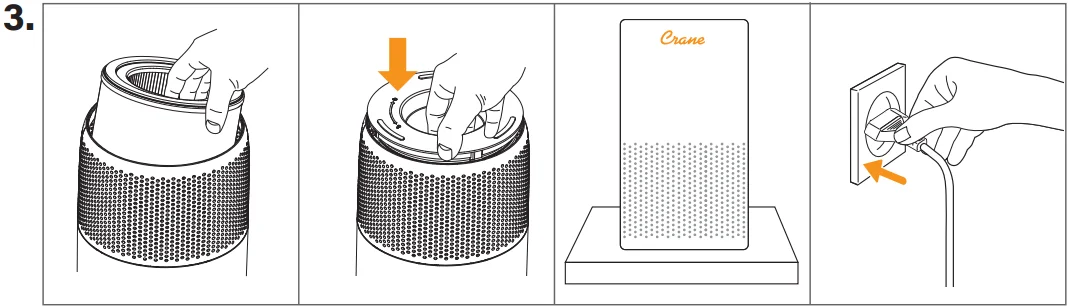
Important
PLEASE READ AND SAVE ALL INSTRUCTIONS TO ENSURE THE SAFE AND EFFECTIVE USE OF THIS PURIFIER.
Crane & Sustainability
Crane USA is dedicated to your environment, both inside and outside your home. We know that if cleaned and maintained properly, our products last for years, helping to reduce unnecessary use of resources and emissions from making new products. The Crane manual you are holding is from recycled materials with no added finishes or harmful dyes. If the purifier should no longer operate, please be sure to dispose of the unit in an environmentally friendly way by taking it to a public collection point. PLEASE DO NOT PLACE BROKEN PURIFIERS WITH YOUR REGULAR HOUSEHOLD WASTE.
Important Safety Instructions
WARNING! READ AND SAVE THESE INSTRUCTIONS. Failure to follow all of the instructions listed below may result in electric shock, fire, and/or serious personal injury.
- To avoid fire and shock hazard, plug the appliance directly into a 120V AC electrical outlet.
- Never operate the unit with a damaged cord or plug.
- Keep the cord out of heavy traffic areas. To avoid fire hazard, NEVER put the cord under rugs or near heat registers, radiators, stoves, or heaters.
- Always place the air purifier where it is not easily knocked over by persons in the household.
- Never touch the air purifier with wet hands. ALWAYS plug and unplug the unit with dry hands.
- Do not operate the product in any greasy environment, such as a kitchen. This product is not intended to filter oil or grease from the air.
- Do not use the air purifier in bathrooms or other humid environments, near fireplaces, or in areas where flammable or combustible vapors or products may exist.
- Always unplug the power cord from the electrical outlet when the air purifier is not in use, before cleaning, inserting or removing parts, or before moving to another location.
- NEVER run the air purifier until it is fully assembled.
- NEVER drop or insert any object into any openings.
- Use the appliance only for the intended household use as described in this manual. Do not use outdoors.
- Never use the power cord to pick up, carry, drag, pull, or lift the air purifier. Do not pull the cord against or around sharp corners or edges. This could result in injury to the user and/or damage to the cord.
- Never pull on the cord itself to unplug from the power outlet.
- ALWAYS turn the unit off before unplugging.
- Never block the air openings or place the unit on a soft surface, such as a bed or sofa, as this could cause the unit to tip over, thus blocking the air intake opening.
- DO NOT place anything on top of the unit.
- NEVER use detergents, gasoline, glass cleaner, paint thinner, or other household solvents to clean any part of the unit.
- Always place the unit on a smooth, flat, level surface, and away from direct sunlight. Keep the cord away from heated surfaces and areas where it could be walked on or tripped over. Unplug the unit when not in use and whenever you clean or move the unit.
Technical Specifications
- Adaptor Input: 100-240 VAC 50/60 Hz, 0.5A
- Adaptor Output: DC 24V, 0.75A, 15.6 W
- Air Purifier Appliance: 24V DC, 15.6W
- Coverage: Up to 27.88 sq. m
Air Purifier Filters:
Level 1: Pre Filter
The purpose of this filter is to capture large dust particles and pet hair. NOTE: See Maintenance instructions for the filter. NOTE: See Maintenance instructions for the filter.
Level 2: HEPA Filter
HEPA stands for High Efficiency Particulate Air. The inlet grill of your purifier draws in dirty air. Crane’s air purifier true HEPA filter removes at least 99.97% of particles as small as 0.3 microns. Microns are used to measure the size of these microscopic airborne particles. Allergens such as pollen, smoke, animal dander, and dust get trapped in the HEPA filter.
NOTE: See Maintenance instructions for the filter.
Level 3: Active Carbon Filter
An active carbon filter reduces VOCs and odors to keep the air smelling fresh.
Before Each Use
- Remove the plastic covering from the filter.
- Select a firm, level, and flat surface to place the purifier. For proper air flow, locate the unit at least 3 feet from any wall or furniture.
- Do not place the purifier in proximity to electronic devices that are sensitive to electrical fields.
- Do not place the unit on metal shelving. The air purifier may be placed on the floor, nightstand, table, or desk. Make sure the outlet grill faces away from the nearest wall or furniture.
- Make sure the intake and outlet grills are not blocked.
- Plug into a grounded 120V outlet. (See Safety Instructions)
Operation & Use
OPERATING INSTRUCTIONS:
- Power Button: Press this button to turn the unit on or off.
- Fan Speed Button: Press this button to select I, II, or III.
- Night Light & Sleep Mode Button: Short-press this button to turn the nightlight on or off. Long-press this button 3-5 seconds to enter or exit sleep mode. Under sleep mode, all the indicators (except the sleep mode indicator) and the nightlight will turn off, and the fan will run at sleep mode speed. Short press any button to exit sleep mode. NOTE: Once the item is unplugged, the sleep mode and timer need to be reset.
- Timer Button: Press this button to operate in intervals of 2 hours, 4 hours, and 8 hours. The unit will turn off when the scheduled operating time has elapsed. To go back to a continuous run time, press the button until there are no more indicator lights lit up.
- Child Lock Button: Long-press this button for 3-5 seconds to activate the child lock feature. This will lock the unit into its current settings until the child lock feature is turned off. Long-press the Child Lock Button for 3-5 seconds to exit the child lock mode.
- To reset the filter timer after replacing the filter, hold down the Filter Reset Button.
IMPORTANT NOTE: When the unit is not in use, please turn it off and unplug it.
REPLACING THE FILTER
When the Filter Reset light is illuminated red, it is an indication to replace the filter. Once you have replaced the filter, hold the Filter Reset Button down for 5 seconds to reset the system. On average, the filter needs to be replaced every 3-6 months (approx. 4320 hours). Filter life will depend on air quality and usage.
- ALWAYS turn off and unplug the air purifier from the power outlet before replacing the filter.
- Turn the unit upside down, unscrew the base cover.
- Discard the old filter. DO NOT attempt to wash the filter. Insert the new filter into the unit.
- Once you have replaced the filter, screw the base cover back on and turn the unit right side up. Hold the POWER button down for 5 seconds to reset the system.
Maintenance
CAUTION: Always be sure the purifier is unplugged and switched off before cleaning, removing the filter, or attempting to store the item. NEVER PLUG OR UNPLUG THE PURIFIER WITH WET HANDS.
The filter should be cleaned once a month with a vacuum cleaner. More frequent cleaning may be required depending on the environmental conditions where you live. Use the brush attachment on your vacuum cleaner to remove lint and dirt from the filter.
CLEANING THE AIR PURIFIER
NOTE: No part of the air purifier should be placed in the dishwasher.
- Always unplug the unit before cleaning.
- Once unplugged, the exterior of the unit may be cleaned by wiping with a lightly damp cloth. DO NOT ALLOW WATER TO GET INTO THE INTAKE AND OUTLET GRILLS. DO NOT USE GASOLINE, POLISH, OR ANY CHEMICAL SOLUTION TO CLEAN THE AIR PURIFIER.
- The intake grill and outlet grill can be cleaned of dust with a small soft brush.
- If you wish to lightly clean the inside of the air purifier, please remove the filter and ONLY use a dry, soft cloth to lightly wipe down.
STORING YOUR PURIFIER
Store the purifier in a dry location. Do not place heavy items on top of the purifier during storage, as this may result in possible damage to the appliance. Store the cord in a clean, dry location away from metal objects. Always check the plug before use to ensure metal items have not become attached.
Trouble Shooting
DO NOT attempt to repair the air purifier yourself. If the air purifier continues to not operate, please contact Crane Customer Care.
If the air purifier does not operate:
- Make sure the air purifier is set to I, II, or III.
- Make sure the power cord is plugged into a working power outlet.
- If the above solutions do not work, please contact Crane Customer Care.
If the air flow is reduced:
- Make sure that the intake and outlet grills are not blocked and are free of debris.
- Check your HEPA filter; it may need to be replaced.
- If the above solutions do not work, please contact Crane Customer Care.
For More Manuals By Crane, Visit ManualsLibraryy.
Crane EE-5077 True HEPA Air Purifier-FAQs
What room size is the Crane EE-5077 air purifier designed for?
The Crane EE-5077 is generally suited for small to medium rooms up to around 300 square feet, making it a strong fit for bedrooms, nurseries, and offices. Its coverage works well for everyday air cleaning, especially in spaces needing regular allergen and odor control.
How effective is the Crane EE-5077 at removing airborne particles?
The Crane EE-5077 uses True HEPA filtration that captures up to 99.97% of airborne particles as small as 0.3 microns, including dust, pollen, smoke, and pet dander. Its multi-stage filtration can also support odor reduction for cleaner, fresher indoor air.
Does the Crane EE-5077 help with allergies and pet dander?
Yes, many people use the Crane EE-5077 to reduce allergens like pollen, dust, and pet dander in indoor spaces. Its HEPA filtration can support allergy relief, while the carbon layer may help minimize odors, making it practical for homes with pets.
How often should you replace the Crane EE-5077 filter?
Filter replacement depends on usage and air quality, but many users replace the filter every six to eight months for best performance. Regular filter changes help maintain airflow, filtration efficiency, and odor control while keeping the purifier operating as intended.
Is the Crane EE-5077 quiet enough for bedrooms or nurseries?
The Crane EE-5077 is designed with quiet operation and sleep-friendly settings, making it suitable for bedrooms and nurseries. Many users appreciate the sleep mode and multiple fan speeds, which allow lower noise during nighttime use while still maintaining consistent purification.
What features make the Crane EE-5077 stand out?
Popular features include True HEPA filtration, activated carbon filtration, UV-C support, multiple fan speeds, child lock, timer settings, and a filter replacement indicator. These features make it appealing for users seeking convenience, cleaner air, and low-maintenance daily operation.
Does the Crane EE-5077 remove odors as well as particles?
Yes, beyond particle filtration, the activated carbon layer helps reduce common household odors from pets, cooking, and smoke. While primarily built for particle removal, this added odor control feature makes the purifier more versatile for everyday home air quality improvement.
Is the Crane EE-5077 easy to maintain?
The Crane EE-5077 is generally considered easy to maintain because of its straightforward controls, filter replacement indicator, and accessible filter system. Routine maintenance mainly involves changing filters on schedule and keeping air inlets unobstructed for reliable long-term performance.
Is the Crane EE-5077 worth buying for everyday home use?
For everyday use in smaller living spaces, the Crane EE-5077 is often considered a practical option due to its HEPA filtration, quiet operation, and helpful convenience features. It can suit users looking for dependable air cleaning without stepping into premium-priced purifier models.
What should buyers consider before choosing the Crane EE-5077?
Buyers should consider room size, filter replacement costs, noise preferences, and whether features like UV-C, sleep mode, or carbon filtration matter most. Some purifier enthusiasts also recommend comparing CADR and air changes per hour alongside coverage claims when evaluating any purifier.