
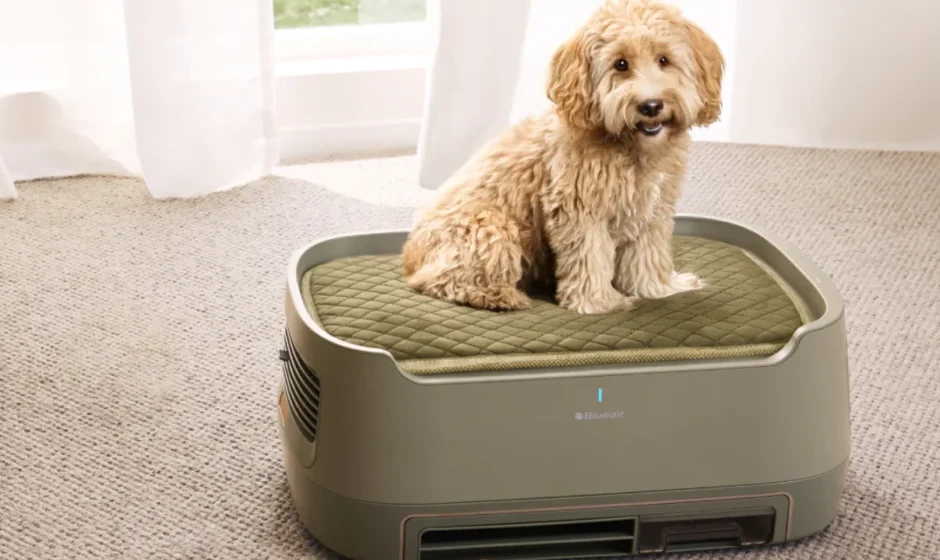

Blueair PetAir Pro Air Purifier
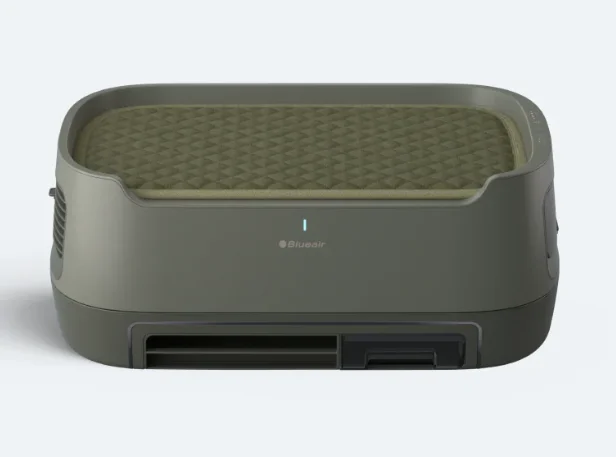
Safety Information
General Safety Instructions
The PetAir purifier is an appliance for indoor use only. Take the necessary precautions to reduce the risk of fire, electric shock or injury.
- This appliance is not intended for use by persons (including children) with reduced physical, sensory, or mental capabilities, or a lack of experience and knowledge, unless they have been given supervision or instruction concerning the use of the appliance by a person responsible for their safety.
- Supervise children to ensure that they do not play with the appliance.
- Children shall not clean and maintain this product.
- Ensure that the power adapter and power plug are not at risk of getting damaged.
- If the appliance is damaged or malfunctions, turn it off, disconnect it from the power supply, and contact Blueair customer support.
- The power plug must be firmly inserted in the power socket.
- When disconnecting the appliance from the power supply, pull the power adapter or the power plug.
- Use the adapter (ZD036B240150US) provided with your PetAir purifier to plug directly and firmly into an appropriate electrical outlet.
- Do not use an extension cord or a power strip. Refer to the rating label on your appliance.
- Do not alter the power plug in any way. If the plug does not fit into the outlet, contact qualified personnel to install the proper outlet.
- Do not use the included power adapter for anything else but the appliance.
- Do not allow objects to enter or block the air inlets/outlets as this can cause electric shock or damage the appliance.
- Do not place any objects on top of or directly against the appliance.
- Do not sit, stand, climb, or hang on this device.
- Do not use the appliance outdoors or in wet environments such as bathrooms or pool areas.
- Keep the appliance and power plug away from water and other liquids.
- Keep the appliance, including the power adapter, at a safe distance from heated surfaces and open fire.
- Keep the appliance and power plug away from chemicals such as pesticides and deodorants.
- Never clean with gasoline, chemical solvents, or corrosive materials as these agents may damage the PetAir purifier.
- Place the PetAir purifier on the floor or a stable surface to prevent tipping.
- Always turn off and disconnect the appliance from the power supply before moving the unit, changing filters, cleaning or carrying out maintenance.
- DO NOT allow pets to chew on or swallow any parts.
- Dispose of all packaging materials properly. Keep away from children and pets.
- If your Blueair appliance is found to be defective, we will replace it with the same or a similar model at no cost, per the warranty terms. Please use caution when attempting repairs yourself, as this poses a risk of electric shock or injury.
- To reduce risk of fire, electric shock or injury to persons, do not use replacement parts that have not been recommended by the manufacturer (e.g., parts made at home using a 3D printer.
- To avoid risk of fire or electric shock, the appliance should only be used with the correct input voltage that it is rated for. Refer to your rating label on the device.
- This product complies with the maximum allowable concentration of ozone of 0.050 parts per million by volume (ppmv) in 24 hours.
Product Introduction
- Product Name: Blueair PetAir Pro P3i
- Regulatory Model Number: 2712716000
This product comes with integrated controls and a built-in sensor. Use the control panel on the appliance or the Blueair App to adjust the settings of your product.
Performance Optimization Suggestions
- Ensure that the size of the room where the purifier is placed does not exceed the recommended capacity.
- Position the purifier in an area where air can freely flow in and out, ensuring proper circulation.
- Maintain a distance of at least 4 inches (10 cm) between the purifier and any other object to ensure proper air circulation.
- Keep doors and windows closed while the purifier is in operation.
- Replace the filter when the Filter Replacement indicator light turns red on the control panel.
- Refer to the maintenance instructions in this user manual for proper care.
- To prevent accidental activation of smart mode, ensure the total weight of objects placed on the appliance does not exceed 1.1lb.
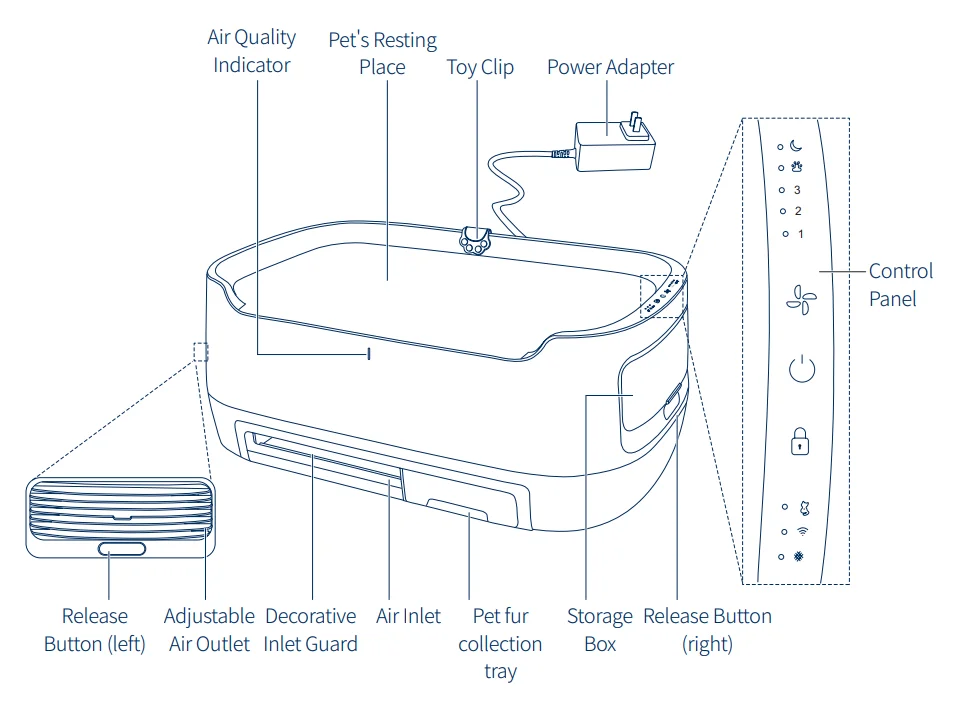
Product Diagram
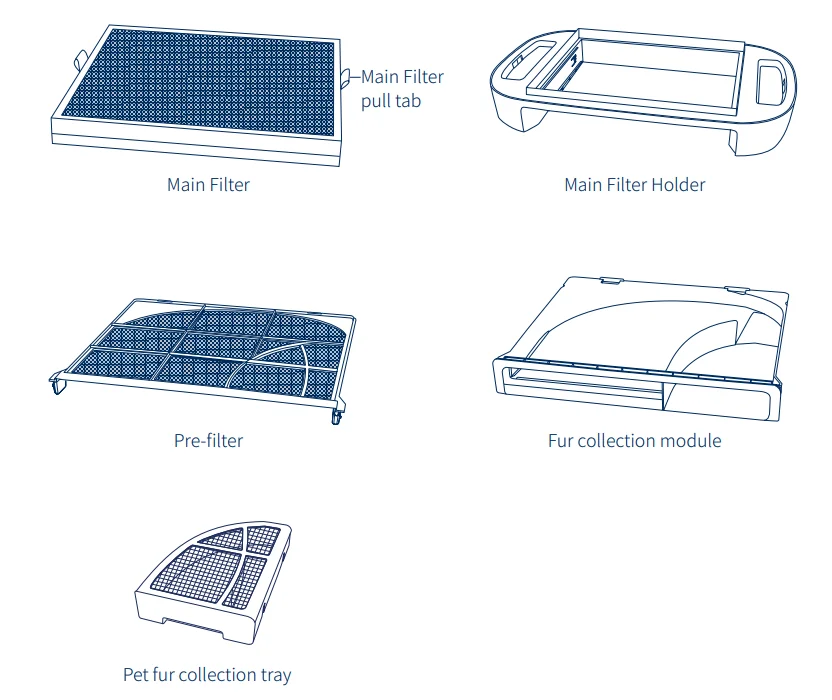
Replacement Filter & Fur Collection System
Getting Started
Connect to the Blueair app

Connecting to the Blueair app allows you to control the air purifier remotely and monitor filter usage. The app offers additional features to the device.
- Download the Blueair app from the App Store or Google Play.
- Create or sign in to your Blueair account.
- Follow the instructions to complete app pairing.
First Time Connecting Tips

- Turn on your air purifier. Press and hold the Fan Speed button for 5 seconds to prepare the air purifier for pairing. Once the Wi-Fi indicator is blinking, it is ready to be paired with your app. Make sure you are using a visible Wi-Fi network. VPN (Virtual Private Network) should be deactivated while using the Blueair app.

- First-time pairing requires enabling the phone’s Bluetooth function and placing the phone near the air purifier (recommended within 3 feet).

- Note: The purifier can only connect to 2.4 GHz Wi-Fi. If your router supports dual-band, be sure to select the 2.4 GHz band. If you choose not to connect the product, the Wi-Fi can be turned off. Long-press the Fan Speed button for 15 seconds and then release; the Wi-Fi will be turned off.

- Keep your purifier within 15 feet of your Wi-Fi router when connecting the product for the first time.

Control Panel
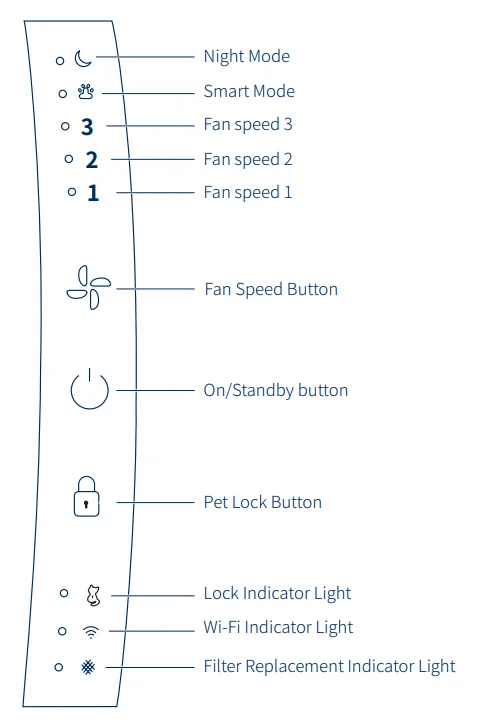
Control Panel Icons
- On/Standby Button

Click twice to turn the device on and off. - Connecting to Wi-Fi

- Press and hold the fan speed button
 for 5 seconds to begin pairing the Blueair PetAir Pro purifier to your phone.
 - The Wi-Fi indicator light is offif you have not previously paired your mobile phone.
- The Wi-Fi indicator lightflashes if the appliance is trying to connect.
- The Wi-Fi indicator lightis normally on if Wi-Fi is connected.
- Press and hold the fan speed button
- Fan Speed Button
Adjust the fan to 1-2-3, Smart Mode, and Night Mode. - Smart Mode Indicator

Auto-adjusts the fan speed based on indoor air quality and pet weight. If a pet is lying on the bed, it goes into Silent Mode, and the UI will lock automatically. When it detects the pet leaving the bed, it adjusts the fan speed according to the indoor air, and UI unlocks automatically. - Night mode

Night mode sets the device to the lowest fan speed and brightness for nighttime use. - Lock Button

Press and hold the lock button for 2 seconds until the LED lights flash to activate/deactivate the lock function. When the key lock is activated, all buttons are locked, and the lock indicator light turns on to prevent accidental operation.
 - Filter Replacement

When the filter replacement indicator turns red, it means that the filter has expired. After replacing it with a new filter, always reset the filter replacement indicator light by pressing and holding the fan setting button and lock button for 15 seconds until the LED lights flash. (see filter replacement section). - Factory reset
Long-press the On/Standby button for about 15 seconds. All the LEDs of the interface light up and blink. Then release. Factory Reset will start in 10 seconds. After a factory reset, the air purifier restarts with the default configuration and will go into Standby
mode. - Air Outlet Louvers
The air outlet on the left side of the PetAir purifier is equipped with louvers to set the wind direction. Set the desired wind direction manually. - Toy Clip
This clip can be used to secure toys, such as cat teasers. The toy clip is provided as an accessory for this appliance. Please do not use the toy clip for other purposes. - Decorative inlet guard
This Inlet guard will prevent pet toys, such as pet balls, from entering. - Cleaning and Changing the Filters
Important Tips! Always turn off and disconnect the device from the power supply before changing filters, cleaning or carrying out maintenance. Your filters are non-washable and non-recyclable. Failure to replace the filter when prompted may result in changes to product performance. - Filter Replacement
The purifier uses a patented RealTrack algorithm to calculate the remaining life of the filter. When it is time to replace the filter, the filter replacement indicatorwill turn red on the control panel. The recommended time for filter change is 9 – 12 months.
Easily order Blueair filters from www.blueair.com or via the app, or sign up for a Blueair filter subscription. The serial number and model name can be found at the bottom of the top part. (Detach the top part and see the bottom)


 for 5 seconds to begin pairing the Blueair PetAir Pro purifier to your phone.


 to prevent accidental operation.
Replacing the Main Filter
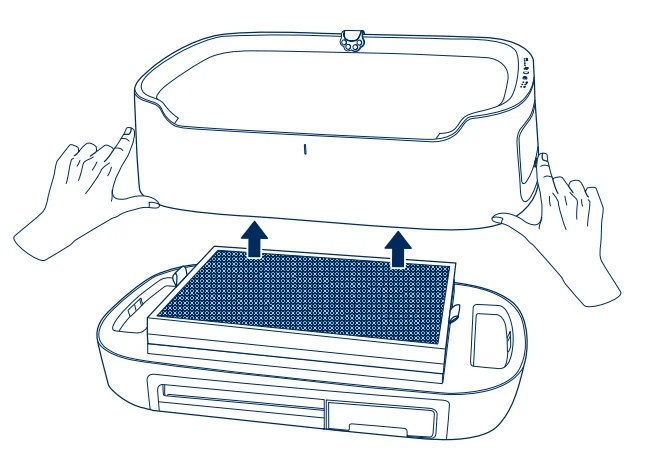
- Step 1
Press the two release buttons and lift the top part of the device.
- Step 2
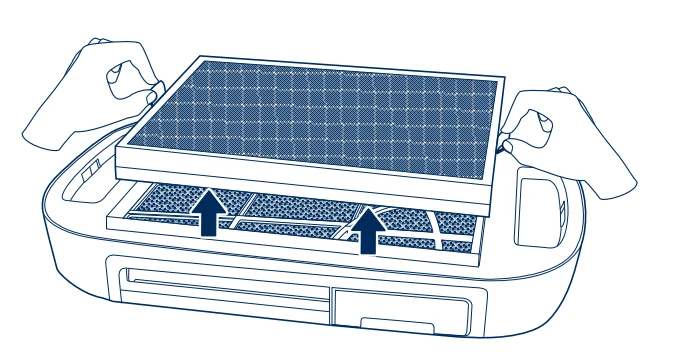
Take hold of the two tabs of the main filter and lift it out. Dispose of the main filter.
- Step 3
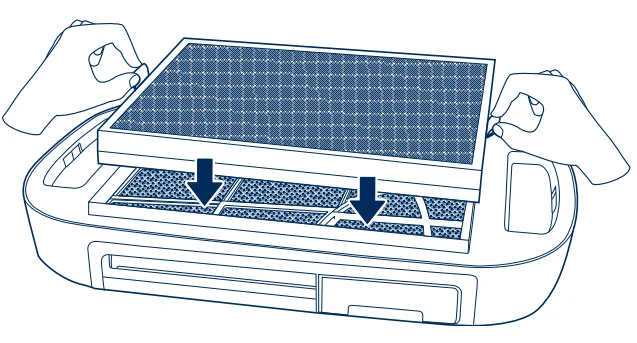
Install the new filter correctly into the filter unit according to the direction indicated on the filter frame.
Note! Before using a new filter, remove the plastic film.
- Step 4
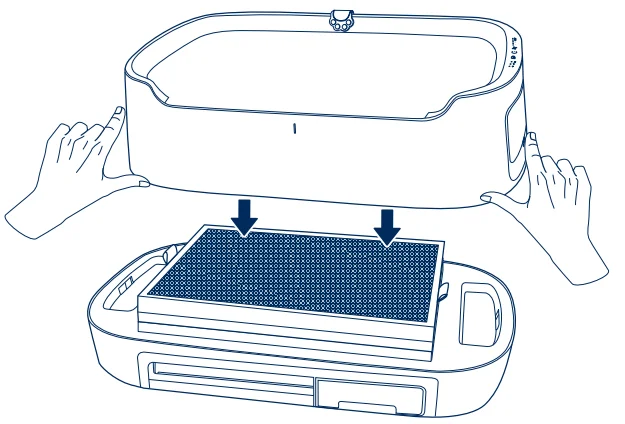
After replacing the main filter, reattach the top part of the device.
Note! After replacing it with a new filter, always reset the filter replacement indicator light by pressing and holding the fan setting button and lock button for 15 seconds until the LED lights flash.
Pet fur collection tray cleaning
- Step 1
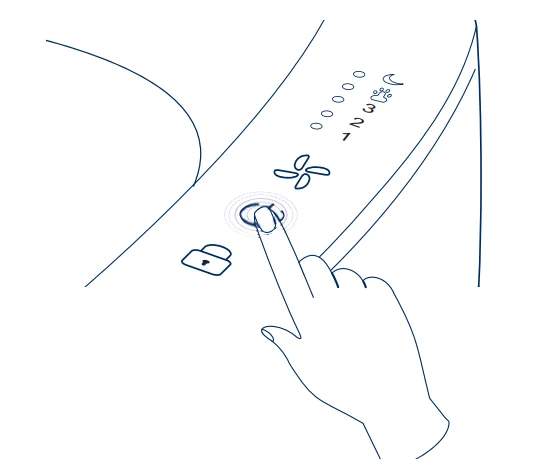
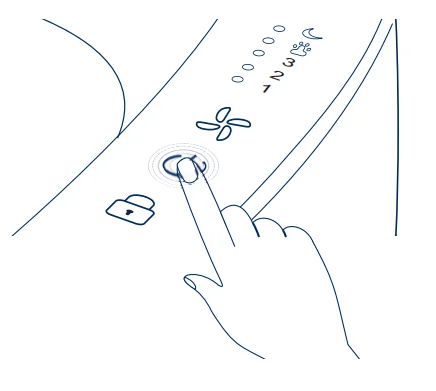
Double-click the On/Off buttonto turn the device off and unplug the power adapter.
- Step 2
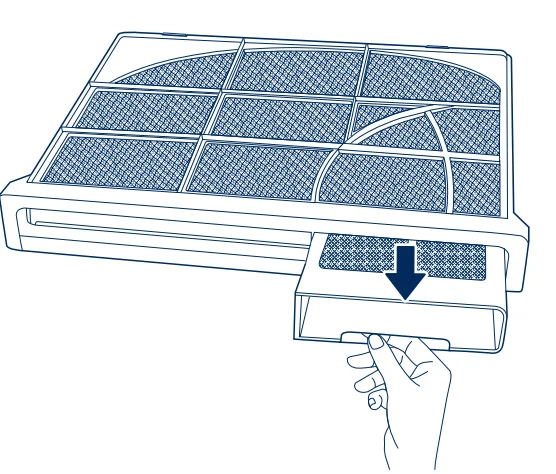
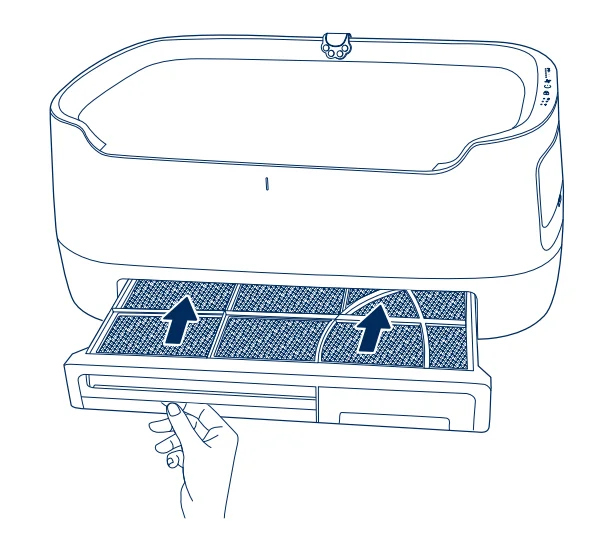
Pull out the hair collection box at the bottom of the device.
- Step 3
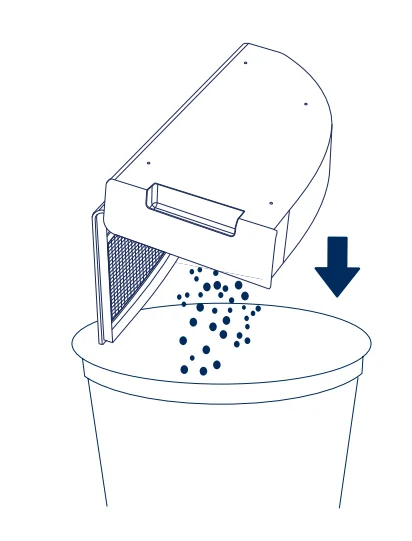
Open the hair collection box and dump out the pet hair inside.
- Step 4
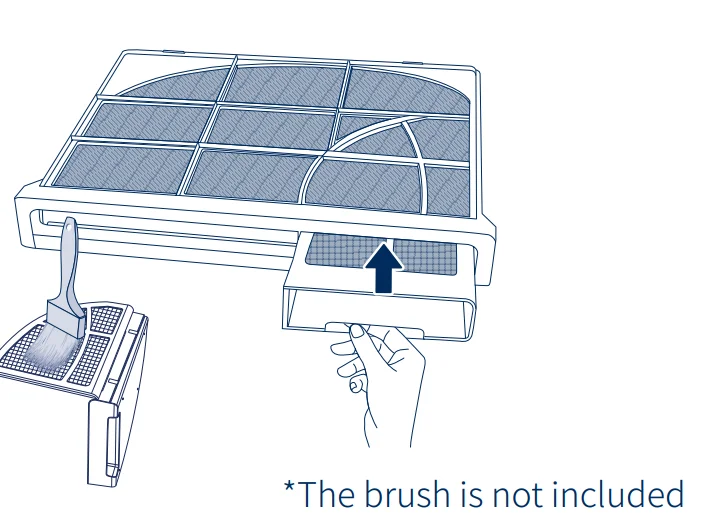
Use a soft brush or vacuum using a brush attachment(not included) to clean the prefilter.
Pre-Filter Cleaning and Maintenance
Pre-Filter Cleaning
- Step 1
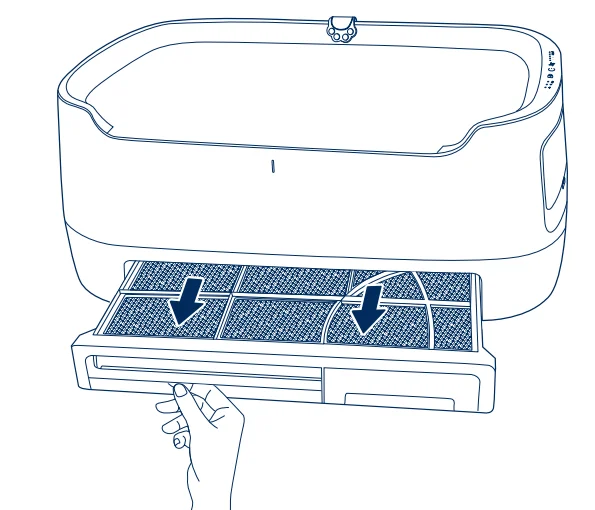
Double-click the On/Off buttonto turn the device off and unplug the power adapter.
- Step 2
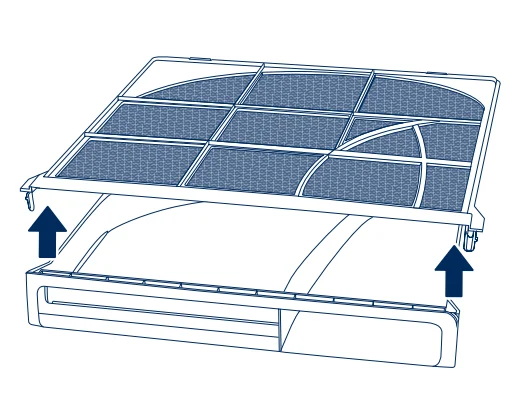
Pull out the hair collection unit from the bottom of the device.
- Step 3
Gently lift the pre-filter.
- Step 4
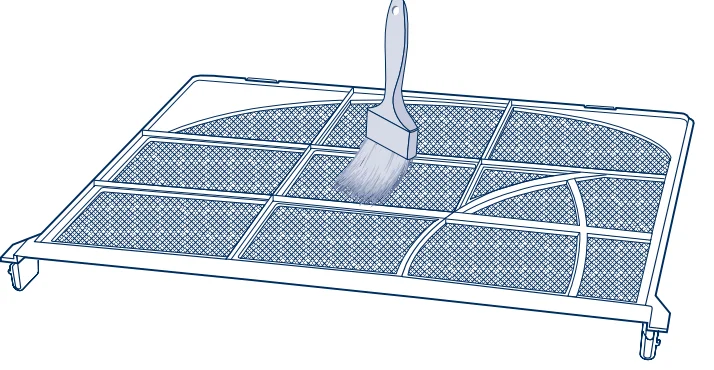
Use a soft brush or vacuum using a brush attachment(not included) to clean the prefilter.
- Step 5
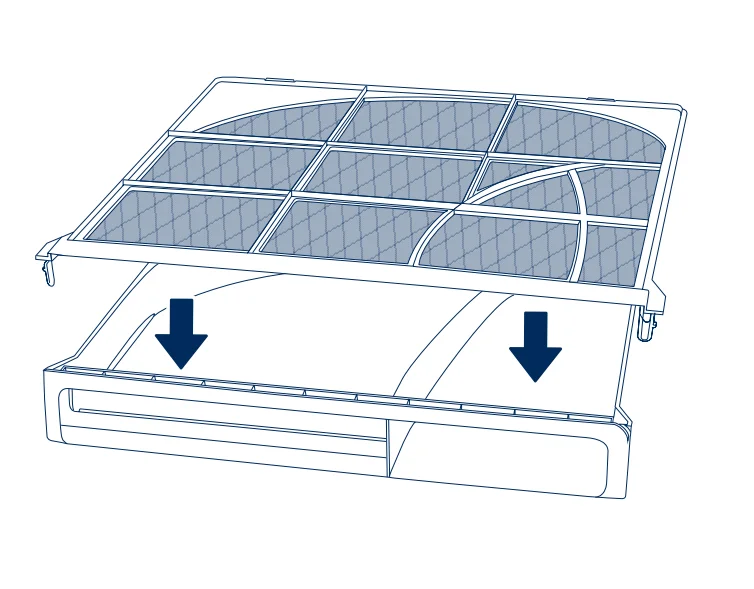
Reattach the cleaned pre-filter to the base of the hair collection unit.
- Step 6
Reinstall the hair collection unit to its original position.
Air Quality Indicator
Air Quality Conditions
The PetAir pet air purifier is equipped with a laser particle sensor to monitor the concentration of fine particulate matter (including PM1, PM2.5, and PM10) in real-time. In addition, the purifier includes a TVOC (Total Volatile Organic Compounds) sensor to detect levels of indoor volatile gases. The LED indicator uses a five-color display system for excellent air quality.

Maintenance Information
To keep your PetAir purifier in optimal condition, regular maintenance is essential. Please follow these recommendations when cleaning your appliance.
Warning: RISK OF ELECTRIC SHOCK – All servicing instructions are for use by qualified personnel only. To reduce the risk of electric shock, do not perform any maintenance other than that contained in the user manual unless you are qualified to do so. Otherwise, do not perform any maintenance other than that contained in the user manual.
General Information
- Before maintenance, disconnect the PetAir purifier from the main power supply.
- Never clean your PetAir purifier with gasoline, chemical solvents, or corrosive materials, as these agents may damage the appliance.
- Do not wash the main filter; it is not washable or reusable.
Cleaning
- Cleaning and maintenance by the user must not be carried out by children.
- Do not use any aggressive cleaning agents or solvents, hard brushes, metal or sharp objects to avoid damaging the devices.
- Wipe the exterior of the PetAir purifier with a soft, clean cloth.
- Clean the inside of the filter housing with a soft, clean cloth.
- Clean and check the power adapter and power plug for wear and damage.
- We recommend cleaning the pre-filter and hair collection box with a soft brush (soft brush not included).
- Never immerse the motor section of your PetAir purifier in water or other liquids during cleaning. Never hold the product under running water.
- Make sure that no water penetrates the PetAir purifier.
Moving the Device
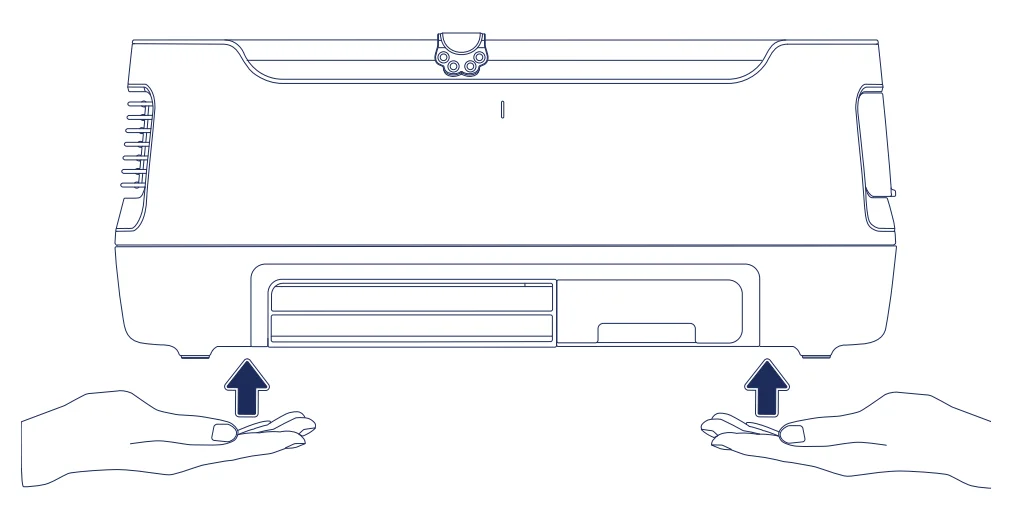
Important Tips! When moving the appliance, ensure the power adapter and power cord are unplugged.
- Place your hands left and right under the device.
- Lift the device straight up and carry it carefully.
Troubleshooting
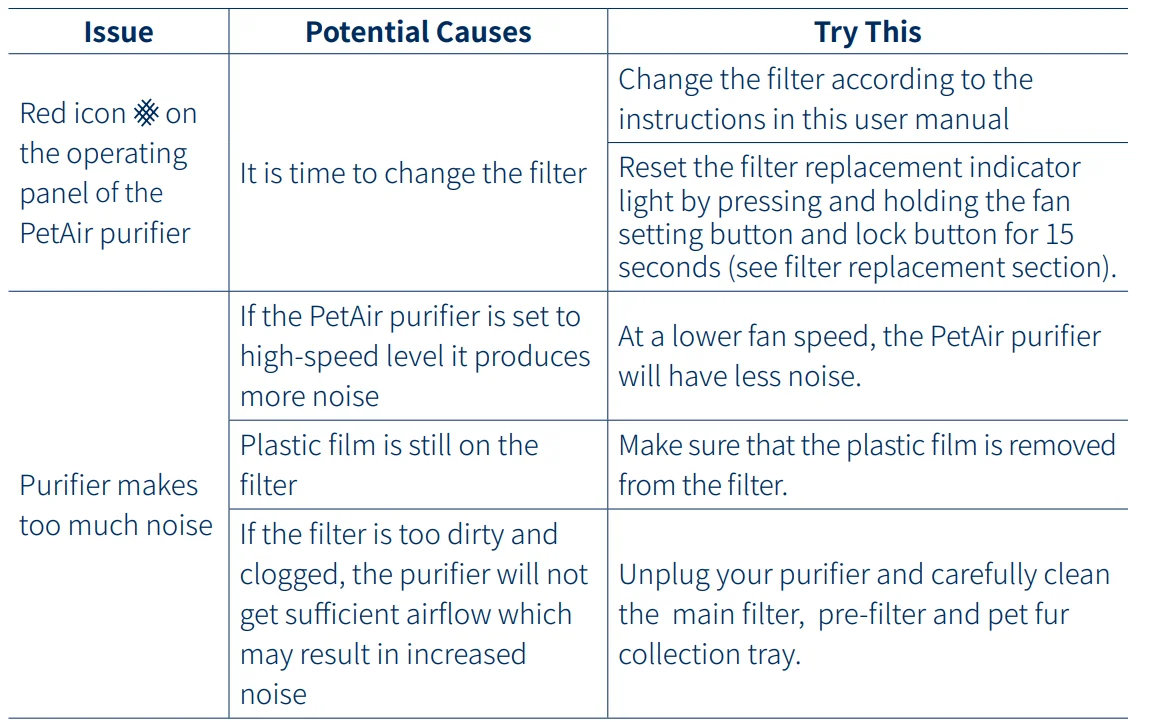
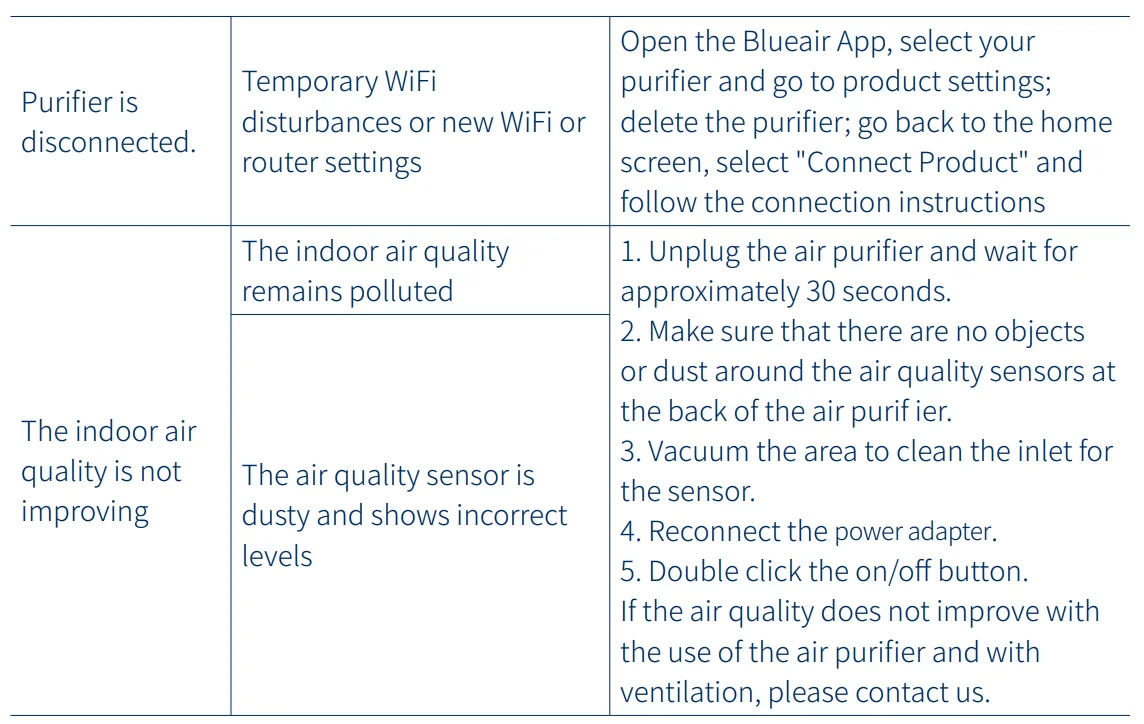
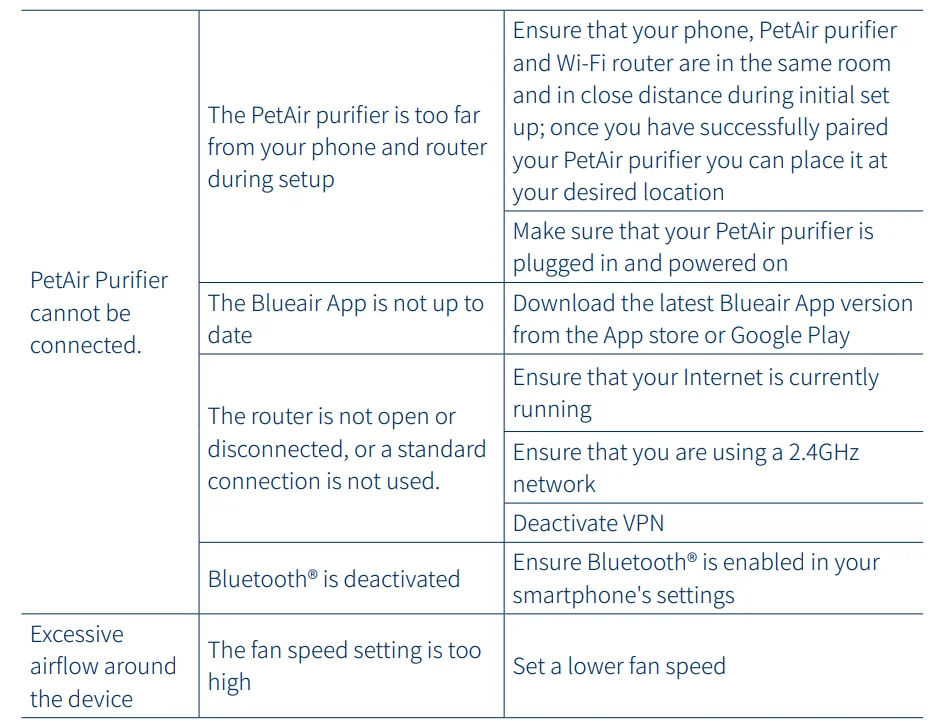
For more information and troubleshooting tips, please check the support page on www.blueair.com.
Disposal, Support, and Warranty
Disposal and Recycling
The PetAir purifier should be disposed of or recycled as electrical waste, and the filter should be disposed of as regular waste. If you have questions regarding the disposal and recycling of your device, please contact your local recycling facility or your Blueair retailer.
Help and Support
If you have questions about your product, please visit www.blueair.com or contact your local Blueair retailer.
Limited Warranty
The PetAir purifier has a limited warranty of 3 years.
Regulatory Information
WARNING: Changes or modifications to this appliance not expressly approved by the party responsible for compliance could void the user’s authority to operate the equipment.
Note! This equipment has been tested and found to comply with the limits for a Class B digital device, pursuant to Part 15 of the FCC Rules. These limits are designed to provide reasonable protection against harmful interference in a residential installation. This equipment generates, uses, and can radiate radio frequency energy and, if not installed and used in accordance with the instructions, may cause harmful interference to radio communications.
However, there is no guarantee that interference will not occur in a particular installation. If this equipment does cause harmful interference to radio or television reception, which can be determined by turning the equipment off and on, the user is encouraged to try to correct the interference by one or more of the following measures:
- Reorient or relocate the receiving antenna.
- Increase the separation between the equipment and receiver.
- Connect the equipment into an outlet on a circuit different from that to which the receiver is connected.
- Consult the dealer or an experienced radio/TV technician for help.
This device complies with Part 15 of the FCC Rules. Operation is subject to the following two conditions:
- This device may not cause harmful interference.
- This device must accept any interference received, including interference that may cause undesired operation.
This Class B digital apparatus complies with Canadian ICES-003. This device contains licence-exempt transmitter(s)/receiver(s) that comply with Innovation, Science and Economic Development Canada’s license-exempt RSS(s). Operation is subject to the following two conditions: (1) This device may not cause interference, and (2) This device must accept any interference, including interference that may cause undesired operation of the device.
FCC/ISED RF Exposure Information: This equipment should be installed and operated with a minimum distance of 4 inches (10 cm) between the radiator and your body.
For more manuals by Blueair, visit ManualsLibraryy
Blueair PetAir Pro Air Purifier-FAQs
What makes the Blueair PetAir Pro Air Purifier useful for pet owners?
The Blueair PetAir Pro Air Purifier is designed to reduce pet hair, odors, dander, dust, and airborne allergens. Its advanced filtration system helps keep indoor air fresher and cleaner, making it helpful for homes with cats, dogs, or multiple pets.
Can the Blueair PetAir Pro help with allergies?
Yes, the purifier can help reduce common airborne allergens such as pollen, pet dander, dust, and smoke particles. Cleaner indoor air may improve comfort for people who experience allergy symptoms or mild respiratory irritation.
Is it safe to leave the Blueair PetAir Pro running all day?
Yes, the unit is built for continuous daily operation. Running it throughout the day can maintain consistent air quality and help reduce pollutants that build up indoors over time.
Does the Blueair PetAir Pro remove pet odors?
The purifier is designed to reduce unpleasant smells caused by pets, litter boxes, cooking, and smoke. Its filtration system captures odor-causing particles to help rooms smell fresher.
Can I sleep with the Blueair PetAir Pro in my bedroom?
Yes, many users place the purifier in bedrooms because it operates quietly on lower settings. Cleaner air during sleep may also help create a more comfortable sleeping environment.
Does the Blueair PetAir Pro remove dust from the air?
Yes, it helps capture airborne dust particles before they settle on furniture and floors. Regular use may reduce visible dust buildup in frequently used rooms.
Where should I place the Blueair PetAir Pro for best performance?
Place the purifier in an open area with good airflow, away from walls or blocked corners. For bedrooms, positioning it a few feet from the bed can improve airflow around your sleeping area.
How often should I replace the filter?
Filter replacement depends on room conditions and usage, but many users replace filters every several months. The purifier may also include a filter replacement indicator for convenience.
Can the Blueair PetAir Pro help reduce smoke and cooking smells?
Yes, the purifier can help lower airborne smoke particles and household odors from cooking or indoor activities, helping improve overall indoor air freshness.
Is the Blueair PetAir Pro energy efficient?
The purifier is designed to operate efficiently while maintaining strong air-cleaning performance. Many users keep it running daily without a major increase in energy usage.