
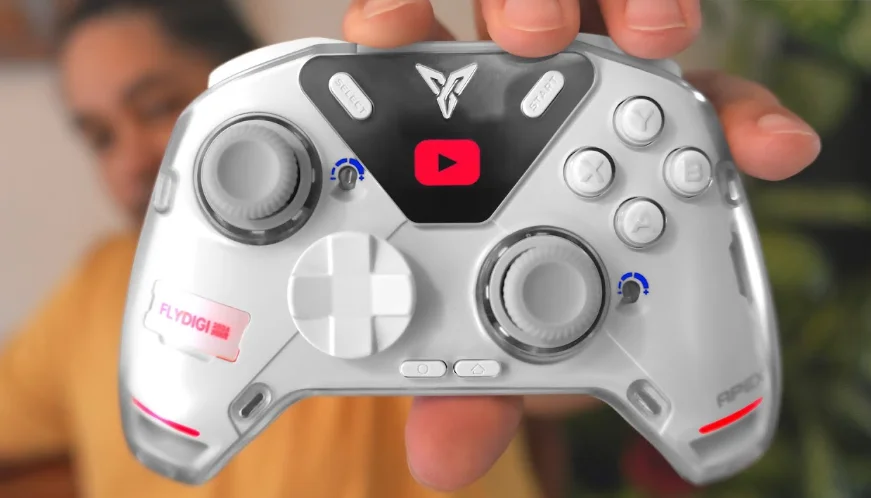

Flydigi Apex 4 Gaming Controller
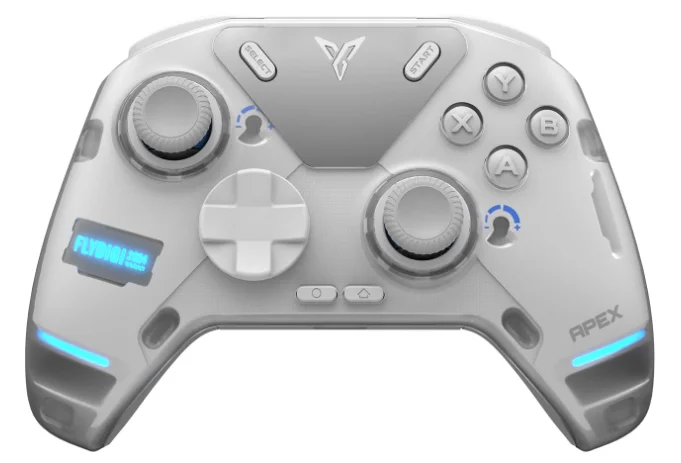
Force Adjustable Joystick Instruction
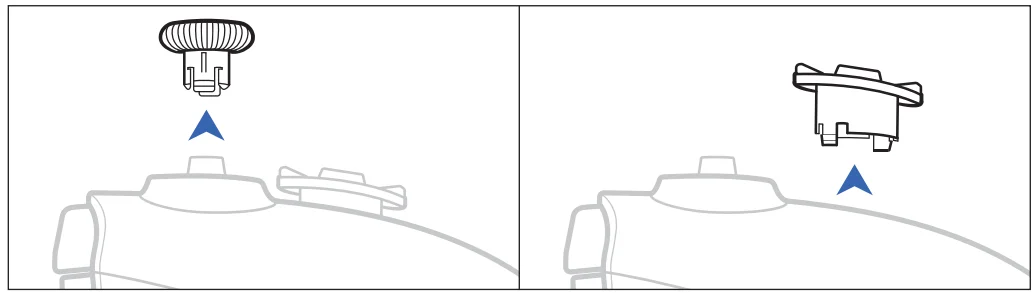
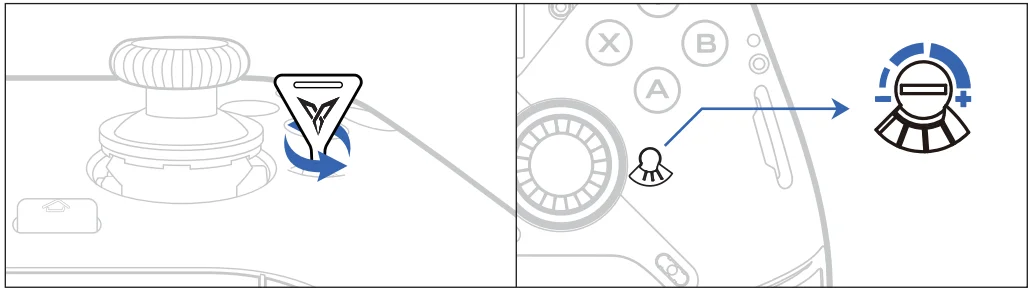
- Remove the joystick cap by pulling it upwards vertically, and take off the D-pad.

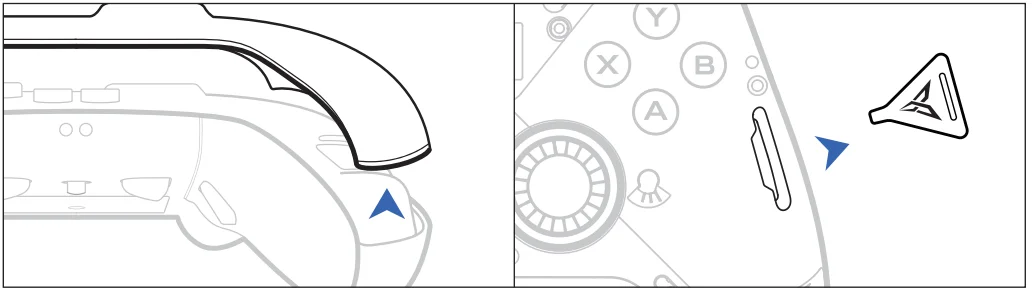
- Remove the magnetic cover from the gap of the grip, and take out the force adjustment paddle from the right side of the controller.

- Adjust the joystick sensitivity by rotating the screw on the right side of the joystick using the adjustment paddle. You can use the tangent position between the edge of the screw and the scale as a reference to remember the current sensitivity of the joystick. Once the adjustment is complete, you can put the joystick cap back on to conveniently experience the sensitivity in real-time.

Force Feedback Trigger Instruction
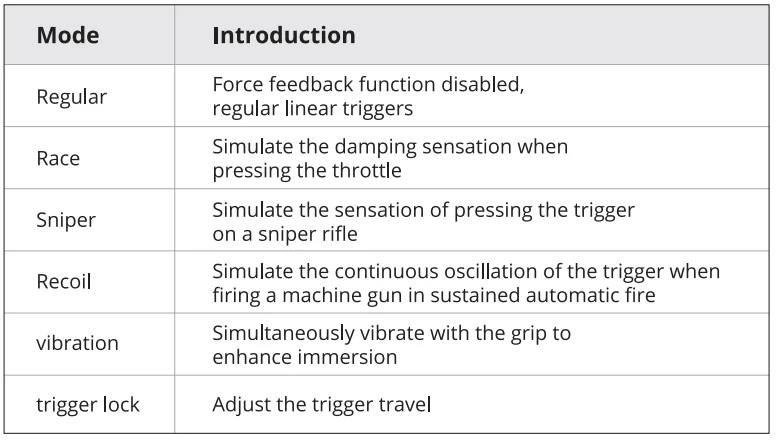
Adaptive Mode
According to the real-time changes in the game scene, the force feedback sensation of the triggers is automatically switched. Please access www.flydigi.com on your computer and download “Flydigi Space Station” to enable adaptive mode.
Custom Mode
Open Flydigi Space Station for more customized settings.
Visit our official website www.flydigi.com to download “Flydigi Space Station”. You can customize buttons, macros, motion sensing, joystick, and other functions.
Connect Your Controller
Pull the reel switch of the controller to ON, then short-press the  button to open the menu on the screen, where you can configure the controller mode and button settings.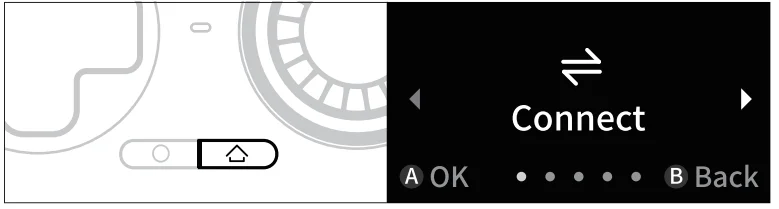
Connect to a PC
Open the on-screen menu, select [Connect] – [PC], and connect the computer and the controller using a receiver or a cable. Home Capture.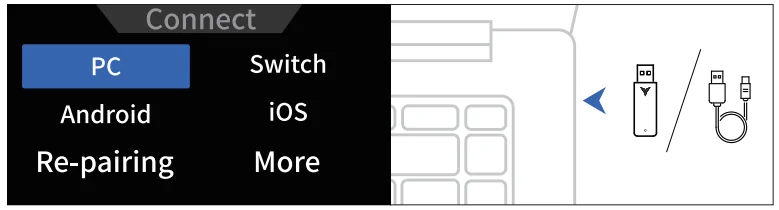
If the controller is not used for a period of time, it will automatically enter sleep mode. Press the button to wake up the controller. You can modify the sleep timeout in the Flydigi Space Station.
Connect to a Switch
Adjust the controller to Switch mode, click on the controller’s icon on the home page of your Nintendo Switch, and go to [Change Grip/Order]. The controller will automatically pair and connect.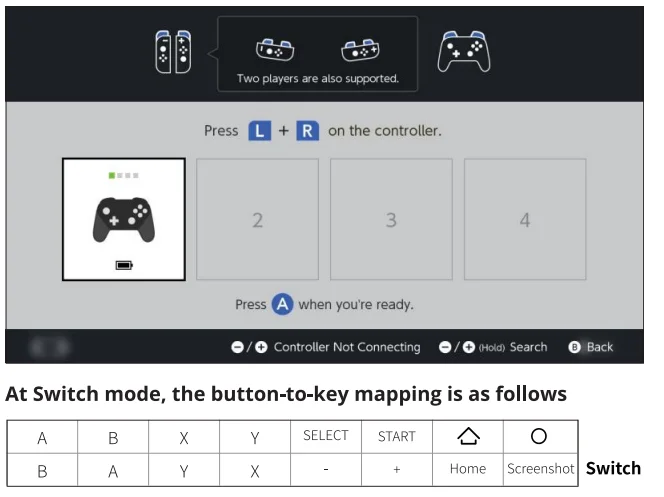
Connect to an Android/iOS device:
- Scan the QR code to download and install the Flydigi Game Hall app.
- Add device – Game Hall – Peripheral Management and click on it.
- Follow the instructions provided in the game hall to connect the controller.


Specifications
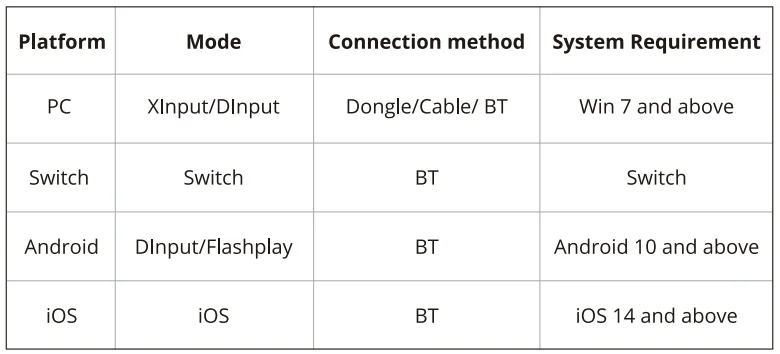
- Xinput Mode: This mode is suitable for games that natively support controllers.
- Dinput Mode: This mode is suitable for emulator games that natively support controllers.
- Flashplay Mode: This mode is suitable for mobile games that do not support controllers. It requires the use of the Flydigi Game Hall app as a companion.
- Wireless RF: BT 5.0, BT 5.0 BLE
- Operating Distance: Less than 10 meters
- Battery Information: Rechargeable lithium-ion battery, battery capacity 1500mAh, charging time 3-4 hours, charging voltage 5V, charging current 1000mA
- Operating Current: Current less than 80mA during use (excluding motors and force feedback triggers), current less than 0.1 mA in standby mode
- Temperature Range: Use and store between -10°C and 50°C.
Appearance
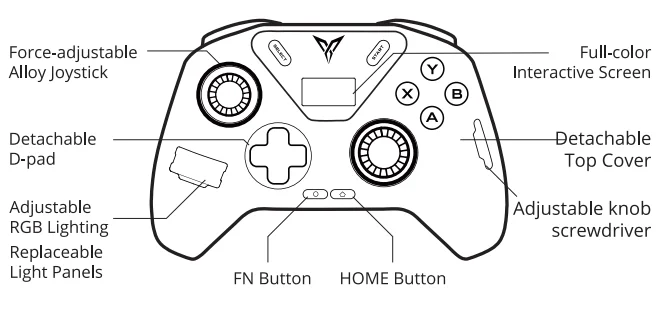
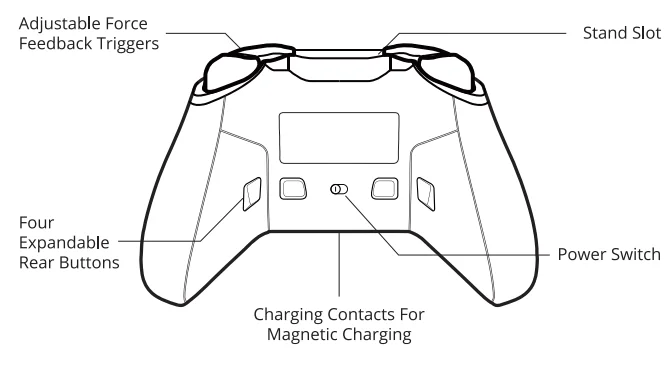
FAQ
Q: The controller BT cannot connect.
A: In the screen menu – Connect, click Re-pairing. The controller will display “Pairing” at this time. Open the device’s BT settings and reconnect.
Q: The dongle connection signal is unstable. (delay/disconnect, etc.)
A: If there are many 2.4GHz signals in the vicinity, it may cause interference. It is recommended to use a USB extension cable between the dongle and the computer to enhance the signal.
Q: Joystick/trigger/motion sensor has anomalies?
A: Install the Flydigi Space Station on your computer, enter the test page, and follow the instructions to calibrate the controller.
The name and content of harmful substances in the product
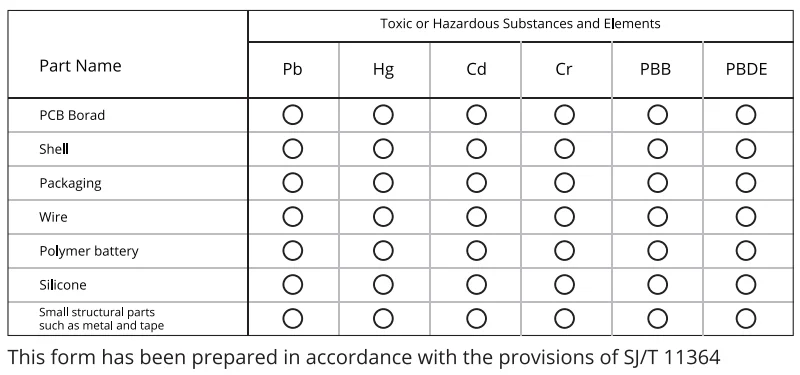
 Indicates that the content of the hazardous substance in all homogeneous materials of this part is within the limit specified in GB/T 26572-2011. Require the following
 Indicates that the content of the hazardous substance in at least one homogeneous material of the component exceeds the provisions of GB/T 26572-2011, the limited requirements.
 Indicates that the content of the hazardous substance in all homogeneous materials of this part is within the limit specified in GB/T 26572-2011. Require the following
 Indicates that the content of the hazardous substance in at least one homogeneous material of the component exceeds the provisions of GB/T 26572-2011, the limited requirements.
For More Manuals By Flydigi, Visit ManualsLibraryy.
Flydigi Apex 4 Gaming Controller-FAQs
What is the Flydigi Apex 4 Gaming Controller?
The Flydigi Apex 4 is a premium wireless gaming controller designed for PC, Nintendo Switch, Android, and iOS devices. It features Hall effect joysticks, adaptive triggers, customizable back buttons, and an interactive display, making it a strong alternative to high-end pro gaming controllers.
Does the Flydigi Apex 4 use Hall effect sticks?
Yes, the Apex 4 uses Hall effect thumbsticks that rely on magnetic sensors instead of physical contact. This design helps reduce joystick drift, improves long-term durability, and provides smoother movement accuracy compared to traditional analog stick mechanisms.
What makes the Flydigi Apex 4 different from other controllers?
The Apex 4 stands out because of its adjustable joystick tension, adaptive trigger system, LCD, and extensive customization software. Users can modify trigger resistance, stick sensitivity, vibration settings, and back-button mappings directly through Flydigi’s Space Station software and onboard controls.
Does the Flydigi Apex 4 support adaptive triggers like the PS5 DualSense?
Yes, the controller includes adaptive trigger technology that provides variable resistance during gameplay. Different trigger modes simulate effects like recoil, racing pedal pressure, and trigger locks, creating a more immersive gaming experience similar to Sony’s DualSense controller features.
How good is the Flydigi Apex 4 for competitive gaming?
Many gamers consider the Apex 4 excellent for competitive play due to its 1000Hz polling rate, low-latency wireless connection, and responsive Hall effect sticks. The additional back buttons and adjustable trigger settings also help players react faster in shooters, racing games, and fighting titles.
Is the Flydigi Apex 4 comfortable for long gaming sessions?
Most reviews describe the controller as ergonomic and premium-feeling, although some users mention it feels slightly heavy during extended sessions. The textured grips, responsive buttons, and Xbox-style layout generally provide comfortable handling for long gaming periods.
What platforms are compatible with the Flydigi Apex 4?
The controller supports PC, Nintendo Switch, Android, and iOS connectivity through Bluetooth, wired USB-C, or a 2.4GHz wireless dongle. Some users also attempt PlayStation compatibility through third-party adapters, although official PlayStation support is limited.
What are the common problems reported with the Flydigi Apex 4?
Some users report software issues involving adaptive trigger setup, firmware updates, and gyro performance during rumble use. Others dislike the lack of a 3.5mm headphone jack or mention occasional learning curves when configuring the controller’s advanced customization settings.
How long does the Flydigi Apex 4 battery last?
Battery life typically reaches around 20 hours or more, depending on lighting, trigger effects, and wireless settings. The integrated screen and advanced vibration features may reduce runtime slightly during intensive gaming sessions with heavy customization enabled.
Is the Flydigi Apex 4 worth buying?
The Apex 4 is widely considered one of the best premium third-party gaming controllers for players wanting advanced customization and Hall effect technology. While software quirks and support concerns exist, many gamers praise its responsiveness, build quality, and immersive adaptive trigger performance.