
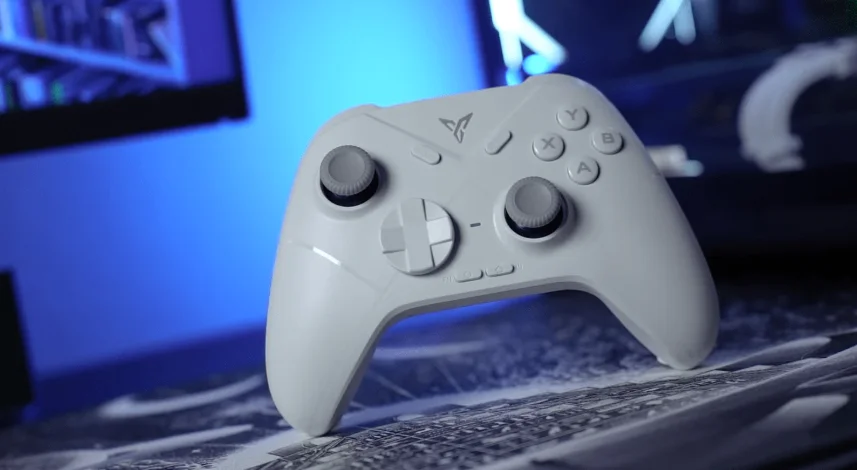

Flydigi Vader Direwolf 3 Game Controller
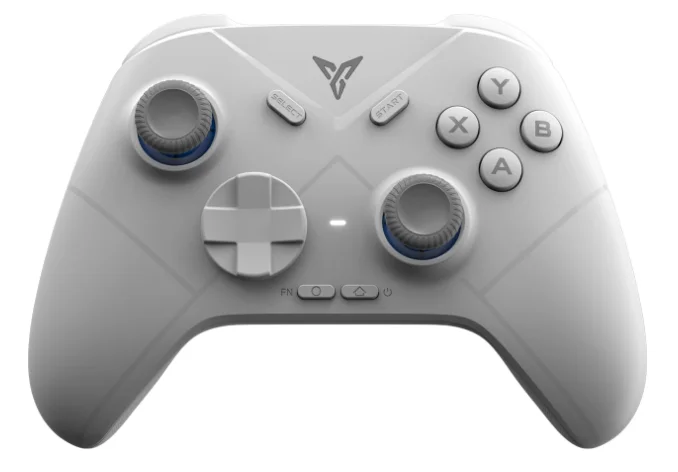
Connect to the computer. 

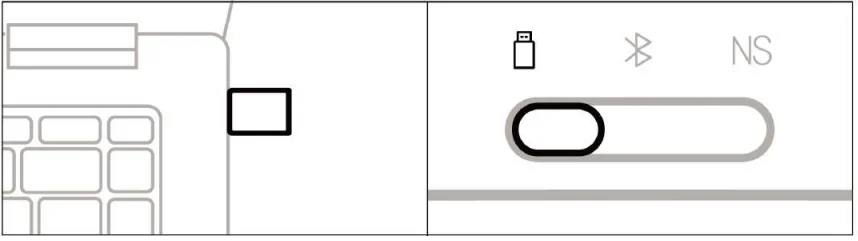
Wireless dongle connection
- Plug the dongle into the computer’s USB port.
- Switch the mode gear to
 .
.
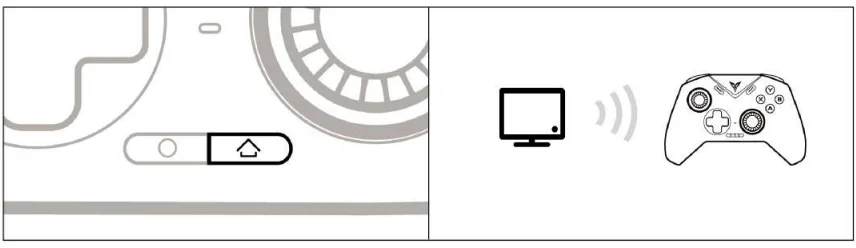
- Press the
 button, and the controller will be connected automatically, and the indicator light will remain white.
 - The next time you use it, press the button once, and the controller will be connected automatically.

 .
.
Wired connection
Connect the computer and the controller through the USB cable, and the indicator light remains white, which indicates the connection is successful.
BT connection
Switch the mode gear to  , press the
  button to wake up the controller, and connect the Xbox Wireless Controller in the computer’s BT settings.
Connect to Switch 

- Click the controller icon on the Switch homepage to enter [Change grip/order].
- Switch the mode gear to NS.

- Press the button, and the controller will be connected automatically, and the indicator light will remain blue.
- The next time you use it, press the button once, and the controller will automatically connect.

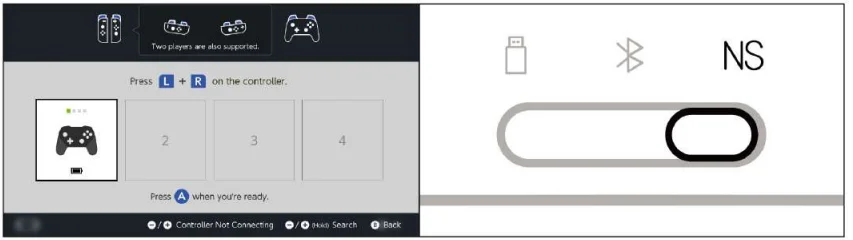
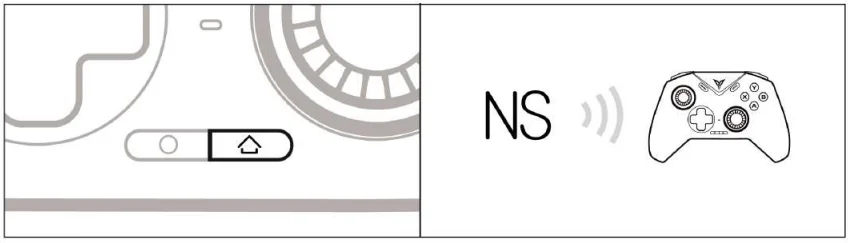
In Switch mode, the key and key-value mapping relationship is as follows.

Connect to an Android/iOS device. 
- Switch the mode gear to .
- Press the button once to wake up the controller.

- Turn on the device’s Bluetooth, connect to the Xbox Wireless Controller, and the controller indicator light remains white.
- The next time you use it, press the button once, and the controller will automatically connect.

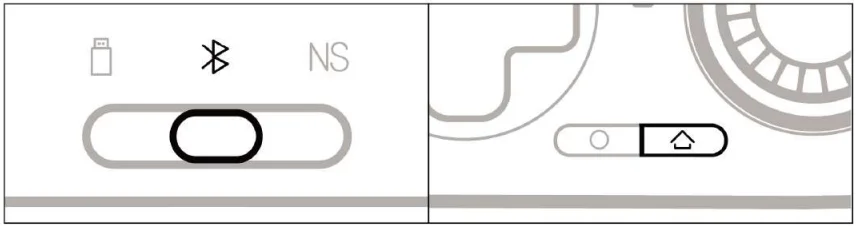
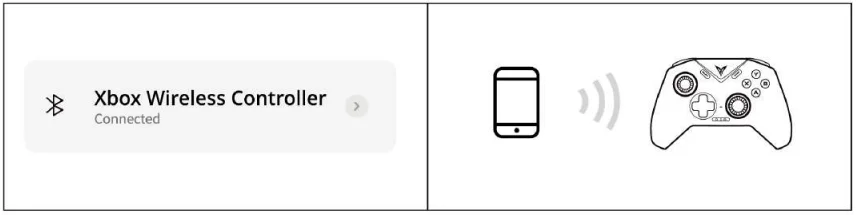
More Customizable Settings in the Flydigi Space Station
Visit our official website www.flydigi.com to download “Flydigi Space Station”. You can customize buttons, macros, motion sensing, joystick, and other functions.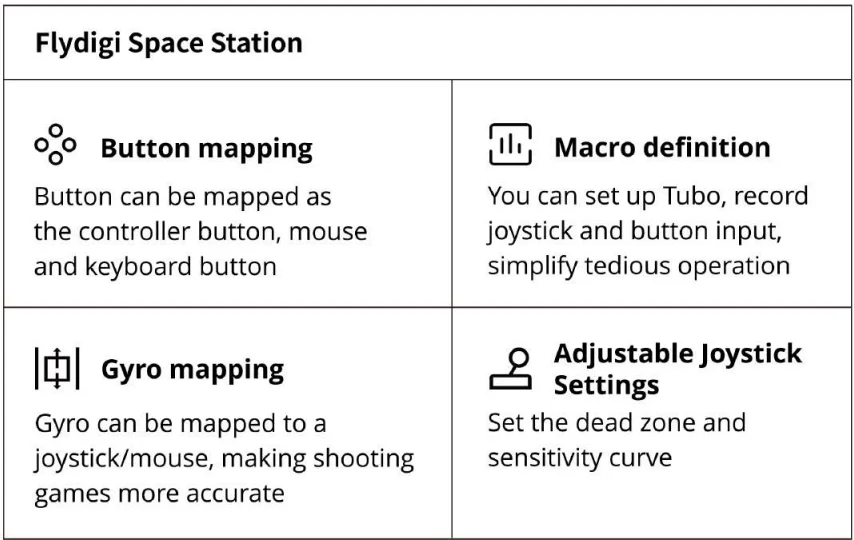
Basic operations
- Power on: Press the button once.
- Power off: switch back to gear. The controller will automatically turn off if inactive for 15 minutes.
- Low Power: The indicator light flashes red.
- Charging when the power is off: the indicator light stays red.
- Fully charged when powered off: the indicator light stays green.
Specification
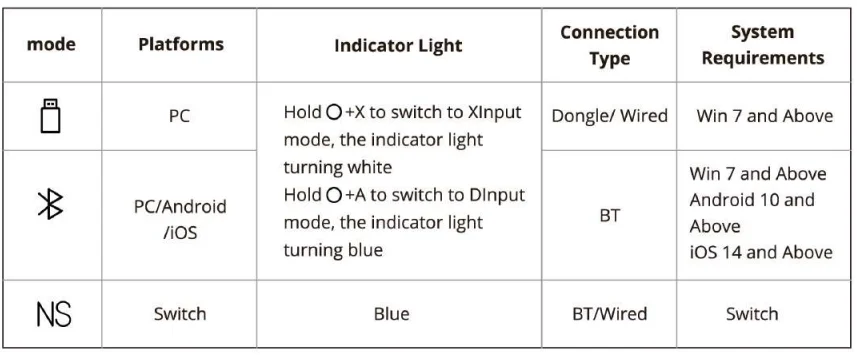
Note: Most games on PC support XInput mode, but some older games may only support DInput mode.
Wireless RF: BT 5.0
- Service distance: less than 10 meters
- Battery information: rechargeable lithium-ion battery, battery capacity 800mAh, charging time 2 hours, charging voltage 5V, charging current 800mA.
- Operating current: less than 40mA when in use, less than 10µA in standby.
- Temperature range: use and storage at -10°C ~ 50°C.
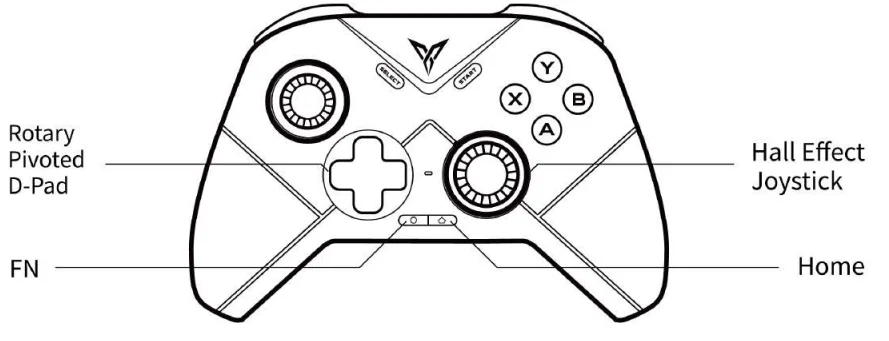
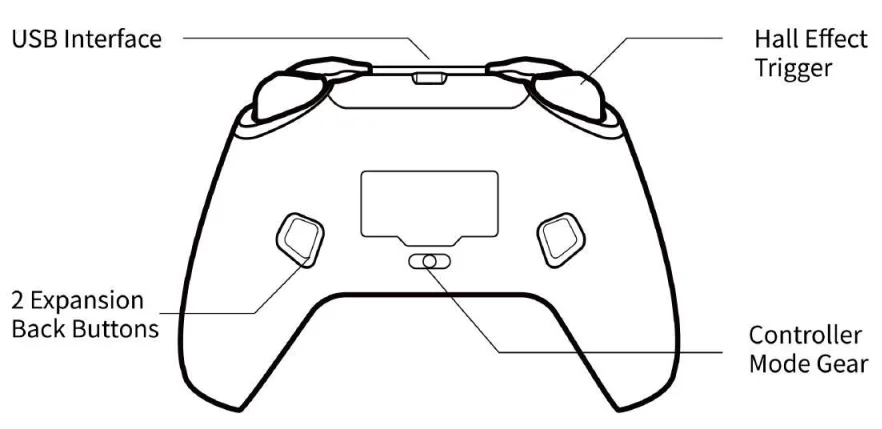
Appearance
Q & A
Q: Any delays or disconnections occur when the dongle is connected to the computer?
A: The issue is generally caused by signal interference. It is recommended to add a USB extension cable between the dongle and the computer. For more details, please consult customer service.
Q: How to upgrade the controller firmware?
A: Install the Flydigi Space Station on the computer, or install the Flydigi Game Hall on the mobile phone, and upgrade the firmware according to the software boot.
Q: Any abnormalities in the joystick/trigger/motion sensing?
A: Install the Flydigi Space Station on the computer, enter the test page, and adjust the controller under the guidance.
The name and content of harmful substances in the product
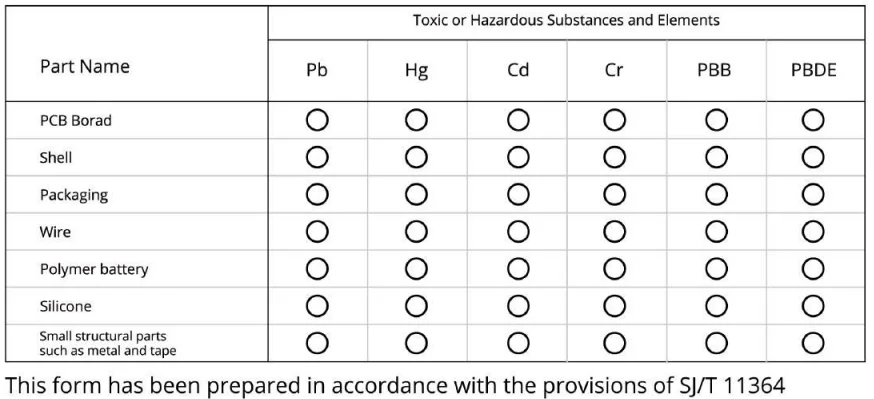
 Indicates that the content of the hazardous substance in all homogeneous materials of this part is within the limit specified in GB/T 26572-2011. Requires the following:
 Indicates that the content of the hazardous substance in at least one homogeneous material of the component exceeds the provisions of GB/T 26572-2011. The limited requirements.
 Indicates that the content of the hazardous substance in all homogeneous materials of this part is within the limit specified in GB/T 26572-2011. Requires the following:
 Indicates that the content of the hazardous substance in at least one homogeneous material of the component exceeds the provisions of GB/T 26572-2011. The limited requirements.
FCC Statement
FCC Statement: This device complies with Part 15 of the FCC Rules. Operation is subject to the following two conditions:
- This device may not cause harmful interference.
- This device must accept any interference received, including interference that may cause undesired operation.
Changes or modifications not expressly approved by the party responsible for compliance could void the user’s authority to operate the equipment. Note: This equipment has been tested and found to comply with the limits for a Class B digital device, pursuant to Part 15 of the FCC Rules. These limits are designed to provide reasonable protection against harmful interference in a residential installation.
This equipment generates, uses, and can radiate radio frequency energy and, if not installed and used in accordance with the instructions, may cause harmful interference to radio communications. However, there is no guarantee that interference will not occur in a particular installation. If this equipment does cause harmful interference to radio or television reception, which can be determined by turning the equipment off and on, the user is encouraged to try to correct the interference by one or more of the following measures:
- Reorient or relocate the receiving antenna.
- Increase the separation between the equipment and receiver.
- Connect the equipment into an outlet on a circuit different from that to which the receiver is connected.
- Consult the dealer or an experienced radio/TV technician for help.
The device has been evaluated to meet general RF exposure requirements. This equipment should be installed and operated with a minimum distance of 20 cm between the radiator and your body.
For More Manuals By Flydigi, Visit ManualsLibraryy.
Flydigi Vader Direwolf 3 Game Controller-FAQs
What is the Flydigi Direwolf 3 Game Controller?
The Flydigi Direwolf 3 is a wireless gaming controller designed for PC, Nintendo Switch, Android, and other compatible platforms. It offers Hall effect sticks, customizable controls, low-latency connectivity, and ergonomic handling aimed at gamers seeking reliable performance at a more affordable price point.
Does the Flydigi Direwolf 3 use Hall effect joysticks?
Yes, the Direwolf 3 features Hall effect thumbsticks that use magnetic sensing technology instead of traditional contact-based mechanisms. This design helps reduce joystick drift, improves long-term durability, and delivers smoother control precision during competitive and casual gaming sessions.
What devices are compatible with the Flydigi Direwolf 3?
The controller supports PC, Nintendo Switch, Android devices, and some additional platforms through Bluetooth, wired USB-C, and 2.4GHz wireless connections. Its multi-platform compatibility makes it suitable for gamers who regularly switch between different gaming systems and devices.
Is the Flydigi Direwolf 3 good for competitive gaming?
Many users consider the Direwolf 3 suitable for competitive gaming because of its responsive buttons, low-latency wireless performance, and accurate Hall effect sticks. The controller performs especially well in shooters, racing games, and action titles that require fast reactions and precise movements.
Does the Flydigi Direwolf 3 have customizable buttons?
Yes, the controller includes programmable buttons and adjustable settings through Flydigi software. Users can remap controls, modify trigger sensitivity, and create personalized gaming profiles to improve comfort and gameplay performance across different genres and gaming preferences.
How long does the battery last on the Flydigi Direwolf 3?
Battery life depends on vibration intensity, wireless mode, and gameplay duration, but many users report extended playtime on a single charge. The controller also supports USB-C charging, allowing faster recharging and uninterrupted gaming during longer sessions.
Is the Flydigi Direwolf 3 comfortable for long gaming sessions?
Most users describe the controller as lightweight and ergonomic with textured grips that help improve comfort during extended gameplay. Its familiar layout and balanced design reduce hand fatigue, making it practical for long gaming sessions across multiple gaming genres.
What are the common problems with the Flydigi Direwolf 3?
Some users report occasional software setup difficulties, inconsistent vibration behavior, and compatibility issues with certain games. Others mention that the controller’s plastic build feels less premium compared to higher-end Flydigi models, although overall performance remains positively reviewed.
Does the Flydigi Direwolf 3 support wireless gaming?
Yes, the controller supports Bluetooth and 2.4GHz wireless connectivity for low-latency gaming performance. It also offers wired USB-C connectivity, giving users flexibility when choosing between wireless convenience and wired stability for competitive gameplay situations.
Is the Flydigi Direwolf 3 worth buying?
The Flydigi Direwolf 3 is considered a strong budget-friendly gaming controller because it combines Hall effect sticks, wireless connectivity, and customizable controls at a relatively affordable price. Many gamers view it as a good value option for multi-platform gaming setups.