
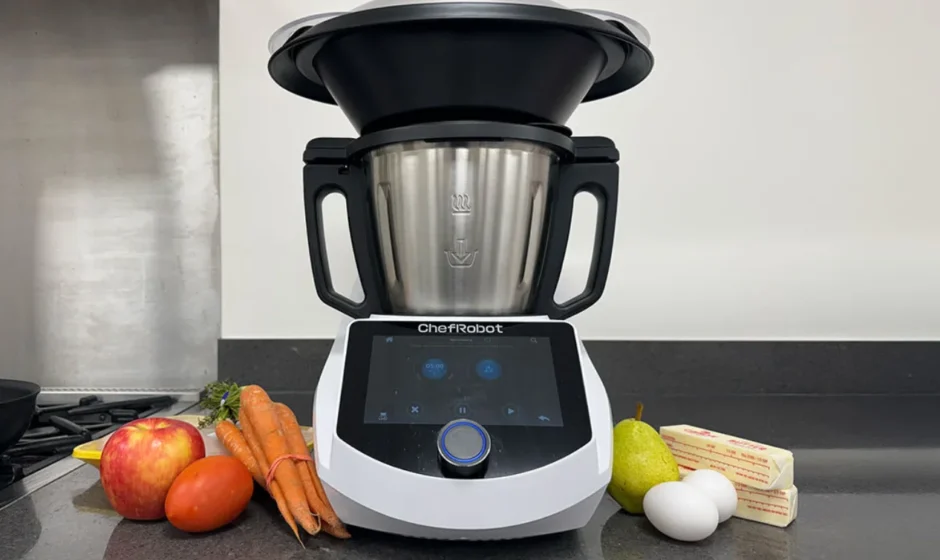

ChefRobot CR-8 Food Processor
IMPORTANT SAFEGUARDS
When using electrical appliances, basic safety precautions should always be followed, including the following:
- Read all instructions.
- To protect against the risk of electrical shock, do not put the plug, power supply cord, or the main body in water or other liquids.
- This appliance is not intended for use by persons (including children) with reduced physical, sensory, or mental capabilities, or lack of experience and knowledge, unless they are closely supervised and instructed concerning use of the appliance by a person responsible for their safety. Close supervision is necessary when any appliance is used by or near children. Children should be supervised to ensure that they do not play with the appliance.
- Turn the appliance OFF, then unplug from the outlet when not in use, before assembling or disassembling parts, and before cleaning. To unplug. Grasp the plug and pull it from the outlet. Never pull from the power cord.
- Do not touch moving parts. Do not attempt to defeat the cover interlock mechanism.
- Do not operate any appliance with a damaged cord or plug, or after the appliance malfunctions, or is dropped or damaged in any manner. Contact the manufacturer at [email protected] for information on examination, repair, or adjustment.
- The use of attachments, not recommended by the manufacturer, may cause a risk of injury to persons.
- Do not use outdoors. –
- Do not let the cord hang over the edge of the table or counter, or touch hot surfaces.
- Do not place on or near a hot gas or electric burner, or in a heated oven.
- Do not touch hot surfaces. Use handles or knobs.
- Keep hands and utensils out of the machine during use to reduce the risk of severe injury to persons or damage to Chef Robot. The spatula may be used, but must be used only when the machine is not running.
- The blade assembly is sharp. When handling the blade assembly, always handle it carefully by the top. To avoid risk of injury, when pouring out the contents, be careful to grasp with two hands when pouring out food or liquid.
- Always operate the machine with the cover in place.
- Allow to cool before assembling or disassembling parts and before cleaning the appliance.
- To reduce the risk of injury, never place the mixing blade assembly on the base without the bowl properly attached. Never place the mixing blade in the mixing bowl without locking it in place by rotating the latch on the underside of the mixing bowl clockwise.
- Unplug from the outlet when not in use and before cleaning. Allow to cool before putting on or taking off parts.
- Extreme caution must be used when moving an appliance containing hot liquids.
- Always attach the plug to the appliance first, then plug the cord into the wall outlet. To disconnect, turn any control to “off”, then remove the plug from the wall outlet.
SAVE THESE INSTRUCTIONS
To assure continued FCC compliance: FEDERAL COMMUNICATIONS COMMISSION INTERFERENCE STATEMENT
This equipment has been tested and found to comply with the limits for a Class B digital device, pursuant to Part 15 of the FCC Rules. These limits are designed to provide reasonable protection against harmful interference in a residential installation. This equipment generates, uses and can radiate radio frequency energy and, if not installed and used in accordance with the instructions, may cause harmful interference to radio communications. However, there is no guarantee that interference will not occur in a particular installation. If this equipment does cause harmful interference to radio or television reception, which can be determined by turning the equipment off and on, the user is encouraged to try to correct the interference by one or more of the following measures:
- Reorient or relocate the receiving antenna.
- Increase the separation between the equipment and receiver.
- Connect the equipment into an outlet on a circuit different from that to which the receiver is connected.
- Consult the dealer or an experienced radio/TV technician for help.
This equipment complies with FCC radiation exposure limits set forth for an uncontrolled environment. This equipment should be installed and operated with a minimum distance of 20cm between the radiator & your body.
About your ChefRobot
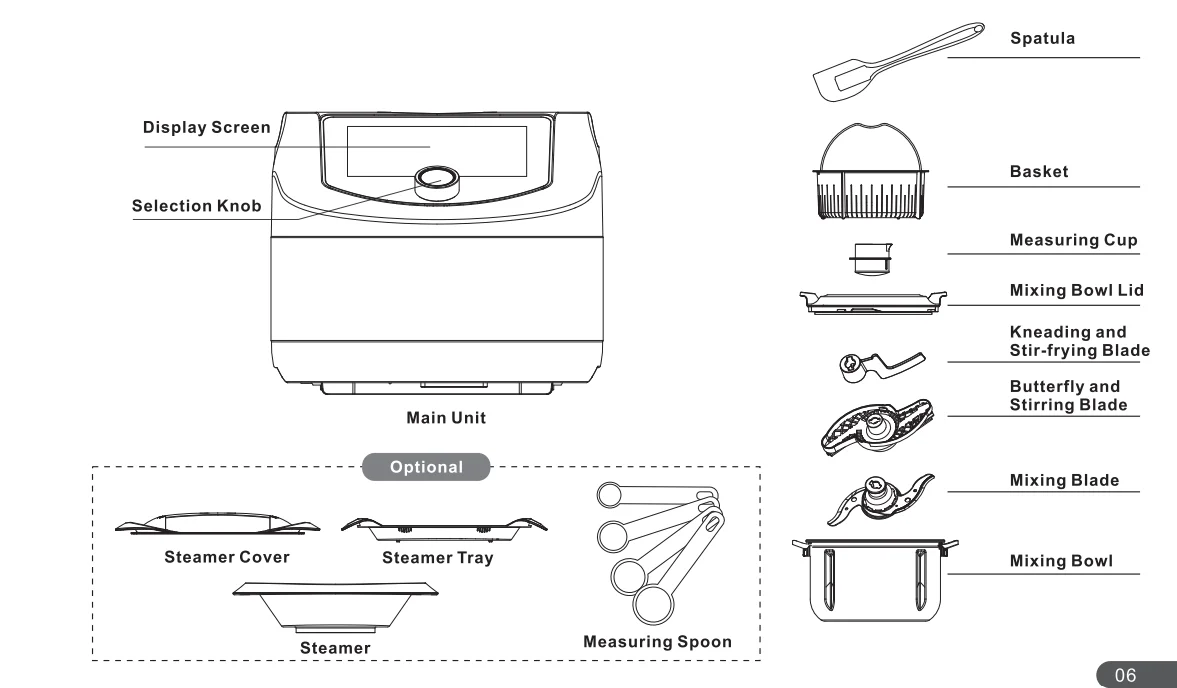
ChefRobot Overview
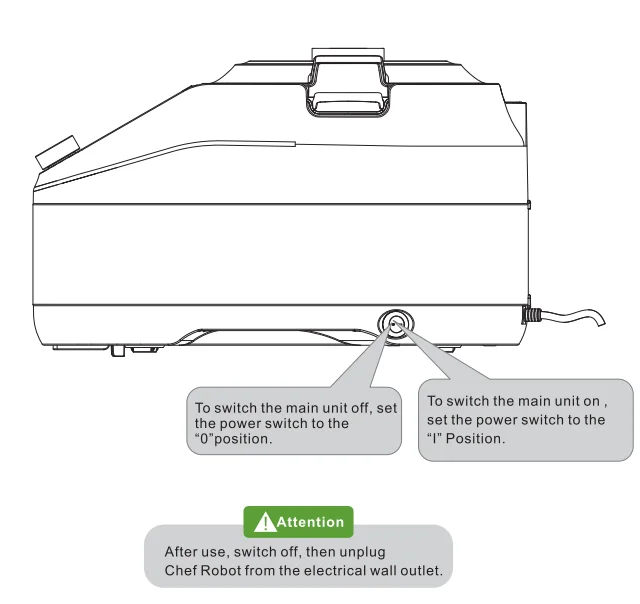
Switch On/Off
Connect the power cable to a suitable electrical wall outlet.
Main Functions
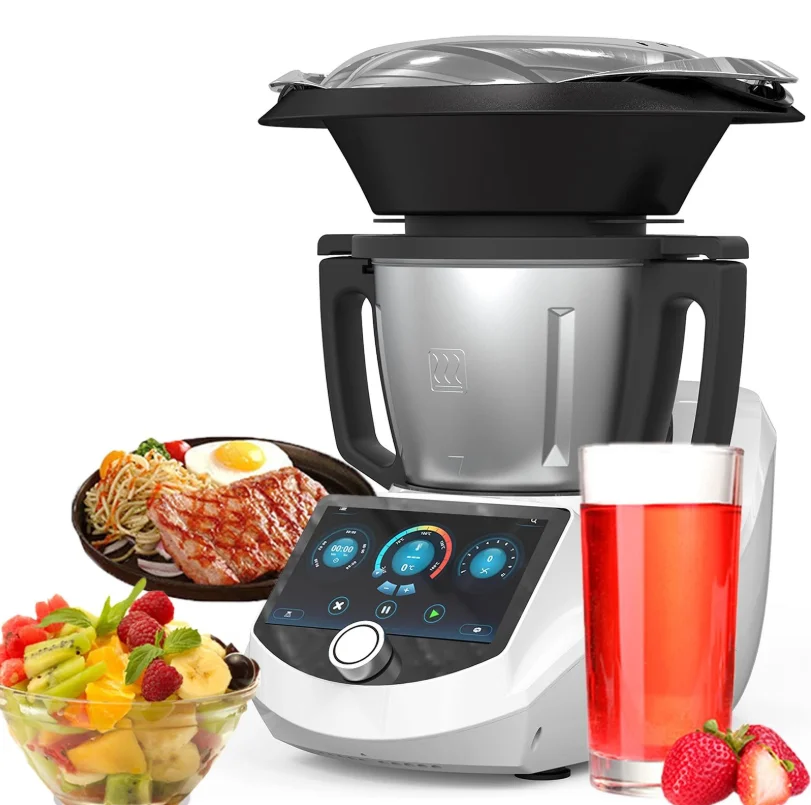
Chef Robot is a multifunctional smart kitchen cooking machine that allows you to create and share your own recipes with the app. It makes you find fun in cooking.
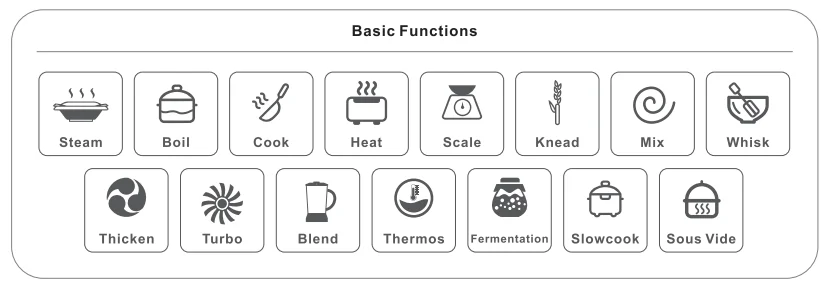
ChefRobot is intended for household use only and not for commercial use. It Is Intended to be used in dry Indoor areas only.
Installation/Use of Accessories
The Use Instruction of Three Blades
Mixing Blade
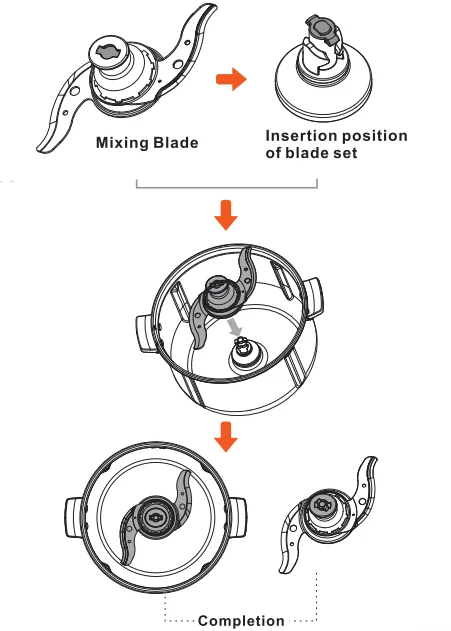
How to install the blade set
The vegetable blade has a powerful chopping function and adopts a special design that is easy to install and disassemble.
- For your safety, the mixing bowl must be removed from the machine before installing and removing the blade set.
- Place the mixing bowl on a flat table.
- Hold the upper part of the blade handle with your hand.
- Align the insertion port in the centre of the blade set with the insertion point on the bottom of the mixing bowl.
- According to the specially designed structure, the blade set will automatically rotate while being fixed at the insertion site.
Caution
- For your safety, the mixing bowl must be removed from the machine before installing and removing the blade set.
- The blade set is very sharp, so do not touch the blades during installation and removal to prevent scratches. Be sure to hold the handle for Installation and removal.The blade set is not designed to fall off because of centrifugal force; however, the inverted mixing bowl will fall off by itself in the stopped state. Please do not invert the mixing bowl to prevent the blade head from falling and causing Injury.
- When the machine is running, do not put your hands or other utensils into the mixing bowl to avoid the risk of personal injury or damage to the appliance.
- Do not install the blade while the Ingredients are still on the cutting board. Be sure to install the blade before piecing the Ingredients.
- When using and operating the machine, keep hair and clothing away from the moving parts of the machine.
- When cleaning the blade set, be sure to do it when the mixing bowl is removed or powered off.
How to disassemble the blade set
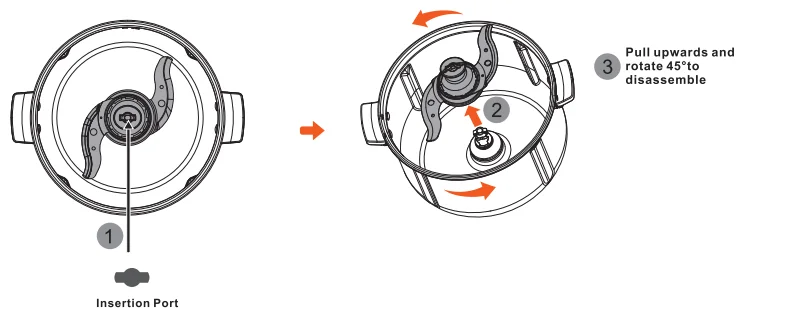
- Hold the upper part of the blade handle
- Rotate the blade set to align with the shape of the insertion site
- Pull upwards and rotate 45°to disassemble
Attention
- When the machine is running, if any liquid leaks into the machine, unplug it.
Butterfly Blade
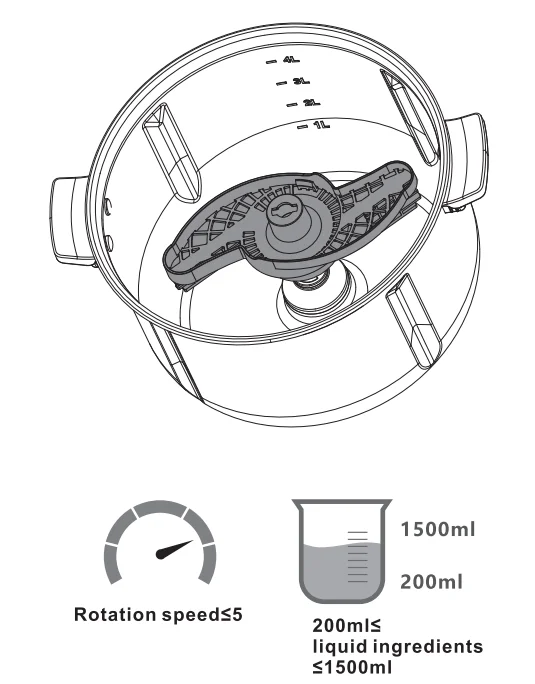
- The methods of installation and removal of the butterfly blade are the same as those of the mixing blade.
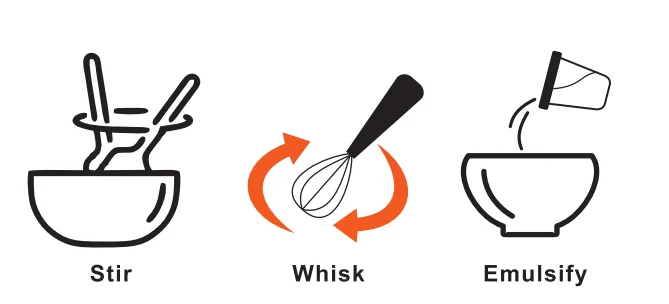
- Butterfly blade is mainly used for stirring viscous foods such as thick soups, seasoning sauces, and baby complementary food, or for foaming, such as making cream and whipping egg whites.
Attentlon
- Ensure that the kneading and stir-frying blade is installed properly before starting to use it. When using a kneading and stirring blade to knead the dough, the amount of flour added cannot exceed 800g. Excess flour can cause the machine to make abnormal noises.
- When using the kneading and stir-frying blade, the speed cannot exceed 3, it will damage the machine.
- When using a kneading and stir-frying blade, do not add ingredients while the machine is running.
Kneading and Stir-frying Blade
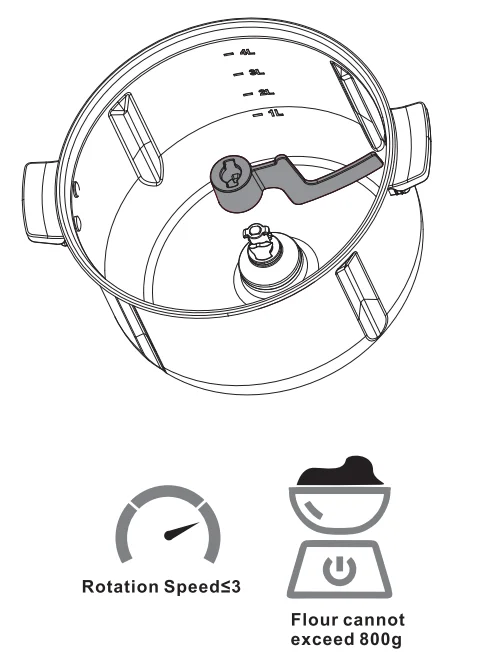
- The method of installation and removal of the kneading and stir-frying blade is the same as that of the mixing blade.
- The kneading and stir-frying blade is mainly used for solid ingredients or very thick ingredients, such as kneading, or for stir-frying ingredients, which plays a role in rolling the ingredients.

Attention
- Ensure that the butterfly stirring blade is installed in place before starting to use it.
- Use the butterfly mixing blade, and the speed cannot exceed 5, it will damage the parts. Use a butterfly stirring blade to create foam, such as when whipping cream or egg whites. The amount of ingredients added must be greater than 200ml and less than 1500ml. Too few ingredients cannot create foam, and too many Ingredients can not achieve good results, and the foam will overflow from the hole of the measuring cup.
- When using the butterfly stirring blade, do not add ingredients while the device is running.
- Do not use the butterfly stirring blade to cook solid or very thick ingredients, as it may damage the parts.
Mixing Bowl
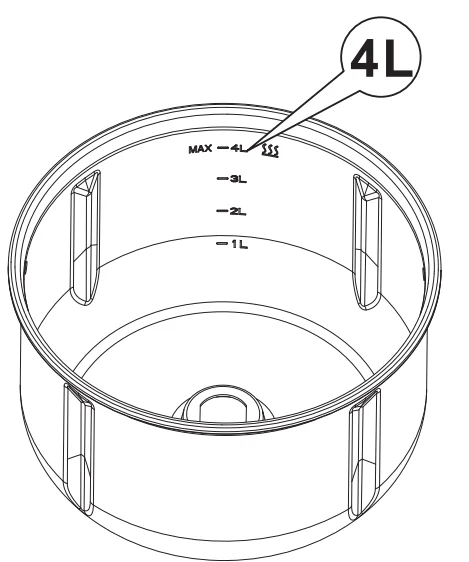
The maximum capacity of the mixing bowl is 4L, and the side of the mixing bowl is marked with a capacity scale. When placing food, do not exceed the maximum capacity scale line.
How to install the mixing bowl
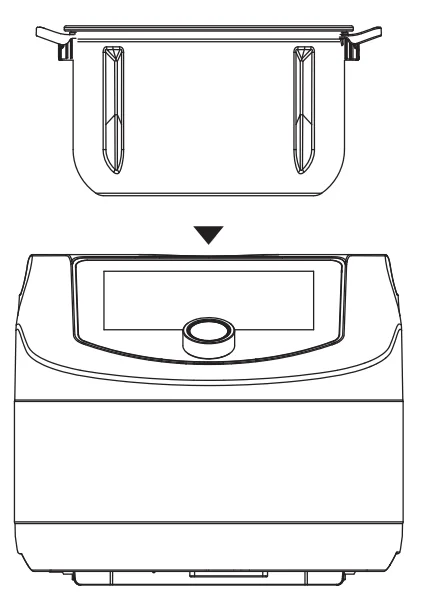
- Install the blade in the mixing bowl first
- Hold the left and right handles of the mixing bowl with both hands. Align the mixing bowl with the centre of the body, and slowly insert it into the body
Caution
- Before installing the mixing bowl, It Is necessary to install the blades first, and then put down the mixing bowl
- The Ingredients In the mixing bowl cannot exceed the maximum capacity scale line of 4L. Filling too many Ing radiants may cause injury.
- During operation, make sure that the measuring cup hole on the mixing bowl lid is not blocked.
- Be careful when moving the mixing bowl to avoid spilling or splashing food from the mixing bowl.
- When it is necessary to remove the mixing bowl after cooking, hold the handle and do not touch the wall to avoid scalding.
Attention
- It is forbidden to use sharp, hard objects such as shovels, stainless steel spoons, steel wool, etc., to rub against the inner wall of the mixing bowl. Sharp, hard objects can scratch the inner wall of the mixing bowl.
Mixing Bowl Lid
The main function of the mixing bowl lid is to cover the mixing bowl when using. When using, make sure that the mixing bowl lid is locked; the machine will not operate.
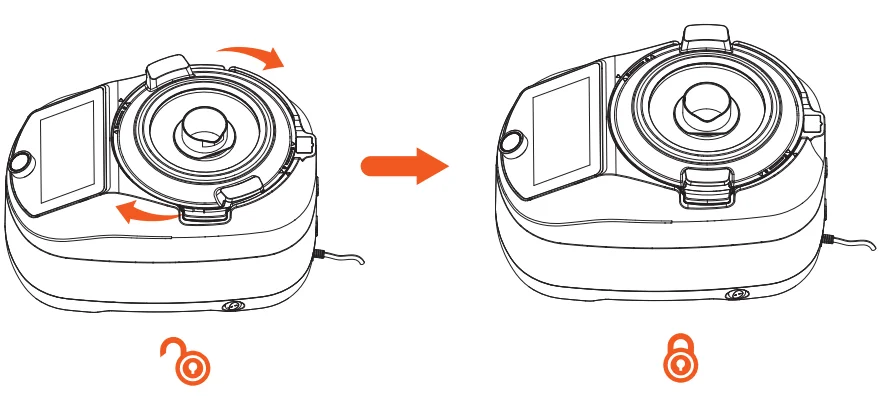
Caution
- Please do not forcefully open the mixing bowl lid during operation. If you want to open the mixing bowl lid, you must first stop the machine and open it after the motor has completely stopped rotating.
- When cooking at high speed, high temperature and in large quantities, be aware that the Inside may spray out if the mixing bowl is opened.
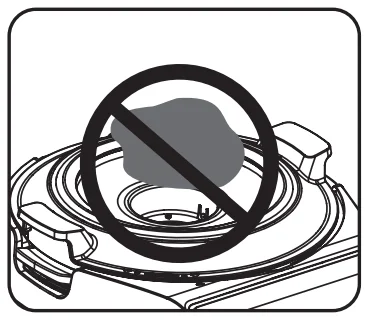
- Do not pour a large volume of granular ingredients from the measuring cup hole

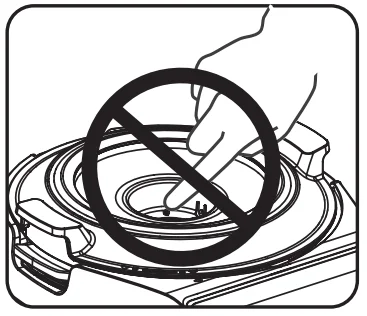
- Do not put fingers or cooking utensils into the measuring cup hole

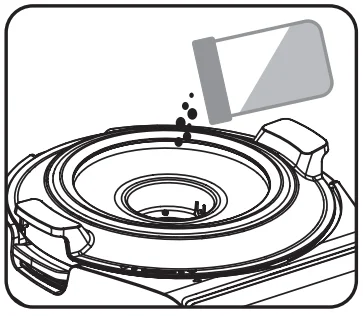
- It’s good to add powdered ingredients such as flour and seasonings
Attention
- When the equipment is running, do not put hands, spoons, spatulas and other cooking tools into the measuring cup hole.
- When the device is running. Do not put large and hard Ingredients Into the measuring cup hole of the mixing bowl lid.
- When the device is running, you can add powdered Ingredients such as flour and spices, or liquid ingredients such as purified water, cooking oil, and seasoning sauce.
Basket
Installation/Disassembly
- The basket is equipped with a metal handle, as shown in the picture. Lift it by the handle and place it inside the mixing bowl, and then place the handle on the edge of the basket.
- To remove it, simply lift it out using the handle.
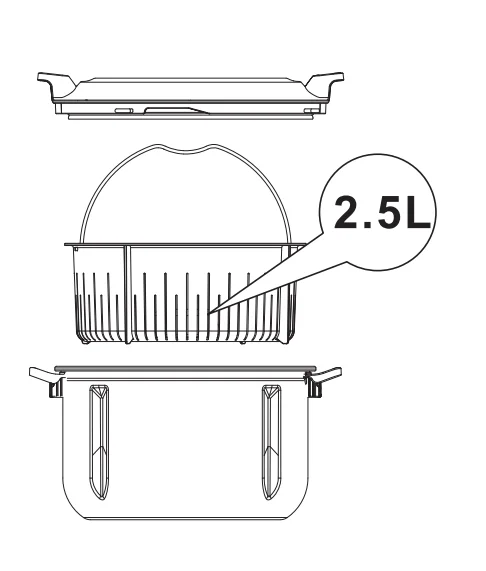
Steamer (optional)
Method and steps of use
- Put the mixing bowl in place, add at least 500ml of water to the mixing bowl bowl, and cover the mixing bowl lid.
- Place the steamer on the mixing bowl lid steadily, so that the bottom of the steamer is embedded in the transparent groove in the middle of the mixing bowl lid.
- Evenly place the ingredients to be steamed in the steamer. If there are multiple ingredients that are not large in size, you can place them separately in the steamer and the steaming rack.
- After placing the ingredients, cover the steamer lid on the steamer.
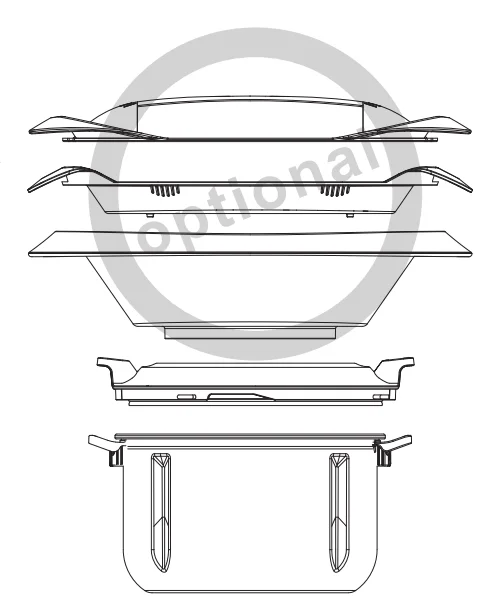
Caution: Do not place too many ingredients in the steamer to prevent them from blocking the steam holes on the aleamer rack and lid.
Icons and User Interface
Main Icons
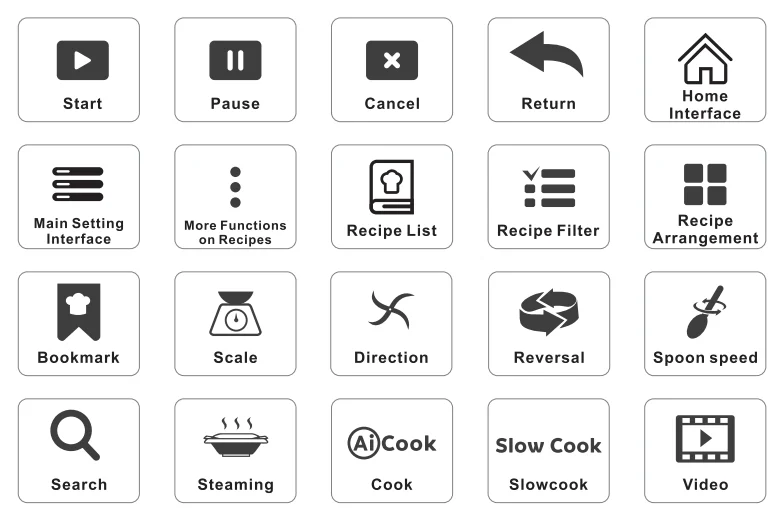
Main User Interface
Opening Screen
After the machine is powered on, press the power switch button on the right rear side of the body, and the display screen wlll llght up with the LOGO. After about 25 seconds, it will enter the operation interface.

Opening Guide
When the device is turned on for the first time, an opening guide will pop up, allowing you to preset 8 items in sequence: ” Language”, “Country and Time Zone”, “WIFI”, “Bind Mobile Phone”, “Power Display”, “Sound”, “Sleep Mode”, and “Unit System”.
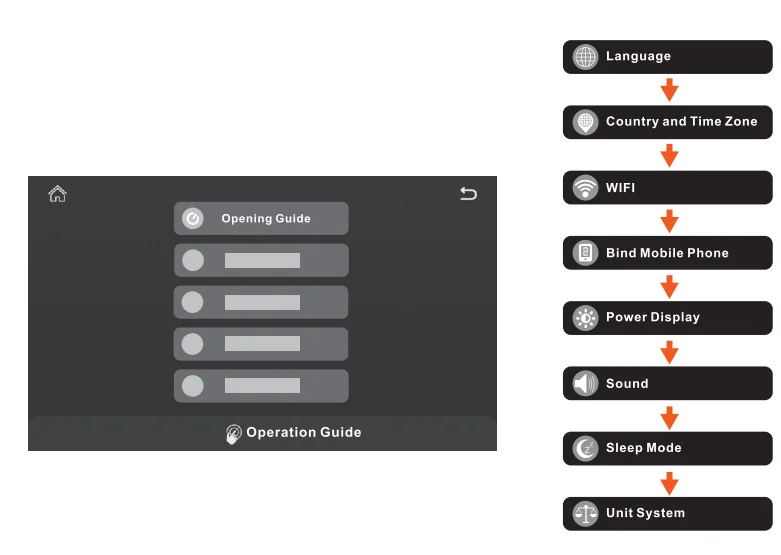
Safety Guide
- The “Safety Guide” describes the correct and safe use of the machine.
- Please read the “Safety Guide” carefully before using this machine for the first time.
- If you have a good understanding of this machine, you can choose to “skip” the safe use instructions.
- On the last page, you can select “Don’t show again”, and the Safety Guide won’t be displayed after startup.
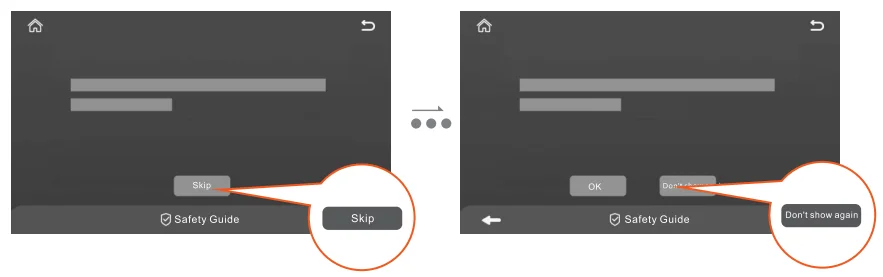
After selecting Don’t show again”, you can follow the steps below: “Main Setting Interface Icon” – “Operation Guide” – “Safety Guide” scroll to the last page and click “Power-on Prompt” to restore the power-on prompt.

Interface Operation Guide
- The “Interface Operation Guide” describes the maximum use level of the three blades, as well as the button descriptions on the DIY page.
- Please read the “Interface Operation Guide” carefully before using this machine for the first time.
- If you have a good understanding of this machine, you can choose to “skip” the interface instructions.
- On page 2 of the “Interface Operation Guide”, you can select “Don’t show again”. The “Interface Operation Guide” will no longer be displayed when you power on in the future.
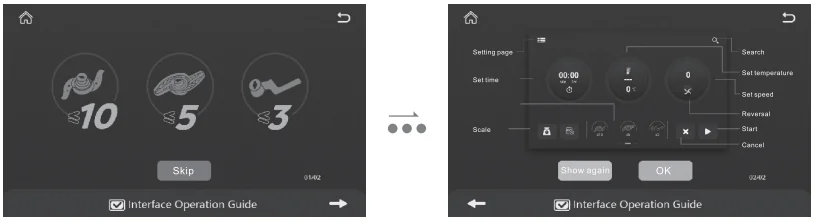
After selecting “Don’t show again”, you can follow the steps below: “Main Setting Interface Icon” – “Operation Guide” – “Safety Guide” – scroll to page 2 and click “Power-on Prompt” to restore the power -on prompt.

Home Screen
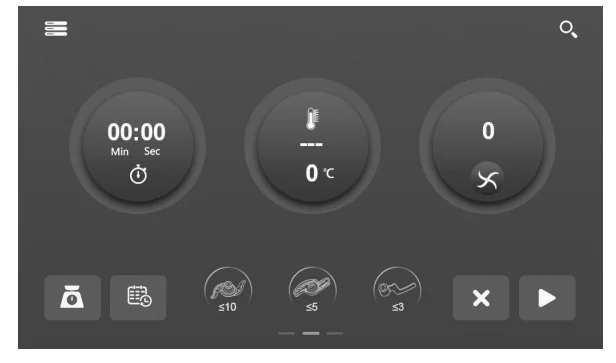
On the home screen, you can create or follow your own recipes, and freely adjust time, temperature and speed.
A Setting the Cooking Time
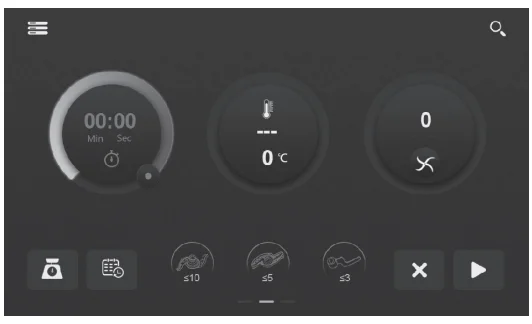
- The adjustment range of the home screen is 0-99 minutes (within 1 minute, plus or minus 1 second, 1-5 minutes, plus or minus 10 seconds, 5-20 minutes, plus or minus 30 seconds, and 20-99 minutes, plus or minus 1 minute). The display units are seconds and minutes.
- The maximum time in the quick functions is 12 hours. (plus or minus 1 second within 1 minute, plus or minus 10 seconds for 1-5 minutes, plus or minus 30 seconds for 5-20 minutes, and plus or minus 1 minute for more than 20 minutes. The display units are seconds and minutes.
B Setting the Temperature
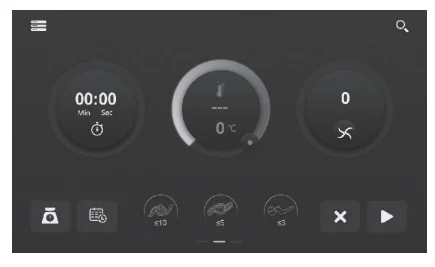
- The setting range is 37″C-160″C, and the display segments are: 37°C, 40°C, 45°C, 50°C, 55°C, 60°C, 65°C, 70°C, 75°C, 80°C, 85°C, 90°C, 95°C, 100°C, 105°C, 110°C, 115°C, 120°C, 125°C, 130°C, 135°C, 140°C, 145°C, 150°C, 155°C, 160°C, SlowCook.. AiCook.. Steam.
- To turn on the heating function, you must set the time first.
- As long as the heating function is turned on, the default setting is to turn on the motor less and the
 spoon; the user can manually adjust the speed to 0.
 - During the heating function, the adjustable range of motor speed is from thespoon to 5. If the speed exceeds 5, a dialogue box will appear: “The motor speed exceeds 5, and the heating function cannot be executed,” and the heating will stop.
 spoon; the user can manually adjust the speed to 0.
Special Functions
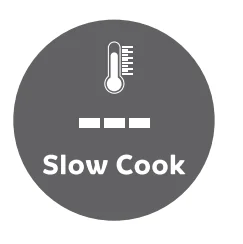
Slow Cook:
- Set the cooking time before starting.
- SlowCook is used to cook foods of thick consistencies, such as milk and cheese. It is heated relatively slowly to prevent the bottom from getting burned.

Ai Cook:
- Set the cooking time before starting.
- Use AICook to stir-fry meat that otherwise might stick to the bottom of the pot.
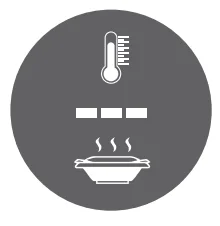
Steam:
- Set the cooking time before starting.
- Steaming cooks food by using boiling water vapour to heat ingredients.
Scale
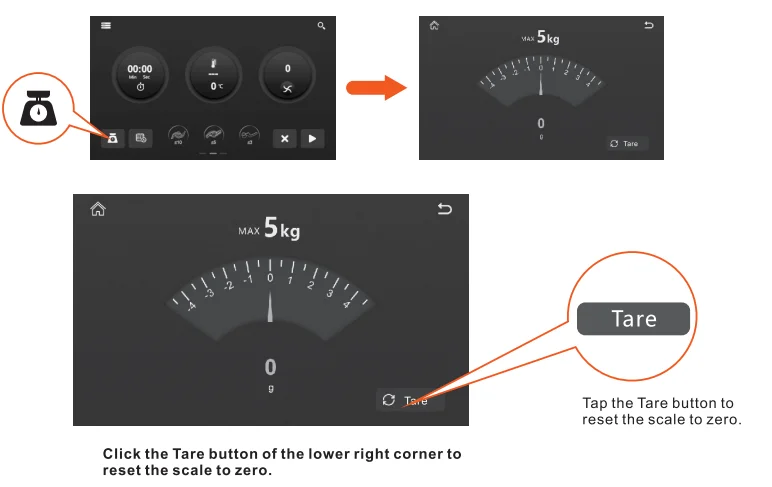
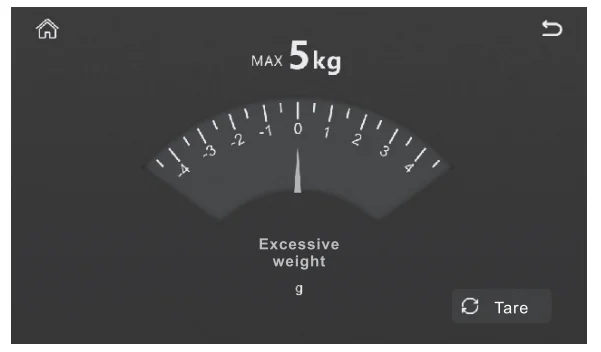
- Each time you launch the scale function, it automatically resets to zero.

- Don’t use the scale for items that weigh more than 5000g. Weights of 5000g or more will prompt the warning “Excessive weight”, as shown in the figure below.

Attention- When calibrating, ensure that the machine is placed on a stable table.
- During the calibration, the machine must not be affected by other external forces, such as wind or the pulling of the machine’s power cord.
- Ensure the accuracy of the 1 kg and 2kg weights used for calibration.
- Calibration
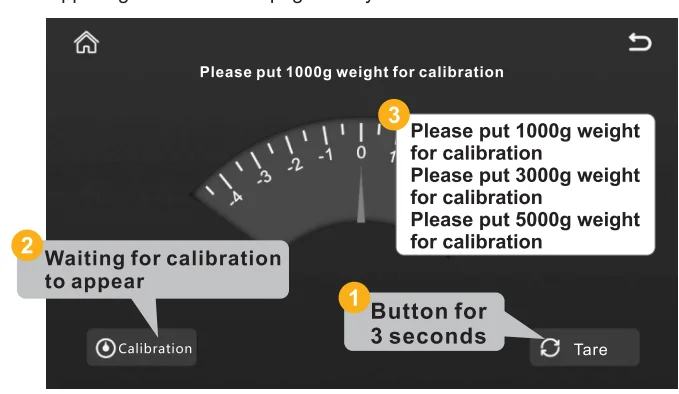
- Press and hold the “Zero” button for 3 seconds to enter calibration in the weighing interface.
- When calibrating the equipment, it is necessary to prepare one 1kg weight and two 2kg weights in advance.
- The calibration steps are as follows:
- Press and hold the “Zero’ button for 3 seconds to enter calibration on the weighing interface. After entering calibration, the “Calibration” button appears in the lower left corner of the page.
- Click the “Zero” button to reset the scale, and wait until the weighing data display area shows “0” and the data is stable and not jumping.
- Click the “Calibrate” button, and the text “Please place a 1000g weight for calibration’ will appear at the top of the interface. According to the text prompt, place a 1 kg weight in the centre of the machine. After the machine recognises that the weight of 1 kg is stable, the text at the top of the interface will change to “Please place a 3000g weight for calibration· and “Please place a 5000g weight for calibration”. According to the text prompt, place two 2kg weights twice.
- After successful calibration, the device will automatically exit calibration
- If the calibration fails or the weighing data is still inaccurate after successful calibration, it can be calibrated again.
- During the calibration process, you can click the “Today” button in the upper right corner of the page at any time to exit calibration.

Appointment function
- Introduction to the appointment function
- Place the ingredients in the main pot, set the reservation time, confirm, and the reservation countdown will start. After the countdown ends, the current page function will be executed.
- The DIV and quick functions on the home page (except for “automatic cleaning”,” Turbo”, and “mud beating”) can all perform the reservation function.
- How to use the appointment function
- Install the necessary cutting tools in the main pot, place the pot, add the ingredients needed for cooking, and cover the main lid.
- Set the cooking time, temperature, and speed.
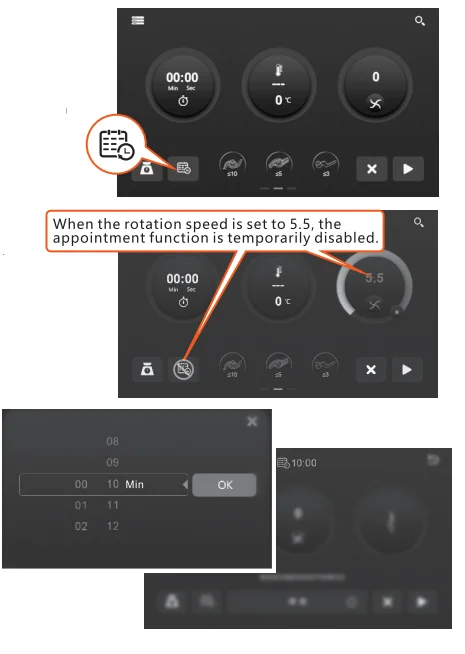
- Click the “Booking” icon, set the time you want to book, and click “OK”.
- The entire screen will darken, and a reservation countdown will appear in the upper-middle position.
- When the reservation countdown ends, the cooking settings on the current page will be executed.
- Precautions for the appointment function
- The cooking time must be set before the reservation function can be enabled; a pop-up window will appear saying “Please set the cooking time”. When the motor speed adjustment is greater than 5 (starting from 5), the” Reserve” button doesn’t work, and the reservation function cannot be turned on.
- The moment you click the “booking” button, it means the machine has entered the starting state. You must place the ingredients, place the main pot, and cover the main pot lid. If you do not place the main pot or cover the lid, it will directly show a fault.
- The reported fault is that the reservation function cannot be started.
- During the execution of the reservation mode, it is no longer possible to adjust the cooking settings. At this point, operating the knob or clicking the screen will bring up a pop-up window that reads “After the countdown is complete, the current page function will be executed. Do you want to cancel the reservation?”
- During the execution of the reservation mode, if you want to adjust the cooking settings, you need to cancel the reservation first.
For more manuals by Chef Robot, visit ManualsLibraryy
ChefRobot CR-8 Food Processor-FAQs
What is the Chef Robot CR-8?
The Chef Robot CR-8 is a smart kitchen appliance that combines food processing and cooking functions in one machine. It can chop, blend, knead, steam, cook, stir, and mix ingredients, helping users prepare meals more easily and quickly.
What can the Chef Robot CR-8 do?
The CR-8 can handle many kitchen tasks such as mixing dough, chopping vegetables, making soups, steaming food, blending sauces, and slow cooking. Its multi-function design reduces the need for several separate kitchen appliances.
Can the Chef Robot CR-8 handle hot ingredients?
Yes, the appliance is built to process and cook hot ingredients safely. However, users should always follow the manufacturer’s safety instructions for handling heated food and liquids.
How do you clean the Chef Robot CR-8?
Most removable parts can be washed separately after use. Some components may also be dishwasher-safe, making cleanup simple and convenient after cooking.
Can the Chef Robot CR-8 cook food automatically?
Yes, many cooking programs are automated. Users can select a recipe or cooking mode, and the appliance manages temperature, mixing, and cooking time automatically.
Is the Chef Robot CR-8 suitable for everyday cooking?
Yes, the appliance is designed for daily kitchen use. It can help prepare breakfast, lunch, dinner, sauces, soups, desserts, and many other recipes with minimal effort.
What are the benefits of using the Chef Robot CR-8?
The main benefits include faster meal preparation, reduced manual work, consistent cooking results, and the convenience of having multiple cooking functions in a single appliance.
Can the Chef Robot CR-8 replace a food processor?
Yes, it can perform most food processor tasks such as slicing, chopping, mixing, and blending. In addition, it also includes cooking functions that a regular food processor does not provide.
Is the Chef Robot CR-8 worth buying?
The CR-8 can be a good investment for people who cook regularly and want to save time in the kitchen. Since it combines several cooking tools in one appliance, it may reduce kitchen clutter and improve convenience.