
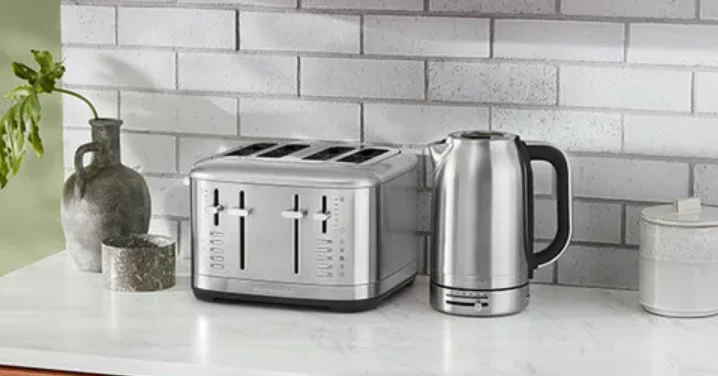

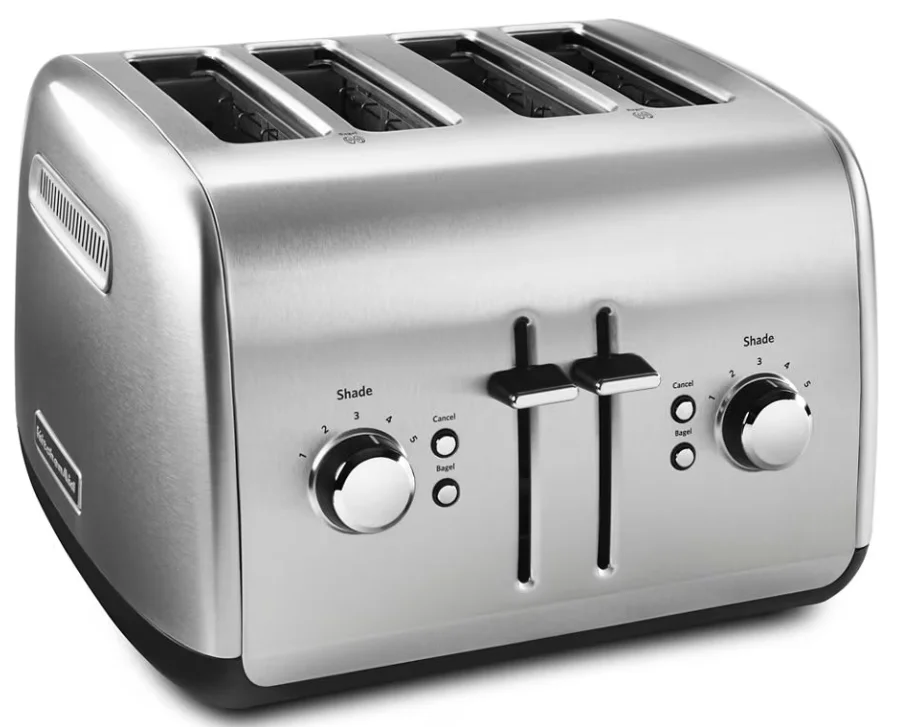
KitchenAid 4 Slice Toaster Brushed Stainless Steel
PRODUCT SAFETY
IMPORTANT SAFEGUARDS
When using electrical appliances, basic safety precautions should always be followed, including the following:
- Read all instructions. Misuse of the appliance may result in personal injury.
- Do not touch hot surfaces. Use handles or knobs.
- To protect against electrical shock, do not immerse the cord, plugs, or Toaster in water or other liquid.
- This appliance is not intended for use by persons (including children) with reduced physical, sensory, or mental capabilities, or lack of experience and knowledge, unless they have been given supervision or instruction concerning use of the appliance by a person responsible for their safety. Children should be supervised to ensure that they do not play with the appliance.
- Close supervision is necessary when any appliance is used by or near children.
- Unplug from the outlet when not in use and before cleaning. Allow to cool before putting on or taking off parts.
- WARNING: To prevent electric shock, unplug before servicing.
- Do not operate any appliance with a damaged cord or plug, or after the appliance malfunctions, or is dropped or damaged in any manner. Return the appliance to the nearest Authorised Service Facility for examination, repair, or electrical or mechanical adjustment.
- Do not use the appliance outdoors.
- To disconnect, turn any control to off, then remove the plug from the wall outlet.
- The use of accessories/attachments not recommended or sold by KitchenAid may cause fire, electric shock, or injury to persons.
- Do not let the cord hang over the edge of the table or counter, or touch hot surfaces.
- Do not place on or near a hot gas or electric burner, or in a heated oven.
- Do not use the toaster for anything other than its intended use.
- Oversized foods, metal foil packages, or utensils must not be inserted in the Toaster as they may involve a risk of fire or electric shock.
- A fire may occur if the Toaster is covered with or touching flammable material, including curtains, draperies, walls and the like when in operation.
- Do not attempt to dislodge food when the Toaster is plugged in.
- Do not operate the toaster unattended.
- When heating toaster pastries, always use the lightest toast colour setting.
- Allow the appliance to cool completely before putting on or taking off parts, and before cleaning the appliance.
- Refer to the “Care and Cleaning” section for instructions on cleaning the surfaces in contact with food. Important Security Measures required for compliance with regulations in Mexico:
- If the power cord is damaged, it must be replaced by KitchenAid or its service agent or by qualified personnel in order to avoid a hazard.
- This appliance is not intended for use by persons (including children) with reduced physical, sensory, or mental capabilities, or a lack of experience and knowledge, unless they are closely supervised and instructed concerning use of the appliance by a person responsible for their safety
- Children should be supervised to ensure that they do not play with the appliance.
- The appliance is not intended to be operated by means of an external timer or separate remote control system.
- Bread may burn, so do not use the toaster near or under combustible material such as curtains.
- Do not use the appliance for any other use other than that for which it was designed. It could lead to possible injury.
- The temperature of accessible surfaces may be higher when the appliance is in operation.
- This appliance is intended for use in domestic and similar applications, such as the following:
- staff kitchen areas in shops, offices, and other working environments;
- farmhouses;
- by clients in hotels, motels, and other residential-type environments;
- bed and breakfast type environments.
SAVE THESE INSTRUCTIONS
This product is designed for household use only.
ELECTRICAL REQUIREMENTS
WARNING
Electrical Shock Hazard
- Plug into a grounded 3-prong outlet.
- Do not remove the ground prong.
- Do not use an adapter.
- Do not use an extension cord.
- Failure to follow these instructions can result in death, fire, or electrical shock.
- Voltage: 120 V∽
- Frequency: 60 Hz
- Power: 900 W for model KMT2109, 1800 W for model KMT4109
NOTE: Your Toaster has a 3-prong grounded plug. To reduce the risk of electrical shock, this plug will fit in an outlet only one way. If the plug does not fit in the outlet, contact a qualified electrician. Do not modify the plug in any way.
Do not use an extension cord. If the power supply cord is too short, have a qualified electrician or technician install an outlet near the appliance. A short power supply cord (or detachable power supply cord) should be used to reduce the risk resulting from becoming entangled in or tripping over a longer cord.
GETTING STARTED
Before using your Toaster for the first time, check the Slots and remove any packing or printed material that might have fallen inside during shipping or handling.
IMPORTANT: To avoid damage to the Toaster, do not probe inside the Toaster Slots with any metal objects, including utensils.
- Tuck the power cord into the channel of the Cord Guide on the bottom of the Toaster so that it exits from the rear of the Toaster beneath the Crumb Tray. Plug into a grounded outlet.
NOTE: You may see light smoke the first time you use the Toaster. This is normal. The smoke is harmless and will soon dissipate.
PRODUCT USAGE
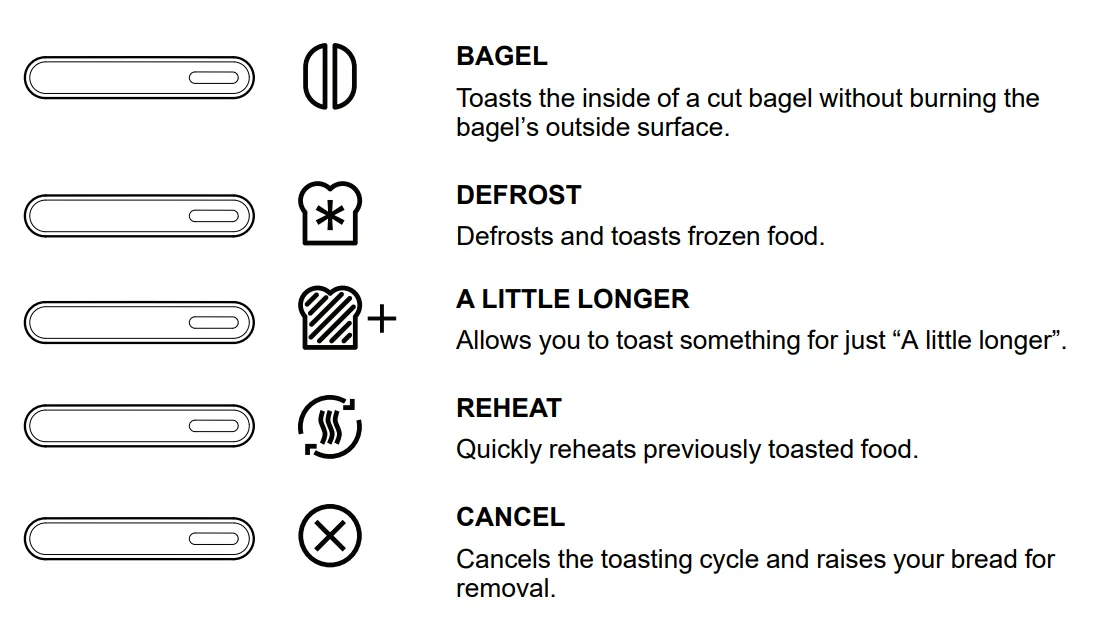
FUNCTION BUTTONS
TOASTING
- Insert bread or other food to be toasted into the slots.
TIP: For even toasting, toast only one bread type and thickness at a time. If toasting bagels, be sure to press the Bagel button. See “Toasting Bagels” section.
NOTE: The age, type, and moisture level of different breads may require different shade settings. For example, dry bread will brown more rapidly than moist bread and will require a lighter setting. - Select your desired shade by raising the Shade Lever for darker toasting or lowering the lever for lighter toasting.
- Press down on the Start Lever to start the toasting cycle. The toast will pop up automatically at the end of the cycle, and the Toaster will turn off.
NOTE: If using a function button, you must lower the Start Lever first before selecting the function. The LED light next to the function will be lit while the function is in use. - To cancel toasting at any time, press the Cancel
 button. The toast will pop up, and the Toaster will turn off.
TIP: For smaller items, lift up on the Start Lever to raise the toast above the top of the Toaster.
 button. See “Toasting Bagels” section.
 button. The toast will pop up, and the Toaster will turn off.
TOASTING BAGELS
Your Toaster features a special Setting for bagels, ensuring optimal heating time for the best results. The heating elements will adjust to nicely toast the inside of a cut bagel without burning the outside surface.
- Insert bagels as indicated by the Bagel Iconon top of the Toaster.
- With the Shade Lever set to your desired shade, press down on the Start Lever to start the toasting cycle.
- Pressbutton; the bagel indicator light will glow. The bagels will pop up automatically at the end of the cycle, and the Toaster will turn off.
TIP: The Bagel function can be used at the same time as the Defrost function.
DEFROST
The Defrost function adds extra time to the toasting cycle to defrost frozen items before toasting them.
- Insert bread or other food to be toasted into the Slots.
- With the Shade Lever set to your desired shade, press down on the Start Lever to start the toasting cycle.
- Press
 button; the defrost indicator light will glow. The toast will pop up automatically at the end of the cycle and the Toaster will turn off.
 button; the defrost indicator light will glow. The toast will pop up automatically at the end of the cycle and the Toaster will turn off.
A LITTLE LONGER
This function allows you to toast something for just “A Little Longer” at the touch of a button without changing your favourite setting. Use this function after the toasting cycle is complete and the toast has risen.
- Press down on the Start Lever to lower the toast again into the Toaster to resume toasting.
- Press
 button. The toast will pop up automatically at the end of the cycle and the Toaster will turn off.
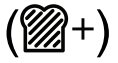 button. The toast will pop up automatically at the end of the cycle and the Toaster will turn off.
REHEAT
This function allows you to quickly reheat previously toasted foods.
- Insert the previously toasted food into the Slots.
NOTE: Do not place food with butter or any other topping in the Toaster. Use the Reheat Function with dry foods only. - Press down on the Start Lever to start the toasting cycle.
- Press
 button. The toast will pop up automatically at the end of the cycle and the Toaster will turn off, or you may press cancelbutton at any time to cancel the function.
NOTE: No shade adjustment is necessary — the Reheat function overrides whatever shade level you have set.
 button. The toast will pop up automatically at the end of the cycle and the Toaster will turn off, or you may press cancel
CARE AND CLEANING
IMPORTANT: Allow the appliance to cool completely before removing the Crumb Tray, and before cleaning the appliance.
CLEANING THE TOASTER
IMPORTANT: The Crumb Tray will be hot immediately following a toasting cycle. Allow the Toaster to cool before emptying the Crumb Tray.
IMPORTANT: Unplug the Toaster and let it cool before cleaning.
NOTE: For consistent browning results, empty the Crumb Tray after each use.
- Wipe the Toaster with a soft, damp cotton cloth. Do not use paper towels, abrasive cleansers, or liquid cleaning products. Do not immerse the Toaster in water.
NOTE: If grease or oil splatters on the Toaster, wipe splatters away immediately using a clean, damp cotton cloth. - Press the push icon located in the centre of the Crumb Tray.
- Once the Crumb Tray has opened slightly, slide it out of the Toaster and shake the crumbs into a waste container.
IMPORTANT: Be sure to open the Crumb Tray by pressing the push icon. Forcing the Crumb Tray open may damage the Crumb Tray. - The Crumb Tray should be hand-washed only.
- Replace the Crumb Tray by sliding it back into its slot and pressing in on the centre of the Crumb Tray until it clicks into place.
NOTE: Do not use the Toaster without the Crumb Tray installed.
NOTE: KitchenAid does not recommend the use of a Toaster cover.
LIMITED WARRANTY AND SERVICE
KITCHENAID® PRODUCT WARRANTY FOR THE 50 UNITED STATES, THE DISTRICT OF COLUMBIA, PUERTO RICO, AND CANADA
This limited warranty extends to the original purchaser and any succeeding owner for the product operated in the 50 United States, the District of Columbia, Puerto Rico, and Canada. Length of Warranty: One Year Limited Warranty from the date of delivery.
- KitchenAid Will Pay for Your Choice of:
Hassle-Free Replacement of your product. See the “Arranging for Service” section in this warranty for details on how to arrange for service, or call the Customer Experience Centre toll-free at 1-800-541-6390.
OR
The replacement parts and repair labour costs to correct defects in materials and workmanship that existed at the time this product was purchased. Service will be provided by an Authorised KitchenAid Service Centre. - KitchenAid Will Not Pay for (What is Not Covered By This Limited Warranty):
- Commercial, non-residential, or multiple-family use or use inconsistent with product instructions and manuals.
- Defects or damage resulting from accident, alteration, misuse, abuse, fire, flood, or acts of God.
- Any shipping or handling costs to deliver your product to an Authorised Service Centre.
- Replacement parts or repair labour costs for the product operated outside the 50 United States, the District of Columbia, Puerto Rico, and Canada.
- Damages, defects, or repairs caused by unauthorised servicers or use of non-genuine or third-party parts; however, use of unauthorised service providers or non-genuine or third-party parts will not void this warranty.
- Cosmetic damage (e.g., scratches, dents, chips, and other damage to finishes), unless damage results from defects in materials and workmanship and is reported to KitchenAid within 30 days from the date of delivery.
- Discolouration, rust or oxidation of surfaces resulting from caustic or corrosive environments (e.g., high salt concentrations, high moisture or humidity or exposure to chemicals).
- Products with original, factory-installed model/serial numbers removed, altered or not easily determined.
- Incidental or consequential damages resulting from product failure.
- Consumable parts or accessories.
- DISCLAIMER OF IMPLIED WARRANTIES
Implied warranties, including any implied warranty of merchantability or implied warranty of fitness for a particular purpose, are limited to ten years or the shortest period allowed by law. Some states and provinces do not allow limitations on the duration of implied warranties of merchantability or fitness, so this limitation may not apply to you. - HOW STATE LAW APPLIES
This warranty gives you specific legal rights, and you may also have other rights that vary from state to state or province to province. Some states and provinces, such as California, do not allow for limitations on the date your warranty coverage begins, so this limitation may not apply to you.
HASSLE-FREE REPLACEMENT WARRANTY – 50 UNITED STATES, DISTRICT OF COLUMBIA, AND PUERTO RICO
We’re so confident the quality of our products meets the exacting standards of KitchenAid that, if your product should fail within the first year of ownership due to defects in materials or workmanship, KitchenAid will arrange to deliver an identical or comparable replacement to your door free of charge and arrange to have your original product returned to us. Your replacement unit will also be covered by our one year limited warranty. If your product should fail within the first year of ownership, simply call our toll-free Customer eXperience Center at 1-800-541-6390 Monday through Friday. Please have your original sales receipt available when you call. Proof of purchase will be required to initiate the claim. Give the consultant your complete shipping address (no P.O. Box numbers, please). When you receive your replacement product, use the carton, packing materials, and prepaid shipping label to pack up your original product and send it back to KitchenAid.
HASSLE-FREE REPLACEMENT WARRANTY – CANADA
We’re so confident the quality of our products meets the exacting standards of the KitchenAid brand that, if your product should fail within the first year of ownership due to defects in materials or workmanship, we will replace your product with an identical or comparable replacement. Your replacement unit will also be covered by our one year limited warranty. If your product should fail within the first year of ownership, simply call our toll-free Customer eXperience Center at 1-800-807-6777 Monday through Friday. Please have your original sales receipt available when you call. Proof of purchase will be required to initiate the claim. Give the consultant your complete shipping address. When you receive your replacement product, use the carton, packing materials, and prepaid shipping label to pack up your original product and send it back to KitchenAid.
ARRANGING FOR SERVICE AFTER THE WARRANTY EXPIRES, OR ORDERING ACCESSORIES AND REPLACEMENT PARTS
- In the United States and Puerto Rico: For service information, or to order accessories or replacement parts, call toll-free at 1-800-541-6390 or write to: Customer Experience Centre, KitchenAid Small Appliances, P.O. Box 218, St. Joseph, MI 49085-0218
- Outside the United States and Puerto Rico: Consult your local KitchenAid dealer or the store where you purchased the product for information on how to obtain service.
- For service information in Canada: Call toll-free 1-800-807-6777.
- For service information in Mexico: Call toll-free 01-800-0022-767.
For more manuals by KitchenAid, visit ManualsLibraryy
KitchenAid 4 Slice Toaster Brushed Stainless Steel -FAQs
Is the KitchenAid 4 Slice Toaster made with durable materials?
Yes, the toaster features a sturdy brushed stainless steel exterior designed for long-lasting use. Its solid construction helps it withstand daily kitchen tasks while maintaining an attractive appearance.
Does this toaster toast bread evenly?
The KitchenAid 4 Slice Toaster is designed to provide consistent browning across different types of bread. Multiple shade settings allow you to customize the level of crispness to suit your preference.
What types of bread can fit in the toaster?
The extra-wide slots accommodate a variety of items, including thick artisan bread, bagels, English muffins, and standard sandwich bread, making it suitable for many breakfast options.
Is a 4-slice toaster better than a 2-slice toaster?
A 4-slice toaster is ideal for larger households or anyone who frequently prepares breakfast for several people. It reduces waiting time by allowing more items to be toasted at once.
How long can a KitchenAid toaster last?
With proper care and routine cleaning, a quality toaster can provide many years of reliable service. Regularly removing crumbs and avoiding overloading the slots can help extend its lifespan.
How much electricity does a 4-slice toaster use?
A 4-slice toaster generally uses more power than a 2-slice model because it heats additional slots. However, it can save time by toasting more bread in a single cycle.
Is the toaster easy to clean?
Yes, the toaster includes a removable crumb tray that collects crumbs during use. Emptying the tray regularly helps keep the appliance clean and operating efficiently.
How many slices can it toast at one time?
This model can toast up to four slices simultaneously, making it a convenient choice for families or households preparing multiple servings at once.
Does the toaster have a bagel setting?
Yes, it includes a dedicated bagel function that toasts the cut side while gently warming the outer side, helping create the ideal texture for bagels.