
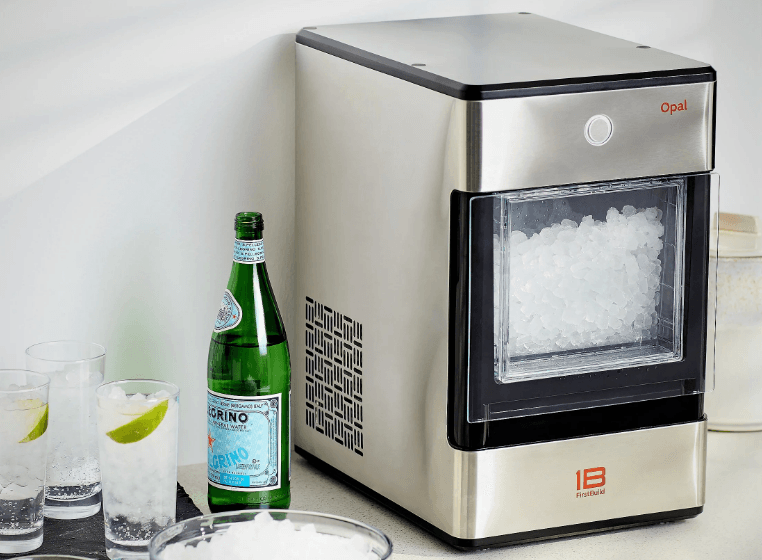

FirstBuild Opal Nugget Ice Maker

SAFETY INFORMATION
WARNING: To reduce the risk of fire, explosion, electric shock, exposure to UV radiation, or injury when using your Opal, follow these basic safety precautions:
- Do not, under any circumstances, alter or remove the third (ground) prong from the power cord. For personal safety, this product must be properly grounded.
- Do not exceed power outlet ratings. It is recommended that the ice maker be connected to its own circuit. Use only a 115 V, 60 Hz standard electrical supply that is properly grounded in accordance with the National Electrical Code and local codes and ordinances.
- Due to potential safety hazards under certain conditions, we strongly advise against the use of an extension cord. However, if you must use an extension cord, it is absolutely necessary that it is a UL-listed, 3-wire ground-type appliance extension cord having a grounding-type plug and that the electrical rating of the cord be 15 Amperes (minimum) and 120 Volts.
- This product must be properly installed and located in accordance with the installation instructions before it is used. The product is for indoor household use only. Do not use outdoors.
- Do not store or use flammable vapors or liquids near this product.
- Do not allow children to climb, stand, or hang on the ice maker. They could seriously injure themselves.
- Do not look directly at the UV lamp when it is operating. The light emitted by the lamp will cause serious eye damage and burn unprotected skin.
- In order to avoid exposure to UV radiation, disconnect power to the ice maker before removing the external covers.
- Do not use with water that is microbiologically unsafe or of unknown quality.
- Place the power cord in such a way that it cannot be pulled on by children or cause a tripping hazard.
- Place the power cord in such a way that it is not in contact with hot surfaces.
- Do not operate if any component, including the cord or plug, is damaged. Contact FirstBuild for repair or replacement. See page 13 for more information.
- Unplug the product before cleaning by hand and when not in use.
- Do not immerse any part of the product in water.
- Do not plug or unplug the product with wet hands.
- Do not attempt to disassemble, repair, modify, or replace any part of your product. See page 13 for Warranty information.
- Use this product only for its intended purpose as described in this user manual.
- Do not use any accessories not recommended by the manufacturer.
CAUTION: To reduce the risk of injury when using your Opal, follow these basic safety precautions:
- Do not remove any safety, warning, or product information labels from your ice maker.
- Lifting Hazard: It is recommended to have two people move and install the ice maker in order to prevent injury.
Box Contents
What’s included in the box

Installation and setup
Getting started
Installation requirements
CAUTION: Lifting Hazard: It is recommended to have two people move and install the ice maker in order to prevent injury.
- The product is designed to be installed indoors. Do not use your ice maker outdoors.
- The product must be installed upright on a flat, level surface that is able to support the total weight when full of water.
- Ensure a minimum of three inches (3”) clearance around the side and back walls of the ice maker for proper air circulation.
- Install the product in a well-ventilated area with an ambient temperature between 55°F and 90°F.
- Do not place the product near heat sources such as ovens or cooktops.
- Do not place the product in direct sunlight.
Prepare Opal for use
- Carefully remove packing material. Do not use sharp tools that can damage the box contents.
- Ensure all components are present. If any item is missing, please contact [email protected].
- Place the ice maker upright on a flat, level surface and plug it in.
- Install the drip tray by sliding it under the front edge of the Opal. The tray slots should align with the front feet of Opal.
- Rinse the ice maker with clean water for five minutes before first use. Start with step 4 of the cleaning instructions on page 6. It is not necessary to use bleach for the first rinse.
ATTENTION: Some types of under-cabinet lamps can be hot enough to cause damage to your Opal top’s appearance.
Care and cleaning
To keep your nugget ice tasting fresh and your Opal looking great, we recommend cleaning your Opal at least once per week.
To clean the exterior of the ice maker, unplug the product, then use a soft cloth dampened with soapy water to gently clean the exterior surfaces. Dry with a soft cloth.
The exterior stainless steel surfaces can be cleaned with a commercially available stainless steel cleaner. Use only a liquid cleaner free of grit and rub in the direction of the brush lines with a damp, so sponge. Do not use appliance wax, polish, solvents, or chemicals on the stainless steel. Do not use soap to clean the reservoir. Use a soft cloth moistened with water.
WARNING: Chemical Exposure Hazard, when cleaning with Bleach, use bleach in a well-ventilated area and avoid mixing bleach with other household cleaners.
Unplug the product before cleaning by hand, and when not in use.
To clean Opal’s internal components, complete the following steps:
For First Time Use only, Start at Step 4 :
- Unplug Opal and remove the drip tray
- Remove filter (if present) and replace with the reservoir’s screened intake cap.
- Drain Opal (see page 9 for detailed instructions).
- Plug in Opal and slide the rear switch to the “Clean” position.
- The display ring will light up yellow and pulse. NOTE: Do not use soap to clean the water reservoir. Do not clean Opal immediately after use; wait at least 1 hour.
- Create a solution of five (5) cups of water and one (1) tsp of household bleach.
- Pour the solution into the water reservoir.
- Touch the display button to start the cleaning process, the light will start to spin and you will hear water circulating. A er three minutes the water will stop and the light will begin to pulse again.
- When the light pulses, drain Opal.
- Unhook the top of the drain hoses at the back of the unit. Then lay them down to drain into a sink or bucket that is below the level of the ice maker. Remove the plugs and allow the water to completely drain.
- Once water stops flowing, re-insert the drain plugs.
- Add five (5) cups of fresh water to the water reservoir, and touch the button. The light ring is divided into four sections to indicate each stage. Successive quarters of the ring will become brighter with each rinse cycle.
- Rinse three (3) times with fresh water. Repeat steps 7 through 12 three (3) more times, adding fresh water to the reservoir each time. (You may continue to repeat the rinse cycle as many times as you like.)
- When complete, slide the rear switch back to “Ice” mode.
Cleaning the bin and tray:
To clean the ice bin, remove the ice bin from the ice maker and clean with a soft cloth dampened with soapy water. Rinse thoroughly. Dry with a soft cloth. Do not use solvents or chemicals.
The drip tray should be wiped dry. Water le in this area may leave deposits. To clean the drip tray, remove the tray from Opal and use a soft cloth dampened with mild soapy water to gently clean the surface. Dry with a soft cloth. Do not use solvents or chemicals.
Operation
Understanding the display
Opal uses an innovative light ring to let you know what it is doing.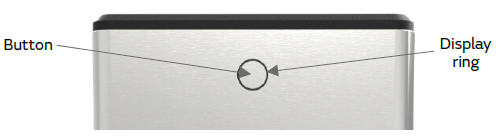
Button
Touch once to turn Opal ON or OFF. Touch and hold for 3 seconds to dim the interior lighting if desired.
Display ring
Displays the status of the Opal ice maker. See below for details.
Mode switch (located on the back)
Switching to in “Ice” position places Opal in ice-making mode.
Switching to in “Cleaning” position places Opal in cleaning mode.
- Falling white: Opal is currently making ice.
- Solid white: The Ice bin is full. Opal is no longer continuing to make ice.
- Swishing blue: Opal needs more water.
- Pulsing yellow: Opal is in cleaning mode, awaiting drain and refill confirmation.
- Rotating yellow: Opal is rinsing (cleaning mode).
- Slowly falling white: Opal is defrosting. Please don’t unplug or turn off. This takes 30 minutes.
Making ice with Opal
Once Opal has been cleaned, move the ice maker to its desired location and complete the following steps:
- Remove the ice bin.
- Fill the reservoir with potable (safe to drink) water up to the “Max Fill” line. Water hardness must be less than 12 grains per gallon. Do not fill the reservoir with any liquid except water. Using any liquid except potable water is misuse and will void your warranty.
- Plug the ice maker into a grounded outlet.
- Touch the display button to start the ice maker. The display will flash green to indicate the ice maker is ON, then transition to the falling white display.
- Opal will begin to produce ice in 15-30 minutes. It will continue to make ice until the bin is full or it runs out of water. To continue making ice, just add more water.
Draining Opal
We recommend draining your Opal when:
- You put it away, or anytime it’s being relocated.
- You turn it off for more than a few days. (i.e., vacation)
- You’re not using much ice. Continuous recirculation of meltwater may affect taste. For best results, drain your Opal.
FirstBuild app for Opal
Use the FirstBuild app to enhance your nugget ice experience!
Installing the FirstBuild app will allow you to do the following:
- Schedule start and stop times
- See if Opal needs more water
The FirstBuild mobile app can be found and downloaded from the Apple App Store for your Apple device. Or, Google Play Store for your Android device.
For help with the FirstBuild app, including how to pair your device, check out our support page at support.firstbuild.com
Note: Works with Android, iPhone 4s or newer, iPad 3 or newer, iPad Mini, and iPod Touch 5th generation and newer.
Water filter
The Opal Water Filter, available at nuggetice.com, is the only water filter compatible with Opal. Please follow the installation instructions included with your filter.
Note: Remove your water filter (if installed) and reinstall the screened intake cap prior to cleaning your Opal.
Normal sounds
Your new ice maker may make sounds that are not familiar. Most of these sounds are normal. Hard surfaces like the floor, walls, and countertops can amplify these sounds. The following describes the sounds that may be new to you and what may be creating them.
WHIR
When Opal is first turned on, you may notice the condenser fan spinning.
BUZZ
When the water pump first turns on, it may be dry and slightly noisy. Once it is filled with water, the noise reduces significantly.
RATTLE
Rattling noises may be produced by the flow of the refrigerant. These noises should reduce significantly once the refrigerant system has stabilized.
GURGLE
When the refrigerant system shuts off, there may be a brief gurgle as the refrigerant stops flowing.
HUM
The compressor is a motor. It produces a low-toned humming sound while it is running.
CLICK
As nugget ice is produced, it drops into the ice drawer. The first nuggets produced are the loudest, as they impact the bottom of the ice bin. As the bin fills, this noise reduces significantly.
SQUEAK
When Opal is in need of defrosting, it may start to squeak as ice starts to build up around the mechanisms. The defrost cycle is automatic and may take 30-45 minutes. During this time, the front button won’t respond.
Warranty
Opal Nugget Ice Maker Limited Warranty
Limited Warranty:
One (1) year from the date of receipt of the product.
What is covered:
Product failure during the Limited Warranty Period, due to a defect in materials or workmanship.
What is not covered:
Product failure due to abuse, misuse, improper use, or commercial use.
Damage to the product caused by accident, fire, floods, or acts of God.
Incidental or consequential damages caused by possible defects with this product.
So were bugs that can be corrected with an update via the “FirstBuild” App. Labor and other charges to install and/or remove the product.
What FirstBuild will do:
If your product qualifies for this Limited Warranty, FirstBuild will either: (1) replace your product with a new or remanufactured product, or (2) refund the purchase price of the product, at FirstBuild’s sole discretion.
Limitations:
The Limited Warranty is extended to the original purchaser for products purchased for home use within the US and Canada.
Some states do not allow the exclusion or limitation of incidental or consequential damages. This warranty gives you specific legal rights, and you may also have other rights which vary from state to state. To determine what your legal rights are, consult your local or state consumer affairs office or your state’s Attorney General.
For more Manuals by FirstBuild, visit ManualsLibraryy
FirstBuild Opal Nugget Ice Maker-FAQs
Can I leave my Opal Ice Maker running all the time?
Yes! The Opal is designed to run continuously, similar to a refrigerator. It has an auto-shutoff feature when the ice bin is full and will restart once ice melts below the sensor.
How long does it take to make the first batch of ice?
About 30 minutes for solid nuggets. The initial batches may be slushy before the machine reaches optimal freezing performance.
Why is my Opal not making ice?
Common causes:
Low water (check the reservoir).
Clogged water line (clean or flush the system).
Stuck in defrost/cleaning mode (wait for the cycle to finish).
Faulty sensor (clean the sensors inside the ice chute).
How do I clean my Opal Ice Maker?
Monthly cleaning (if using distilled water).
Descaling: Fill the reservoir with hot vinegar (100–120°F) and run 1–3 cleaning cycles.
Wipe sensors (located inside the ice chute) with a soft cloth.
Why is my side tank not supplying water?
An air bubble in the line may block water flow. Try:
Disconnecting and reattaching the tank.
Tilting the tank to release trapped air.
What does a blinking yellow light mean?
A solid/flashing yellow light indicates the machine is in cleaning mode. Wait for the cycle to complete.
Should I use distilled or tap water?
Distilled water is recommended to prevent mineral buildup. Tap water may require more frequent descaling.
How often should I replace the water filter?
Every 3 months for best performance. A clogged filter can slow ice production.
How do I reset my Opal Ice Maker?
Unplug for 3–4 hours to reset.
For persistent issues, hold the power button for 30 seconds while plugged into a USB charger.
Why is my ice maker slow?
Possible fixes:
Check water supply (filter, pressure, or line clogs).
Ensure proper ventilation (blocked air vents reduce efficiency).
Clean the machine (mineral buildup slows freezing).