
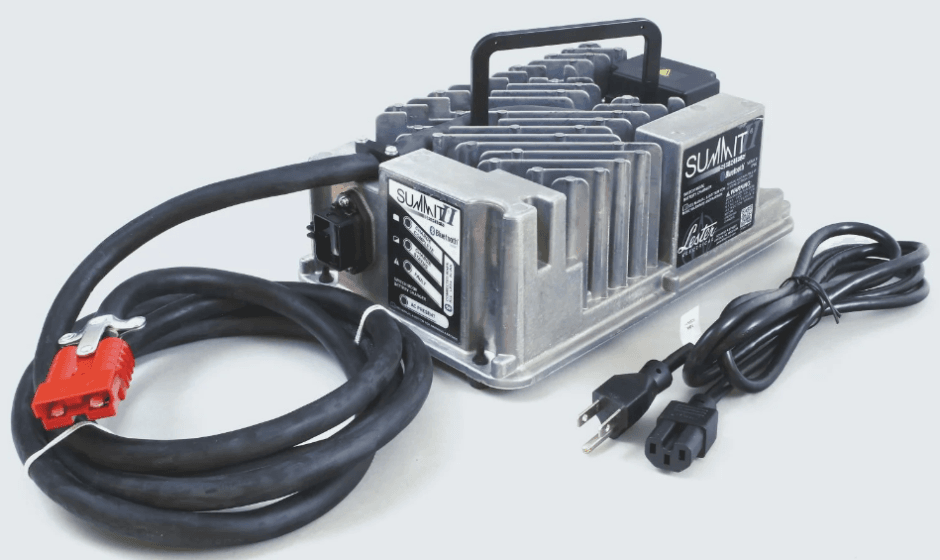

Lester Summit II Series Battery Charger
 RECEIVING AND INSTALLING THE CHARGER
 RECEIVING AND INSTALLING THE CHARGER
Unpack the charger and examine it for shipping damage. In the event that shipping damage is found, report it as a claim with the freight company. Do not operate the charger with a damaged AC or DC cable or connector. Do not operate the charger if it has received a sharp blow, was dropped, or was otherwise damaged in any way. Contact your dealer. Proper installation is important to achieve optimum performance and life from the charger and batteries. Allow as much free air space around the charger as possible.
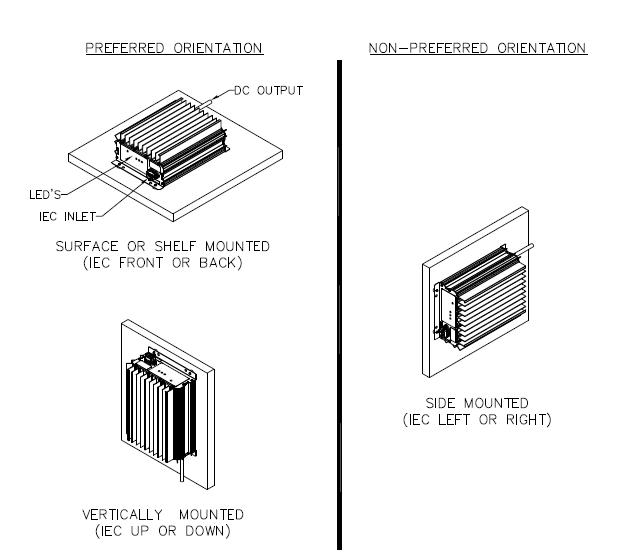
Please refer to the Specifications section for specific storage and operating environmental specifications. The most favorable mounting orientations of the charger are shown in Figure 2-1. For on-board use, the most favorable way to mount the charger is with the charger base bolted to a 0.1-inch (2.5 mm) minimum-thick metal plate. This provides both a strong structural mounting and good thermal conductive cooling (examples are shown in Figure 2-1). A poor thermal conductive mounting material, such as plastic or wood, would be less favorable for cooling.
- Charger Mounting Recommendations

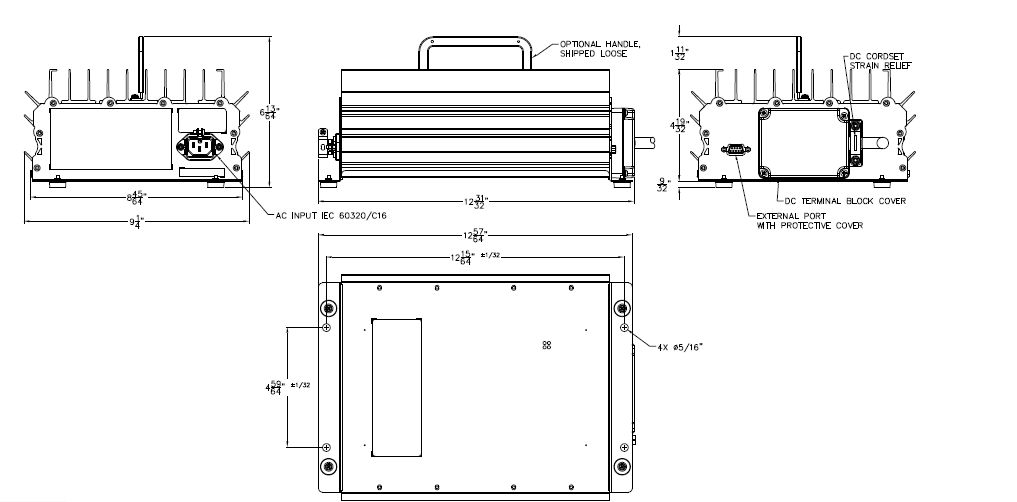
- Charger Dimensions and Mounting Hole Locations

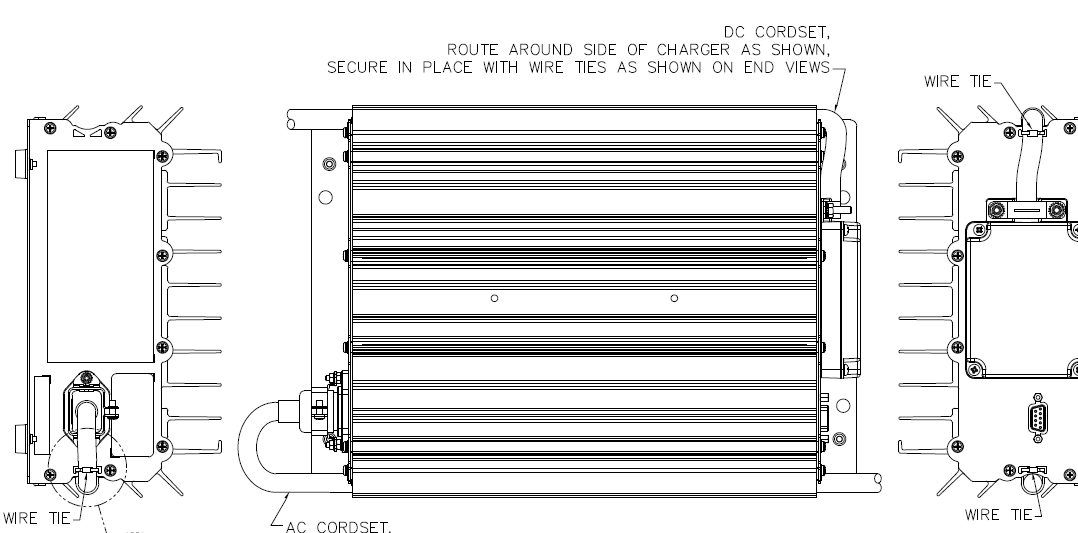
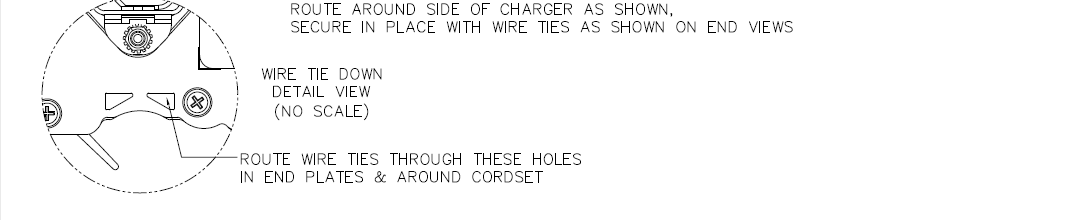
- AC & DC Cordset Routing


BATTERY TYPE
This charger contains multiple battery profiles for different battery types (including wet/flooded, AGM, and gel) and capacities of batteries. The charger was factory-configured with the active battery profile that was requested as part of the original order from Lester Electrical. Before (1) using the charger for the first time or (2) using the charger with a battery pack of a different type or capacity, use the Charger Connect app to verify that the proper active battery profile is selected. If the proper battery profile is not available on the charger, the Charger Connect app can be used to download the appropriate battery profile from the Cloud.
If the battery type you will be charging is not available via the Charger Connect app Cloud (for example, a specific lithium-ion brand or chemistry), contact Lester Electrical for more information. See Section 8 for additional details. Battery manufacturers frequently use the same battery cases for different battery types. Wet/flooded batteries have removable cell caps. Water electrolyzed by discharging and charging the battery is replaced through these openings. Sealed batteries are generally distinguished by non-removable cell caps.
The physical appearance of the battery case is frequently the same as a wet battery, though the cell caps are generally not removable. Refer to the battery manufacturer’s information panel on the battery case to determine the type of battery you have. If the information panel is missing or not legible, do not use the battery. If you have questions regarding which battery profile to select for use with your particular battery pack, contact your dealer for assistance.
AC INPUT
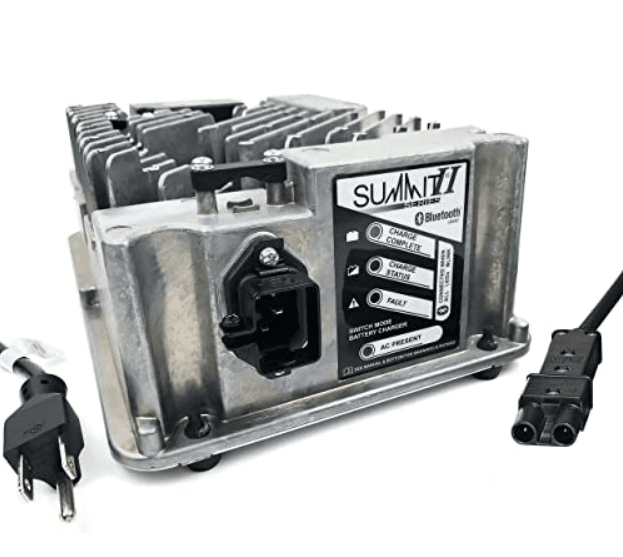
The charger has an AC input rating of 100-240 volts, 50-60 hertz, single-phase. The charger has an AC operating range of 85-265 volts, 45-65 hertz. Below 108 volts, the charger may reduce output power. The charger is equipped with an IEC 60320 C16 inlet for the AC input power, as shown. This allows the AC power cord set to be selected with a proper plug compatible with local electrical codes. The AC power cord set must be a minimum of 14 AWG (2.0 mm2) for proper operation. An AC cord clamp is also included to retain the AC power cord set IEC 60320 C15 connector. Loosen the screw on the side of the clamp as shown before inserting the C15 connector.
Fully insert the connector into the charger inlet and then tighten the AC cord clamp screw to secure the AC power cord to the charger. The charger must be grounded to reduce the risk of electric shock and is equipped with an IEC 60320 C16 inlet having an equipment-grounding conductor and a grounding socket. The installed AC power cord set must be plugged into an outlet that is properly installed and grounded in accordance with all applicable electrical codes and ordinances. If this charger includes the UL Listed symbol on its ratings label, it is provided with a cord set for connection to outlets operating at nominal 120 volts (or 240 volts as appropriate).
If the input plug does not fit the power outlet, contact Lester Electrical for the proper cord set terminating in an attachment plug of the proper configuration for the power outlet. If an extension cord is necessary, it must be a 3-conductor, No. 10 AWG (6.0 mm) minimum, heavy-duty cord with ground. It must also be in good electrical condition and as short as possible, 25 ft (7.6 m) maximum. Make sure that the pins on the plug of the extension cord are the same number, size, and shape as the AC power cord plug on the charger. The use of an improper extension cord could result in a risk of fire or electrical shock. Locate all cords so that they will not be stepped on, tripped over, or otherwise subjected to damage, stress, or accidentally disconnected.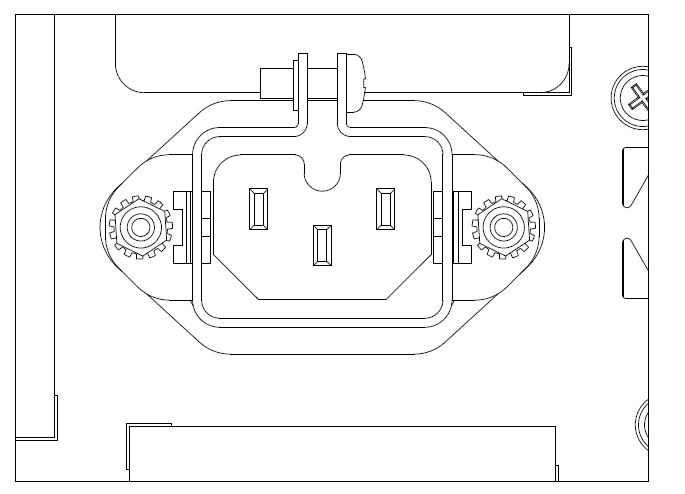
DC OUTPUT
WARNING: LEAD-ACID BATTERIES GENERATE EXPLOSIVE GAS. CHARGE ONLY IN WELL VENTILATED AREAS. TO PREVENT ARCING OR BURNING NEAR BATTERIES, DO NOT DISCONNECT THE DC CHARGING CONNECTOR(S) FROM THE BATTERIES WHEN THE CHARGER IS OPERATING. IF THE CHARGE CYCLE MUST BE INTERRUPTED, UNPLUG THE AC POWER CORD BEFORE DISCONNECTING THE DC OUTPUT CONNECTOR(S) FROM THE BATTERIES. KEEP SPARKS, FLAME, AND SMOKING MATERIALS AWAY FROM BATTERIES. TO REDUCE THE RISK OF FIRE, DO NOT USE THE CHARGER NEAR FLAMMABLE MATERIALS OR VAPORS.
Only charge batteries of the same type, voltage, number of cells, and amp-hour capacities listed on the charger ratings label. Before (1) using the charger for the first time or (2) using the charger with a battery pack of a different type or capacity, use the Charger Connect app to verify that the proper active battery profile
Auto Voltage Mode
The 1425W charger models support automatic multi-voltage DC charging, referred to as Auto Voltage Mode. Auto Voltage Mode provides automatic DC output voltage detection and adjustment so that battery packs of nominal 36V and 24V can be charged with a single charger without any configuration changes needing to be made to the charger when switching between battery packs of different nominal voltages. When connected to a 1425W charger model with the Charger Connect app , the “System Profile” screen will include an “Auto Profile” selection box, which provides the following three (3) options:
- OFF: Single voltage mode – you MUST ensure that the nominal DC voltage of the “Active Battery Profile” for the charger matches the nominal DC voltage of the connected battery pack.
- PER VOLTAGE PROFILES: A battery profile can be assigned for 36V, and a different battery profile can be assigned for 24V. The proper battery profile is automatically selected based on the connected battery pack. This mode is primarily used when the charger will be charging 36V and 24V nominal battery packs, where the battery packs are of different types and/or capacities, so using the “Scalable Profile” mode is not appropriate.
- SCALABLE PROFILE: The nominal DC voltage of the “Active Battery Profile” is automatically scaled to 36V or 24V based on the connected battery pack.
DC Output Cordset
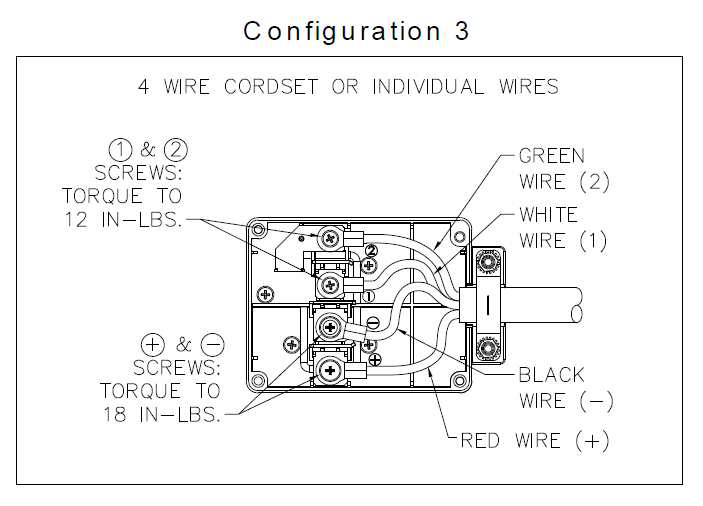
The DC output cordset includes a connector, plug, or terminals. The polarity of the charger DC connector/plug/ terminals must be the same as the battery connector/receptacle/terminals. The BLACK DC cable must be connected to the battery negative (-), and the WHITE or RED DC cable must be connected to the battery positive (+). The charger will not operate if the polarity is reversed. The DC cordset attaches to the external DC terminal block on the charger. Remove the touch-proof cover (if pre-installed) to expose the DC terminal block as shown in Figure 6.2-1.
Based on the DC cordset connector/plug/terminals, use Table 6.2 to determine the correct Configuration Number, and then attach the DC cordset wires as shown in Figure 6.2-2. Torque the screws for the battery connections to 18 in-lbs. (2.0 Nm) and the lockout and external temperature sense connections to 12 in-lbs (1.35 N-m). Place the strain relief over the DC cordset cable/wires. When individual wires are used for on-board applications, place the foam rubber gasket that comes on the cordset under the strain relief, center the wires, and then tighten the strain relief nuts and torque them to 12 in-lbs (1 N-m). This prevents the wires from getting pinched on the side of the strain relief when tightened. Replace the terminal block cover, and torque the cover screws to 9 in-lbs (1 N-m).
DC Terminal Block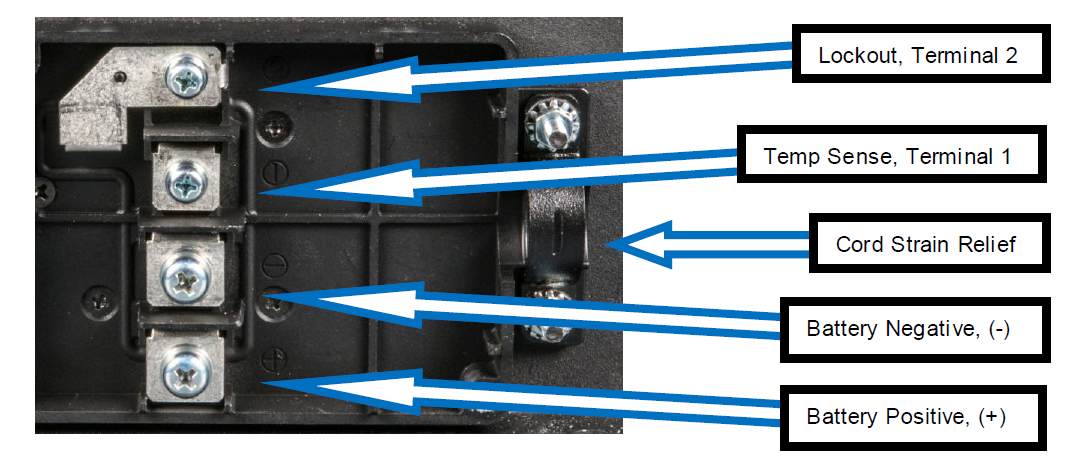
Common DC Output Connector Configurations
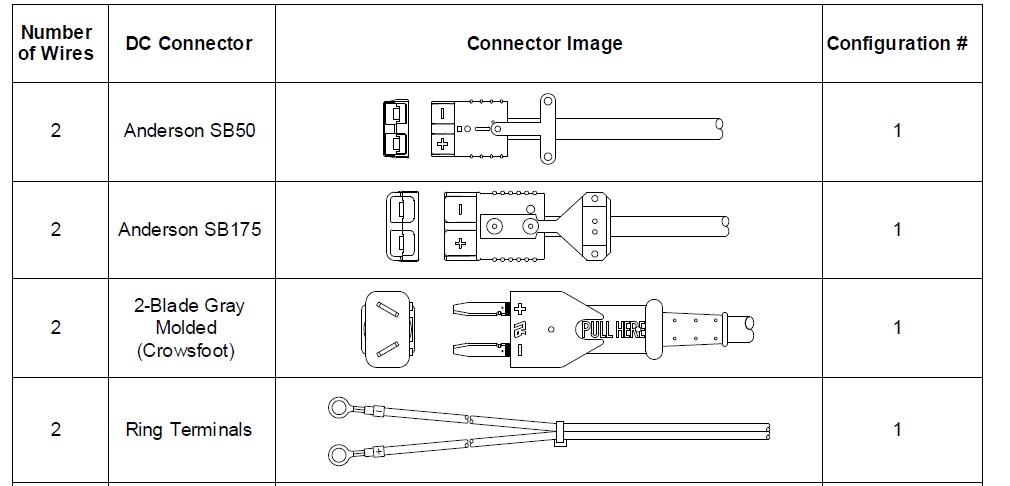
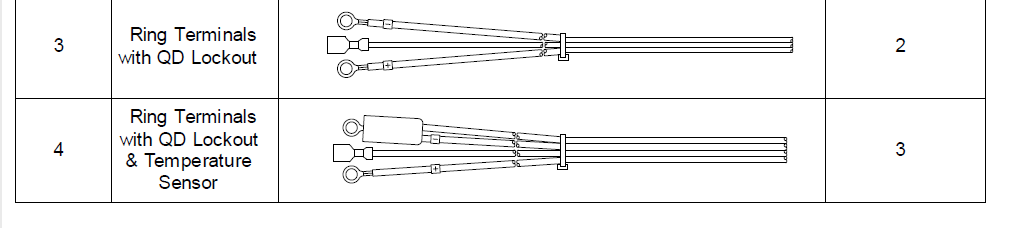
DC Terminal Block Configurations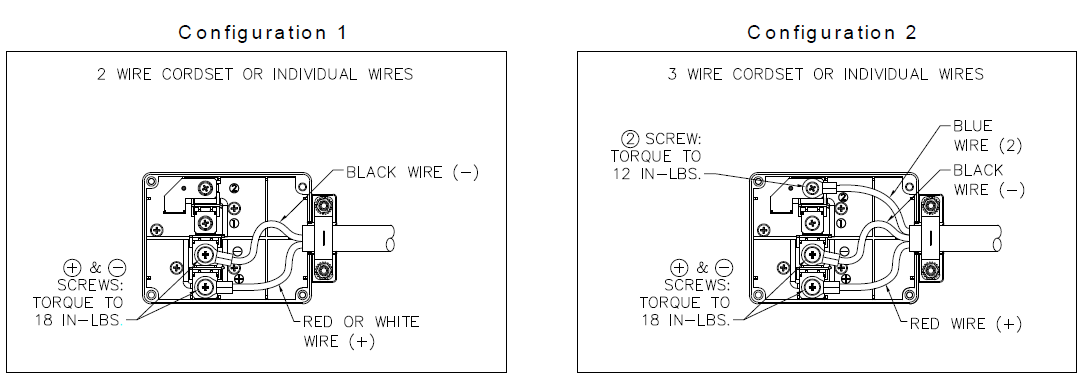
EXTERNAL PORT
The charger has an external port with a sealed DB9 (DE9) connector located near the DC terminal block, which is used for the remote LED and/or CAN communication cable assemblies. When this port is not being used, leave the protective cover over the connector to keep moisture and debris out of the connector. When mounting the charger on board a vehicle where the charger LEDs are not visible, a remote LED cable assembly can be used. Attach the remote LED cable assembly to the external port on the charger and hand-tighten the connector mounting screws. The LED end of the cable assembly is to be rear-mounted through a hole on the vehicle, or it can be attached to a panel that mounts to the vehicle. Install the remote LED assembly as shown.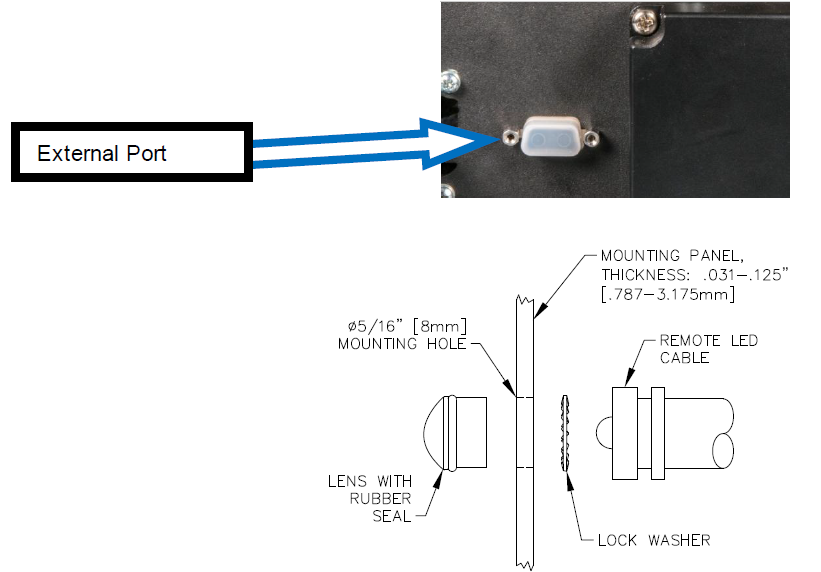
PROPER CARE OF DEEP-CYCLE LEAD-ACID MOTIVE POWER BATTERIES
Motive power battery packs are subjected to severe deep-cycle duty on a daily basis. Although these batteries are designed to withstand such duty, the following precautions must be observed to obtain good performance and maximum cycle life.
- When installing new batteries, be sure the polarity of each battery and the overall battery pack is correct. Otherwise, battery and/or charger damage can result.
- New batteries should be given a full charge before their first use because it is difficult to know how long the batteries have been stored.
- New batteries and older batteries that have been in storage are not capable of their rated output until they have been discharged and charged a number of times. Consult the manufacturer of your batteries for more information.
- DO NOT EXCESSIVELY DISCHARGE THE BATTERIES. Excessive discharge can cause polarity reversal of individual cells, resulting in complete failure shortly thereafter.
- Maintain the proper electrolyte level of wet (flooded) batteries by adding water when necessary. Distilled or deionized water is best for battery life. Never allow the electrolyte level to fall below the top of the battery plates. Electrolyte levels are lower during discharge and rise during charge. Therefore, to prevent the overflow of electrolyte when charging, it is mandatory that water be added to cells AFTER they have been fully charged; do not overfill. Old batteries require more frequent additions of water than new batteries.
- Hard crystalline sulfates form when batteries in storage are not maintained in a charged active state. Internal self-discharge can bring about the start of this condition in as little as three days in warm temperatures. Batteries not maintained and allowed to sit in storage will self-discharge, sulfate, and lose capacity. Repeated charging without using the batteries between charges can recover some of the lost power, range, and life, but some permanent loss should be expected.
- Cold batteries require more time to fully charge. When the temperature falls below 65°F, the batteries should be placed on charge as soon after use as possible.
- The tops of batteries and battery hold-downs must be kept clean and dry at all times to prevent excessive self-discharge and the flow of current between the battery posts and frame. Electrolyte spilled on batteries never dries or evaporates.
- All connections to batteries must be maintained clean and tight. Due to heating and discharge rates, bolted connections loosen over time. Re-tighten the connections twice yearly to the torques specified by the battery manufacturers.
- Follow all operating instructions, cautions, and warnings as specified in this manual, on the charger, in the battery manuals, and in the vehicle manuals.
Off-Board Charger Operation
If the charger was configured for off-board use, follow these operating instructions:
- With the charger DC output connector/plug disconnected from the battery connector/receptacle, connect the charger AC power cord to an appropriate AC outlet (if not already connected), and the blue “AC PRESENT” LED will turn on.
- Connect the charger DC output connector/plug to the battery connector/receptacle. The charger will start automatically, which is indicated by the yellow “CHARGE STATUS” LED beginning to blink slowly.
- If the charger must be disconnected from the battery while a charge cycle is in progress, first disconnect the AC power cord from the AC outlet. Do not disconnect the charger DC output connector/plug from the battery while a charge cycle is in progress.
- The charge cycle 80% point is indicated by the yellow LED beginning to blink quickly.
- The Finish charge cycle phase is indicated by the solid illumination of the yellow LED. Not all charge profiles include a Finish phase.
- An extended Balance/Equalize charge cycle phase is indicated by the green “CHARGE COMPLETE” LED beginning to blink quickly. Not all charge profiles include a Balance/Equalize phase.
- The charger automatically terminates the charge cycle when a battery reaches full charge, which is indicated by [1] the solid illumination of the green LED or \[2] the green LED beginning to blink slowly, indicating a post-charge phase. The required charge time is affected by numerous factors, including battery amp-hour capacity, depth of discharge, battery temperature, and battery age/usage.
- Before operating the machine/equipment, disconnect the charger DC output connector/plug from the battery connector/receptacle by firmly grasping both connectors and pulling them straight apart.
On-Board Charger Operation
If the charger was configured for on-board use, follow these operating instructions:
- Ensure that the vehicle/equipment on which the charger is mounted is turned off.
- With the charger AC power cord disconnected from the AC outlet, connect the charger DC output connector/ plug to the battery connector/receptacle (most likely already connected or hard-wired).
- Connect the charger’s AC power cord to an appropriate live AC outlet, which is indicated by the blue “AC PRESENT” LED turning on. The charger will start automatically as indicated by the yellow “CHARGE STATUS” LED beginning to blink slowly.
- If the charger must be disconnected from the battery while a charge cycle is in progress, disconnect the AC power cord from the AC outlet. Do not disconnect the charger DC output connector/plug from the battery while a charge cycle is in progress.
- The charge cycle 80% point is indicated by the yellow LED beginning to blink quickly.
- The Finish charge cycle phase is indicated by the solid illumination of the yellow LED. Not all charge profiles include a Finish phase.
- An extended Balance/Equalize charge cycle phase is indicated by the green “CHARGE COMPLETE” LED beginning to blink quickly. Not all charge profiles include a Balance/Equalize phase.
- The charger automatically terminates the charge cycle when a battery reaches full charge, which is indicated by [1] the solid illumination of the green LED or [2] the green LED beginning to blink slowly, indicating a post-charge phase. The required charge time is affected by numerous factors, including battery amp-hour capacity, depth of discharge, battery temperature, and battery age/usage.
- Before operating the vehicle/equipment, disconnect the charger AC power cord from the outlet.
Storage Mode Operation
- Storage Mode is designed to keep your battery maintained during storage periods that last a few weeks to several months at a time.
- Depending on the battery type and battery profile selected, a storage charge can be a continuous float or a periodic charge mode.
- Do NOT disconnect the charger from the battery or from the AC power until your machine is needed for use. Disconnecting and reconnecting the charger from the batteries or AC power may start a charge cycle, but disconnection disrupts the storage mode, so optimum battery maintenance is not achieved.
- After several months of storage, your batteries should be serviced and the charger reset by disconnecting the DC for Off-Board or the AC for On-Board applications (disconnect the AC for a minimum of 10 minutes) before continuing another storage season.
TROUBLESHOOTING
The charger was fully tested and calibrated before leaving the factory. It was delivered ready to charge. If properly installed, the charger should require very little attention. If improper charger operation occurs, it will require repair by a qualified service technician (see section 12.1 for information regarding the Fault LED).
If the charger does not turn on, check for one of the following conditions.
- The charger AC power cord is not plugged into a live and/or appropriate AC outlet.
- The battery connections are incorrect – battery not connected, reverse polarity, or short circuit.
- The battery voltage is too high.
- The battery voltage is too low (below 10 volts).
If the charger turns off before a battery is fully charged, and a fault condition is not indicated by the Fault LED, this indicates one of the following conditions.
- The AC power was interrupted during the charge cycle.
- The charger DC output connector was disconnected from the battery during the charge cycle.
- The battery has been allowed to sulfate. Charge the battery at least once every three (3) days when the equipment is lightly used. Once sulfation is allowed to take place, it may be partially reduced by returning, temporarily, to daily charging.
A decrease in vehicle/equipment range, where the battery loses power faster, indicates one of the following conditions.
- The electrolyte level in a wet lead-acid battery was allowed to drop below the top of the battery plates. If so, add distilled water to just cover the top of the plates immediately upon discovery, and then fill to the proper level with distilled water at the completion of the very next charge cycle.
- Use of the vehicle/equipment before the battery has been fully charged, and the charger automatically terminates the charge cycle. This shortens battery life and accelerates the onset of reduced daily range.
- The normal wear-out pattern for the battery.
A charge cycle running longer than anticipated before terminating indicates one of the following conditions.
- An over-discharged battery.
- The charger output may have been reduced due to low AC input voltage, high ambient temperature, or obstructions to cooling airflow.
- The amp-hour capacity of the battery is greater than the charger can fully charge in the anticipated amount of time.
For full troubleshooting and additional details, visit: [www.LesterElectrical.com]
For More Manuals By Lester Electrical, Visit ManualsLibraryy.
Lester Summit II Series Battery Charger-FAQs.
Can I leave the battery on the charger after it’s fully charged?
Yes, the Summit II charger automatically stops charging when full to prevent overcharging.
Can a battery drain while charging?
Yes, if:
The battery is old/damaged.
There’s a faulty charging port.
The charger is not supplying enough power.
Why should I open the battery compartment during charging?
Prevents hydrogen gas buildup (explosion risk).
Ensures proper ventilation, especially in confined spaces.
What does a blinking red light mean?
Blinking Red: Bad battery (replace or check connections).
Steady Red: Charging in progress.
What voltage should a fully charged 12V battery read?
12.8V: Fully charged & healthy.
12.1V–12.4V: Needs recharging.
Below 10.5V: Likely a dead cell.
Can I overcharge a battery?
Yes, overcharging can:
Reduce battery lifespan.
Cause overheating or swelling.
Lead to explosion risks (in extreme cases).
How long should I charge a dead battery?
Depends on battery size & charger amperage:
10A charger: ~4–12 hours for a dead 12V battery.
Trickle charger: May take 24+ hours.
What is a trickle charger?
A slow, low-power charger that maintains battery charge without overcharging. Ideal for long-term storage.
How do I reset the Summit II charger?
Unplug the charger.
Wait 30 seconds, then reconnect.
If issues persist, check the user manual or contact support.