
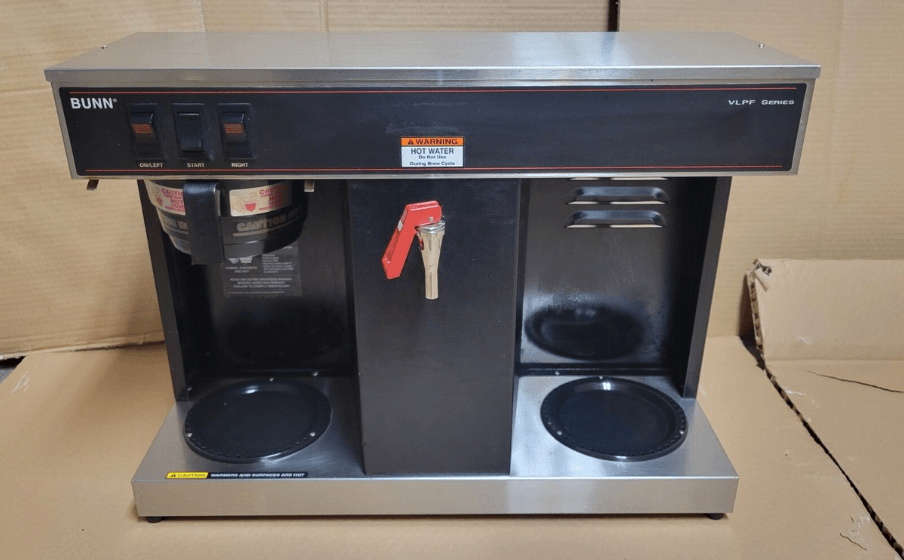

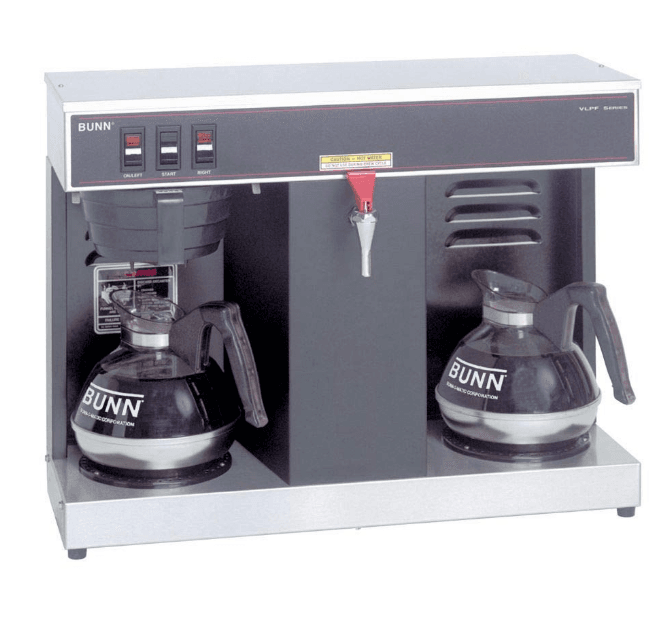
BUNN VLPF 12-Cup Automatic Commercial Coffee Maker
ELECTRICAL REQUIREMENTS
CAUTION – The brewer must be disconnected from the power source until specified in Initial Set-Up.
The brewer has an attached cordset and requires 2-wire, grounded service rated 120 volts ac, 15 amp, single phase, 60 Hz.
PLUMBING REQUIREMENTS
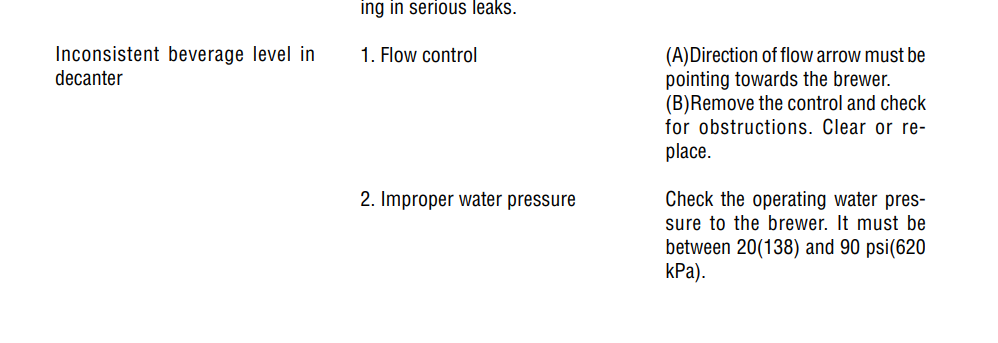
This brewer must be connected to a cold water system with operating pressure between 20(138) and 90 psi(620 kPa) from a 1/2” or larger supply line. A shut-off valve should be installed in the line before the brewer. Install a regulator in the line when pressure is greater than 90 psi(620 kPa) to reduce it to 50 psi(345 kPa). The water inlet fitting is 1/4” flare.
NOTE Bunn-O-Matic recommends 1/4” copper tubing for installations of less than 25 feet and 3/8” for more than 25 feet from the 1/2” water supply line. A tight coil of copper tubing in the water line will facilitate moving the brewer to clean the counter top. Bunn-O-Matic does not recommend the use of a saddle valve to install the brewer. The size and shape of the hole made in the supply line by this type of device may restrict water flow. Plumbing Hook-Up
- Attach the female fitting from the short piece of tubing on the flow control/strainer assembly (supplied) to the water inlet fitting on the right rear side of the brewer.
- Flush the water line and securely attach it to the flare fitting on the flow control/strainer assembly.
- Turn on the water supply
OPERATING CONTROLS
On/Left Switch
Placing the switch in the upper position supplies power to the left decanter warmer and enables brewing and refilling of the tank. Placing the switch in the lower position cuts power to the left decanter warmer and stops brewing and refilling of the tank. Stopping a brew cycle after it has been started will not stop the flow of water into the funnel until the tank syphons down to its proper level.
NOTE The On/Left switch must be in the upper position to initiate and complete a brew cycle or to automatically refill the tank after using the hot water faucet.
Start Switch
Starts a brew cycle when the On/Left switch is in the upper position.
Right Switch
Placing the switch in the upper position supplies power to the right decanter warmer. Placing the switch in the lower position cuts power to the right decanter warmer
INITIAL SET-UP
CAUTION The brewer must be unplugged throughout the Initial Set-up, except when specified in the instructions.
- Remove the top lid from the brewer.
- Rotate the control thermostat knob fully counterclockwise to the “OFF” position and replace the top lid.
- Insert an empty funnel into the funnel rails.
- Place a decanter containing a small amount of water on the left warmer.
- Plug in the brewer and place the On/Left switch in the upper position. Water will flow into the tank after a five second delay and continue until the tank has filled to its capacity. This should take approximately seven minutes.
NOTE The On/left switch must be in the upper position to initiate and complete a brew cycle or to automatically refill the tank after using the hot water faucet. - Place the On/left switch in the lower position.
- Unplug the brewer.
- Remove the top lid.
- Rotate the control thermostat knob fully clockwise to the “ON” position and replace the top lid.
- Plug in the brewer and wait for the water in the tank to heat to the proper temperature. Some water will drip from the funnel during this time. This is due to expansion and should not occur thereafter.
- Place an empty decanter under the funnel.
- Place the On/Left switch in the upper position and press the Start switch. Empty the decanter after water has stopped flowing from the funnel.
- Allow the water in the tank to reheat to the proper temperature.
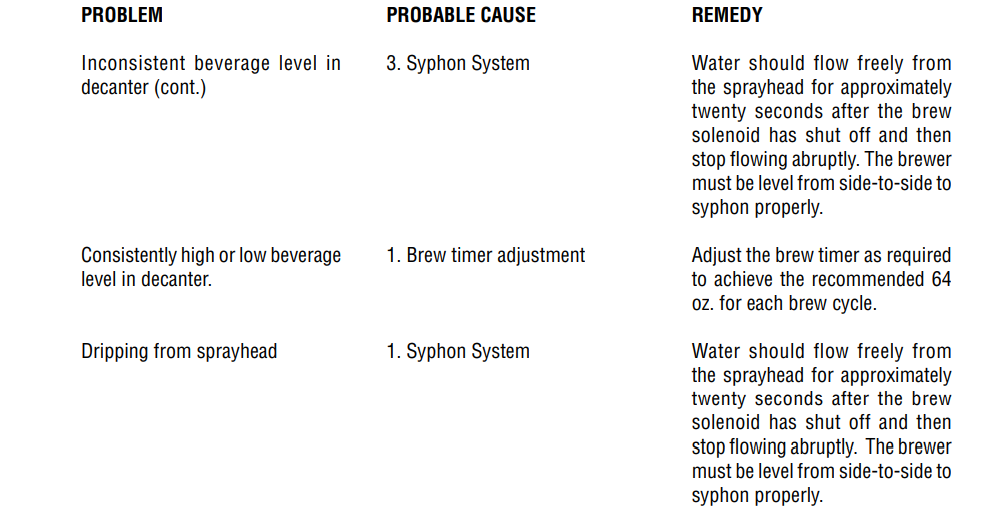
- Press the Start switch. Check the water volume in the decanter after water has stopped flowing from the funnel. It should be 64 ounces.
- If not, unplug the brewer and remove the top lid.
- Adjust the brew timer as required. See Adjusting Brew Volumes. Replace the top lid, plug in the brewer, start, and measure another brew cycle.
- Repeat steps 13-16 until 64 oz. water volume is achieved
ADJUSTING BREW VOLUMES
CAUTION Disconnect the power source from the brewer prior to the removal of any panel for the replacement or adjustment of any component.
NOTE: Prior to setting or modifying batch sizes, check that the brewer is connected to water supply, the tank is properly filled, and a funnel and server are in place.
- Modifying batch sizes. To modify a batch volume, first check that the SET/LOCK switch is in the “SET” position on the circuit board.
To increase a batch size. Press and hold the START or BREW switch until three clicks are heard. Release the switch (Failure to release the switch within two seconds after the third click causes the volume setting to be aborted and previous volume setting will remain in memory) and press it again one or more times. Each time the switch is pressed, two seconds are added to the brew time period. Allow the brew cycle to finish in order to verify that the desired volume has been achieved.
To decrease a batch size. Press and release the START or BREW switch once for every two-second interval
to be removed from the total brew time period; then immediately press and hold down the START or BREW switch until three clicks are heard. Release the switch. (Failure to release the switch within two seconds after the third click causes the volume setting to be aborted and previous volume setting will remain in memory). Allow the brew cycle to finish in order to verify that the desired volume has been achieved. - Setting batch sizes. To set a batch volume, first check that the SET/LOCK switch is in the “SET” position on
the circuit board. Press and hold the START or BREW switch until three distinct clicks are heard, and then release the switch. (Failure to release the switch within two seconds after the third click causes the volume setting to be aborted and previous volume setting will remain in memory). View the level of the liquid being
dispensed. When the desired level is reached, turn the ON/OFF switch to “OFF”. The brewer remembers this
volume and will continue to brew batches of this size until the volume setting procedure is repeated.
NOTE: When brewing coffee, batch volumes will decrease due to absorption by the coffee grounds. - Setting programming disable feature. If it becomes necessary to prevent anyone from changing brew times once programmed, you can set the SET/LOCK switch to the “LOCK” position. This will prevent any programming to be done until switch is once again placed in the “SET” position.
COFFEE BREWING
- Insert a BUNN filter into the funnel.
- Pour the fresh coffee into the filter and level the bed of grounds by gently shaking.
- Slide the funnel into the funnel rails.
- Place the On/Left switch in the upper position.
- Press the Start switch.
- When brewing is completed, simply discard the grounds and filter.
NOTE – Any attempt to draw hot water from the faucet during a brew cycle will result in a lesser amount of finished beverage in the decanter.
CLEANING
- The use of a damp cloth rinsed in any mild, non-abrasive, liquid detergent is recommended for cleaning all surfaces on Bunn-O-Matic equipment.
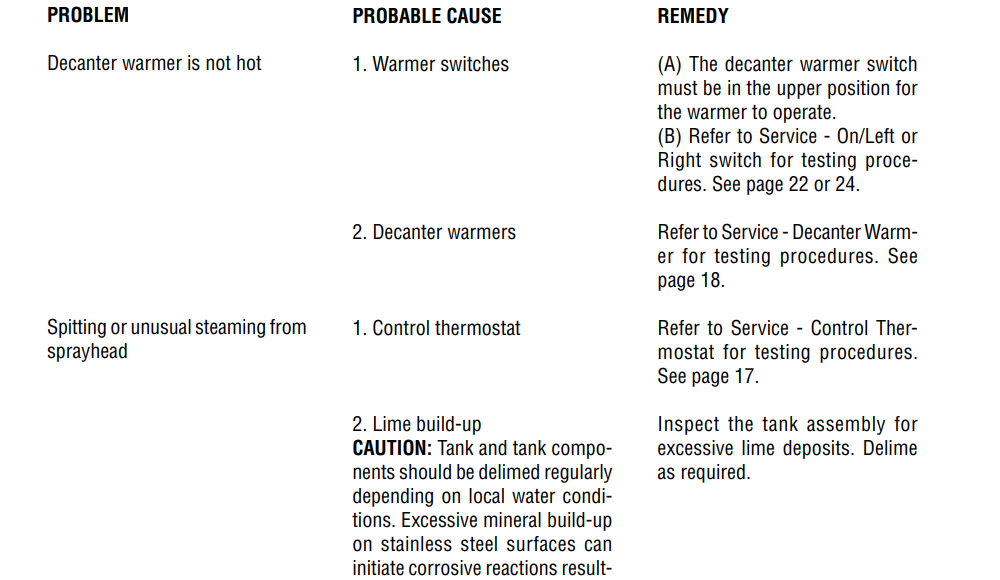
- Check and clean the sprayhead. The sprayhead holes must always remain open.
- With the sprayhead removed, insert the deliming spring (provided) all the way into the sprayhead tube. When
inserted properly , no more than two inches of spring should be visible. Saw back and forth five or six times. Then, repeat this step for the airvent tube
TROUBLESHOOTING
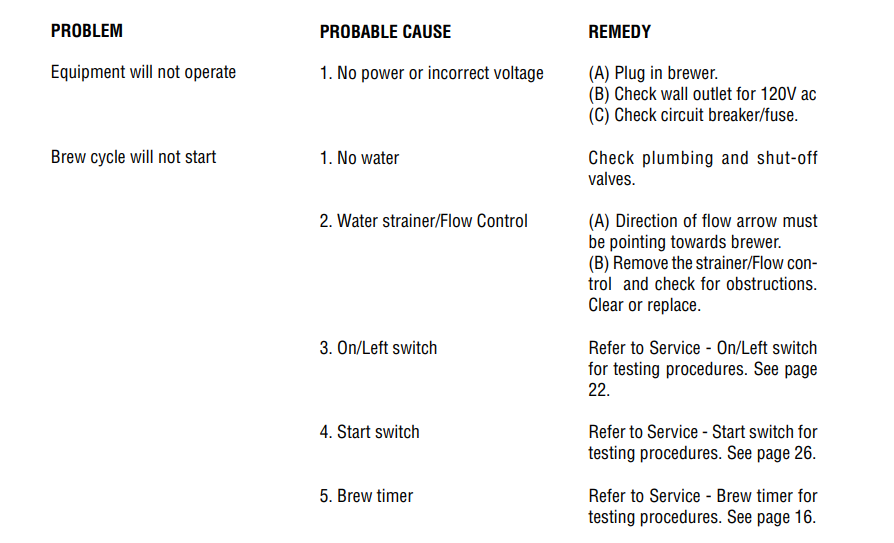
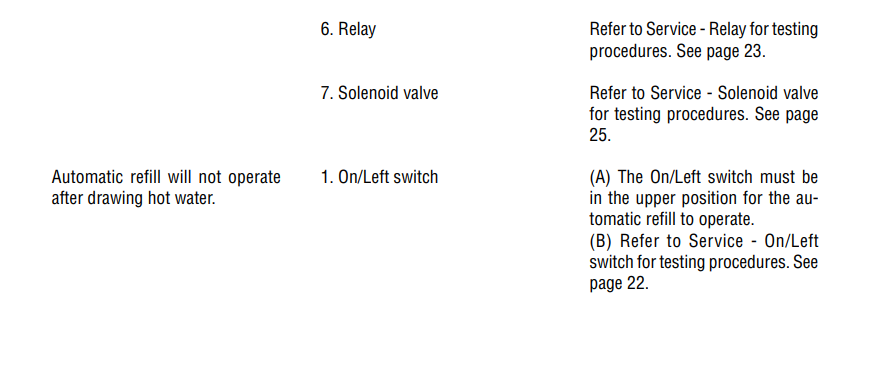
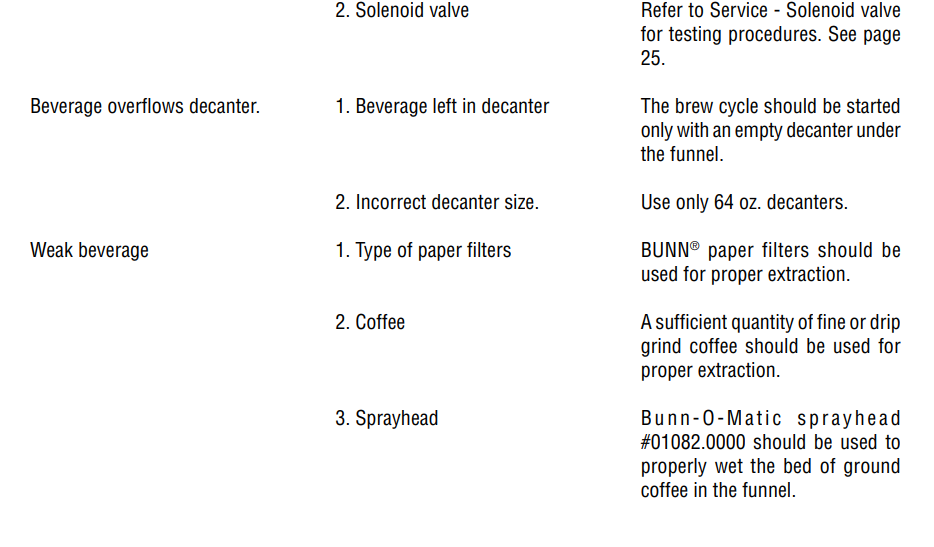
A troubleshooting guide is provided to suggest probable causes and remedies for the most likely problems encountered. If the problem remains after exhausting the troubleshooting steps, contact the Bunn-O-Matic Technical Services Department.
- Inspection, testing, and repair of electrical equipment should be performed only by qualified service personnel.
- All electronic components have 120 volt ac and low voltage dc potential on their terminals. Shorting of terminals or the application of external voltages may result in board failure.
- Intermittent operation of electronic circuit boards is unlikely. Board failure will normally be permanent. If an intermittent condition is encountered, the cause will likely be a switch contact or a loose connection at a terminal or crimp.
- Solenoid removal requires interrupting the water supply to the valve. Damage may result if solenoids are energized for more than ten minutes without a supply of water.
- The use of two wrenches is recommended whenever plumbing fittings are tightened or loosened. This will help to avoid twists and kinks in the tubing.
- Make certain that all plumbing connections are sealed and electrical connections tight and isolated.
- This brewer is heated at all times unless unplugged. Keep away from combustibles.
WARNING
- Exercise extreme caution when servicing electrical equipment.
- Unplug the brewer when servicing, except when electrical tests are specified.
- Follow recommended service procedures.
- Replace all protective shields or safety notices.
SERVICE
This section provides procedures for testing and replacing various major components used in this brewer should service become necessary. Refer to Troubleshooting for assistance in determining the cause of any problem.
COMPONENT ACCESS
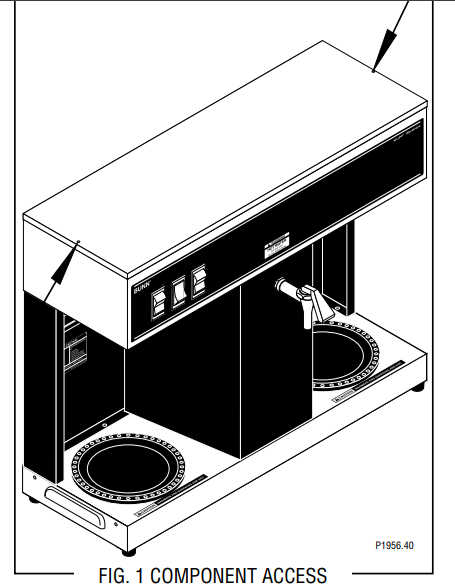
WARNING Unplug the brewer before the removal of any panel or the replacement of any component The On/Left switch, Start switch, Right switch, solenoid valve, brew timer, liquid level control components, relay, control thermostat, limit thermostat, and tank heater are located in the hood. Access is gained by removing the top lid, attached with two #4-40 slotted-head screws.
WARNING Inspection, testing, and repair of electrical equipment should be performed only by qualified service personnel. The brewer should be unplugged when servicing, except when electrical tests are required and the test procedure specifically states to plug in the brewer.
BREW TIMER (early models)
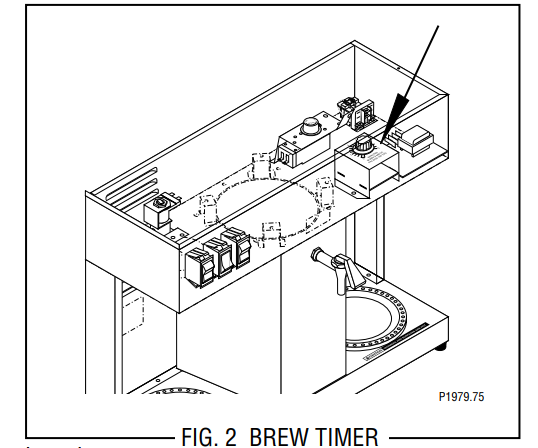
Location: The brew timer is located in the hood, to the right of the tank.
Test Procedure
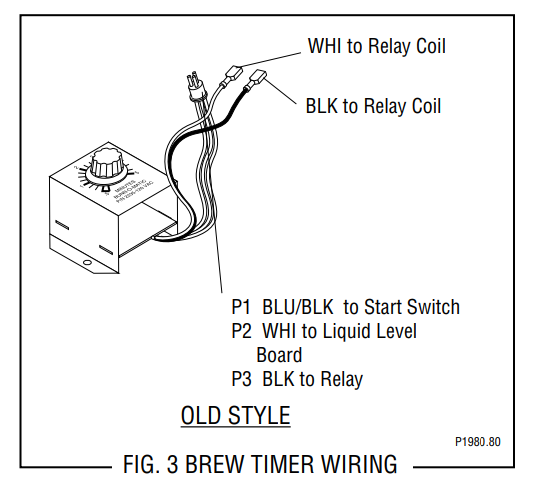
- Disconnect the brewer from the power source and separate the polarized, three-pin connectors between the timer and brewer wiring harness and rotate the brew timer dial fully counterclockwise.
- With a voltmeter, check the voltage across sockets 2 & 3 (white and black wires) of the female connector when the On/Left switch is in the upper position. Connect the brewer to the power source. The indication must be 120 volts ac.
- Disconnect the brewer from the power source.
If voltage is present as described, proceed to #4. If voltage is not present as described, refer to the Wiring Diagram and check the brewing harness.
- With a voltmeter, check the voltage across sockets 1 & 2 (blue and white wires) of the female connector when the On/Left switch is in the upper position and the Start switch is pressed to the lower position and held. Connect the brewer to the power source. The indication must be 120 volts ac until the Start switch is released.
- Disconnect the brewer from the power source.
If voltage is present as described, reconnect the polarized, three-pin connectors, and proceed to #6. If voltage is not present as described, refer to the Wiring Diagram and check the brewer wiring harness.
- Disconnect the in-line connectors on the black and white wires from the timer to the wiring harness.
- With a voltmeter, check the voltage across the black and white wires when the On/Left switch is in the upper position and the Start switch is pressed to the lower position and released. Connect the brewer to the power source. The indication must be 120 volts ac for approximately 20 seconds and then return to its previous indication.
- Disconnect the brewer from the power source.
If voltage is present as described, the brew timer is operating properly. Reset the timer dial as required, to obtain the desired brew volume. If voltage is not present as described, replace the brew timer
Removal and Replacement
- Separate all connectors between the brewer wiring harness and the timer.
- Remove the two #8-32 nuts holding the timer to the inside of the hood.
- Install the new timer circuit board as described in Late Model Timer section on the following pages.
- Refer to FIG. 5 when reconnecting the wires.
- Install the Timer Setting decal provided with the replacement timer kit, on the bottom of the top cover.
- Adjust the timer as required. Refer to Late Model Timer section on the following pages
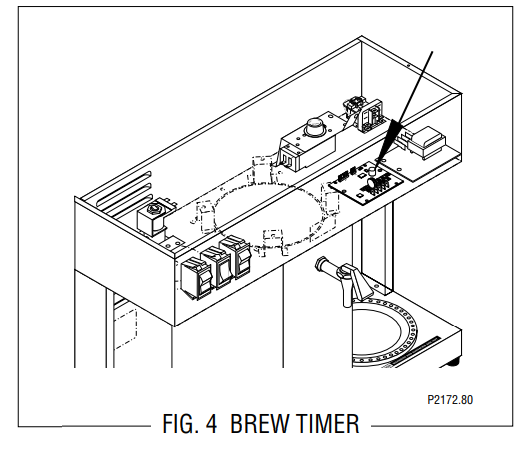
Location: The brew timer is located in the hood, to the right of the tank.
Test Procedures
- Disconnect the brewer from the power source and remove the top cover.
- With a voltmeter, check the voltage across terminals TL1 and TL2 when the “ON/OFF” switch is in the “ON” position. Connect the brewer to the power source. The indication must be 120 volts ac.
- Disconnect the brewer from the power source.
If voltage is present as described, proceed to #4. If voltage is not present as described, refer to the Wiring Diagram and check the brewer wiring harness.
- Disconnect the white/blue wire from terminal TL3mand the blue wire from terminal TL5. Check for continuity across the two wires when the start switch is pressed to the “START” position.
If continuity is present as described, reconnect the wires and proceed to #5. If continuity is not present as described, refer to the Wiring Diagram and check the brewer wiring harness
- With a voltmeter, check the voltage across terminals TL1 and TL4 when the “ON/OFF” switch is in the “ON” position. Connect the brewer to the power source. The indication must be 0 volts.
If voltage is as described, proceed to #6. If voltage is not as described, disconnect the brewer from the power source and replace the timer.
- With a voltmeter, check the voltage across terminals TL1 and TL4 when the “ON/OFF” switch is in the “ON” position. Connect the brewer to the power source and press the start switch. The indication must be 120 volts ac.
If voltage is present as described, the brew timer is operating properly. Reset the timer as required, to obtain the desired brew volume. If voltage is not present as described, disconnect the brewer from the power source and replace the timer.
For more manuals by Bunn, visit ManualsLibraryy
BUNN VLPF 12-Cup Automatic Commercial Coffee Maker-FAQs
Q1. What makes a Bunn coffee maker special?
BUNN brewers are designed with a stainless steel hot water tank that keeps water at the ideal brewing temperature. This allows coffee to start brewing immediately and ensures a consistent, smooth flow of hot water over the grounds—brewing a full pot in just about 4 minutes.
Q2. How much coffee should I use for 12 cups?
For a 12-cup BUNN coffee maker, use 12 scoops (24 tablespoons) of ground coffee. This makes about 12 six-ounce cups or 6 standard mugs. Adjust slightly for stronger or milder coffee.
Q3. Does BUNN make a 12-cup decanter?
Yes. BUNN offers a 12-Cup Standard Glass Decanter, which fits perfectly with the VLPF model.
Q4. How long does it take for a BUNN coffee maker to heat up?
When first set up, it takes about 15 minutes to heat the internal water tank. After that, the hot water stays ready so you can brew coffee anytime.
Q5. How long does it take to brew a full pot?
The BUNN VLPF brews 12 cups (about 64 ounces) in just 4–5 minutes.
Q6. Should I leave my BUNN coffee maker on all the time?
Yes, you can. The machine is designed to keep water hot so you can brew instantly. It uses about 10 cents of electricity per day, making it energy-efficient for commercial use.
Q7. How do I clean a BUNN coffee maker?
Daily: Rinse and wash the decanter and brew funnel.
Weekly: Wipe the spray head and clean the machine with mild soap and warm water.
Monthly: Descale with a vinegar solution or BUNN-approved cleaner to remove mineral deposits.
Q8. How often should I descale it?
At least once a week in areas with hard water, or monthly if your water is soft. Regular descaling prevents clogs and keeps coffee tasting fresh.
Q9. Can I use distilled water in my BUNN coffee maker?
Yes. Distilled water helps prevent mineral buildup and extends the life of the machine, especially in areas with hard water.