
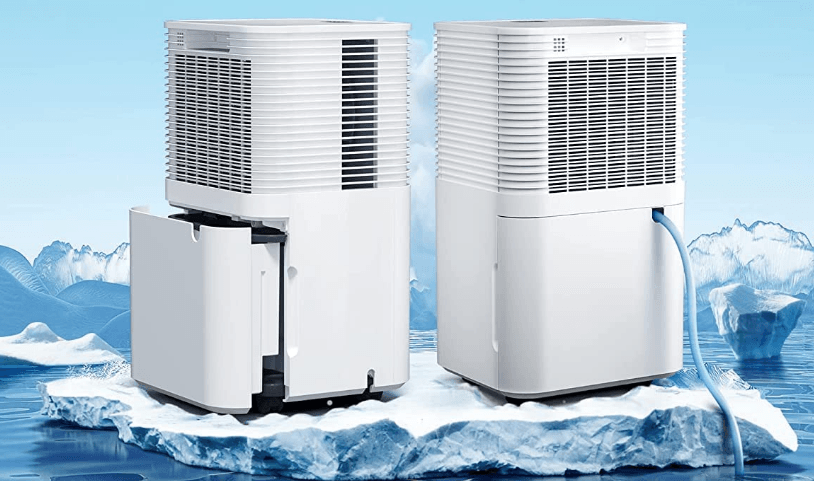

Bublue OL12D-D031A Portable Dehumidifier
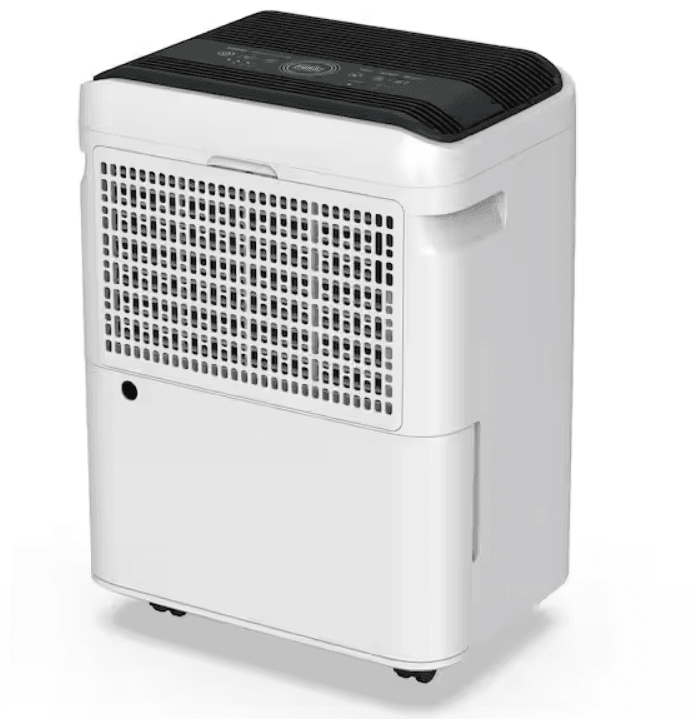
OPERATIONAL PRECAUTIONS
WARNING – to reduce the risk of fire, electric shock, or injury to people or property:
- If the supply cord is damaged, it must be replaced by the manufacturer, its service agent, or similarly qualified persons in order to avoid hazards.
- The appliance shall be disconnected from its power source during maintenance.
- Always operate the unit from a power source of equal voltage, frequency, and rating as indicated on the product identification plate.
- Always use a grounded power outlet that is grounded.
- Unplug the power cord when cleaning or not using.
- Do not operate with wet hands. Prevent water from spilling onto the unit.
- Do not immerse or expose the unit to rain, moisture, or any other liquid.
- Do not leave the unit running unattended. Do not tilt or turn over the unit.
- Do not unplug while the unit is operating.
- Do not unplug by pulling on the power cord.
- Do not use an extension cord or an adapter plug.
- Do not put objects on the unit.
- Do not climb or sit on the unit.
- Do not insert fingers or other objects into the air outlet.
- Do not touch the air inlet or the aluminum fins of the unit.
- Do not operate the unit if it is dropped, damaged, or showing signs of product malfunction. Ensure the unit is far away from fire, flammable, or explosive objects. The unit shall be installed in accordance with national
- wiring regulations.
- Do not use means to accelerate the defrosting process or to clean, other than those recommended by the manufacturer.
- The appliance shall be stored in a room without continuously operating sources (for example, open flames, an operating gas appliance, an operating electric heater).
- The appliance shall be stored so as to prevent mechanical damage from occurring.
- Do not piece or burn, even after using.
- Be aware that refrigerants may not have an odor.
- Pipe-work shall be protected from physical damage and shall not be installed in an unventilated space that’s smaller than 43 square feet.
- Compliance with national gas regulations shall be observed.
- Keep any required ventilation openings clear of obstruction.
- The appliance shall be stored in a well-ventilated area where the room size corresponds to the dimensions specified for operation.
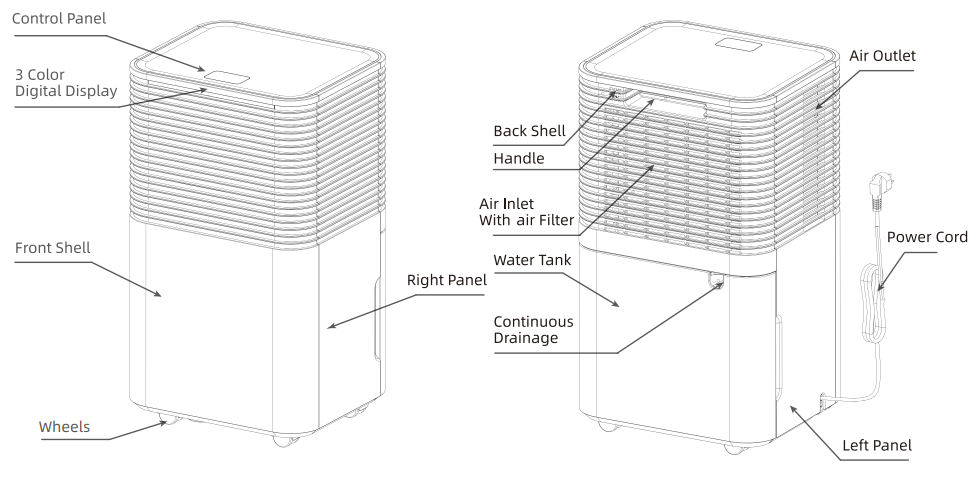
PRODUCT OVERVIEW
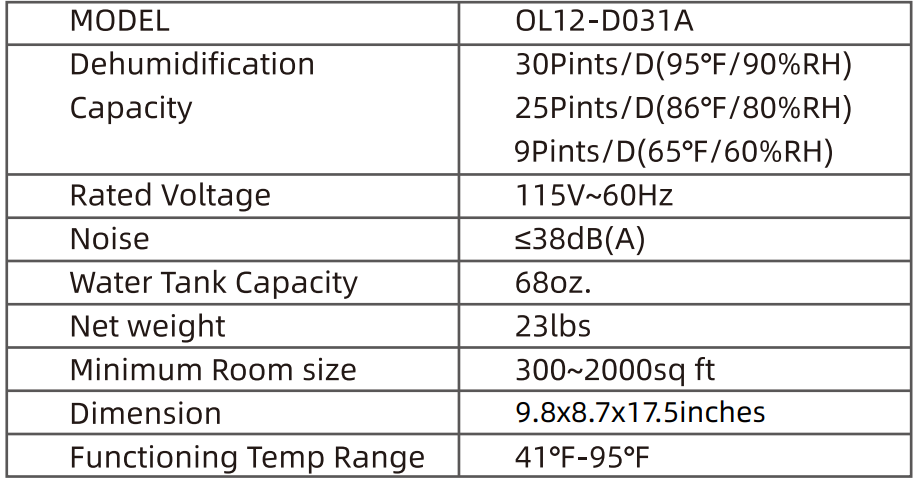
SPECIFICATIONS
INSTALLATION
LOCATION
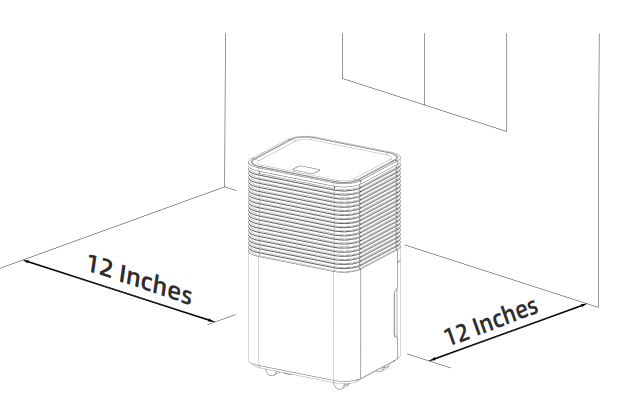
- Place the unit on a firm, horizontal surface in an area with at least 12 inches of free space around it to allow for proper air circulation.
- Never install the unit in a place that could be subject to:
- Heat sources such as radiators, heat registers, stoves, and other products that produce heat.
- Possible splashing of oil or water.
- Direct sunlight.
- Mechanical vibration or shock.
- Excessive dust.
- Lack of ventilation, such as a cabinet or bookcase.
- Uneven surface.

OPERATING THE DEVICE SAFELY
- Check the device after unpacking for any damage or scratches on it.
- Operate this unit in an ambient temperature ranging from 41°F to 95°F.
- Do not use the device in outdoor settings, as it is intended for indoor residential applications only.
- Do not operate the device in close proximity to walls, curtains, or other objects that may block the inlet and outlet.
- Keep the air inlet and outlet free of obstacles.
- Adjust the wind deflector in the upward direction prior to start-up.
- If the device is being tipped more than 45°, allow it to sit upright for at least 24 hours before startup.
- Keep doors and windows closed for better energy saving.
- Do not operate or store the unit in direct sunlight or rain.
- It is normal for the air outlet to feel warm to the touch after continuous operation on hot days.
- Empty the water tank before moving the device.
- Make sure the water tank is correctly fitted; otherwise, the unit will not operate properly.
- The dehumidifier starts up in the mode selected when the unit was last used.
- The dehumidifier starts to dehumidify if the room’s humidity level is 3% higher than the selected humidity level.
- There is a protective 3-minute time delay for the compressor. Wait 3 minutes for the dehumidifier to resume dehumidification.
OPERATION
CONTROL PANEL
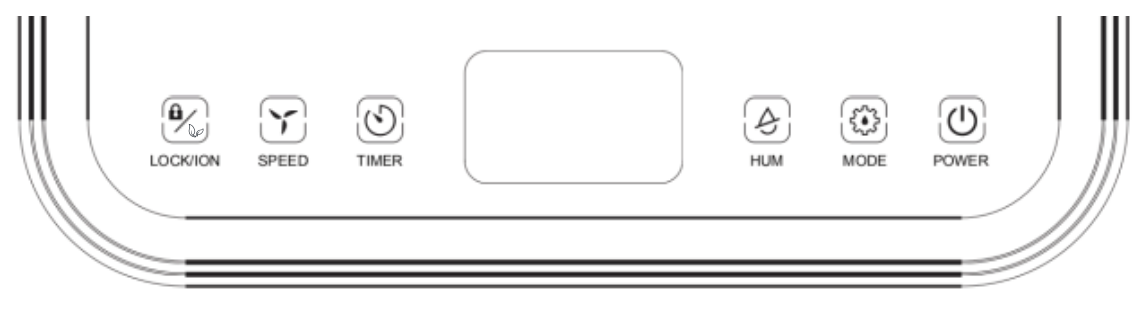
 POWER
POWER
- After switching on the power, all the indicators and the screen will be on for 1 second and then off. After a buzzer, the power indicator will be on, and the machine will be in standby mode.
- Press this button, the machine will start to run, whose an initial humidity will 50% 50%RH and will be in the default intelligent mode and high wind operation. Press this button again, and the machine will stop running, and the fan will be closed.
 MODE
MODE
Intelligent mode – continuous mode – sleeping mode cycle, press once to switch the mode from one to another, with the corresponding indicator lighting up.
- Intelligent mode: when environmental humidity ≥ set humidity +3%, the fan begins working, and the compressor begins working after 3 seconds. When environmental humidity ≤ set humidity -3%, the compressor stops working, and the fan shuts down after a delay. Both fan speed and humidity can be adjusted under intelligent mode.
- Continuous mode: The machine continues to run, but the humidity level cannot be adjusted.
- Sleeping mode: Touch the sleep button, the button lights up, and starts the sleep function. After 10 seconds of null operation, all indicators turn dark gradually, and the wind speed is automatically switched from high to low. Touch any button to wake up the indicator. Touch the sleep button again to exit the sleeping mode. In the sleeping mode, if there is a fault or the water is full, the buzzer will not sound, and the fault code will be displayed dimly.
 HUM
HUM
- In intelligent mode or sleeping mode, you can touch this button to adjust the set humidity: every time you press the button, the set humidity increases by 5%, according to the cycle of 30%-80%.
- Long pressing this button shows the current room temperature that is displayed on the control panel for 5 seconds, after which the screen automatically returns to display the current humidity. If pressing this button and holding the press without letting go, the room temperature will remain shown on the display.
 TIMER
TIMER
- Press this button to start the timer function. Press this button to set the time. The interval is 1 hour. Each time you press this button, the value increases by 1 hour, with its current number displayed on the screen. Set the time to “00” to exit the timer function, and the indicator light will turn off accordingly.
- After the time is set, the timer LED is on during the timing period and turns off automatically after the period is over.
- In the non-timing state: press the “timing” button to enter the time-setting state, where the digits flash to display the setting time; during the flashing period, press the adjustment button (or up and down buttons) to adjust the setting time (0 \~ 24h).
- In the timing state, press the “timing” button to display the remaining set time, and press the “timing” button during the digital flashing period to cancel the timing.
- In the running state, set the time to turn off the machine.
- In the standby state, set the time to turn on the machine.
 SPEED
SPEED
- The wind speed can only be adjusted in the intelligent mode. Press this button to switch between the high and low wind speeds shown by the corresponding wind speed indicator.
 LOCK/ION
- Press this button to turn on or off the ionizer purification function.
- Long pressing this button turns on the child lock function, and the corresponding child lock indicator lights up, and all buttons are locked and cannot be operated. Another long press of this button turns off this function and the corresponding indicator, and all buttons resume their functionality.
- The child lock function is automatically turned off once the device is shut down or the power is off.
Color Digital Display:
- Ambient Humidity < 45%: The light shows Blue.
- 45% ≤ Ambient Humidity ≤ 65%: The light shows Green.
- Ambient Humidity > 65%: The light shows Red.
- If the LED displays E0, E2, CL, CH, LO, or HI, the light will show red.
DRAINAGE
EMPTYING THE WATER TANK
- When the tank is full, the unit will make a buzzing sound, and the
 light will turn on.
 - Press the POWER button to turn off the device.
- Pull on the water tank to simply slide it out of the body of the dehumidifier.
- Dispose of the water by pouring it into an area with a drain or outside.
- Clean the inside of the tank as well as the outside.
- Place the empty tank back into the device.
- Press the POWER button to resume operation.
- If the
 light does not extinguish, check if the water tank is correctly put in place.
 light will turn on.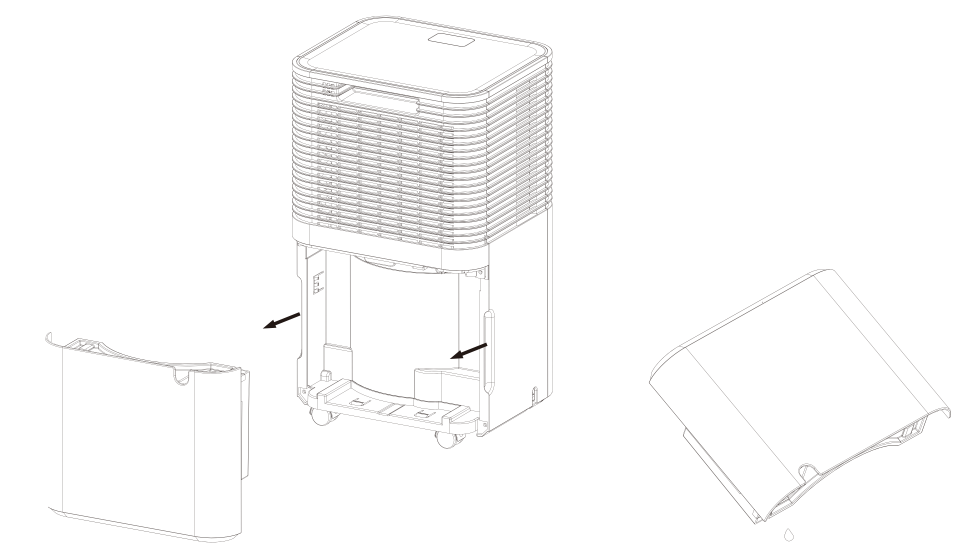
Warning:
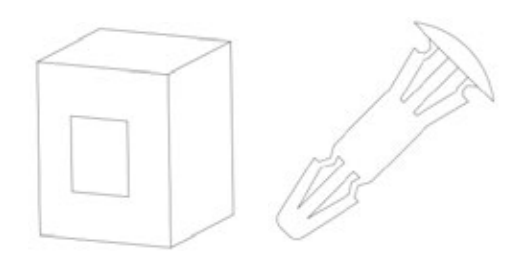
- Do not discard water tank magnets and plastic rivets. Otherwise, the machine will be unable to automatically stop when the water tank is full, and the condensate will overflow and damage the floor of the room.

- Please clean the condensate in the water tank before resetting the work mode of the machine.
- If the water tank is dirty, rinse it with clean water. Avoid using detergents, steel balls, chemical dust removers, diesel oil, benzene, diluents, or other solvents. Otherwise, the water tank will be damaged and leak.
- Put the empty tank back into the device after cleaning. Otherwise, the “Water Full” indicator may remain red, and the machine cannot restart.
CONTINUOUS DRAINING
For continuous operation or unattended dehumidification, please connect the attached drain hose to the unit. Condensate can automatically flow into a bucket or drain by gravity.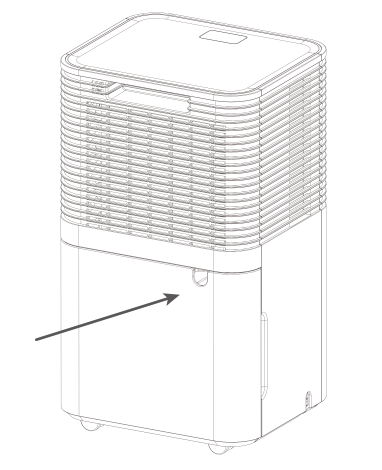
- Straighten the drainage pipe.
- Insert one end of the drain hose into the cistern hole and connect the other end to a bathroom, outdoor space, bucket-like container, or the prescribed area for drainage.
CLEANING THE AIR FILTER (every two weeks)
Dust collected on the filter restricts airflow, which reduces the efficiency of the dehumidification system and can cause damage to the device if the dust blocks the filter. The air filter is removable and requires regular cleaning. Do not operate the device without an air filter, as this might cause the evaporator to be contaminated.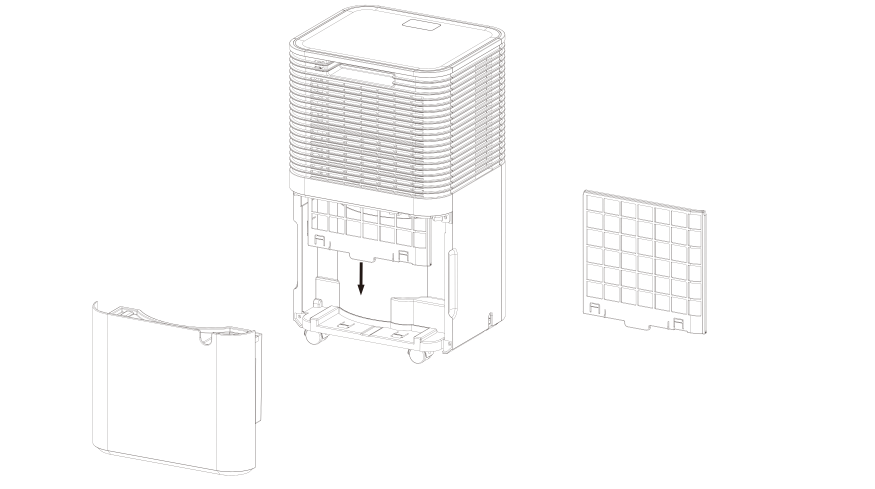
- Take the water tank out of the device’s body, and then pull out the filter from the bottom of the device’s rear shell.
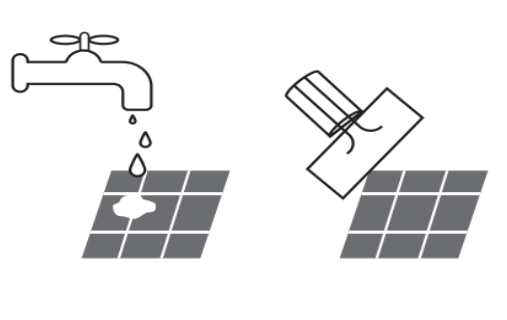
- Use a vacuum cleaner to gently absorb the dust on the surface. If the filter is very dirty, wash it with water and a soft detergent and dry it thoroughly afterwards.

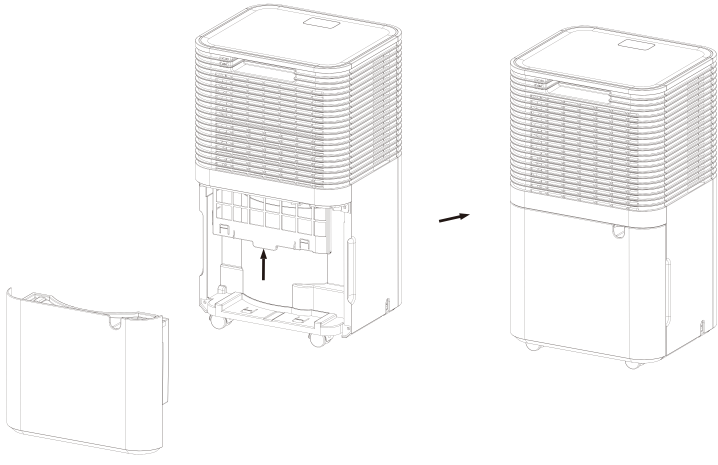
- Put the filter back.

TROUBLE SHOOTING
FUNCTIONING TEMP.
- 41°F \~ Ambient Temp. \~ 95°F.
- When the ambient temperature is lower or higher than the functioning temperature, the dehumidifier stops working.
- When 41°F \~ Ambient Temp. \~ 61°F, the compressor automatically defrosts at intervals; during defrosting, the compressor stops and the fan keeps running.
BEFORE CALLING FOR SERVICE
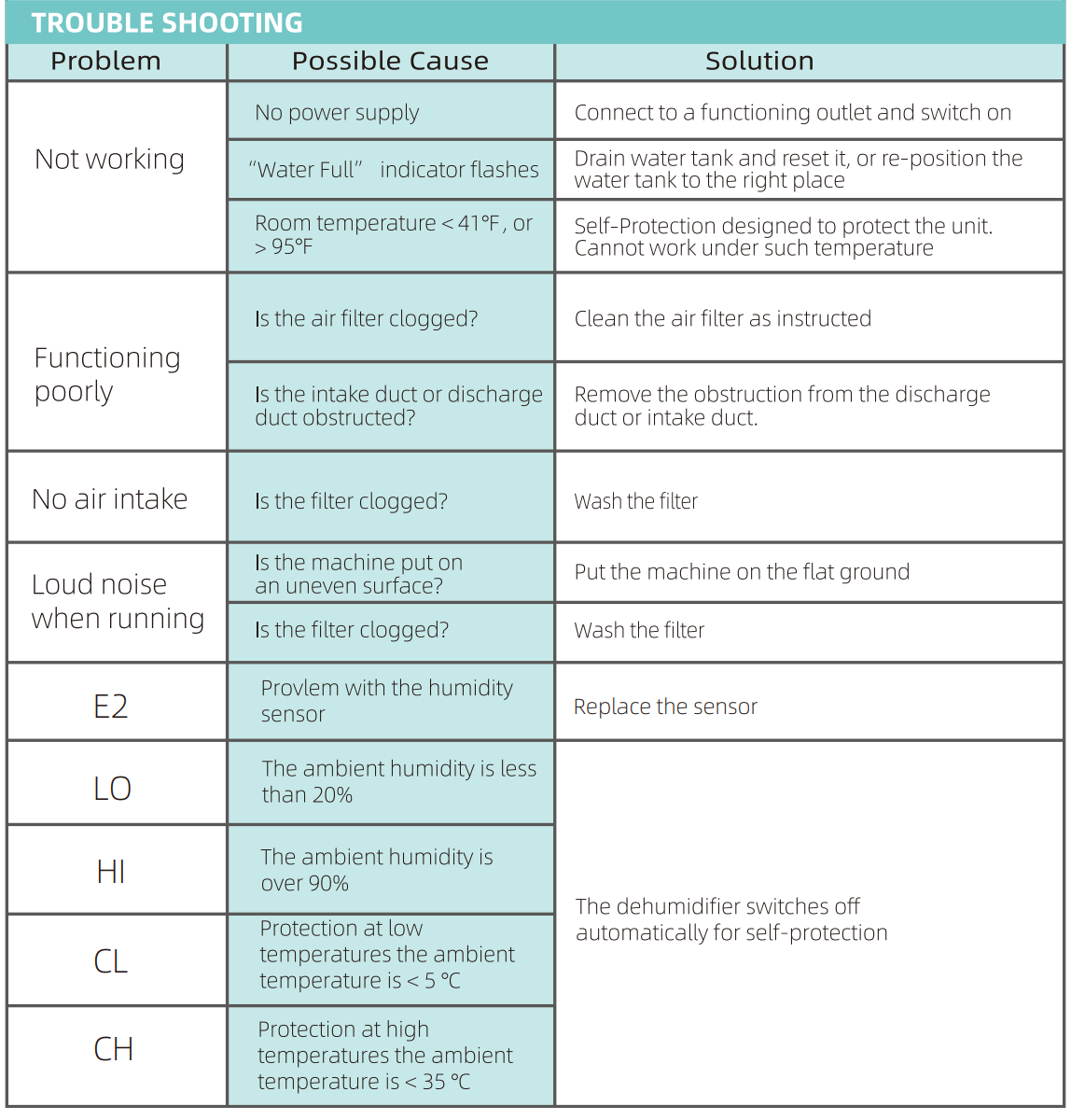
- Before contacting customer service, please review the following troubleshooting list that includes common problems that are not the result of a defect in workmanship.

DECOMMISSIONING
STORAGE
Long-term storage – If you will not be using the unit for an extended period of time (more than a few weeks), it is best to clean the unit and dry it completely. Please store the unit according to the following steps:
- Press the power button to switch off and unplug the unit.
- Drain the remaining water from the unit.
- Clean the filter and let the filter dry completely in a shaded area.
- Collect the power cord at the water tank.
- Reinstall the filter in its position.
- The unit must be kept in an upright position when in storage.
- Preserve the machine in a ventilated, dry, corrosive gas-free, and safe indoor space.
ATTENTION: The evaporator inside the machine has to be dried before the unit is packed to avoid component damage and mold. Unplug the unit and place it in a dry open area for days to dry it out. Another way to dry the unit is to set the humidity level more than 5% higher than the ambient humidity to force the fan to dry the evaporator for a couple of hours.
DISPOSAL
WARNING!!!
- Releasing refrigerant into the atmosphere is strictly forbidden!
- Do not dispose of electrical appliances as unsorted municipal waste, but use separate collection facilities.
- Contact your local government for information regarding the collection systems available.
- If electrical appliances are disposed of in landfills or dumps, hazardous substances can leak into the groundwater and get into the food chain, thus impairing your health and well-being.
For More Manuals By Bublue, Visit ManualsLibraryy.
Bublue OL12D-D031A Portable Dehumidifier-FAQs
What does a portable dehumidifier do?
A portable dehumidifier removes excess moisture from the air, helping to reduce dampness, prevent mold growth, and make the room feel more comfortable.
How does a portable dehumidifier work?
The unit pulls in humid air with a fan, passes it over cooled coils, and collects the condensed water in a tank or through a drain hose. Dry air is then released back into the room.
How long should I run my dehumidifier each day?
For most rooms, running the unit for 6–12 hours a day is enough. In very damp areas, you may need to run it longer at first until humidity levels drop to a comfortable range (30–50%).
Can I leave the dehumidifier on overnight?
Yes, it is safe to run a dehumidifier while you sleep. In fact, using it at night can improve air quality and comfort, especially in humid bedrooms.
Where is the best place to put a dehumidifier?
Place it close to the source of moisture or in the most central part of the room. Keep doors and windows closed for best results.
Can one dehumidifier cover multiple rooms?
If the layout is open (like a loft or large living space), one unit can work. But in homes with separate rooms and doors, you may need more than one dehumidifier for even results.
Does a dehumidifier use a lot of electricity?
No. Most portable units use 300–700 watts, which is less than many household appliances. Running costs depend on your local electricity rate and usage time.
Do dehumidifiers shut off automatically?
Yes. The Bublue OL12D-D031A stops when the water tank is full or when the set humidity level is reached, then restarts as needed.