
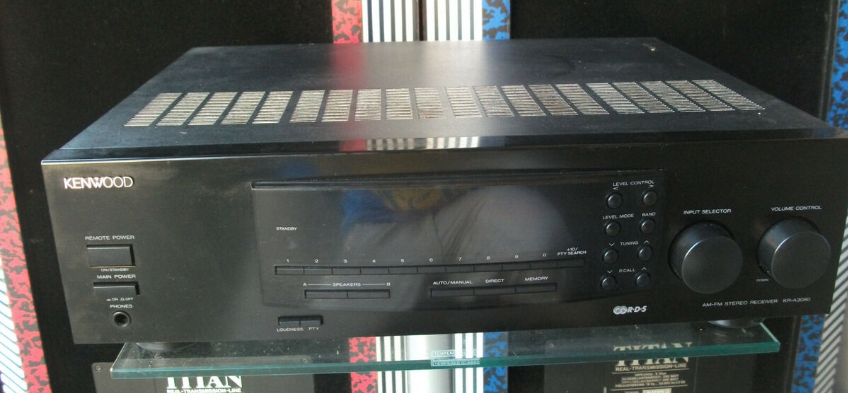

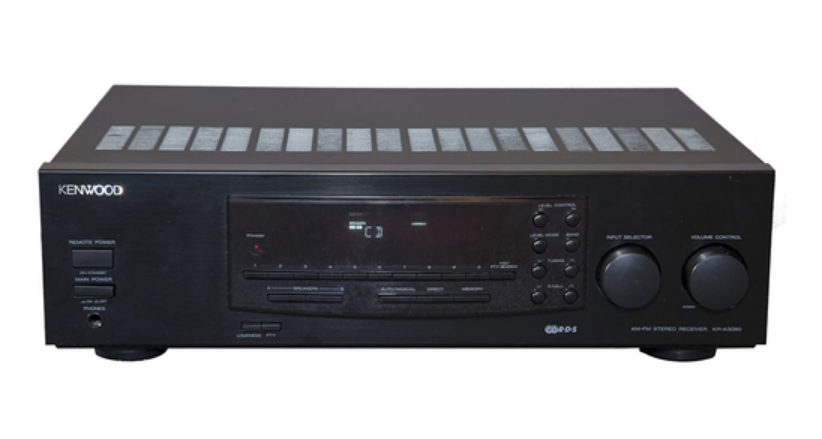
Kenwood 105VR AV Solid State Amp Receiver
Unpacking
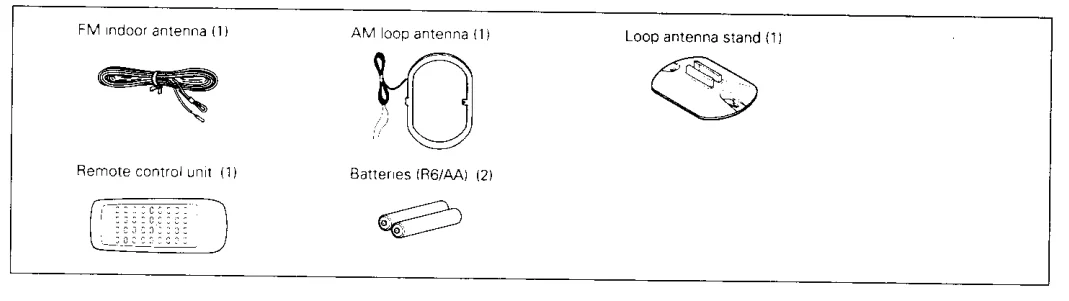
Unpack the unit carefully and make sure that all accessories are put aside so they will not be lost. Examine the unit for any possibility of shipping damage. If your unit is damaged or fails to operate, notify your dealer immediately. If your unit was shipped to you directly, notify the shipping company without delay. Only the consignee (the person or company receiving the unit) can file a claim against the carrier for shipping damage. We recommend that you retain the original carton and packing materials for use should you transport or ship the unit in the future.
Accessories
Special Features
DOLBY PRO LOGIC & DOLBY 3 STEREO
The surround system reproduces video software programs carrying the  mark with similar acoustic effects to movie theaters. The DOLBY PRO LOGIC mode controls the audio signals of the Front Left/Right, Center, and Rear surround channels using the built-in directivity enhancer circuit to reproduce the feeling of sound motions very realistically. The DOLBY 3 STEREO mode can reproduce the motions of sound even when only the front and center speakers are used, by providing proper acoustic position using the directivity enhancer circuit.
SRS 3D Stereo
The SRS (Sound Retrieval System) is an innovative system simulating a 3-dimensional sound space, which features clearly improved feelings of depth, sound field extension, and acoustic image positioning, as well as a widened listening area.
System Connection
Connections of Audio and Video Components
Make connections as shown below. When connecting the related system components, refer also to the instruction manuals of the related components. Do not plug in the power lead until all connections are completed.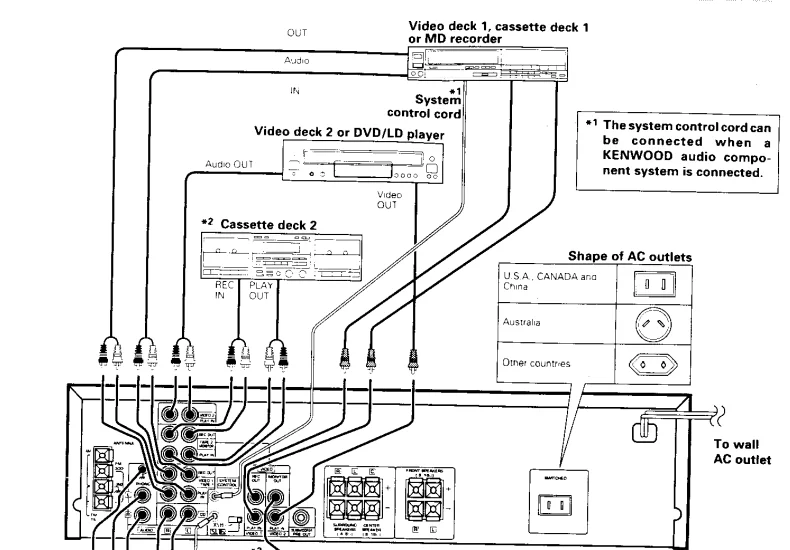
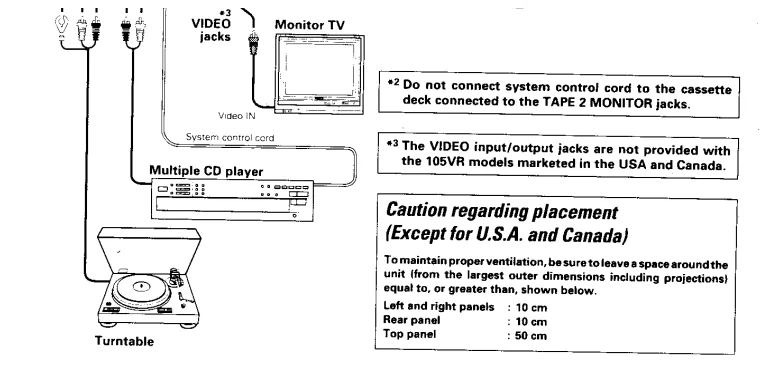
Malfunction of Microcomputer
If the operation is not possible or an erroneous display appears even though all connections have been made properly, reset the microcomputer, referring to “In Case of Difficulty.”
About the System Control Connections
Connecting system control cords after connecting a KENWOOD audio component system lets you take advantage of convenient system control operations. There are two KENWOOD system control modes. Make connections according to the groups of terminal symbols shown below.
- XS8 Mode: lets you combine XC, XS, and XS8 terminals.
- SL16 Mode: for SL16 terminals only.
This unit is compatible with both XS8 and SL16 modes. It comes from the factory set to the SL16 mode. To switch to the XS8 mode, follow the instructions in “Switching Between XS8 and SL16” below.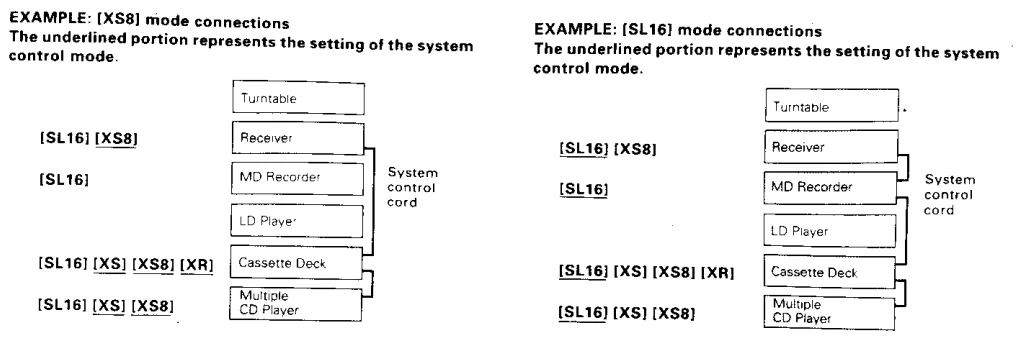
- Some CD players and cassette decks are not compatible with the SL16 system control mode. Be sure to use the XS8 system control mode when making system connections with equipment that is not SL16 compatible.
- Some MD players are not system control compatible. You cannot make system control connections to this kind of equipment.
Notes
- SL16 equipment cannot be combined with XR, XS, and XS8 equipment for system operations. If your equipment consists of this kind of combination, please do not connect any system control cords. Even without system control cords, normal operations can be carried out without affecting performance.
- Do not connect system control cords to any components other than those specified by KENWOOD. It may cause a malfunction and damage your equipment.
- Be sure the system control plugs are inserted all the way into the system control terminals.
About the System Control Operations
- Remote Control (possible when the system control mode matches)
- Let’s you operate source components with the system remote supplied with this unit.
- Automatic Operation (Except XR equipment). When you start playback from a source component, the input selector on this unit switches to that component automatically (except TAPE 2).
- Synchronized Recording (Except XR equipment). Lets you synchronize recording with the start of playback when recording from a CD or MD.
Switching Between XS8 and SL16
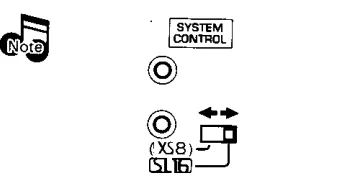
The system control mode can be switched easily with the following operation:
- Unplug the AC power cord from the wall outlet.
- Set the SYSTEM CONTROL switch on the rear panel to the desired position.

Notes
- This operation does not affect the items stored in memory.
Notes
- Connect all cords firmly. If connections are loose, there could be a loss of sound or noise produced.
- When plugging and unplugging connection cords, be sure to first remove the power cord from the AC outlet. Plugging/unplugging connection cords without removal of the power cord can cause malfunctions or damage to the unit.
- Do not connect up a power source that is larger than that indicated on the socket at the rear of the unit.
- If the system control cords or audio cords are not connected properly, the remote control or automatic operation between system components will not work properly.
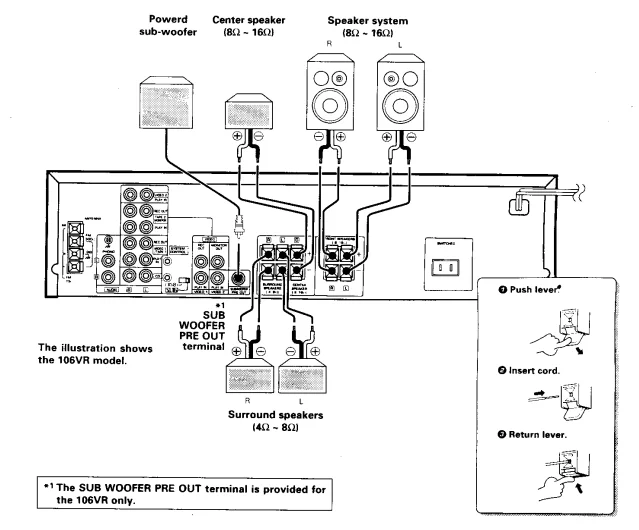
Connection of Speakers
- Never short-circuit the + and – speaker cords. For the symptom and remedy when a speaker cord is shorted, refer to the instructions.
- If the left and right speakers are connected inversely or if the speaker cords are connected with reversed polarity, the sound becomes unnatural with an ambiguous acoustic image positioning. Be sure to connect the speakers and speaker cords correctly.
- Connect a subwoofer if you want to enhance the bass sound. The connected subwoofer should be a power subwoofer with a built-in amp.

Connection of Antenna
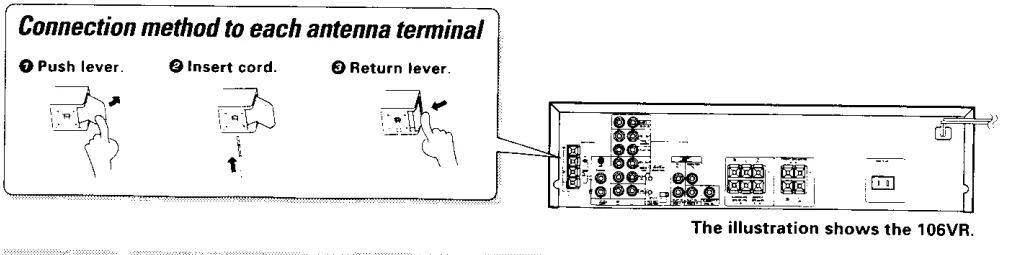
AM Loop Antenna Connection
The supplied antenna is for indoor use. Place it as far as possible from the main system, TV set, speaker cords, and power cord, and set it in a direction that provides the best reception.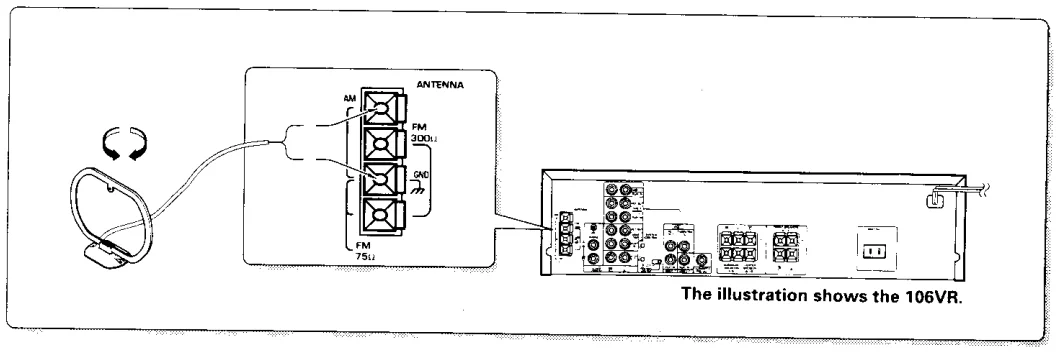
FM Indoor Antenna Connection
The accessory antenna is for temporary indoor use only. For stable signal reception, we recommend using an outdoor antenna. Remove the indoor antenna if you connect one outdoors.
FM Outdoor Antenna Connection
Lead the 75Ω coaxial cable connected to the FM outdoor antenna into the room and connect it to the FM 75 terminal.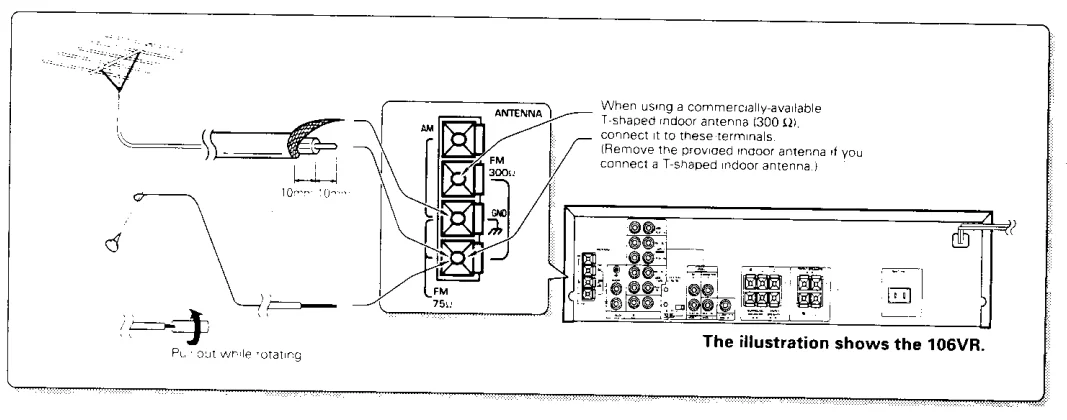
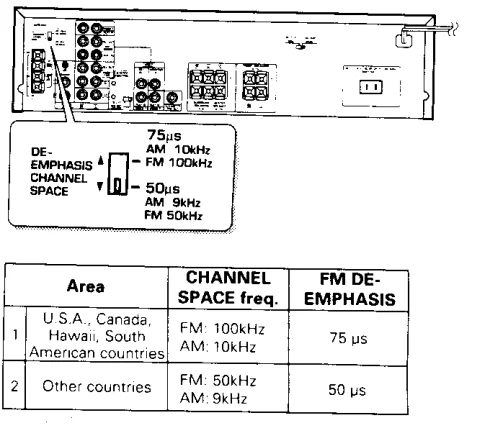
FM DE-EMPHASIS/CHANNEL SPACE Switch (Except for U.S.A. and Canada)
The FM DE-EMPHASIS/CHANNEL SPACE switch on the rear panel is set to the correct setting that prevails in the area to which the unit is shipped. However, if the FM DE-EMPHASIS/CHANNEL SPACE setting is not matched to the area where the unit is to be used—for instance, when you move from area 1 to area 2 or vice versa—desired reception of AM/FM broadcasts is not expected. In this case, change the FM DE-EMPHASIS/CHANNEL SPACE setting in accordance with the area corresponding to the table. The FM DE-EMPHASIS is switched over at the same time.
- When changing the setting of the FM DE-EMPHASIS/CHANNEL SPACE switch, first disconnect the power cord of the amplifier, then reset the channel space switch, connect the power cord again, and turn the power on.

Controls and Indicators
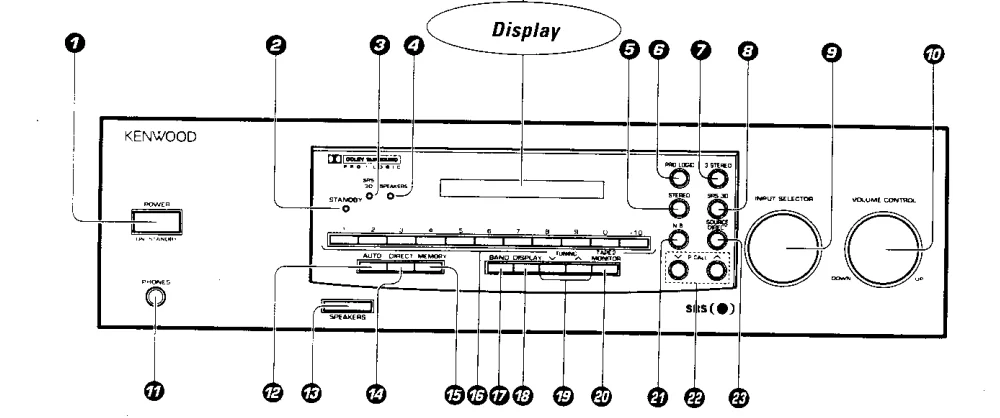
- POWER key: Press to switch the power ON and OFF.
- STANDBY indicator.
- SRS 3D indicator: Lights when the SRS 3D system is ON.
- SPEAKERS indicator: Lights when the speakers are ON.
- STEREO key: Press to turn the surround mode OFF.
- DOLBY PRO LOGIC key.
- DOLBY 3 STEREO key.
- SRS 3D key.
- INPUT SELECTOR knob: Rotate to select the input source.
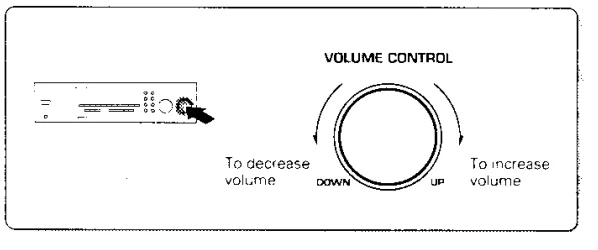
- VOLUME CONTROL knob.
- PHONES jack: Plug headphones into this jack.
- AUTO key: Press to select the tuning mode from the auto tuning and manual tuning modes. Press and hold the AUTO key for more than 2 seconds to switch the VIDEO1 display to another input display.
- SPEAKERS key: Press to turn the speakers ON and OFF.
- DIRECT key: Press when tuning a broadcast station by entering the digits of its frequencies.
- MEMORY key: Press when registering a broadcast station in the preset memory.
- Numeric keys (1 to 0, +10).
- BAND key: Press to switch the broadcasting band.
- DISPLAY key: Press to switch the displayed information between the surround mode display and the input selector display. Press and hold the DISPLAY key for more than 2 seconds to switch the display brightness.
- TUNING keys (V, ^): Press to select a radio station.
- TAPE 2 MONITOR key: Press to monitor the sound being recorded, etc.
- N.B. key: Press to compensate for the insufficiency in the bass sound.
- P.CALL keys (v, ^): Press to select one of the preset stations.
- SOURCE DIRECT key: Press to listen to the source sound with higher sound quality.


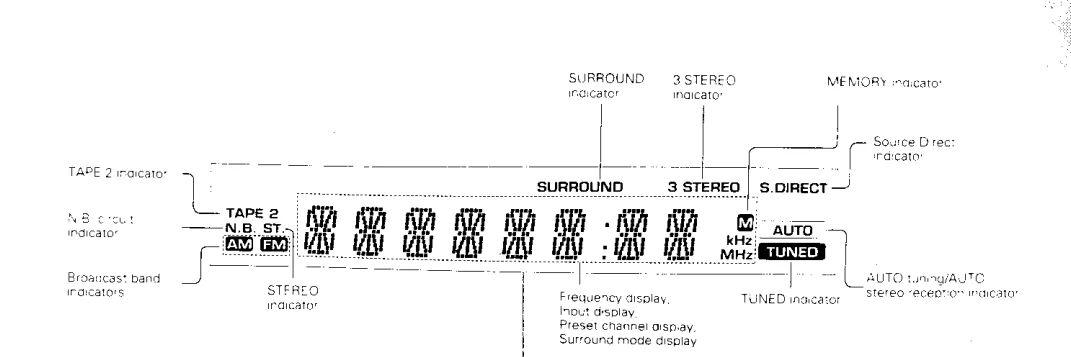
About the STANDBY Indicator
This unit has a STANDBY indicator, the lighting of which indicates that a small amount of current is supplied to back up the unit’s internal memory. This status is referred to as the standby mode of the unit. In this mode, the power of the unit can be switched ON from the remote control unit. Where the unit is not to be used for a long period of time, unplug the power cord from the power outlet.
Operation of the Remote Control Unit
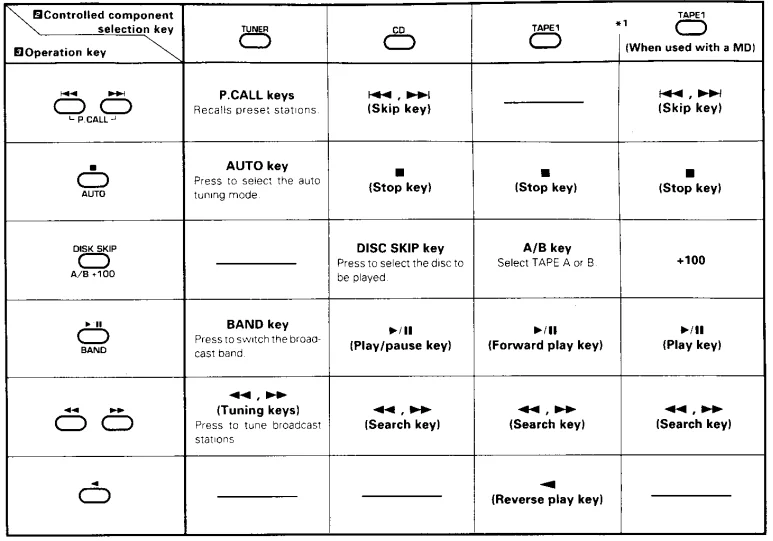
Names of Keys and Their Functions
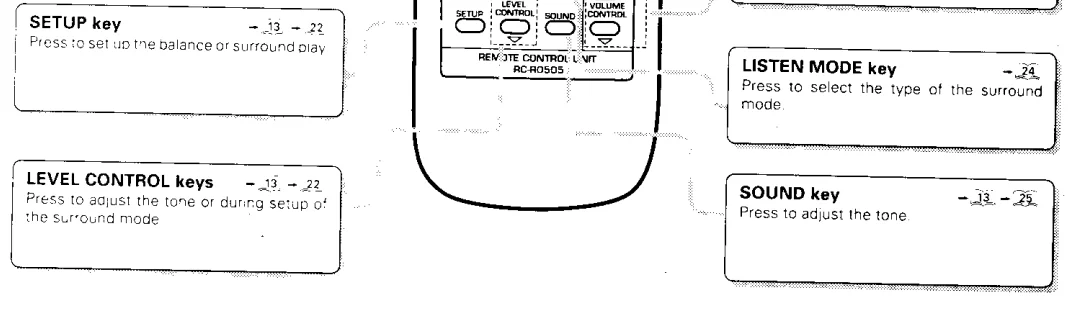
The remote control unit provided with the receiver can also control KENWOOD cassette decks, multiple CD players, and MD recorders connected to the receiver through system control cords. For details of the controllable functions, refer to the instruction manuals of these components.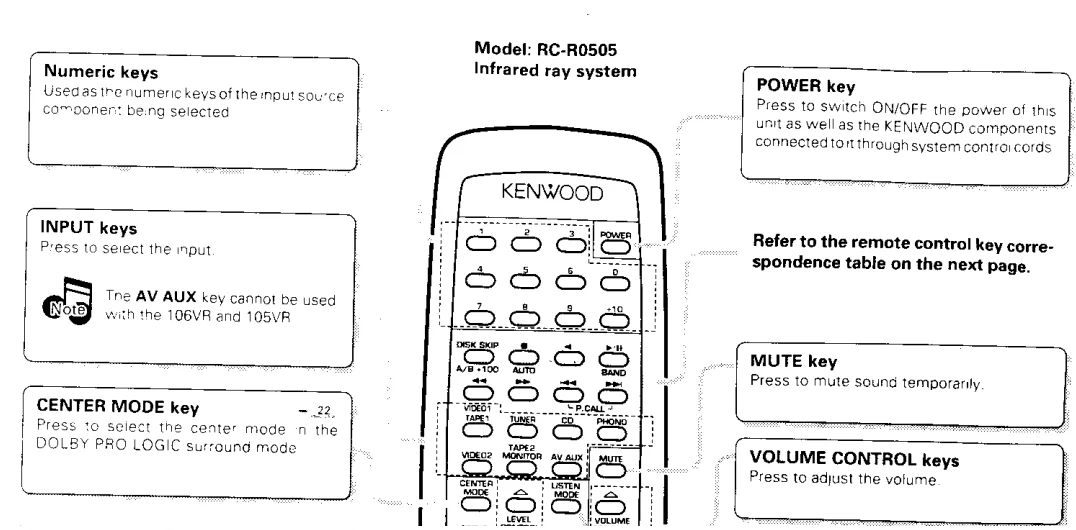
Loading Batteries
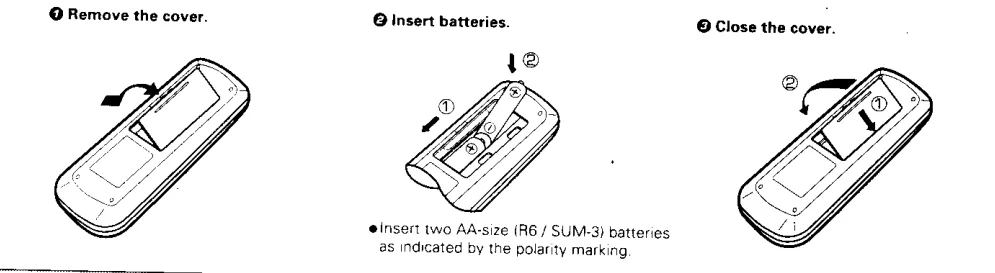
Operation Procedure
- Switch ON the power of the main unit.
- Select the component to be remote-controlled with one of the controlled component selection keys.
- Refer to the remote control key correspondence table below and press the key for the desired operation.
- Pressing the POWER key of the remote control unit while the STANDBY indicator is lit turns the power ON. Press the desired key after the power has been turned ON.
- When two operation keys of the remote control unit are pressed successively, press each key securely, reserving an interval of more than 1 second for each press.
Remote Control Key Correspondence Table (For KENWOOD Component Control Mode)
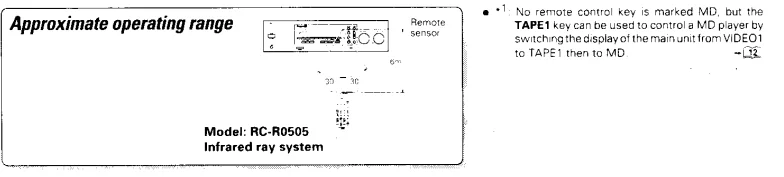
Notes
- The supplied batteries are intended for use in operation checks. Therefore, their lives may be shorter than ordinary batteries.
- When the remote-controllable distance gets shorter than before, replace both batteries with new ones.
- Malfunction may occur if direct sunlight or the light of a high-frequency fluorescent lamp enters the remote control light sensor. In such a case, change the system installation position to prevent the malfunction.
Playing Music
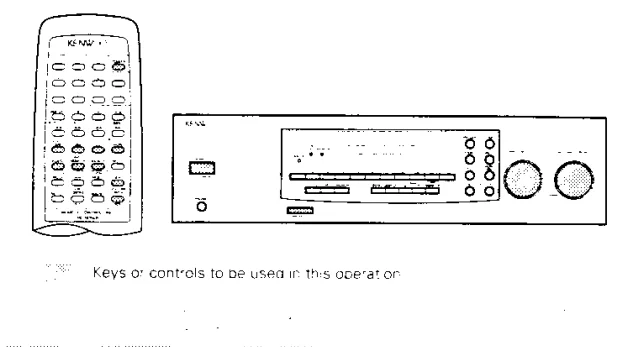
1. Turn the power ON.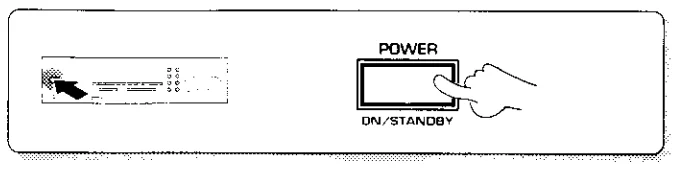
2. Select the SPEAKERS key setting.
When the SPEAKERS indicator is ON
The speakers connected to the SPEAKERS terminals on the rear panel output sound.
When the SPEAKERS indicator is OFF
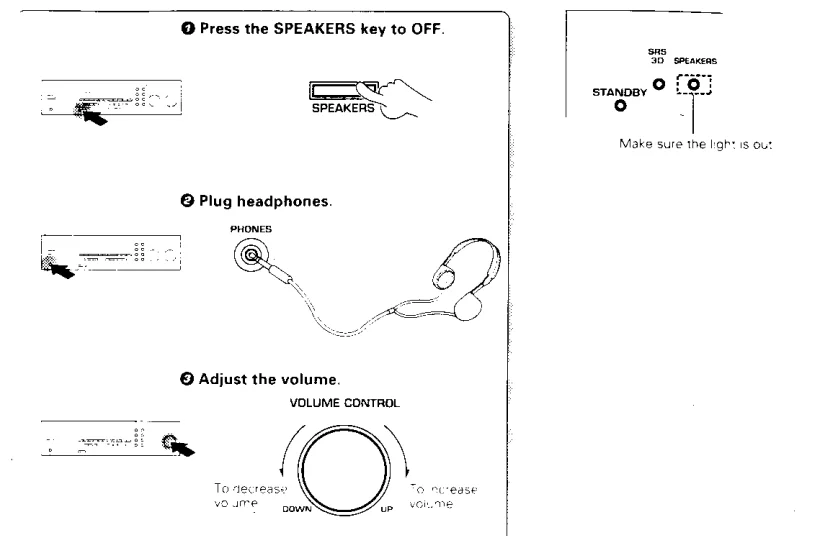
The speakers do not output sound. Use this setting when listening through headphones.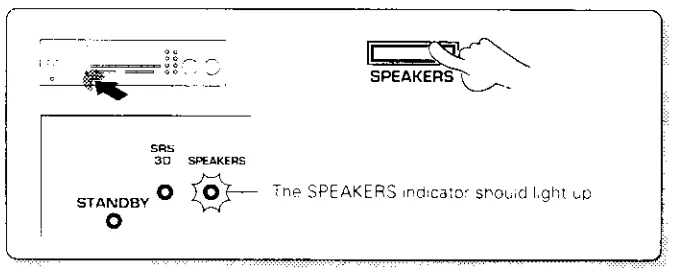
3. Select the input source.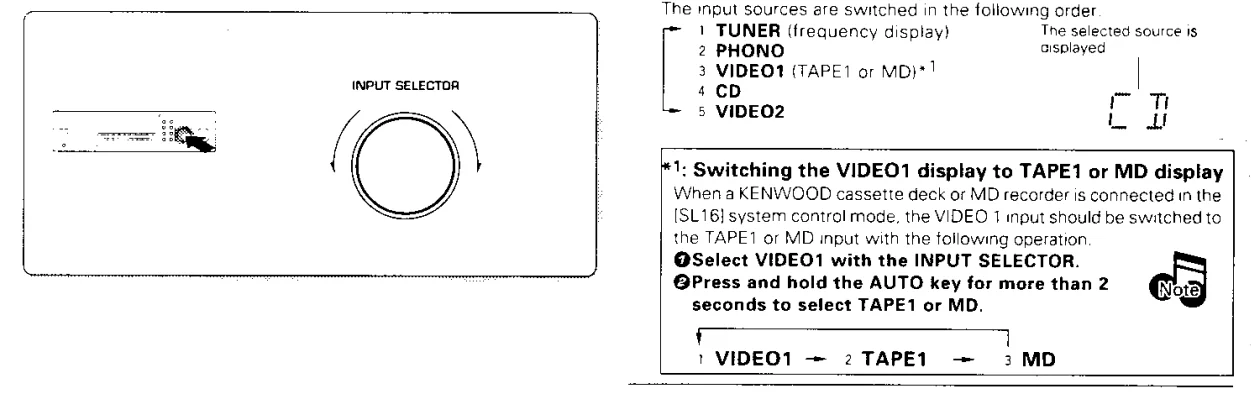
4. Play the selected source.
5. Adjust the volume.
- The time taken till the volume level is displayed is variable depending on the current operating condition.
- Rotating the VOLUME CONTROL at a higher speed increases the amount of volume change (AI VOLUME function).
- The sound of the input source cannot be listened to while TAPE 2 MONITOR is ON.

Sound Adjustment Functions
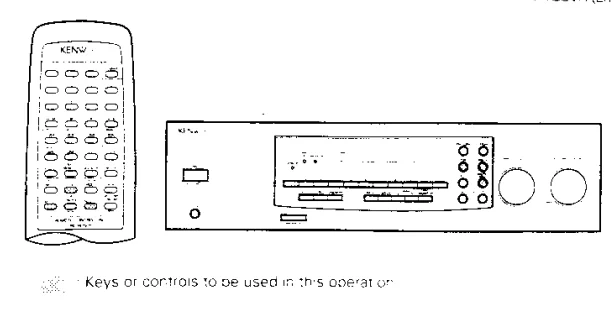
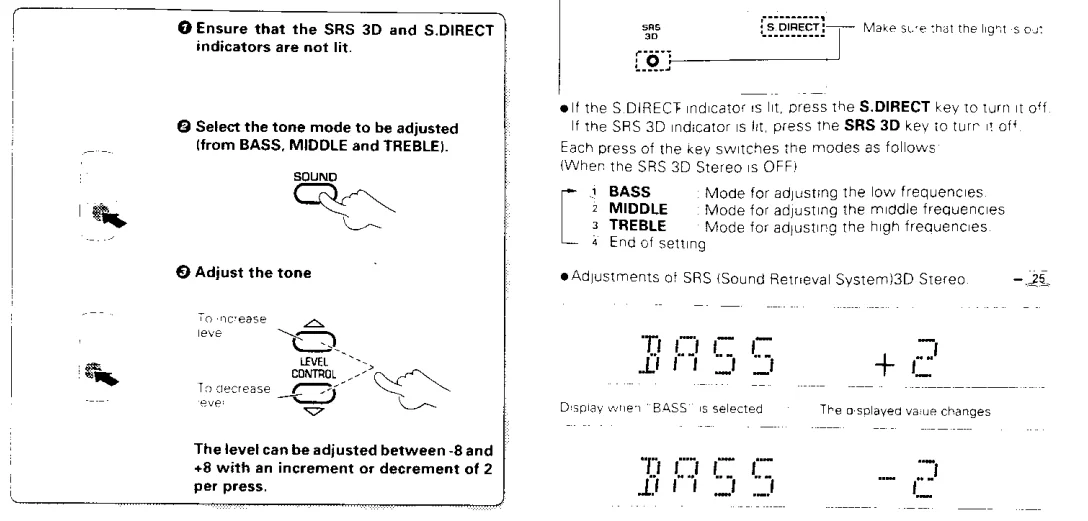
Adjusting the Tone
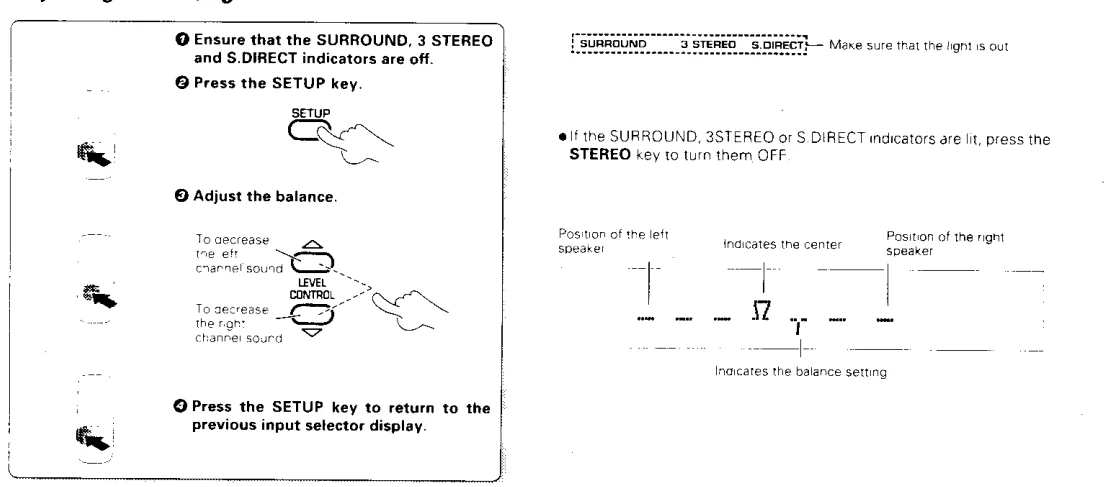
Adjusting the Left/Right Sound Balance
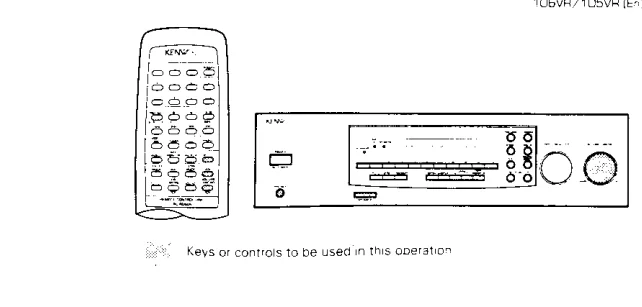
Source Direct Playback
This feature allows you to play the source signal with high quality by passing it only through the minimum required circuitry.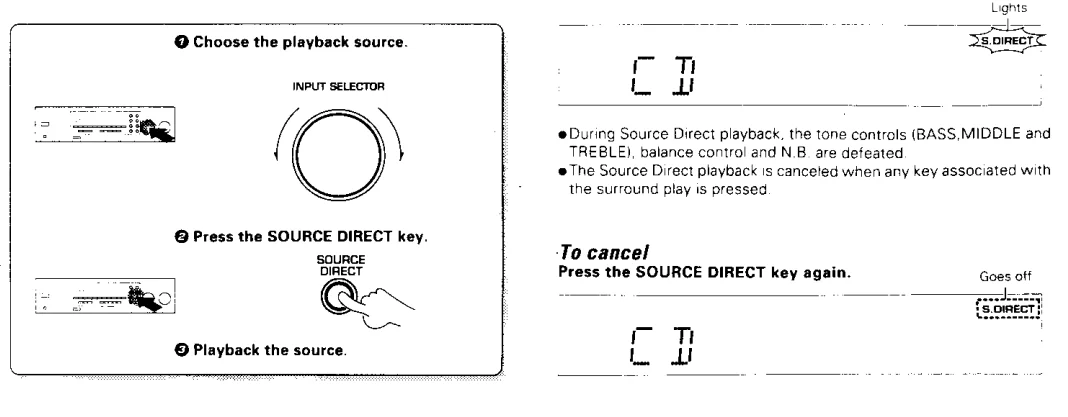
Compensating for Low Frequencies (N.B.: Natural Bass Circuit)
The N.B. circuit is used to compensate for the low frequencies that are less audible during low-volume listening.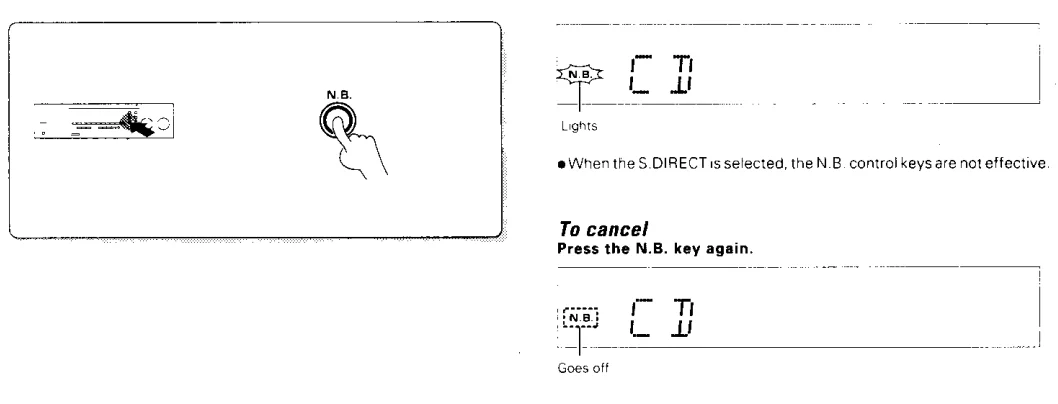
To Listen Through Headphones
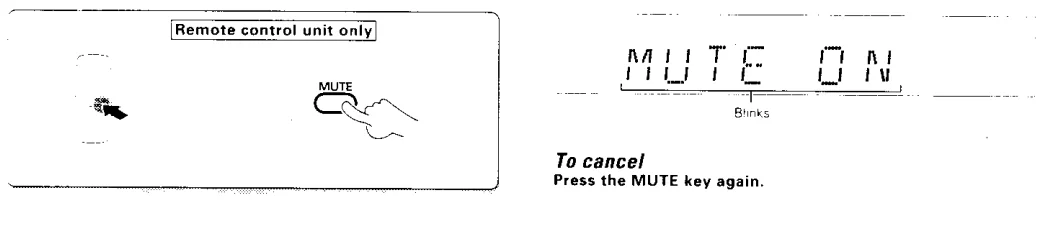
To Mute Sound Temporarily
Recording
When recording sound with a recorder component of KENWOOD, sync recording is possible by setting the INPUT SELECTOR to select TAPE 1 or MD according to the connected component.
Preparation
- Switch the VIDEO1 display to TAPE1 or MD with the following operation:
- Select VIDEO1 with the INPUT SELECTOR.
- Press and hold the AUTO key for more than 2 seconds.

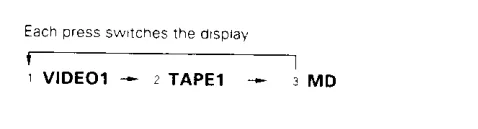
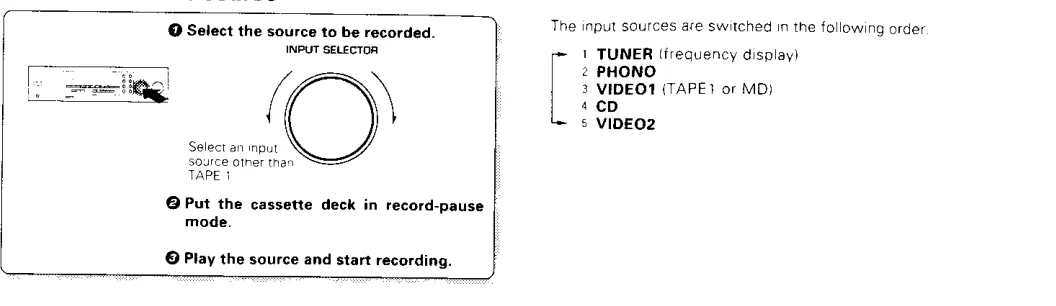
To Record a Music Source
- The VIDEO1 display can be switched to the display of another input by using the procedure described in “Preparation” above.
- For MD recording, refer to the instruction manual of your MD recorder.
- It is not possible to use the VIDEO1 or MD input to TAPE1 because all of these components should use the same INPUT SELECTOR position.

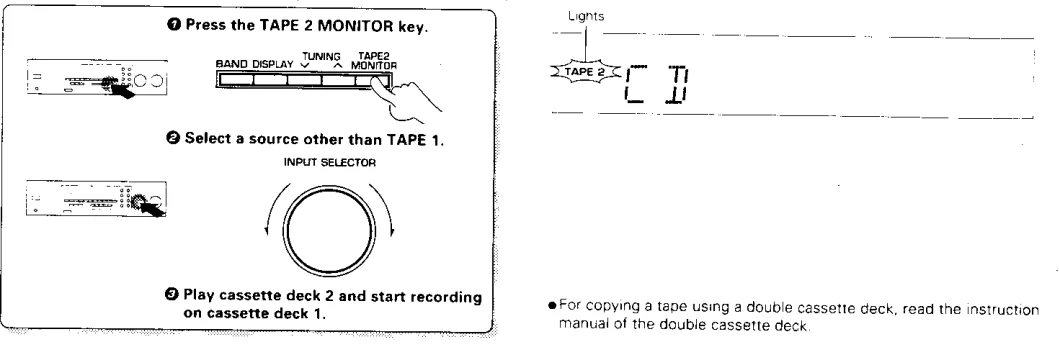
Copying Tape (Tape Dubbing TAPE 2 → TAPE 1)
- For copying a tape using a double cassette deck, read the instruction manual of the double cassette deck.

Copying Tape (Tape Dubbing TAPE 1 → TAPE 2)
- Select TAPE 1 with the INPUT SELECTOR control of the main unit.
- Play the cassette deck connected to the TAPE 1 jacks and start recording on the cassette deck connected to the TAPE 2 jacks.
Regarding TAPE 2 MONITOR
A cassette deck or graphic equalizer can be connected to this unit’s TAPE 2 MONITOR terminals. If you connect a graphic equalizer, turn the TAPE 2 MONITOR key ON. If you connect a 3-head cassette deck, you can monitor the source sound or the sound being recorded while recording. Pressing the TAPE 2 MONITOR key lets you compare the recorded sound and the source sound. Refer to the operating manual for the component you connected for further details.
Presence Play
The surround modes allow you to enjoy the feeling of presence in music. Select the mode according to the source or components played. For the connections of the surround and/or center speakers, refer to “Connection of Speakers.”
DOLBY PRO LOGIC Surround Mode
Video, DVD, and LD software programs carrying the mark contain recordings of the same Dolby Surround data as those used in movie theaters. The DOLBY PRO LOGIC surround mode uses the Dolby Surround data and brings into your home a similar sound field full of presence. To use this mode, connect the surround (and center) speakers.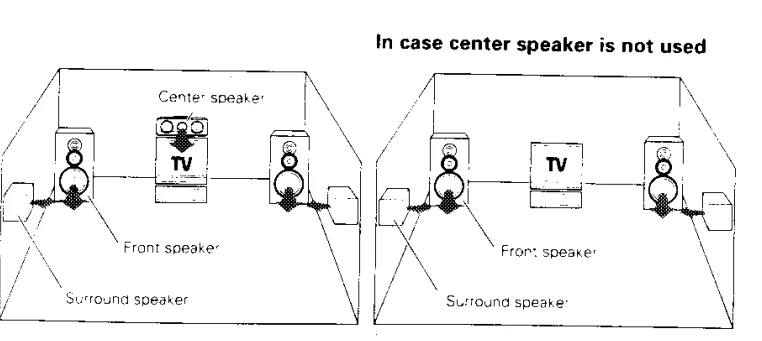
DOLBY 3 STEREO Mode
If the left and right speakers are installed apart from each other, the center acoustic image (words, etc.) may vary depending on the listener’s position. The DOLBY 3 STEREO mode provides improved positioning of the center acoustic image regardless of the listening position. Use this mode when playing videotape, DVD, or LD software carrying the mark. To use this mode, connect the center speaker.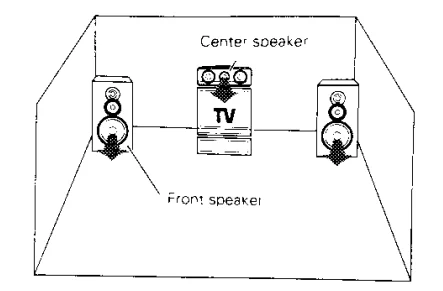
Recommended Speaker Installation
It is recommended that the surround speakers be installed straight to the left and right of the listening position or slightly behind, at a horizontal level.
Memory Backup Function
Please note that the following items will be deleted from this unit’s memory if the power cord is disconnected from the AC outlet or the main power switch is turned off for approximately three days:
- The power setting is cleared, and the power is set to OFF.
- The input selection is cleared, and the TUNER input is selected.
- The volume setting is cleared, and the volume is set to -80 dB.
- The receiving band setting is cleared, and the FM band is selected.
- The frequency setting is cleared, and 87.5 MHz is selected.
- The preset station memory is cleared.
Note
Do not use contact cleaners because they could…
For the U.S.A.
FCC WARNING
This equipment may generate or use radio frequency energy. Changes or modifications to this equipment may cause harmful interference unless the modifications are expressly approved in the instruction manual. The user could lose the authority to operate this equipment if an unauthorized change or modification is made.
NOTE:
This equipment has been tested and found to comply with the limits for a Class B digital device, pursuant to Part 15 of the FCC Rules. These limits are designed to provide reasonable protection against harmful interference in a residential installation. This equipment may cause harmful interference to radio communications if it is not installed and used in accordance with the instructions.
However, there is no guarantee that interference will not occur in a particular installation. If this equipment does cause harmful interference to radio or television reception, which can be determined by turning the equipment off and on, the user is encouraged to try to correct the interference by one or more of the following measures:
- Reorient or relocate the receiving antenna.
- Increase the separation between the equipment and receiver.
- Connect the equipment into an outlet on a circuit different from that to which the receiver is connected.
- Consult the dealer or an experienced radio/TV technician for help.
For the U.S.A.
Note to CATV System Installer
This reminder is provided to call the CATV system installer’s attention to Article 820-40 of the NEC that provides guidelines for proper grounding and, in particular, specifies that the cable ground shall be connected to the grounding system of the building as close to the point of cable entry as practical.
For More Manuals By Kenwood, Visit ManualsLibraryy.
Kenwood 105VR AV Solid State Amp Receiver-FAQs
What does the red light on my Kenwood amp mean?
A red light usually indicates a protection mode. This can happen if there’s a wiring issue, gain is set incorrectly, or the amp detects a fault. Check your connections and settings.
How do I reset my Kenwood amplifier?
To reset, locate the reset button (if available) or turn off the power and disconnect it for a few minutes. Some models require holding the power or sync button for a few seconds to reset.
How can I tell if my amp is in protection mode?
If the amp cuts all output and a red or flashing LED lights up, it’s in protection mode to prevent damage.
How do I check if my amplifier is working properly?
Use a multimeter or check voltage at the terminals. Also, play audio at low volume and listen for clean sound without distortion.
Why does my amp have power but no sound?
This can be caused by loose connections, blown fuses, incorrect gain settings, or speaker wiring issues. Double-check all connections and settings.
How should I set my amp settings for the best sound?
Start with gain at minimum, then gradually increase while testing low, mid, and high frequencies. Adjust bass, midrange, and treble to taste, and use a test track to fine-tune.
What is a good RMS rating for a car amplifier?
Your amp’s RMS should ideally be 1.5–2 times the speaker’s continuous power rating for clean sound and safe headroom.
How do I set the amplifier gain correctly?
Start with low gain, play a test tone, then increase slowly until the output is clear without distortion. Proper gain ensures strong audio without overloading the amp.
Can I use 4-ohm speakers with this amp?
Yes, but ensure the amp’s output matches the speaker’s RMS power and impedance to avoid distortion or damage.