

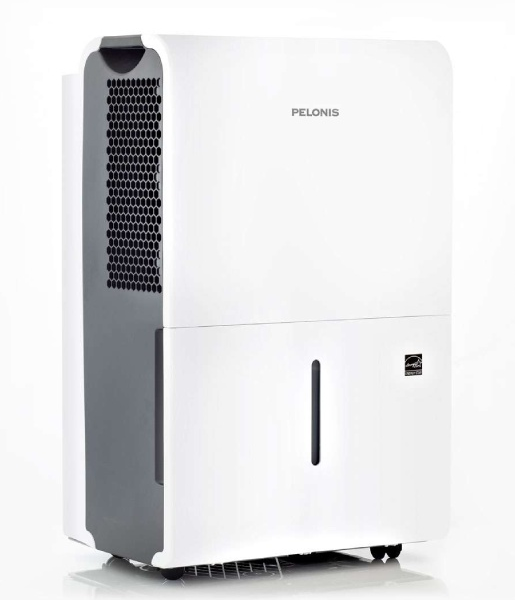
Pelonis PAD20C1AWT 20-Pint Dehumidifier
Read This Manual
Inside, you will find many helpful hints on how to use and maintain your dehumidifier properly. Just a little preventive care on your part can save you a great deal of time and money over the life of your dehumidifier. You’ll find many answers to common problems in the troubleshooting tips – you should be able to fix most of them quickly before calling service. These instructions may not cover every possible condition of use, so common sense and care for safety are required when installing, operating, and maintaining this product.
Unit Specifications and Features
Product Overview
NOTE
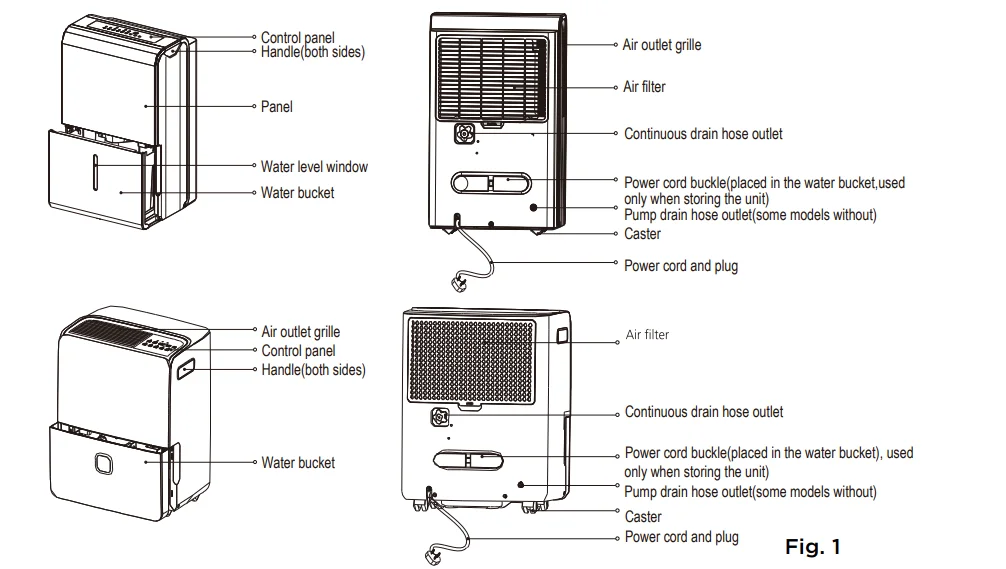
All the pictures in this manual are for illustrative purposes only. The actual shape of the dehumidifier you purchased may be slightly different, but its operations and functions are similar.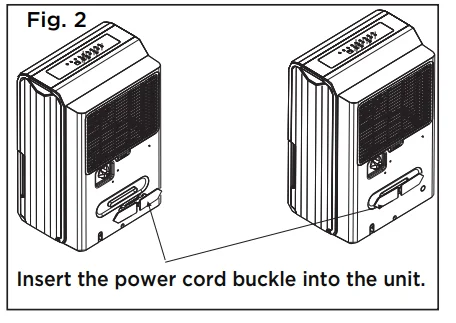
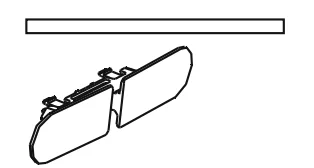
Accessories
- Pump drain hose (1 pc) (Only for units with the drain pump feature)
- Power cord buckle (1 pc)

Operating Instructions
CAUTION
Clean your unit occasionally to keep it looking new. Be sure to unplug the unit before cleaning to prevent shock or fire hazards.
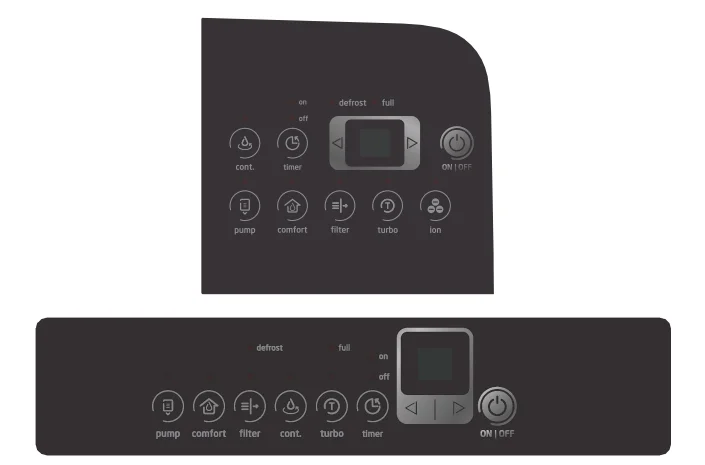
Key Pad Features
NOTE
The appearance of the control panel on your unit may vary slightly. Functions will be similar.
Control Pads
When you push the button to change operation modes, the unit will make a beep sound to indicate that it is changing modes.
(PUMP) Button (Pump Models Only)
Press to activate the pump operation.
NOTE
Make sure the pump drain hose is installed into the unit and the continuous drain hose is removed from the unit before the pump operation is activated. When the bucket is full, the pump starts to work. Refer to the next pages for removing the collected water. Do not use this operation when the outdoor temperature is equal to or less than 0°C (32°F).
(COMFORT) Button
Press to activate the COMFORT dehumidifying operation. The dehumidifier will automatically set to a preset humidity and fan level. To exit comfort mode, adjust the humidity to the desired level.
(FILTER) Button
This feature is a reminder to clean the Air Filter for more efficient operation. The LED light will flash after 250 hours of operation. To reset after cleaning the filter, press the Filter button, and the light will go off. The 250-hour counter will reset.
(Cont.) Button
Press to activate the continuous dehumidifying operation.
NOTE
When the CONTINUOUS mode function is turned on, the set humidity is automatic and cannot be changed manually.
(TURBO) Button
Control the Turbo speed. Press to select either Turbo or normal fan speed. Set the Turbo control to high for maximum moisture removal. When the room humidity is at your preferred level, it is advised to turn off Turbo speed.
(TIMER) Button
Starts the Timer ON and Timer OFF function setting.
Up/Down Buttons ( ◀/▶)
Humidity Set Control Buttons
The humidity level can be set within a range of 35% RH (Relative Humidity) to 85% RH (Relative Humidity) in 5% increments. For drier air, press the ◀ button and set to a lower value (%). For damper air, press the▶ button and set to a higher value (%).
TIMER Set Control Buttons
Use the ◀ and ▶key buttons to set the Timer ON or Timer OFF from 0 to 24 hours.
ION Button (on some models)
Press to activate the ionizer. Ions are automatically generated by ionization. The ions deactivate the airborne chemical vapors and dust particles. Press it again to stop the function.
(POWER) Button
Press to turn the dehumidifier on and off.
LED Display
Shows the set % humidity level from 35% to 85% or auto start/stop time (0–24) while setting, then shows the actual (+/- 5% accuracy) room % humidity level in a range of 30% RH (Relative Humidity) to 90% RH (Relative Humidity).
Error Codes and Protection Code:
- AS – Humidity sensor error – Unplug the unit and plug it back in. If the error persists, contact Customer Service.
- ES – Tube Temperature sensor of the evaporator error – Unplug the unit and plug it back in. If the error persists, contact Customer Service.
- P2 – Bucket is full or bucket is not in the right position – Empty the bucket and replace it in the right position (only available for the unit with no pump feature).
- P2 – Bucket is full – Empty the bucket (only available for the unit with the pump feature).
- Eb – Bucket is removed or not in the right position – Replace the bucket in the right position (only available for the unit with the pump feature).
Other Features
Bucket Full Light
Lights up when the bucket is ready to be emptied.
Auto Shut Off
The dehumidifier shuts off when the bucket is full, or when the bucket is removed or not replaced in the proper position. When the set point humidity level is reached, the unit will be shut off automatically. The fan motor will continue operating.
Auto Defrost
When frost builds up on the evaporator coils, the compressor will cycle off, and the Auto Defrost function will run automatically.
3-Minute Compressor Operation Delay Protection
After the unit has stopped, it cannot be restarted for the first 3 minutes to protect compressor operation. The unit will restart automatically after 3 minutes.
Auto-Restart
If the unit stops unexpectedly due to a power cut, it will restart with the previous function setting automatically when the power resumes.
Setting the Timer ON and Timer OFF
- When the unit is on, first press the Timer button; the Timer OFF indicator light illuminates. It indicates the Timer OFF program is initiated. Press it again, and the Timer ON indicator light illuminates. It indicates that the Timer ON is initiated.
- When the unit is off, first press the Timer button; the Timer ON indicator light illuminates. It indicates the Timer ON program is initiated. Press it again, and the Timer OFF indicator light illuminates. It indicates that the Timer OFF is initiated.
- Press or hold the◀ and ▶buttons to change the Timer by 0.5-hour increments up to 10 hours, then in 1-hour increments up to 24 hours. The control will count down the time remaining until the start.
- The selected time will register in 5 seconds, and the system will automatically revert to display the previous humidity setting.
- When the Timer ON and Timer OFF times are set within the same program sequence, indicator lights illuminate, identifying that both ON and OFF times are now programmed.
- Turning the unit ON or OFF at any time or adjusting the timer setting to 0.0 will cancel the Timer function.
- When the LED display window displays the code of P2, the Auto Start/Stop function will also be canceled.
NOTES
- When first using the dehumidifier, operate the unit continuously for 24 hours.
- Make sure the plastic cover on the continuous drain hose outlet installs tightly and properly so there are no leaks.
- This unit is designed to operate in a working environment between 5°C/41°F and 32°C/90°F.
- Make sure the water bucket is positioned correctly so that the unit can operate properly. When the water in the bucket reaches a certain level, please be careful while moving the unit to avoid it spilling.
Removing Collected Water
There are three ways to remove collected water:
1. Use the bucket
- When the unit is off, if the bucket is full, the Full indicator light will light.
- When the unit is on, if the bucket is full, the compressor and the fan turn off, and the Full indicator light will light, the digital display shows P2.
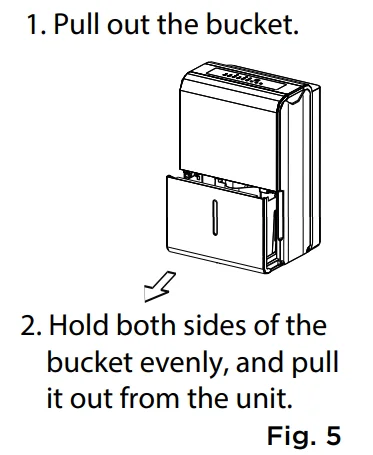
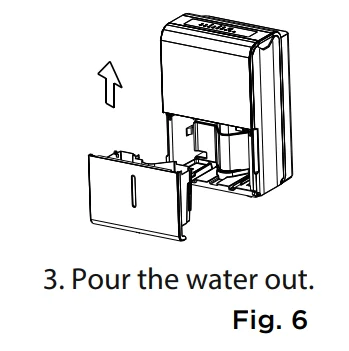
- Slowly pull out the bucket. Grip the left and right handles securely, and carefully pull out straight so water does not spill. Do not put the bucket on the floor because the bottom of the bucket is uneven. Otherwise, water may be spilled.

- Empty the water and reposition the bucket.

- The unit will restart operation when the bucket is back in place.
NOTES
- When you remove the bucket, do not touch any parts inside the unit. Doing so may damage the product.
- Be sure to push the bucket gently all the way into the unit.
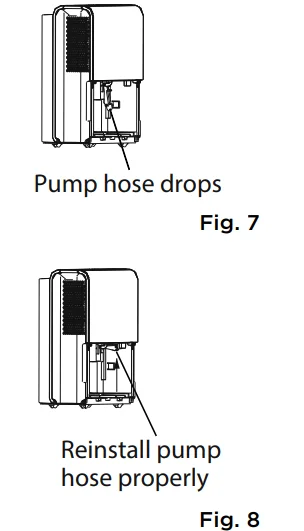
- If the pump hose falls off when you remove the bucket (see Fig. 7), you must reinstall the pump hose properly to the unit before replacing the bucket into the unit (see Fig. 8).

- When the unit is on, if the bucket is removed, the compressor and the fan turn off, then the unit will beep 8 times, and the digital display shows Eb.
- When the unit is off, if the bucket is removed, the unit will beep 8 times, and the digital display shows Eb.
2. Continuous draining
- Water can be automatically emptied into a floor drain by attaching the unit with a standard garden hose thread to the back of the dehumidifier. The hose should have an outside diameter of 5/8 inch or greater. A garden hose is not included.
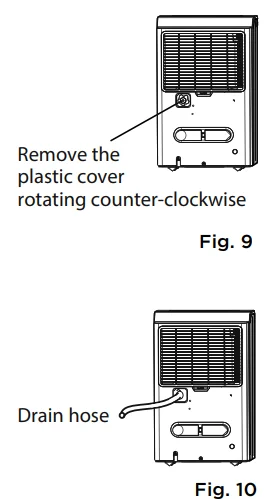
- Remove the plastic cover from the back drain outlet of the unit and set it aside, then insert the drain hose through the drain outlet of the unit and lead the drain hose to the floor drain or a suitable drain facility (See Fig. 9 and Fig. 10).

- When you remove the plastic cover, if there is some water in the back drain outlet of the unit, you must dry it. Make sure the hose is secure so there are no leaks, and the end of the hose is level or sloping downwards to let the water flow.
- Direct the hose toward the drain, making sure that there are no kinks that will stop the water from flowing.
- Select the desired humidity setting and fan speed on the unit for continuous draining to start.
3. Pump draining (Pump models only)
Water can be automatically emptied into a floor drain or a suitable drainage facility by attaching the pump drain out with a pump drain hose (Ø od = 1/4”, supplied).
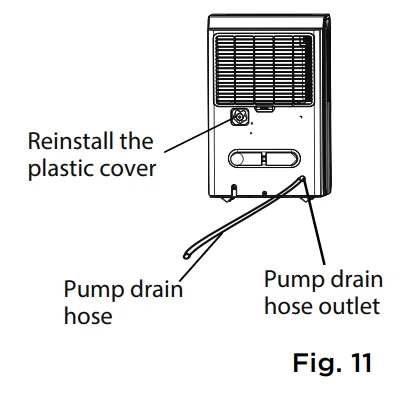
- Remove the continuous drain hose from the unit and install the plastic cover to the continuous drain hose outlet of the unit by clockwise rotation (See Fig. 11).

- Insert the pump drain hose into the pump drain hose outlet for at least 15 mm (See Fig. 11), then lead the water hose to the floor drain or a suitable drainage facility.
- Press the pump pad on the unit to activate the pump operation. When the bucket is full, the pump starts to work.
- By using the internal pump operation (hose also included), the pump unit can pump water vertically up to 16 feet.
- Make sure the hose is secure so there are no leaks.
- Direct the hose toward the drain, making sure that there are no kinks that will stop the water from flowing.
- Place the end of the hose into the drain.
- Select the desired humidity setting and fan speed on the unit for pump draining to start.
NOTE
The pump operation light blinks when a failure occurs. Please turn off the unit and disconnect the power cord. Check the following items:
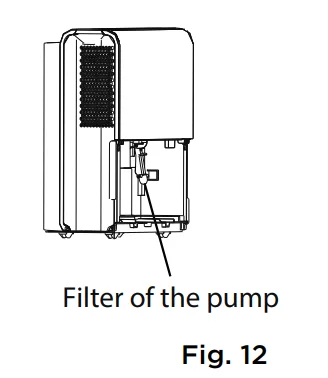
- Cleaning the pump filter:
- Remove the bucket from the unit, take out the pump, and clean the pump filter (See Fig. 12).

- Check if the drain hose is clean and free of debris.
- Empty the water from the bucket.
- Check the hose connection and the bucket for proper assembly. If the error persists, contact Customer Service.
NOTE
- Do not use the pump operation when the outdoor temperature is equal to or less than 0°C (32°F); otherwise, ice may form, blocking the hose and causing the unit to stop operating.
- Make sure to empty the bucket at least once a week when using the pump draining feature. When the pump draining feature is not being used, remove the pump drain hose from the outlet.
Installation Instructions
Positioning the Unit
A dehumidifier operating in a basement will have little or no effect in drying an adjacent enclosed storage area, such as a closet, unless there is adequate circulation of air in and out of the area (See Fig. 13).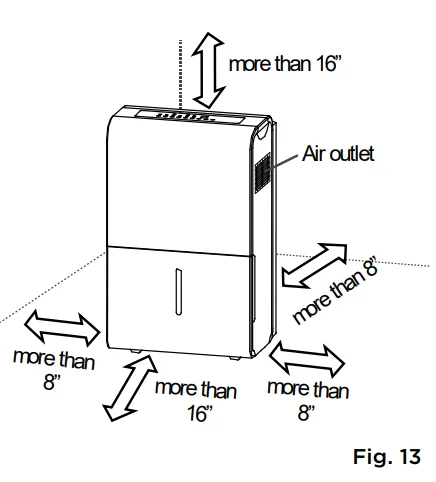
- Do not use outdoors.
- This dehumidifier is intended for indoor residential applications only. This dehumidifier should not be used for commercial or industrial applications.
- Place the dehumidifier on a smooth, level floor strong enough to support the unit with a full bucket of water.
- Allow at least 8” of air space on all sides of the unit for air circulation (at least 16” for air outlet).
- Place the unit in an area where the temperature will not fall below 41°F (5°C). The coils can become covered with frost at lower temperatures, which may reduce performance.
- Place the unit away from any clothes dryer, heater, or radiator.
- Close all doors, windows, and other outside openings to the room.
Care and Cleaning
Turn the dehumidifier off and disconnect the plug from the power source before cleaning.
1. Clean the Grill and Case
- Use water and a mild detergent. Do not use bleach or abrasives.
- Do not splash water directly onto the unit. Doing so may cause an electrical shock, cause the insulation to deteriorate, or cause the unit to rust.
- The air intake and outlet may get dirty during operation; use a vacuum cleaner or brush to clean.
2. Clean the Bucket
Every few weeks, clean the bucket thoroughly to prevent the growth of mold, mildew, and bacteria. Partially fill the bucket with clean water and mild detergent. Swish it around in the bucket, empty, and rinse.
3. Clean the Air Filter
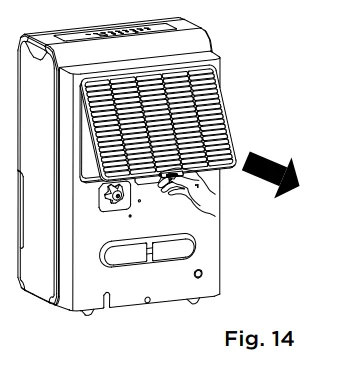
- To remove the filter, pull the filter outwards (See Fig. 14).

- Wash the filter with clean water, then dry.
- Reinstall the filter and replace the bucket.
4. When Not Using the Unit for Long Time Periods
- Before storing the unit, let it rest for one full day so that the system can dry out naturally.
- Clean the unit, water bucket, and air filter.
- Wrap the cord with the power cord buckle.
- Store the unit upright in a dry, well-ventilated area.
Troubleshooting Tips
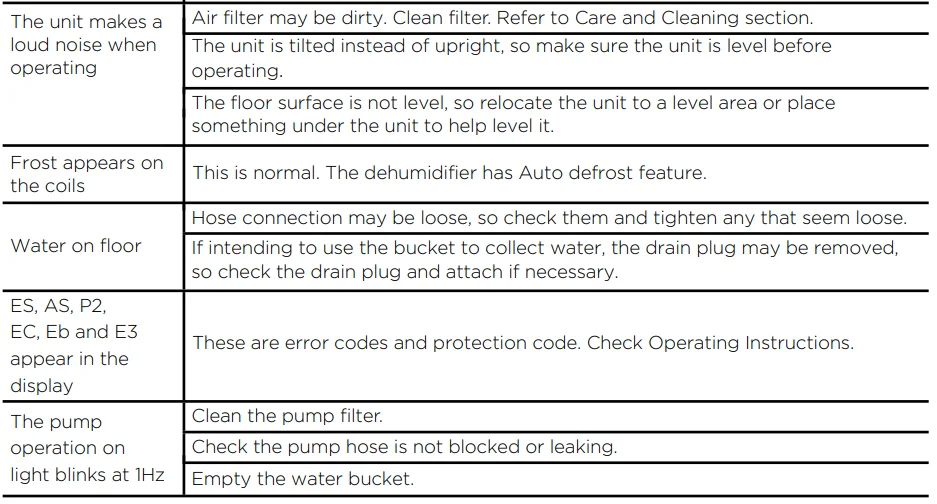
Before calling for service, review this list. It may save you time and money. This list includes common occurrences that are not the result of defective workmanship or materials in this appliance.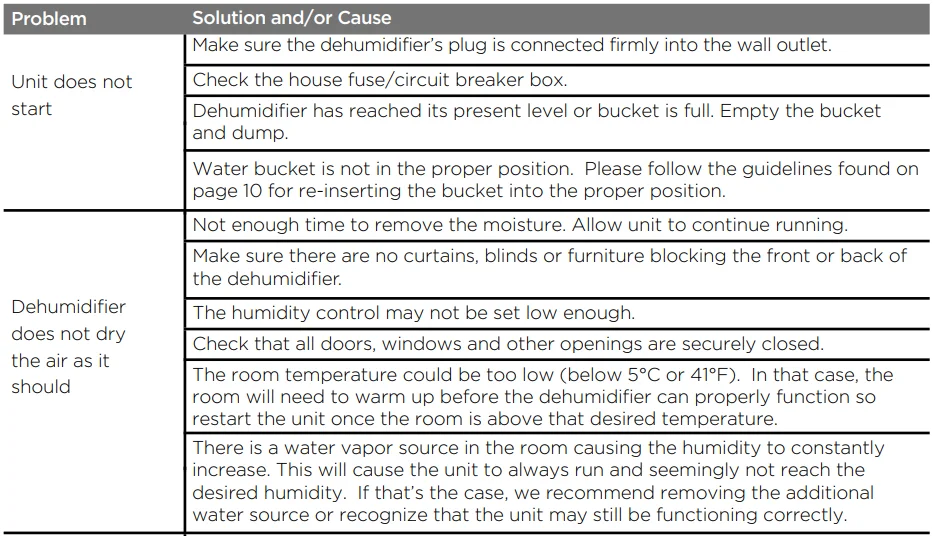
Warranty
Dehumidifier Limited Warranty
Your product is protected by this Limited Warranty: Warranty service must be obtained from Midea Consumer Services or an authorized Midea servicer.
Warranty
- Three-year limited warranty from the original purchase date.
Midea, through its authorized servicers, will:
- Pay all costs for repairing or replacing parts of this appliance that prove to be defective in materials or workmanship.
Consumer will be responsible for:
- Diagnostics, removal, transportation, and reinstallation costs are required because of the service.
- Costs of service calls that are a result of items listed under NORMAL RESPONSIBILITIES OF THE CONSUMER.
- Midea replacement parts shall be used and will be warranted only for the original warranty.
NORMAL RESPONSIBILITIES OF THE CONSUMER
This warranty applies only to products in ordinary household use, and the consumer is responsible for the items listed below:
- Proper use of the appliance in accordance with the instructions provided with the product.
- Proper installation by an authorized service professional in accordance with instructions provided with the appliance and in accordance with all local plumbing, electrical, and/or gas codes.
- Proper connection to a grounded power supply of sufficient voltage, replacement of blown fuses, repair of loose connections, or defects in house wiring.
- Expenses for making the appliance accessible for servicing.
- Damages to finish after installation.
EXCLUSIONS
This warranty does not cover the following:
- Failure caused by damage to the unit while in your possession (other than damage caused by defect or malfunction), by its improper installation, or by unreasonable use of the unit, including, without limitation, failure to provide reasonable and necessary maintenance or to follow the written installation and Operating Instructions.
- Damages caused by services performed by persons other than authorized Midea customer service, or external causes such as abuse, misuse, inadequate power supply, or acts of God.
- If the unit is put to commercial, business, rental, or other use or application other than for consumer use, we make no warranties, express or implied, including but not limited to any implied warranty of merchantability or fitness for use or purpose.
- Products without original serial numbers or products that have serial numbers that have been altered or cannot be readily determined.
NOTE: Some states do not allow the exclusions or limitations of incidental or consequential damages. So this limitation or exclusion may not apply to you.
IF YOU NEED SERVICE
Keep your bill of sale, delivery slip, or some other appropriate payment record. The date on the bill establishes the warranty period, should service be required. If service is performed, it’s in your best interest to obtain and keep all receipts. This written warranty gives you specific legal rights. You may also have other rights that vary from state to state. Service under this warranty must be obtained by following these steps, in order:
- Contact Midea Consumer Services or an authorized Midea service at 1-866-646-4332.
- If there is a question as to where to obtain service, contact our consumer relations department.
For More Manuals By Pelonis, Visit ManualsLibraryy.
Pelonis PAD20C1AWT 20-Pint Dehumidifier-FAQs
What is the pump feature on the Pelonis dehumidifier?
It has a built-in pump for continuous drainage, so you don’t need to manually empty the water tank.
What does the Comfort button do?
Activating Comfort mode automatically sets the dehumidifier to a preset humidity level and fan speed for optimal comfort.
How do I clean the filter?
Pull out the air filter, wash it with clean water, let it dry completely, and then reinstall it.
Can I use vinegar to clean my dehumidifier?
Yes, a natural solution of vinegar and water can clean the coils, drain lines, and pump. Mix 2 oz vinegar with 4 oz water.
What happens if I don’t change the filter?
A dirty filter reduces efficiency, lowers air quality, and can affect your health and comfort.
How long should I run my dehumidifier each day?
For best results, run it continuously in closed rooms until the desired humidity is reached. Typically, it works within 30 minutes, but continuous operation is fine.
What is the ideal humidity setting?
Set the dehumidifier between 30–50% humidity for comfort and to prevent mold or overly dry air.
Is Pelonis a reliable brand?
Yes, Pelonis is affordable, reliable, and easy to use, making it a good choice for small to medium spaces.
Is it safe to run a dehumidifier overnight?
Yes, it’s safe as long as the unit is placed in a secure location and functions correctly.