


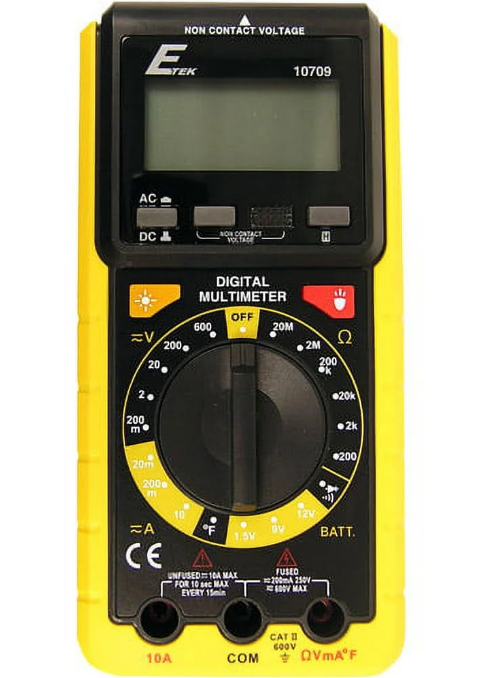
ETEK 10709 Digital Multimeter
SAFETY INFORMATION
To avoid possible electric shock or personal injury, follow these guidelines:
- a. Do not use the meter if it is damaged. Before you use the meter, inspect the case. Pay particular attention to the insulation surrounding the connectors.
- b. Inspect the test leads for damaged insulation or exposed metal.
- c. Check the test leads for continuity. Replace damaged test leads before you use the meter.
- d. Do not use the meter if it operates abnormally. Protection may be impaired. When in doubt, have the meter serviced.
- e. Do not operate the meter around explosive gas, vapor, or dust.
- f. Do not apply more than the rated voltage, as marked on the meter, between terminals or between any terminal and earth ground.
- g. Before use, verify the meter’s operation by measuring a known voltage.
- h. When measuring currentturnum off the circuit power before connecting the meter in the circuit. Remember to place the meter in series with the circuit.
- i. When servicing the meter, use only specified replacement parts.
- j. Use caution when working above 30V AC RMS, 42V peak, or 60V DC. Such voltages pose a shock hazard.
- k. When using the probes, keep your fingers behind the finger guards on the probes.
- l When making connections, connect the common test lead before you connect the five test leads. When you disconnect test leads, disconnect the live test lead first.
- m. Remove the test leads from the meter before you open the battery cover or the case.
- n. Do not operate the meter with the battery cover or portions of the case removed or loosened.
- o. To avoid false readings, which could lead to possible electric shock or personal injury, replace the batteries as soon as the low battery indicator ( CH”) appears.
ELECTRICAL SYMBOLS
- AC (Alternating Current)
- DC (Direct Current) DCor AC
- Important safety information. Refer to the manual.
- Dangerous voltage may be present. Be cautious. Earth ground
- Fuse
- Conforms to European Union directives
- Double insulated
- Low battery
- Diode
GENERAL DESCRIPTION
This multimeter is a compact 3 1/2-digit digital multimeter for measuring DC and AC voltage, OC and ACt, resistance, continuity, diode, battery, and temperature. In addition, it can be used to detect AC voltage. It has the features of polarity indication, data hold, and andover-rangee
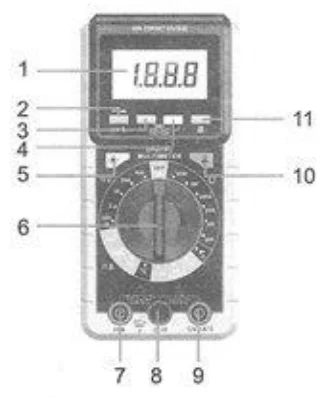
- DISPLAY: 3 1/2-digit LCD, with a max. reading of 1999
- “AC/DC” exchange button: It can be used to switch between DC and AC functions.
- AC voltage detection button
- AC voltage detection indicator
- Backlight button: To turn on the backlight, press the button. The backlight will turn off automatically approximately 10 seconds later,
- Function / Range Switch: Used to select the desired function range and 10 turn the meter on/off. To preserve battery
life, set this switch to the “OFF” position when the meter is not in use. - “10A” Jack: Plug-in connector for the red test lead for current (200mA~10R) measurements,
- “COM” Jack: Plug-in connector for black (negative) test lead.
- “QVmMA*F” Jack: Plug-in connector for the red (positive) test lead for all measurements < 200mA.
- Work Light button: Press and hold down this button to turn on the light. Release the button to turn off the light.
- °H” button (Data Hold): After pressing the button, the meter enters Hold mode and the present reading is held on the display. To exit the Hold mode, press the button again.
GENERAL SPECIFICATION
- Display: 3 1/2-digit LCD, with a max. Reading of 1999 Sampling rate: 2-3 times/sec over range indication: only figure “1” shown on the LCD.
- Battery: 2X 1.5V, AAA or equivalent
- Polarity indication: *-” displayed automatically
- Low battery indication: “(53 shown on the display
- Operating temperature: 0°C to 40°C, <75%RH
- Storage temperature: -10°C to 50°C, <85%RH
SPECIFICATIONS
Accuracy is specified for a period of one year after calibration and at 18°C to 28°C, with relative humidity < 75%. Accuracy specifications take the form of: + (19% of Reading] +{number of Least Significant Digits)
DC Voltage
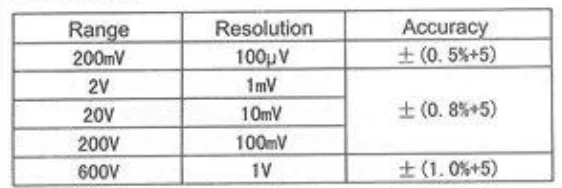
- Input impedance: 10MQ
- Max. input voltage:200mV range: DC 250V
- All other ranges: DC 600V
AC Voltage
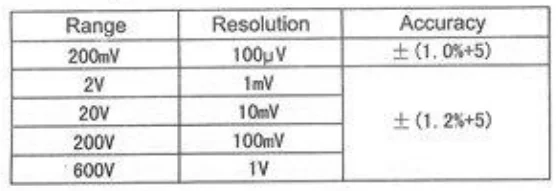
- Frequency Range: 40Hz ~ 400Hz
- Max. input voltage: |
- +200mV range: AC 250V RMS
- All other ranges: AC 600V RMS.
- Response: Average, calibrated in RMS of sine wave.
DC Current
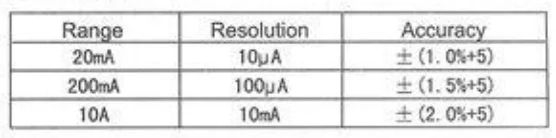
- Overload Protection: F 500mA L 250V fused,10A range unfused.
- Max. Input Current: 10A ( For measurements >5A : measurement duration<10secs, and interval >15 minutes.)
AC Current
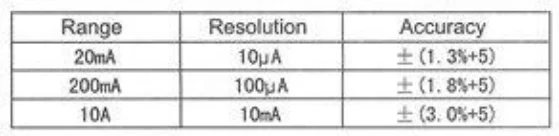
- Overload Protection: F 500mA L 250V fused, 10A range unfused.
- Max. Input Current: 10A ( For measurements >5A: measurement duration<10 secs, and interval >15 minutes.)
Resistance
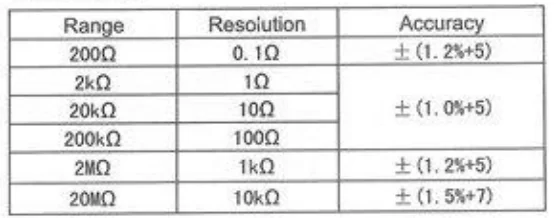
Temperature

Battery
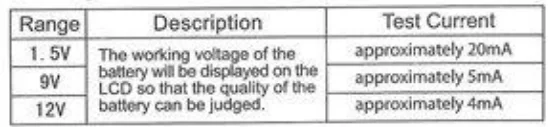
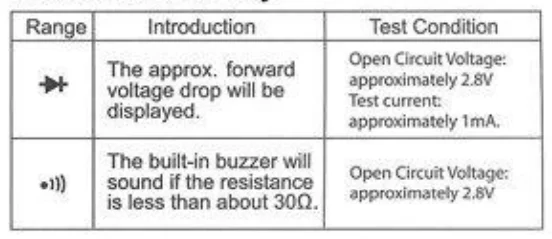
Diode and Continuity
OPERATION INTRODUCTION
Measuring Voltage
- Connect the black test lead to the “COM” jack, and the red test lead to the “QVmA’F* jack.
- 5et the range switch to the desired Range. If the magnitude of the voltage is not known beforehand, set the range switch to the highest range position, and then reduce it range by range until satisfactory resolution is obtained.
- Select the “AC/DC” exchange button to select the DC or AC function exchange button.
- Connect the test leads across the load to be measured.
- Read the LCD. For DC voltage measurement, the polarity of the red lead connection will be indicated as well.
Measuring Current
- Connect the black test lead to the “COM” jack. Connect the red test lead to the “QVMAF” jack if the current to be measured is less than 200mA. If the current is. between 200mA and 10A , connect the red test lead to the *10A” jack instead.
- Set the range switch to the desired A-range. If the magnitude of the current is not known beforehand, set the range switch to the highest range position and then reduce it range by range until satisfactory resolution is obtained.
- Press the “AC/DC” exchange button to select DC or AC function.
- Turn off the power to the circuit whose current you want to measure. Discharge all high-voltage capacitors of the circuit.
- Break the current path to be tested. Connect the red test lead to the more positive side of the break and the black test lead to the more negative side of the break.
- Turn on the power 10 tto he circuit.
- Read the LCD. For DC measurement, the. The polarity of the red lead connection will be indicated as well.
Measuring Resistance
- Connect the black test lead to the “COM” jack and the red test lead to the *QVMA’F* jack (Note: The polarity of the red lead is positive “+” ).
- 5et the range switch to the desired range.
- Connect test leads across the load to be measured.
- Read the reading on the display.
Continuity Test
- Connect the black test lead to the “COM” jack and the red test lead to the *QVmA’F” jack ( Note: The polarity of the red lead is positive “+” ),
- Set the function switch to the +3 position.
- Connect the test leads 0 the circuit to be measured.
- If the resistance is lower than approximately 300, the built-in buzzer will sound.
Diode
- Connect the black test lead to the “COM” jack and the | red test lead to the “QVmA’F* jack ( Note: The polarity of the red lead is positive “+” ).
- Set the range switch to the $ k$ position. |
- Connect the red test lead to the anode of the diode to be tested, and the black test lead to the cathode. |
- The display will show the approximate forward voltage of the diode. If the connection is reversed, only figure ™1* will be shown on the display.
Measuring Battery
- Set the range switch to the desired “BATT” range.
- Connect the red test lead to the “QVmA’F * jack, and the black test lead to the “COM” jack.
- Connect the test leads to the two terminals of the battery to be measured.
- Read the voltage value of the battery on the display.
MAINTENANCE/CLEANING
Periodically wipe the case with a damp cloth and mild detergent. Do not use abrasives or solvents.
ACCESSORIES
- Owners’ manual: 1 piece
- Test leads: 1 pair
- K-type thermocouple: 1 piece
- Carrying Case: 1 piece
SERVICE PROCEDURES
The Manufacturer warrants to the original purchaser that this unit is free of defects in material and workmanship under normal conditions nd maintenance for a period of one (1) year from the date of original purchase. If the unit fails within the one (1) year period, it will be repaired or replaced, at the manufacturer’s option, at no charge when returned prepaid to Custom Accessories with Poof of Purchase. The sales receipt may be used for this purpose. Instafiation labor is not covered under this warranty. All replacement parts, whether new or re-manufactured. Assume that their warranty period is only the remaining time of this warranty. This warranty does not apply to damage caused by improper use, accident. Abuse, improper voltage, service, fire, flood, lightning, or other acts of God, or if the product was altered or repaired by anyone other than the Manufacturer’s Technical Service Center. Consequential and incidental damages are not recoverable under this warranty. Some states do not allow the exclusion or limitation of incidental or consequential damages, so the above limitation or exclusion may not apply to you. This warranty gives you specific legal rights, and you may also have other rights, which vary from state to state. No portion of this warranty may be copied or duplicated without the expressed written permission of the Manufacturer.
FOR MORE MANUALS BY BLOGS, VISIT MANUALSLIBRARYY
ETEK 10709 Digital Multimeter-FAQs
1. What is it used for?
Measures voltage, current, resistance, continuity, diodes, and batteries.
2. How to measure voltage?
Set dial to AC/DC, connect probes, read the display.
3. How to measure current?
Set to current mode, connect in series, read value.
4. How to measure resistance?
Set to Ω, touch probes to component, read value.
5. How to test a battery?
Set to DC voltage, connect probes to battery terminals, check reading.
6. How to check continuity?
Set to continuity mode, touch ends of wire; beep or 0Ω = connected.
7. How to test if a wire is live?
Set to AC voltage, touch red to wire and black to neutral/ground; reading shows live.
8. What do symbols mean?
V~ = AC, V⎓ = DC, A = current, Ω = resistance, ⏚ = continuity, diode = diode test.
9. Safety tips?
Don’t exceed limits, avoid touching metal, switch settings only when off.