
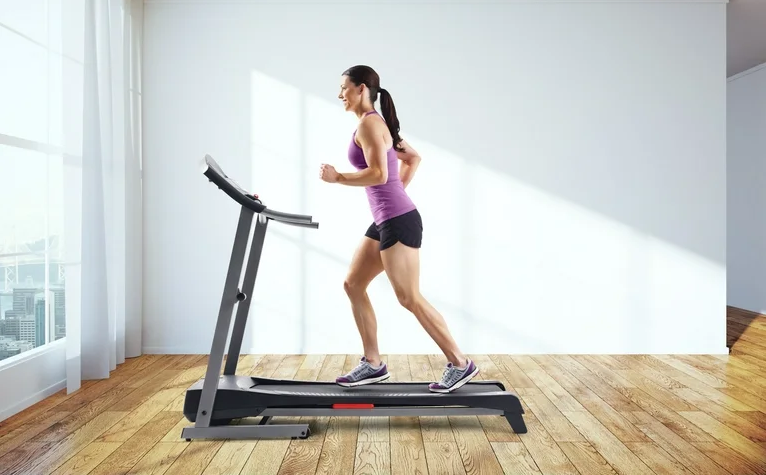

Weslo Cadence GTX WLTL295080 Treadmill
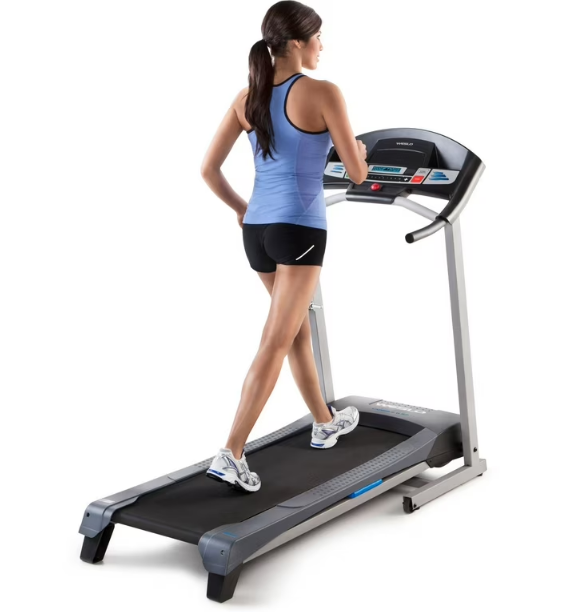
IMPORTANT PRECAUTIONS
- Before beginning this or any exercise program, consult your physician. This is especially important for persons over age 35 or persons with pre-existing health problems.
- It is the responsibility of the owner to ensure that all users of this treadmill are adequately informed of all warnings and precautions.
- Use the treadmill only as described.
- Place the treadmill on a level surface, with at least 8 ft. (2.4 m) of clearance behind it and 2 ft. (0.6 m) on each side. Do not place the treadmill on any surface that blocks air openings. To protect the floor or carpet from damage, place a mat under the treadmill.
- Keep the treadmill indoors, away from moisture and dust. Do not put the treadmill in a garage or covered patio, or near water.
- Do not operate the treadmill where aerosol products are used or where oxygen is being administered.
- Keep children under age 12 and pets away from the treadmill at all times.
- The treadmill should not be used by persons weighing more than 250 lbs. (113 kg).
- Never allow more than one person on the treadmill at a time.
- Wear appropriate exercise clothes when using the treadmill. Do not wear loose clothes that could become caught in the treadmill. Athletic support clothes are recommended for both men and women. Always wear athletic shoes; never use the treadmill with bare feet, wearing only stockings, or in sandals.
- When connecting the power cord (see page 12), plug the power cord into a surge suppressor (not included) and plug the surge suppressor into a grounded circuit capable of carrying 15 or more amps. No other appliance should be on the same circuit. Do not use an extension cord.
- Use only a single-outlet surge suppressor that meets all of the specifications described on page 12. To purchase a surge suppressor, see your local WESLO dealer or call the telephone number on the front cover of this manual and order part number 146148, or see your local electronics store.
- Failure to use a properly functioning surge suppressor could result in damage to the control system of the treadmill. If the control system is damaged, the walking belt may slow, accelerate, or stop unexpectedly, which may result in a fall and serious injury.
- Keep the power cord and the surge suppressor away from heated surfaces.
- Never move the walking belt while the power is turned off. Do not operate the treadmill if the power cord or plug is damaged, or if the treadmill is not working properly. (See TROUBLESHOOTING on page 19 if the treadmill is not working properly.)
BEFORE YOU BEGIN
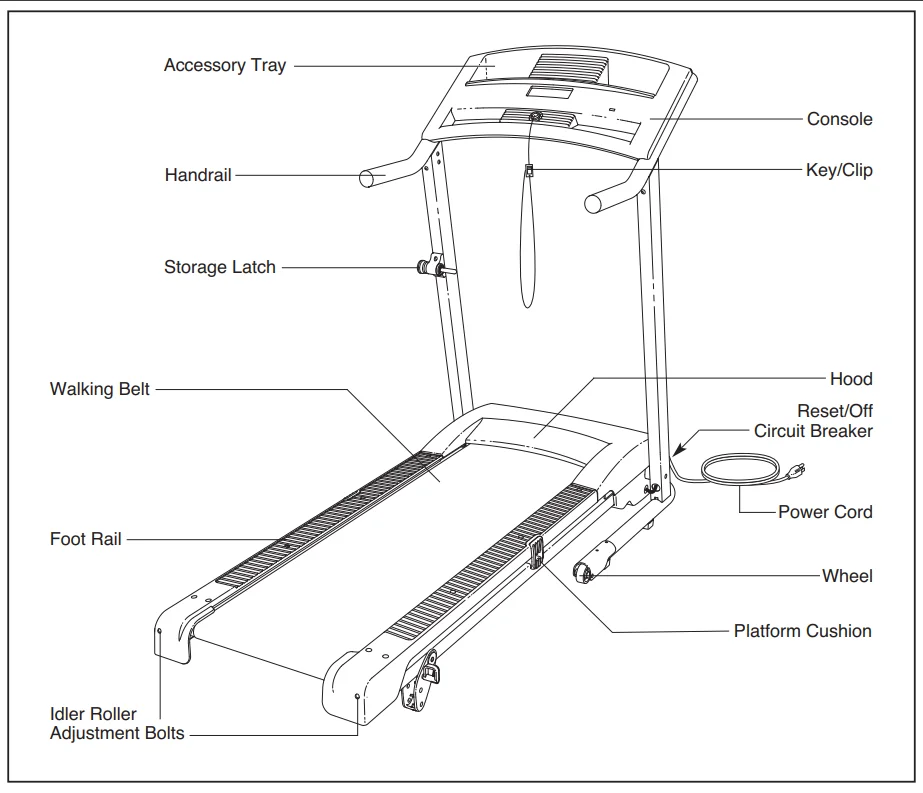
Thank you for selecting the new WESLO® CADENCE GTX treadmill. The CADENCE GTX treadmill combines advanced technology with innovative design to help you get the most from your exercise in the convenience of your home. And when youʼre not exercising, the treadmill can be folded up, requiring less than half the floor space of other treadmills. For your benefit, read this manual carefully before using the treadmill. If you have questions after reading this manual, please see the front cover of this manual. To help us assist you, note the product model number and serial number before contacting us. The model number and the location of the serial number decal are shown on the front cover of this manual. Before reading further, please review the drawing below and familiarize yourself with the labeled parts.
ASSEMBLY
To hire an authorized service technician to assemble the treadmill, call toll-free 1-800-445-2480.
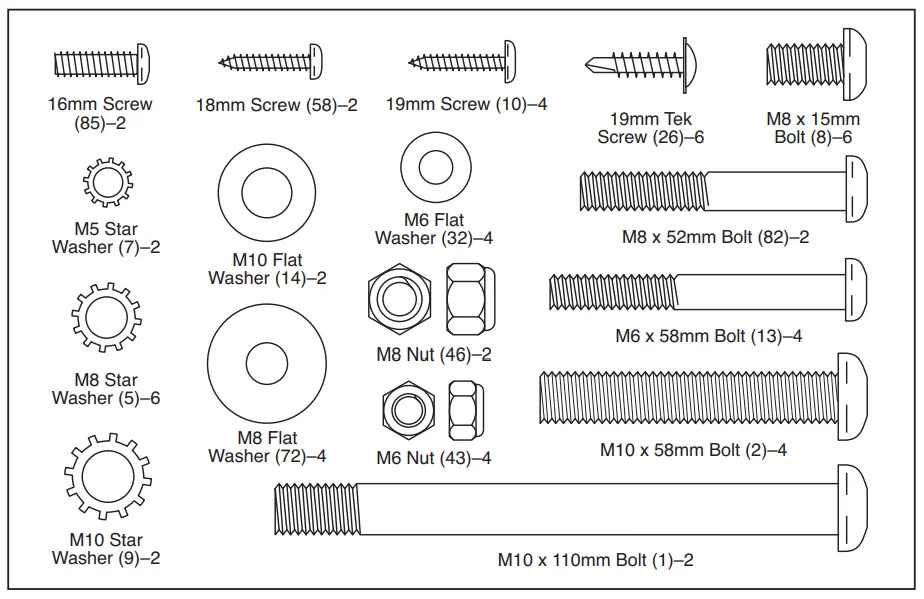
The assembly requires two persons. Set the treadmill in a cleared area and remove all packing materials; do not dispose of them until assembly is completed. Note: The underside of the treadmill walking belt is coated with high-performance lubricant. During shipping, a small amount of lubricant may be transferred to the top of the walking belt or the shipping carton. This does not affect treadmill performance. If there is lubricant on top of the walking belt, simply wipe off the lubricant with a soft cloth and a mild, non-abrasive cleaner. In addition to the included hex keys, assembly requires a Phillips screwdriver, an adjustable wrench, and needle-nose pliers. Use the drawings below to identify the hardware used during assembly. Note: If a part is not in the hardware kit, check to see if it has been preattached to one of the parts to be assembled. Extra hardware may be included. To avoid damaging plastic parts, do not use power tools for assembly.
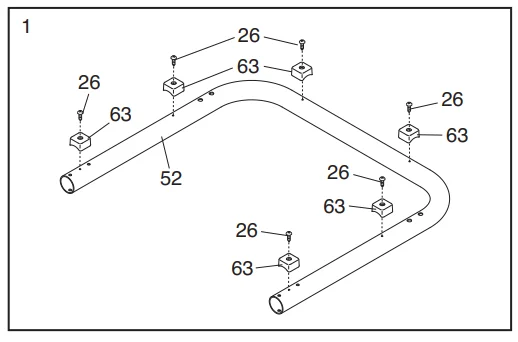
- Make sure that the power cord is unplugged. Place a piece of cardboard under the treadmill frame to protect the floor during assembly. Have a second person hold the Base (52) in the position shown. Attach six Base Feet (63) to the Base (52) with six 19mm Tek Screws (26).

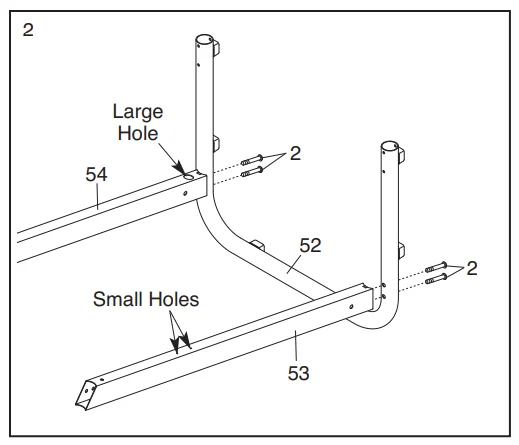
- Have a second person hold the Base (52) in the position shown. Identify the Left Upright (53) (the Right Upright
[54] has a large hole near the lower end. Hold the Left Upright (53) so that the two indicated small holes are on top. Attach the Left Upright to the Base (52) with two M10 x 58mm Bolts (2). Do not tighten the Bolts yet. Attach the Right Upright (54) to the Base (52) in the same way.
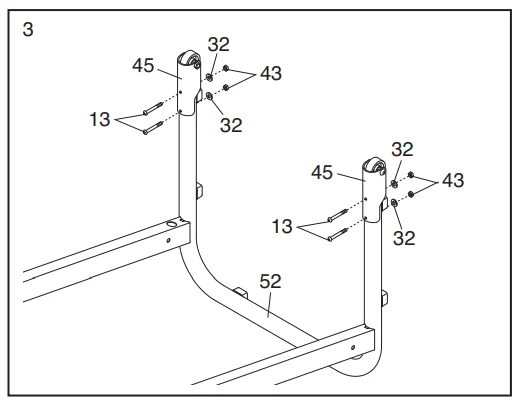
- Slide the two Wheel Housings (45) onto the Base (52). Attach each Wheel Housing with two M6 x 58mm Bolts (13), two M6 Flat Washers (32), and two M6 Nuts (43).

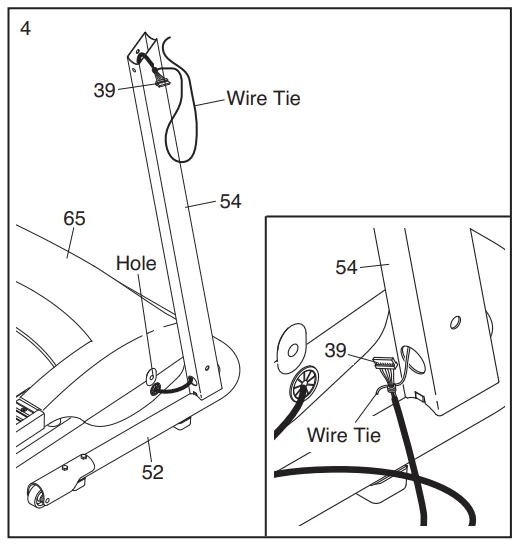
- Remove the bolts (not shown) from the indicated holes in the Hood (65) (only one side is shown). Remove the cardboard packaging and discard the bolts. Position the Base (52) as close to the front of the treadmill as possible. See the inset drawing. Locate the wire tie in the Right Upright (54). Tie the wire tie securely to the connector on the end of the Wire Harness (39). Next, pull the opposite end of the wire tie out of the upper end of the Right Upright until the Wire Harness is routed completely through the Right Upright. Secure the Wire Harness to the upper end of the Right Upright so that it will not fall inside.

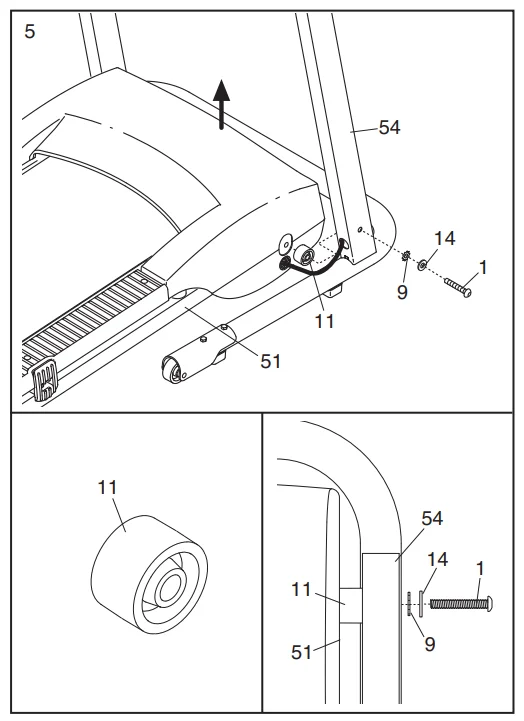
- See the left inset drawing and identify a Frame Spacer (11). Hold the Frame Spacer between the Right Upright (54) and the Frame (51). Attach the Right Upright to the Frame with an M10 x 110mm Bolt (1), an M10 Flat Washer (14), and an M10 Star Washer (9); do not fully tighten the Bolt yet.

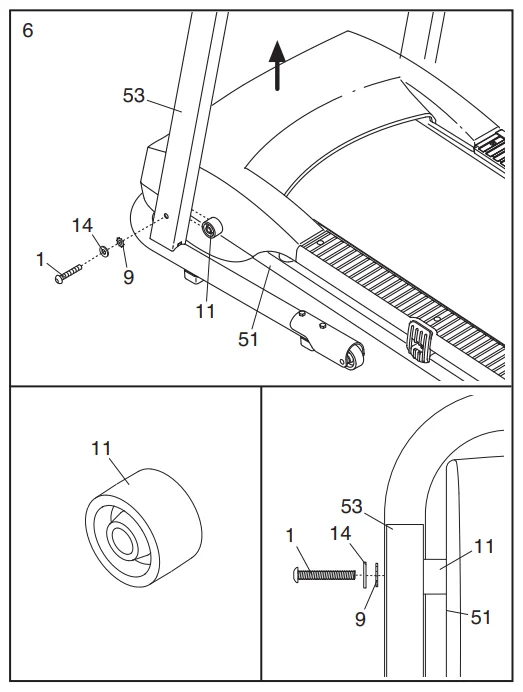
- Hold the other Frame Spacer (11) between the Left Upright (53) and the Frame (51). Attach the Left Upright to the Frame with an M10 x 110mm Bolt (1), an M10 Flat Washer (14), and an M10 Star Washer (9); do not fully tighten the Bolt yet.

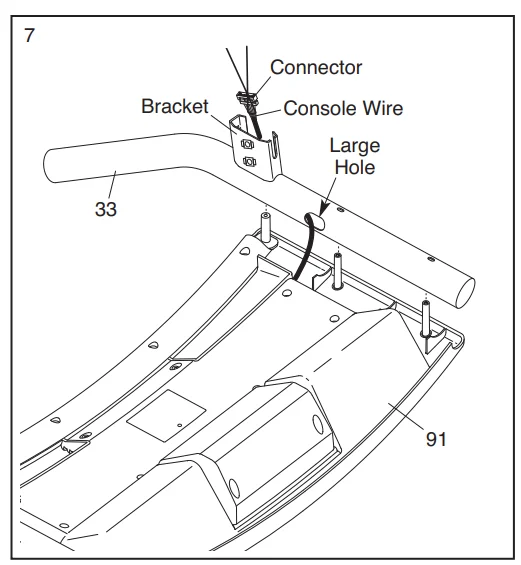
- Set the Console (91) face down on a soft surface to avoid scratching it. Next, identify the Right Hrail(33), which has a large hole in the location shown. Hold the Right Handrail near the Console. Next, insert the console wire into the large hole in the side of the Right rail (33). Using needlenose pliers, carefully grasp the connector and pull the console wire out of the hole near the bracket on the Right rail.

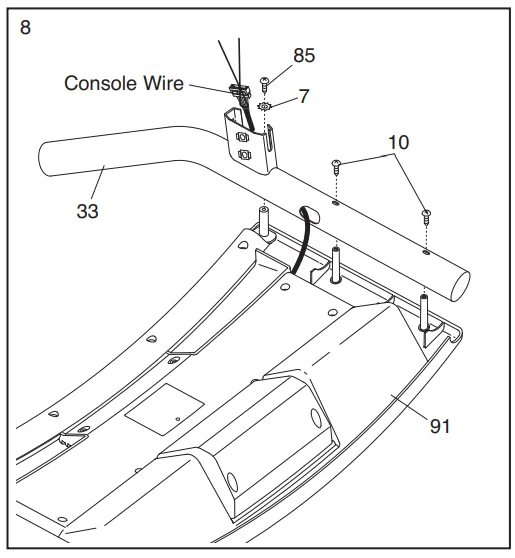
- Set the Right Handrail (33) on the Console (91). Make sure that the console wire is not pinched. Start a 16mm Screw (85) with an M5 Star Washer (7) into the Right rail, and then start two 19mm Screws (10) into the Right rail. Tighten the 16mm Screw and then tighten the two 19mm Screws; do not overtighten the Screws. Attach the Left Handrail (not shown) to the Console (91) in the same way. Note: There is no console wire on the left side.

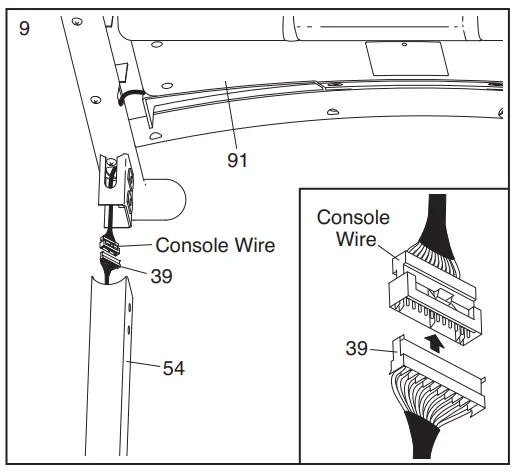
- Have a second person hold the Console (91) near the Right Upright (54). Connect the Wire Harness (39) to the console
wire. See the inset drawing. The connectors should slide together easily and snap into place. If they do not, turn one connector and try again. IF THE CONNECTORS ARE NOT CONNECTED PROPERLY, THE CONSOLE MAY BE DAMAGED WHEN THE POWER IS TURNED ON. Then, insert the connectors and the excess wire downward into the Right Upright (54). Remove the wire ties from the Wire Harness and the console wire.
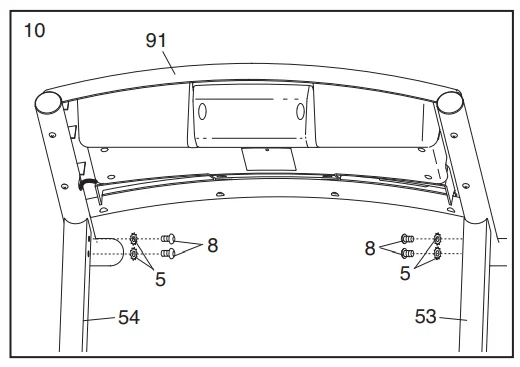
- Set the Console (91) on the Uprights (53, 54). Make sure that no wires are pinched. Start four M8 x 15mm Bolts (8) with four M8 Star Washers (5) into the Uprights as shown. Do not fully tighten the Bolts yet.

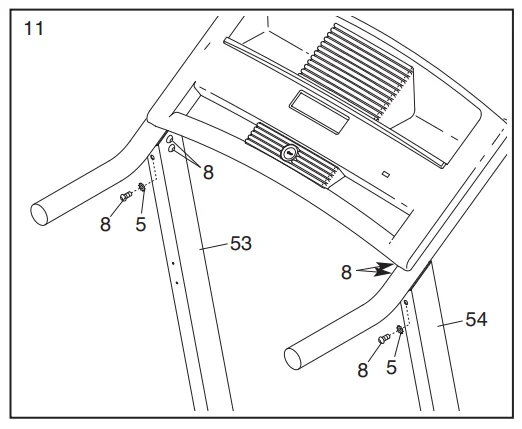
- Start an M8 x 15mm Bolt (8) with an M8 Star Washer (5) into each Upright (53, 54). See steps 10 and 11. Firmly tighten all six M8 x 15mm Bolts. With the help of a second person, carefully lower the Uprights (53, 54) to the floor.

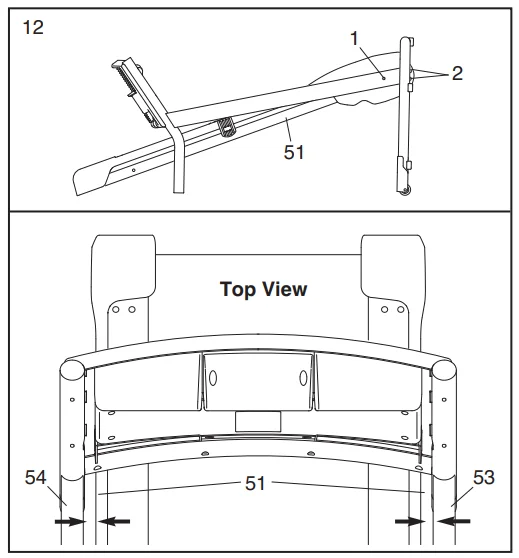
- Lower the Uprights (53, 54). See the lower drawing. Position the Uprights so that the treadmill Frame (51) is centered between the Uprights. Firmly tighten the two M10 x 110mm Bolts (1) and the four M10 x 58mm Bolts (2). Be careful
not to overtighten the M10 x 110mm Bolts. Raise the Uprights (53, 54) to the vertical position.
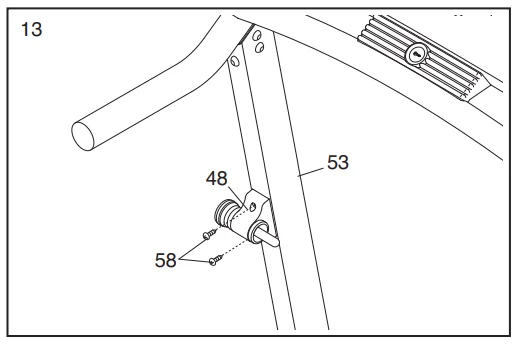
- Attach the Latch Housing (48) to the Left Upright (53) with two 18mm Screws (58); start both Screws before tightening either of them.

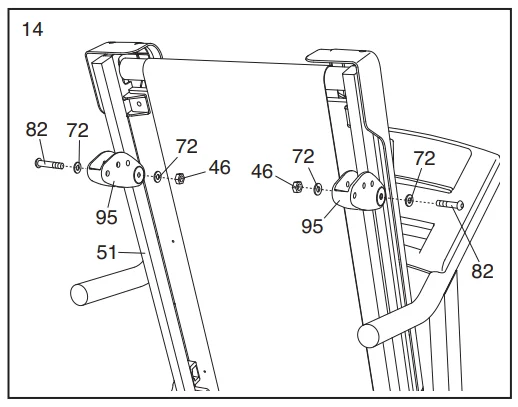
- Raise the treadmill to the storage position (see HOW TO FOLD THE TREADMILL FOR STORAGE on page 17). Attach an Incline Leg (95) to each side of the Frame (51) with an M8 x 52mm Bolt (82), two M8 Flat Washers (72), and an M8
Nut (46) as shown. Note: Do not overtighten the Nuts. The Incline Legs should be able to rotate easily. Adjust the Incline Legs (95) to the desired incline (see page 16). Lower the treadmill (see HOW TO LOWER THE TREADMILL FOR USE on page 18)
- Make sure that all parts are properly tightened before you use the treadmill. Keep the included hex keys in a secure place. A hex key is used to adjust the walking belt (see page 20). To protect the floor or carpet, place a mat under the treadmill.
OPERATION AND ADJUSTMENT
THE PRE-LUBRICATED WALKING BELT
Your treadmill features a walking belt coated with high-performance lubricant. IMPORTANT: Never apply silicone spray or other substances to the walking belt or the walking platform. Such substances will deteriorate the walking belt and cause excessive wear.
HOW TO PLUG IN THE POWER CORD
- Your treadmill, like any other type of sophisticated electronic equipment, can be seriously damaged by sudden voltage changes in your homeʼs power.
- Voltage surges, spikes, and noise interference can result from weather conditions or from other appliances being turned on or off. To decrease the possibility of your treadmill being damaged, always use a surge suppressor with your treadmill (see drawing 1 at the right).
- To purchase a surge suppressor, see your local WESLO dealer or call the telephone number on the front cover of this manual and order part number 146148, or see your local electronics store. Use only a single-outlet surge suppressor that is UL 1449 listed as a transient voltage surge suppressor (TVSS). The surge suppressor must have a UL-suppressed-voltage rating of 400 volts or less and a minimum surge dissipation of 450 joules. The surge suppressor must be electrically rated for 120 volts AC and 15 amps.
- There must be a monitoring light on the surge suppressor to indicate whether it is functioning properly. Failure to use a properly functioning surge suppressor could result in damage to the control system of the treadmill.
- If the control system is damaged, the walking belt may slow, accelerate, or stop unexpectedly, which may result in a fall and serious injury. This product must be grounded. If it should malfunction or break down, grounding provides a path of least resistance for electric current to reduce the risk of electric shock. This product is equipped with a cord having
an equipment-grounding conductor and a grounding plug. Plug the power cord into a surge suppressor, and plug the surge suppressor into an appropriate outlet that is properly installed and grounded in accordance with all local codes and ordinances.
This product is for use on a nominal 120-volt circuit and has a grounding plug that looks like the plug illustrated in drawing 1 below. A temporary adapter that looks like the adapter illustrated in drawing 2 may be used to connect the surge suppressor to a 2-pole receptacle, as shown in drawing 2, if a properly grounded outlet is not available.
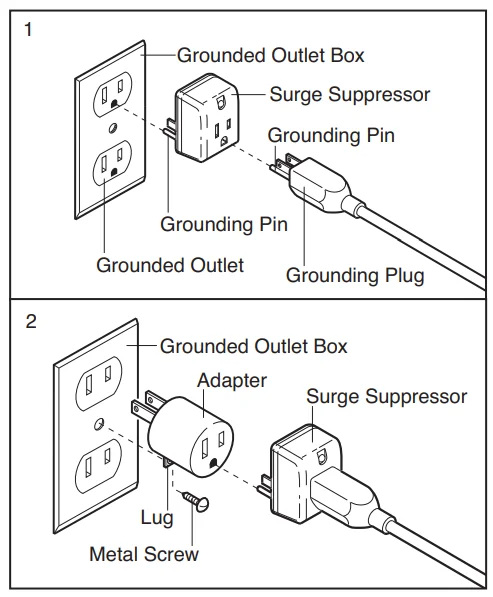
The temporary adapter should be used only until a properly grounded outlet (drawing 1) can be installed by a qualified electrician. The green-colored rigid ear, lug, or the like extending from the adapter must be connected to a permanent ground, such as a properly grounded outlet box cover. Whenever the adapter is us, it must be held in place by a metal screw. Some 2-pole receptacle outlet box covers are not grounded. Contact a qualified electrician to determine if the outlet box cover is grounded before using an adapter.
CONSOLE DIAGRAM
FEATURES OF THE CONSOLE
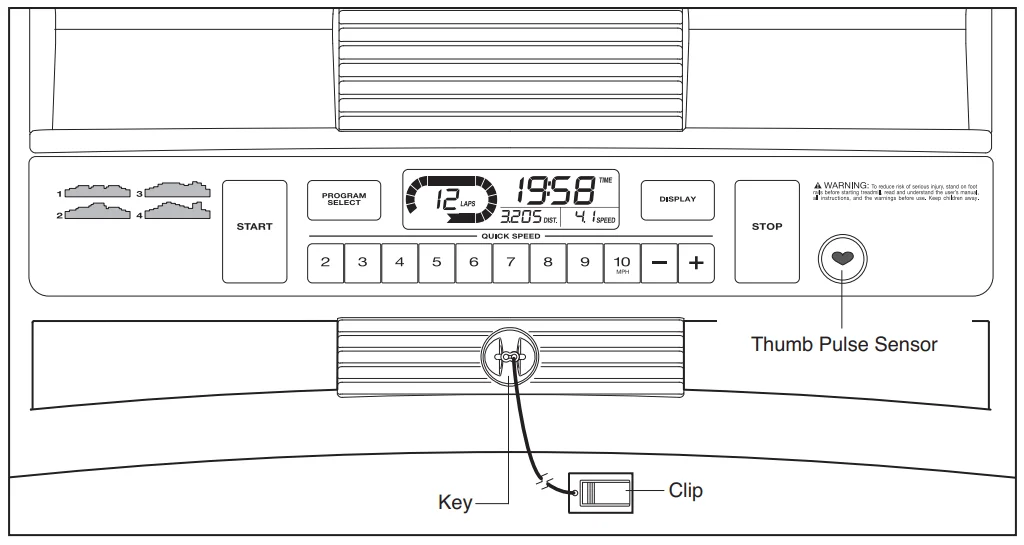
The treadmill console offers a selection of features designed to make your workouts more effective. When you select the manual mode of the console, you can change the speed of the treadmill with the touch of a button. As you exercise, the displays will provide continuous exercise feedback. You can even measure your heart rate using the built-in pulse sensor. The console also offers four speed programs. Each program automatically controls the speed of the treadmill as it guides you through an effective workout.
HOW TO TURN ON THE POWER
Plug in the power cord (see page 12). Next, locate the reset/off circuit breaker on the treadmill frame near the power cord. Make sure that the circuit breaker is in the “reset” position.
HOW TO USE THE MANUAL MODE
- Insert the key into the console. See HOW TO TURN ON THE POWER on page 13.
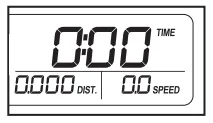
- Select the manual mode. When the key is inserted, the manual mode will be selected. If you have selected a speed program, reselect the manual mode by pressing the Program Select button repeatedly until only zeros appear in the displays.

- Start the walking belt. To start the walking belt, press the Start button, the speed + button, or one of the numbered Quick Speed buttons. If you press the Start button or the speed + button, the walking belt will begin to move at 1 mph. As you exercise, change the speed of the walking belt as desired by pressing the speed + and – buttons. Each time you press a button, the speed setting will change by 0.1 mph; if you hold down a button, the speed setting will change in increments of 0.5 mph. Note: After you press the buttons, it may take a moment for the walking belt to reach the selected speed setting. If you press one of the numbered Quick Speed buttons, the walking belt will gradually change speed until it reaches the selected speed setting. To stop the walking belt, press the Stop button. The time will begin to flash in one of the displays. To restart the walking belt, press the Start button or the speed + button.
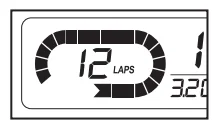
- Follow your progress with the track and the displays. The track—The track represents a distance of 1/4 mile. As you walk or run on the treadmill, the indicators around the track will appear in succession until the entire track appears. The track will then disappear, and the indicators will again begin to appear in succession. The center of the track will show the number of laps that you have completed.

HOW TO USE A SPEED PROGRAM
- Insert the key into the console. See HOW TO TURN ON THE POWER on page 13.
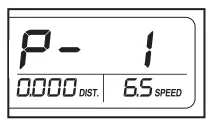
- Select one of the four speed programs. To select a speed program, press the Program Select button repeatedly; “P-1,” “P2,” “P-3,” or “P-4” will appear in the upper display for a few seconds to show which program is selected. The maximum speed setting of the selected program will also flash in one of the displays for a few seconds.

- Press the Start button or the speed + button to start the program. When you press either button, the treadmill will automatically adjust to the speed setting that is programmed for the first period of the program. Hold the handrails and begin walking. When the first period ends, a series of tones will sound. If a different speed setting is programmed for the second period, the speed setting will flash in one of the displays to alert you, and then the speed of the walking belt will change. The program will continue until all 30 periods are completed. The walking belt will then slow to a stop
- Measure your heart rate if desired. See step 5 on this page.
- When you are finished exercising, remove the key from the console. See step 6 on this page.
HOW TO FOLD AND MOVE THE TREADMILL
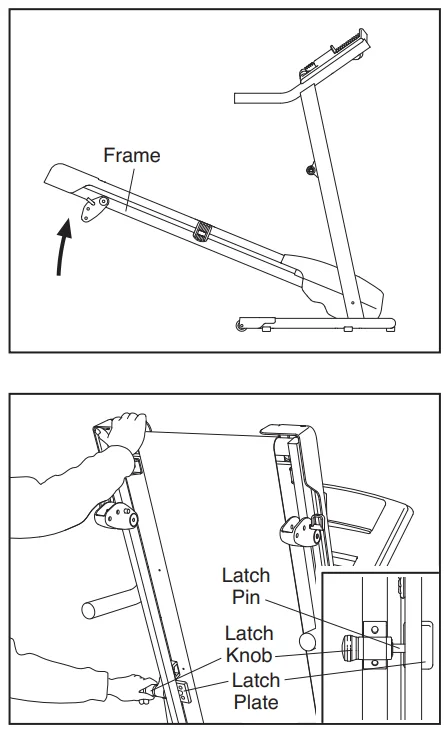
- Hold the metal frame firmly in the location shown by the arrow at the right. CAUTION: To decrease the possibility of injury, do not lift the frame by the plastic foot rails. Make sure to bend your legs and keep your back straight. As you raise the frame, make sure to lift with your legs rather than your back. Raise the frame about halfway to the vertical position.
- Move your right hand to the position shown and hold the treadmill firmly. Using your left hand, pull the latch knob
to the left and hold it. Raise the frame until the latch plate is past the latch pin. Then, slowly release the latch knob; make sure that the latch plate is resting against the latch pin.
HOW TO MOVE THE TREADMILL
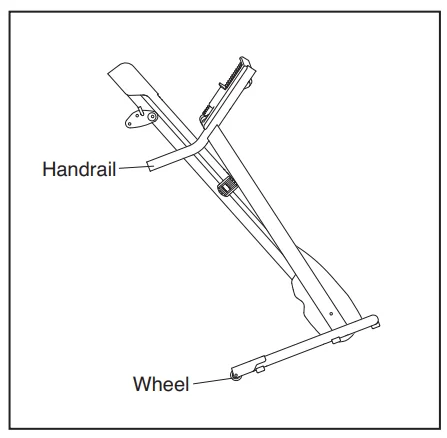
- Hold the handrails and place one foot against one of the wheels. Do not pull back on the frame.
- Tilt the treadmill backward until it rolls freely on the wheels, and carefully move the treadmill to the desired location. Never move the treadmill without tipping it backward. To reduce the risk of injury, use extreme caution while moving the treadmill. Do not attempt to move the treadmill over an uneven surface.
- Place one foot against one of the wheels, and carefully lower the treadmill until it is in the storage position.
TROUBLESHOOTING
Most treadmill problems can be solved by following the steps below. Find the symptom that applies, and follow the steps listed. If further assistance is needed, please see the front cover of this manual.
PROBLEM: The power does not turn on
SOLUTION:
- a. Make sure that the power cord is plugged into a surge suppressor, and that the surge suppressor is plugged into a properly grounded outlet (see page 12). Use only a single-outlet surge suppressor that meets all of the specifications described on page 12. IMPORTANT: The treadmill is not compatible with GFCI-equipped outlets.
- b. After the power cord has been plugged in, make sure that the key is inserted into the console.
- c. Check the reset/off circuit breaker located on the treadmill frame near the power cord. If the switch protrudes as shown, the circuit breaker has tripped. To reset the circuit breaker, wait for five minutes, and then press the switch back in.
FOR MORE MANUALS BY WELSO CADENCE, VISIT MANUALSLIBRARYY
Weslo Cadence GTX WLTL295080 Treadmill-FAQs
Does the Weslo Cadence GTX treadmill have an incline?
Yes. It features a 2-position manual incline that allows you to increase the slope and target different muscles for a more effective workout.
What is the weight limit of the Weslo Cadence GTX treadmill?
The treadmill supports up to 250 lbs. Users above this weight should consider higher-capacity models.
How fast can the treadmill go?
The speed range is 0–10 mph, making it suitable for walking, jogging, and running workouts.
How do I lubricate the treadmill?
Use a manufacturer-approved treadmill lubricant. Apply it under the belt after cleaning the deck. Avoid WD-40, Vaseline, or other non-approved oils.
How often should I oil the treadmill?
Lubricate your treadmill approximately every 3 months or every 130 miles of use to maintain smooth operation and protect the motor and belt.
Can I use WD-40 or Vaseline to lubricate it?
No. Only use the treadmill’s recommended silicone or treadmill lubricant. WD-40, Vaseline, or other oils can damage the belt.
Who manufactures Weslo treadmills?
Weslo treadmills are produced by Icon Health & Fitness, a leading company in home fitness equipment.
What size treadmill do I need for my height?
For most users, a 55-inch belt works for walking, while a 60-inch belt is recommended for running. Adjust if you are taller than 6’4” or shorter than average.
Can walking on an incline help burn more fat?
Yes. Walking at just a 5% incline can burn up to 50% more calories than walking on a flat surface at the same speed.
Can I use the treadmill if I exceed the weight limit?
It is not recommended. Exceeding the 250 lbs limit may damage the treadmill and compromise safety. Consider a treadmill designed for heavier users.