
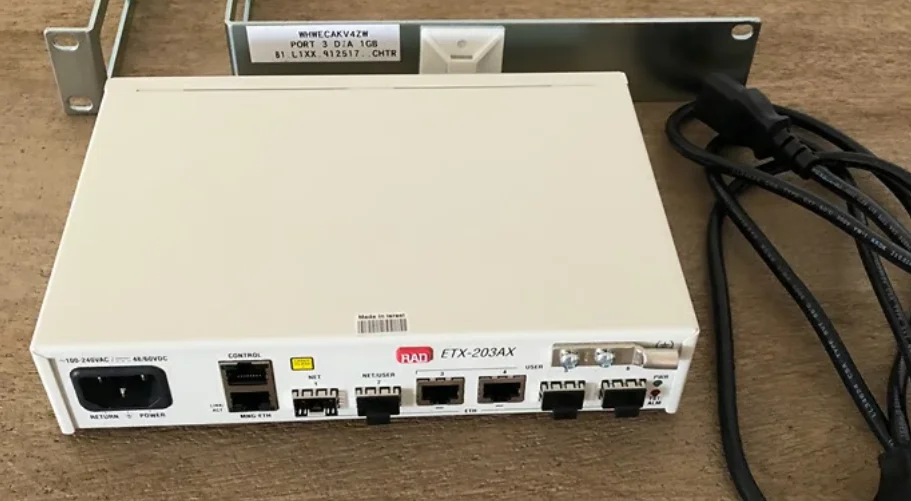

RAD ETX-203AX Carrier Ethernet Demarcation Device
General Safety Practices
Do not touch or tamper with the power supply when the power cord is connected. Line voltages may be present inside certain products even when the power switch (if installed) is in the OFF position or a fuse is blown. For DC-powered products, although the voltage levels are usually not hazardous, energy hazards may still exist.
Before working on equipment connected to power lines or telecommunication lines, remove jewelry or any other metallic objects that may come into contact with energized parts.
Unless otherwise specified, all products are intended to be grounded during normal use.
Grounding is provided by connecting the mains plug to a wall socket with a protective ground terminal. If a ground lug is provided on the product, it should be connected to the protective ground at all times by a wire with a diameter of 18 AWG or wider. Rack-mounted equipment should be mounted only in grounded racks and cabinets.
Always make the ground connection first and disconnect it last. Do not connect telecommunication cables to ungrounded equipment. Make sure that all other cables are disconnected before disconnecting the ground.
Some products may have panels secured by thumbscrews with a slotted head. These panels may cover hazardous circuits or parts, such as power supplies. These thumbscrews should therefore always be tightened securely with a screwdriver after both initial installation and subsequent access to the panels.
Quick Start Guide
This section describes the minimum configuration needed to prepare ETX-203AX for operation.
Installing the Unit
Perform the following steps to install the unit:
- Determine the required configuration of ETX-203AX, according to your application.
- Connect the user/network ports as required for the application.
- Connect the ASCII terminal to the control port.
- Connect power to the unit.
Connecting the Interfaces
To connect the interfaces:
- Insert the SFP modules (if applicable) into the relevant SFP-based Ethernet ports.
- Connect the optical cables.
- Connect the network port(s) to the service provider network equipment.
- Connect the user port(s) to the customer network equipment.
Notes:
- The number of available Ethernet ports depends on the options you purchased.
- Lock the wire latch of each SFP module by lifting it up until it clicks into place.
Connecting to a Terminal
To connect the unit to a terminal:
- Connect the male RJ-45 connector of the cable supplied by RAD to the unit’s 8-pin connector, designated CONTROL.
- Connect the other side of the cable to the ASCII terminal equipment.
Connecting the Power
The unit can be connected to AC or DC power.
To connect to AC power:
- Connect the power cable to the AC power connector on the unit’s front panel.
- Connect the power cable to the mains outlet.
The unit turns on automatically upon connection to the mains, and the PWR indicator lights up.
To connect to DC power:
For instructions on wiring the DC adapters, refer to the DC Power Supply Terminal Block Connection supplement at the end of this manual.
Configuring the Unit for Management
Configure ETX-203AX for management, using a local ASCII-based terminal.
Starting a Terminal Session for the First Time
To start the terminal session:
- Connect an ASCII terminal to the CONTROL port.
- Configure the ASCII terminal to the settings listed below, and then set the terminal emulator to VT100 emulation for optimal viewing of system menus.
- Data Rate: 9,600 bps
- Data bits: 8
- Parity: None
- Stop bits: 1
- Flow control: None.
- If you are using HyperTerminal, set the terminal mode to 132-column mode for optimal view of system menus (Properties> Settings> Terminal Setup> 132 column mode).
- Power up ETX-203AX.
- ETX-203AX boots up. When the startup process is completed, you are prompted to press <ENTER> to receive the login prompt.
- Press <ENTER> until you receive the login prompt.
- To log in, enter your user name (su for full configuration and monitoring access) and your password.
- The device prompt appears: ETX-203AX#
Configuring SVI
SVI 1 must be administratively enabled in order to be able to administratively enable the corresponding flows and router interface.
To administratively enable SVI 1:
Enter the following commands:
configure port svi 1
no shutdown
exit all
Configuring Management Flows
The following sections provide an example of configuring management flows for out-of-band management via the Ethernet management port. The management traffic is untagged. The management flows are set up between the Ethernet management port and SVI 1.
To define the management flows:
Enter the following commands:
configure flows
# Classifier profile to match untagged traffic
classifier-profile untagged match-any match untagged
# Flow from management Ethernet port to SVI 1
flow mng_in
classifier untagged
no policer
ingress-port ethernet 101
egress-port svi 1 queue 1
no shutdown
exit
# Flow from SVI 1 to the management Ethernet port
flow mng_out
classifier untagged
ingress-port svi 1
egress-port ethernet 101 queue 0 block 0/1
no shutdown
exit all
Configuring Router
The router must be configured with a router interface that is bound to the SVI used for the management flows and assigned an IP address. Also, a static route must be set up for the default gateway.
This section illustrates the following configuration:
- Router interface 1:
Bound to SVI 1
IP address 172.17.154.96 with mask 255.255.255.0
Router: Static route associated with IP address 172.17.154.1 (default gateway).
To define the router:
Enter the following commands:
configure router 1
interface 1
bind svi 1
# IP address 172.17.154.96 with mask 255.255.255.0 address 172.17.154.96/24
no shutdown
exit
# Default gateway 172.17.154.1
static-route 0.0.0.0/0 address 172.17.154.1
exit all
Saving Management Configuration
Saving Configuration
Type save in any level to save your configuration in startup-config.
Copying User Configuration to Default Configuration
In addition to saving your configuration in startup-config, you may also wish to save your configuration as a user default configuration.
To save the user’s default configuration:
Enter the following commands:
exit all
file copy startup-config user-default-config
y
Verifying Connectivity
At the ASCII terminal, ping the IP address assigned to ETX-203AX and verify that replies are received. If there is no reply to the ping, check your configuration and make the necessary corrections.
Introduction
Overview
ETX-203AX is a carrier Ethernet demarcation device owned and operated by the service provider and installed at the customer premises, delivering SLA-based Ethernet business services to the customer premises over native Ethernet access.
It serves as a clear demarcation point between the user and operator networks.
The device delivers Ethernet E-line services (EPL and EVPL) and is MEF 9 and MEF 14 certified.
Incoming customer traffic is classified and mapped according to port-based (all-in-one) bundling or by user port and CE VLAN-ID, VLAN priority, DSCP, IP precedence, MAC, IP address, and Ethertype. This offers operators the flexibility to differentiate services using different kinds of classification methods, police the traffic, and enforce SLA per service.
ETX-203AX supports powerful bandwidth profiles such as CIR/CBS and EIR/EBS for differentiated Ethernet services and includes comprehensive Ethernet OAM (Operation, Administration, and Maintenance) functionality together with SLA monitoring.
The SFP-based interfaces accommodate a wide range of Fast Ethernet and Gigabit Ethernet SFP transceivers, allowing service providers to seamlessly connect customers located at different distances from the device.
The network ports support 1:1 or LAG link aggregation. At the physical layer, ETX-203AX supports autonegotiation and fault propagation.
The unit can be managed via a local terminal port, via a dedicated out-of-band Ethernet port, or via a user or network port.
Product Options
Several versions of the unit are available, offering different combinations of Ethernet ports and enclosures. The basic port type is Fast Ethernet, which can be optionally increased to Gigabit Ethernet.
- Network ports – Up to two SFP-based fiber optic or electrical, depending on whether port 2 is configured as a network or a user port.
- User ports – Up to four SFP-based fiber optic or electrical, or five if port 2 is configured as a user port.
- Enclosure – Plastic, 8.4”. For the allowed storage and operating temperature range, refer to Technical Specifications.
Applications
ETX-203AX delivers Ethernet services as defined by the MEF standards.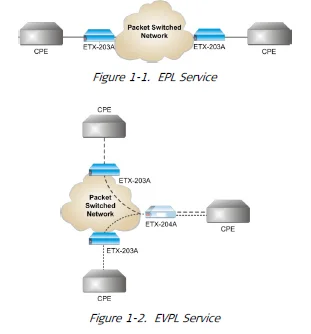
Features
Service Types
ETX-203AX provides port- and flow-based services.
Port-Based Service
In a typical port-based (all-to-one bundling) application, ETX-203AX receives different services via different user ports (Figure 1-3). This method achieves clearer service separation, does not require any marking for CoS, and provides straightforward SLA measurement.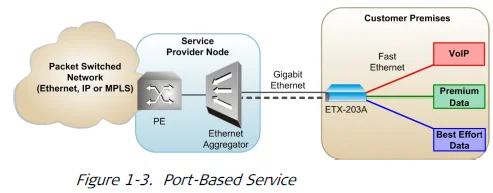
Flow-Based Service
In a typical flow-based application, different services are assigned to different Ethernet flows received by the same user port (Figure 1-4). This provides a cheaper, more scalable solution, with a possibility of mixing different service types.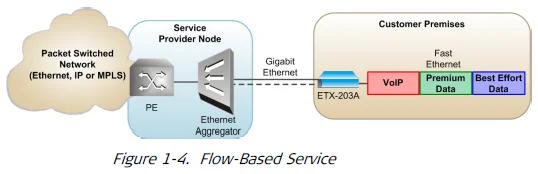
Service Level Agreement (SLA) Monitoring
ETX-203AX is an effective tool for measuring the Service Level Agreement parameters, such as Frame Delay, Frame Delay Variance (jitter), Frame Loss, and Availability.
Flow Classification
The ingress user traffic is mapped to the Ethernet flows using the following list of per-port classification criteria. In the classifications, VLAN refers to the service provider (outer) VLAN, previously referred to as SP-VLAN, while inner VLAN refers to the Customer Entity VLAN, previously referred to as CE-VLAN.
- Port-based (All to one bundling)
- VLAN
- VLAN + VLAN priority
- VLAN + IP precedence
- VLAN + DSCP
- VLAN + source/destination MAC
- VLAN + source/destination IP address
- VLAN + inner VLAN
- VLAN + VLAN priority + inner VLAN
- VLAN + non-IP
- VLAN + Ethertype
- VLAN priority
- IP precedence
- DSCP
- Source/destination MAC
- Source/destination IP address
- Non-IP
- Ether Type
- Untagged.
ETX-203AX supports up to 192 Ethernet flows. Flows are unidirectional.
Tagging and Marking
ETX-203AX supports several options for marking and tagging. You can perform the following marking actions:
- Overwrite the inner or outer VLAN with a new value
- Overwrite the inner or outer VLAN p-bit with a new value.
You can perform the following tagging actions:
- Add (push) outer VLAN, with p-bit value that can be copied from the original value or set to a new value. When you add a new VLAN, the original outer VLAN becomes the inner VLAN.
- Remove (pop) outer VLAN and p-bit. When you remove a VLAN, the inner VLAN becomes the outer VLAN.
- Add (push) inner VLAN, with p-bit value that can be copied from the original value or set to a new value
- Remove (pop) inner VLAN and p-bit.
Only certain combinations of actions on the outer and inner VLANs are allowed.
Refer to Chapter 8 for details on the permitted combinations of actions.
Quality of Service (QoS)
Different service types require different levels of QoS to be provided end-to-end. QoS can be defined per subscriber as well as per flow. QoS has three aspects: rate limitation, traffic shaping, and traffic prioritization.
A single policer can be applied per flow, or a policer aggregate can be applied to a group of flows. The policers operate according to the dual token bucket mechanism (CIR+CBS, EIR+EBS). A special mechanism compensates for Layer 1 headers. Traffic can be limited to the line rate or the data rate.
In addition, ETX-203AX features unique p-bit re-marking capabilities that assign color-specific p-bit values to Ethernet frames at network ingress to ensure metering continuity across the Metro Ethernet network. User traffic that was marked “yellow” according to the CIR/EIR parameters by the device QoS engine is assigned a new p-bit value to signal its status and priority, so that it is dropped first by 802.1Q and 802.1ad network elements in the event of congestion. This is especially useful in color-blind as well as color-aware networks with no “discard eligible” (“yellow”) marking.
As well as assigning color-specific p-bit values, the Drop Eligible Indicator (DEI) bit in the Ethernet frames can be used to indicate that frames marked “yellow” are eligible for dropping, while frames marked “green” are not eligible for dropping.
Traffic Prioritization
Once traffic is classified to a flow, it can be mapped to Strict (Strict Priority) queues or WFQ (Weighted Fair Queues):
- Strict. The data flow set to the highest priority is transmitted first. If this data flow stops, all tasks at lower priorities move up by one priority level. For example, the data flow set to the second-highest priority is then transmitted at the highest priority.
- WFQ. Allows different scheduling priorities to statistically multiplex data flows with different shares on the service. Each data flow has a separate FIFO queue. A link transmitting at a data rate R, all non-empty data flows N are served simultaneously according to the assigned share w, each at an average rate of R/(w1 + w2 + w3 + … +wN). If one data flow stops, the remaining data flows each receive a larger share w.
The WRED mechanism ensures that queues are not congested and high-priority traffic is maintained. Each queue is assigned a WRED profile for which you can configure the thresholds and probability to suit your needs.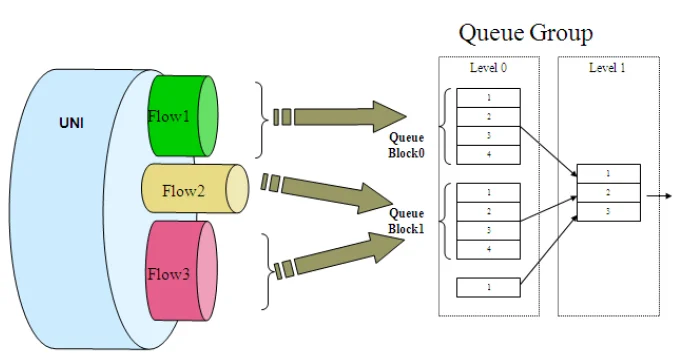
Level 0 contains up to 31 queue blocks. Each block has eight queues and its own scheduling (Strict and WFQ). For each queue block in level 0, there is a queue in level 1 that represents the scheduling between the queue blocks in level 0. Flows can be bound to each queue block in level 0.
Queue Mapping and Marking
The queue mapping functionality associates the user priorities with queue numbers (CoS).
The marking functionality maps the user priority to the SP priority, according to p-bit/DSCP/IP precedence. The marking can also be done according to color (green and/or yellow) in addition to user priority.
The queue mapping and marking functionality is bound to each flow. For every port, a queue mapping can be done for one type of user priority classification.
Hierarchical Scheduling and Shaping Per Flow
Every flow has its own queues and scheduler. ETX-203AX supports up to 31 queue blocks per queue group. There are up to 31 available queues for the network ports and eight available queues for the user ports. Flows that are in the direction user port to network port can be bound to one of up to 31 queues, and flows that are in the direction network port to user port can be bound to one of eight queues.
Ethernet OAM
Featuring ultra-fast, hardware-based processing capabilities, ETX-203AX performs OAM and PM measurements in under 1 microsecond with maximum precision.
ETX-203AX provides OAM to monitor and troubleshoot an Ethernet network and quickly detect failures:
- CFM OAM (End-to-end OAM) based on IEEE 802.1ag-D8 and Y.1731 for continuity check, non-intrusive loopback, and performance management.
- EFM OAM (Link OAM) according to IEEE 802.3-2005 (formerly IEEE 802.3ah) for remote management and fault indication, including remote loopback, dying gasp, and MIB parameter retrieval.
RFC-2544 Testing and Analysis
ETX-203AX provides BERT testing based on RFC-2544:
- Throughput test – Until binary search convergence
- Packet loss rate – 10% steps
- Latency – Round-trip frame latency.
Jumbo Frames and Egress MTU
ETX-203AX supports large frames of up to 12 Kbytes. The egress MTU can be defined per port.
Link Redundancy
The unit features network link redundancy in a LAG architecture that supports the LACP protocol according to 802.3-2005. Dual homing technology in a 1:1 architecture allows ETX-203AX to be connected to two different upstream devices. Link redundancy is available if two ports are configured as network ports.
Ethernet Linear Protection
The device offers protection switching in the following modes for network ports per ITU-T G.8031:
- 1:1
- Unidirectional
- Using APS messages.
The protection functions for the following topologies:
- EVC protection with one fiber — Both EVCs running on the same fiber
- EVC protection with two fibers — Each path on a different fiber (dual link)
- EVC protection with dual fiber working with MC-LACP to dual PE.
L2CP Handling
ETX-203AX can be configured to pass through Layer-2 control frames (including other vendors’ L2CP frames) across the network, to peer-supported protocols (IEEE 802.3-2005), or to discard L2CP frames.
For more Manuals by RAD Data Communication, visit ManualsLibraryy
RAD ETX-203AX Carrier Ethernet Demarcation Device-FAQs
What is a Carrier Ethernet Demarcation Device?
A Carrier Ethernet Demarcation Device connects a customer’s local network to a service provider’s network. It manages data traffic, ensures Quality of Service (QoS), and monitors network performance to meet strict service-level agreements (SLAs).
What is the RAD ETX-203AX?
The RAD ETX-203AX is a compact, high-performance Carrier Ethernet demarcation device. It’s built for service providers and enterprises that need advanced Ethernet functions at customer premises or in multi-tenant buildings.
What is the main purpose of network demarcation?
Network demarcation defines the boundary between the service provider’s network and the customer’s internal network. It clarifies responsibility for maintenance, troubleshooting, and network performance on both sides.
What are the key features of the RAD ETX-203AX?
It supports high-speed Ethernet services, advanced QoS, remote management, and performance monitoring. These features make it ideal for delivering reliable, SLA-based Carrier Ethernet connectivity.
How do I set up the RAD ETX-203AX?
Connect the power adapter and Ethernet cables according to the labeled ports. Then access the device’s web interface or management software to configure network parameters like VLANs, IP settings, and QoS policies.
Can the ETX-203AX work without internet access?
Yes. The device can operate on a local Ethernet network for data transmission or testing, but internet connectivity is required for cloud-based management or remote monitoring.
Does Ethernet require a monthly payment?
Ethernet itself has no monthly fee. However, the internet service delivered over Ethernet—provided by your carrier—typically involves a subscription cost.
What cable type is recommended for the ETX-203AX?
Use Cat 6 or higher-grade Ethernet cables to ensure optimal data transfer rates and signal quality, especially for Gigabit or higher-speed services.
Is Ethernet better than Wi-Fi for performance?
Yes. Ethernet offers faster speeds, lower latency, and more stable connections compared to Wi-Fi, making it ideal for critical business and industrial networks.
What does “RAD” stand for in networking?
In this context, RAD Data Communications is the company that manufactures networking and access devices like the ETX-203AX—not to be confused with Rapid Application Development (RAD) in software.