


Contax G1 35mm Film Camera
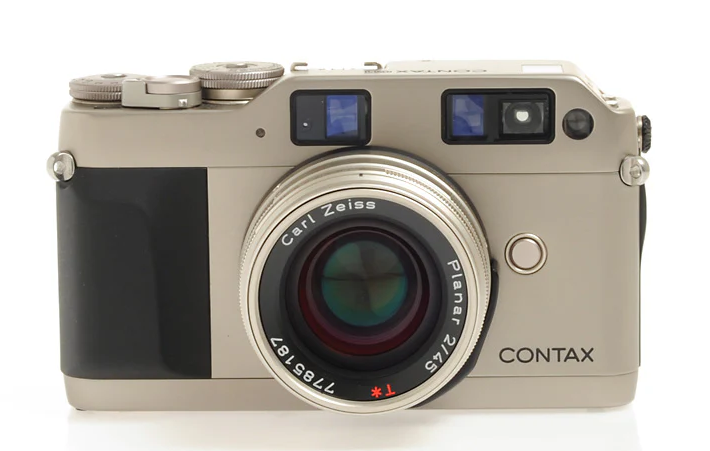
Names of Parts
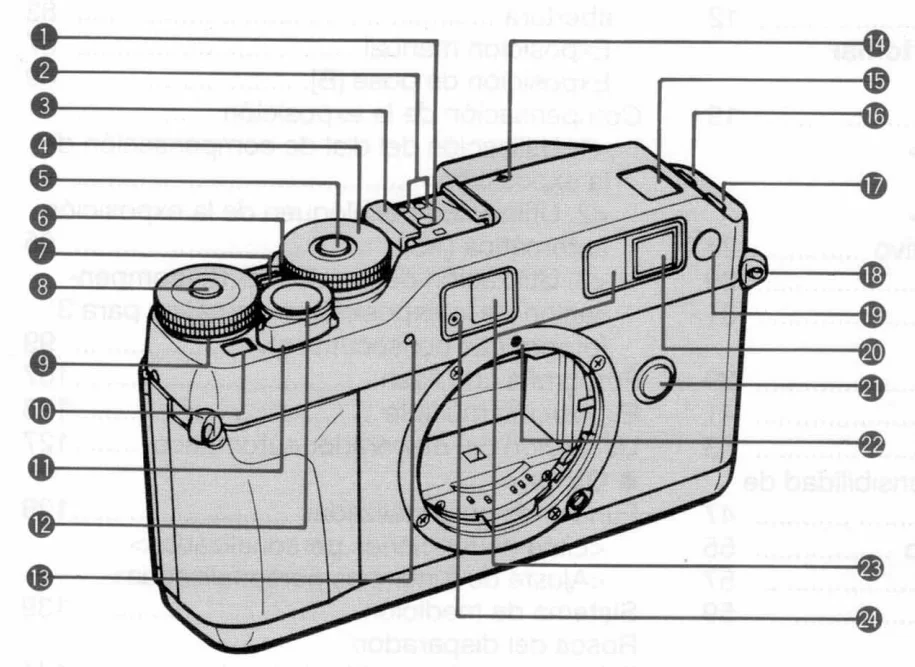
- Direct X-contact
- Dedicated-flash Contact
- Accessory Shoe
- Shutter Speed/Exposure Compensation Dial
- Dial Lock Release Button (A)
- A.B.C. Lever
- Dial Index
- Dial Lock Release Button (B)
- Focus Dial
- Exposure Counter
- Main Switch
- Shutter Release
- Self-timer LED
- Distance Reference Index
- Display Panel
- Film Speed Button/ “DOWN” Button
- Drive Mode Selector Button/ “UP” Button
- Strap Lug
- AF-assist Beam Emitter
- Viewfinder
- Lens Release Button
- Lens Index
- Focusing Window
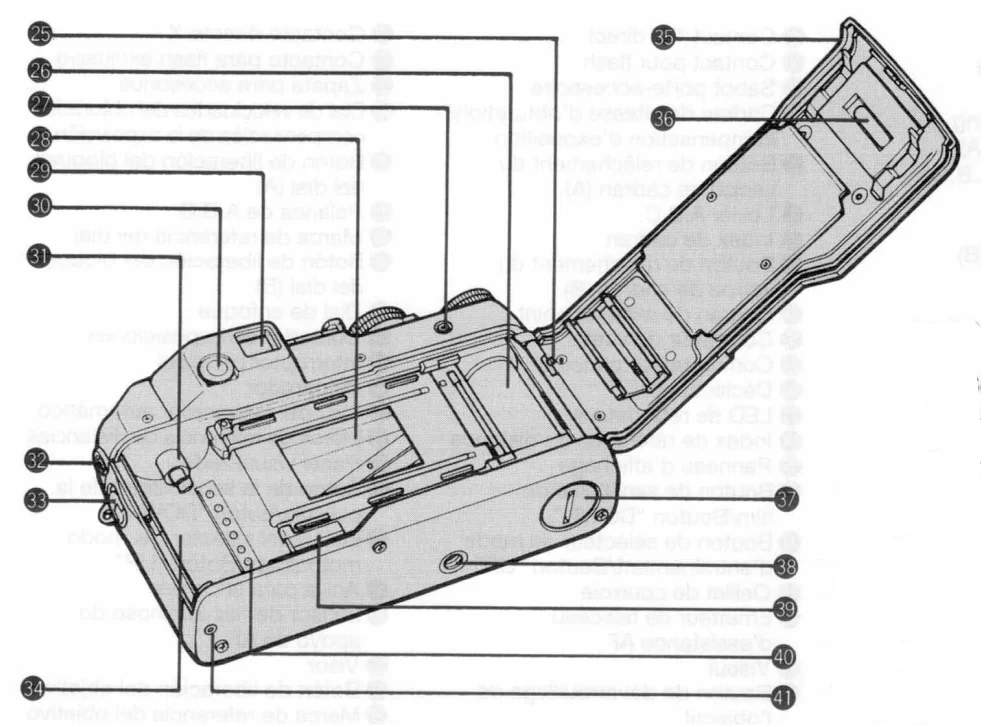
- External Metering Window
- Camera Back Release Pin
- Spool
- Release Socket
- Shutter Curtain
- Viewfinder Eyepiece
- Diopter Adjuster
- Film Mounting Spindle
- Sync Terminal
- Camera Back Release Knob
- Film Chamber
- Camera Back
- Film Check Window
- Battery Compartment/Cover
- Tripod Socket
- Data back Contacts
- DX Contacts
- Manual Rewind Button
Basic Steps
- Load the batteries (see page 18).

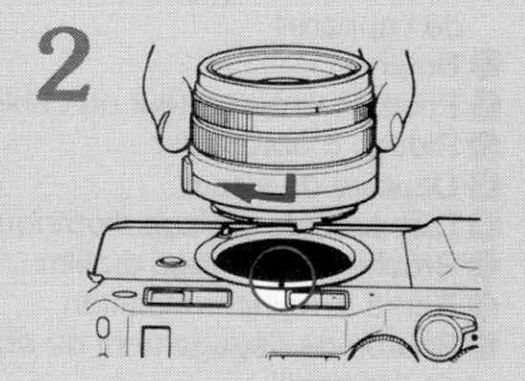
- Mount the lens (see page 24).

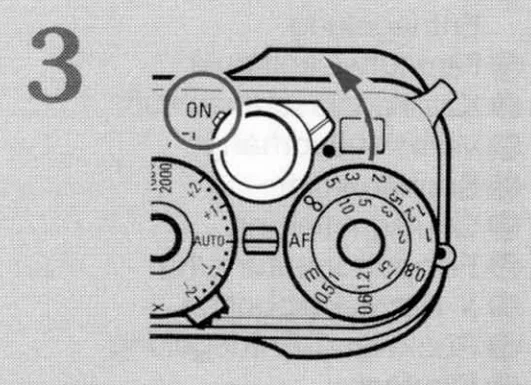
- Turn on the main switch (see page 28).

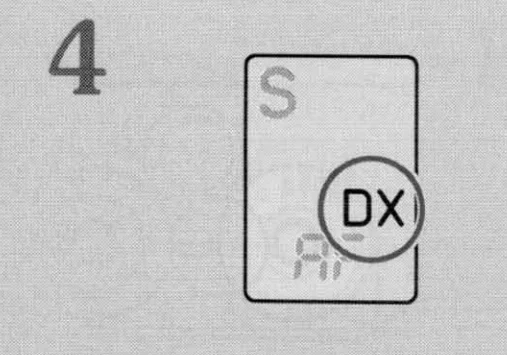
- Set the film speed to “DX” (see page 48).

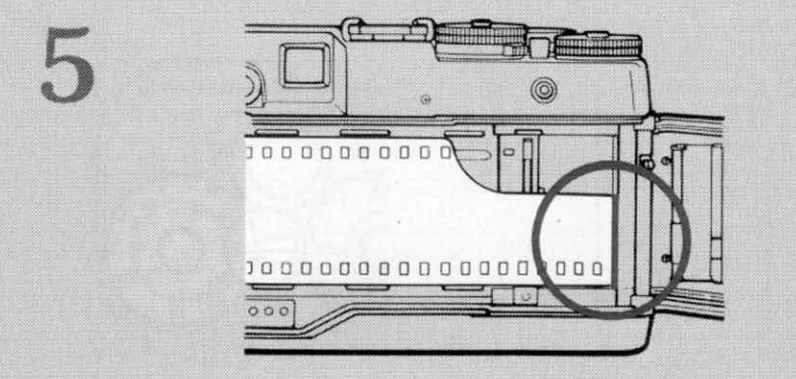
- Load DX film and pull out its tip as far as the orange ” — ” mark and place it on the spool (see page 42).

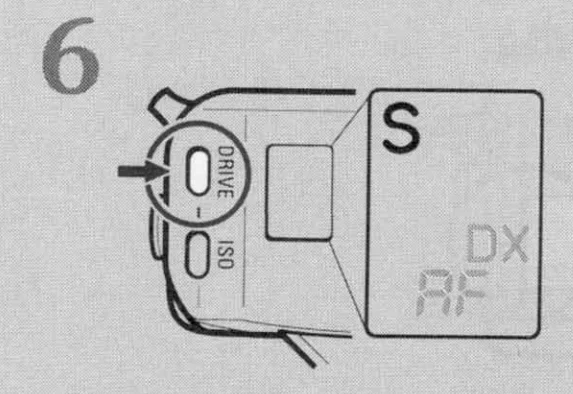
- Set the drive mode selector button to “S” or “C” (see page 54).

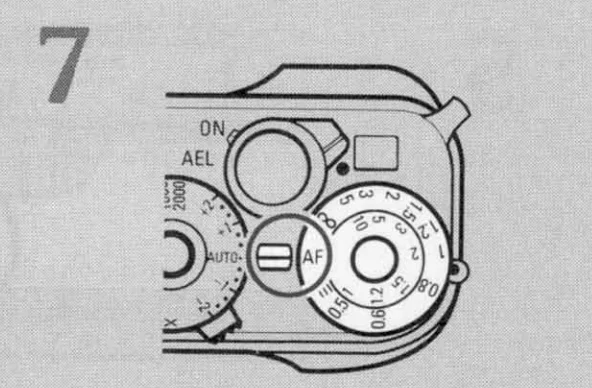
- Set the focus dial to “AF”. (see page 58)

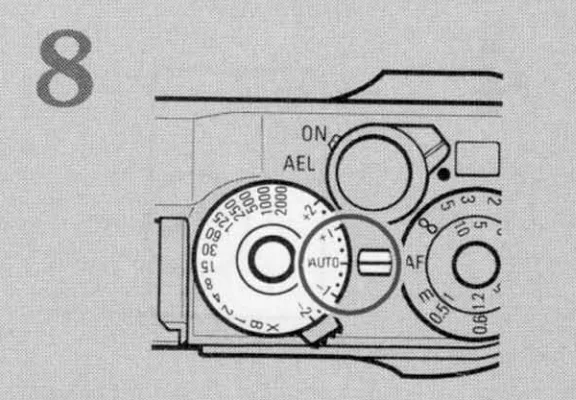
- Set the shutter speed/ exposure compensation dial to “AUTO”. (see page 82)

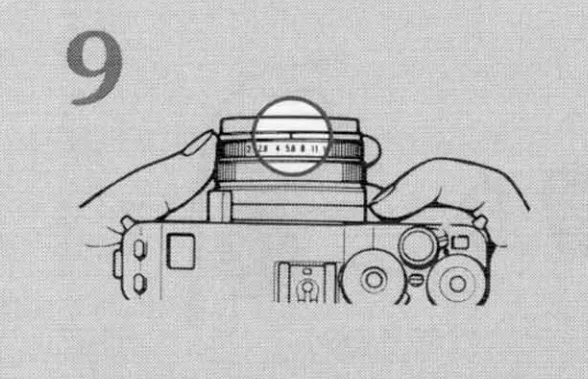
- Set your desired aperture. (see page 82)

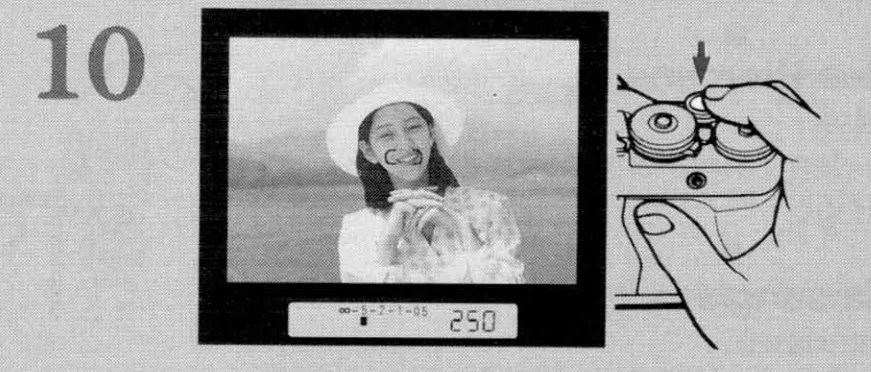
- Press the shutter release and shoot. (see page 60)

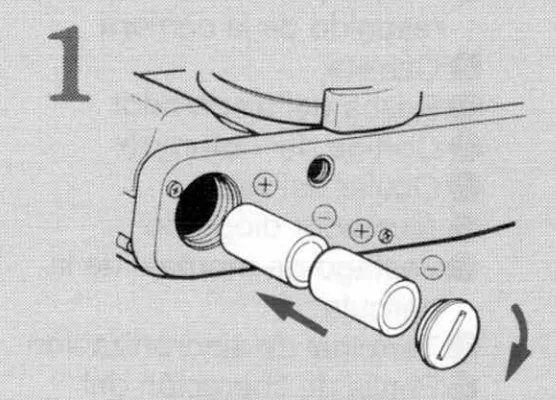
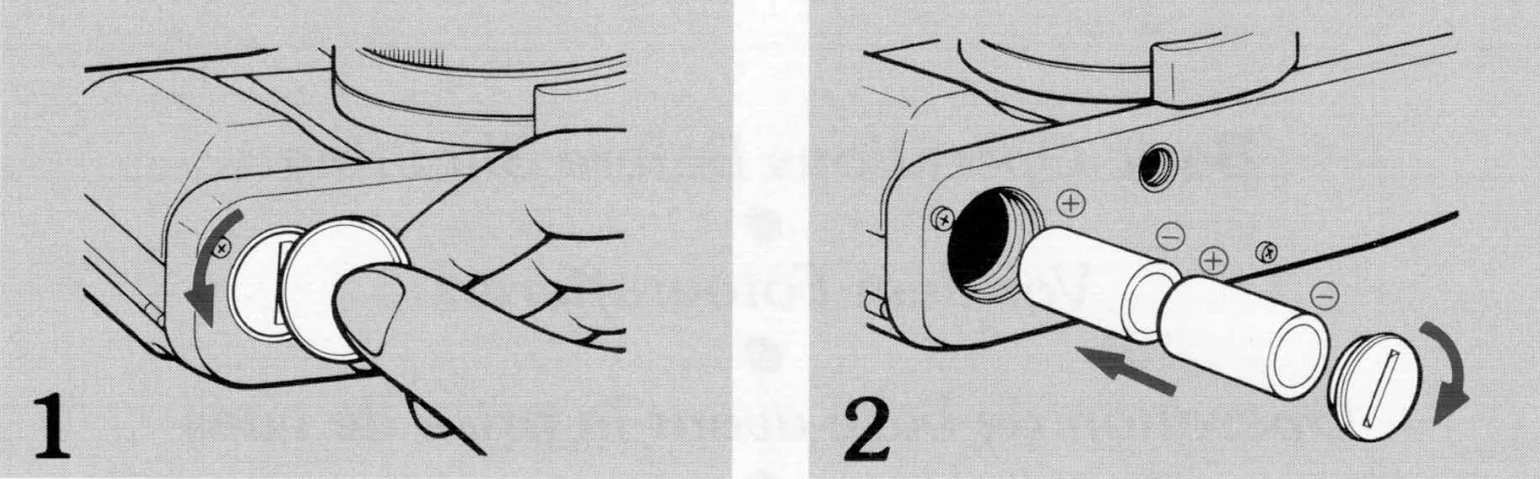
Loading the Batteries
- With a coin, loosen the battery compartment cover screw on the camera’s bottom and remove the cover.
- After turning the main switch off, insert the two 3V lithium batteries (CR2) with the plus + and minus – ends correctly, as illustrated inside the battery compartment. Replace the cover and fix it in place by turning the battery compartment cover screw as far as it will go.
- If batteries are loaded with their + and – ends incorrectly, the camera does not operate and may even cause malfunctioning.
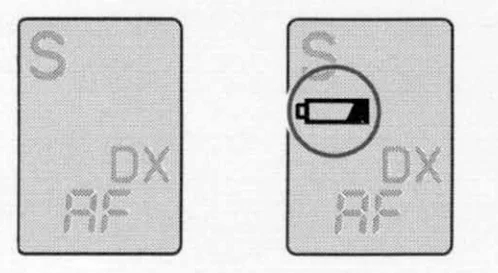
<Battery Check>
After the batteries are loaded, operate the camera first. The battery voltage is normal if the mark “ ” (battery warning mark) does not appear in the display panel.
Replace the batteries.
<Battery Replacement>
If the mark “ ” turns on in the display panel, it is time to replace the batteries. Set the main switch to “OFF”, open the battery compartment cover, and replace the batteries with new ones.
- Though you can take picture even after the mark “
 ” has turned on, it is recommended to replace the batteries as soon as possible.
Be careful because the mark “” will blink or go out, and the camera will no longer operate if the battery capacity has dropped below the effective limit. In this case, the last picture you took may not turn out correctly exposed. - Some batteries may tend to decrease their voltage temporarily when they are loaded. You need not worry about this because they recover their performance when the power is turned on. If the mark “” appears soon after the batteries are loaded, turn off the main switch and then turn it on again. If the mark “” goes out, you can use these batteries.
<Battery Precautions>
- Always replace the batteries with new ones of the same type. Do not mix different kinds of batteries or new and old batteries. Always use two new batteries of the same type and brand.
- Generally, battery performance is reduced by cold temperatures. If you are shooting in cold weather, it is advisable to keep the camera warm in a bag or an outfit for protection againstthe the cold. The battery, reduced by low temperature,,s will return to normal when you take pictures at an ordinary temperature.
- Before loading the batter,,ies wipe both poles clean with a dry cloth because poor contact may result if they are soiled with sweat or grease.
- If you are going on a long trip, bring new spare batteries with you.
- Do not throw used batteries into a fire or try to change or disassemble them because it is dangerous.
- The 3V lithium battery (CR2) cannot be charged by any means.
- The battery should be kept away from children.
Mounting and Dismounting the Lens
<Mounting the Lens>
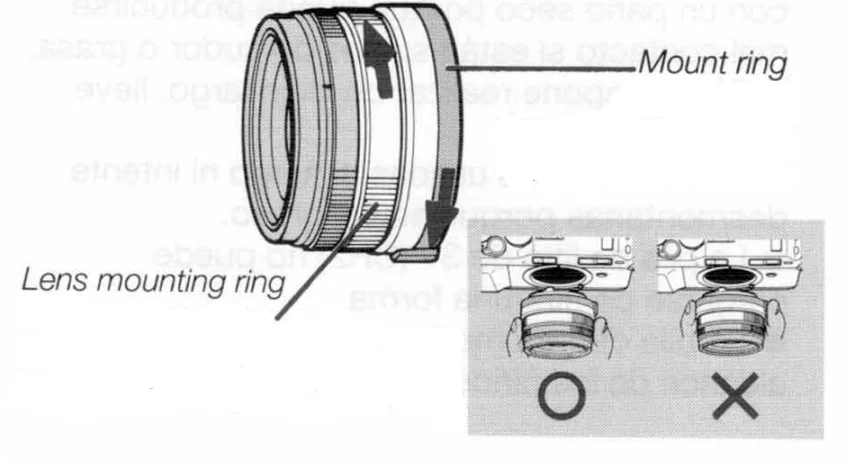
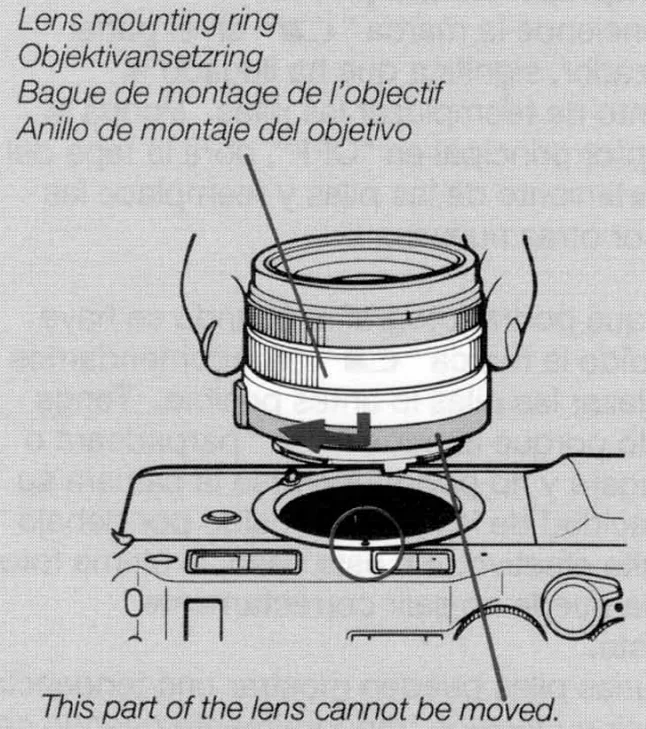
First, remove the camera’s body cap and the lens’s rear cap by turning them counterclockwise. Then, while holding the lens mounting ring, align the red dot on the lens with the lens index on the camera, fit it i,,n and turn it clockwise until it locks with a click.
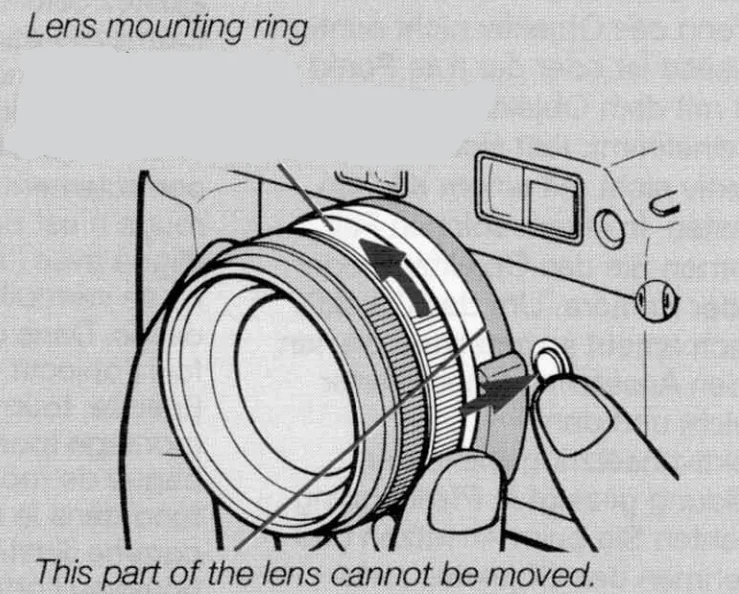
- If the lens is not properly mounted orr the red dot is not correctly aligned with the lens index, it will not lock with a click. In this case, remove the lens from the camera once. Then, turn the mount ring (shaded portion) and the lens mounting ring in the direction of the arrow fully, as illustrated, to mount the lens on the camera again.


- Be sure to hold the lens mounting ring whenever mounting and dismounting the lens.
- Be sure to hold the lens guard whenever mounting and dismounting the Hologon 16mm F8.
- Be sure to remove the lens cap when taking pictures.
 Lens Cap: Push both knobs inward for removal.
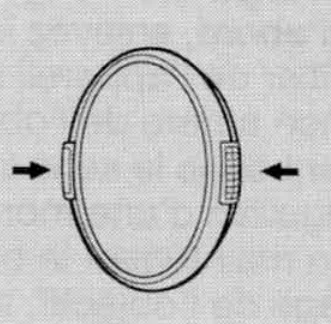 Lens Cap: Push both knobs inward for removal.
<Dismounting the Lens>
When holding the lens mounting ring and pressing in the middle of the lens release button, turn the lens counterclockwise as far as it will go and pull it out toward you. After dismounting the lens from the camera, protect the lens with the lens cap and rear cap, and the camera with the body cap.
- Do not touch the lens surface and camera inside, contact a,, nd so on with your fingers when mounting and dismounting the lens.
- Avoid direct sunlight when changing the lens with film loaded in the camera.
Main Switch
The main switch turns on and off the camera and sets it for AE lock (AEL).
- The main switch should be locked at a click position when shooting to prevent it from shifting by mistake.
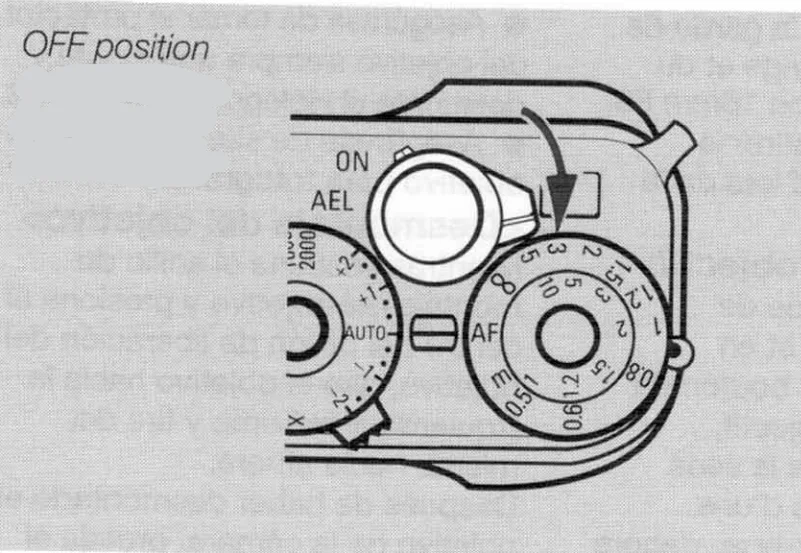
OFF: Red mark not visible
When the red mark is not visible, the main switch is set at OFF, turning off the camera. If you are not using the camera, turn off the main switch to prevent the shutter from tripping inadvertently.
“ON” mark
The camera is turned on.
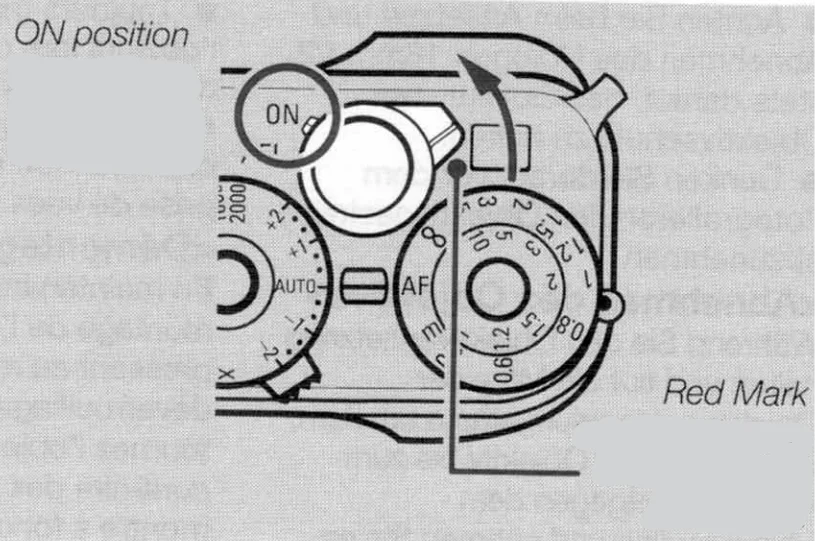
“AEL” mark
The AE lock is useful for shooting backlighted subjects or if you want to shoot moving subjects continuously with a fixed exposure. For details on AE lock, see page 94.
Display in the Viewfinder
The display in the viewfinder will turn on in the following cases, then turn off automatically
after 16 seconds.
- When the main switch is turned on.
- With the main switch on, the shutter release is depressed halfway or the focus dial is operated.
- It also turns on when the drive mode selector button or film speed button is operated.
If you switch a button, dial, etc. while the display is shown, the display will remain on for another 16 seconds.
(The illustration shows all information available in the viewfinder for reference. Idoes not represent an actual example of display.)
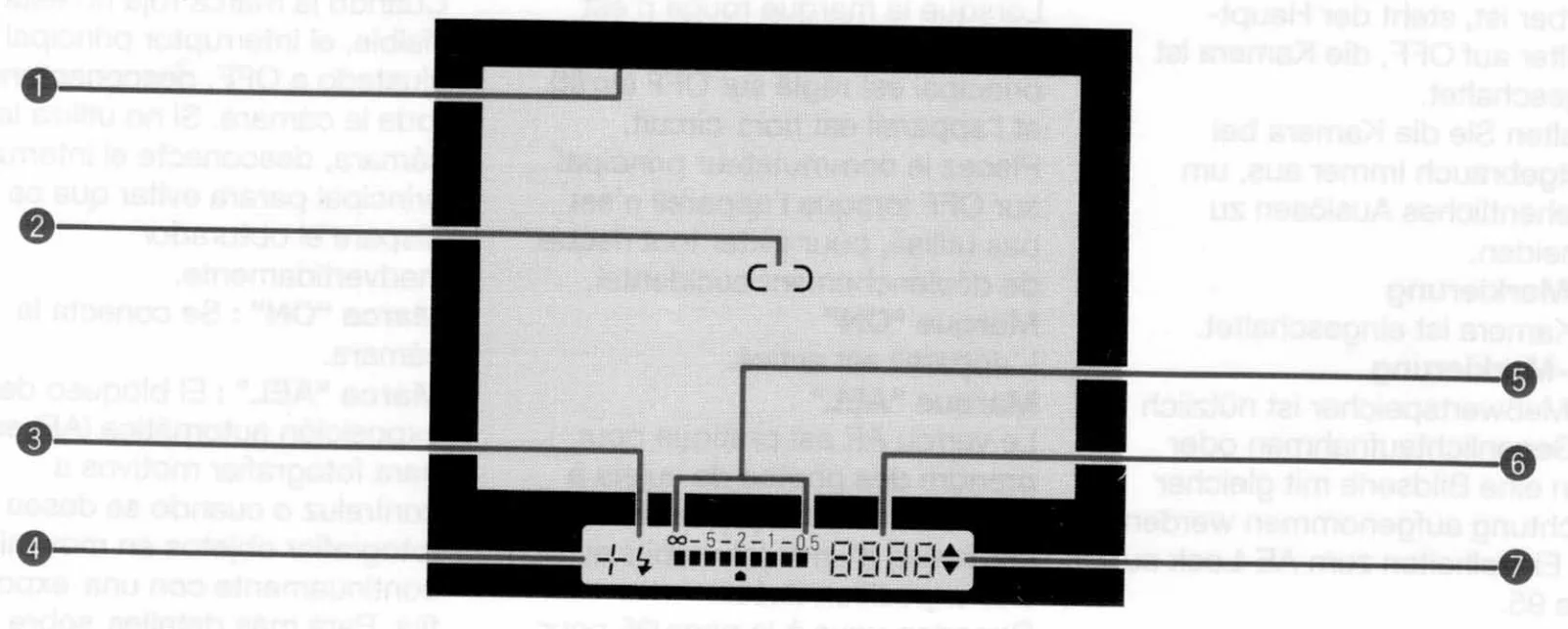
- Picture Area Frame
When the shutter release is depressed halfway, the picture area frame on display changes automatically according to the shooting distance, lens focal length, etc. To shoot, place your subject within the displayed frame. - Focusing Frame
Place your subject to focus on in this frame. - Flash Mark
If you are using the TLA flash system for taking flash pictures, the flash mark ” ” will turn on as soon as the flash is fully charged. If your subject is correctly exposed, it will blink two seconds after the flash has fired.
 - Exposure Compensation Mark
When the exposure is compensated with the shutter speed/exposure compensation dial and A.B.C. mode, “+” or “-” is displayed according to the type of compensation. - Focus Display
The focus display shows the focusing state. Refer to the section “Focusing the Lens” on ppagess58- 74 for details. - Shutter Speed
The camera displays the shutter speed from 1 /2000 sec. to 16 sec. “2000” means 1 /2000 sec., 125″ means 1/125, and “16” means 16 sec. - Exposure Mark
In the auto exposure mode, the over “▲” or under “▼” mark indicating deviation from the exposure control range will be displayed. In the manual mode, the correct “ “, over “▲” or under “▼” mark will be displayed.
 ” will turn on as soon as the flash is fully charged. If your subject is correctly exposed, it will blink two seconds after the flash has fired.
 “, over “▲” or under “▼” mark will be displayed.
You can ignore a part of the filter or hood (or lens-barrel with the 28 mm lens mounted) that might appear in ine bottom right corner of the viewfinder because it does not come out in the picture.
Display Panel/ Exposure Counter
<Display Panel>
(The illustration shows all information available in the display panel/exposure counter for reference. It does not represent an actual example of display.)
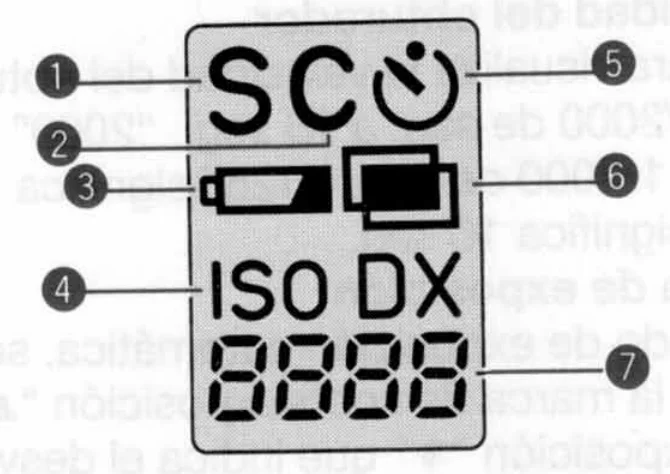
- Single-frame Shooting Mode Indicator
- Continuous Shooting Mode Indicator
- Battery Warning Mark
It turns on when it is time to change the batteries. - ISO/DX Indicator
When displaying the film speed or in the film speed setting mode, this indicator will be displayed.- When auto mode is set with the DX code, always “DX” is displayed.
- Self-timer Mode Indicator
- Multiple Exposure Mark
- Shooting Distance/Film Speed Indicator
When the shutter release is depressed halfway, the shooting distance is displayed. If the “film speed button” is depressed, however, it switches to display the film speed.
It also shows the setting conditionsfor custom functions.
<Exposure Counter>
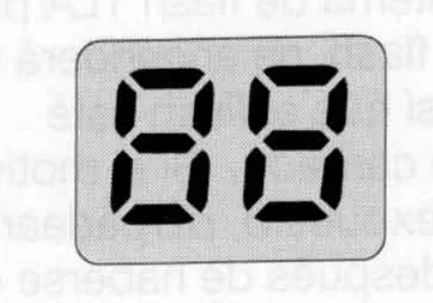
The exposure counter normally shows the number of exposures on a film. It also provides the following functions:
- Display of the operation order in the “A.B.C.” mode
- Display of the end of the film.
Diopter Adjustment
This camera has a built-in diopter adjustment unit. To adjust the viewfinder eyepiece to your eyesight, turn the diopter adjuster until the focusing frame in the center of the viewfinder appears sharp and clear. The adjustable range is from +0.3 to -2 dipoters.
Loading the Film
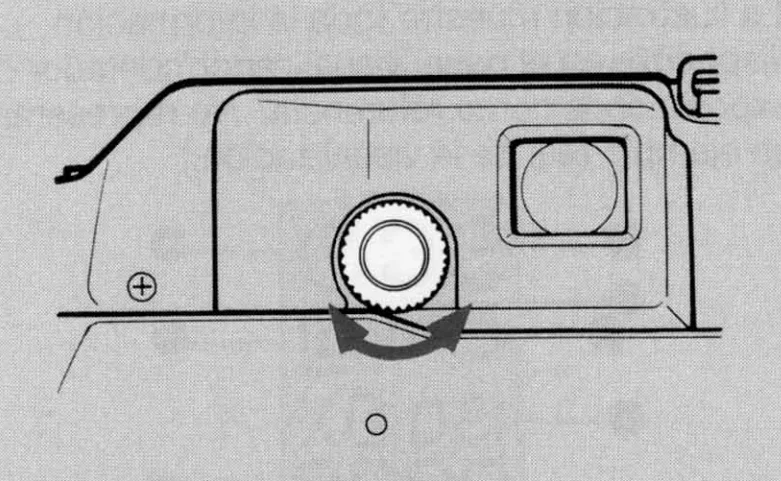
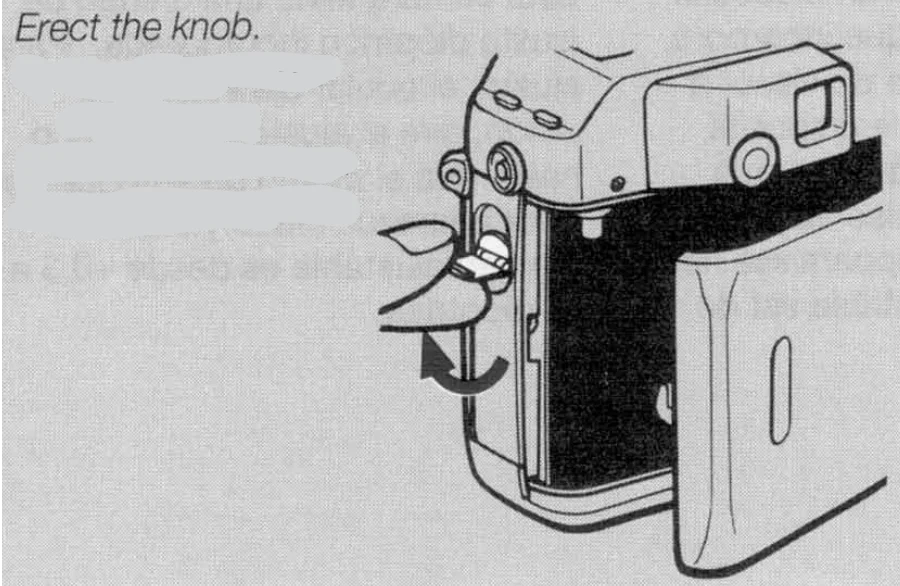
- Open the camera back by erecting and rotating the camera back release knob in the direction of the arrow. After the camera back is opened, replace the knob in place.
- When loading film, be sure to remove the protective sheet from the camera’s picture area frame.

- When loading film, be sure to remove the protective sheet from the camera’s picture area frame.
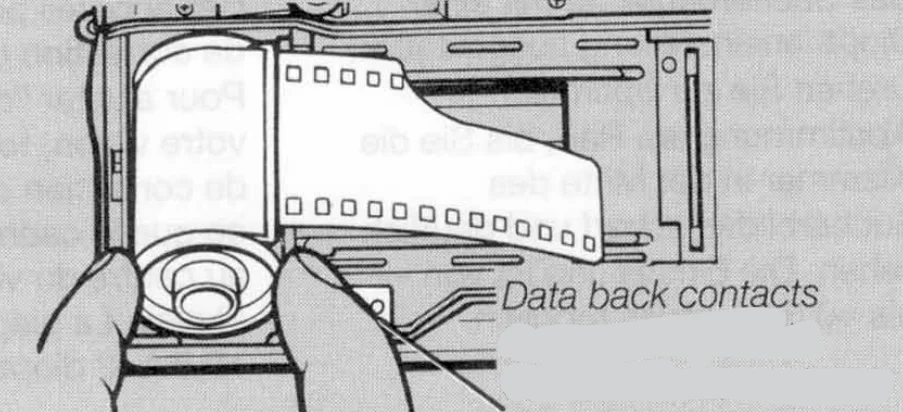
- Insert the film cassette slantwise into the film chamber with its protruding end downward as illustrated.
Note on the shutter curtain:
The shutter curtain is a precision part. Never touch it with your finger or strike it with the film tip. When the film tip lies on the shutter curtain, in particular, never trip the shutter.- Take care not to touch or contaminate the DX contacts and data back contact.
- Always load and unload a film in subdued light.

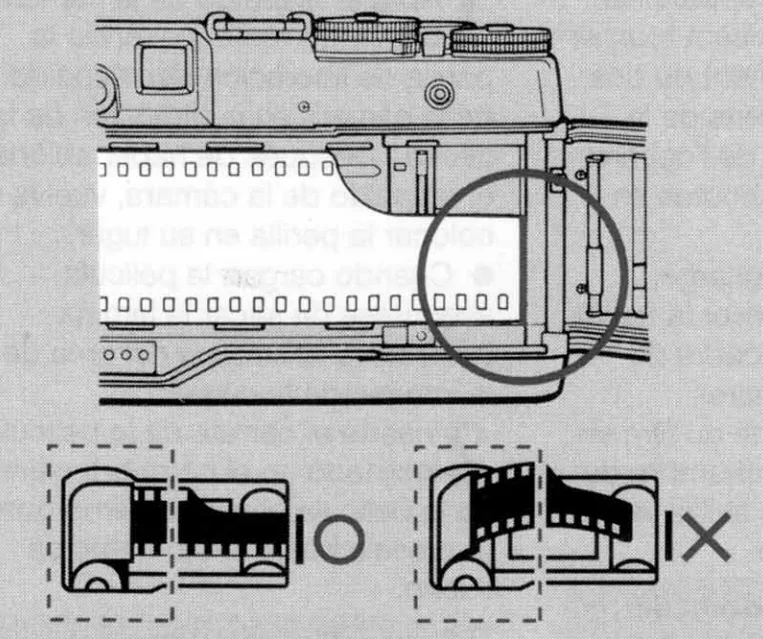
- Pull out the film tip as far as the orange ” – ” mark and place it on the spool. Take care that the film does not float up (see illustration).
- If the length of film protruding from the cassette is too long, adjust it by winding film back into the cassette before loading the film.

- If the length of film protruding from the cassette is too long, adjust it by winding film back into the cassette before loading the film.
- Close the camera back securely.
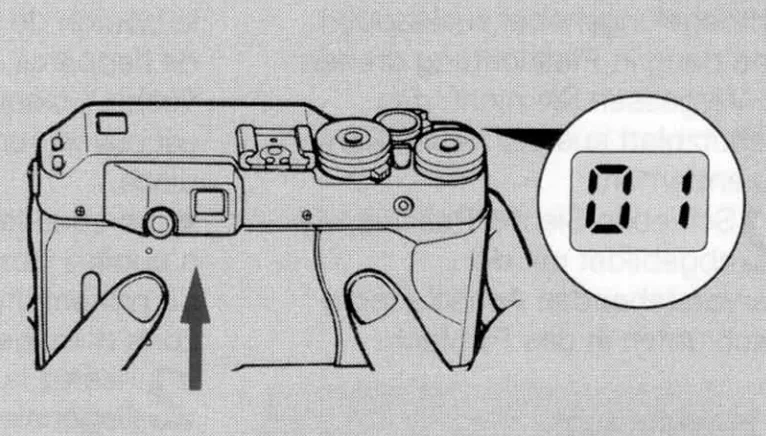
As soon as the camera back is closed, the film advances automatically and stops when the exposure counter shows “01 “.- If the exposure counter blinks at “00”, the film is not advancing properly. Open the camera back and reload the film correctly.

- If the exposure counter blinks at “00”, the film is not advancing properly. Open the camera back and reload the film correctly.
Setting and Checking the Film Speed
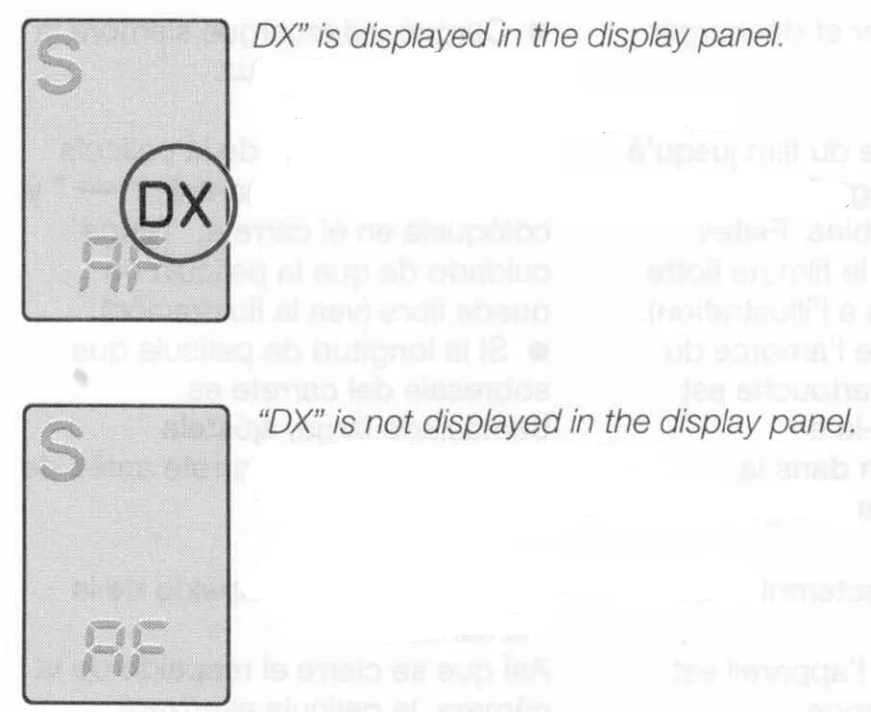
If “DX” is displayed in the display panel, the film speed is automatically set by the DX code. When using film with DX code, no adjustment is required. Without the “DX” mark, be sure to set the film speed manually.

<Checking the Film Speed>
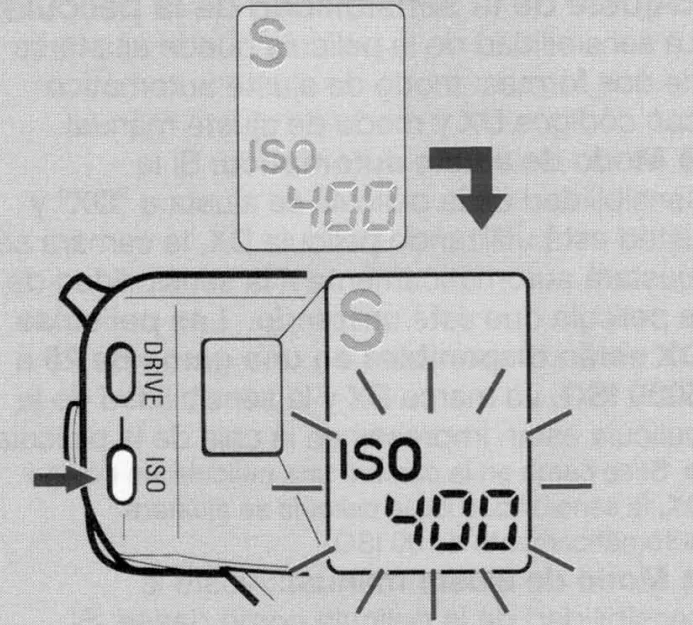
If you press the film speed button, the current setting of the film speed appears on the display panel.
<Setting the Film Speed>
The film speed can be set in two ways: automatic setting mode with DX codes and manual setting mode.
- Automatic Setting Mode:
If the film speed is set to “DX” and you are using DX film, the camera will automatically set itself to the speed of the film you are using. DX films are available in a range of ISO 25 to 5000. The DX mark and film speed are printed on the film box.
- If the camera is loaded with non-DX film, the film speed will be automatically set to ISO 100.
- Manual Setting Mode:
Set the film speed as you desire. If you are using non-DX film, or if you want to change the film speed from that of the film you are using, set the film speed manually.
- You can set the film speed in 1/3 step increments in a range of ISO 6 to 6400.
- If a film speed is set, the DX film will be set to the manually set value.
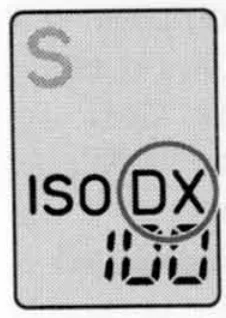
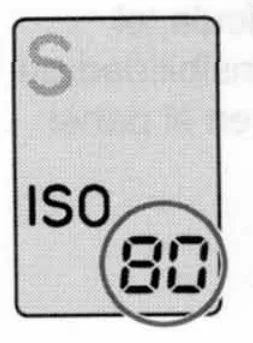
- Turn the main switch on. If you press and hold the film speed button for about 1.2 seconds or more, the display of the film speed in the display panel will start to blink. After blinking, remove your finger from the button.

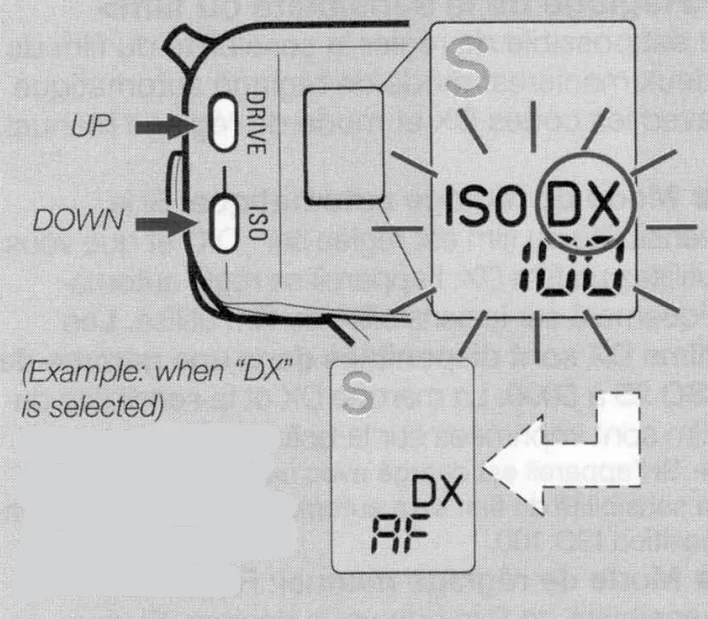
- Press the “UP” button (drive mode selector button) or “DOWN” button (film speed button) so that the letter “DX” or the desired film speed appears in the display panel.

- If you press the “UP” button or “DOWN” button, the film speed will increase or decrease by a 1/3 step each respectively.
- The numbers will change in succession if you hold the button.
- The film speed will continue to blink for 8 seconds after you have removed your finger from the button. Then, it will be automatically switched to light up at the end of the setting.
- The distance will be displayed automatically as soon as an additional 8 seconds expire after the film speed has lit up.
- If you turn the main switch off or depress the shutter release halfway while the film speed is displayed, the film speed will be set as you desired.
- Once set, the mode will be stored in the memory unit until it is reset to another value.
Specifications
- Type: 35 mm AF range finder camera with focal plane shutter.
- Picture Size: 24 x 36 mm
- Lens Mount: Contax G mount.
- Shutter: Electronically-controlled vevertical-travel focal-planeehutter.
- Shutter Speeds: 16 sec. to 1/2000 sec. at “Aperture priority auto exposure”
Manual mode … 1 sec.Too 1/2000 sec.
Band X (1/100 sec.). - Sync Contacts: Direct X contact (synchronizing speeds 1/100 sec. or slower), provided with sync terminal.
- Self-timer: Electronic self-timer with a 10-second. Delay.
- Shutter Release: Electromagnetic release, provided with a special release socket.
- Exposure Control: CD Aperture-priority auto exposure, @ Manual exposure, Q) TTL auto flash control©, Manual flash control.
- Metering System: TTL actual exposure metering (center-weighted average light metering)/ External metering (automatic switchover with the mounted lens).
- Metering Range: EV1 – 19 on TTL actual exposure metering (ISO 100, F2), EV3 – 17 on external metering (ISO 100) (about 70 degrees reception angle).
- Film Speed Range: ISO 25 – 5000 for automatic setting with DX film, SO 6 – 6400 for manual setting.
- Display Panel: Shooting distance/film speed, drive mode (single-frame exposure, continuous shooting, self-timer, multiple exposure), custom function mar,k ad, battery warning mark.
- Film Loading: Auto loading, automatic film positioning to “01 ” onthe counterr.
- Film Advance: Automatic winding with built-in motor.
- Film Rewinding: Automatic rewinding with built-in motor, automatic stop/return after rewinding is completed, mid-roll rewinding possible.
- Drive Modes: Single-frame exposure, continuous shooting, self-timer, multiple exposure.
- Winding Speed: Up to about 2 frames/sec. On continuous shooting (“C” mode) (with new batteries, at ordinary temperature, as tested according to Contax testing standard).
- Exposure Counter: Automatic-resetting additive type, A.B.C. display.
- Accessory Shoe: Direct X-contact hot shoe (provided with Tl. A flash contact).
Custom Functions:- AE lock operation (AE lock is activated by pressing the main switch or shutter release halfway)
- A.B.C. exposure order selection (standard-+over-+under/over-+standard-+under).
- Film end rewinding (completely rewound/film end left wound)
- Camera Back: Can be opened by the camera back opening knob, detachable, and provided with a film check window.
- Power Source: Two 3V lithium batteries (CR2).
- Battery Check: Automatic check, battery warning mark in the display panel.
- Battery Capacity: About 80 rolls of 24-exposure film (with new lithium batteries, at ordinary temperature, as tested according to Contax testing standard).
- Dimensions: 133 0N) x 77 (H) x 42 (D) mm
- Weight: 460 g (without batteries)
* Specifications and design are subject to change without notice.
To make full use of the capabilities of this camera, it is recommended to use our interchangeable lenses and accessories with it. We may not be able to make repairss for the damage or trouble that has occurred when it was used with products of other makers offered for use witthe h Contax camera.
For more manuals by Contax, visit ManualsLibraryy
Contax G1 35mm Film Camera- FAQs
Is the Contax G1 a manual camera?
The Contax G1 is primarily an electronic and automatic 35mm film camera. It offers manual control options for both focus and exposure, but these are electronically operated rather than fully mechanical.
How do I load film into the Contax G1?
Open the back cover, insert your 35mm film cartridge into the left chamber, pull the film leader to the red mark, and close the cover. The G1 will automatically advance the film to the first frame.
How do I set ISO on the Contax G1?
Press and hold the ISO button until the LCD displays your desired film speed. Adjust it to match the ISO rating of your film before shooting.
Does the Contax G1 have a self-timer feature?
Yes. The G1 includes a self-timer and multiple exposure mode, along with exposure compensation and a light meter for accurate photo settings.
How can I tell if my Contax G1 is a green label version?
Blurry photos may occur if the subject is too close or lacks contrast. Ensure you focus properly, use a steady grip or tripod, and shoot under adequate lighting conditions.
Which lenses are compatible with the Contax G1?
The standard G1 supports 28mm f/2.8 Biogon, 45mm f/2 Planar, 90mm f/2.8 Sonnar, and 16mm f/8 Hologon lenses. The green label G1 can also use 21mm and 35mm lenses.
Does 35mm film need to be loaded in the dark?
No. You can load 35mm film in normal indoor light or shade. Avoid direct sunlight to prevent accidental film exposure.
What should I do if my photos come out blurry?
Blurry photos may occur if the subject is too close or lacks contrast. Ensure you focus properly, use a steady grip or tripod, and shoot under adequate lighting conditions.
How do I choose the best shutter speed for my shots?
Use 1/125s for portraits, 1/250–1/800s for moving subjects, and slower speeds (1–10 seconds) for creative effects like motion blur—a tripod is recommended for long exposures.
What is the best ISO setting for different lighting?
Use ISO 100 for bright outdoor scenes, ISO 400–800 for low-light or indoor shots, and higher ISO only when necessary, as it increases film grain.