
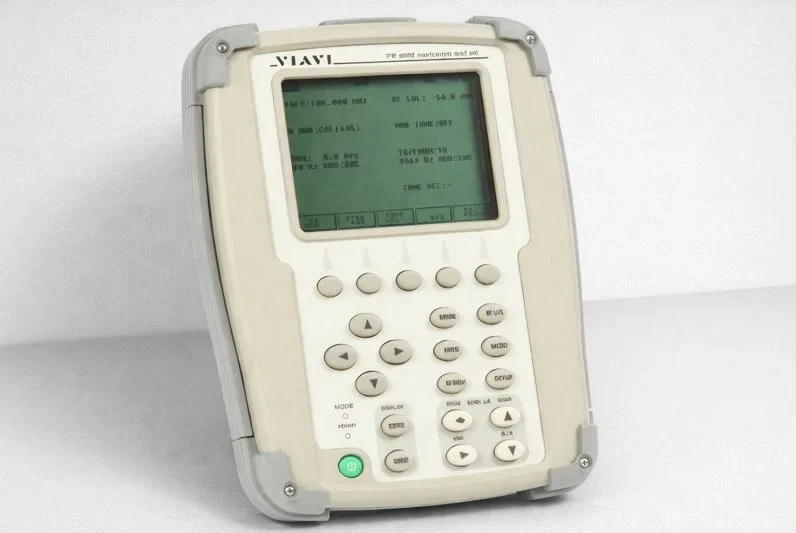

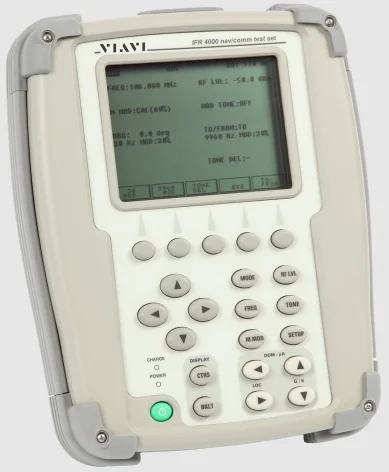
Viavi IFR 4000 Nav-Comm Flight Line Test Set
SERVICE UPON RECEIPT OF MATERIAL
Unpacking
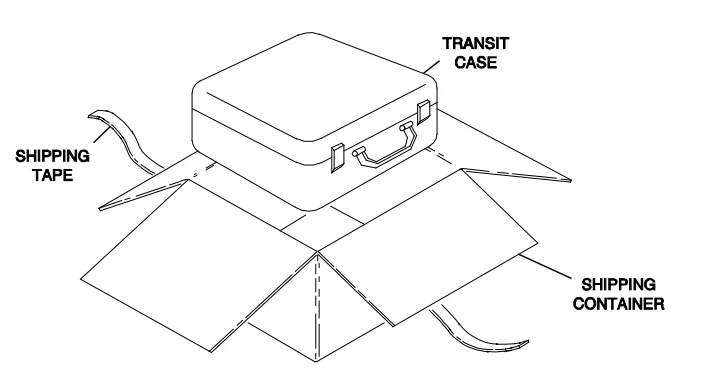
Special-design packing material inside this shipping carton provides maximum protection for the IFR 4000. Avoid damaging the carton and packing material during equipment unpacking. Use the following steps for unpacking the IFR 4000.
- Cut and remove the sealing tape on the carton top and open the carton.
- Grasp the IFR 4000 transit case firmly, while restraining the shipping carton, and lift the equipment and packing material vertically.
- Place the IFR 4000 transit case and end cap packing on a suitable flat, clean, and dry surface.
- Remove the protective plastic bag from the IFR 4000 transit case. Place the protective plastic bag and end cap packing material inside the shipping carton. Store the shipping carton for future use should the IFR 4000 need to be returned.

SECTION 1 – DESCRIPTION
1. GENERAL DESCRIPTION AND CAPABILITIES
1.1 DESCRIPTION
The IFR 4000 is a Flight Line or Ramp Test Set for testing ILS, VOR, Marker Beacon, HF/VHF/UHF Communications (NAV/COMM) Systems, and, with the ELT Option, 121.5/243 MHz Short Range Emergency Beacons and 406 MHz COSPAS/SARSAT Long Range Emergency Beacons. The IFR 4000 is designed for ease of use, portability, reliability, and long service life. The IFR 4000 may also be used for bench testing in the General Aviation environment. Power is derived from an internal battery. For DC input, the DC POWER Connector is provided for battery charging, bench operation, or servicing use. The IFR 4000 and supplied accessories are stored in a Ruggedized Plastic Transport Case.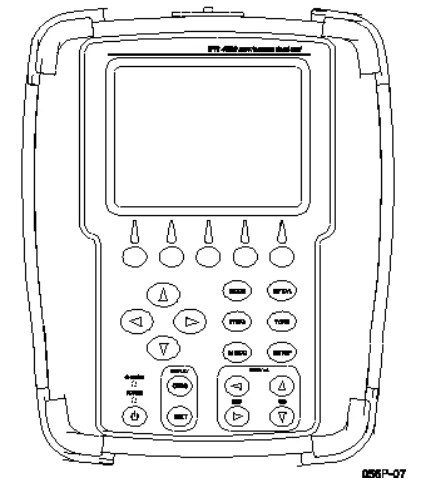
1.2 FUNCTIONAL CAPABILITIES
The IFR 4000 has the following features and capabilities:
- Accurate measurements of VHF/UHF transmitter frequency, output power, modulation (AM and FM), and receiver sensitivity.
- Accurate measurements of HF transmitter frequency, output power, modulation (AM), and SSB USB/LSB receiver sensitivity.
- Generation of ARINC 596 Selective Calling Tones.
- Accurate measurement of VHF/UHF antenna and or feeder SWR (Standing Wave Ratio).
- Simulation of Localizer and Glideslope (CAT I, II, and III) Signals with variable DDM settings.
- Swept Localizer DDM for coupled Auto-Pilot testing. (Simultaneous Localizer, Glideslope, and Marker signals.)
- Simulation of a VOR beacon with a variable bearing.
- Simulation of Marker Beacon, Selectable Airways (Z), Outer and Middle Marker Tones.
- Guided Test capability allows instrument setup steps to be stored.
- Accurate measurement of 121.5/243 Hz emergency beacon transmitter frequency, output power, and modulation (AM). Audio output for headphones to monitor the swept tone. (p/o ELT Option)
- Accurate measurement of 406 MHz COSPAS/SARSAT beacon transmitter frequency and output power. Decodes and displays all location and user protocols. (p/o ELT Option)
- Large LCD Display with user-adjustable Backlight and Contrast.
- The internal battery allows eight hours of operation before recharge.
- Automatic power shutdown after approximately 5 to 20 minutes (selectable) of non-use when AC power is not connected.
- Compact and lightweight enough to allow for one-person operation.
SECTION 2 – OPERATION
1. INSTALLATION
1.1 GENERAL
The IFR 4000 is powered by an internal Lithium-Ion battery pack. The Test Set is supplied with an external DC Power Supply that enables the operator to recharge the battery when connected to AC power. NOTE: The IFR 4000 can operate continuously on AC power via the DC Power Supply, for servicing and/or bench tests. Refer to 1-2-2, Figure 2, for the location of controls, connectors, or indicators.
1.2 BATTERY OPERATION
The internal battery is equipped to power the IFR 4000 for eight hours of continuous use, after which time, the IFR 4000 battery needs recharging. Battery Operation Time Remaining (in Hours) is displayed on all screens. The IFR 4000 contains an automatic time-out to conserve power. If a key is not pressed within a 5 to 20 minute time period, the Test Set shuts off (only when using battery power). The Power Down Time may be set in the Setup Screen.
1.3 BATTERY CHARGING
The battery charger operates whenever DC power (11 to 32 Vdc) is applied to the Test Set with the supplied DC Power Supply or a suitable DC power source. When charging, the battery reaches a 100% charge in approximately four hours. The internal battery charger allows the battery to charge between a temperature range of 5° to 40°C.
The IFR 4000 can operate, connected to an external DC source, outside the battery charging temperature range (5° to 40°C). The battery should be charged every three months (minimum) or disconnected for long-term inactive storage periods of more than six months. The Battery must be removed when conditions surrounding the Test Set are <-20°C and >60°C.
1.4 SAFETY PRECAUTIONS
The following safety precautions must be observed during installation and operation. VIAVI assumes no liability for failure to comply with any safety precaution outlined in this manual.
1.4.1 Complying with Instructions
Installation/operating personnel should not attempt to install or operate the IFR 4000 without reading and complying with the instructions contained in this manual. All procedures contained in this manual must be performed in the exact sequence and manner described.
1.4.2 Grounding Power Cord
WARNING: DO NOT USE A THREE-PRONG TO TWO-PRONG ADAPTER PLUG. DOING SO CREATES A SHOCK HAZARD BETWEEN THE CHASSIS AND ELECTRICAL GROUND.
For AC operation, the AC Line Cable, connected to the DC Power Supply, is equipped with a standard three-prong plug and must be connected to a properly grounded three-prong receptacle that is easily accessible. It is the customer’s responsibility to:
- Have a qualified electrician check the receptacle(s) for proper grounding.
- Replace any standard two-prong receptacle(s) with properly grounded three-prong receptacle(s).
1.4.3 Operating Safety
Due to the potential for electrical shock within the Test Set, the Case Assembly must be closed when the Test Set is connected to an external power source. Battery replacement, fuse replacement, and internal adjustments must only be performed by qualified service technicians.
1.5 AC POWER REQUIREMENTS
The DC Power Supply, supplied with the IFR 4000, operates over a voltage range of 100 to 250 VAC at 47 to 63 Hz. The battery charger operates whenever DC power (11 to 32 Vdc) is applied to the Test Set with the supplied DC Power Supply or a suitable DC power source. When charging, the battery reaches a 100% charge in approximately four hours. The Battery Charging temperature range is 5° to 40°C, controlled by an internal battery charger.
1.6 BATTERY RECHARGING
- Connect the AC Line Cable to either:
- AC PWR Connector on the DC Power Supply and an appropriate AC power source.
- Suitable DC power source.
- Connect the DC Power Supply to the DC POWER Connector on the IFR 4000.
- Verify the CHARGE Indicator illuminates yellow.
- Allow four hours for battery charge or until the CHARGE Indicator illuminates green.

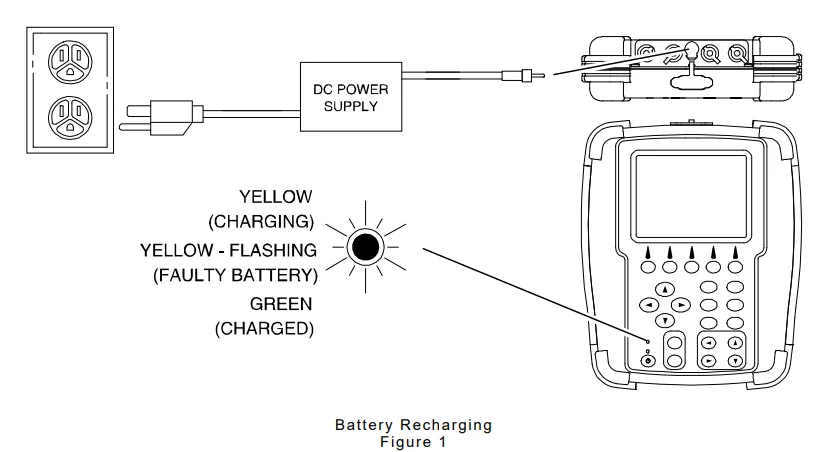
NOTE: If the CHARGE Indicator flashes yellow and/or the battery fails to accept a charge and the IFR 4000 does not operate on battery power, the battery, serviceable only by a qualified technician, requires replacement. Refer to Battery/Voltage Instructions.
1.7 EXTERNAL CLEANING
The following procedure contains routine instructions for cleaning the outside of the Test Set. CAUTION: DISCONNECT POWER FROM TEST SET TO AVOID POSSIBLE DAMAGE TO ELECTRONIC CIRCUITS.
STEP PROCEDURE
- Clean front panel buttons and display face with a soft lint-free cloth. If dirt is difficult to remove, dampen a cloth with water and a mild liquid detergent.
- Remove grease, fungus, and ground-in dirt from surfaces with a soft lint-free cloth dampened (not soaked) with isopropyl alcohol.
- Remove dust and dirt from connectors with a soft-bristle brush.
- Cover connectors, not in use, with a suitable dust cover to prevent tarnishing of connector contacts.
- Clean cables with a soft, lint-free cloth.
- Paint the exposed metal surface to avoid corrosion.
CONTROLS, CONNECTORS, AND INDICATORS
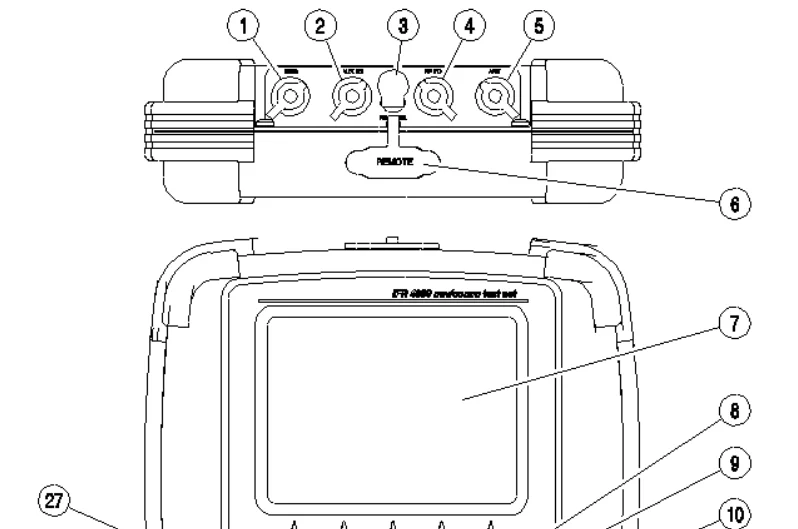
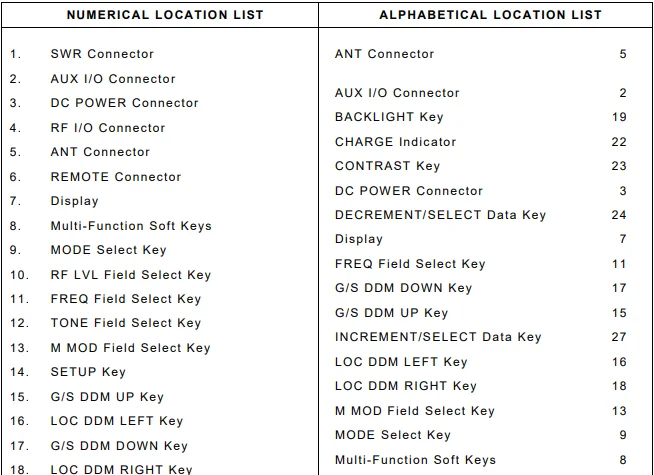
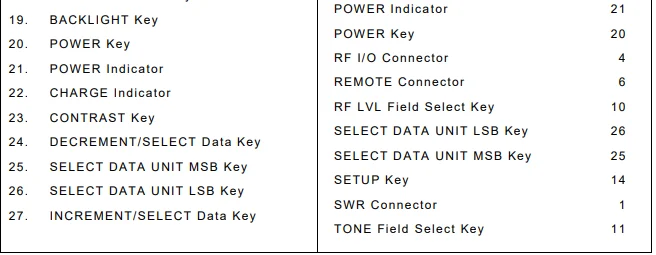
1. SWR Connector
TNC Type Connector used for VSWR measurements on Antenna and Feeder Systems.
2. AUX I/O Connector
BNC Type Connector for the output of baseband modulation and 10 MHz reference, and for the counter input.
3. DC POWER Connector
Circular Type Connector (2.5 mm center, 5.5 mm outer diameter, center positive) used for battery charging or operation of the Test Set.
4. RF I/O Connector
TNC Type Connector used for direct connection to the UUT for power and frequency measurements for COMM testing, and for providing RF stimulus for VOR/ILS/GS/MB receivers.
5. ANT Connector
BNC Type Connector used for over-the-air stimulus for VOR/ILS/GS/MB receivers and for COMM testing.
6. REMOTE Connector
DB15 Type Connector or DB25 Type Connector used for remote operation and software upgrades. Contains RS-232, USB Host, and USB Peripheral connections.
7. Display (LCD)
38 characters by 16 lines for the main screen display with Soft Key boxes at the bottom of the screen.
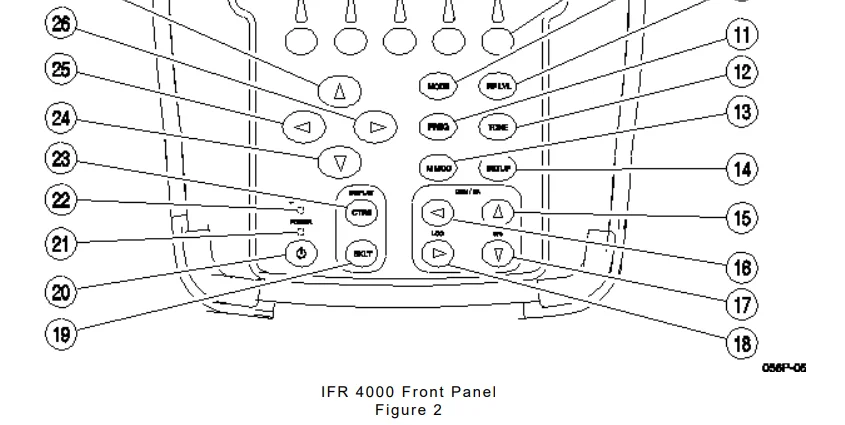
8. Multi-Function Soft Keys
Five Soft Keys are provided. The legends are displayed in boxes at the bottom of the Display.
9. MODE Select Key
This Key enters the MODE Field and selects the operational mode (i.e., VOR, Localizer, etc.).
10. RF LVL Field Select Key
This Key moves the edit cursor to the RF LVL (RF Level) Field. The INCREMENT/SELECT Data Key or the DECREMENT/SELECT Data Key may be used to slew the RF Level. The SELECT DATA UNITS MSB Key or the SELECT DATA UNITS LSB Key may be used to select the RF LVL units to be slewed (i.e., 0.1 dB, 1 dB, etc.).
11. FREQ Field Select Key
This Key moves the edit cursor to the FREQ (Frequency) Field. The INCREMENT/SELECT Data Key or the DECREMENT/SELECT Data Key may be used to slew the data. The SELECT DATA UNITS MSB Key or the SELECT DATA UNITS LSB Key may be used to select the FREQ units to be slewed (i.e., 25 kHz, 100 kHz, etc.).
12. TONE Field Select Key
This Key moves the edit cursor to the MOD TONE Field. The INCREMENT/SELECT Data Key or the DECREMENT/SELECT Data Key may be used to slew the data.
13. M MOD Field Select Key
This Key moves the edit cursor to the M MOD (Master Modulation) Field and turns the modulation OFF (0%) or ON (CAL). The INCREMENT/SELECT Data Key or the DECREMENT/SELECT Data Key may be used to slew the modulation depth.
14. SETUP Key
This Key displays the SETUP Menu.
15. G/S DDM UP Key
This Key slews the displayed Glideslope DDM Up. Increments are either FIXED or VAR (Variable) depending on the DDM DEV STEP Field setting.
16. LOC DDM LEFT Key
This Key slews the displayed Localizer DDM to the Left. Increments are either FIXED or VAR (Variable) depending on the DDM DEV STEP Field setting.
17. G/S DDM DOWN Key
This Key slews the displayed Glideslope DDM Down. Increments are either FIXED or VAR (Variable) depending on the DDM DEV STEP Field setting.
18. LOC DDM RIGHT Key
This Key slews the displayed Localizer DDM to the Right. Increments are either FIXED or VAR (Variable) depending on the DDM DEV STEP Field setting.
19. BACKLIGHT Key
This Key displays/exits the Backlight Adjust Field. The INCREMENT/SELECT Data Key or the DECREMENT/SELECT Data Key may be used to adjust the Backlight Intensity. The IFR 4000 powers up with the Backlight set to the setting of the previous session.
20. POWER Key
This Key powers the IFR 4000 up and down.
21. POWER Indicator
This Indicator is illuminated when the IFR 4000 is powered.
22. CHARGE Indicator
This Indicator is illuminated when external DC power is applied for Bench Operation or Battery charging. This Indicator is yellow when the battery is charging, flashing yellow when the battery needs replacing, and green when the battery is fully charged.
23. CONTRAST Key
This Key displays/exits the Contrast Adjust Field. The INCREMENT/SELECT Data Key or the DECREMENT/SELECT Data Key may be used to adjust the Contrast.
24. DECREMENT/SELECT Data Key
This Key decrements data in slewable fields, such as FREQ. This Key also selects data in fields that have fixed functions, such as MOD TONE and MODE.
25. SELECT DATA UNIT MSB Key
This Key moves the slew cursor toward the MSB (Most Significant Bit) of the data field.
Example: When a variable frequency is selected, the slew cursor can be moved from the 1 kHz unit to the 10 kHz unit.
26. SELECT DATA UNIT LSB Key
This Key moves the slew cursor toward the LSB (Least Significant Bit) of the data field.
Example: When a variable frequency is selected, the slew cursor can be moved from the 10 kHz unit to the 1 kHz unit.
27. INCREMENT/SELECT Data Key
This Key increments data in slewable fields, such as FREQ. This Key also selects data in fields that have fixed functions, such as MOD TONE and MODE.
4. OPERATING PROCEDURES
4.1 GENERAL
The IFR 4000 verifies the operation and installation of ILS, VOR, and Marker Beacon receivers, VHF AM/FM, UHF AM, and HF AM/SSB Transceivers, and, with the ELT Option, 121.5/243 and 406 MHz Emergency Beacons. This section contains operating instructions for the IFR 4000.
Included is a description of the Operational Mode screens with Field definitions, followed by general operating instructions. For specific Unit Under Test (UUT) Procedures, refer to the UUT Manual. Refer to 1-2-2, Figure 2, for the location of the controls, connectors, and indicators. The IFR 4000 uses nine Main Operational Modes and one Optional Mode:
- SETUP Mode allows the operator to set various parameters used in testing, configuration, and memory storage. The Setup Menu can be entered from any mode by pressing the SETUP Key.
- VOR Mode provides signal generation over the VOR band (108.00 to 117.95 MHz) with a 30 Hz reference phase and 9960 Hz (subcarrier frequency modulated with 30 Hz variable phase) amplitude modulated at 30% per tone. VOR bearing selection is provided in preset steps of 30° or variable steps of 0.1°.
- LOC (Localizer) Mode provides signal generation over the Localizer band of 108.10 to 111.95 MHz, 90 and 150 Hz, amplitude modulated at 20% per tone. Variable and fixed DDM control is provided.
- G/S (Glideslope) Mode provides signal generation over the Glideslope band of 329.15 to 335.00 MHz, 90 Hz and 150 Hz, amplitude modulated at 40% per tone. Variable and fixed DDM control is provided.
- MARKER BEACON Mode provides 75 MHz signal generation, amplitude modulated at 95% with selectable 400, 1300, and 3000 Hz tones.
- ILS Mode provides simultaneous Localizer (with swept DDM), Glideslope, and Marker Beacon signals.
- COMM AM Mode provides signal generation over the range of 10.00 to 400.00 MHz in 1 kHz increments and monitoring of transmitter power and modulation depth over the same range. A calibrated 1020 Hz tone, amplitude modulated at 30%, is also provided. Frequency control is provided in 8.33 kHz / 25 kHz channel steps or in 1 kHz variable steps. Audio output is available.
- COMM FM Mode provides signal generation over the range of 10.00 to 400.00 MHz in 1 kHz increments and monitoring of transmitter power and modulation deviation over the same range. A 1000 Hz tone, frequency modulated at 5 kHz, is also provided. Frequency control is provided in 12.5 kHz / 25 kHz channel steps or in 1 kHz variable steps. Audio output is available.
- COMM SSB Mode provides signal generation and monitoring of transmitter power and modulation depth over the range of 10.00 to 30.00 MHz. A 1000 Hz tone is also provided. Audio output is available.
- SWR Mode provides selected CW frequency SWR measurement or swept SWR measurement over a 10.00 to 400.00 MHz range.
- SELCAL Mode provides selectable consecutive amplitude-modulated tone pulse pairs, which may be sent continuously or as a burst.
- FREQUENCY COUNTER Mode provides external frequency measurement over the RF I/O Connector and ANT Connector from 10 to 400 MHz and over the AUX I/O Connector from 1 to 10 MHz.
- 121.5/243 BCN Mode (p/o ELT Option) provides monitoring for 121.5/243 MHz swept tone short-range Beacons and displays transmitter frequency, power, and start/stop tone frequencies. Audio output is available.
- 406 BEACON Mode (p/o ELT Option) provides monitoring for 406 MHz COPAS/SARSAT Emergency Locator Transmitter (ELT), Emergency Position Indicating Radio Beacons (EPIRB), and Personal Locator (PLB) Beacons. The Beacon utilizes BPSK data to transmit position information derived from a long-range navigation system or GPS receiver. The Protocol management and data field decode is automatically handled by the IFR 4000.
Product Warranty
Refer to http://www.viavisolutions.com/en-us/warranty-information for the Product Warranty information.
For More Manuals By Viavi Solutions, Visit ManualsLibraryy.
Viavi IFR 4000 Nav-Comm Flight Line Test Set-FAQs
What is the Viavi IFR 4000 used for?
The IFR 4000 is a portable test set designed to check and verify navigation and communication avionics on aircraft. It is commonly used for flight line and hangar testing.
Which avionics systems can the IFR 4000 test?
It supports testing of ILS, VOR, Marker Beacon receivers, and VHF AM/FM and UHF AM transceivers, ensuring proper installation and operation.
Is the IFR 4000 suitable for flight line use?
Yes, the unit is compact, lightweight, and weather-resistant, making it ideal for outdoor flight line maintenance and troubleshooting.
Can the IFR 4000 verify both transmit and receive functions?
Yes, it can test receiver sensitivity, transmitter power, modulation, and frequency accuracy for supported Nav-Comm systems.
Who typically uses the Viavi IFR 4000?
It is commonly used by aviation maintenance technicians, avionics engineers, and MRO facilities for routine checks and fault diagnosis.
Does the IFR 4000 support ILS testing?
Yes, it is designed to verify ILS localizer, glide slope, and marker beacon receiver performance.
Is the IFR 4000 still relevant for modern avionics testing?
Yes, it remains a trusted solution for traditional Nav-Comm system testing, especially in legacy and mixed-avionics aircraft.
Is the IFR 4000 weatherproof?
Yes, the unit is built to withstand challenging outdoor environments, making it reliable in various weather conditions.
Can the IFR 4000 be used for installation checks?
Yes, it is frequently used to confirm correct installation and alignment of avionics systems after maintenance or upgrades.