

Flomasta TDW230 Programmable Digital Thermostat
These instructions are for your safety. Please read through them thoroughly before installation and retain them for future reference.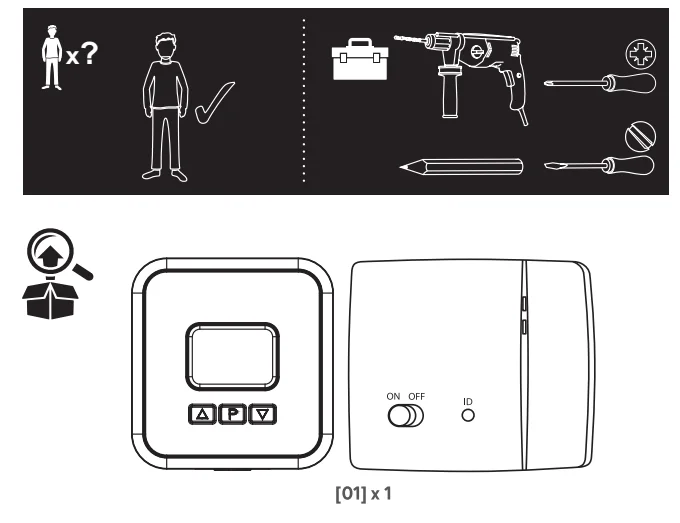
Product Description
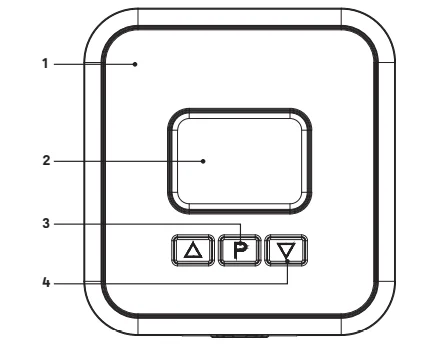
- Thermostat transmitter
- LCD screen
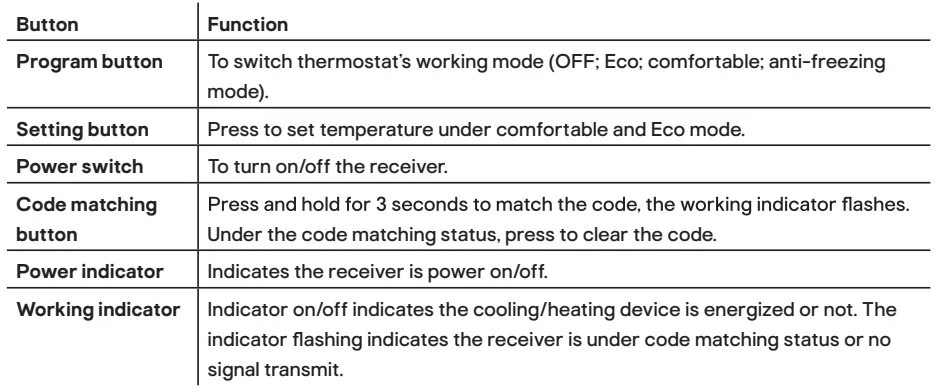
- Setting button
- Program button

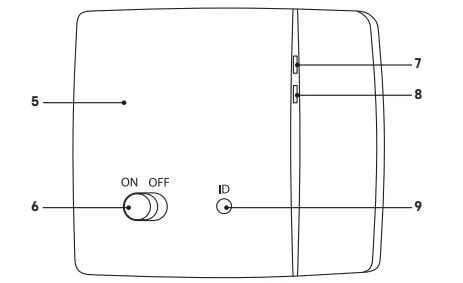
- Receiver
- Power switch
- Working indicator
- Power indicator
- Code matching button


Before you start
Read the instructions before using the product. WARNING! Risk of electrical shock! Isolate the main supply before opening the unit and before wiring.
- All fittings must be installed by a competent person in accordance with local regulations.
- If you have any doubt about the installation or use of this product, consult a qualified electrician.
- Mount the product at eye level.
- This product is for indoor use only. It is not intended for areas constantly subject to moisture, such as a bathroom.
- The product can be securely fixed to the mounting surface using screws and wall plugs supplied. The screws and wall plugs supplied are suitable for masonry surfaces only. Fittings to suit other surfaces are not supplied and must be purchased separately.
- The wiring diagram is for reference only. Always refer to the terminal marking for wiring. Ensure that all electrical connections are tight and that no loose strands are left out of the terminal blocks.
- Do not cover the device, and do not hang anything from this product.
- Do not install near a direct heat source or in direct sunlight.
- Avoid moisture, extreme temperatures, vibrations, and impacts.
- Do not install in locations where the product can be affected by
- drafts or dead spots behind doors and in corners,
- hot or cold air from ventilation ducts,
- sunlight or radiant heat from appliances,
- concealed pipes or chimneys, or
- unheated/uncooled areas such as an outside wall.
Battery Warnings
- Only the recommended batteries should be used.
- Remove batteries from the product when not in use for long periods of time.
- Keep this product out of the reach of small children.
- Store unused batteries in the original packaging.
- Dispose of used batteries responsibly.
- An adult must carry out battery replacement and installation.
- Remove exhausted batteries from this product.
- Do not dispose of batteries in a fire; batteries may explode or leak.
- Do not short-circuit the battery terminals.
- Do not mix used and new batteries.
- Do not mix alkaline, standard, lithium, or rechargeable batteries.
- Do not use rechargeable batteries in this product.
- Do not recharge non-rechargeable batteries.
- Do not allow any part to come in contact with heat or direct flame.
- Do not allow water to come into contact with the batteries or wiring.
- Install carefully to avoid damaging the batteries.
- When installing batteries in the battery compartments, ensure the batteries are placed as marked (+)(-).
- Do not ingest the battery.
- Keep new and used batteries away from children.
- If the battery compartment does not close securely, stop using the product and keep it away from children.
- If you think batteries may have been swallowed or placed inside any part of the body, seek immediate medical attention.
Installation
Installing the thermostat transmitter
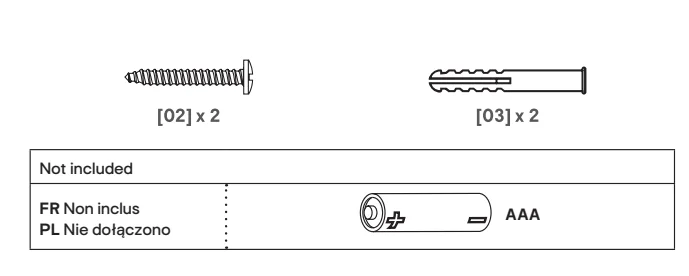
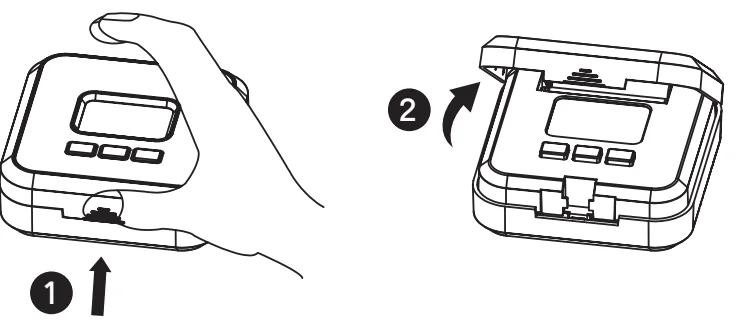
- Open the thermostat transmitter by pressing and lifting the front cover. Insert 2 AAA batteries (not included). NOTE: If the LCD doesn’t show after inserting batteries, observe the correct polarity (+ and -) marked on the battery and the transmitter.

- Close and clip the front cover back to the thermostat transmitter.

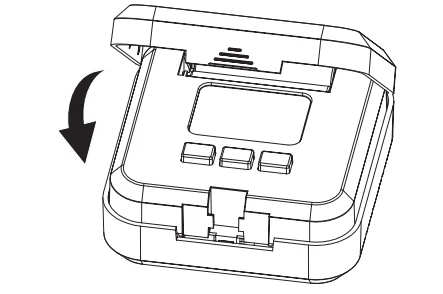
NOTE: Place the thermostat in a well-ventilated place and away from heat sources, e.g., TV, furnace, or direct sunlight.
Installing the receiver
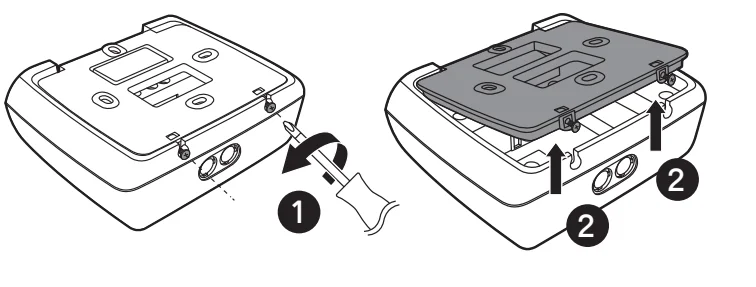
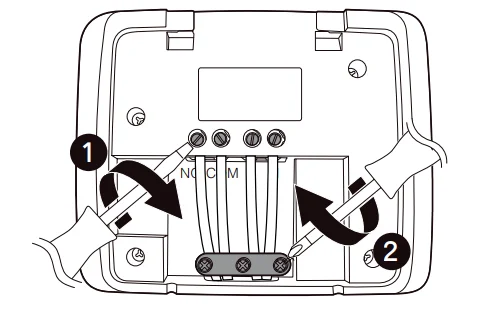
- Loosen the screws at the bottom of the receiver and remove the cover.

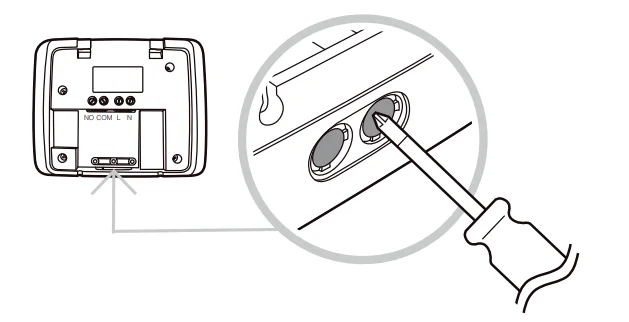
- Using a screwdriver, remove the knockout plugs located at the bottom of the receiver.

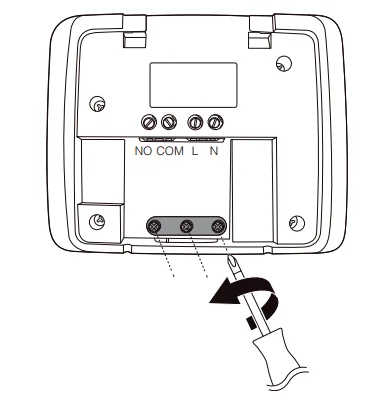
- Loosen the screws and remove the cable clamp.

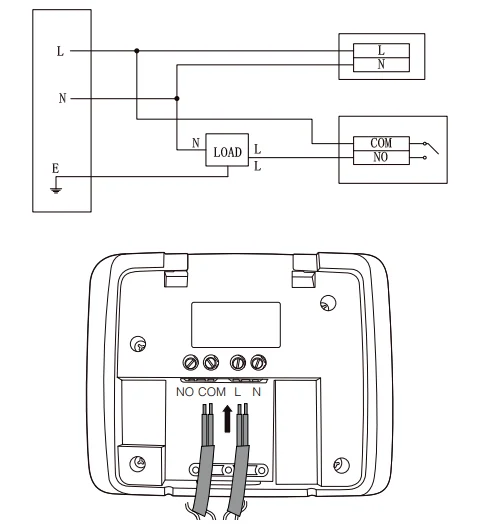
- Connect the electrical wires to the terminals as shown. Use 2.5 mm² wires.

- Tighten the terminal screws and ensure the wires are tightly fixed. Refit the cable clamp and tighten the screws.

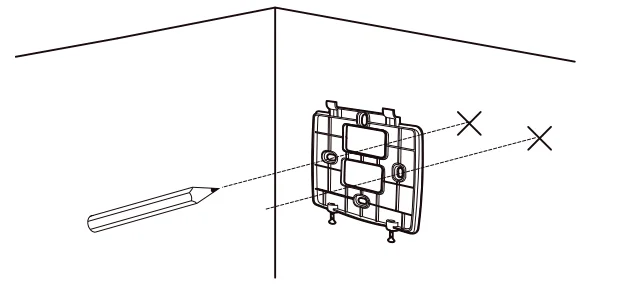
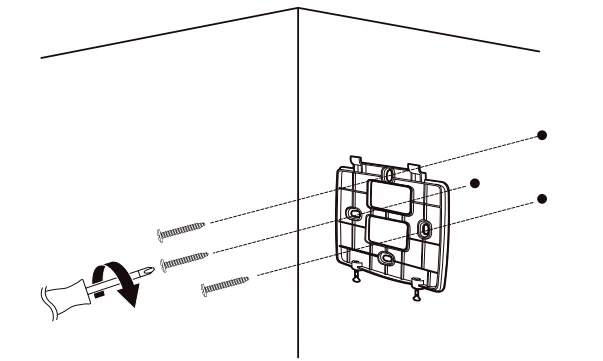
- Mark the locations of the mounting holes on the wall.

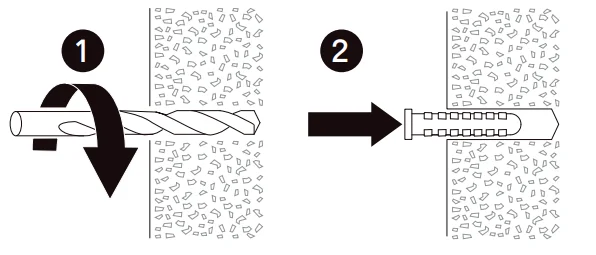
- Drill the mounting holes and insert a wall plug into each mounting hole.

- Fix the back cover to the wall using the provided screws.

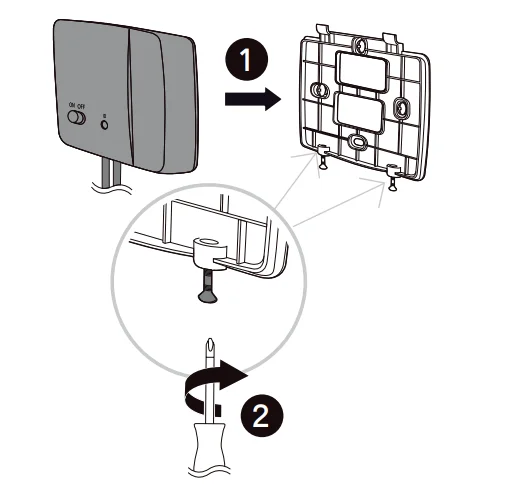
- Place the receiver on the back cover and secure it with both screws.

Intended use
- This product is intended to be used for room temperature control of a heating system. This product maintains comfortable temperatures when you are in the room and energy savings when you are away.
- This product is intended for private use only. It is not intended for commercial use.
- This product is intended to be used in dry indoor areas only.
- No liability will be accepted for damages resulting from improper use or non-compliance with these instructions.
Instruction
NOTE: When the battery is low, the icon will show to the user to change the batteries.
RF transmission and pairing
- After installing the receiver, turn ON the receiver using “Power Switch ON/OFF”, press and hold the “code matching button ID” for 3 seconds, working indicator on the receiver flashes. Press and hold the “Program button P” on the thermostat transmitter for 5 seconds. If the working indicator on the receiver stops flashing, the receiver and transmitter are paired.
- Press the “Program button P” on the transmitter to switch between Standby mode
 . Eco mode
 . Comfort mode
 and anti-freeze mode
 .
. - Under Comfortable mode
 and Eco mode
 , press the Setting button
 to set your preferred temperature (setting range is from 5-30 °C). The temperature display will switch to the current temperature if no operation is made in 5 seconds. The room thermostat works by sensing the air temperature. It switches on the heating when the air temperature falls below the setting of preferred temperature setting, and switches off once the set temperature has been reached
 - Anti-freezing mode cannot adjust the temperature; the default temperature is 7 °C. The room thermostat works by sensing the temperature. It switches on the heating when the air temperature falls below 7 °C, and switches off once 7 °C has been reached.
 . Eco mode
 . Comfort mode
 and anti-freeze mode
 .
. and Eco mode
 , press the Setting button
 to set your preferred temperature (setting range is from 5-30 °C). The temperature display will switch to the current temperature if no operation is made in 5 seconds. The
 Technical data
- Temperature display: 0 deg * C to 40 deg * C
- Temperature setting: 5 deg * C to 30 deg * C ( 0.2 deg * C : step)
- Temperature accuracy: / – 1 deg * C
- Operation temperature: 0 deg * C to 40 deg * C
- Storage temperature: z 20 deg * C to 60 deg * C
- Power resource: 2 x 1.5 V AAA battery (not included)
- Max. switching voltage:230 V~, 50 Hz
- Max. switching current: 16(5) A
- Control switch: relay switch
- Transmission distance: 70 m in an open area
- Frequency: 868 MHz
- Maximum radio frequency power: <10 mW
Addresses
Manufacturer • Fabricant • Producent:
UK Manufacturer:
Kingfisher International Products Limited,
3 Sheldon Square, London, W2 6PX,
United Kingdom
EU Manufacturer:
Kingfisher International Products B.V.,
Rapenburgerstraat 175E,
1011 VM Amsterdam, The Netherlands
www.kingfisher.com/products
www.diy.com
www.screwfix.com
www.screwfix.ie
For More Manuals By Flomasta, Visit ManualsLibraryy.
Flomasta TDW230 Programmable Digital Thermostat-FAQs
What is a programmable digital thermostat?
A programmable digital thermostat lets you set different temperatures for various times of the day. It offers more precise temperature control than manual thermostats, usually accurate within 1°C.
Why is my Flomasta TDW230 thermostat not working?
If the thermostat isn’t responding, replace the batteries first. After changing batteries, reset the receiver according to the instructions in the user manual.
Can my AC run without a thermostat?
No. The AC depends on the thermostat to read room temperature and signal when to turn on or off.
How do I set the Flomasta TDW230 programmable thermostat?
Follow your manual, then input date and time. Use the SET/PROGRAM buttons to choose heating periods and assign preferred temperatures for each time slot.
Do I need a plumber to replace this thermostat?
Usually not. However, if your thermostat controls a water-based heating system, a professional may be required. Otherwise, an electrician is typically the correct installer.
How do I reset the Flomasta TDW230 thermostat?
Turn the thermostat off, switch off the HVAC breaker for about 30 seconds, then turn both back on. This performs a soft reset in most cases.
How long does a digital or smart thermostat last?
Most modern thermostats last around 10 years with normal use and stable power conditions.
Can I replace the thermostat myself?
Yes, if you’re comfortable with wiring. If not, it’s safer to call an electrician or HVAC technician.
What are the disadvantages of smart thermostats?
They can be expensive compared to basic digital models, often costing between $100 and $250 or more.
How can I tell if my thermostat needs replacing?
Common signs include: no power, inaccurate temperature readings, unresponsive buttons, frequent system cycling, or loss of programmed settings.