
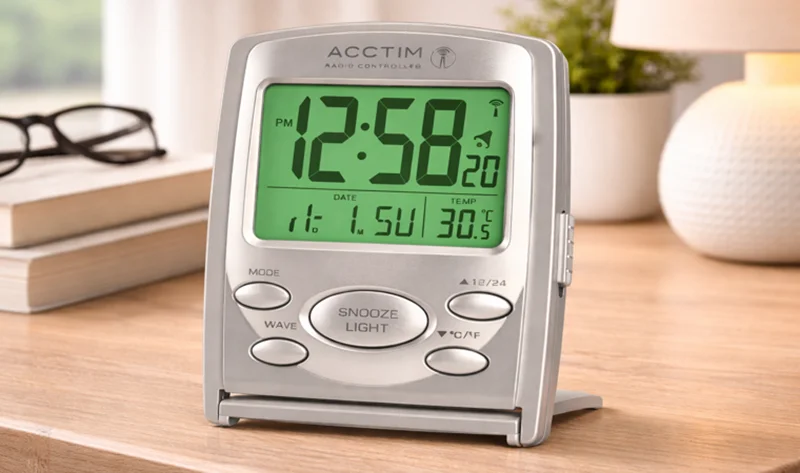

Acctim 71707 Vista RC LCD Alarm Clock
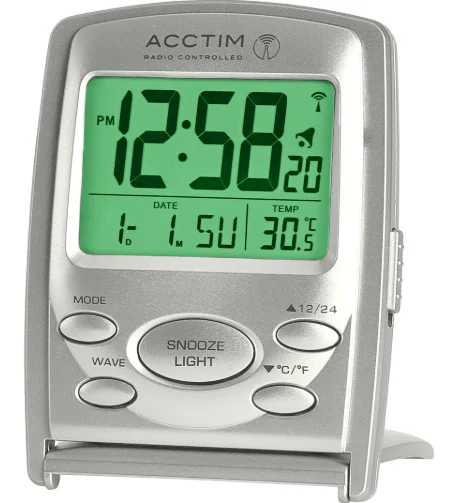
RADIO CONTROLLED LCD ALARM CLOCK OPERATING INSTRUCTIONS
Thank you for your purchase of this quality clock. Please read these instructions carefully and keep them in a safe place for future reference.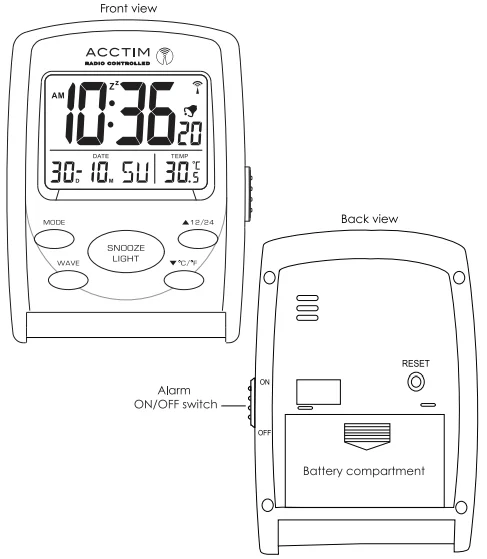
RADIO CONTROLLED TECHNOLOGY
The radio-controlled mechanism fitted to your clock has a built-in receiver which is tuned to the National Physical Laboratory (NPL) radio signal, called MSF, which is transmitted from the Anthorn radio station in Cumbria, UK. The MSF signal is broadcast on a frequency of 60kHz and carries a time and date code that radio-controlled clocks use to set themselves to the correct time. The time signal received is controlled by cesium atomic clocks and is accurate to within one second every 1000 years.
AUTOMATIC SET-UP
Remove the protective film from the LCD screen. Insert 2 x AAA batteries, observing the polarity markings inside the compartment. All segments will display briefly, and the clock display will show 12:00. The clock will automatically search for the time signal, and the radio signal icon  will flash. If the clock receives the time signal, it will set automatically within 7 minutes, and the radio signal icon will remain on the display. Note: The DST icon will display during daylight saving time.
Note: It is recommended that you leave the clock overnight for searching the time signal since nighttime allows better transmission of the MSF signal reception. When the clock receives the signal, to maintain accuracy, it will search for the signal at 2 am, 3 am, 4 am, and 5 am.
Note: In normal status, if the clock does not receive the MSF signal during initial set-up or at the change of Summer/Winter time, you can:
SET THE CLOCK MANUALLY
- Press and hold the MODE button for 3 seconds, and the hour digits will flash.
- Press
 button to set the hour, ensuring AM/PM is set correctly.
 - Press the MODE button once again, and the minute digits will flash.
- Press the button to set the minute.
- Press the MODE button once again, and the seconds will flash.
- Press the button to set to 00.
- Press the MODE button once again, and the year digits will flash.
- Press the button to set the year.
- Press the MODE button once again, and the D (date) and M (month) digits will flash.
- Press the button to switch the month and date display.
- Press the MODE button once again, and the month digits will flash.
- Press the button to set the month.
- Press the MODE button once again, and the date digits will flash.
- Press the button to set the date.
- Press the MODE button again, and the time zone digit ‘0’ (UK time) will flash. If you would like your clock to display a different time zone, e.g., a location abroad –
- Press the button to automatically adjust the hour digits to the correct time zone you have selected. Press the MODE button once again to exit.
 button to set the hour, ensuring AM/PM is set correctly.
RCC BUTTON
Press and hold the WAVE button for 3 seconds, and the radio signal icon will flash. The clock will automatically search for the signal. Press the RCC button for 3 seconds to stop the signal search.
12/24 HOUR FORMAT
In normal time mode, press the ’12/24′ button to select between 12/24 hour format.
SELECT TEMPERATURE IN °C OR °F
In normal time mode, press the ‘°C/°F’ button to select °C or °F.
SETTING THE ALARM
- Press the MODE button once to display the alarm time; the AL icon will show. Press and hold the MODE button until the hour digits flash.
- Press the button to set the alarm hour, ensuring AM/PM is set correctly.
- Press the MODE button once again, and the minute digits will flash.
- Press the button to set the minutes.
- Press the MODE button to exit.
TO TURN ON/OFF OR VIEW ALARM
Slide the ALARM ON/OFF switch to turn on/off the alarm. The bell icon will display when the alarm is on.
SNOOZE FEATURE
When the alarm sounds, press the SNOOZE/LIGHT button to snooze the alarm. The Zz icon will flash. To stop the snooze function, press any button (except snooze/light).
TO USE THE DISPLAY LIGHT
Press the SNOOZE/LIGHT button to activate the display light.
TROUBLE SHOOTING/MSF RECEPTION DIFFICULTIES
Like any receiver, your clock needs a good signal to work properly. The main causes of reception failure are –
- Atmospheric and local interferences.
- Interference from electrical equipment, e.g., TV, computers, radios.
- Location of the clock’s internal receiver within the building.
- Reduced local signal due to steel-framed structure.
- Outside the normal transmission.
Note: If the signal is weak and your clock does not set, move your clock to a new location, press and hold the WAVE button for 3 seconds to start the radio-controlled signal search.
The following suggestion may help improve reception of the MSF signal:
- Check that the batteries are new and in good condition.
- Check that the batteries are inserted correctly.
- Place the clock near a window or external wall.
- Try rotating the clock as the internal receiver that picks up the signal is most effective when it is facing directly towards or away from Anthorn.
- Try moving your clock to a new location away from any electrical equipment, e.g., TV, computers, radios, and start the setup again, or remove the batteries and insert them again after 5.30 pm. Due to local interference, the signal is stronger between midnight & 5 am.
Interruption to the MSF signal
The Anthorn transmitter is periodically shut down for scheduled maintenance, resulting in no signal being transmitted. For dates of the scheduled maintenance, visit: www.npl.co.uk/science-technology/time-frequency/products-and-services/time/msf-outages.
CHANGING THE BATTERIES
It is recommended that you replace the batteries annually, even if the product is still running. Only use 2 x AAA (1.5V) alkaline batteries in this clock. Do not mix old and new batteries, different types, or brands. Remove the batteries if the clock is not stored or not in use. Remove exhausted batteries from the product. Warning: Do not recharge non-rechargeable batteries. Please dispose of used batteries in a responsible manner. For more information, please contact your local authority.
MAINTENANCE
A soft cloth may be used to clean your clock. Do not use any corrosive cleaners or chemical solutions on the clock. Keep the clock clean and dry to avoid any problems.
YOUR GUARANTEE
Your clock is guaranteed for 2 years from the date of purchase against any faults arising from defective materials or manufacture. Damage caused through careless handling, misuse, or in transit is expressly excluded. Should this clock fail within 2 years, please return it to your retailer.
Environmental Protection
 Disposal of electrical & electronic equipment. Do not dispose of this product with household waste. For the proper treatment, recovery, and recycling, please take this product to the appropriate collection point. If you are unsure of where this is, contact your local authority. Improper disposal may be harmful to the environment. For more innovative Acctim products, please visit: www.acctim.com.
For More Manuals By Acctim Clocks, Visit ManualsLibraryy.
Acctim 71707 Vista RC LCD Alarm Clock-FAQs
What are the main features of the Acctim 71707 Vista RC LCD Alarm Clock?
The Acctim 71707 Vista is a multi-function travel alarm clock featuring a radio-controlled time system, LCD, calendar, and indoor temperature reading. It also includes a backlight, snooze function, and compact folding design, making it ideal for both bedside and travel use.
How does the radio-controlled function work on this clock?
The clock automatically synchronizes with a radio time signal to ensure accurate timekeeping. Once powered, it searches for the signal and updates itself without manual adjustment, though it can also be set manually when used in regions without signal coverage.
Does the clock display temperature and calendar information?
Yes, the clock features a multi-function LCD that shows indoor temperature along with the date, day of the week, and time. This makes it a convenient all-in-one display for daily information at a glance.
Is the Acctim Vista suitable for travel?
Yes, the compact size and folding design make it highly portable and ideal for travel. It can function as a standard clock even when the radio signal is unavailable, making it reliable for international use.
What type of power source does the clock use?
The clock is powered by two AAA batteries, which are not included. This battery-operated design makes it convenient for travel and allows placement anywhere without needing a power outlet.
Does the clock have a snooze and backlight feature?
Yes, it includes a snooze function that delays the alarm for a few minutes, along with an electroluminescent backlight. The backlight allows users to easily read the display in low-light or nighttime conditions.
Can the time be displayed in both 12-hour and 24-hour formats?
Yes, users can switch between 12-hour and 24-hour formats depending on preference. This flexibility makes the clock suitable for different regional settings and user habits.
Does the clock support dual alarms?
Yes, the Acctim Vista allows users to set two separate alarms. This is useful for individuals with different schedules or for setting a backup alarm to ensure timely waking.
What are the dimensions of the Acctim 71707 Vista clock?
The clock measures approximately 90 x 57 x 84 mm, making it compact enough for travel while still offering a clear and readable display. Its lightweight design adds to its portability and convenience.
Is the Acctim 71707 Vista RC LCD Alarm Clock a good value for money?
The clock is considered a good value due to its combination of radio-controlled accuracy, multi-function display, and travel-friendly design at an affordable price. It offers reliable performance and useful features for both home and travel users.