
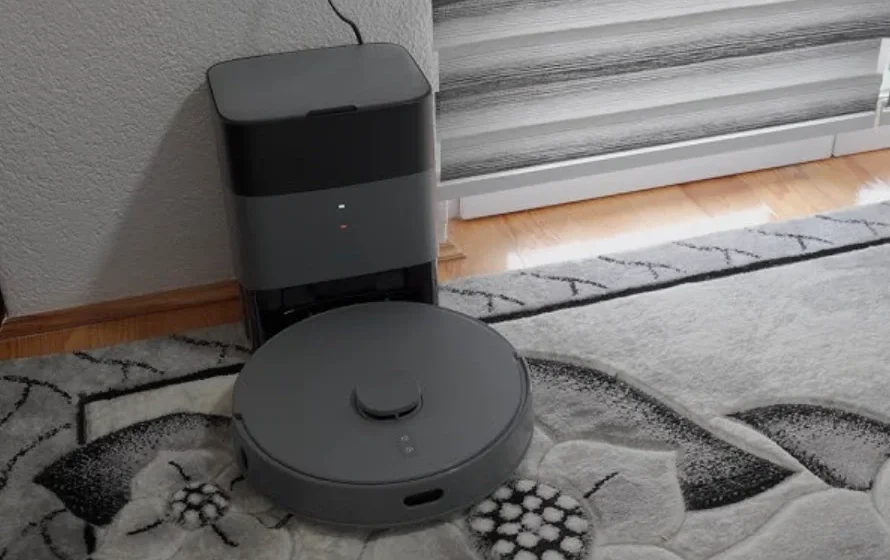

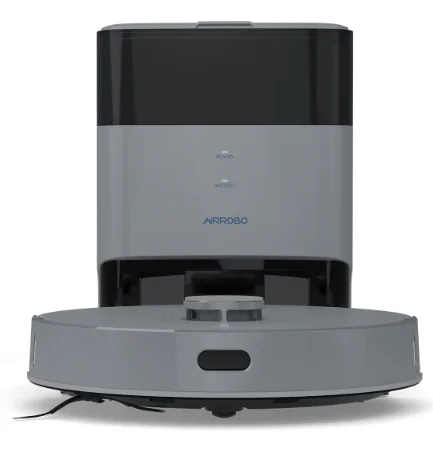
AIRROBO T25+ Robot Vacuum Cleaner
Safety Information
Precautions
- This product should only be used for floor cleaning at home. Do not use it outdoors (such as in an open yard), on a non-floor surface (such as on a sofa), or in a commercial or industrial environment.
- Do not use it in a suspended environment without any protective barriers, such as duplex floors, open balconies, or on top of furniture.
- Do not use the robot in a wet or damp environment.
- Do not use or charge it in an environment where the temperature is higher than 40°C, lower than 0°C, or where there is any liquid or sticky material on the ground.
- Please pick up all cables on the floor before using them to avoid getting tangled.
- Please pick up all fragile objects, such as vases and plastic bags to prevent collisions or damaging valuable belongings.
- This appliance can be used by children aged eight years and above and persons with reduced physical, sensory, or mental capabilities or lack of experience and knowledge if they have been given supervision or instruction concerning using the appliance safely and understand the hazards involved.
- Cleaning and user maintenance shall not be made by children without supervision.
- If the supply cord is damaged, it must be replaced by the manufacturer, its service agent or similarly qualified persons in order to avoid a hazard.
- Children should be supervised to ensure that they do not play with the appliance.
- Do not attempt to disassemble, repair, modify or replace any part of your product. All servicing should be performed by qualified personnel only. There are no user-serviceable parts inside. Please contact us when you need repair services.
- Dispose of all packaging materials properly. Keep away from children and pets.
- Do not place the cleaning brush where children can reach it.
- Beware of the suction: hair and fingers might get sucked. Please keep a safe distance.
- Do not use the product to pick up any burning objects, such as unextinguished cigarette butts.
- Do not let the product pick up any sharp objects, such as glass pieces and nails.
- Do not grab the protective cover of the radar or the bumper as a handle to carry.
- To clean or maintain the robot, dustbin and charging base, please turn them off first, unplug them from the socket, and disconnect the power supply. The robot and 2-in-1 dustbin cannot be soaked in water.
- Do not use a wet cloth with any kind of detergent to wipe any parts of the robot.
- Do not mop on carpets. Before mopping the floor, please set up a restricted area in the APP to avoid damaging the carpets.
- Please use this product in compliance with the instructions in the manual.
- CAUTION: To avoid a hazard due to inadvertent resetting of the thermal cut-out, this appliance must not be supplied through an external switching device, such as a timer, or connected to a circuit that is regularly switched on and off by the utility.
Battery and Charging
- It is forbidden to incinerate the product. Even if it is severely damaged, the battery may explode.
- This appliance may only be charged with the charging base (Model: T20-01) supplied with the appliance. Do not use any third-party charging bases.
- Do not disassemble, repair, or modify the battery and charging base.
- Do not place the charging base near a heat source, such as a heater.
- Do not wipe or clean the charging base with a wet cloth or your hands.
- Do not throw away old batteries. The disposal of old batteries should be handled by a professional recycling agency.
- Please make sure the robot is turned off, and it’s recommended to use the original packaging during transportation.
- If unused for an extended period, please turn the robot off after having fully charged it and store it in a cool and dry place.
- Charge the robot at least once every three months to avoid damage to the battery due to excessive discharge.
- Use the right tool to take out the battery when needed. The power supply must be disconnected when removing the battery.
- First, remove the bottom cover screw, then open the bottom cover. Unplug the battery connector, and finally, remove the battery from the battery compartment.
- Before discarding the robot, the battery must be removed. The battery is to be disposed of safely.
- Do not recharge non-rechargeable batteries.
- This appliance contains batteries that are only replaceable by skilled persons.
Product Overview
Packing List
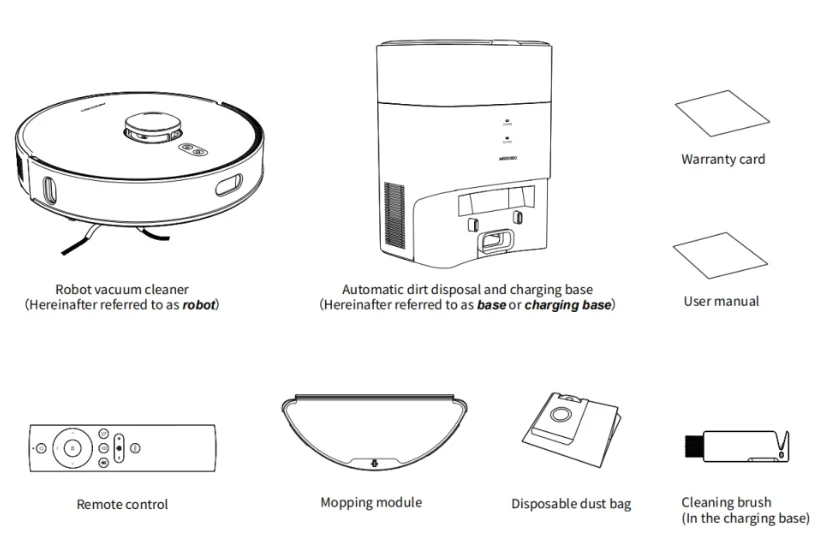
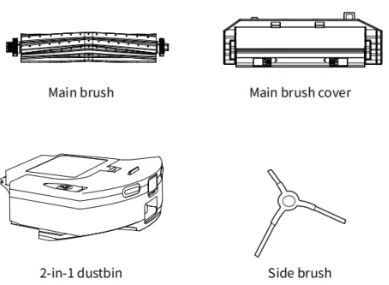
Accessories installed on the robot
Accessories installed on the charging base
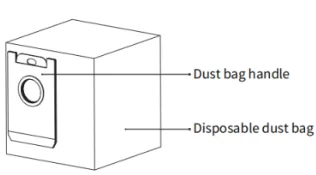
1 piece of a disposable dust bag is installed on the base. The dust bag is a disposable product and cannot be reused. Please replace it regularly.
Reminder:
The outline sketches of the product, accessories, user interface, etc., in the manual are for reference only.
Product Appearance
Buttons
Power Button
- Press it to start Auto Cleaning/Pause Cleaning.
- Press it and hold for 3 seconds to turn the robot on or off.
Home Button
Press it and hold for 3 seconds to start Local Cleaning, in which mode the robot will clean a square-meter area centered on itself.
Reminder: When the robot is moving, you can press any button to pause it.
Robot Vacuum Cleaner
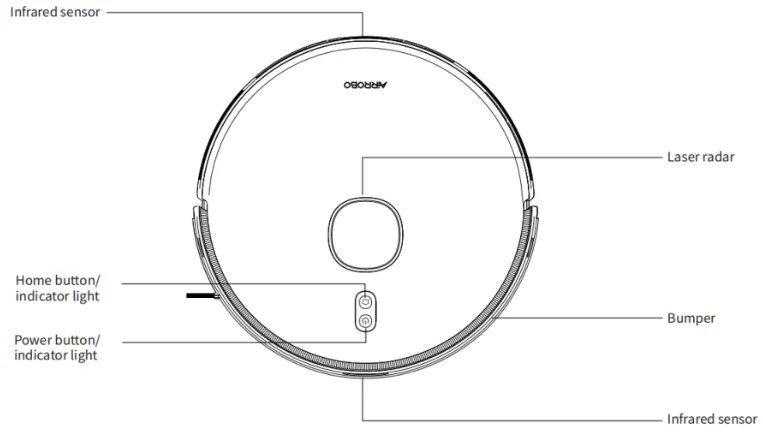
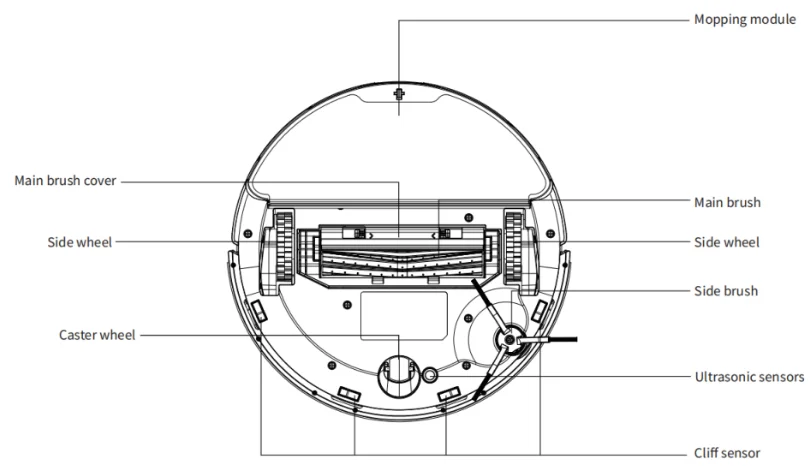
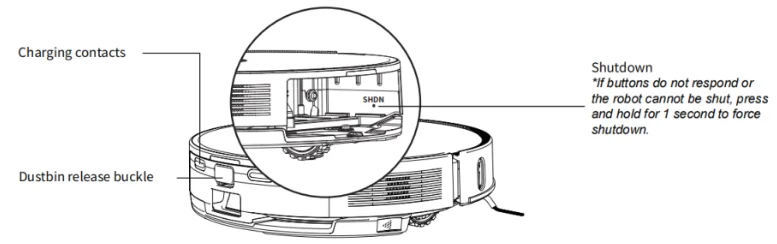
Automatic dirt disposal and charging base
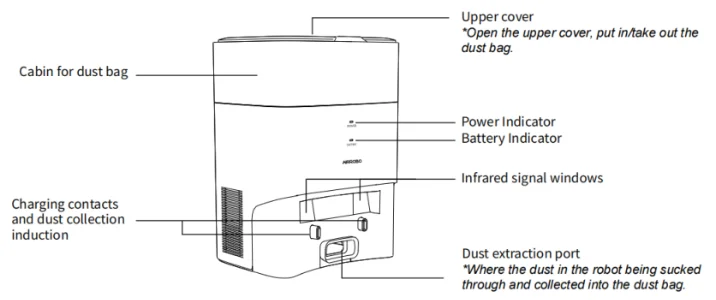
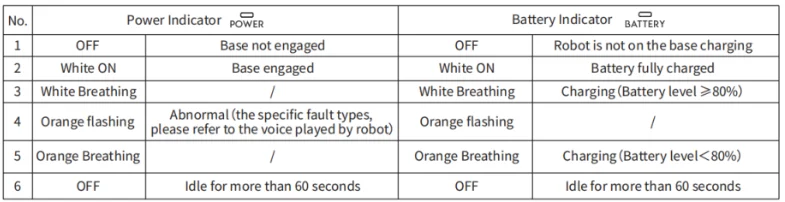
Description of the base indicator lights
Reminder: The dust bag is a consumable item and needs to be purchased from the official distribution channels.
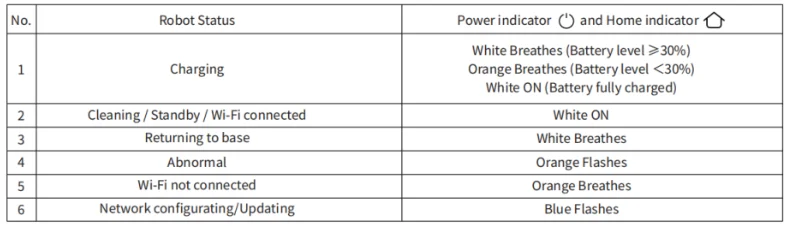
Description of the robot indicator lights
Remote Control
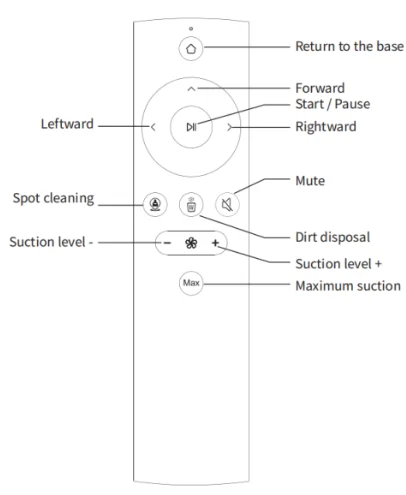
Remote Control Buttons
- Press the Start/Pause button to pause cleaning; press it again to resume.
- Press Forward, Leftward, and Rightward to adjust the direction of the robot.
- During the cleaning, press the Return to the Base button to return to the charging base.
- Press Spot Cleaning to start the spot cleaning mode, in which the robot will clean a four-square-meter area centred on itself.
- When you press Dirt Disposal, the base sucks the dirt out of the robot and stores it in the disposable dust bag. (only available when the robot is charging at base)
- Press the Suction level button to adjust the level of suction power.
- Press Max suction to adjust to the maximum level of the suction power of the robot.
Note:
- Before using, install two AAA batteries in the remote control, making sure that the positive and negative ends follow the markings indicated in the battery compartment.
- When the robot is not connected to a Wi-Fi network, you can still operate it with the remote control.
- When the robot is on the charging base, it will back off a short distance if any direction button on the remote control is pressed. After that, you can operate it normally.
- Remove the batteries from the remote control if you will not use it for a long time.
- Non-rechargeable batteries are not to be recharged.
- Different types of batteries or new and used batteries are not to be mixed.
- Batteries are to be inserted with the correct polarity.
- Exhausted batteries are to be removed from the appliance and safely disposed.
- The supply terminals are not to be short-circuited.
Installation and Operation
Installation
Remove the bumper stopper
Place the robot on a flat floor and remove the bumper stopper plugged at both ends of the front bumper.
Install the base
- Place the base against the wall on a flat floor, insert the power plug into a socket that meets the national standards requirements, and then turn on the power.
- Ensure that there are no obstacles within 1.2 meters (4 feet) in front and 0.5 meters (L6 feet) from both sides.
Charge the robot
- Press and hold the power button for 3 seconds to turn on the robot, and then press the Return to the Base button to make the robot automatically align to charge.
- Make sure that the charging contact points are dry before charging. Please get the robot fully charged before operating.
- Please pick up the cables, lightweight, and fragile objects on the floor before cleaning to avoid damage caused by entangling, dragging, and colliding during cleaning.
- It is recommended to start cleaning from the base so as to remember the location of the base when building the map, and it is efficient to find the base when returning to the base.
- When the battery runs low during cleaning, the robot will automatically return to the base to charge and continue cleaning from its breakpoint once the battery is restored to 80% battery level.
- Or you can manually push the robot, aligning it to charge.
- Recharge failed, please clean the charging contact area with a dry cloth.

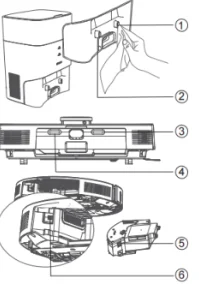
Operation
Preparation
- Step 1: First, ensure that the RF band of your WiFi network is 24 GHz.In particular, 5 GHz is not supported.
- Step 2: Ensure your phone is connected to your 2.4GHz Wi-Fi, and the Bluetooth of your phone should be ON.
- Step 3: Scan the QR code or search AIRROBO in the App Store or Google Play to download the APP. Register and log in to the AIRROBO APP.

- Step 4: Press and hold the power button for 3 seconds to start the robot. Oryou can charge the robot on the base to start it automatically. Ensure your phone and the robot are right within the signal range, not more than 3 meters the better.
Network configuration/Pairing
- Open the app and create a user account.
- Tap”+” in the upper right to go to the “Add Device” page, and then select your device model, RoboVacTB.
- Follow the instructions in the app to set up the Wi-Fi connection.
Tips:
- Due to the update of the APP, these pages may be slightly different. Please follow the current in-app guides while using.
- If your robots are unable to be found or have timed out several times, please do as following before trying again. Ensure that the phone does not disable Nearby Devices and that the router is not in whitelist mode. Reset Wi-Fi to the robot: Press and hold power + return to the base for 3 seconds when the robot is ON. Then clear the APP case: Me – Settings – Clear Cache.
- The APP is currently not compatible with Android tablets and iPads.
- To use the APP properly, please turn on the Basic Google Services if you are using an Android phone.
Reminder:
- Due to the regular upgrade and update of the APP, the actual operation might be slightly different from the above description. Please follow the instructions in the current APP.
- If you want to connect to Alexa, click” Alexa” and follow the prompts.
Automatic charge/manual charge
- When the battery runs low or cleaning is completed, the robot will automatically return to the charging base.
- Press Return to the base button when the robot is paused, and it will return to the base to charge.
Add water or clean the mop during cleaning
If you want to add water to the tank or clean the mop during cleaning, you should press any button to pause the robot first. Afterwards, you can press the Power button again to resume cleaning. Not available on waterlogged ground.
Fault state
When the robot fails, a voice prompt will be issued, and the light will flash orange. Please refer to Troubleshooting for solutions.
Daily Maintenance
Replace the disposable dust bag
When the dust passage is stuck or dust bags are full, the Power Indicator on the base will flash orange, and a voice prompt will be issued by the robot.
- Open the top cover
- Pull up the handle of the dust bag to take out
- Discard the old dust bag
- Insert a new dust bag
- Close the top cover
Clean the dust passage
If the Power Indicator ( power) on the base is still flashing after replacing the dust bag, it is recommended to disconnect power, turn the base upside down, and check whether the dust passage is blocked by any foreign objects. If the dust passage is blocked, refer to the figure below and use a screwdriver to remove the transparent cover of the dust passage and remove foreign objects.
Note: Violent dismantling is prohibited. After that, please reassemble it.
Clean infrared signal windows/ Charging contacts and dust collection induction
Wipe gently with a clean, soft, dry cloth. It is recommended to clean once a month.
Clean the fan filter
The fan filter is under the dust bag. If there is dust accumulation, you can wipe it with a soft and dry cloth.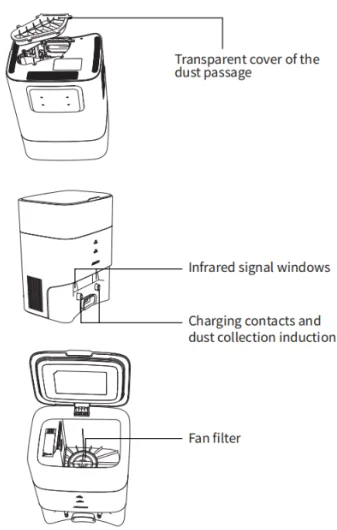
Clean the main brush
The main brush is a consumable item and should be cleaned at least once a week. It is recommended to replace it every 6-12 months to ensure optimal performance.
- Flip the robot over, press the buckle on the main brush cover, and remove the cover first. Note: When placing the robot upside down, please protect the top lidar from damage.
- Use the blade of the cleaning brush to cut entangled hair on the main brush.
- Replace the main brush and its cover, and press to fasten the buckle.

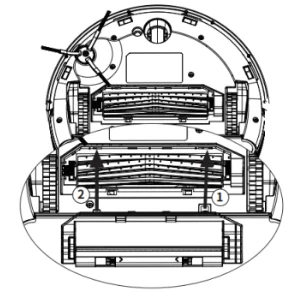
Clean the sensors
It is recommended to wipe each sensor with a clean, soft, and dry cloth once a week to ensure optimal performance.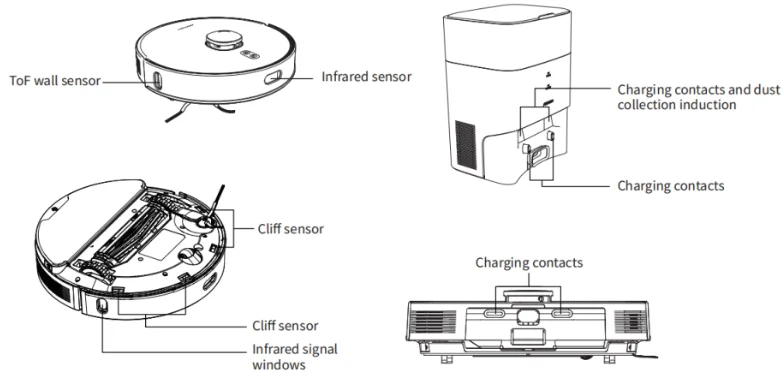
Clean the 2-in-1 dustbin
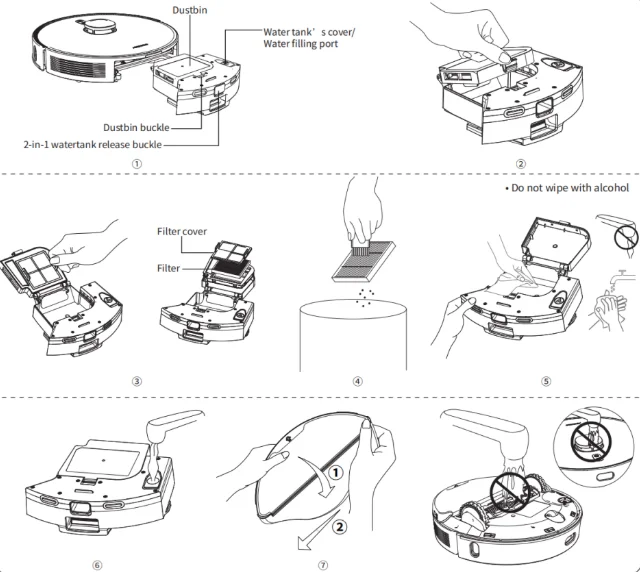
- Press and hold the release buckle while pulling it out.
- Press the buckle of the dustbin to open it.
- Take out the filter.
- Use the cleaning brush to clean the filter and remove debris.
The HEPA filter is a consumable item. It is recommended to replace it every 3-6 weeks. Please purchase replacements from the authorised sellers.
- Clean the dustbin.
- Open the water tank cover and fill it with the right amount of water. Never add any type of cleaner or disinfectant to the tank to avoid corroding the electronics in it.
- Reverse the 2-in-1 dustbin and remove the mop for replacement.
Reminder:
- The state of the mop affects the mopping effect; please keep the mop clean.
- Always remove the mop to clean and dry it before installing. It is recommended to clean the mop separately from the water tank; otherwise, the dirty water will stain the filter.
- The mop is a consumable item; it is recommended to replace it once every 3-6 weeks.

Battery care
- The robot has a built-in, high-performance, rechargeable lithium-ion battery pack. To maintain battery performance, please keep charging on the base.
- If left unused for a long period, please turn it off for storage and charge at least once a month to old damage to the battery due to over-discharge.
- Never charge the robot at sub-zero temperatures. Due to the characteristics of lithium batteries, charging below zero will cause irreversible damage to the battery.
For more Manuals by AIRROBO, visit ManualsLibraryy
AIRROBO T25+ Robot Vacuum Cleaner-FAQs
How do I set up and use the AIRROBO T25+ for the first time?
First, place the robot on its docking station to charge fully for 4-6 hours. Clear the floor of small objects and cords. Next, download the AIRROBO app, connect your smartphone to a 2.4GHz Wi-Fi network, and follow the in-app instructions to pair the device. You can start cleaning using the app, the buttons on the robot, or via voice commands with Alexa or Google Assistant.
Can I control it without Wi-Fi or a smartphone?
Yes, you can use the physical buttons on the robot to start, pause, or send it back to the dock. However, advanced features like scheduling, smart mapping, and remote control require the app and a Wi-Fi connection.
What cleaning solution can I use in the water tank?
Use only plain water or the cleaning solution recommended by AIRROBO. Do not use vinegar, Dettol, Lizol, Pine-Sol, or any harsh chemicals, as they can damage the internal water pump, clog the system, and void the warranty.
How often should I run the robot vacuum?
For homes with pets or high foot traffic, running it daily is best. For moderate traffic, every other day is sufficient. In low-traffic areas, running it once or twice a week will maintain cleanliness.
What is the battery life and coverage?
The AIRROBO T25+ has a battery that provides up to 180 minutes of runtime on a single charge, allowing it to clean areas up to 2200 square feet.
What are the main disadvantages of a robot vacuum?
The main drawbacks include a higher initial cost compared to basic vacuums, less powerful suction for deep cleaning, the need for regular maintenance like emptying the dustbin and cleaning brushes, and the possibility of it getting stuck on cords or dark carpets.
Can it clean multiple rooms and different floor types?
Yes, it is designed to automatically transition between hard floors and low-pile carpets. It can navigate through doorways to clean multiple rooms in one session, especially when using its smart mapping feature.
How do I maintain and clean the robot?
After each run, empty the dustbin. Weekly, clean the main brush and side brushes of tangled hair and debris. Regularly wipe the sensors and charging contacts with a dry cloth. Clean the mopping cloth and water tank with water only as needed.
Does it significantly increase my electricity bill?
No, robot vacuums are very energy-efficient. The cost of running one daily is minimal, similar to operating a small fan or an LED light bulb.