
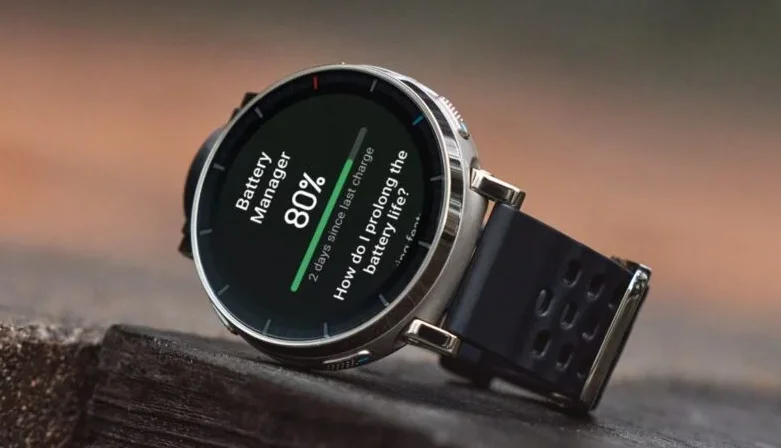

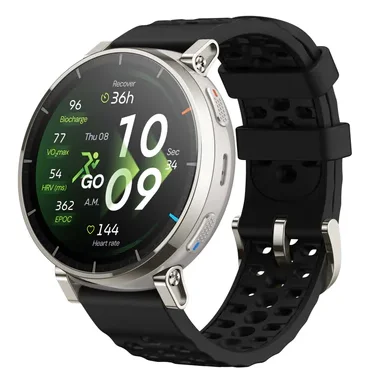
Amazfit Active 3 Premium Smart Watch
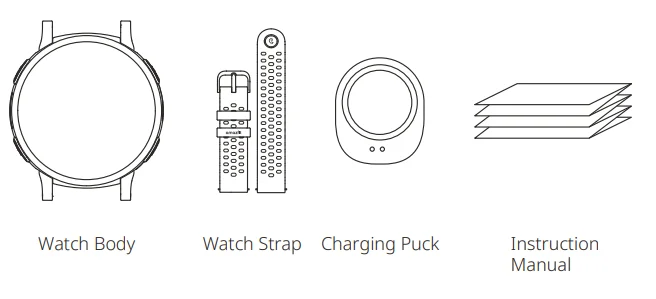
Package Contents
About the Watch
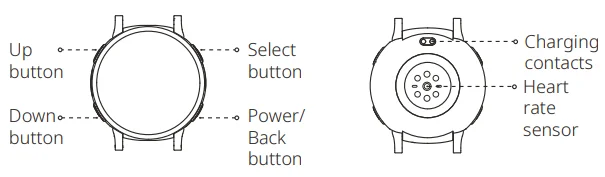
Note: Press and hold the power button to turn on the watch. If the watch cannot be turned on, please charge it and then try again.
Pairing the Watch
Zepp is a must-have app for this watch. It provides scientific sleep and workout guidance and personalized health services to help you start a healthy lifestyle.
- Use your mobile phone to scan the QR code on the right side to download and install the app, or search for the app in the Google Play Store or Apple App Store and then download and install the latest version of the app.
- Open the app, register an account, and log in.
- Pair the watch as prompted by the app.


Notes:
- For a better user experience, please use the most recent version of the app.
- The operating system needs to be Android 7.0, iOS 15.0, or above.
- Do not pair the watch directly using your mobile phone’s Bluetooth. Follow the steps in the app to pair your watch correctly.
Charging the Watch
- Use a Type-C USB cable to connect the charging base to a power adapter or computer. Ensure a secure connection for proper charging.
- Put the watch into the charging base. Pay attention to the direction and position of the watch, and make sure that the metal contacts on the back of the watch fit closely with the charging base.
- When charging starts, the watch screen displays the charging progress.

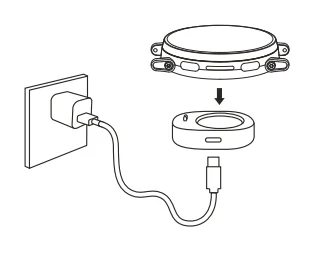
Notes:
- Please use the charging base that comes with the watch. Make sure that the charging base is dry before charging.
- To ensure optimal charging efficiency, it is recommended to use a power adapter with a charging current of 1A or above.
Assembling and Disassembling the Watch Strap
- Take the strap out of the packaging box, ensuring the short strap is on top, and the long strap is on the bottom, with the correct orientation.
- Align the strap pin with the lug hole, insert one end first, then use your finger or a tool to press the spring bar, allowing the other end to snap into the lug hole.
- After installation, gently pull the strap to ensure it is securely installed.
- To remove the strap, please refer to the illustration.
Note: Do not disassemble the screws on the lug by yourself, as this may lead to damage to the lug.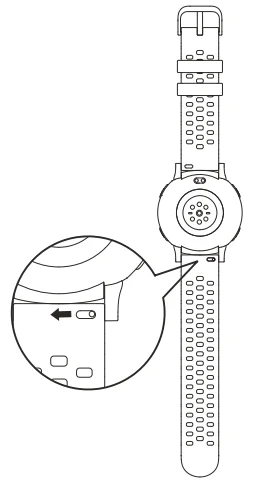
Wearing the Watch
- To ensure the accuracy of heart rate, blood oxygen, and other measurements, please wear your watch at a distance of at least one finger away from the carpal, and keep the strap at a comfortable snugness.

- During workouts, please wear it as tightly as possible to ensure that the watch does not shake. Wear your watch at a distance of at least one finger away from the carpal to obtain more accurate heart rate data. After workouts, you can loosen the strap appropriately to ensure a comfortable wear experience.
- When measuring blood oxygen saturation, wear the watch correctly. Avoid wearing the watch on the wrist joint, keep your arm flat, maintain a comfortable (appropriately tight) fitting between the watch and the skin of your wrist, and keep your arm still throughout the measurement process.
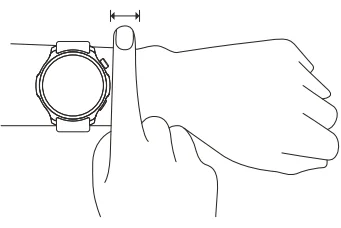
Notes: When affected by external factors (arm sag, arm sway, arm hair, tattoo, etc.), the measurement result may be inaccurate, or the measurement may fail and provide no output.
Basic Parameters
- Product name: Smart Watch
- Model number: A2558/A2559
- Input: DC 5 V 500 mA MAX
- Bluetooth version: V5.3
- Bluetooth output power: <13 dBm
- Working temperature: 0°C–45°C
- Water resistance rating: 5 ATM
- Bluetooth frequency: 2400–2483.5 MHz
- View product certification information on the watch’s Settings > System > Regulation page.
- Device requirements: Devices installed with Android 7.0 or iOS 15.0 or above OS versions
- Package Contents: Watch body, Watch strap, Charging puck, Instruction manual
- Please refer to the watch user interface to see the software version.
 Bluetooth®
 Bluetooth®
The Bluetooth® word mark and logos are registered trademarks owned by Bluetooth SIG, Inc., and any use of such marks by Anhui Huami Information Technology Co., Ltd. is under license. Other trademarks and trade names are those of their respective owners.
Battery Safety
- This device is equipped with a built-in battery that cannot be removed or replaced. Do not disassemble or modify the battery by yourself.
- Disposal of a battery into fire or a hot oven, or mechanically crushing or cutting a battery, can result in an explosion.
- Leaving a battery in an extremely high temperature environment can result in an explosion or the leakage of flammable liquid or gas.
- A battery subjected to extremely low air pressure may result in an explosion or the leakage of flammable liquid or gas.
- Do not use power adapters or data cables that are not properly certified or incompatible, as this may damage the watch and accessories or cause fire, explosion, or other hazards.
Safety Notice
- Do not allow children or pets to bite or swallow the product or its accessories, as this may cause injury.
- Do not place this product under excessively high or low temperatures, which may cause the product to catch fire or explode.
- Do not place this product near heat sources or open flames, such as ovens and electric heaters.
- Some people may experience allergic skin reactions to plastics, leathers, fibers, and other materials, and symptoms such as redness, swelling, and inflammation may occur after long-term contact with this product’s components. If you experience such symptoms, please discontinue use and consult your doctor.
- Do not use unauthorized or incompatible power adapters or data cables, which may damage the watch and accessories or cause fire, explosion, or other hazards.
- The radio waves generated by this product may affect the normal operation of implanted medical devices or personal medical devices, such as pacemakers and hearing aids. If you use any such medical devices, consult the manufacturer for relevant usage restrictions.
- Do not dispose of this device or its accessories as ordinary household waste. Please make sure you dispose of or recycle this device and its accessories in accordance with local laws and regulations.
Repair and Maintenance
- Avoid contact with soap, hand sanitizer, body wash, lotion, and other cleansers with the watch to prevent residual chemicals from irritating the skin or corroding the device, thus affecting its waterproof performance. In case of accidental contact, rinse immediately with clean water, soak the device for 30 minutes, and then wipe it dry with a clean soft cloth.
- After swimming or sweating while wearing the device, please clean and dry the device promptly to ensure its good performance.
- After prolonged wearing, it is recommended to use a soft cloth dipped in clean water to clean the charging contacts, to avoid sweat, sebum, and dirt affecting charging performance.
- When using light-colored watch straps, avoid contact with dark clothing to prevent staining.
- The watch cannot be used in snorkeling, showering, hot spring bathing, saunas (steam rooms), diving, scuba diving, water skiing, or other water-related and deep-water activities involving high-speed water flow. After the watch comes into contact with seawater, please rinse the surface holes or interfaces with fresh water to prevent the crystallization of residual seawater, which could affect the normal use of the watch.
- Do not place the device in direct sunlight for long periods. Excessively high or low ambient temperature may cause device failure.
- Handle with care during transportation. Keep the device dry and away from humidity.
- Do not wear the watch in MRI examinations and other highly magnetic environments. Otherwise, the watch may be damaged.
Warranty and Return Policy
The Amazfit Limited Warranty covers Amazfit products against manufacturing defects beginning on the original purchase date. The warranty period is 12 months or another specified period as the applicable consumer laws in the consumer’s country of purchase require. Our warranty is in addition to the rights provided by applicable consumer laws. Official website: www.amazfit.com Please check the FAQ on the website for troubleshooting: support.amazfit.com/en/product-list.
Notes: This product isn’t a medical device. None of the data or measurements is intended for medical diagnosis or medical monitoring.
If the product is not in use for a long period of time, it is recommended that you power off the product before storing it. Recharge the battery every 6 months to 100% to prevent battery damage by over-discharge due to long-term storage. For detailed operating instructions, safety precautions, and repair and maintenance information, please visit the website https://support.amazfit.com to download the user manual & product manual.
For More Manuals By Amazfit, Visit ManualsLibraryy.
Amazfit Active 3 Premium Smart Watch-FAQs
What are the main features of the Amazfit Active 3 Premium Smart Watch?
The Amazfit Active 3 Premium Smart Watch is designed to combine style, health tracking, and smart connectivity in one device. It typically includes features like heart rate monitoring, sleep tracking, multiple sports modes, and Bluetooth connectivity. The watch also offers smartphone notifications, fitness tracking, and a long-lasting battery. Its lightweight design and bright display make it suitable for everyday wear, workouts, and casual use while keeping users connected and informed throughout the day.
Is Amazfit a Chinese brand?
Yes, Amazfit is a brand owned by Zepp Health, formerly known as Huami. The company originated in China and was initially connected with Xiaomi, a major Chinese electronics company. Amazfit focuses on producing smartwatches, fitness trackers, and health-focused wearable devices. Over the years, the brand has expanded globally and sells products in many international markets. Despite its Chinese origins, Amazfit devices are widely used worldwide due to their balance of affordability, features, and reliability.
Is the Amazfit Active 3 waterproof?
The Amazfit Active 3 comes with a 5 ATM water resistance rating, which means it can handle water pressure equivalent to a depth of about 50 meters under normal conditions. This level of protection makes it suitable for activities like swimming, showering, and sweaty workouts. However, it is not designed for deep-water activities such as scuba diving or high-speed water sports, where stronger pressure could affect the watch’s seals.
Can the Amazfit Active 3 answer phone calls?
Some Amazfit smartwatches support Bluetooth calling, allowing users to answer and make calls directly from the watch when it is connected to a compatible smartphone. If the Amazfit Active 3 includes this feature, users can use the built-in microphone and speaker to take calls without picking up their phone. This functionality can be especially useful while exercising, driving, or when the phone is not easily accessible.
Is Amazfit considered a good smartwatch brand?
Amazfit is generally considered a good smartwatch brand because it offers a strong balance of performance, features, and affordability. Many of its devices include advanced health tracking, long battery life, and sleek designs while remaining competitively priced. The brand has gained popularity among fitness enthusiasts and casual users alike. For people looking for a capable smartwatch without paying premium prices, Amazfit is often viewed as a reliable option.
How long does the battery last on the Amazfit Active 3?
Battery life is one of the strengths commonly associated with Amazfit smartwatches. The Amazfit Active 3 is designed to last several days on a single charge, depending on usage patterns, such as GPS tracking, notifications, and health monitoring. Light to moderate use can extend battery life even further. This longer battery performance helps reduce the need for frequent charging compared to many other smartwatches.
Does the Amazfit Active 3 work with both Android and iPhone?
Yes, Amazfit smartwatches are generally compatible with both Android and iOS devices. Users can connect the watch to their smartphone through the Zepp mobile app, which allows them to sync health data, customize watch settings, and receive notifications. This cross-platform compatibility makes the Amazfit Active 3 accessible to a wide range of smartphone users who want a smartwatch without being tied to a single operating system.
Can the Amazfit Active 3 show smartphone notifications?
The Amazfit Active 3 can display notifications from a connected smartphone, including calls, text messages, and app alerts. Once paired with the Zepp app, the watch mirrors selected notifications so users can quickly check updates without constantly looking at their phone. While replies may depend on device compatibility, the notification feature is helpful for staying informed during workouts, meetings, or daily activities.
Who should consider buying the Amazfit Active 3 Premium Smart Watch?
The Amazfit Active 3 Premium Smart Watch is ideal for users who want a feature-rich smartwatch at a reasonable price. It suits people interested in fitness tracking, daily health monitoring, and convenient smartphone connectivity. With its combination of style, useful smart features, and good battery life, it appeals to both casual users and active individuals who want a reliable wearable without spending as much as premium flagship smartwatch brands.