

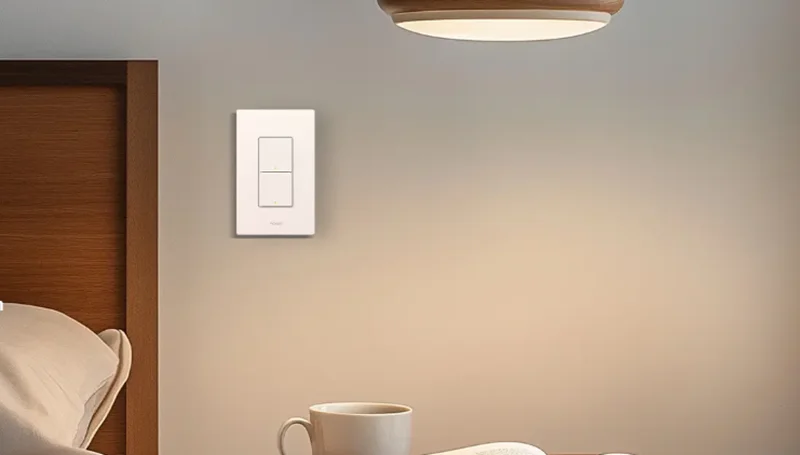

Aqara Light Switch H2 US
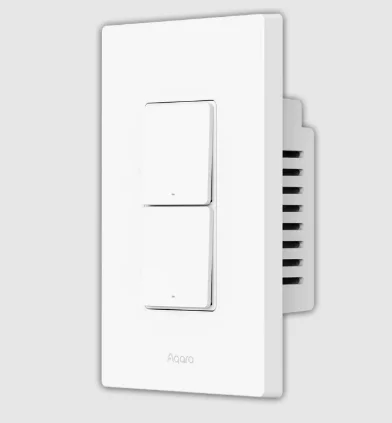
Product Introduction
Aqara Presence Switch H2 US is a smart switch based on Thread/Zigbee wireless communication protocols, which can control lights, automations, and scenes. When used with a hub, it can be controlled via the app and has features for scheduling, power monitoring, power statistics, and other functions. It can also be used with other smart devices to enable a variety of interconnected control functions. This product needs to be used with a device that has the Matter Border Router function.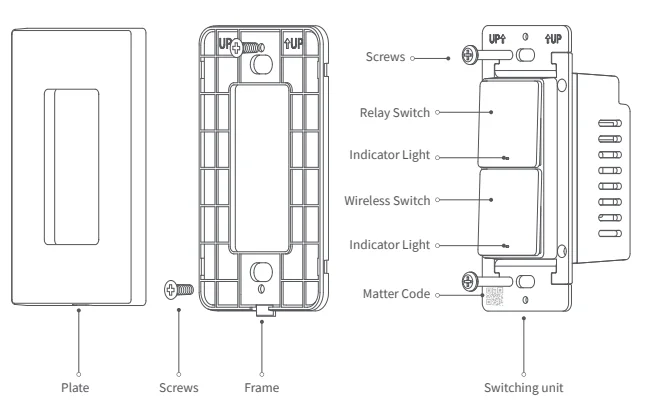
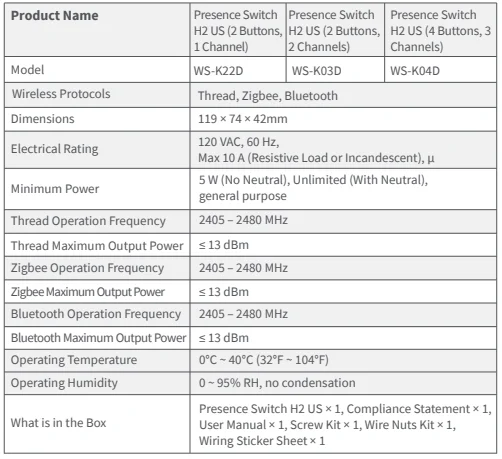
Presence Switch H2 US (2 Buttons, 1 Channel)

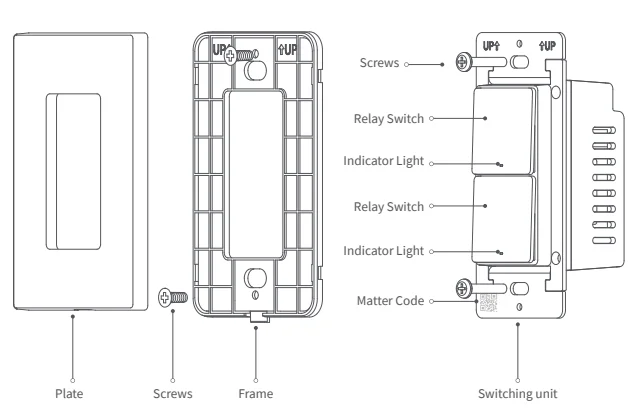
Presence Switch H2 US (2 Buttons, 2 Channels)

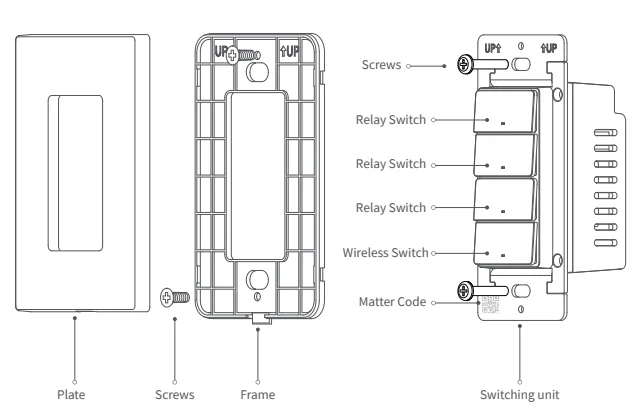
Presence Switch H2 US (4 Buttons, 3 Channels)
Warnings
- This product is not a toy. Please keep it away from children.
- This product is designed for indoor use only.
- Do not use in humid environments or outdoors.
- Moisture will damage the product. Do not spill water or other liquids onto the product.
- Do not place this product near a heat source. Do not place it in an enclosed area unless there is adequate ventilation.
- Do not attempt to repair this product by yourself. All repairs should be performed by an authorized professional.
- This product is suitable for home monitoring and smart home integration. The manufacturer is not responsible for any risks or property losses caused by misuse or failure to follow the product instructions.
Installation Method
Presence Switch H2 US (2 Buttons, 1 Channel)
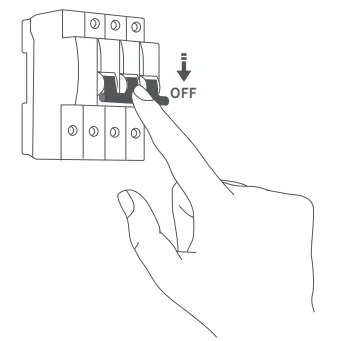
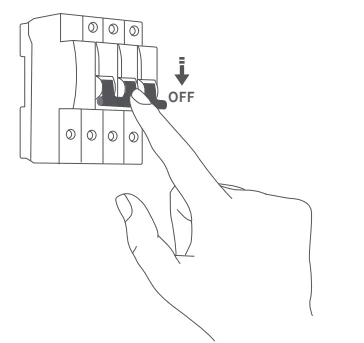
- Please make sure that the power at the circuit breaker or fuse box is turned off before wiring!

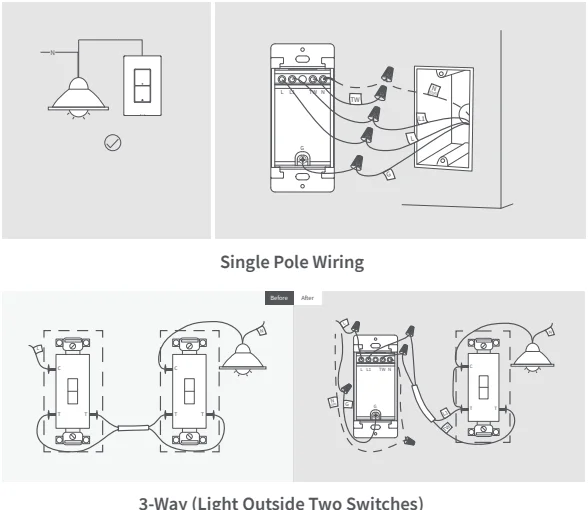
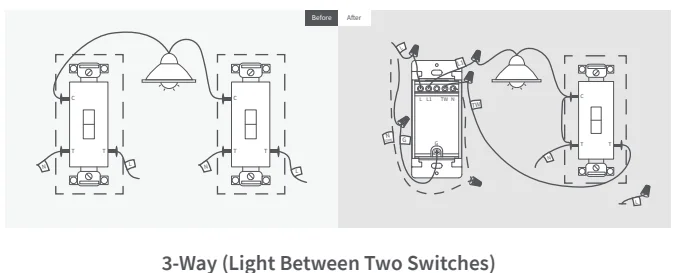
- Identify the type of electrical circuit in your home. For the 2-button and 1-channel switch, we support three types of circuits:
- a) single pole
- b) 3-way (light outside two switches)
- c) 3-way (light between two switches). Please follow the instructions below to determine your home’s circuit type and wire it correctly. For 3-way circuit wiring, we recommend seeking assistance from a professional electrician.


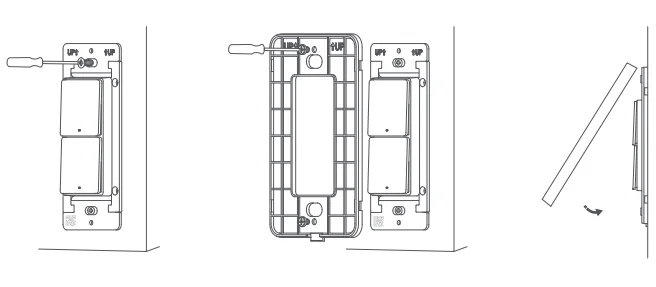
- Mount the switch unit to the electrical box with the attached screws. Then mount the frame to the switch unit with screws, and attach the faceplate cover to the frame.

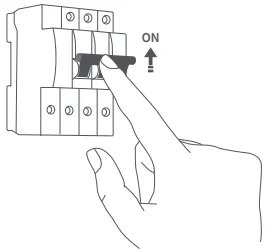
- Turn on the power at the circuit breaker and test the switch by pressing the upper button. If the wired light can be controlled by the upper button, the switch is functioning correctly.

- In the Aqara Home app, tap Add Accessory, choose Presence Switch H2 US. Scan the Matter QR Code on the paper manual to add the device to the app. The following Quick Setup section will introduce the network configuration methods for both Zigbee and Thread protocols. If the QR code on the paper manual is lost, you can remove the plastic cover frame and scan the QR code on the mounting bracket of the product.
Presence Switch H2 US (2 Buttons, 2 Channels)
Presence Switch H2 US (4 Buttons, 3 Channels)
- Please make sure that the power at the circuit breaker or fuse box is turned off before wiring!

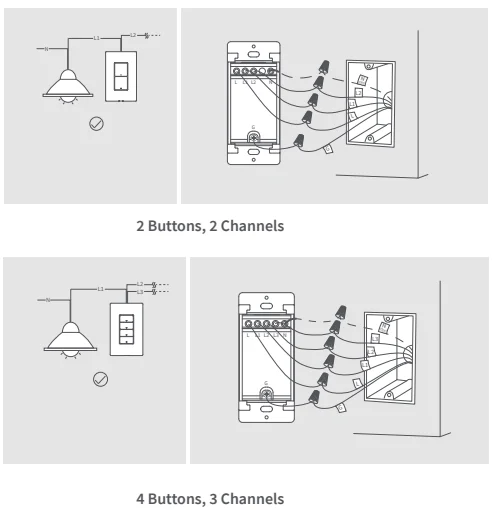
- For users with Presence Switch H2 US (2 Buttons, 2 Channels) or (4 Buttons, 3 Channels), please follow the corresponding wiring methods according to your product model. It is recommended to seek assistance from a professional electrician to complete this step.

- Mount the switch unit to the wall electrical box with the attached screws. Then mount the frame to the switch unit with screws, and attach the faceplate cover to the frame.

- Turn on the power at the circuit breaker and test the switch by pressing the upper button. If the wired light can be controlled by the upper button, the switch is functioning correctly.

- In the Aqara Home app, tap Add Accessory, choose Presence Switch H2 US. Scan the Matter QR Code on the paper manual to add the device to the app. The following Quick Setup section will introduce the network configuration methods for both Zigbee and Thread protocols.
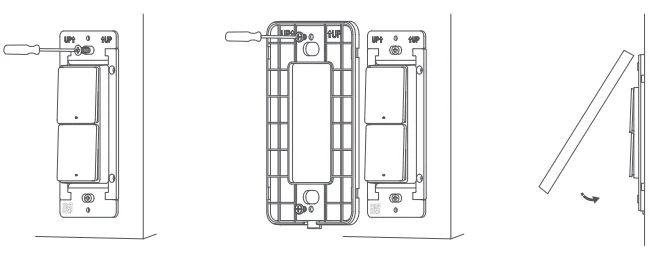
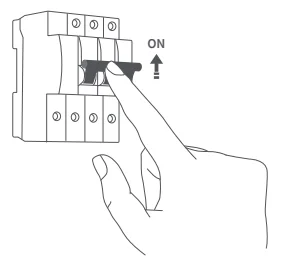
If the QR code on the paper manual is lost, you can open the product cover and scan the QR code on the metal frame of the product.
Quick Setup
To use the device with a particular Matter ecosystem (Thread Mode), a Matter Controller of this ecosystem and a Thread Border Router are required.
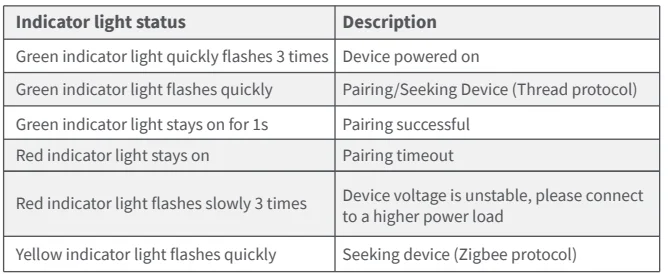
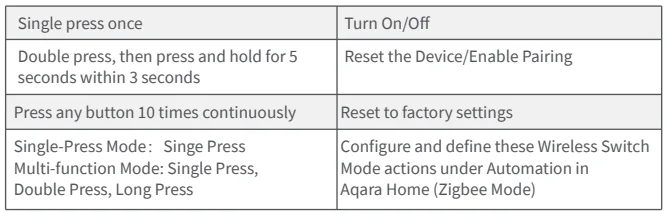
- Double-press any button, then press and hold it for 5 seconds until the green indicator light starts blinking. This indicates that the device is in pairing mode.
- Open the app that supports Matter, scan the Matter code on the manual or product, or enter the setup code to add the device to the app.
- Proceed following the app’s instructions.
To use the device in Aqara Home (Thread Mode), an Aqara Hub with border router function (for example, Hub M3) is required. To use the device in Aqara Home (Zigbee Mode), an Aqara Zigbee Hub is required:
- Double-press any button, then press and hold it for 5 seconds until the green indicator light starts blinking. This indicates that the device is in pairing mode.
- In the Aqara Home app, tap Add Accessory, keep your phone close to the device, and Presence Switch H2 US will appear in the app’s discovery section (at the top left). Tap the icon and select Zigbee on the Switch Protocol page.
- Proceed by following the app’s instructions.
Presence Sensor Features
Detection Range Setting
Wall Mounting: When wall mounting, the device has a maximum detection distance of 5 m and a field of view (FOV) angle of 120°.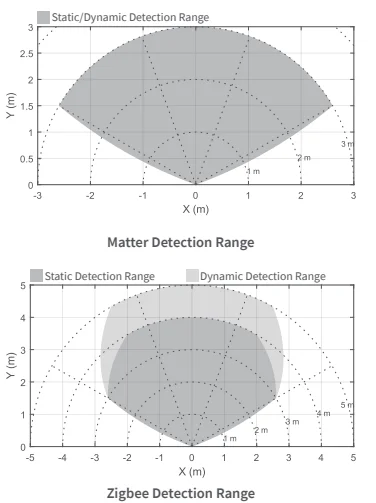
In Matter mode, the device’s default maximum detection range is 3 m. In Zigbee mode, the device’s default maximum detection range is 5 m and supports four detection range options: Near (approx. 0.5 m), Medium (approx. 1 m), Far (approx. 3 m), and Farthest (approx. 5 m). The above detection range is based on ideal test data. The actual detection range during use may vary depending on the specific environment and conditions. It is recommended to configure the detection range according to actual needs, exclude unnecessary detection areas, and improve detection accuracy.
Presence Trigger
When this feature is enabled, the device can automate lights to turn on when presence is detected and turn off when absence is detected. Each switch button can be configured individually for flexible control. To improve user experience, the device has a built-in default absence delay of 10 seconds. Even if no turn-off absence delay is configured, the device will still wait 10 seconds before turning off. This helps prevent false triggers caused by brief absence or slight movement.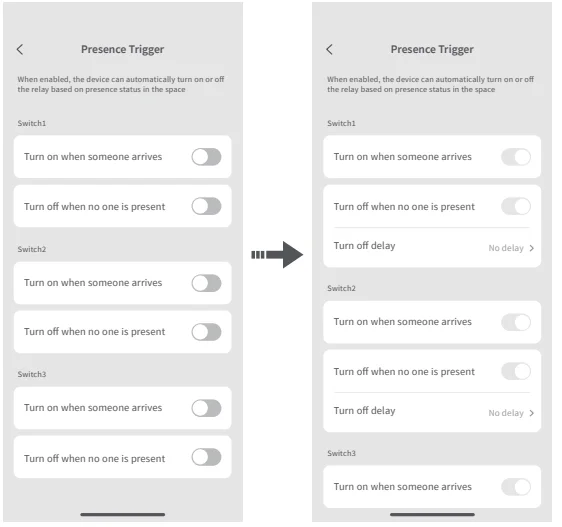
The same functionality can also be achieved through the following automation: If “Presence“, then “turn on the light”; If “Absence for a certain period of time”, then “turn off the lights or the air conditioning”.
AI Spatial Learning
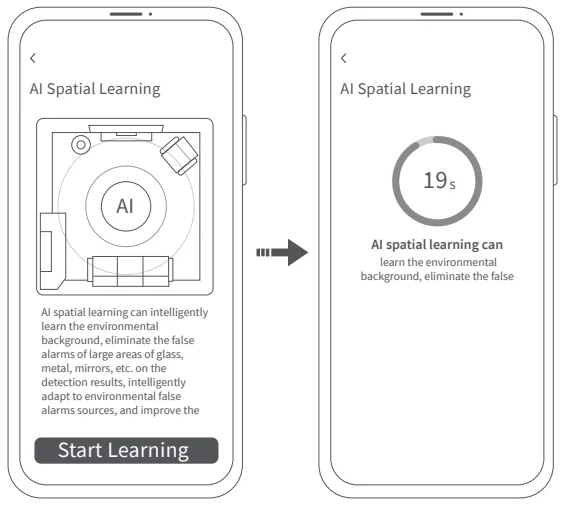
- AI spatial learning can intelligently learn the environmental background, eliminate the false alarms of large areas of glass, metal, mirrors, etc., in the detection results, intelligently adapt to environmental false alarm sources, and improve the accuracy of detection results.
- It is recommended that users actively conduct AI spatial learning after the device is installed. AI spatial learning requires that the space be unmanned and takes about 30 seconds. Please wait patiently.
- During use, the device will continue to learn the spatial background through AI to adapt to the real-time changing spatial environment, making the device more accurate with use.
- If, under special circumstances, the user finds that the device mistakenly reports a false presence status when the space should be absent, an AI spatial learning can be performed immediately to quickly restore the space to an empty state.
- If the device mistakenly detects presence, you can use the AI Spatial Learning to quickly correct it. With AI false-alarm identification and continuous self-learning, the device becomes more accurate over time. For best performance, avoid installing it near air conditioners, air purifiers, or fans.

Regarding Dual Protocol (Thread/Zigbee) Switching
Q: How to switch from Thread protocol to Zigbee protocol?
A:
- Install the Aqara Home app, and enable Wi-Fi and Bluetooth.
- Reset the device to factory settings (press any button 10 times continuously) to enter network setup (the first time you add the device, it will automatically begin pairing), with its green indicator light flashing quickly.
- In the Aqara Home app, tap Add Accessory, scan the Matter code on the manual or product, then select Zigbee on the Switch Protocol page. Proceed by following the app’s instructions.
Q: How to switch from Zigbee protocol to Thread protocol?
A:
- Install the Aqara Home app, and enable Wi-Fi and Bluetooth.
- Reset the device to factory settings (press any button 10 times continuously), then enter network setup (yellow indicator light flashes quickly).
- In the Aqara Home app, tap Add Accessory, keep the phone close to the device, and the Presence Switch H2 US will show in the app’s discovery section (at the top left). Tap the icon and select Thread in the Switch Protocol page. Proceed by following the app’s instructions.
Indicator Light Description
Button Description
Product Specifications
For More Manuals By Aqara, Visit ManualsLibraryy.
Aqara Light Switch H2 US-FAQs
What is the Aqara Light Switch H2 US, and what does it do?
The Aqara Light Switch H2 US is a smart in-wall switch designed to control lighting circuits and automate your home. It allows manual control via buttons and remote control through apps, voice assistants, or automations, making everyday lighting more convenient and efficient.
What makes the Aqara Light Switch H2 US different from regular smart switches?
The H2 US stands out with dual protocol support, offering both Zigbee and Thread connectivity. This flexibility allows users to choose between Aqara’s ecosystem or Matter-based platforms, making it more future-proof compared to traditional smart switches that rely on a single protocol.
Does the Aqara Light Switch H2 US require a neutral wire?
No, the switch supports installation with or without a neutral wire, making it suitable for older and newer homes. However, when a neutral wire is available, users can access advanced features like power monitoring and overload protection for improved performance and safety.
How many lights or circuits can the H2 US control?
The Aqara Light Switch H2 US comes in multiple configurations, supporting up to three channels. This means it can control one, two, or three lighting circuits depending on the model, making it flexible for different room setups and lighting needs.
Is the Aqara Light Switch H2 US compatible with smart home platforms?
Yes, the switch works with major platforms like Apple Home, Google Home, Amazon Alexa, SmartThings, and Home Assistant. It’s Matter over Thread support allows seamless integration without requiring an Aqara hub, depending on the setup you choose.
Can the switch be used for smart automation and scenes?
Yes, it supports advanced automation features, including scene control and decoupled mode. This allows the physical buttons to trigger automations without directly controlling the connected light, enabling more flexible smart home setups tailored to your preferences.
Is the Aqara Light Switch H2 US safe to use?
The switch includes built-in safety features such as overheat and overload protection, which automatically disconnect the circuit in unsafe conditions. These features enhance reliability and protect both the device and connected appliances from potential electrical damage.
Can the Aqara Light Switch H2 US work in 3-way switch setups?
Yes, certain versions support 3-way configurations, allowing control of a single light from two locations. This makes it suitable for hallways or staircases, though setup may vary depending on wiring and the specific model chosen.
How is the Aqara Light Switch H2 US powered and installed?
The switch is wired directly into your home’s electrical system and operates on standard 120V AC power. It fits into standard US wall boxes and includes installation accessories, making it relatively straightforward to install for those familiar with electrical wiring.