
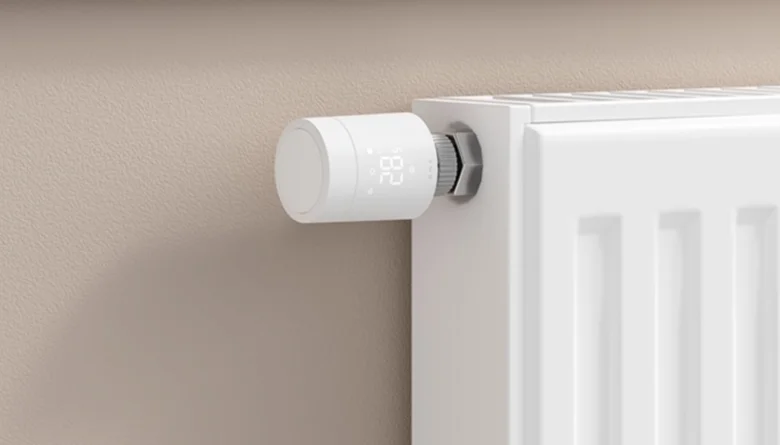

Aqara Radiator Thermostat W600
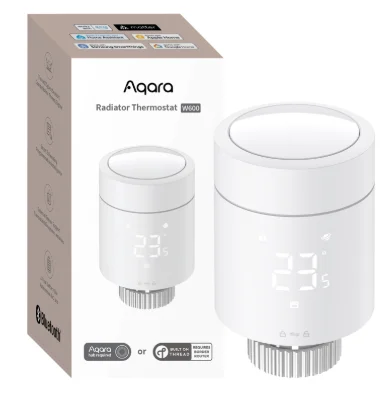
Product Introduction
Radiator Thermostat W600 is a smart valve thermostat with a built-in low-power wireless communication module, Zigbee/Thread dual protocol support, an LED display, and is powered by 2 AA batteries. The device can be used on its own or can be added to the Aqara Home app through a hub, transforming it into a smart home thermostat with advanced features and controls. Installing the thermostat for water-heated radiators is uncomplicated, and it maintains comfortable temperatures while reducing energy waste. When linked to temperature, humidity, door, and window sensors, it can integrate into a full-house automated climate control system.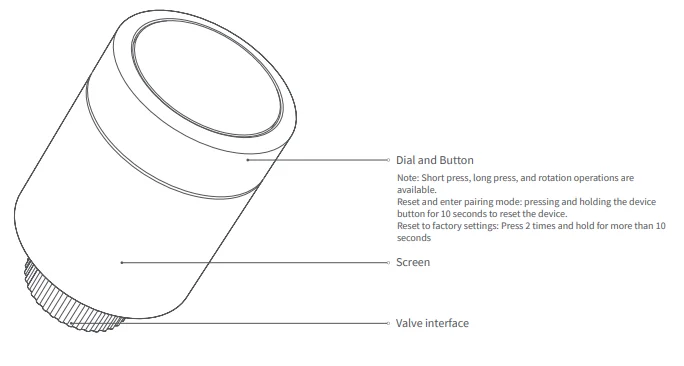
Icon Description
Warnings
- This product is not a toy; please keep this product away from children.
- This product is designed for indoor use only. Do not use in humid environments or outdoors.
- Beware of moisture; do not spill water or other liquids onto the product.
- Do not place this product near a heat source.
- Do not attempt to repair the product by yourself. All repairs should be performed by authorized personnel.
- This product is designed only for improving the convenience of household life, and for sending notifications. If the user violates the product instructions and this warning, the manufacturer is not responsible for any risks and property losses caused thereby.
Quick Setup
(1) Access to Aqara Home
1. Download the Aqara Home app
Search for “Aqara Home” in the app store or scan the QR code below to download the “Aqara Home” app.
2. Power on
Follow the instructions to install the thermostat correctly and wait for the device to power on.
3. Add device
Open the Aqara Home app, click “+” in the upper right corner of the home page, and select the device accordingly.
- If the addition fails, move the device closer to the hub and try again.
- Make sure that there is a hub that supports this device (such as Hub M3) under the Aqara account, and it is within the connection range when using it.
(2) Access to a 3rd-party Matter ecosystem
Method 1:
- Please make sure you have installed the Matter-compatible app and have a Matter-compatible Thread border router.
- After the device is powered on, the indicator light will begin to flash slowly, indicating that the device has entered pairing mode.
- Open the Matter-enabled app, scan the Matter OR code on the user manual or product, or enter the setup code to add the device to the app.
Method 2:
After adding the device to the Aqara Home app, select “Matter Ecosystem” on the settings page, and follow the prompts to join. Synchronize device-specific actions (such as single press, long press) to the Matter platform that supports “wireless switch” and “temperature and humidity sensor” device types (such as Apple Home, Home Assistant), and trigger automation and scenes.
For help, please visit: www.aqara.com/support.
Device Installation
Installation Instructions
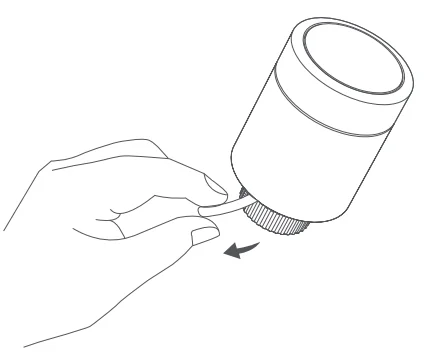
- Before use, pull out the battery tab and confirm that the device is turned on.

- It is recommended to install the thermostat on the radiator valve within 5 minutes after the device starts.

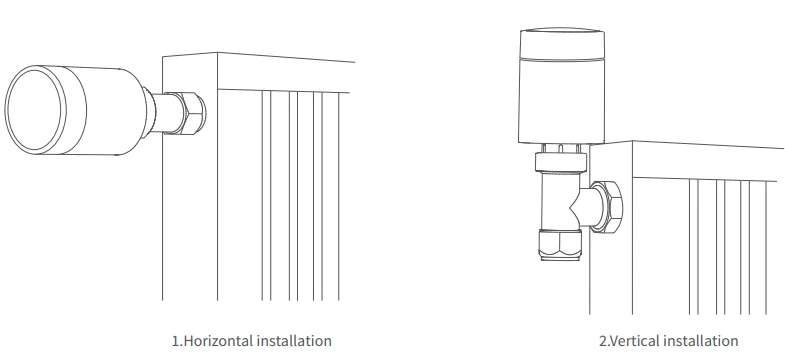
- a. The thermostat supports both horizontal and vertical installation. However, vertical installation may lead to inaccurate temperature readings because the built-in temperature sensor is close to the radiator. Note: Regardless of the installation method, an external Aqara temperature and humidity sensor is recommended to ensure more precise temperature control.
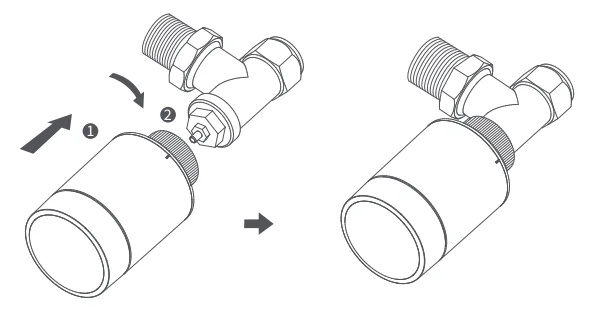
- b. Align the thermostat interface nut with the radiator valve, and rotate the nut until it is tight. Note: The installation of the [M30*1.5 mm] valve interface is as shown in the diagram.

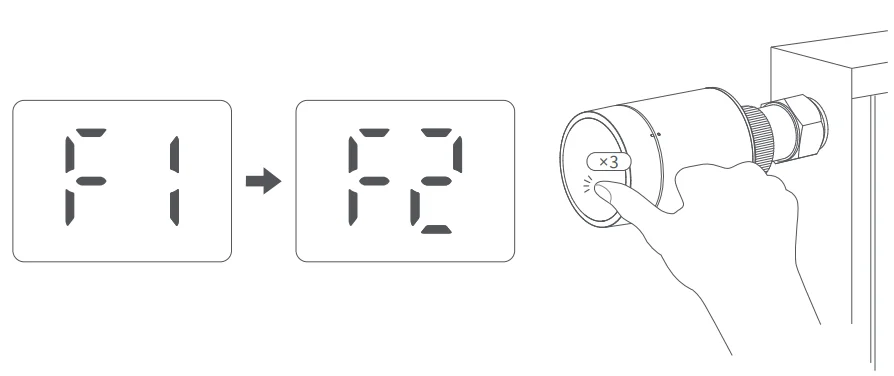
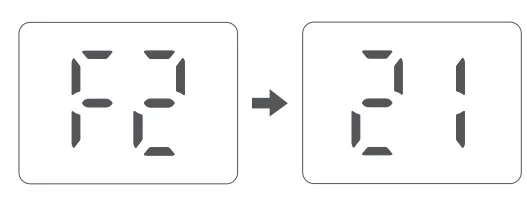
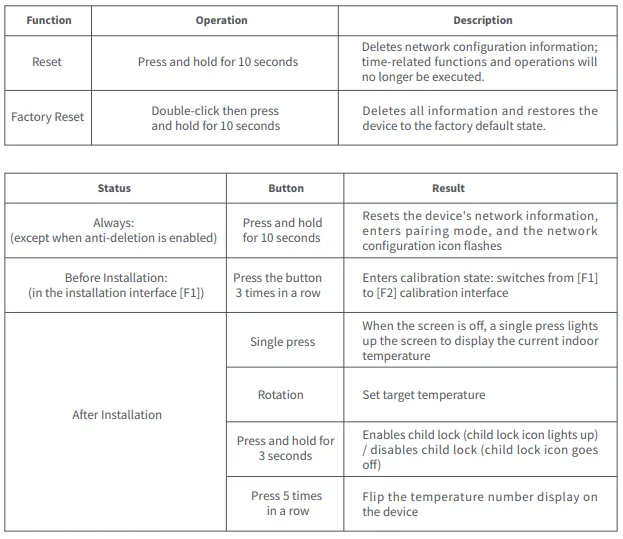
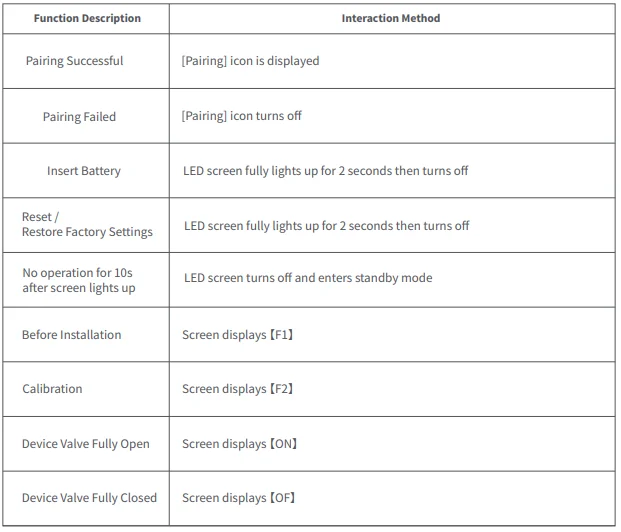
- c. When the screen displays the number [F1], press the thermostat button 3 times continuously to calibrate the valve. During calibration, the screen will show the [F2] symbol. (Note: If [F1] is not displayed, you can try pressing and holding the device button for 10 seconds to reset the device.)

- d. The [F2] symbol will disappear after approximately 10 seconds, and the screen will display the current set temperature, indicating that the installation is complete.

How to Use
1. Frost Protection
When the built-in temperature sensor detects a temperature of ≤ 5 C, the device will automatically activate its anti-freeze protection and initiate heating; when the built-in temperature sensor detects a temperature of > 8° C, the device will turn off anti-freeze protection and resume normal operation. (The anti-freeze mode in Zigbee is adjustable, with an adjustment range of 5~15 C. Under the Thread protocol, it is defaulted to 5 C and cannot be adjusted.)
2. Open Window Detection
- Once Window Detection is enabled: No door/window sensor bound: If the temperature drops by 3 °C within 5 minutes, Heating mode will automatically pause for 30 minutes.
- With a bound door/window sensor: If the sensor detects that a door or window has been open for more than 3 minutes, Heating mode will automatically pause for 30 minutes.
Note: You can deactivate the window detection function on the W600 device itself.
3. Schedule
The device will automatically control the heating system according to the preset time period and temperature, allowing different temperatures to be set for the morning, daytime, evening, and nighttime periods for each day of the week. A single schedule supports up to 7 time periods, each of which is at least 15 minutes.
4. Manual Control
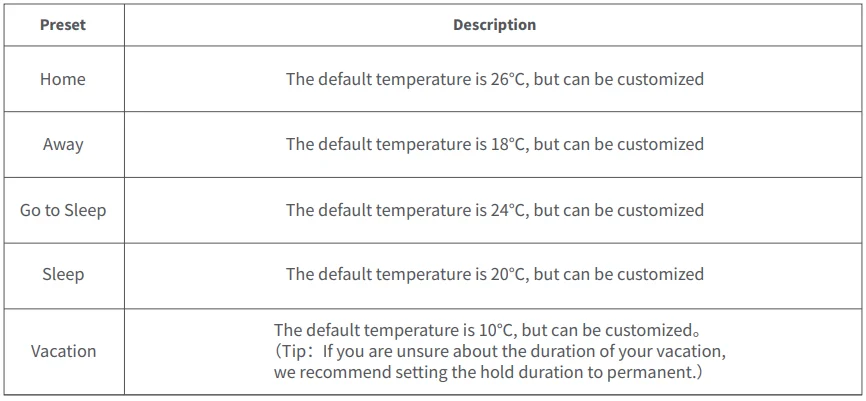
Turn the heating on or off manually to adjust the target temperature, or select a comfortable heating temperature by manually switching presets (if a schedule is created, the device will follow the schedule after the Hold time ends).
Presets
Device Interface
Resetting the Device
Indicator Descriptions
Product Specifications
- Radiator Thermostat W600
- Model: WT-A03E, WT-A03D
- Wireless Protocols: Thread, Zigbee, BLE
- Dimensions: ⌀57×90 mm (⌀2.24×3.54 in.)
- Battery: 3V (2 × 1.5V AA, Alkalinity)
- Threaded Connection: M30 × 1.5 mm
- Operating Temperature: T40 (0 ~ 40 ℃)
- Operating Humidity: 0 ~ 95% RH, no condensation
- Made in China
- What’s in the Box: Radiator Thermostat W600 × 1, User Manual × 1, 1.5V AA Battery × 2, Adapter (RA/RAV/RAVL/Caleffi/Giacomini/M28×1.5) × 6
Notice
Use of the Works with Apple badge means that an accessory has been designed to work specifically with the technology identified in the badge and has been certified by the developer to meet Apple’s performance standards. Apple is not responsible for the operation of this device or its compliance with safety and regulatory standards.
The Bluetooth® word mark and logos are registered trademarks owned by Bluetooth SIG, Inc., and any use of such marks by 【Lumi United Technology Co., Ltd.】 is under license. Other trademarks and trade names are those of their respective owners.
Manufacturer: Lumi United Technology Co., Ltd.
Address: Room 801-804, Building 1, Chongwen Park, Nanshan iPark, No. 3370, Liuxian Avenue, Fuguang Community, Taoyuan Residential District, Nanshan District, Shenzhen, China
Online Customer Service: www.aqara.com/support
Email: [email protected]
For More Manuals By Aqara, Visit ManualsLibraryy.
Aqara Radiator Thermostat W600-FAQs
What is the Aqara Radiator Thermostat W600 and how does it work?
The Aqara Radiator Thermostat W600 is a smart thermostatic radiator valve that replaces your existing valve head to control room temperature automatically. It connects via Thread or Zigbee and adjusts heating based on schedules, sensors, or app commands, improving comfort and reducing unnecessary energy usage.
Does the Aqara Radiator Thermostat W600 require a hub to function?
The W600 can work without a hub when using Thread with a compatible Matter controller, but some advanced features require Zigbee mode with an Aqara hub. This dual approach allows flexibility, letting users choose between simple integration or deeper automation depending on their smart home setup.
Is the Aqara W600 compatible with major smart home platforms?
Yes, the W600 supports Matter over Thread and Zigbee, making it compatible with Apple Home, Google Home, Amazon Alexa, SmartThings, and Home Assistant. This broad compatibility ensures seamless integration into most smart ecosystems without locking users into a single platform.
How does the W600 help save energy?
The thermostat optimizes heating by using schedules, geofencing, and occupancy-based automation to heat rooms only when needed. It can also pause heating when windows are open or rooms are empty, significantly reducing energy waste and helping lower heating costs over time.
Can I control the Aqara W600 remotely?
Yes, you can control the W600 remotely through the Aqara app, allowing you to adjust temperature, set schedules, and monitor heating from anywhere. It also supports voice control via assistants like Alexa and Google Assistant, making it convenient to manage without manual interaction.
How accurate is the temperature control on the W600?
The W600 offers precise temperature adjustments in 0.5°C increments and includes calibration options for improved accuracy. It can also connect to external Aqara temperature sensors to measure room temperature more accurately, rather than relying only on readings near the radiator.
Is the Aqara Radiator Thermostat W600 easy to install?
Installation is straightforward, as the W600 fits most standard radiator valves using included adapters like RA, RAV, and M30×1.5. It typically replaces your existing valve head without requiring complex tools or professional help, making it suitable for most homeowners and renters.
What is the battery life of the Aqara W600?
The W600 runs on two AA batteries and offers up to two years of battery life under typical usage conditions. This long lifespan reduces maintenance needs and ensures reliable operation without frequent battery replacements, making it practical for everyday smart home use.
Does the W600 support automation and smart scheduling?
Yes, it supports advanced automation features such as daily schedules, geofencing, and integration with other Aqara devices. You can create routines like warming rooms before arrival or turning off heating when no one is home, providing both comfort and efficiency.
What safety and convenience features does the W600 offer?
The W600 includes features like frost protection, open-window detection, and ultra-quiet operation below 30 dB. These ensure safe operation, prevent pipe freezing in cold weather, and maintain a peaceful environment while automatically managing heating based on real-time conditions.